Windows 7 restarts problem

Gautam S

New member
Local time
1:49 AM
Messages
26
Command-2.jpg

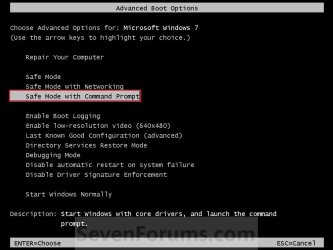
I am having problems with my system it restarts and shows black screen ask want to start it normally or safe mode can anybody help.And I have also ran chkdsk command but that also doesn't help any advice would be appreciated.I have even changed the power supply and checked but it still restarts.
 
Last edited by a moderator:

My Computer

OS
Windows 7 32-bit
When does it do this? There are lots of reasons for why this could be happening. For example, it could be overheating and turning the laptop off to prevent hardware damage. It could also be a faulty PSU which is restarting the machine.

Can you give us more information on your computer? (Make/Model/What OS/Age etc)

How long has it been happening? Any hardware changes or newly installed software?


Dave
 

My Computer

Computer type
PC/Desktop
Computer Manufacturer/Model Number
Custom
OS
Windows 7 Ultimate x64
CPU
Intel Core i7 2600K (O/C 4.7GHz)
Motherboard
Asus ROG Maximus IV Extreme-Z - Intel Z68 Chipset
Memory
8GB Corsair Vengeance LP, DDR3, 1600Mhz
Graphics Card(s)
Nvidia GTX 460 Graphics Card
Sound Card
Onboard
Monitor(s) Displays
Dell E228WFP
Hard Drives
2 x 500GB Samsung SpinPoint Drives (1 for OS, 1 for Data and Apps)
PSU
CoolerMaster 1000W
Case
CoolerMaster HAF
Cooling
Air
Internet Speed
Fibre - 60MB Down, 30MB Up
Antivirus
ESET NOD32 Antivirus
It has been for a month it restarts once in a week.No new device installed and my desktop is only 1 1/2 year old and I have even formatted my pc and saw but it still restarts with black screen ask if you wanna start windows normally or in safe mode. Os is windows 7 32 bit.
 

My Computer

OS
Windows 7 32-bit
It has been for a month it restarts once in a week.No new device installed and my desktop is only 1 1/2 year old and I have even formatted my pc and saw but it still restarts with black screen ask if you wanna start windows normally or in safe mode. Os is windows 7 32 bit.

Did you try to shutdown windows normally by going to start-shutdown option??Does your system still show these options on normal shutdown?If thats the case then it seems like your system is not shutting down properly and something is interrupting with the shutdown process.Check event viewer for any critical errors or shutdown errors.Also test your PSU unit.
 

My Computer

Computer Manufacturer/Model Number
DELL
OS
Windows 8 Pro
CPU
intel i3 2.40 Ghz
Motherboard
DELL inc
Memory
6 GB RAM
Graphics Card(s)
Integrated Intel HD
Sound Card
Realtek high definition SRS surround sound
Screen Resolution
1366*768
Hard Drives
320 GB
Internet Speed
1Mbps
It is maybe because of incompatibility issues when you installed a new program before it restarts. Uninstall it by booting into Safe Mode.
 

My Computer

OS
Windows 7 Ultimate x32
First off, does it restart on its own or does this occur after you tell it to shut down (or both)?
 

My Computer

OS
XP / Win7 x64 Pro
CPU
Intel Quad-Core Q9450 @ 3.2GHz
Motherboard
Asus P5-E
Memory
2x2GB GSkill DDR2
Graphics Card(s)
NVIDIA GeForce 8600 GTS (EVGA)
Monitor(s) Displays
Dell 2408WFP
Screen Resolution
1920x1200
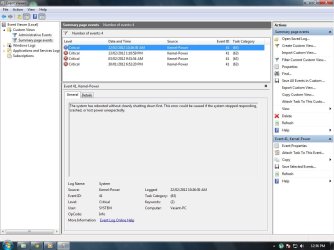
When I go into event viewer it shows me this errors of how many times restarted with errors. My pc restarts in middle while doing anything it doesn't restarts daily once a while in 5 to 6 days.I have run chkdsk and changed my power supply and ran windows repair disk and checked with windows Memory Diagnostics Tool and found no error.But still the restart problem doesn't go.What possible could be the problem be.
 

Attachments

  • event viewer.jpg
    event viewer.jpg
    93.4 KB · Views: 21
Last edited:

My Computer

OS
Windows 7 32-bit
The error showing that the system has shut down unexpectedly gives you the time, but you'll need to check around that time in the Admin and Peformance-Diagnostics logs to see what else might be happening to get clues to the cause of your shutdown. This takes some detective work.

You also need to work through all of the troubleshooting tests including the hardware tests as given and not the ones you've already run. If you have any questions with the steps given just ask back for help. But there are no shortcuts to doing the work if you want to get to the bottom of the problem.

Once you've tested your HD and exhuasted the System logs and resources given in the steps, checked System files and run a Repair Install, we can help you with a Clean Reinstall which will eliminate for sure the OS installation as the problem.
 
What kind of troubleshooting tests do I need to run is it mem test or any other test tell me.
 

My Computer

OS
Windows 7 32-bit

My Computer

Computer type
PC/Desktop
Computer Manufacturer/Model Number
Custom
OS
Windows 7 Ultimate x64
CPU
Intel Core i7 2600K (O/C 4.7GHz)
Motherboard
Asus ROG Maximus IV Extreme-Z - Intel Z68 Chipset
Memory
8GB Corsair Vengeance LP, DDR3, 1600Mhz
Graphics Card(s)
Nvidia GTX 460 Graphics Card
Sound Card
Onboard
Monitor(s) Displays
Dell E228WFP
Hard Drives
2 x 500GB Samsung SpinPoint Drives (1 for OS, 1 for Data and Apps)
PSU
CoolerMaster 1000W
Case
CoolerMaster HAF
Cooling
Air
Internet Speed
Fibre - 60MB Down, 30MB Up
Antivirus
ESET NOD32 Antivirus
More than the MemTest i think the OP needs to check his power supply.Electricity supply in India is rather erratic and in my opinion sudden fluctuation in voltage is the reason behind the unexpected shutdown of his system.

@Gautam Do you have UPS connected to your pc??
 
Last edited:

My Computer

Computer Manufacturer/Model Number
DELL
OS
Windows 8 Pro
CPU
intel i3 2.40 Ghz
Motherboard
DELL inc
Memory
6 GB RAM
Graphics Card(s)
Integrated Intel HD
Sound Card
Realtek high definition SRS surround sound
Screen Resolution
1366*768
Hard Drives
320 GB
Internet Speed
1Mbps
Agreed, I said in my original post on the first page that it could be a PSU issue...

Try Memtest to rule out the RAM. Personally I would also swap out the PSU.


Dave
 

My Computer

Computer type
PC/Desktop
Computer Manufacturer/Model Number
Custom
OS
Windows 7 Ultimate x64
CPU
Intel Core i7 2600K (O/C 4.7GHz)
Motherboard
Asus ROG Maximus IV Extreme-Z - Intel Z68 Chipset
Memory
8GB Corsair Vengeance LP, DDR3, 1600Mhz
Graphics Card(s)
Nvidia GTX 460 Graphics Card
Sound Card
Onboard
Monitor(s) Displays
Dell E228WFP
Hard Drives
2 x 500GB Samsung SpinPoint Drives (1 for OS, 1 for Data and Apps)
PSU
CoolerMaster 1000W
Case
CoolerMaster HAF
Cooling
Air
Internet Speed
Fibre - 60MB Down, 30MB Up
Antivirus
ESET NOD32 Antivirus
Thanks for all reply's I will be checking both my ram and ups and then update this thread.
 

My Computer

OS
Windows 7 32-bit
in reality; from what i have experienced with older versions of windows; when a system restarts like that it is almost always been a hardware related issue from what i have experienced. I had my 7 year old dell do that before i got this new system up and running and I discovered it had something to do with a outdated driver for something called the intel matrix storage manager which has something to do with storage on the hard drives. Well updating that driver fixed the problem in my case; so u might want to try checking the system for updated drivers for the hard drives.
 

My Computer

Computer type
PC/Desktop
Computer Manufacturer/Model Number
custom built
OS
Windows 7 ultimate 64-bit
CPU
Intel I7 2600K 3.4ghz
Motherboard
Asus Evo P8P67
Memory
Corsair 16gb ddr3 1600mhz
Graphics Card(s)
Nvidia Geforce gt 430
Sound Card
Sound Blaster Titanium x-fi pci express
Monitor(s) Displays
Dell E198WFP
Hard Drives
1 western digital 2TB drive.
PSU
Antec 1200 watt
Case
Inwin Dragon Rider
Cooling
6 case supplied cooling fans
Keyboard
logitech mk700
Mouse
logitech m705
Internet Speed
25-50mbps download; 10mbps upload(i think)
Antivirus
avg free 2014
Browser
mozilla firefox
Other Info
Also have a pretty bad speaker setup which is a klipsch promedia 5.1 surround speaker setup with huge subwoofer and lg blu ray player/writer. Also a hp officejet pro 8600 plus wireless all in one and a logitech s7500 webcam.
Back
Top