Windows 7 Slow Boot (Sometime).

FurqanHanif

New member
Local time
4:37 PM
Messages
26
Location
Pakistan
My Windows Boot Really Slow Sometimes. When Windows Boot Logo Appears (Splash Screens) After that Black Screen Appears and My Hard Disk Activity Light Just Stuck , After Sometime (1/2 of Minute Approx) Login Screen Appears and i Login and Then Windows Take Too Much Time To show Desktop properly and Running BackGround Programs.. :(
Now Sometime It Happens that My Windows Boot Really Fast , (Like No Black Screen , Instantly Desktop Appears , Programs Loads) , So i don't Know Why Sometime it Boots Slow And Sometime it Fast .
i also Uninstall the antivirus (SOmetime antivirus Cause Issue) but Still same Slow Boot .. :sarc:
So Some One Please Help me To resolve This Issue ... :)
My Recent ntbtlog.txt is Attached (i Didn't See any unusual Thing/activity in It)..
 

Attachments

My Computer

Computer type
Laptop
Computer Manufacturer/Model Number
Dell
OS
Windows 7 Professional 32bit
CPU
Intel B950
Motherboard
Intel HM67
Memory
2GB
Graphics Card(s)
Intel HD Graphics
Sound Card
IDT High Definition Audio Controller
Screen Resolution
1366x768
Hard Drives
Western Digital (WD5000LPVX)
Keyboard
Dell Keyboard
Mouse
Dell TouchPad
Internet Speed
4Mb Broadband Connection
Antivirus
Microsoft Security Essentials
Browser
Chrome/Firefox
Hi FurqanHanif

Welcome to Windows 7 Forums.

Can you tell me what software you use to do disk cleanup and how often you run it?
 

My Computer

Computer type
Laptop
Computer Manufacturer/Model Number
HP
OS
Dual Boot Win 8.1 x64; Win 7 SP1 x64
CPU
i7-3610QM @ 2.3 GHz
Motherboard
Hewlett-Packard 181C (U3E1)
Memory
8 GB Dual-Channel DDR3 @ 798MHz
Graphics Card(s)
Intel HD Graphics 4000
Hard Drives
Hitachi HTS547575A9E384 SCSI Disk Device;
WD Elements 1042 USB Device
Antivirus
Microsoft Security Essentials; Comodo Firewall w/ Defense +
i Use Ccleaner , and i use it Once a Week ( Sometime Once in Two Weeks) ..
 

My Computer

Computer type
Laptop
Computer Manufacturer/Model Number
Dell
OS
Windows 7 Professional 32bit
CPU
Intel B950
Motherboard
Intel HM67
Memory
2GB
Graphics Card(s)
Intel HD Graphics
Sound Card
IDT High Definition Audio Controller
Screen Resolution
1366x768
Hard Drives
Western Digital (WD5000LPVX)
Keyboard
Dell Keyboard
Mouse
Dell TouchPad
Internet Speed
4Mb Broadband Connection
Antivirus
Microsoft Security Essentials
Browser
Chrome/Firefox
Hi,
Which antivirus did you remove and what did you replace it with ?
Cheers.
 

My Computer

Computer type
PC/Desktop
Computer Manufacturer/Model Number
Custom assembled by me :}
OS
Win-7-Pro64bit 7-H-Prem-64bit
CPU
i7-5930K 2nd i9-9940x both water blocked VRM's too
Motherboard
ASUS SABERTOOTH X99 2nd ASUS x299 Apex
Memory
Trident-z 3200C14 2nd Trident-z 3600C16
Graphics Card(s)
EVGA 1080ti ftw3 2nd Titan Xp both water blocked
Sound Card
Built-in Realtek
Monitor(s) Displays
1-AOC G2460PG 24"G-Sync 144Hz/ 2nd 1-ASUS VG248QE 24" 144Hz
Screen Resolution
1920 x 1080 144Hz
Hard Drives
2-Samsung M.2 Evo & Evo Plus
2-Samsung 850 EVO 500GB SSD's/ 3-2.5 W.D. Black 1tb-&3-1tb/3-3.5 WD Black 1tb hdd's
PSU
EVGA SuperNOVA 1000-P2 2nd 1200-P2
Case
2-Corsair Obsidian Series 450D Black ATX Mid Tower
Cooling
Custom water loops
Keyboard
Logitech G710+/ 2nd Logitech G910
Mouse
2-RedDragon M901 Perdition 16400 dpi Gaming mouse = wired
Internet Speed
Comcast Ping 19ms 89.31mbps download speed 6.12mbps upload
Antivirus
Malwarebytes Pro/ Superantispyware Pro
Browser
FireFox & Pale moon
Other Info
2nd ASUS X299 Apex/Intel i9-9940x with Custom water loop/7H-Prem-x64/Corsair 450D case/Ram Trident-z 3600C16 4x8gb / Samsung970Evo plus 500gb SSD/Dual ssd EZ swap evo/PSU EVGA SuperNova 1200w-P2 80+Platinum/GPU Titan Xp /8-ML-140 on push-pull on 2-280GTX rads
Microsoft Security Essentials , and i Re-install it ..
 

My Computer

Computer type
Laptop
Computer Manufacturer/Model Number
Dell
OS
Windows 7 Professional 32bit
CPU
Intel B950
Motherboard
Intel HM67
Memory
2GB
Graphics Card(s)
Intel HD Graphics
Sound Card
IDT High Definition Audio Controller
Screen Resolution
1366x768
Hard Drives
Western Digital (WD5000LPVX)
Keyboard
Dell Keyboard
Mouse
Dell TouchPad
Internet Speed
4Mb Broadband Connection
Antivirus
Microsoft Security Essentials
Browser
Chrome/Firefox
Hi,
What has ever been installed on the machine ?
Cheers.
 

My Computer

Computer type
PC/Desktop
Computer Manufacturer/Model Number
Custom assembled by me :}
OS
Win-7-Pro64bit 7-H-Prem-64bit
CPU
i7-5930K 2nd i9-9940x both water blocked VRM's too
Motherboard
ASUS SABERTOOTH X99 2nd ASUS x299 Apex
Memory
Trident-z 3200C14 2nd Trident-z 3600C16
Graphics Card(s)
EVGA 1080ti ftw3 2nd Titan Xp both water blocked
Sound Card
Built-in Realtek
Monitor(s) Displays
1-AOC G2460PG 24"G-Sync 144Hz/ 2nd 1-ASUS VG248QE 24" 144Hz
Screen Resolution
1920 x 1080 144Hz
Hard Drives
2-Samsung M.2 Evo & Evo Plus
2-Samsung 850 EVO 500GB SSD's/ 3-2.5 W.D. Black 1tb-&3-1tb/3-3.5 WD Black 1tb hdd's
PSU
EVGA SuperNOVA 1000-P2 2nd 1200-P2
Case
2-Corsair Obsidian Series 450D Black ATX Mid Tower
Cooling
Custom water loops
Keyboard
Logitech G710+/ 2nd Logitech G910
Mouse
2-RedDragon M901 Perdition 16400 dpi Gaming mouse = wired
Internet Speed
Comcast Ping 19ms 89.31mbps download speed 6.12mbps upload
Antivirus
Malwarebytes Pro/ Superantispyware Pro
Browser
FireFox & Pale moon
Other Info
2nd ASUS X299 Apex/Intel i9-9940x with Custom water loop/7H-Prem-x64/Corsair 450D case/Ram Trident-z 3600C16 4x8gb / Samsung970Evo plus 500gb SSD/Dual ssd EZ swap evo/PSU EVGA SuperNova 1200w-P2 80+Platinum/GPU Titan Xp /8-ML-140 on push-pull on 2-280GTX rads
i Use Ccleaner , and i use it Once a Week ( Sometime Once in Two Weeks) ..

This seems like your issue.
When running CCleaner you should uncheck the [Old Prefetch Data] option.

Your system is building a list of things you like to do so it can serve them to you just as you request them, or right before. You're cleaning it out each time you use CCleaner.

This will result in inconsistent boot times. I would expect your system to boot slower after you run CCleaner and clean prefetch data.

Uncheck that option whenever you run CCleaner unless you do want to clean the prefetch cache.

Boot times should regularize within a week.
 

My Computer

Computer type
Laptop
Computer Manufacturer/Model Number
HP
OS
Dual Boot Win 8.1 x64; Win 7 SP1 x64
CPU
i7-3610QM @ 2.3 GHz
Motherboard
Hewlett-Packard 181C (U3E1)
Memory
8 GB Dual-Channel DDR3 @ 798MHz
Graphics Card(s)
Intel HD Graphics 4000
Hard Drives
Hitachi HTS547575A9E384 SCSI Disk Device;
WD Elements 1042 USB Device
Antivirus
Microsoft Security Essentials; Comodo Firewall w/ Defense +
@thrashZone What Do You Mean By That Exactly ???? i installed Software Etc (Vlc , Chrome etc).. :rolleyes:
Old Prefecth is Already Deslect , i Never Selected It... :sarc:
 

My Computer

Computer type
Laptop
Computer Manufacturer/Model Number
Dell
OS
Windows 7 Professional 32bit
CPU
Intel B950
Motherboard
Intel HM67
Memory
2GB
Graphics Card(s)
Intel HD Graphics
Sound Card
IDT High Definition Audio Controller
Screen Resolution
1366x768
Hard Drives
Western Digital (WD5000LPVX)
Keyboard
Dell Keyboard
Mouse
Dell TouchPad
Internet Speed
4Mb Broadband Connection
Antivirus
Microsoft Security Essentials
Browser
Chrome/Firefox
Security wise what has ever been installed :/
 

My Computer

Computer type
PC/Desktop
Computer Manufacturer/Model Number
Custom assembled by me :}
OS
Win-7-Pro64bit 7-H-Prem-64bit
CPU
i7-5930K 2nd i9-9940x both water blocked VRM's too
Motherboard
ASUS SABERTOOTH X99 2nd ASUS x299 Apex
Memory
Trident-z 3200C14 2nd Trident-z 3600C16
Graphics Card(s)
EVGA 1080ti ftw3 2nd Titan Xp both water blocked
Sound Card
Built-in Realtek
Monitor(s) Displays
1-AOC G2460PG 24"G-Sync 144Hz/ 2nd 1-ASUS VG248QE 24" 144Hz
Screen Resolution
1920 x 1080 144Hz
Hard Drives
2-Samsung M.2 Evo & Evo Plus
2-Samsung 850 EVO 500GB SSD's/ 3-2.5 W.D. Black 1tb-&3-1tb/3-3.5 WD Black 1tb hdd's
PSU
EVGA SuperNOVA 1000-P2 2nd 1200-P2
Case
2-Corsair Obsidian Series 450D Black ATX Mid Tower
Cooling
Custom water loops
Keyboard
Logitech G710+/ 2nd Logitech G910
Mouse
2-RedDragon M901 Perdition 16400 dpi Gaming mouse = wired
Internet Speed
Comcast Ping 19ms 89.31mbps download speed 6.12mbps upload
Antivirus
Malwarebytes Pro/ Superantispyware Pro
Browser
FireFox & Pale moon
Other Info
2nd ASUS X299 Apex/Intel i9-9940x with Custom water loop/7H-Prem-x64/Corsair 450D case/Ram Trident-z 3600C16 4x8gb / Samsung970Evo plus 500gb SSD/Dual ssd EZ swap evo/PSU EVGA SuperNova 1200w-P2 80+Platinum/GPU Titan Xp /8-ML-140 on push-pull on 2-280GTX rads
Only Microsoft Security Essentials , No Other Security Tool/Software i Installed Ever..
 

My Computer

Computer type
Laptop
Computer Manufacturer/Model Number
Dell
OS
Windows 7 Professional 32bit
CPU
Intel B950
Motherboard
Intel HM67
Memory
2GB
Graphics Card(s)
Intel HD Graphics
Sound Card
IDT High Definition Audio Controller
Screen Resolution
1366x768
Hard Drives
Western Digital (WD5000LPVX)
Keyboard
Dell Keyboard
Mouse
Dell TouchPad
Internet Speed
4Mb Broadband Connection
Antivirus
Microsoft Security Essentials
Browser
Chrome/Firefox
@FurqanHanif will you please do the following so we can gather some more information about your particular system to help with diagnostics:

Piriform - How to list installed programs
Post the txt file it generates.

Open CCleaner, Click [Tools] and then [Startup].
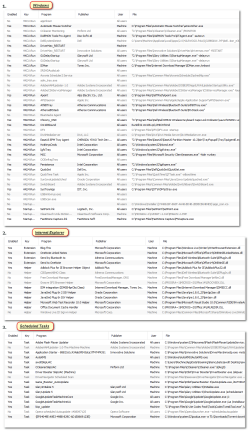
Please screenshot the [Windows], [Internet Explorer] and [Scheduled Tasks] tabs and post them here.

That way I know what we're working with.
 

My Computer

Computer type
Laptop
Computer Manufacturer/Model Number
HP
OS
Dual Boot Win 8.1 x64; Win 7 SP1 x64
CPU
i7-3610QM @ 2.3 GHz
Motherboard
Hewlett-Packard 181C (U3E1)
Memory
8 GB Dual-Channel DDR3 @ 798MHz
Graphics Card(s)
Intel HD Graphics 4000
Hard Drives
Hitachi HTS547575A9E384 SCSI Disk Device;
WD Elements 1042 USB Device
Antivirus
Microsoft Security Essentials; Comodo Firewall w/ Defense +
All Things Are Attached...
 

Attachments

  • install.txt
    install.txt
    40.6 KB · Views: 1
  • 2015-01-11_181900.png
    2015-01-11_181900.png
    101.5 KB · Views: 3

My Computer

Computer type
Laptop
Computer Manufacturer/Model Number
Dell
OS
Windows 7 Professional 32bit
CPU
Intel B950
Motherboard
Intel HM67
Memory
2GB
Graphics Card(s)
Intel HD Graphics
Sound Card
IDT High Definition Audio Controller
Screen Resolution
1366x768
Hard Drives
Western Digital (WD5000LPVX)
Keyboard
Dell Keyboard
Mouse
Dell TouchPad
Internet Speed
4Mb Broadband Connection
Antivirus
Microsoft Security Essentials
Browser
Chrome/Firefox
Programs to uninstall immediately
DAEMON Tools Pro - This is known to cause issues and you already have PowerIso
DriverMax
Glary Utilities
awdit Desktop
IOBit GameBooster


Programs I would like you to explain:
awdit Desktop
Automatic Mouse Switcher
DivX

I also suggest you run through the programs you have installed and uninstall the ones you DO NOT USE at least once every two weeks (Unless you really need that program for some reason. This does not include games).

Note to self: Next time suggest Belarc Advisor
 
Last edited:

My Computer

Computer type
Laptop
Computer Manufacturer/Model Number
HP
OS
Dual Boot Win 8.1 x64; Win 7 SP1 x64
CPU
i7-3610QM @ 2.3 GHz
Motherboard
Hewlett-Packard 181C (U3E1)
Memory
8 GB Dual-Channel DDR3 @ 798MHz
Graphics Card(s)
Intel HD Graphics 4000
Hard Drives
Hitachi HTS547575A9E384 SCSI Disk Device;
WD Elements 1042 USB Device
Antivirus
Microsoft Security Essentials; Comodo Firewall w/ Defense +
Once you've uninstalled these programs please redo and repost the screenshots and the installed files log.
 

My Computer

Computer type
Laptop
Computer Manufacturer/Model Number
HP
OS
Dual Boot Win 8.1 x64; Win 7 SP1 x64
CPU
i7-3610QM @ 2.3 GHz
Motherboard
Hewlett-Packard 181C (U3E1)
Memory
8 GB Dual-Channel DDR3 @ 798MHz
Graphics Card(s)
Intel HD Graphics 4000
Hard Drives
Hitachi HTS547575A9E384 SCSI Disk Device;
WD Elements 1042 USB Device
Antivirus
Microsoft Security Essentials; Comodo Firewall w/ Defense +
Why Uninstall DriverMax??? i Think it's Safe and Good Free Driver Update Program.
Iobit Gamebooster , Awdit Desktop are already Uninstalled ( See The Previous Install.txt).
Automatic Mouse Switcher (Scans for mouse/touchpad devices being added or removed and automatically changes mouse speed - you can virtually have different mouse speed settings for touchpad and external mouse.) (Automatic Mouse Switcher | SourceForge.net)

Divx Player (DivX Video Software | Free Video Software | DivX Format | DivX.com)
 

Attachments

My Computer

Computer type
Laptop
Computer Manufacturer/Model Number
Dell
OS
Windows 7 Professional 32bit
CPU
Intel B950
Motherboard
Intel HM67
Memory
2GB
Graphics Card(s)
Intel HD Graphics
Sound Card
IDT High Definition Audio Controller
Screen Resolution
1366x768
Hard Drives
Western Digital (WD5000LPVX)
Keyboard
Dell Keyboard
Mouse
Dell TouchPad
Internet Speed
4Mb Broadband Connection
Antivirus
Microsoft Security Essentials
Browser
Chrome/Firefox
Why Uninstall DriverMax??? i Think it's Safe and Good Free Driver Update Program.

I figured you would say that.
In that case please remove it from Startup.

Navigate to the Startup section in CCleaner.
Click the [Windows] tab
Right-click DriverMax and click delete.

Iobit Gamebooster , Awdit Desktop are already Uninstalled ( See The Previous Install.txt).

Good.

Please repost the startup screenshots.

Automatic Mouse Switcher (Scans for mouse/touchpad devices being added or removed and automatically changes mouse speed - you can virtually have different mouse speed settings for touchpad and external mouse.) (Automatic Mouse Switcher | SourceForge.net)Divx Player (DivX Video Software | Free Video Software | DivX Format | DivX.com)

I know what these programs are used for. I want to know what you use them for. You may be able to remove them.

For example Divx:

I'm not sure. But given that you use Potplayer I don't think you need Divx if all you use it for is to watch movies.
 

My Computer

Computer type
Laptop
Computer Manufacturer/Model Number
HP
OS
Dual Boot Win 8.1 x64; Win 7 SP1 x64
CPU
i7-3610QM @ 2.3 GHz
Motherboard
Hewlett-Packard 181C (U3E1)
Memory
8 GB Dual-Channel DDR3 @ 798MHz
Graphics Card(s)
Intel HD Graphics 4000
Hard Drives
Hitachi HTS547575A9E384 SCSI Disk Device;
WD Elements 1042 USB Device
Antivirus
Microsoft Security Essentials; Comodo Firewall w/ Defense +
DIVX uninstalled..
 

Attachments

  • 2015-01-11_210355.png
    2015-01-11_210355.png
    15.9 KB · Views: 2

My Computer

Computer type
Laptop
Computer Manufacturer/Model Number
Dell
OS
Windows 7 Professional 32bit
CPU
Intel B950
Motherboard
Intel HM67
Memory
2GB
Graphics Card(s)
Intel HD Graphics
Sound Card
IDT High Definition Audio Controller
Screen Resolution
1366x768
Hard Drives
Western Digital (WD5000LPVX)
Keyboard
Dell Keyboard
Mouse
Dell TouchPad
Internet Speed
4Mb Broadband Connection
Antivirus
Microsoft Security Essentials
Browser
Chrome/Firefox
Ok @FurqanHanif

Good job.

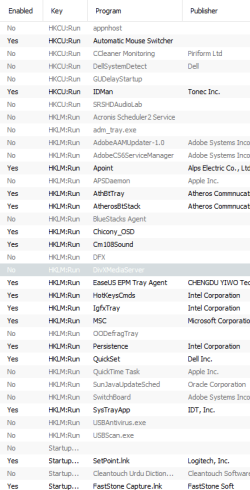
Please open CCleaner and navigate to the Startup Window

Please Delete the following from the startup processes

  • appnhost.exe
  • ooDefragTray
  • USBAntivirus.exe
  • USBScan.exe
  • The startup reference directly after USBScan.exe

Please post another screenshot of your Scheduled Tasks and Windows tabs from CCleaner Startup after you've done this.
After you post those screenshots I will have two tasks for you, and you should be good to go.
 

My Computer

Computer type
Laptop
Computer Manufacturer/Model Number
HP
OS
Dual Boot Win 8.1 x64; Win 7 SP1 x64
CPU
i7-3610QM @ 2.3 GHz
Motherboard
Hewlett-Packard 181C (U3E1)
Memory
8 GB Dual-Channel DDR3 @ 798MHz
Graphics Card(s)
Intel HD Graphics 4000
Hard Drives
Hitachi HTS547575A9E384 SCSI Disk Device;
WD Elements 1042 USB Device
Antivirus
Microsoft Security Essentials; Comodo Firewall w/ Defense +
Back
Top