Windows 7 startup hangs when external USB drives are powered on

sfwul

New member
Member
Local time
6:54 PM
Messages
54
I have a few external (WD) drives.
Starting Windows 7 x64 whilst they are being switched on, mostly result in a hanging bootsequence.
E.g. I got a black screen and nothing is happening. there is no response on alt-ctrl-del, nothing.

The only solution sofar is to shut down the pc (power off), switch off the drives and start again.
After Windows is up and running again, switch on the drives.

Maybe this is a 'normal' situation and there is no real solution for it.
Have to live with it then.

It is a bit annoying though when I shut down Windows and forget to also switch off the drives.

-
 

My Computer My Computer

At a glance

Windows 7 Ultimate x64
OS
Windows 7 Ultimate x64
For other member to give proper advice your system specs will be needed.
These two tutorial will help you do just that.

By Brink:
http://www.sevenforums.com/tutorials/180324-system-info-see-your-system-specs.html

By Kari:
http://www.sevenforums.com/tutorials/311593-speccy-publish-snapshot-your-system-specs.html

Once you complete that this tutorial will be helpful with all the drives plugged in.


By Golden:
http://www.sevenforums.com/tutorials/274797-disk-management-post-screen-capture-image.html
 

My Computer My Computer

At a glance

Windows 10 Pro. 64/ version 1709 Windows 7 Pr...Intel i7-6800K @ 4.3Corsair Platinum 16 gig @2400EVGA GTX 1070 OC
Computer type
PC/Desktop
Computer Manufacturer/Model Number
Home made Desktop
OS
Windows 10 Pro. 64/ version 1709 Windows 7 Pro/64
CPU
Intel i7-6800K @ 4.3
Motherboard
ASUS X-99 Deluxe II
Memory
Corsair Platinum 16 gig @2400
Graphics Card(s)
EVGA GTX 1070 OC
Monitor(s) Displays
Asus 27" LED LCD/VE278Q
Screen Resolution
1920-1080 or 1280-720 HDMI
Hard Drives
INTEL SSD 730-240 Gb Sata 3.0/
PSU
EVGA Platium 1200W
Case
Phanteks Luxe Tempered Glass 8 fans/ one radiator
Cooling
XSPC/ Water Cooled CPU
Keyboard
Das 4 Professional
Mouse
Logitech M705/MX Anywhere 2-S
Internet Speed
100 mbits
Antivirus
Microsoft Security Essentials/ Malwarebytes Premium 3.0/ SAS
Browser
I.E. 11 default/Firefox/ ISP Time Warner Cable/Spectrum
Other Info
LG BluRay Burner/
Sound system-KLipsch-THX/
Icy Dock ssd Hot Swap bays.
Maybe the below will help, although I am not sure if it is a hardware issue

Later... :
A -very- long shot...
http://support.microsoft.com/kb/2848572

but then again, if it IS the above kb article, then there is not much of a better solution than the shut down.

Idufvr.png


JOT88h.png
 

My Computer My Computer

At a glance

Windows 7 Ultimate x64
OS
Windows 7 Ultimate x64
Please read the tutorials again slowly and follow.

Look in the lower left corner of this post (My System Specs) and tick on it.
I will give you a idea of what the tutorials guide you to do.

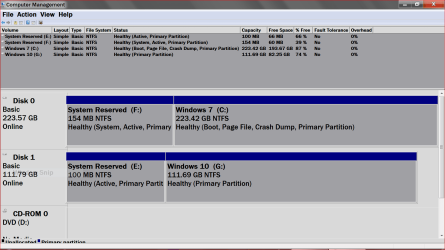
This is what I'm looking for in Disk Management.

New Disc Management.PNG
 

My Computer My Computer

At a glance

Windows 10 Pro. 64/ version 1709 Windows 7 Pr...Intel i7-6800K @ 4.3Corsair Platinum 16 gig @2400EVGA GTX 1070 OC
Computer type
PC/Desktop
Computer Manufacturer/Model Number
Home made Desktop
OS
Windows 10 Pro. 64/ version 1709 Windows 7 Pro/64
CPU
Intel i7-6800K @ 4.3
Motherboard
ASUS X-99 Deluxe II
Memory
Corsair Platinum 16 gig @2400
Graphics Card(s)
EVGA GTX 1070 OC
Monitor(s) Displays
Asus 27" LED LCD/VE278Q
Screen Resolution
1920-1080 or 1280-720 HDMI
Hard Drives
INTEL SSD 730-240 Gb Sata 3.0/
PSU
EVGA Platium 1200W
Case
Phanteks Luxe Tempered Glass 8 fans/ one radiator
Cooling
XSPC/ Water Cooled CPU
Keyboard
Das 4 Professional
Mouse
Logitech M705/MX Anywhere 2-S
Internet Speed
100 mbits
Antivirus
Microsoft Security Essentials/ Malwarebytes Premium 3.0/ SAS
Browser
I.E. 11 default/Firefox/ ISP Time Warner Cable/Spectrum
Other Info
LG BluRay Burner/
Sound system-KLipsch-THX/
Icy Dock ssd Hot Swap bays.
This ?

Sorry for the big screenshots!


UX1wtA.png


dNEjHO.png
 

My Computer My Computer

At a glance

Windows 7 Ultimate x64
OS
Windows 7 Ultimate x64
Back
Top