Windows 7 Still slow...... Need help

Windows7inMiami

New member
Member
VIP
Local time
4:09 AM
Messages
120
Well after I did a fresh install of my Windows 7, it sill runs so many applications that 50%-60% of the CPU is being used at any given point. Not to mention windows media player network sharing is turned on and takes up 2 MILLIONK which pegs the CPU at 100%. I have to constantly end the process to make the computer usable but them my Networking with my XBOX 360 doesn't work at all. Real issue here, any help?
 

My Computer

Computer Manufacturer/Model Number
Gateway NV52
OS
Windows 7
Graphics Card(s)
ATI
Win7 32bit or 64bit ? How much memory (Ram) do you have ?
 

My Computer

Computer type
PC/Desktop
Computer Manufacturer/Model Number
Built them myself, Science Experiments !
OS
Win7 Enterprise, Win7 x86 (Ult 7600), Win7 x64 Ult 7600, TechNet RTM on AMD x64 (2.8Ghz)
CPU
AMD fx8350 4ghz, AMD-32 2400mhz, AMD-64 3200mhz, AMDx64 2.8G
Motherboard
SIS 755, ECS-K8M890M-M (Ult 7600), GigaByte & others
Memory
2gb, 4gb on the Ult 7600, 4gb on Technet RTM, 32gb on FX8350
Graphics Card(s)
Draw my own Graphics, several nVidia cards
Sound Card
on motherboard
Monitor(s) Displays
19" flat scr, 28" I-Inc widescr,22" Emprex Widescr, 23" Acer
Screen Resolution
1280 x 1024, 1440 x 900, 1920 x 1080
Hard Drives
6 pata Ide HD's & 2 Sata HD's
added 80gb external on Ult 7600 computer,
numerous extra 1tb, 2TB, 3Tb SATA HD's
A collection of ext HD Docks w/ HDs
PSU
430w, 550w, 600w, 700, 800, etc
Case
All Generic Full Towers
Cooling
Open Air & a few fans, some w/ colored LEDs
Keyboard
Compaq & Dell recycled from GoodWill
Mouse
Made in China Optical Wired Mouse
Internet Speed
Fast Cable InterNet
Antivirus
AVG Free on 24 different Desktops, NO Problems!
Browser
IE 8 is preferred, but use FireFox sometimes
Other Info
Linksys Routers, switches, & Hubs
Too Many USB Flash Drives to count, Biggest is 64GB !
Eight computers in my home network.
Sixteen computers at my business network.
Linked via TeamViewer !
Lots of old used spare computer parts everywhere!
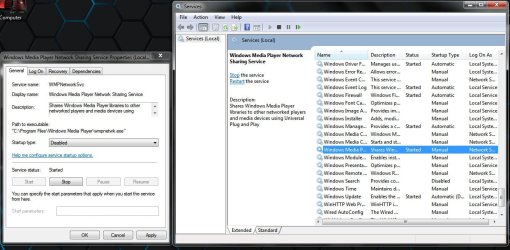
To disable Windows media player sharing permanently. Follow this method.

Open up your start menu, type services.msc. On the Services menu, locate "Windows Media Player Network sharing Service" and double-click on it. Navigate to "Startup Type". Select "Disabled", click Apply then Ok.

Hope this helps. :)
 

Attachments

  • Untitled.jpg
    Untitled.jpg
    114.9 KB · Views: 80

My Computer

Computer Manufacturer/Model Number
D3f's Customs
OS
Win 7 Ultimate SP1 x64
CPU
Intel Pentium Dual Core E5300 OC'd @ 3GHz
Motherboard
Asus P5G41-M LE
Memory
Kingston 2x2GB DDR2-800 Dual Channel SDRAM
Graphics Card(s)
Integrated Intel GMA X4500
Sound Card
Realtek 5.1 HD Audio (ALC887)
Monitor(s) Displays
LG Flatron W1943S @ 60Hz
Screen Resolution
1360 x 768
Hard Drives
Internal - WD Caviar Blue 500GB, External - WD My Passport Essential 500GB
PSU
Headway 450w PSU
Case
Pixxo Slim Black mATX Case
Cooling
Stock Cpu Fan, 1 x Top Case Fan
Keyboard
Logitech K120
Mouse
Logitech LS1 Laser Mouse
Internet Speed
17.66Mb/s Down, 0.82Mb/s Up
Other Info
Creative SBS A300 2.1 Speaker System, LG GH22NS50 22x Internal Super-Multi DVD-RW, 2Wire 5012NV Wireless Modem Router
Well after I did a fresh install of my Windows 7, it sill runs so many applications that 50%-60% of the CPU is being used at any given point. Not to mention windows media player network sharing is turned on and takes up 2 MILLIONK which pegs the CPU at 100%. I have to constantly end the process to make the computer usable but them my Networking with my XBOX 360 doesn't work at all. Real issue here, any help?


Now you know how to stop Media Center Sharing do you have hybernation on or off. It is by default on after any install and opens a large file in your root directory of C:

I turned mine off and things run much faster on bootup and shutdown.
 

My Computer

Computer type
PC/Desktop
Computer Manufacturer/Model Number
Self Built
OS
Windows 10 Pro
CPU
Intel i5
Motherboard
I have a fatherboard
Memory
I'm old and lost a few chips
Graphics Card(s)
Yup
Sound Card
Yup
Monitor(s) Displays
Samsung 32" UHD
Screen Resolution
3840 x 2160
Hard Drives
Samsung 860 EVO drives
PSU
450 Watt and some fans that blow
Case
Small tower
Cooling
Yes I am cool. lol
Keyboard
Who needs a keyboard?
Mouse
Logitech Laser G7 wireless
Internet Speed
Zippy fast UP and DOWN
Antivirus
I got a shot
Browser
The new Improved EDGE 2020
Fill in your system specs and update all your drivers with the guide in my sig. What antivirus are you using? Consider running chkdsk and memtest86+.
 

My Computer

Computer Manufacturer/Model Number
Sony Vaio Z46GDU
OS
Windows 7 Ultimate x86-64
CPU
[email protected] 1066MHz FSB
Motherboard
Sony branded
Memory
6GB DDR3 1066MHz
Graphics Card(s)
9300M GS 256MB Dedicated (Speed) + Intel4500MHD (Stamina)
Sound Card
Realtek HD Audio
Monitor(s) Displays
13.1' WXGA
Screen Resolution
1600x900
Hard Drives
320GB 7200RPM w/ 16MB cache
Internet Speed
1MB/s
Win7 32bit or 64bit ? How much memory (Ram) do you have ?


Win 7, clean install, 64 Bit.


To disable Windows media player sharing permanently. Follow this method.

Open up your start menu, type services.msc. On the Services menu, locate "Windows Media Player Network sharing Service" and double-click on it. Navigate to "Startup Type". Select "Disabled", click Apply then Ok.

Hope this helps. :)

THANKS, but if I do this, won't media sharing on my XBOX 360 also be permanently disabled? If you search on me you will see that Media sharing is VERY touchy and SOMETIMES works and when it does my computer CPU is maxed at 100% because the network sharing is using 2million + K. If I use Windows Media Center which ALWAYS synchs it is slow and glitchy and movies skip and freeze every now and again. I like using the basic sharing.


Well after I did a fresh install of my Windows 7, it sill runs so many applications that 50%-60% of the CPU is being used at any given point. Not to mention windows media player network sharing is turned on and takes up 2 MILLIONK which pegs the CPU at 100%. I have to constantly end the process to make the computer usable but them my Networking with my XBOX 360 doesn't work at all. Real issue here, any help?


Now you know how to stop Media Center Sharing do you have hybernation on or off. It is by default on after any install and opens a large file in your root directory of C:

I turned mine off and things run much faster on bootup and shutdown.

I believe that I turned off hibernation but the screen goes dark after 30 mins of no activity, but no hibernation.


Fill in your system specs and update all your drivers with the guide in my sig. What antivirus are you using? Consider running chkdsk and memtest86+.


Gateway NV52, AMD Athlon 64 X2 QL-64, 320 GB HDD, 4 GB memory. As far as antivirus I use Microsoft Security Essentials, I used to use McAfee but it would block all synching with my XBOX 360 which I use daily to dream media.


Thank you all so much!
 

My Computer

Computer Manufacturer/Model Number
Gateway NV52
OS
Windows 7
Graphics Card(s)
ATI
To disable Windows media player sharing permanently. Follow this method.

Open up your start menu, type services.msc. On the Services menu, locate "Windows Media Player Network sharing Service" and double-click on it. Navigate to "Startup Type". Select "Disabled", click Apply then Ok.

Hope this helps. :)


OK if I do this then I can't use my XBOX 360 folder of VIDEOS or MUSIC any more correct? Meaning I would have to use Windows Media Center which is kinda slow and lagy. WMP always works well IF it connects, until it doesn't for no god damn funkin reason. IDK, it's all sh1t.:mad::cry:
 

My Computer

Computer Manufacturer/Model Number
Gateway NV52
OS
Windows 7
Graphics Card(s)
ATI
To disable Windows media player sharing permanently. Follow this method.

Open up your start menu, type services.msc. On the Services menu, locate "Windows Media Player Network sharing Service" and double-click on it. Navigate to "Startup Type". Select "Disabled", click Apply then Ok.

Hope this helps. :)


OK if I do this then I can't use my XBOX 360 folder of VIDEOS or MUSIC any more correct? Meaning I would have to use Windows Media Center which is kinda slow and lagy. WMP always works well IF it connects, until it doesn't for no god damn funkin reason. IDK, it's all sh1t.:mad::cry:

Have you tried Tversity?
 

My Computer

Computer Manufacturer/Model Number
Sony Vaio Z46GDU
OS
Windows 7 Ultimate x86-64
CPU
[email protected] 1066MHz FSB
Motherboard
Sony branded
Memory
6GB DDR3 1066MHz
Graphics Card(s)
9300M GS 256MB Dedicated (Speed) + Intel4500MHD (Stamina)
Sound Card
Realtek HD Audio
Monitor(s) Displays
13.1' WXGA
Screen Resolution
1600x900
Hard Drives
320GB 7200RPM w/ 16MB cache
Internet Speed
1MB/s
Back
Top