Windows 7 - Stuck on "Shutting down screen" - Nvidia 110.70 beta drive

Kope

New member
Local time
4:26 AM
Messages
8
Windows 7 - Stuck on "Shutting down screen" - Nvidia 110.70 beta drive

Hello,

Sorry for making a new thread, but it seems this subject needs one as it differs from others. So basicly when I ever try to shut down my computer it just gets stuck on the shutting down screen. I search through older threads and such and found a way to see if there is any errors at Even Viewer.

Few days ago I downloaded Nvidia beta driver for my GTX 560 Ti, graphic card, the version of the driver is 310.70. Now as it seems from Even Viewer it's causing the problem, there was an error with event id 1.

Details of the error: "The NVIDIA OpenGL driver detected a problem with the display
driver and is unable to continue. The application must close.

Error code: 3
Visit Support | NVIDIA for more information."

Althought Nvidia seems to be the one causing problem, for example yesterday my computer was again stuck on the shutting down screen but I can't see any errors regarding to Nvidia at Event Viewer or for any else application. Now I wonder if I should remove the driver and replace it with older stable one or do as done in the older problem which had the same kind of nvidia problem but there the guy just removed Nvidia service?

Thanks already!
 

My Computer My Computer

At a glance

Windows 7 - Home Premium - 64bit
OS
Windows 7 - Home Premium - 64bit
Welcome aboard, Kope.

Get rid of the beta driver, and use a known stable version. I recommend GeForce 306.23.
Let us know the results ... is the issue still there after making this change?
 

My Computer My Computer

At a glance

Microsoft Windows 10 Pro Insider Preview 64-bitIntel(R) Core(TM) i3-4130 CPU @ 3.40GHzCorsair Vengence 4GB x2 (8.00GB Dual-Channel ...2047MB GeForce GTS 450 (ZOTAC International)
Computer type
PC/Desktop
Computer Manufacturer/Model Number
Self Assembled
OS
Microsoft Windows 10 Pro Insider Preview 64-bit
CPU
Intel(R) Core(TM) i3-4130 CPU @ 3.40GHz
Motherboard
Gigabyte Technology Co., Ltd. B85M-D3H
Memory
Corsair Vengence 4GB x2 (8.00GB Dual-Channel DDR3 @ 798MHz)
Graphics Card(s)
2047MB GeForce GTS 450 (ZOTAC International)
Sound Card
Onboard (Realtek High Definition Audio)
Monitor(s) Displays
LG Flatron E2040T
Screen Resolution
1600x900
Hard Drives
Western Digital 1 TB
Seagate 500 GB
PSU
Corsair VS550
Case
Cooler Master K380
Cooling
Cooler Master Seidon 120V Plus
Keyboard
Logitech MK260r
Mouse
Logitech MK260r
Internet Speed
PMPL Broadband
Antivirus
Windows Defender + MBAM
Browser
Firefox
Other Info
Dell Studio 15" Laptop
I did all as u said deleted with driver fusion and when trying to shut down the problem was still there. I downloaded drivers(downloaded 306.97 because they had been stable before) and problem was still there. Thanks for help thought! Any more ideas?
 

My Computer My Computer

At a glance

Windows 7 - Home Premium - 64bit
OS
Windows 7 - Home Premium - 64bit
Do a clean boot ....
How to perform a clean boot to troubleshoot a problem in Windows Vista, Windows 7, or Windows 8

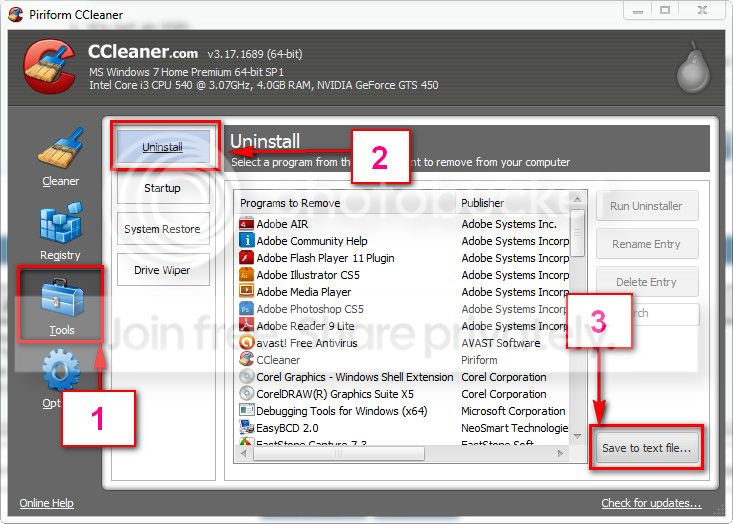
Generally it occurs when any program refuses to shut down. So I need to know what are the programs you have installed. Download and install CCleaner. Then run it.
Go to "Tools" .... by default it will open the "uninstall" tab.
Click on save as text file. Save it on your desktop.
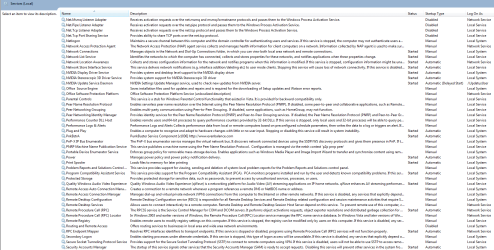
Upload the text file for us.
2012-11-02_224417.jpg


upload your MSINFO32.nfo file.

  1. Click on the start button
  2. Type "msinfo32" (without quotes) in the search bar of the start menu, click the resulting link. It will open the System Information window.
  3. File>Save. In the "File Name" filed, put "MSINFO32" (without Quote), give the save location to desktop, and click the "save" button.
  4. Give the time for processing, it will save a .nfo file on your desktop.
  5. Zip it, and upload it following the instruction.
Also, as a safety reason, Scan the system for possible virus infection.


My Computer My Computer

At a glance

Microsoft Windows 10 Pro Insider Preview 64-bitIntel(R) Core(TM) i3-4130 CPU @ 3.40GHzCorsair Vengence 4GB x2 (8.00GB Dual-Channel ...2047MB GeForce GTS 450 (ZOTAC International)
Computer type
PC/Desktop
Computer Manufacturer/Model Number
Self Assembled
OS
Microsoft Windows 10 Pro Insider Preview 64-bit
CPU
Intel(R) Core(TM) i3-4130 CPU @ 3.40GHz
Motherboard
Gigabyte Technology Co., Ltd. B85M-D3H
Memory
Corsair Vengence 4GB x2 (8.00GB Dual-Channel DDR3 @ 798MHz)
Graphics Card(s)
2047MB GeForce GTS 450 (ZOTAC International)
Sound Card
Onboard (Realtek High Definition Audio)
Monitor(s) Displays
LG Flatron E2040T
Screen Resolution
1600x900
Hard Drives
Western Digital 1 TB
Seagate 500 GB
PSU
Corsair VS550
Case
Cooler Master K380
Cooling
Cooler Master Seidon 120V Plus
Keyboard
Logitech MK260r
Mouse
Logitech MK260r
Internet Speed
PMPL Broadband
Antivirus
Windows Defender + MBAM
Browser
Firefox
Other Info
Dell Studio 15" Laptop
I will do clean boot later, thanks for help again! Much appreciated!
 

My Computer My Computer

At a glance

Windows 7 - Home Premium - 64bit
OS
Windows 7 - Home Premium - 64bit
I guess you have done the other two suggestions too.

Uinistall the following programs:

  • Apple Mobile Device Support, including apple charger
  • Apple Software Update
  • DAEMON Tools Lite
  • Easy Tune 6
Let us know the results, when all done.
 

My Computer My Computer

At a glance

Microsoft Windows 10 Pro Insider Preview 64-bitIntel(R) Core(TM) i3-4130 CPU @ 3.40GHzCorsair Vengence 4GB x2 (8.00GB Dual-Channel ...2047MB GeForce GTS 450 (ZOTAC International)
Computer type
PC/Desktop
Computer Manufacturer/Model Number
Self Assembled
OS
Microsoft Windows 10 Pro Insider Preview 64-bit
CPU
Intel(R) Core(TM) i3-4130 CPU @ 3.40GHz
Motherboard
Gigabyte Technology Co., Ltd. B85M-D3H
Memory
Corsair Vengence 4GB x2 (8.00GB Dual-Channel DDR3 @ 798MHz)
Graphics Card(s)
2047MB GeForce GTS 450 (ZOTAC International)
Sound Card
Onboard (Realtek High Definition Audio)
Monitor(s) Displays
LG Flatron E2040T
Screen Resolution
1600x900
Hard Drives
Western Digital 1 TB
Seagate 500 GB
PSU
Corsair VS550
Case
Cooler Master K380
Cooling
Cooler Master Seidon 120V Plus
Keyboard
Logitech MK260r
Mouse
Logitech MK260r
Internet Speed
PMPL Broadband
Antivirus
Windows Defender + MBAM
Browser
Firefox
Other Info
Dell Studio 15" Laptop
Ye I ran the windows defender scan and will also do later avast scan.
 

My Computer My Computer

At a glance

Windows 7 - Home Premium - 64bit
OS
Windows 7 - Home Premium - 64bit
I uninstalled those progmans and yet it didn't work.
 

My Computer My Computer

At a glance

Windows 7 - Home Premium - 64bit
OS
Windows 7 - Home Premium - 64bit
I want to take one more chance on it.

Depending on the result, we will decide our next step.
 

My Computer My Computer

At a glance

Microsoft Windows 10 Pro Insider Preview 64-bitIntel(R) Core(TM) i3-4130 CPU @ 3.40GHzCorsair Vengence 4GB x2 (8.00GB Dual-Channel ...2047MB GeForce GTS 450 (ZOTAC International)
Computer type
PC/Desktop
Computer Manufacturer/Model Number
Self Assembled
OS
Microsoft Windows 10 Pro Insider Preview 64-bit
CPU
Intel(R) Core(TM) i3-4130 CPU @ 3.40GHz
Motherboard
Gigabyte Technology Co., Ltd. B85M-D3H
Memory
Corsair Vengence 4GB x2 (8.00GB Dual-Channel DDR3 @ 798MHz)
Graphics Card(s)
2047MB GeForce GTS 450 (ZOTAC International)
Sound Card
Onboard (Realtek High Definition Audio)
Monitor(s) Displays
LG Flatron E2040T
Screen Resolution
1600x900
Hard Drives
Western Digital 1 TB
Seagate 500 GB
PSU
Corsair VS550
Case
Cooler Master K380
Cooling
Cooler Master Seidon 120V Plus
Keyboard
Logitech MK260r
Mouse
Logitech MK260r
Internet Speed
PMPL Broadband
Antivirus
Windows Defender + MBAM
Browser
Firefox
Other Info
Dell Studio 15" Laptop
Okhey, thanks so much!

services.PNG
 

My Computer My Computer

At a glance

Windows 7 - Home Premium - 64bit
OS
Windows 7 - Home Premium - 64bit
You need to disable the three nvidia services, or set them to manual. That is, you should not set them at the default value "Automatic". Dont worry, it will not hamper the performance of your graphics driver at all.

First, double click the first nvidia item in services list.

1.jpg

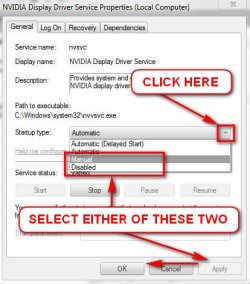
It will open the properties window, as per the pic below:

2.jpg

Click the item"Automatic" listed under startup type. When it is expanded, choose either "Manual" or "Disabled". Then apply, and OK.

Do it, for all the three items of nvidia.

Finally restart the computer, to apply the changes.

Now observe, on the next shutdown, is it still behaves abnormally?
 

My Computer My Computer

At a glance

Microsoft Windows 10 Pro Insider Preview 64-bitIntel(R) Core(TM) i3-4130 CPU @ 3.40GHzCorsair Vengence 4GB x2 (8.00GB Dual-Channel ...2047MB GeForce GTS 450 (ZOTAC International)
Computer type
PC/Desktop
Computer Manufacturer/Model Number
Self Assembled
OS
Microsoft Windows 10 Pro Insider Preview 64-bit
CPU
Intel(R) Core(TM) i3-4130 CPU @ 3.40GHz
Motherboard
Gigabyte Technology Co., Ltd. B85M-D3H
Memory
Corsair Vengence 4GB x2 (8.00GB Dual-Channel DDR3 @ 798MHz)
Graphics Card(s)
2047MB GeForce GTS 450 (ZOTAC International)
Sound Card
Onboard (Realtek High Definition Audio)
Monitor(s) Displays
LG Flatron E2040T
Screen Resolution
1600x900
Hard Drives
Western Digital 1 TB
Seagate 500 GB
PSU
Corsair VS550
Case
Cooler Master K380
Cooling
Cooler Master Seidon 120V Plus
Keyboard
Logitech MK260r
Mouse
Logitech MK260r
Internet Speed
PMPL Broadband
Antivirus
Windows Defender + MBAM
Browser
Firefox
Other Info
Dell Studio 15" Laptop
Did just that, still abnormal :o
 

My Computer My Computer

At a glance

Windows 7 - Home Premium - 64bit
OS
Windows 7 - Home Premium - 64bit
Now I think I should somebody more efficient and knowledgeable. I am asking gregrocker to have a look, please wait for him.
 

My Computer My Computer

At a glance

Microsoft Windows 10 Pro Insider Preview 64-bitIntel(R) Core(TM) i3-4130 CPU @ 3.40GHzCorsair Vengence 4GB x2 (8.00GB Dual-Channel ...2047MB GeForce GTS 450 (ZOTAC International)
Computer type
PC/Desktop
Computer Manufacturer/Model Number
Self Assembled
OS
Microsoft Windows 10 Pro Insider Preview 64-bit
CPU
Intel(R) Core(TM) i3-4130 CPU @ 3.40GHz
Motherboard
Gigabyte Technology Co., Ltd. B85M-D3H
Memory
Corsair Vengence 4GB x2 (8.00GB Dual-Channel DDR3 @ 798MHz)
Graphics Card(s)
2047MB GeForce GTS 450 (ZOTAC International)
Sound Card
Onboard (Realtek High Definition Audio)
Monitor(s) Displays
LG Flatron E2040T
Screen Resolution
1600x900
Hard Drives
Western Digital 1 TB
Seagate 500 GB
PSU
Corsair VS550
Case
Cooler Master K380
Cooling
Cooler Master Seidon 120V Plus
Keyboard
Logitech MK260r
Mouse
Logitech MK260r
Internet Speed
PMPL Broadband
Antivirus
Windows Defender + MBAM
Browser
Firefox
Other Info
Dell Studio 15" Laptop
Work through these Troubleshooting Steps for Windows 7 leading up to if necessary a Clean Reinstall following the tutorial provided to get it perfect.

Run a completely clean boot with only MSE starting up.

THere is more here on how to trace shutdown hangs: Use Windows 7 Event Viewer to track down issues that cause slower boot times | TechRepublic

If all else fails and you don't want to get the superior Clean Reinstall then try Gathering a Startup, Shutdown, Sleep, Hibernate, or Reboot Trace - Windows 7 Forums
 
  • Like
Reactions: Arc
Back
Top