
Windows 7 Universal Installation Disc - Create

How to Create a Windows 7 Universal Installation Disc

Introduction

For Windows users who installed or upgraded Windows Vista, there is one big difference that will be immediately noticed when installing or upgrading to Windows 7: The Windows 7 installation wizard no longer prompts, or asks, for the user to select which edition of the operating system to install. Instead, each Windows 7 DVD disc will automatically install the specific edition which it’s limited to. So a Windows 7 Home Premium disc will only install Windows 7 HP, a Pro disc will only install Pro, etc.

Although Microsoft does not provide any such universal Windows 7 installation media, the function is indeed feasible. (see Screenshot below) A disc such as this can be especially helpful to PC technicians, IT staff, and the like who need to reinstall Win7 frequently. Remember you will still need a valid license key specific to the version you are installing. In addition, Microsoft has eliminated the differences between the retail and OEM install discs with Windows 7, so this disc can be used to reinstall Win7 on PC’s where the owner has lost, or is unable to find, the OEM restore discs. In order to create such a disc; just delete and remove the ei.cfg from any Windows 7 ISO to convert that image into a universal disc for all editions of Windows 7.
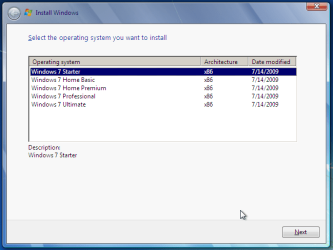
Win7 Universal Install Disc SS.PNG


STAGE 1 UNIVERSAL DVD - ALL 32 OR 64 BIT ON 1 DVD

For any user who has the Windows 7 install DVD or ISO and wishes to make a universal installer disc now there is an easier way to modify the ISO. Normally this was accomplished by manually unpacking and extracting the contents of the ISO image (or copying files from DVD to HDD), deleting the ei.cfg and then repacking the installation files back into an ISO to burn. Users can now eliminate these tedious procedures by making use of the “ei.cfg Removal Utility”.

The ei.cfg Removal Utility is a simple tool that will disable the ei.cfg from any Windows 7 ISO disc image, thereby converting the image into a “universal disc” that will prompt the user to select their preferred edition during setup. The ei.cfg Removal Utility works directly to patch the ISO image, by toggling the deletion bit in the UDF file table to instruct the operating system to ignore and remove ei.cfg, or treat it as if it does not exist. Best of all, the ei.cfg Removal Utility can reverse the patching to restore the ISO disc image to its original state when the tool is been used to apply on a disc image that previously been patched by the utility.

The ei.cfg Removal Utility is a standalone portable app, and requires no installation. In fact, the program does not have much of a user interface at all. Simply selecting the target Windows 7 ISO, and the disc image (ISO) will be patched right away. So make sure a backup copy of your ISO is created beforehand.

Download the ei.cfg Removal Utility here:eicfg_removal_utility.zip


STAGE 2 UNIVERSAL DVD - ALL 32 AND ALL 64 BIT ON 1 DVD

I was amazed at how easy it is to merge Win7 x86 and Win7 x64 editions (DVDs) in a single DVD or 4GB USB. The process is pretty simple, you need a copy of both any 32 bit and any 64 bit Windows 7 install DVD or ISO. Either copy the DVD's contents to a folder on a HDD, or extract the ISO's contents to a folder. Run 4 commands from the prompt, then create and burn your new Universal install DVD/USB.


Requirements:

  1. WAIK (Windows Automation Installation Kit) Download WAIK
  2. Windows Win7 x86 and Windows Win7 x64 DVDs.
  3. An application that can extract the files from an ISO (if using a downloaded ISO). I use WinRAR, but many apps can do this extraction.
  4. An application that allows you to build a new iso or create a bootable DVD/USB. I use UltraISO for this.
  5. Single Layer DVD, compatible DVD Burner and, of course DVD burning software… or a 4GB USB flash drive.
We will merge the four Windows 7 x64 editions into the Win7 x86 DVD contents, because Win7 x64 DVD has 64-bit content that can’t run some of the Win32 installation components.


Getting Started


1. Install WAIK in your Windows (doesn’t matter you are running Win7 or Windows XP)

2. Make two folders, in my examples I use Win7_64 and Win7_32. Now copy both Windows 7 x64 and x86 DVDs contents into their respective folders. Or extract your downloaded ISO’s into their respective folder.

   Note
If copying files over from a DVD to the above folders, you actually only need the Sources\install.wim file from the Windows 7 x64 DVD.


3. Run WAIK command prompt (Run as Administrator if UAC enabled):
Start à All Programs àWindows AIK àWindows AIK and PE Command Prompt

4. Each and every Win7 edition has an index no. in the install.wim (WIM file), you can check using the following command:
Code:
Imagex/info G:\Win7_32\Sources\install.wim
   Note
Where G:\Win7_32 represents the location of your 32 bit DVD files
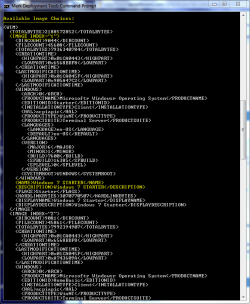

Win7 Universal Install Disc cmd 1.PNG

The results will look something like above.
This shows that INDEX=1 denotes Windows 7 Starter and so on… (you may have to scroll down to observe these entries)

5. We will use the Imagex /export command to move our x64 WIM entries into the x86 wim file.
   Note
The syntax for this command is:
   Note

imagex /export src_file src_number src_name dest_file dest_name


Now execute the following commands with appropriate INDEX no. to export a copy of the specified image to the Windows 7 32bit (x86) WIM file.

For Win7 Home Basic x64:
Code:
Imagex/export G:\Win7_64\Sources\install.wim 1 G:\Win7_32\Sources\install.wim "Windows 7 Home Basic (x64)"
For Win7 Home Premium x64:
Code:
Imagex/export G:\Win7_64\Sources\install.wim 2 G:\Win7_32\Sources\install.wim "Windows 7 Home Premium (x64)"
For Win7 Professional x64:
Code:
Imagex/export G:\Win7_64\Sources\install.wim 3 G:\Win7_32\Sources\install.wim "Windows 7 Professional (x64)"
For Win7 Ultimate x64:
Code:
Imagex /export G:\Win7_64\Sources\install.wim 4 G:\Win7_32\Sources\install.wim "Windows 7 Ultimate (x64)"
6. After execution of above commands Win7_32's WIM file will be the universal WIM file that contains all version of Win7. You can export only desired versions into the image. For example you could make a Win7 DVD, which includes Win7 Ultimate x86 and x64 version only.

7. Now to make bootable DVD image...


Last edited by a moderator:
View attachment 149679
tried going through the step, but got this result when I click the Setup.exe in the USB. No choice of OS's really.
 
Last edited:

My Computer

Computer type
PC/Desktop
Computer Manufacturer/Model Number
Home Built Desktop By DataTech
OS
Windows 7 Ultimate X64 SP1
CPU
Intel i5-2550K, Differing ~4.4-4.8GHz No built in GPU
Motherboard
ASUS P8Z68-V PRO/GEN3
Memory
16GB G.Skill Sniper 1866MHz @ 2133MHz 2x8GB
Graphics Card(s)
ASUS GTX650TIB-DC2OC-2GD5, (650TI Boost)
Sound Card
Onboard Realtek 5-1
Monitor(s) Displays
Samsung P2570HD
Screen Resolution
1920x1080
Hard Drives
Samsung 840 Pro 256GB SSD for OS, 500GB Seagate Constellation (Enterprise drive) for Data
PSU
Corsair HX650W
Case
Inwin Dragon Rider
Cooling
Hyper 212 EVO w/two Noctua fans, push-pull, @1300 RPM
Keyboard
E-Z Eyes, bright yellow keys with large characters
Mouse
steelseries SENSEI Laser Pro Gaming
Internet Speed
48-51Mbs Mbs down, 11 Mbs up Xfinity Cable
Antivirus
Norton Internet Security 2013
Browser
IE 10, Opera, Pale Moon if needed
Other Info
4 case fans, LG BluRay-RE, ASUS DVD-RW, Mr. Fusion power supply, 1.21 gigawatts.
Did you try selecting "Install Now" ?
 

My Computers

System One System Two

  • Computer type
    PC/Desktop
    OS
    7 X64
    CPU
    i5 8400
    Motherboard
    gigabyte b365m ds3h
    Memory
    2x8gb 3200mhz
    Hard Drives
    various
    PSU
    pure power 11 400w cm
    Case
    Coolermaster
    Cooling
    cryorig m9i
  • Computer type
    PC/Desktop
    OS
    7x64
    CPU
    g5400
    Motherboard
    ga b365m ds3h
    Memory
    8gb ddr4 2400
    PSU
    xfx pro 450w
Hello.


As SIW suggests, you have to click through a few windows/dialog boxes to get to this selection window, when you get here you can just remove the disk and X out of the install in you were just testing.


click to enlarge


My Computer

Computer Manufacturer/Model Number
* BFK Customs *
OS
W 7 64-bit Ultimate
CPU
Intel Q9550 Yorkfield
Motherboard
ASUS P5Q Pro
Memory
8GB Dominator 8500C5D
Graphics Card(s)
ATI : XFX 5870
Sound Card
Realtek HD Audio 7-1
Monitor(s) Displays
1x 47" LCD HDMI & 3x 26" LCD HDMI
Screen Resolution
1920x1080P & 1920x1200
Hard Drives
1x 80GB Intel X25-M G2 SSD : 1x 500GB & 1x 640GB WD Caviar Black(s)
PSU
Corsair 620HX
Case
Cooler Master RC-690
Cooling
Tuniq Tower 120, 2x 140mm and 3x 120mm case fans
Keyboard
Microsoft 500
Mouse
Razer Diamondback 3G
Internet Speed
14 Mb/s
Other Info
1x Koutech 3Gb/s SATA HDD Hot Swap Rack
there's also the small matter of the difference between 7 and 8.

(look at his screenshot)
 

My Computer

Computer Manufacturer/Model Number
mickey megabyte 1234
OS
ultimate 64 sp1
CPU
i5 2500K [email protected]
Motherboard
MSI P67A-GD53
Memory
8 gigs GSkill Ripjaws 1600
Graphics Card(s)
amd hd6950
Sound Card
creative x-fi gamer
Monitor(s) Displays
samsung 24"
Screen Resolution
1920x1080
Hard Drives
ocz vertex 2e 60 gig, samsung f3 1tb, buffalo 2tb ext
PSU
antec 550
Case
antec three hundred
Cooling
i'm a cooling fan
Keyboard
saitek eclipse ii
Mouse
logitech g3
Internet Speed
about 4 Mbps
Other Info
i love win7

My Computer

Computer Manufacturer/Model Number
* BFK Customs *
OS
W 7 64-bit Ultimate
CPU
Intel Q9550 Yorkfield
Motherboard
ASUS P5Q Pro
Memory
8GB Dominator 8500C5D
Graphics Card(s)
ATI : XFX 5870
Sound Card
Realtek HD Audio 7-1
Monitor(s) Displays
1x 47" LCD HDMI & 3x 26" LCD HDMI
Screen Resolution
1920x1080P & 1920x1200
Hard Drives
1x 80GB Intel X25-M G2 SSD : 1x 500GB & 1x 640GB WD Caviar Black(s)
PSU
Corsair 620HX
Case
Cooler Master RC-690
Cooling
Tuniq Tower 120, 2x 140mm and 3x 120mm case fans
Keyboard
Microsoft 500
Mouse
Razer Diamondback 3G
Internet Speed
14 Mb/s
Other Info
1x Koutech 3Gb/s SATA HDD Hot Swap Rack
there's also the small matter of the difference between 7 and 8.

(look at his screenshot)


Oh my, I never did. :shock:
Sorry BFK anf MM, the 8 install screen is a mashup I made.
The 7 install screen showed up, I clicked install now and it started loading files. It was continuing to install. when does the OS selection screen show up? I was just taking it for a test run.
 

My Computer

Computer type
PC/Desktop
Computer Manufacturer/Model Number
Home Built Desktop By DataTech
OS
Windows 7 Ultimate X64 SP1
CPU
Intel i5-2550K, Differing ~4.4-4.8GHz No built in GPU
Motherboard
ASUS P8Z68-V PRO/GEN3
Memory
16GB G.Skill Sniper 1866MHz @ 2133MHz 2x8GB
Graphics Card(s)
ASUS GTX650TIB-DC2OC-2GD5, (650TI Boost)
Sound Card
Onboard Realtek 5-1
Monitor(s) Displays
Samsung P2570HD
Screen Resolution
1920x1080
Hard Drives
Samsung 840 Pro 256GB SSD for OS, 500GB Seagate Constellation (Enterprise drive) for Data
PSU
Corsair HX650W
Case
Inwin Dragon Rider
Cooling
Hyper 212 EVO w/two Noctua fans, push-pull, @1300 RPM
Keyboard
E-Z Eyes, bright yellow keys with large characters
Mouse
steelseries SENSEI Laser Pro Gaming
Internet Speed
48-51Mbs Mbs down, 11 Mbs up Xfinity Cable
Antivirus
Norton Internet Security 2013
Browser
IE 10, Opera, Pale Moon if needed
Other Info
4 case fans, LG BluRay-RE, ASUS DVD-RW, Mr. Fusion power supply, 1.21 gigawatts.

My Computer

Computer Manufacturer/Model Number
* BFK Customs *
OS
W 7 64-bit Ultimate
CPU
Intel Q9550 Yorkfield
Motherboard
ASUS P5Q Pro
Memory
8GB Dominator 8500C5D
Graphics Card(s)
ATI : XFX 5870
Sound Card
Realtek HD Audio 7-1
Monitor(s) Displays
1x 47" LCD HDMI & 3x 26" LCD HDMI
Screen Resolution
1920x1080P & 1920x1200
Hard Drives
1x 80GB Intel X25-M G2 SSD : 1x 500GB & 1x 640GB WD Caviar Black(s)
PSU
Corsair 620HX
Case
Cooler Master RC-690
Cooling
Tuniq Tower 120, 2x 140mm and 3x 120mm case fans
Keyboard
Microsoft 500
Mouse
Razer Diamondback 3G
Internet Speed
14 Mb/s
Other Info
1x Koutech 3Gb/s SATA HDD Hot Swap Rack
Thanks Ted, I'll try that again.
ps. That makes a whole 21,000 helpfuls posts.:D
 

My Computer

Computer type
PC/Desktop
Computer Manufacturer/Model Number
Home Built Desktop By DataTech
OS
Windows 7 Ultimate X64 SP1
CPU
Intel i5-2550K, Differing ~4.4-4.8GHz No built in GPU
Motherboard
ASUS P8Z68-V PRO/GEN3
Memory
16GB G.Skill Sniper 1866MHz @ 2133MHz 2x8GB
Graphics Card(s)
ASUS GTX650TIB-DC2OC-2GD5, (650TI Boost)
Sound Card
Onboard Realtek 5-1
Monitor(s) Displays
Samsung P2570HD
Screen Resolution
1920x1080
Hard Drives
Samsung 840 Pro 256GB SSD for OS, 500GB Seagate Constellation (Enterprise drive) for Data
PSU
Corsair HX650W
Case
Inwin Dragon Rider
Cooling
Hyper 212 EVO w/two Noctua fans, push-pull, @1300 RPM
Keyboard
E-Z Eyes, bright yellow keys with large characters
Mouse
steelseries SENSEI Laser Pro Gaming
Internet Speed
48-51Mbs Mbs down, 11 Mbs up Xfinity Cable
Antivirus
Norton Internet Security 2013
Browser
IE 10, Opera, Pale Moon if needed
Other Info
4 case fans, LG BluRay-RE, ASUS DVD-RW, Mr. Fusion power supply, 1.21 gigawatts.

My Computer

Computer Manufacturer/Model Number
* BFK Customs *
OS
W 7 64-bit Ultimate
CPU
Intel Q9550 Yorkfield
Motherboard
ASUS P5Q Pro
Memory
8GB Dominator 8500C5D
Graphics Card(s)
ATI : XFX 5870
Sound Card
Realtek HD Audio 7-1
Monitor(s) Displays
1x 47" LCD HDMI & 3x 26" LCD HDMI
Screen Resolution
1920x1080P & 1920x1200
Hard Drives
1x 80GB Intel X25-M G2 SSD : 1x 500GB & 1x 640GB WD Caviar Black(s)
PSU
Corsair 620HX
Case
Cooler Master RC-690
Cooling
Tuniq Tower 120, 2x 140mm and 3x 120mm case fans
Keyboard
Microsoft 500
Mouse
Razer Diamondback 3G
Internet Speed
14 Mb/s
Other Info
1x Koutech 3Gb/s SATA HDD Hot Swap Rack
What about SP1?

If I have the ISOs for Win 7 Ultimate with SP1 (x86 and x64) do I need to download and install the WAIK Supplement for SP1, and use it to modify the SP1 wim file? Thought I'd ask since this doesn't seem to be addressed in the thread so far.
 

My Computer

Computer Manufacturer/Model Number
Gateway DX4720-03
OS
Windows Vista HP 64-bit, Windows 7 P 64-bit, Leopard 10.5.8, Windows 7 P 32-bit
CPU
Pentium(R) Dual-Core E5200 @ 2.50GHz
Motherboard
ACPI x64
Memory
4.00GB
Graphics Card(s)
NVIDIA GeForce 7100 / NVIDIA nForce 630i
Sound Card
Onboard Sound
Monitor(s) Displays
Samsumg Syncmaster 2233SW, Syncmaster 205BW
Screen Resolution
1680X1050 and 1920X1080
Hard Drives
WDC WD64 00AAKS-22A7B SCSI
WDC WD50 00AAKS-00V2B SCSI
WDC WD10 EADS-00M2B0 SCSI
FUJITSU USB
SEAGATE USB
PSU
Generic (cheap) 550W
Case
Gateway
Cooling
30 W
Keyboard
Kinesis Advantage
Mouse
Trackball
Internet Speed
Cable Modem
Other Info
Hauppauge HD-PVR, USB-UIRT

My Computer

Computer Manufacturer/Model Number
* BFK Customs *
OS
W 7 64-bit Ultimate
CPU
Intel Q9550 Yorkfield
Motherboard
ASUS P5Q Pro
Memory
8GB Dominator 8500C5D
Graphics Card(s)
ATI : XFX 5870
Sound Card
Realtek HD Audio 7-1
Monitor(s) Displays
1x 47" LCD HDMI & 3x 26" LCD HDMI
Screen Resolution
1920x1080P & 1920x1200
Hard Drives
1x 80GB Intel X25-M G2 SSD : 1x 500GB & 1x 640GB WD Caviar Black(s)
PSU
Corsair 620HX
Case
Cooler Master RC-690
Cooling
Tuniq Tower 120, 2x 140mm and 3x 120mm case fans
Keyboard
Microsoft 500
Mouse
Razer Diamondback 3G
Internet Speed
14 Mb/s
Other Info
1x Koutech 3Gb/s SATA HDD Hot Swap Rack
Hello Gary.


I just checked mine and if you get to #5 before you get the version selection screen then X out as it must not be done correctly.

My attempt got to step 5 but only listed win7 Ultimate to install. My .iso was created from a Win7 X64 retail DVD, no SP1.

STAGE 1 UNIVERSAL DVD - ALL 32 OR 64 BIT ON 1 DVD

For any user who has the Windows 7 install DVD or ISO and wishes to make a universal installer disc now there is an easier way to modify the ISO. Normally this was accomplished by manually unpacking and extracting the contents of the ISO image (or copying files from DVD to HDD), deleting the ei.cfg and then repacking the installation files back into an ISO to burn. Users can now eliminate these tedious procedures by making use of the “ei.cfg Removal Utility”.

The ei.cfg Removal Utility is a simple tool that will disable the ei.cfg from any Windows 7 ISO disc image, thereby converting the image into a “universal disc” that will prompt the user to select their preferred edition during setup. The ei.cfg Removal Utility works directly to patch the ISO image, by toggling the deletion bit in the UDF file table to instruct the operating system to ignore and remove ei.cfg, or treat it as if it does not exist. Best of all, the ei.cfg Removal Utility can reverse the patching to restore the ISO disc image to its original state when the tool is been used to apply on a disc image that previously been patched by the utility.

The ei.cfg Removal Utility is a standalone portable app, and requires no installation. In fact, the program does not have much of a user interface at all. Simply selecting the target Windows 7 ISO, and the disc image (ISO) will be patched right away. So make sure a backup copy of your ISO is created beforehand.

I did all the above, is there something I have missed later in the tut?
 

My Computer

Computer type
PC/Desktop
Computer Manufacturer/Model Number
Home Built Desktop By DataTech
OS
Windows 7 Ultimate X64 SP1
CPU
Intel i5-2550K, Differing ~4.4-4.8GHz No built in GPU
Motherboard
ASUS P8Z68-V PRO/GEN3
Memory
16GB G.Skill Sniper 1866MHz @ 2133MHz 2x8GB
Graphics Card(s)
ASUS GTX650TIB-DC2OC-2GD5, (650TI Boost)
Sound Card
Onboard Realtek 5-1
Monitor(s) Displays
Samsung P2570HD
Screen Resolution
1920x1080
Hard Drives
Samsung 840 Pro 256GB SSD for OS, 500GB Seagate Constellation (Enterprise drive) for Data
PSU
Corsair HX650W
Case
Inwin Dragon Rider
Cooling
Hyper 212 EVO w/two Noctua fans, push-pull, @1300 RPM
Keyboard
E-Z Eyes, bright yellow keys with large characters
Mouse
steelseries SENSEI Laser Pro Gaming
Internet Speed
48-51Mbs Mbs down, 11 Mbs up Xfinity Cable
Antivirus
Norton Internet Security 2013
Browser
IE 10, Opera, Pale Moon if needed
Other Info
4 case fans, LG BluRay-RE, ASUS DVD-RW, Mr. Fusion power supply, 1.21 gigawatts.
Hello again Gary.


How are you disabling/dealing with the ei.cfg file?
 

My Computer

Computer Manufacturer/Model Number
* BFK Customs *
OS
W 7 64-bit Ultimate
CPU
Intel Q9550 Yorkfield
Motherboard
ASUS P5Q Pro
Memory
8GB Dominator 8500C5D
Graphics Card(s)
ATI : XFX 5870
Sound Card
Realtek HD Audio 7-1
Monitor(s) Displays
1x 47" LCD HDMI & 3x 26" LCD HDMI
Screen Resolution
1920x1080P & 1920x1200
Hard Drives
1x 80GB Intel X25-M G2 SSD : 1x 500GB & 1x 640GB WD Caviar Black(s)
PSU
Corsair 620HX
Case
Cooler Master RC-690
Cooling
Tuniq Tower 120, 2x 140mm and 3x 120mm case fans
Keyboard
Microsoft 500
Mouse
Razer Diamondback 3G
Internet Speed
14 Mb/s
Other Info
1x Koutech 3Gb/s SATA HDD Hot Swap Rack
Hello mate.


Have a look at this tutorial at the link below, it may have the answers you seek and be sure to post back with any further questions you may have and to keep us informed.


Slipstream Windows 7 SP1 to Create a Bootable USB, Installation DVD, or ISO File

BFK:

I'm not sure whether you were responding to me, but I'm not asking about the slipstream approach because apparently you can't use that to do a repair install of an installation that has been updated to SP1, and it has other constraints as well. I'm talking about using the ISOs that have SP1 integrated already (available from Technet or MSDN). I assume that you have to do something extra with the WAIK SP1 supplement to create a "universal install disk" with SP1 integrated?
 

My Computer

Computer Manufacturer/Model Number
Gateway DX4720-03
OS
Windows Vista HP 64-bit, Windows 7 P 64-bit, Leopard 10.5.8, Windows 7 P 32-bit
CPU
Pentium(R) Dual-Core E5200 @ 2.50GHz
Motherboard
ACPI x64
Memory
4.00GB
Graphics Card(s)
NVIDIA GeForce 7100 / NVIDIA nForce 630i
Sound Card
Onboard Sound
Monitor(s) Displays
Samsumg Syncmaster 2233SW, Syncmaster 205BW
Screen Resolution
1680X1050 and 1920X1080
Hard Drives
WDC WD64 00AAKS-22A7B SCSI
WDC WD50 00AAKS-00V2B SCSI
WDC WD10 EADS-00M2B0 SCSI
FUJITSU USB
SEAGATE USB
PSU
Generic (cheap) 550W
Case
Gateway
Cooling
30 W
Keyboard
Kinesis Advantage
Mouse
Trackball
Internet Speed
Cable Modem
Other Info
Hauppauge HD-PVR, USB-UIRT
BFK:

I'm not sure whether you were responding to me, but I'm not asking about the slipstream approach because apparently you can't use that to do a repair install of an installation that has been updated to SP1, and it has other constraints as well. I'm talking about using the ISOs that have SP1 integrated already (available from Technet or MSDN). I assume that you have to do something extra with the WAIK SP1 supplement to create a "universal install disk" with SP1 integrated?


No you don't have to do anything extra, I have ISOs from TechNet and created the new integrated SP 1 AIO installer without issue, have a look here for mine.

I hope I answered you correctly this time ;)
 

My Computer

Computer Manufacturer/Model Number
* BFK Customs *
OS
W 7 64-bit Ultimate
CPU
Intel Q9550 Yorkfield
Motherboard
ASUS P5Q Pro
Memory
8GB Dominator 8500C5D
Graphics Card(s)
ATI : XFX 5870
Sound Card
Realtek HD Audio 7-1
Monitor(s) Displays
1x 47" LCD HDMI & 3x 26" LCD HDMI
Screen Resolution
1920x1080P & 1920x1200
Hard Drives
1x 80GB Intel X25-M G2 SSD : 1x 500GB & 1x 640GB WD Caviar Black(s)
PSU
Corsair 620HX
Case
Cooler Master RC-690
Cooling
Tuniq Tower 120, 2x 140mm and 3x 120mm case fans
Keyboard
Microsoft 500
Mouse
Razer Diamondback 3G
Internet Speed
14 Mb/s
Other Info
1x Koutech 3Gb/s SATA HDD Hot Swap Rack
Hello again Gary.


How are you disabling/dealing with the ei.cfg file?

Hello Ted, I downloaded, and unzipped the ei.cfg Removal Utility. I clicked on its .exe, then clicked my iso file. A dialog box said "eicfg removed", or something similar. then I used the Windows DVD download tool to "burn" to my USB drive.
I don't see my USB drive as an option drive in IMGburn nor ULTRAiso.
 

My Computer

Computer type
PC/Desktop
Computer Manufacturer/Model Number
Home Built Desktop By DataTech
OS
Windows 7 Ultimate X64 SP1
CPU
Intel i5-2550K, Differing ~4.4-4.8GHz No built in GPU
Motherboard
ASUS P8Z68-V PRO/GEN3
Memory
16GB G.Skill Sniper 1866MHz @ 2133MHz 2x8GB
Graphics Card(s)
ASUS GTX650TIB-DC2OC-2GD5, (650TI Boost)
Sound Card
Onboard Realtek 5-1
Monitor(s) Displays
Samsung P2570HD
Screen Resolution
1920x1080
Hard Drives
Samsung 840 Pro 256GB SSD for OS, 500GB Seagate Constellation (Enterprise drive) for Data
PSU
Corsair HX650W
Case
Inwin Dragon Rider
Cooling
Hyper 212 EVO w/two Noctua fans, push-pull, @1300 RPM
Keyboard
E-Z Eyes, bright yellow keys with large characters
Mouse
steelseries SENSEI Laser Pro Gaming
Internet Speed
48-51Mbs Mbs down, 11 Mbs up Xfinity Cable
Antivirus
Norton Internet Security 2013
Browser
IE 10, Opera, Pale Moon if needed
Other Info
4 case fans, LG BluRay-RE, ASUS DVD-RW, Mr. Fusion power supply, 1.21 gigawatts.
Hello again Gary.


How are you disabling/dealing with the ei.cfg file?

Hello Ted, I downloaded, and unzipped the ei.cfg Removal Utility. I clicked on its .exe, then clicked my iso file. A dialog box said "eicfg removed", or something similar. then I used the Windows DVD download tool to "burn" to my USB drive.
I don't see my USB drive as an option drive in IMGburn nor ULTRAiso.


Hello, gregrocker is the one that knows how to use UltraISO, perhaps if you start a thread at the Installation sub-forum he'll help; I haven't really played with bootable USB much; there is this tutorial at the link below.

USB Windows 7 Installation Key Drive - Create
 

My Computer

Computer Manufacturer/Model Number
* BFK Customs *
OS
W 7 64-bit Ultimate
CPU
Intel Q9550 Yorkfield
Motherboard
ASUS P5Q Pro
Memory
8GB Dominator 8500C5D
Graphics Card(s)
ATI : XFX 5870
Sound Card
Realtek HD Audio 7-1
Monitor(s) Displays
1x 47" LCD HDMI & 3x 26" LCD HDMI
Screen Resolution
1920x1080P & 1920x1200
Hard Drives
1x 80GB Intel X25-M G2 SSD : 1x 500GB & 1x 640GB WD Caviar Black(s)
PSU
Corsair 620HX
Case
Cooler Master RC-690
Cooling
Tuniq Tower 120, 2x 140mm and 3x 120mm case fans
Keyboard
Microsoft 500
Mouse
Razer Diamondback 3G
Internet Speed
14 Mb/s
Other Info
1x Koutech 3Gb/s SATA HDD Hot Swap Rack
7. Now to make bootable DVD image...
I'm using IMGBURN and it's asking me if I want to make the ISO "bootable". Do I make it bootable or is it already bootable, and if so what parameters do I set? Do I extract the boot image from my hard drive, or do I use the one from the original ISO? There are presumably some boot images in the "boot" directory, right?

Update: I'm going to answer my own question. I followed the tutorial precisely, up to the point of creating a bootable image. (I deleted ei.cfy from both originals manually before using WAIK.) To create a bootable image in Imgburn I first mounted one of my ISOs and then pointed to it in the dialogue box as the bottom of the "bootable image" tab under "advanced" and clicked the "extract boot image" button. That created an *.ima file. The program then asked me if I wanted to use this image in my current project and I just clicked "yes" and then created the image. Haven't tried it yet, but will let you know how it goes.
 
Last edited:

My Computer

Computer Manufacturer/Model Number
Gateway DX4720-03
OS
Windows Vista HP 64-bit, Windows 7 P 64-bit, Leopard 10.5.8, Windows 7 P 32-bit
CPU
Pentium(R) Dual-Core E5200 @ 2.50GHz
Motherboard
ACPI x64
Memory
4.00GB
Graphics Card(s)
NVIDIA GeForce 7100 / NVIDIA nForce 630i
Sound Card
Onboard Sound
Monitor(s) Displays
Samsumg Syncmaster 2233SW, Syncmaster 205BW
Screen Resolution
1680X1050 and 1920X1080
Hard Drives
WDC WD64 00AAKS-22A7B SCSI
WDC WD50 00AAKS-00V2B SCSI
WDC WD10 EADS-00M2B0 SCSI
FUJITSU USB
SEAGATE USB
PSU
Generic (cheap) 550W
Case
Gateway
Cooling
30 W
Keyboard
Kinesis Advantage
Mouse
Trackball
Internet Speed
Cable Modem
Other Info
Hauppauge HD-PVR, USB-UIRT

My Computer

Computer Manufacturer/Model Number
* BFK Customs *
OS
W 7 64-bit Ultimate
CPU
Intel Q9550 Yorkfield
Motherboard
ASUS P5Q Pro
Memory
8GB Dominator 8500C5D
Graphics Card(s)
ATI : XFX 5870
Sound Card
Realtek HD Audio 7-1
Monitor(s) Displays
1x 47" LCD HDMI & 3x 26" LCD HDMI
Screen Resolution
1920x1080P & 1920x1200
Hard Drives
1x 80GB Intel X25-M G2 SSD : 1x 500GB & 1x 640GB WD Caviar Black(s)
PSU
Corsair 620HX
Case
Cooler Master RC-690
Cooling
Tuniq Tower 120, 2x 140mm and 3x 120mm case fans
Keyboard
Microsoft 500
Mouse
Razer Diamondback 3G
Internet Speed
14 Mb/s
Other Info
1x Koutech 3Gb/s SATA HDD Hot Swap Rack
Thanks Ted, I'll do that.:geek:
 

My Computer

Computer type
PC/Desktop
Computer Manufacturer/Model Number
Home Built Desktop By DataTech
OS
Windows 7 Ultimate X64 SP1
CPU
Intel i5-2550K, Differing ~4.4-4.8GHz No built in GPU
Motherboard
ASUS P8Z68-V PRO/GEN3
Memory
16GB G.Skill Sniper 1866MHz @ 2133MHz 2x8GB
Graphics Card(s)
ASUS GTX650TIB-DC2OC-2GD5, (650TI Boost)
Sound Card
Onboard Realtek 5-1
Monitor(s) Displays
Samsung P2570HD
Screen Resolution
1920x1080
Hard Drives
Samsung 840 Pro 256GB SSD for OS, 500GB Seagate Constellation (Enterprise drive) for Data
PSU
Corsair HX650W
Case
Inwin Dragon Rider
Cooling
Hyper 212 EVO w/two Noctua fans, push-pull, @1300 RPM
Keyboard
E-Z Eyes, bright yellow keys with large characters
Mouse
steelseries SENSEI Laser Pro Gaming
Internet Speed
48-51Mbs Mbs down, 11 Mbs up Xfinity Cable
Antivirus
Norton Internet Security 2013
Browser
IE 10, Opera, Pale Moon if needed
Other Info
4 case fans, LG BluRay-RE, ASUS DVD-RW, Mr. Fusion power supply, 1.21 gigawatts.
Back
Top