Windows 7 Universal Installation Disc - Create

How to Create a Windows 7 Universal Installation Disc

Introduction

For Windows users who installed or upgraded Windows Vista, there is one big difference that will be immediately noticed when installing or upgrading to Windows 7: The Windows 7 installation wizard no longer prompts, or asks, for the user to select which edition of the operating system to install. Instead, each Windows 7 DVD disc will automatically install the specific edition which it’s limited to. So a Windows 7 Home Premium disc will only install Windows 7 HP, a Pro disc will only install Pro, etc.

Although Microsoft does not provide any such universal Windows 7 installation media, the function is indeed feasible. (see Screenshot below) A disc such as this can be especially helpful to PC technicians, IT staff, and the like who need to reinstall Win7 frequently. Remember you will still need a valid license key specific to the version you are installing. In addition, Microsoft has eliminated the differences between the retail and OEM install discs with Windows 7, so this disc can be used to reinstall Win7 on PC’s where the owner has lost, or is unable to find, the OEM restore discs. In order to create such a disc; just delete and remove the ei.cfg from any Windows 7 ISO to convert that image into a universal disc for all editions of Windows 7.
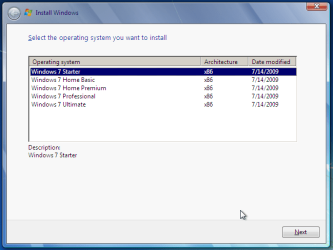
Win7 Universal Install Disc SS.PNG


STAGE 1 UNIVERSAL DVD - ALL 32 OR 64 BIT ON 1 DVD

For any user who has the Windows 7 install DVD or ISO and wishes to make a universal installer disc now there is an easier way to modify the ISO. Normally this was accomplished by manually unpacking and extracting the contents of the ISO image (or copying files from DVD to HDD), deleting the ei.cfg and then repacking the installation files back into an ISO to burn. Users can now eliminate these tedious procedures by making use of the “ei.cfg Removal Utility”.

The ei.cfg Removal Utility is a simple tool that will disable the ei.cfg from any Windows 7 ISO disc image, thereby converting the image into a “universal disc” that will prompt the user to select their preferred edition during setup. The ei.cfg Removal Utility works directly to patch the ISO image, by toggling the deletion bit in the UDF file table to instruct the operating system to ignore and remove ei.cfg, or treat it as if it does not exist. Best of all, the ei.cfg Removal Utility can reverse the patching to restore the ISO disc image to its original state when the tool is been used to apply on a disc image that previously been patched by the utility.

The ei.cfg Removal Utility is a standalone portable app, and requires no installation. In fact, the program does not have much of a user interface at all. Simply selecting the target Windows 7 ISO, and the disc image (ISO) will be patched right away. So make sure a backup copy of your ISO is created beforehand.

Download the ei.cfg Removal Utility here:eicfg_removal_utility.zip


STAGE 2 UNIVERSAL DVD - ALL 32 AND ALL 64 BIT ON 1 DVD

I was amazed at how easy it is to merge Win7 x86 and Win7 x64 editions (DVDs) in a single DVD or 4GB USB. The process is pretty simple, you need a copy of both any 32 bit and any 64 bit Windows 7 install DVD or ISO. Either copy the DVD's contents to a folder on a HDD, or extract the ISO's contents to a folder. Run 4 commands from the prompt, then create and burn your new Universal install DVD/USB.


Requirements:

  1. WAIK (Windows Automation Installation Kit) Download WAIK
  2. Windows Win7 x86 and Windows Win7 x64 DVDs.
  3. An application that can extract the files from an ISO (if using a downloaded ISO). I use WinRAR, but many apps can do this extraction.
  4. An application that allows you to build a new iso or create a bootable DVD/USB. I use UltraISO for this.
  5. Single Layer DVD, compatible DVD Burner and, of course DVD burning software… or a 4GB USB flash drive.
We will merge the four Windows 7 x64 editions into the Win7 x86 DVD contents, because Win7 x64 DVD has 64-bit content that can’t run some of the Win32 installation components.


Getting Started


1. Install WAIK in your Windows (doesn’t matter you are running Win7 or Windows XP)

2. Make two folders, in my examples I use Win7_64 and Win7_32. Now copy both Windows 7 x64 and x86 DVDs contents into their respective folders. Or extract your downloaded ISO’s into their respective folder.

   Note
If copying files over from a DVD to the above folders, you actually only need the Sources\install.wim file from the Windows 7 x64 DVD.


3. Run WAIK command prompt (Run as Administrator if UAC enabled):
Start à All Programs àWindows AIK àWindows AIK and PE Command Prompt

4. Each and every Win7 edition has an index no. in the install.wim (WIM file), you can check using the following command:
Code:
Imagex/info G:\Win7_32\Sources\install.wim
   Note
Where G:\Win7_32 represents the location of your 32 bit DVD files
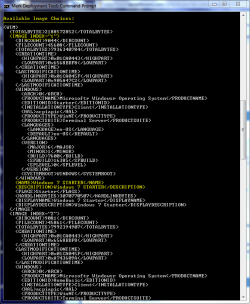

Win7 Universal Install Disc cmd 1.PNG

The results will look something like above.
This shows that INDEX=1 denotes Windows 7 Starter and so on… (you may have to scroll down to observe these entries)

5. We will use the Imagex /export command to move our x64 WIM entries into the x86 wim file.
   Note
The syntax for this command is:
   Note

imagex /export src_file src_number src_name dest_file dest_name


Now execute the following commands with appropriate INDEX no. to export a copy of the specified image to the Windows 7 32bit (x86) WIM file.

For Win7 Home Basic x64:
Code:
Imagex/export G:\Win7_64\Sources\install.wim 1 G:\Win7_32\Sources\install.wim "Windows 7 Home Basic (x64)"
For Win7 Home Premium x64:
Code:
Imagex/export G:\Win7_64\Sources\install.wim 2 G:\Win7_32\Sources\install.wim "Windows 7 Home Premium (x64)"
For Win7 Professional x64:
Code:
Imagex/export G:\Win7_64\Sources\install.wim 3 G:\Win7_32\Sources\install.wim "Windows 7 Professional (x64)"
For Win7 Ultimate x64:
Code:
Imagex /export G:\Win7_64\Sources\install.wim 4 G:\Win7_32\Sources\install.wim "Windows 7 Ultimate (x64)"
6. After execution of above commands Win7_32's WIM file will be the universal WIM file that contains all version of Win7. You can export only desired versions into the image. For example you could make a Win7 DVD, which includes Win7 Ultimate x86 and x64 version only.

7. Now to make bootable DVD image...


Last edited by a moderator:
does'nt work

Hi
i have copy all files and directories from my W7 DVD on my HDD
change the install.wim as we said
rename the ei.cfg file but when i boot on my new DVD i still have only one menu , the standard install menu from the original DVD

?? regards
 

My Computer

Computer type
PC/Desktop
Computer Manufacturer/Model Number
hp
OS
linux windows 7 pro
Code:
 ----------------
Path:        c:\W7_sources\ISO_W7\sources\install.wim
GUID:        {65caf905-5e50-4a42-900b-5e14084871e9}
Image Count: 7
Compression: LZX
Part Number: 1/1
Attributes:  0x8
             Relative path junction


Available Image Choices:
------------------------
<WIM>
  <TOTALBYTES>2960032869</TOTALBYTES>
  <IMAGE INDEX="1">
    <DIRCOUNT>13365</DIRCOUNT>
    <FILECOUNT>64285</FILECOUNT>
    <TOTALBYTES>11710161360</TOTALBYTES>
    <CREATIONTIME>
      <HIGHPART>0x01CB8936</HIGHPART>
      <LOWPART>0x131F339A</LOWPART>
    </CREATIONTIME>
    <LASTMODIFICATIONTIME>
      <HIGHPART>0x01CBF8F0</HIGHPART>
      <LOWPART>0x0027D0DC</LOWPART>
    </LASTMODIFICATIONTIME>
    <WINDOWS>
      <ARCH>9</ARCH>
      <PRODUCTNAME>Microsoft® Windows® Operating System</PRODUCTNAME>
      <EDITIONID>HomeBasic</EDITIONID>
      <INSTALLATIONTYPE>Client</INSTALLATIONTYPE>
      <HAL>acpiapic</HAL>
      <PRODUCTTYPE>WinNT</PRODUCTTYPE>
      <PRODUCTSUITE>Terminal Server</PRODUCTSUITE>
      <LANGUAGES>
        <LANGUAGE>en-US</LANGUAGE>
        <DEFAULT>en-US</DEFAULT>
      </LANGUAGES>
      <VERSION>
        <MAJOR>6</MAJOR>
        <MINOR>1</MINOR>
        <BUILD>7601</BUILD>
        <SPBUILD>17514</SPBUILD>
        <SPLEVEL>1</SPLEVEL>
      </VERSION>
      <SYSTEMROOT>WINDOWS</SYSTEMROOT>
    </WINDOWS>
    <NAME>Windows 7 HOMEBASIC</NAME>
    <DESCRIPTION>Windows 7 HOMEBASIC</DESCRIPTION>
    <FLAGS>HomeBasic</FLAGS>
    <HARDLINKBYTES>4497873056</HARDLINKBYTES>
    <DISPLAYNAME>Windows 7 Home Basic</DISPLAYNAME>
    <DISPLAYDESCRIPTION>Windows 7 Home Basic</DISPLAYDESCRIPTION>
  </IMAGE>
  <IMAGE INDEX="2">
    <DIRCOUNT>13614</DIRCOUNT>
    <FILECOUNT>65339</FILECOUNT>
    <TOTALBYTES>12222587449</TOTALBYTES>
    <CREATIONTIME>
      <HIGHPART>0x01CB8936</HIGHPART>
      <LOWPART>0x131F339A</LOWPART>
    </CREATIONTIME>
    <LASTMODIFICATIONTIME>
      <HIGHPART>0x01CBF8F0</HIGHPART>
      <LOWPART>0x236D21C7</LOWPART>
    </LASTMODIFICATIONTIME>
    <WINDOWS>
      <ARCH>9</ARCH>
      <PRODUCTNAME>Microsoft® Windows® Operating System</PRODUCTNAME>
      <EDITIONID>HomePremium</EDITIONID>
      <INSTALLATIONTYPE>Client</INSTALLATIONTYPE>
      <HAL>acpiapic</HAL>
      <PRODUCTTYPE>WinNT</PRODUCTTYPE>
      <PRODUCTSUITE>Terminal Server</PRODUCTSUITE>
      <LANGUAGES>
        <LANGUAGE>en-US</LANGUAGE>
        <DEFAULT>en-US</DEFAULT>
      </LANGUAGES>
      <VERSION>
        <MAJOR>6</MAJOR>
        <MINOR>1</MINOR>
        <BUILD>7601</BUILD>
        <SPBUILD>17514</SPBUILD>
        <SPLEVEL>1</SPLEVEL>
      </VERSION>
      <SYSTEMROOT>WINDOWS</SYSTEMROOT>
    </WINDOWS>
    <NAME>Windows 7 HOMEPREMIUM</NAME>
    <DESCRIPTION>Windows 7 HOMEPREMIUM</DESCRIPTION>
    <FLAGS>HomePremium</FLAGS>
    <HARDLINKBYTES>4912986404</HARDLINKBYTES>
    <DISPLAYNAME>Windows 7 Home Premium</DISPLAYNAME>
    <DISPLAYDESCRIPTION>Windows 7 Home Premium</DISPLAYDESCRIPTION>
  </IMAGE>
  <IMAGE INDEX="3">
    <DIRCOUNT>13701</DIRCOUNT>
    <FILECOUNT>65851</FILECOUNT>
    <TOTALBYTES>12122886417</TOTALBYTES>
    <CREATIONTIME>
      <HIGHPART>0x01CB8936</HIGHPART>
      <LOWPART>0x131F339A</LOWPART>
    </CREATIONTIME>
    <LASTMODIFICATIONTIME>
      <HIGHPART>0x01CBF8F0</HIGHPART>
      <LOWPART>0x47C4A445</LOWPART>
    </LASTMODIFICATIONTIME>
    <WINDOWS>
      <ARCH>9</ARCH>
      <PRODUCTNAME>Microsoft® Windows® Operating System</PRODUCTNAME>
      <EDITIONID>Professional</EDITIONID>
      <INSTALLATIONTYPE>Client</INSTALLATIONTYPE>
      <HAL>acpiapic</HAL>
      <PRODUCTTYPE>WinNT</PRODUCTTYPE>
      <PRODUCTSUITE>Terminal Server</PRODUCTSUITE>
      <LANGUAGES>
        <LANGUAGE>en-US</LANGUAGE>
        <DEFAULT>en-US</DEFAULT>
      </LANGUAGES>
      <VERSION>
        <MAJOR>6</MAJOR>
        <MINOR>1</MINOR>
        <BUILD>7601</BUILD>
        <SPBUILD>17514</SPBUILD>
        <SPLEVEL>1</SPLEVEL>
      </VERSION>
      <SYSTEMROOT>WINDOWS</SYSTEMROOT>
    </WINDOWS>
    <NAME>Windows 7 PROFESSIONAL</NAME>
    <DESCRIPTION>Windows 7 PROFESSIONAL</DESCRIPTION>
    <FLAGS>Professional</FLAGS>
    <HARDLINKBYTES>4786527097</HARDLINKBYTES>
    <DISPLAYNAME>Windows 7 Professional</DISPLAYNAME>
    <DISPLAYDESCRIPTION>Windows 7 Professional</DISPLAYDESCRIPTION>
  </IMAGE>
  <IMAGE INDEX="4">
    <DIRCOUNT>13737</DIRCOUNT>
    <FILECOUNT>66029</FILECOUNT>
    <TOTALBYTES>12285492779</TOTALBYTES>
    <CREATIONTIME>
      <HIGHPART>0x01CB8936</HIGHPART>
      <LOWPART>0x131F339A</LOWPART>
    </CREATIONTIME>
    <LASTMODIFICATIONTIME>
      <HIGHPART>0x01CBF8F0</HIGHPART>
      <LOWPART>0x6D7F6938</LOWPART>
    </LASTMODIFICATIONTIME>
    <WINDOWS>
      <ARCH>9</ARCH>
      <PRODUCTNAME>Microsoft® Windows® Operating System</PRODUCTNAME>
      <EDITIONID>Ultimate</EDITIONID>
      <INSTALLATIONTYPE>Client</INSTALLATIONTYPE>
      <HAL>acpiapic</HAL>
      <PRODUCTTYPE>WinNT</PRODUCTTYPE>
      <PRODUCTSUITE>Terminal Server</PRODUCTSUITE>
      <LANGUAGES>
        <LANGUAGE>en-US</LANGUAGE>
        <DEFAULT>en-US</DEFAULT>
      </LANGUAGES>
      <VERSION>
        <MAJOR>6</MAJOR>
        <MINOR>1</MINOR>
        <BUILD>7601</BUILD>
        <SPBUILD>17514</SPBUILD>
        <SPLEVEL>1</SPLEVEL>
      </VERSION>
      <SYSTEMROOT>WINDOWS</SYSTEMROOT>
    </WINDOWS>
    <NAME>Windows 7 ULTIMATE</NAME>
    <DESCRIPTION>Windows 7 ULTIMATE</DESCRIPTION>
    <FLAGS>Ultimate</FLAGS>
    <HARDLINKBYTES>4947144081</HARDLINKBYTES>
    <DISPLAYNAME>Windows 7 Ultimate</DISPLAYNAME>
    <DISPLAYDESCRIPTION>Windows 7 Ultimate</DISPLAYDESCRIPTION>
  </IMAGE>
  <IMAGE INDEX="5">
    <DIRCOUNT>13365</DIRCOUNT>
    <FILECOUNT>64285</FILECOUNT>
    <TOTALBYTES>11710161360</TOTALBYTES>
    <CREATIONTIME>
      <HIGHPART>0x01CB8936</HIGHPART>
      <LOWPART>0x131F339A</LOWPART>
    </CREATIONTIME>
    <LASTMODIFICATIONTIME>
      <HIGHPART>0x01D0BCC7</HIGHPART>
      <LOWPART>0x9A2D4342</LOWPART>
    </LASTMODIFICATIONTIME>
    <WINDOWS>
      <ARCH>9</ARCH>
      <PRODUCTNAME>Microsoft® Windows® Operating System</PRODUCTNAME>
      <EDITIONID>HomeBasic</EDITIONID>
      <INSTALLATIONTYPE>Client</INSTALLATIONTYPE>
      <HAL>acpiapic</HAL>
      <PRODUCTTYPE>WinNT</PRODUCTTYPE>
      <PRODUCTSUITE>Terminal Server</PRODUCTSUITE>
      <LANGUAGES>
        <LANGUAGE>en-US</LANGUAGE>
        <DEFAULT>en-US</DEFAULT>
      </LANGUAGES>
      <VERSION>
        <MAJOR>6</MAJOR>
        <MINOR>1</MINOR>
        <BUILD>7601</BUILD>
        <SPBUILD>17514</SPBUILD>
        <SPLEVEL>1</SPLEVEL>
      </VERSION>
      <SYSTEMROOT>WINDOWS</SYSTEMROOT>
    </WINDOWS>
    <NAME>windows home basic (x64)</NAME>
    <DESCRIPTION>Windows 7 HOMEBASIC</DESCRIPTION>
    <FLAGS>HomeBasic</FLAGS>
    <HARDLINKBYTES>4497873056</HARDLINKBYTES>
    <DISPLAYNAME>Windows 7 Home Basic</DISPLAYNAME>
    <DISPLAYDESCRIPTION>Windows 7 Home Basic</DISPLAYDESCRIPTION>
  </IMAGE>
  <IMAGE INDEX="6">
    <DIRCOUNT>13701</DIRCOUNT>
    <FILECOUNT>65851</FILECOUNT>
    <TOTALBYTES>12122886417</TOTALBYTES>
    <CREATIONTIME>
      <HIGHPART>0x01CB8936</HIGHPART>
      <LOWPART>0x131F339A</LOWPART>
    </CREATIONTIME>
    <LASTMODIFICATIONTIME>
      <HIGHPART>0x01D0BCC7</HIGHPART>
      <LOWPART>0xAD3F6994</LOWPART>
    </LASTMODIFICATIONTIME>
    <WINDOWS>
      <ARCH>9</ARCH>
      <PRODUCTNAME>Microsoft® Windows® Operating System</PRODUCTNAME>
      <EDITIONID>Professional</EDITIONID>
      <INSTALLATIONTYPE>Client</INSTALLATIONTYPE>
      <HAL>acpiapic</HAL>
      <PRODUCTTYPE>WinNT</PRODUCTTYPE>
      <PRODUCTSUITE>Terminal Server</PRODUCTSUITE>
      <LANGUAGES>
        <LANGUAGE>en-US</LANGUAGE>
        <DEFAULT>en-US</DEFAULT>
      </LANGUAGES>
      <VERSION>
        <MAJOR>6</MAJOR>
        <MINOR>1</MINOR>
        <BUILD>7601</BUILD>
        <SPBUILD>17514</SPBUILD>
        <SPLEVEL>1</SPLEVEL>
      </VERSION>
      <SYSTEMROOT>WINDOWS</SYSTEMROOT>
    </WINDOWS>
    <NAME>windows home Professional (x64)</NAME>
    <DESCRIPTION>Windows 7 PROFESSIONAL</DESCRIPTION>
    <FLAGS>Professional</FLAGS>
    <HARDLINKBYTES>4786527097</HARDLINKBYTES>
    <DISPLAYNAME>Windows 7 Professional</DISPLAYNAME>
    <DISPLAYDESCRIPTION>Windows 7 Professional</DISPLAYDESCRIPTION>
  </IMAGE>
  <IMAGE INDEX="7">
    <DIRCOUNT>13614</DIRCOUNT>
    <FILECOUNT>65339</FILECOUNT>
    <TOTALBYTES>12222587449</TOTALBYTES>
    <CREATIONTIME>
      <HIGHPART>0x01CB8936</HIGHPART>
      <LOWPART>0x131F339A</LOWPART>
    </CREATIONTIME>
    <LASTMODIFICATIONTIME>
      <HIGHPART>0x01D0BCC7</HIGHPART>
      <LOWPART>0xD32833D1</LOWPART>
    </LASTMODIFICATIONTIME>
    <WINDOWS>
      <ARCH>9</ARCH>
      <PRODUCTNAME>Microsoft® Windows® Operating System</PRODUCTNAME>
      <EDITIONID>HomePremium</EDITIONID>
      <INSTALLATIONTYPE>Client</INSTALLATIONTYPE>
      <HAL>acpiapic</HAL>
      <PRODUCTTYPE>WinNT</PRODUCTTYPE>
      <PRODUCTSUITE>Terminal Server</PRODUCTSUITE>
      <LANGUAGES>
        <LANGUAGE>en-US</LANGUAGE>
        <DEFAULT>en-US</DEFAULT>
      </LANGUAGES>
      <VERSION>
        <MAJOR>6</MAJOR>
        <MINOR>1</MINOR>
        <BUILD>7601</BUILD>
        <SPBUILD>17514</SPBUILD>
        <SPLEVEL>1</SPLEVEL>
      </VERSION>
      <SYSTEMROOT>WINDOWS</SYSTEMROOT>
    </WINDOWS>
    <NAME>windows home Premium (x64)</NAME>
    <DESCRIPTION>Windows 7 HOMEPREMIUM</DESCRIPTION>
    <FLAGS>HomePremium</FLAGS>
    <HARDLINKBYTES>4912986404</HARDLINKBYTES>
    <DISPLAYNAME>Windows 7 Home Premium</DISPLAYNAME>
    <DISPLAYDESCRIPTION>Windows 7 Home Premium</DISPLAYDESCRIPTION>
  </IMAGE>
</WIM>


C:\Program Files\Windows AIK\Tools\PETools>
 

My Computer

Computer type
PC/Desktop
Computer Manufacturer/Model Number
hp
OS
linux windows 7 pro
funny

Hi
I saw the file install.wim as allready the options for the différentes versions of W7 before i made my changes, but i have only one choice in the first menu " install"

regards
 

My Computer

Computer type
PC/Desktop
Computer Manufacturer/Model Number
hp
OS
linux windows 7 pro

My Computer

Computer type
PC/Desktop
Computer Manufacturer/Model Number
Skylake Special #666
OS
Windows 10 Pro x64
CPU
Intel Core i7 6700K
Motherboard
Asus Sabertooth Z170 Mark 1
Memory
GSkill TridentZ RGB 16GB 3600 16-16-16-36
Graphics Card(s)
EVGA GTX 980 Ti SC x2
Sound Card
Realtek High Definition
Monitor(s) Displays
AOC G2460PG
Screen Resolution
1920 x 1080 144Hz
Hard Drives
Samsung 860 Pro 256GB, Seagate Barracuda 4TB x2
PSU
EVGA 1000 P2, EVGA White Custom Braided Cables
Case
Corsair Vengeance C70 Gunmetal Black
Cooling
Corsair H100i v2, Corsair ML120 x2, Thermal Grizzly Kryonaut
Keyboard
Logitech G910 Orion Spectrum
Mouse
Logitech G700s
Internet Speed
Verizon Fios Quantum Gateway 75/75
Antivirus
Windows Defender, Malwarebytes Free 3.8.3
Browser
Chrome
Other Info
Corsair SP120 x4, LG Blu-ray Drive, Durabrand HT-395 100 Watt Dolby Digital Amp, Corsair H2100 Wireless 7.1 Headset
as i know and as i well understand yes ??
I did'nt create a dvd image but copy files on dvd is that the problem ?
 

My Computer

Computer type
PC/Desktop
Computer Manufacturer/Model Number
hp
OS
linux windows 7 pro
please look at the files in the DVD
 

Attachments

  • fichiers.png
    fichiers.png
    133.5 KB · Views: 95

My Computer

Computer type
PC/Desktop
Computer Manufacturer/Model Number
hp
OS
linux windows 7 pro

My Computer

Computer type
PC/Desktop
Computer Manufacturer/Model Number
Skylake Special #666
OS
Windows 10 Pro x64
CPU
Intel Core i7 6700K
Motherboard
Asus Sabertooth Z170 Mark 1
Memory
GSkill TridentZ RGB 16GB 3600 16-16-16-36
Graphics Card(s)
EVGA GTX 980 Ti SC x2
Sound Card
Realtek High Definition
Monitor(s) Displays
AOC G2460PG
Screen Resolution
1920 x 1080 144Hz
Hard Drives
Samsung 860 Pro 256GB, Seagate Barracuda 4TB x2
PSU
EVGA 1000 P2, EVGA White Custom Braided Cables
Case
Corsair Vengeance C70 Gunmetal Black
Cooling
Corsair H100i v2, Corsair ML120 x2, Thermal Grizzly Kryonaut
Keyboard
Logitech G910 Orion Spectrum
Mouse
Logitech G700s
Internet Speed
Verizon Fios Quantum Gateway 75/75
Antivirus
Windows Defender, Malwarebytes Free 3.8.3
Browser
Chrome
Other Info
Corsair SP120 x4, LG Blu-ray Drive, Durabrand HT-395 100 Watt Dolby Digital Amp, Corsair H2100 Wireless 7.1 Headset
NO NEVER imgburn is a bulls... which install a lot of malware, adware !!!!
do you mean i need to have a iso DVD to work ? i did'nt read this
 

My Computer

Computer type
PC/Desktop
Computer Manufacturer/Model Number
hp
OS
linux windows 7 pro
Hi
I have made and DVD with ISO and cdburnerXP but i still only get the old menu with one option
 

My Computer

Computer type
PC/Desktop
Computer Manufacturer/Model Number
hp
OS
linux windows 7 pro
and as i said in the first post i am surprising because the install.wim allready contain the 4 entries for the for W7 64 bytes versions ; so ... i should do something more to get starting menu with options
 

My Computer

Computer type
PC/Desktop
Computer Manufacturer/Model Number
hp
OS
linux windows 7 pro
I tried on remove ie.cfg with the utility and after make and ISO DVD , but again i got the oiginal starting menu. i ma sure the setup.exe is bad
 

My Computer

Computer type
PC/Desktop
Computer Manufacturer/Model Number
hp
OS
linux windows 7 pro
Windows 7 Direct Download Links no more available?

Good to see your Tutorial. I have Lenovo Z580 that is not bootable (big story). It has OEM installed Windows 7 Home premium, 64 bit. The OneKey recovery is also not working.

I am looking for clean install. I have the product key in laptop sticker.

I tried the link of this tutorial. It goes to HeiDoc.net - The Technology Treasure Chest. It says

Windows 7 used to be available for public download on servers owned by Digital River, Microsoft's service provider for e-commerce. As of February 2015, these downloads have been pulled. "Free" access to the OS disk images is somewhat limited now, but a few options remain.

Microsoft allow only for Retail costomer KEY not allowing OEM KEYs.

Where can I go to get windows 7 ISO? :geek:

If you update the url/link in this tutorial, it will help others.:party:

Thanks for sharing
 

My Computer

Computer type
Laptop
Computer Manufacturer/Model Number
Lenovo IdeaPad Z580, x64-based PC
OS
Win 7 64 bit, 6.1.7601 Service Pack 1 Build 7601
CPU
1 Processor(s) Installed. [01]: Intel64 Family 6 Model 58 St
Memory
8,056 MB
Graphics Card(s)
Intel HD 4000
Antivirus
Windows Security Essential
Browser
FireFox, Chrome
Hmm I think I have been hacked by Microsoft as I saved three ISO's when they were still available from Heidoc without that Amazon crap and now they have disappeared form my machine.

Sounds like I should never have mentioned having them elsewhere in this forum am pretty damn mad about this behaviour as I only use the ISO's at my partners address the original OEM's I keep at my place:mad:
Edit in thinking about it it is pretty weak on their part if it was them and Linux is looking better and better.
 

My Computer

Computer type
PC/Desktop
Computer Manufacturer/Model Number
Own build (new) Desk1 / Asus ROG Win 7 / Desk2 1st build
OS
Desk1 7 Home Prem / Desk2 10 Pro / Main lap Asus ROG 10 Pro 2 laptop Toshiba 7 Pro Asus P2520 7 & 10
CPU
Desk1 i5 3750K / Laptop i7 GTX 860M / Desk2 i5 2500
Motherboard
Desk1 Asus P877-V / Desk2 Gigabyte H67 UD3H / Laptop ?
Memory
Desk1 8GB (1866) / Desk2 16GB (1333) / Laptop 8Gb DDR3
Graphics Card(s)
Desk 1& 2NVidia GTX 650 & Laptops on board Intel
Sound Card
Desk 1 & 2 -XONAR DG Realtek High Def audio Laptop
Monitor(s) Displays
Desk 1 Benq HD 2450 / Desk2 Philips 24" / Laptop 17.5"
Screen Resolution
1920x1080 D1 & D2 & Laptop 1
Hard Drives
Desk1 Samsung 120GB 830 SSD
Asus ROG 256GB 850 Pro SSD
Desk2 Samsung 840 256 SSD
Toshiba 120GB EVO
PSU
Desk 1 Corsair HX 1050/ Laptop ? / Desk 2 Corsair HX 650
Case
Desk 1 Cooler HAF XM ? Toshiba laptop / Desk2 Coolermaster
Cooling
Fans on all Desk1 -2 Desk2 - all Coolermasters 5 Laptop ?
Keyboard
Desk 1 MS Sidewinder X6 Desk 2 MS Sidewinder X 4
Mouse
Desk 1&2 - Gigabyte MS 900 gamer - laptop - Logitec wireless
Internet Speed
ADSL2+
Other Info
One other Desktop (tester) and spare Toshba laptop both with SSD's
Running Kaspersky 2016 ISS on all machines config'd identically
Logitec audio stereo systems on each machine (x3)
Canon MG5250MFC
Router/modem TP-Link running WPA2SK
You probably deleted them John.....these things don't dissappear by themselves. You had backups of these right?
 

My Computer

Computer type
PC/Desktop
Computer Manufacturer/Model Number
Golden Mk. I.4
OS
Windows 10 Pro x64 ; Xubuntu x64
CPU
Intel i7 860 @ 2.80 GHz O/C'ed to 4.0GHz
Motherboard
Gigabyte P55A-UD3R Rev.1. Award BIOS F13
Memory
16GB Corsair Vengance DDR3 @ 661 MHz Dual Channel (9-9-9-24)
Graphics Card(s)
EVGA NVidia GTX 560 1024MB
Sound Card
Realtek Integrated
Monitor(s) Displays
Dual Samsung SyncMaster 2494HS
Screen Resolution
1920*1080 and 1920*1080
Hard Drives
1*Samsung 840 EVO 120GB SSD;
1*OCZ Vertex 2 60GB SSD;
2*Samsung F3 SpinPoint 1TB in RAID0;
1*Samsung F1 SpinPoint 1TB;
2*Western Digital 1TB External USB 3.0
1*Western Digital 500GB External USB 3.0
1*Seagate 500GB External USB 2.0
PSU
Thermaltake ToughPower QFan 750W
Case
Thermaltake Element S VK60001W2Z
Cooling
Corsair H60 Water Cooling, 2*230mm and 2*80mm case fans
Keyboard
Logitech G110
Mouse
Logitech MX518

My Computer

Computer type
PC/Desktop
Computer Manufacturer/Model Number
Self Built
OS
Win 10 Pro x64
CPU
Intel I5-2500K @3.3GHz
Motherboard
Asrock P67 Extreme4
Memory
16GB G.Skill Ripjaws X (4x4GB)
Graphics Card(s)
EVGA GeForce 750 Ti SC 2GB
Sound Card
ASUS Xonar DG 5.1 Channels 24-bit 96KHz PCI Interface Sound
Monitor(s) Displays
auria eq2367
Screen Resolution
1920 x 1080
Hard Drives
250GB Samsung 850 EVO SSD
1TB WD Blue
1TB Hitachi
PSU
SeaSonic X 650W 80 Plus Gold
Case
Corsair Obsidian 750D
Cooling
Corsair H60, Three 140mm case fans
Keyboard
Logitech Wireless Keyboard K520
Mouse
Logitech Wireless Mouse M310
Internet Speed
Wave Broadband ~ 100 dn 5 up
Antivirus
Windows Defender, Malwarebytes Premium
Browser
Edge, IE11, Chrome
Other Info
Laptop specs: HP g7-1365dx /
CPU: AMD A6-3420M APU with Radeon(tm) HD Graphics /
RAM: Crucial 8Gb (2x4Gb) /
SSD: Crucial M4-CT128M4SSD2 ATA Device/ FW 000F /
GFX: AMD Radeon HD 6520G /
OS: Windows 10 Pro x64
John, I have over 200GB of ISO files and they have not been bothered. I doubt Microsoft is responsible for your missing files.
 

My Computers

System One System Two

  • Computer type
    PC/Desktop
    Computer Manufacturer/Model Number
    ALWAYS UNDER CONSTRUCTION
    OS
    Windows 11 Pro
    CPU
    Ryzen 9 5900X
    Motherboard
    Asus X570 Crosshair Viii Hero
    Memory
    32GB G Skill DDR4-3600
    Graphics Card(s)
    EVGA RTX 3080 FTW 3 Ultra
    Sound Card
    On Board/Sennheiser PC37X Headset
    Monitor(s) Displays
    3 X Asus 27"
    Screen Resolution
    2560x1440
    Hard Drives
    2 X 1 TB NVME drives
    PSU
    EVGA 850
    Case
    Phanteks Eclipse P400A
    Cooling
    EVGA 280 AIO
    Keyboard
    Logitech G510s/ Logitech G13
    Mouse
    Logitech G502
    Internet Speed
    24/1
    Antivirus
    ESET/MBAM Pro/SAS Pro
    Browser
    Chrome/ Firefox/ Edge
  • Computer type
    Laptop
    System Manufacturer/Model Number
    Dell 16 Plus
    OS
    Windows 11 Pro
    CPU
    Intel Ultra 9 288V
    Memory
    32 GB LPDDR5X 8533
    Monitor(s) Displays
    16" Mini-LED HDR600 Touch 90 Hz
    Screen Resolution
    2560X1600
    Hard Drives
    1 TB NVME
Yep ok point taken:sleepy:
 

My Computer

Computer type
PC/Desktop
Computer Manufacturer/Model Number
Own build (new) Desk1 / Asus ROG Win 7 / Desk2 1st build
OS
Desk1 7 Home Prem / Desk2 10 Pro / Main lap Asus ROG 10 Pro 2 laptop Toshiba 7 Pro Asus P2520 7 & 10
CPU
Desk1 i5 3750K / Laptop i7 GTX 860M / Desk2 i5 2500
Motherboard
Desk1 Asus P877-V / Desk2 Gigabyte H67 UD3H / Laptop ?
Memory
Desk1 8GB (1866) / Desk2 16GB (1333) / Laptop 8Gb DDR3
Graphics Card(s)
Desk 1& 2NVidia GTX 650 & Laptops on board Intel
Sound Card
Desk 1 & 2 -XONAR DG Realtek High Def audio Laptop
Monitor(s) Displays
Desk 1 Benq HD 2450 / Desk2 Philips 24" / Laptop 17.5"
Screen Resolution
1920x1080 D1 & D2 & Laptop 1
Hard Drives
Desk1 Samsung 120GB 830 SSD
Asus ROG 256GB 850 Pro SSD
Desk2 Samsung 840 256 SSD
Toshiba 120GB EVO
PSU
Desk 1 Corsair HX 1050/ Laptop ? / Desk 2 Corsair HX 650
Case
Desk 1 Cooler HAF XM ? Toshiba laptop / Desk2 Coolermaster
Cooling
Fans on all Desk1 -2 Desk2 - all Coolermasters 5 Laptop ?
Keyboard
Desk 1 MS Sidewinder X6 Desk 2 MS Sidewinder X 4
Mouse
Desk 1&2 - Gigabyte MS 900 gamer - laptop - Logitec wireless
Internet Speed
ADSL2+
Other Info
One other Desktop (tester) and spare Toshba laptop both with SSD's
Running Kaspersky 2016 ISS on all machines config'd identically
Logitec audio stereo systems on each machine (x3)
Canon MG5250MFC
Router/modem TP-Link running WPA2SK
You can use this tool to remove it from the ISO,

winisoutils - Windows ISO Disc Image Utilities

Which I think is how ESL did his.

Pretty old post but does this still work as easy as it states :o
I've seen SIW2 I believe post this recently not sure where though :/
I got a 7 64 home premium iso from M$'s site I need a 64 bit pro universal would be an added bonus ;)
 

My Computer

Computer type
PC/Desktop
Computer Manufacturer/Model Number
Custom assembled by me :}
OS
Win-7-Pro64bit 7-H-Prem-64bit
CPU
i7-5930K 2nd i9-9940x both water blocked VRM's too
Motherboard
ASUS SABERTOOTH X99 2nd ASUS x299 Apex
Memory
Trident-z 3200C14 2nd Trident-z 3600C16
Graphics Card(s)
EVGA 1080ti ftw3 2nd Titan Xp both water blocked
Sound Card
Built-in Realtek
Monitor(s) Displays
1-AOC G2460PG 24"G-Sync 144Hz/ 2nd 1-ASUS VG248QE 24" 144Hz
Screen Resolution
1920 x 1080 144Hz
Hard Drives
2-Samsung M.2 Evo & Evo Plus
2-Samsung 850 EVO 500GB SSD's/ 3-2.5 W.D. Black 1tb-&3-1tb/3-3.5 WD Black 1tb hdd's
PSU
EVGA SuperNOVA 1000-P2 2nd 1200-P2
Case
2-Corsair Obsidian Series 450D Black ATX Mid Tower
Cooling
Custom water loops
Keyboard
Logitech G710+/ 2nd Logitech G910
Mouse
2-RedDragon M901 Perdition 16400 dpi Gaming mouse = wired
Internet Speed
Comcast Ping 19ms 89.31mbps download speed 6.12mbps upload
Antivirus
Malwarebytes Pro/ Superantispyware Pro
Browser
FireFox & Pale moon
Other Info
2nd ASUS X299 Apex/Intel i9-9940x with Custom water loop/7H-Prem-x64/Corsair 450D case/Ram Trident-z 3600C16 4x8gb / Samsung970Evo plus 500gb SSD/Dual ssd EZ swap evo/PSU EVGA SuperNova 1200w-P2 80+Platinum/GPU Titan Xp /8-ML-140 on push-pull on 2-280GTX rads
Hey thrash, you mean ei.cfg removal utility?
Still works okay, I just used it last month.
 

My Computer

Computer type
PC/Desktop
Computer Manufacturer/Model Number
Custom Build
OS
Win 7 Ultimate, Win 8.1 Pro, Linux Mint 19 Cinnamon (All 64-Bit)
CPU
Intel i5 4690K
Motherboard
Gigabyte Z97X-UD3H
Memory
Corsair Vengeance LP 32GB DDR3
Graphics Card(s)
MSI GTX 1060 GAMING X 6GB
Sound Card
Onboard
Hard Drives
Samsung 850 EVO 250GB SSD (x2)
Samsung 860 EVO 1TB SSD (x2)
Crucial MX300 525GB SSD
WD Blue 2TB 5400rpm Intellipark Disabled (x2)
PSU
Corsair HX750i
Case
Phanteks Enthoo Pro
Cooling
CM Hyper 212 EVO on CPU, Noctua Redux NF-P14S 1500rpm (x6)
Keyboard
Corsair K70 RGB LUX
Mouse
Corsair Sabre RGB
Antivirus
Avast Free, MalwareBytes, SAS & CryptoPrevent
Browser
Chrome
Other Info
StarTech PEXESAT322I 2 Port PCI-E SATA Card
ASUS PCE-AC56 Dual-band AC1300 Wireless Card
Akasa FC.Six Manual Fan Controller
And a Partridge in a Pear Tree!
I haven't gotten the which os version to install yet when is that supposed to popup after expanding windows files.... ?
 

My Computer

Computer type
PC/Desktop
Computer Manufacturer/Model Number
Custom assembled by me :}
OS
Win-7-Pro64bit 7-H-Prem-64bit
CPU
i7-5930K 2nd i9-9940x both water blocked VRM's too
Motherboard
ASUS SABERTOOTH X99 2nd ASUS x299 Apex
Memory
Trident-z 3200C14 2nd Trident-z 3600C16
Graphics Card(s)
EVGA 1080ti ftw3 2nd Titan Xp both water blocked
Sound Card
Built-in Realtek
Monitor(s) Displays
1-AOC G2460PG 24"G-Sync 144Hz/ 2nd 1-ASUS VG248QE 24" 144Hz
Screen Resolution
1920 x 1080 144Hz
Hard Drives
2-Samsung M.2 Evo & Evo Plus
2-Samsung 850 EVO 500GB SSD's/ 3-2.5 W.D. Black 1tb-&3-1tb/3-3.5 WD Black 1tb hdd's
PSU
EVGA SuperNOVA 1000-P2 2nd 1200-P2
Case
2-Corsair Obsidian Series 450D Black ATX Mid Tower
Cooling
Custom water loops
Keyboard
Logitech G710+/ 2nd Logitech G910
Mouse
2-RedDragon M901 Perdition 16400 dpi Gaming mouse = wired
Internet Speed
Comcast Ping 19ms 89.31mbps download speed 6.12mbps upload
Antivirus
Malwarebytes Pro/ Superantispyware Pro
Browser
FireFox & Pale moon
Other Info
2nd ASUS X299 Apex/Intel i9-9940x with Custom water loop/7H-Prem-x64/Corsair 450D case/Ram Trident-z 3600C16 4x8gb / Samsung970Evo plus 500gb SSD/Dual ssd EZ swap evo/PSU EVGA SuperNova 1200w-P2 80+Platinum/GPU Titan Xp /8-ML-140 on push-pull on 2-280GTX rads
Back
Top