Solved Windows 7...why?

If one isn't so stuck in his ways he'd notice that while Win7 is beautiful, it is its functionality that recommends it as the best OS ever by far.

Only those so stuck in their Dodge Dart that they won't consider the Lexus ignore instantaneous, feather-light performance, zero hangs, and modern features such as a multi-functional task bar (pinned = rightclick>history), Aero snap and preview, Start search box ease, not to mention dragging files into folders or sub-folders all within one window - and all without the XP glitches.

Some of these advances were developed for Vista, but it's Win7 that trimmed it all to perfection.

Welcome to the future. Holler at it all you want. The Dart is in the garage.
 
Last edited:
Hello apogee and welcome to Seven Forums. You can still search in one folder. Use the search box it the top right of Explorer.
View attachment 183588

Ok thanks, that works.

I'm not actually anti upgrade. I would not want to use W95 these days with some of the software I now rely on, but I want the option to run the old stuff. They charge you $$$ for the next OS so you don't expect it to detract from your way of working.

apogee07
 

My Computer

OS
W7
Older programs or drivers that balk in Win7 should be tried in Win7 Compatibility Mode
which virtualizes the old OS to trick the installer into thinking it's installing to XP, 2000, etc. I'm able to get Win7 to run on 10 year old hardware regularly utilizing this feature (another one!).
 
The thing is Windows 8 will be out next September and people moan about Windows 7. The vast majority of people who have changed over to Windows 7 have been happy with it for the last 2 years and were happy to let go of Xp. But, it is very reflective of life. Some things just get worse and most things just get better.
 

My Computer

OS
Stools
The thing is Windows 8 will be out next September and people moan about Windows 7. The vast majority of people who have changed over to Windows 7 have been happy with it for the last 2 years and were happy to let go of Xp. But, it is very reflective of life. Some things just get worse and most things just get better.

I don't think anyone over 10 will like windows 8 if the developer preview is anything to go by.
 

My Computer

Computer type
Laptop
Computer Manufacturer/Model Number
Hewlett-Packard/G62-107SA Notebook
OS
Microsoft Windows 7 Home Premium 64-bit Service Pack 1
CPU
Intel(R) Core(TM) i3 CPU M 330 @ 2.13GHz
Motherboard
Hewlett-Packard 1425
Memory
8 GB DDR3
Graphics Card(s)
Intel(R) HD Graphics
Sound Card
Realtek High Definition Audio
Monitor(s) Displays
Builtin
Screen Resolution
1366 x 768 x 32 bits (4294967296 colors) @ 60 Hz
Hard Drives
250 GB SATA Hard Disk Drive 7200 rpm
2TB Seagate GoFlex USB 2 Drive
1TB Iomega Prestige USB 2 Drive
1.5TB Iomega Prestige USB 2 Drive (Samsung)
2TB WD MyBook Live NAS.
Mouse
Logitech Anywhere MX
Internet Speed
152 Mbs download 10 Mbs upload
Antivirus
Norton 360
Browser
Chrome
If one isn't so stuck in his ways he'd notice that while Win7 is beautiful, it is its functionality that recommends it as the best OS ever by far.

Only those so stuck in their Dodge Dart that they won't consider the Lexus ignore instantaneous, feather-light performance, zero hangs, and modern features such as a multi-functional task bar (docked = rightclick>history), Aero snap and preview, Start search box ease, not to mention dragging files into folders or sub-folders all within one window - and all without the XP glitches.

Some of these advances were developed for Vista, but it's Win7 that trimmed it all to perfection.

Welcome to the future. Holler at it all you want. The Dart is in the garage.

If you can tell me how to get W7 to bring up recently used folders and files when trying to open one in an application then I might abate some of my (justified) "hollering".

apogee07
 

My Computer

OS
W7
We're not mind readers.

Telling us which application would be a start.

Personally, I'm just bemused at this Windows 7 sniping. The people in Redmond have really got their act together on this one.

As one who started with Windows 3.1, loved XP and choked on Vista, I find Windows 7 to be the best. Each morning I get to a working desktop within a minute of switching on, I have tweaked nothing and never will, and have got to a stage where it's going to take something pretty special to wean me off this fine operating system.

And no, I have no connection with Microsoft whatever. I'm just commenting as a satisfied user.
 

My Computer

Computer Manufacturer/Model Number
HP Pavilion Elite 495UK
OS
Windows 7 Ultimate SP1 64-Bit
CPU
Intel Core i7 870 @ 2.93GHz
Motherboard
MSI 2A9C (CPU1)
Memory
8Gb Dual-Channel DDR3 @ 664MHz
Graphics Card(s)
nVidia GeForce GTX 460 1024MB dedicated RAM
Sound Card
Realtek HD Audio
Monitor(s) Displays
HP2310i
Screen Resolution
1920 x 1080
Hard Drives
1x1954GB Hitachi HDS22020ALA 330 (RAID), 1x1954GB Hitachi External for backup and storage
PSU
460W
Case
HP Elite
Cooling
Air cooled
Keyboard
Logitech K750 solar-powered keyboard
Mouse
Logitech Wireless M180 mouse
Internet Speed
2Mb
Other Info
Pure Avanti Flow Internet Radio with iPod Dock, 64Gb iPod, HP USB Speakers, Sony MDR-V500 Headphones, Sony Vaio F-Series Laptop
We're not mind readers.

Telling us which application would be a start.

Personally, I'm just bemused at this Windows 7 sniping. The people in Redmond have really got their act together on this one.

As one who started with Windows 3.1, loved XP and choked on Vista, I find Windows 7 to be the best. Each morning I get to a working desktop within a minute of switching on, I have tweaked nothing and never will, and have got to a stage where it's going to take something pretty special to wean me off this fine operating system.

And no, I have no connection with Microsoft whatever. I'm just commenting as a satisfied user.

Perhaps this is why you are eminently satisfied but many do want to tweak and always have so perhaps that explains why many have issues. I certainly will agree W7 is one of the best OS to be produced so far. :D :) :rolleyes:
 

My Computer

Computer Manufacturer/Model Number
Compaq desktop
OS
Windows 7 x64 SP1
CPU
Athlon II x2 215
Memory
4.0 GB
Graphics Card(s)
Onboard
Sound Card
Creative SB X-Fi Titanium HD (nice)
Monitor(s) Displays
24" Dell LCD
Screen Resolution
1900 x 1200
Hard Drives
320 GB, 500 GB and 750 GB 7200 rpm
PSU
430w
Keyboard
USB
Mouse
USB
Internet Speed
approx 10 Mbps
Point taken, pincushion, but I just fail to see the sense in putting yourself (not you personally) through a lot of hassle just to shave a couple of seconds off the startup up time or see a window open 2 milliseconds quicker.

As I said on another thread: if it ain't broke, don't fix it. :)
 

My Computer

Computer Manufacturer/Model Number
HP Pavilion Elite 495UK
OS
Windows 7 Ultimate SP1 64-Bit
CPU
Intel Core i7 870 @ 2.93GHz
Motherboard
MSI 2A9C (CPU1)
Memory
8Gb Dual-Channel DDR3 @ 664MHz
Graphics Card(s)
nVidia GeForce GTX 460 1024MB dedicated RAM
Sound Card
Realtek HD Audio
Monitor(s) Displays
HP2310i
Screen Resolution
1920 x 1080
Hard Drives
1x1954GB Hitachi HDS22020ALA 330 (RAID), 1x1954GB Hitachi External for backup and storage
PSU
460W
Case
HP Elite
Cooling
Air cooled
Keyboard
Logitech K750 solar-powered keyboard
Mouse
Logitech Wireless M180 mouse
Internet Speed
2Mb
Other Info
Pure Avanti Flow Internet Radio with iPod Dock, 64Gb iPod, HP USB Speakers, Sony MDR-V500 Headphones, Sony Vaio F-Series Laptop
If you can tell me how to get W7 to bring up recently used folders and files when trying to open one in an application then I might abate some of my (justified) "hollering".

Your most recently used folders are available by rightclicking the file icon on taskbar.

In an application, all history is also available by rightclicking it's icon on taskbar providing you pin it to taskbar. Rightclick the program .exe to Pin to Taskbar. This is a feature of the new Win7 taskbar.
 
Point taken, pincushion, but I just fail to see the sense in putting yourself (not you personally) through a lot of hassle just to shave a couple of seconds off the startup up time or see a window open 2 milliseconds quicker.

As I said on another thread: if it ain't broke, don't fix it. :)

I just see an overall strategy of trimming and tweaking where necessary to make a system quicker and safer if that doesn't imply breaking anything in the process. And the more one tweaks then the more one learns - even if it is sometimes painful. :cry:

W7 can be used out-of-the-box and I have no quibbles about it most of the time but it is perhaps a little harder to manage than XP for the tweak brigade (pincushion is an honorary member). :)
 

My Computer

Computer Manufacturer/Model Number
Compaq desktop
OS
Windows 7 x64 SP1
CPU
Athlon II x2 215
Memory
4.0 GB
Graphics Card(s)
Onboard
Sound Card
Creative SB X-Fi Titanium HD (nice)
Monitor(s) Displays
24" Dell LCD
Screen Resolution
1900 x 1200
Hard Drives
320 GB, 500 GB and 750 GB 7200 rpm
PSU
430w
Keyboard
USB
Mouse
USB
Internet Speed
approx 10 Mbps
How long have you been with Win7, pincushion?

Many of us who were with Win7 through beta learned the hard way that the old XP tweaks are counterproductive and not well tolerated by Win7, which is already as lean as an OS can be.

To this day, the only clawback tweak I do is to edit Visual Effects of sliding, fading, animations and dragging intact on older hardware. This was habit in XP and the only habit I've carried over because it is barely noticeable visually (unless you accidentally uncheck Visual Style and everything suddenly looks like a file cabinet :huh:) but usually eliminates the only hangs I've seen in Win7 with more than 512mb RAM.
 
How long have you been with Win7, pincushion?

Many of us who were with Win7 through beta learned the hard way that the old XP tweaks are counterproductive and not well tolerated by Win7, which is already as lean as an OS can be.

To this day, the only clawback tweak I do is to edit Visual Effects of sliding, fading, animations and dragging intact on older hardware. This was habit in XP and the only habit I've carried over because it is barely noticeable visually (unless you accidentally uncheck Visual Style and everything suddenly looks like a file cabinet :huh:) but usually eliminates the only hangs I've seen in Win7 with more than 512mb RAM.

I've been using it for about 15 months and I'm quite happy with it but I still think some things can be trimmed or altered. My XP system was on its last legs but still struggles along - doesn't get connected to the Internet much these days, even for updates. In W7 I disable a few services and can't stand the indexing or search stuff. I never do any searching much anyway but Agent Ransack does it for me when I need it. I like to know what is connecting to the Internet and for what reason and I also like to know why my disk is thrashing about if it does this. So I tend to disable a lot of things that are software-related too. I must admit I've not felt the need to do any registry cleaning although I do use CCleaner after every browser session partly from the space issue but also from the safety aspect. I also am not a convert to Restore having used Ghost, Acronis and now Macrium to do the same thing but more reliably in my view. ;) :rolleyes:
 

My Computer

Computer Manufacturer/Model Number
Compaq desktop
OS
Windows 7 x64 SP1
CPU
Athlon II x2 215
Memory
4.0 GB
Graphics Card(s)
Onboard
Sound Card
Creative SB X-Fi Titanium HD (nice)
Monitor(s) Displays
24" Dell LCD
Screen Resolution
1900 x 1200
Hard Drives
320 GB, 500 GB and 750 GB 7200 rpm
PSU
430w
Keyboard
USB
Mouse
USB
Internet Speed
approx 10 Mbps
I just see an overall strategy of trimming and tweaking where necessary to make a system quicker and safer if that doesn't imply breaking anything in the process. And the more one tweaks then the more one learns - even if it is sometimes painful. :cry:
You are missing one major point, and one that has been stressed for two years, but is still often missed. "Tweaks" aren't going to yield more performance in Windows 7. That's why the best tweaking advice is to leave it alone. Disabling services, altering OS settings, etc will yield no benefit.

If you separate out "customizing", then yes, there's plenty of room for that. But out of the box, aside from loading the latest drivers, Windows 7 will tune itself to run optimally. That's also why it doesn't need to be reloaded every so often.

You always have to remember that Windows 7 is a different animal than XP, and should be treated as such.
 

My Computer

OS
Windows 7 Ultimate x64 SP1
CPU
Intel Core i7-2600
Motherboard
Gigabyte GA-P67A-UD3P-B3
Memory
12 GB Patriot Extreme DDR3-1333
Graphics Card(s)
Nvidia GTX 470
Monitor(s) Displays
Dell UltraSharp 2209WA
Hard Drives
OCZ Agility3 240 GB, WD5001AALS, WD7501AALS
PSU
OCZ ModStream 700W
Case
CoolerMaster HAF 912 Advanced
Cooling
CoolerMaster Hyper 212 Plus
I will say that one thing you CAN get quicker boot performance from is disabling your unnecessary start up programs, it does sometimes save a few extra seconds or more.

Totally safe tweak no bad side effects. :cool:
 

My Computer

Computer Manufacturer/Model Number
hp pavilion 6680t
OS
win 7 home premium 64 bit
CPU
core i5 760
Motherboard
iona (from MSI)
Memory
6 gb
Graphics Card(s)
ati 5450
Sound Card
real tek 888
If you can tell me how to get W7 to bring up recently used folders and files when trying to open one in an application then I might abate some of my (justified) "hollering".

Your most recently used folders are available by rightclicking the file icon on taskbar.

In an application, all history is also available by rightclicking it's icon on taskbar providing you pin it to taskbar. Rightclick the program .exe to Pin to Taskbar. This is a feature of the new Win7 taskbar.

Thanks, that's handy. But I also spend time inside My Computer so as to have access to different file types across folders. A "Recent history" in My Computer would save a lot a endless repetitive folder actions especially when they have several branches to find a commonly used file to launch from.

apogee07
 

My Computer

OS
W7
We're not mind readers.

Telling us which application would be a start.

Personally, I'm just bemused at this Windows 7 sniping. The people in Redmond have really got their act together on this one.

As one who started with Windows 3.1, loved XP and choked on Vista, I find Windows 7 to be the best. Each morning I get to a working desktop within a minute of switching on, I have tweaked nothing and never will, and have got to a stage where it's going to take something pretty special to wean me off this fine operating system.

And no, I have no connection with Microsoft whatever. I'm just commenting as a satisfied user.

See my reply to gregrocker above.

apogee07
 

My Computer

OS
W7
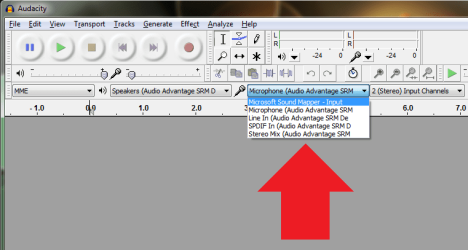
And while we're at it has anyone a solution to enable the "input device" in Audacity 3.1 in W7. Works ok in XP. According to what I found scouring the net on this, apparently W7 does not support an "input device".

apogee07
 

My Computer

OS
W7
Input devices...you mean these:
 

Attachments

  • Untitled.png
    Untitled.png
    19 KB · Views: 8

My Computer

Computer type
PC/Desktop
Computer Manufacturer/Model Number
Alienware Aurora ALX R4
OS
Windows 10 Pro (x64)
CPU
Intel Core i7-3930K (3.2GHz - 4.5GHz)
Motherboard
Alienware Aurora-R4 x79
Memory
4x Samsung 4GB PC3-12800 DDR3 (16GB 1600MHz)
Graphics Card(s)
Nvidia Geforce GTX 690
Sound Card
SteelSeries Siberia Elite
Monitor(s) Displays
Dell UltraSharp U3011
Screen Resolution
2560x1600
Hard Drives
Samsung 850 Pro 256 GB, Seagate 1TB Desktop Hybrid HDD, 2x Western Digital 4TB Green HDD
PSU
875W Some Dell PSU <.<
Case
Alienware Aurora ALX
Cooling
Custom Liquid Cooling (EK CPU & GPU blocks) dual EK 480RAD
Keyboard
Logitech G710+ Mechanical
Mouse
Logitech G700s
Internet Speed
Verizon Fios (50 mbps average)
Other Info
Server: Intel NUC D54250WYK: i5-4250U, 16GB, 256 GB mSATA, Windows Server 2012 R2
I just see an overall strategy of trimming and tweaking where necessary to make a system quicker and safer if that doesn't imply breaking anything in the process. And the more one tweaks then the more one learns - even if it is sometimes painful. :cry:
You are missing one major point, and one that has been stressed for two years, but is still often missed. "Tweaks" aren't going to yield more performance in Windows 7. That's why the best tweaking advice is to leave it alone. Disabling services, altering OS settings, etc will yield no benefit.

If you separate out "customizing", then yes, there's plenty of room for that. But out of the box, aside from loading the latest drivers, Windows 7 will tune itself to run optimally. That's also why it doesn't need to be reloaded every so often.

You always have to remember that Windows 7 is a different animal than XP, and should be treated as such.

I think you'll have to define 'benefit' since performance is not the sole issue.

I'll agree that most of the things I've done have been more customising than tweaks but if disabling some services gives me more memory for other things then that is what I'll do. I was down to about 35 before adding the ones I wanted to run.

One of the few things I have done is to remove Libraries from Explorer and dialogues but my major gripe is the one I can't do and that is remove the Recycle bin completely. Perhaps I am just more organised than most but I very rarely inadvertently delete something that I later regret and I have more than enough back-ups of any saved data. I would just like it to be made easier to remove all the things that you don't particularly need from whatever area e.g context menus. It makes things snappier and you are less likely to make mistakes by inadvertently choosing a wrong item from a menu. If it doesn't exist on the menu then you can't choose it.

Apart from that I do really like W7. :) :shock:
 
Last edited:

My Computer

Computer Manufacturer/Model Number
Compaq desktop
OS
Windows 7 x64 SP1
CPU
Athlon II x2 215
Memory
4.0 GB
Graphics Card(s)
Onboard
Sound Card
Creative SB X-Fi Titanium HD (nice)
Monitor(s) Displays
24" Dell LCD
Screen Resolution
1900 x 1200
Hard Drives
320 GB, 500 GB and 750 GB 7200 rpm
PSU
430w
Keyboard
USB
Mouse
USB
Internet Speed
approx 10 Mbps
Back
Top