Windows 7 Wireless Issues

himitsu

New member
Local time
5:24 AM
Messages
4
Hi all,

This has had me stumped for about a week now, my Windows 7 laptop is having issues connecting to a Wi-Fi network where as it will take quite some time to connect. I first noticed this on my home wifi but it is the same for my friends wifi as well if i tether my laptop to my droid.

The signal strength is strong in all my testing, I noticed that there was a Microsoft Virtual network adapter listed twice in my device manager which if I uninstall them they will return after a reboot, so I have disabled them.

I have updated my wi-fi network drivers, disabled my firewall, UAC. But the issue still is there.

Windows Update is run regularly, so I don't think its related to a missing update.

I have also run the usual sfc/scannow.

Any ideas or recommendations will be great.

Thanks in advance.
 

My Computer

Computer type
PC/Desktop
OS
win 7
Welcome to Seven Forums,

Is the issue only occurs the first time that you are trying to connect? Any disconnection issue? How's the speed?

You might want to do a Clean Boot. Removing all wireless network profiles might also help then re-add the SSID that you're trying to connect to.
Easy Way to Delete Wireless Network Profile in Windows 7
 

My Computer

Computer Manufacturer/Model Number
Lenovo Desktop/Samsung Laptop
OS
Win7 & Win8 64bit
CPU
Intel i5
Internet Speed
Charter-20 Mbps
Antivirus
Avast
Browser
FF, IE9 and Chrome
Thanks for your reply.

I did try what you said, booting to a selective start up, but my wireless would not work at all, I think it had something with the services it needs on start up.

I booted to safe mode with networking and my wireless connected straight away.

When I rebooted back to Windows it also connected straight away, which is strange as I have not changed anything.

But when i booted up my laptop this morning the problem had returned.

I have deleted all SSD profiles and recreated them but the problem still exists.

If I hibernate my laptop and wake it up the problem is still there.

When I am connected there are no disconnections and speed is all OK.
 
Last edited:

My Computer

Computer type
PC/Desktop
OS
win 7
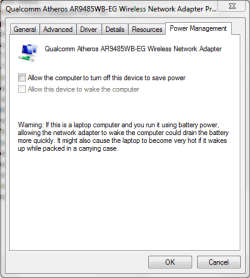
Thanks for giving it a try, have you also tried disabling the Power Management mode of the Wi-Fi Adapter in Device Manager? See attached image.
 

Attachments

  • Power Management mode - disable Wi-Fi.PNG
    Power Management mode - disable Wi-Fi.PNG
    13.7 KB · Views: 1

My Computer

Computer Manufacturer/Model Number
Lenovo Desktop/Samsung Laptop
OS
Win7 & Win8 64bit
CPU
Intel i5
Internet Speed
Charter-20 Mbps
Antivirus
Avast
Browser
FF, IE9 and Chrome
Yes, it is set to disabled in power management.

I have also noticed that it will not connect automatically to wi-fi any more, the settings are still set to connect automatically to my configured SSID.

For my laptop to connect i need to select the wifi icon and click to connect to my wireless.
 

My Computer

Computer type
PC/Desktop
OS
win 7
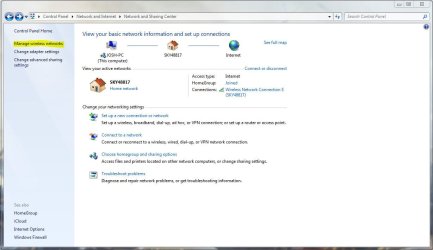
Press Start then search for 'Network and Sharing Center'

Upon opening you should see a control panel console appear similar to the one below:

network and sharing center.JPG

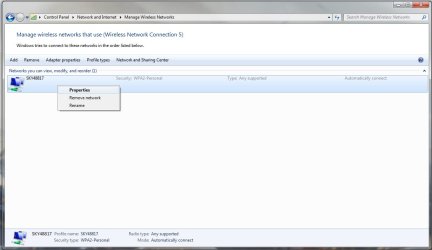
Please then click on 'Manage Wireless Networks' in the side pain to show all your configured wireless networks on that machine:

Properties.jpg

Right click on the wireless SSID that you want to connect to automatically and then click on 'Properties'

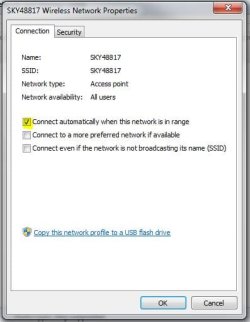
You should be presented with a windows similar to the one below:

connect auto.JPG

Please make sure that the connect automatically box is checked then click OK. Please then restart the machine to test the new settings

Hope This Helps,
Josh! :)
 

My Computer

Computer type
PC/Desktop
Computer Manufacturer/Model Number
Custom Built
OS
Windows 7 Professional x64 SP1 ; Windows Server 2012 R2 Standard
CPU
Intel Core i5 2400 @ 3.10GHz
Motherboard
Foxconn H67MP-S/-V/H67MP
Memory
8.0GB DDR3 @ 665MHz (2GBx4)
Graphics Card(s)
AMD Radeon HD 6870
Sound Card
Realtek High Definition Audio
Monitor(s) Displays
AOC 2243W & SMB1930NW
Screen Resolution
1440x900 & 1920x1080
Hard Drives
977GB Seagate ST31000524AS ATA Drive (SATA)
250GB WD iSCSI attached Drive
PSU
750W Gaming PSU
Case
Novatech Night
Cooling
Fan
Keyboard
Dell Standard PS/2 Keyboard
Mouse
R.A.T 07 Gaming Mouse
Internet Speed
Download: 10 Mbps Ping: 30ms Upload: 0.81 Mbps
Browser
Google Chrome
Other Info
Optiarc DVD RW AD-5260S ATA Device
Thanks for the reply,

I have checked and it is set to connect automatically, the same issue is apparent for my other configured SSID's (Friends wifi and when i connect to my android wifi) these are also set to connect automatically.

Could it be my wireless card in my laptop being faulty?
 

My Computer

Computer type
PC/Desktop
OS
win 7

My Computer

Computer Manufacturer/Model Number
Lenovo Desktop/Samsung Laptop
OS
Win7 & Win8 64bit
CPU
Intel i5
Internet Speed
Charter-20 Mbps
Antivirus
Avast
Browser
FF, IE9 and Chrome
Back
Top