Windows 7 wont boot from SSD

craigh91

New member
Local time
3:24 AM
Messages
5
Hi sorry not sure if this is in the right place, but i currently have a custom build desktop (about a year old) with a HDD and SSD with the operating system(windows 7) on the SSD. Anyway when i boot up the splash screen for the motherboard lags for a second and when i go into the bios and check the boot options the first option is set to windows boot manager but when i change it to the SSD and reboot i get the message about windows can't find bootable device so i have to use wbm (which is clearly slowing down my boot time). I just wondered if maybe i didnt install the os properly or something and if i need to do something or if a reinstall is the only option.
 

My Computer

Computer type
PC/Desktop
Computer Manufacturer/Model Number
custom build
OS
Windows 7 Professional x64
CPU
Intel core i5 3570k
Motherboard
Gigabyte GA Z77X UP4TH
Memory
8GB
Graphics Card(s)
Nvidia Geforce GTX 660ti
Show a snip of your disk management please.
 

My Computer

Computer Manufacturer/Model Number
HP, Dell, Gateway, Toshiba - 4 laptops and 2 desktops
OS
Vista, Windows7, Mint Mate, Zorin, Windows 8
CPU
from 1.6GHz Duo to i7
Monitor(s) Displays
2x HP w2207
Hard Drives
5x HDD, 7x SSD, 12x Externals
Keyboard
with trackball - no mices
Mouse
Trackball mice
Internet Speed
DSL 6000
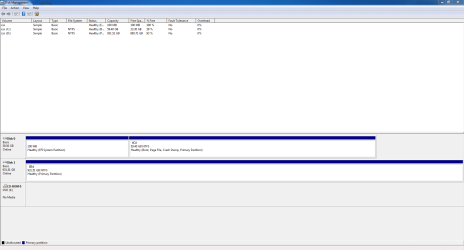
Hi here is a capture of my disk management
 

Attachments

  • Capture.PNG
    Capture.PNG
    22.4 KB · Views: 17

My Computer

Computer type
PC/Desktop
Computer Manufacturer/Model Number
custom build
OS
Windows 7 Professional x64
CPU
Intel core i5 3570k
Motherboard
Gigabyte GA Z77X UP4TH
Memory
8GB
Graphics Card(s)
Nvidia Geforce GTX 660ti
The boot manager partition (located on the #1 drive in the BIOS boot sequence list) must be marked "active". If there is no "active" partition on the #1 boot drive (and if you also don't have a bootable CD or USB drive inserted) then you will get this message about "no bootable device".

From your description it sounds to me like the previously "active" boot manager partition on your SSD has somehow lost its "active" indicator.

I'd download Partition Wizard standalone boot CD ISO, and burn to CD. Then insert it in your machine and boot... which (if the CD is in front of the SSD in the BIOS boot sequence) should let you boot to the CD. Using PW in this standalone mode, you can examine your machine's other drives (and in particular the SSD). You can see if there actually is an "active" partition on the SSD, and if not you can use PW to re-set that "system reserved" partition (where Boot Manager lives) to "active".

That should hopefully resolve your issue, and booting through your SSD should once again be normal with no messages or problems.
 

My Computer

Computer type
PC/Desktop
Computer Manufacturer/Model Number
Home-built, two systems (1) and (2)
OS
Windows 7 Pro x64 (1), Win7 Pro X64 (2)
CPU
i5-3350p 3.1Ghz/6MB-cache (1); E8400 3.0Ghz/6MB-cache (2)
Motherboard
ASUS P8Z77-V Pro (1); ASUS P5Q3 (2)
Memory
8GB PC3-12800 DDR3 (1); 4GB PC3-10600 DDR3 (2)
Graphics Card(s)
ATI HD7750 (1), (see TV cards); ATI R7 250 (2)
Sound Card
Realtek ALC892 HD Audio (1); Realtek ALC1200 HD Audio (2)
Monitor(s) Displays
Eizo HD2441W LCD, Eizo S2433W (1); Eizo 24" S2433W (2)
Screen Resolution
1920x1200, 1920x1200 (1); 1920x1200 (2)
Hard Drives
(1) 1TB SATA-II (7200RPM), 2x2TB SATA-III (7200RPM), 250GB SATA-III (10000RPM) for OS; 2x2TB external USB 3.0

(2) 320GB SATA-II (7200RPM), 750GB SATA-II (7200RPM), 150GB SATA-II (10000RPM) for OS; 2TB external USB 3.0
PSU
Nesteq ECS-6001 600W (1); Nesteq ECS-5001 500W (2)
Case
Acousti-Case 360 (1) and (2)
Cooling
Noctua NH-U12P SE2 for CPU, 2x120mm case fans (1) and (2)
Keyboard
IBM PS/2 (1) and (2)
Mouse
Logitech MX Revolution wireless (1); Microsoft wired (2)
Internet Speed
100mbps down / 10mbps up
Antivirus
Microsoft Security Essentials; Malwarebyte Anti-Malware Pro
Browser
Firefox
Other Info
Ceton InfiniTV 4-tuner cablecard-enabled TV card as well as Hauppauge HVR-2250 OTA/ATSC 2-tuner TV card in (1), running under Win7 WMC
Unfortunately, your screenshot from DISKMGMT does not have the "status" column spread so that we can see everything that's there. In particular, whether or not that 100MB "system reserved" partition is marked "active" or not is not shown.

But that's the issue we're concerned about. That 100MB partition is where Boot Manager lives, and it MUST be indicated as "active" in order to make the BIOS happy.
 

My Computer

Computer type
PC/Desktop
Computer Manufacturer/Model Number
Home-built, two systems (1) and (2)
OS
Windows 7 Pro x64 (1), Win7 Pro X64 (2)
CPU
i5-3350p 3.1Ghz/6MB-cache (1); E8400 3.0Ghz/6MB-cache (2)
Motherboard
ASUS P8Z77-V Pro (1); ASUS P5Q3 (2)
Memory
8GB PC3-12800 DDR3 (1); 4GB PC3-10600 DDR3 (2)
Graphics Card(s)
ATI HD7750 (1), (see TV cards); ATI R7 250 (2)
Sound Card
Realtek ALC892 HD Audio (1); Realtek ALC1200 HD Audio (2)
Monitor(s) Displays
Eizo HD2441W LCD, Eizo S2433W (1); Eizo 24" S2433W (2)
Screen Resolution
1920x1200, 1920x1200 (1); 1920x1200 (2)
Hard Drives
(1) 1TB SATA-II (7200RPM), 2x2TB SATA-III (7200RPM), 250GB SATA-III (10000RPM) for OS; 2x2TB external USB 3.0

(2) 320GB SATA-II (7200RPM), 750GB SATA-II (7200RPM), 150GB SATA-II (10000RPM) for OS; 2TB external USB 3.0
PSU
Nesteq ECS-6001 600W (1); Nesteq ECS-5001 500W (2)
Case
Acousti-Case 360 (1) and (2)
Cooling
Noctua NH-U12P SE2 for CPU, 2x120mm case fans (1) and (2)
Keyboard
IBM PS/2 (1) and (2)
Mouse
Logitech MX Revolution wireless (1); Microsoft wired (2)
Internet Speed
100mbps down / 10mbps up
Antivirus
Microsoft Security Essentials; Malwarebyte Anti-Malware Pro
Browser
Firefox
Other Info
Ceton InfiniTV 4-tuner cablecard-enabled TV card as well as Hauppauge HVR-2250 OTA/ATSC 2-tuner TV card in (1), running under Win7 WMC
ah OK great cheers ill download that and give it a try. i just checked in the status bar and it doesn't seem that any of them are marked as active and when i right click it doesn't allow to mark as active its just greyed out
 

My Computer

Computer type
PC/Desktop
Computer Manufacturer/Model Number
custom build
OS
Windows 7 Professional x64
CPU
Intel core i5 3570k
Motherboard
Gigabyte GA Z77X UP4TH
Memory
8GB
Graphics Card(s)
Nvidia Geforce GTX 660ti
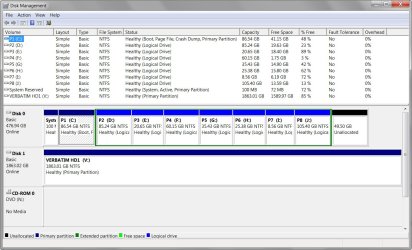
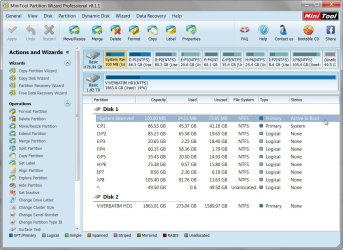
Just for your reference, here is my own Lenovo W530 laptop setup, with a 512GB Samsung 840 Pro SSD (and multiple partitions C-J).

Note that the Samsung 840 Pro SSD includes "Samsung Magician" software, to increase the performance of the SSD. This includes use of "over provisioning" on the drive to make use of whatever's unallocated to partitions (over a minimum recommended available unallocated space of about 10% of the total drive capacity), as well as to use free RAM in the machine to facilitate what they call "rapid mode".

Also, Samsung Magician can automatically change several crucial performance-related options in Windows specifically to improve SSD performance. And of course, you should disable the "defrag service" and prevent it from running once a week as it normally would by default. You don't want to run defrag on an SSD.
 

Attachments

  • DISKMGMT_SSD.jpg
    DISKMGMT_SSD.jpg
    140.5 KB · Views: 1
  • PW_SSD.jpg
    PW_SSD.jpg
    143.8 KB · Views: 1

My Computer

Computer type
PC/Desktop
Computer Manufacturer/Model Number
Home-built, two systems (1) and (2)
OS
Windows 7 Pro x64 (1), Win7 Pro X64 (2)
CPU
i5-3350p 3.1Ghz/6MB-cache (1); E8400 3.0Ghz/6MB-cache (2)
Motherboard
ASUS P8Z77-V Pro (1); ASUS P5Q3 (2)
Memory
8GB PC3-12800 DDR3 (1); 4GB PC3-10600 DDR3 (2)
Graphics Card(s)
ATI HD7750 (1), (see TV cards); ATI R7 250 (2)
Sound Card
Realtek ALC892 HD Audio (1); Realtek ALC1200 HD Audio (2)
Monitor(s) Displays
Eizo HD2441W LCD, Eizo S2433W (1); Eizo 24" S2433W (2)
Screen Resolution
1920x1200, 1920x1200 (1); 1920x1200 (2)
Hard Drives
(1) 1TB SATA-II (7200RPM), 2x2TB SATA-III (7200RPM), 250GB SATA-III (10000RPM) for OS; 2x2TB external USB 3.0

(2) 320GB SATA-II (7200RPM), 750GB SATA-II (7200RPM), 150GB SATA-II (10000RPM) for OS; 2TB external USB 3.0
PSU
Nesteq ECS-6001 600W (1); Nesteq ECS-5001 500W (2)
Case
Acousti-Case 360 (1) and (2)
Cooling
Noctua NH-U12P SE2 for CPU, 2x120mm case fans (1) and (2)
Keyboard
IBM PS/2 (1) and (2)
Mouse
Logitech MX Revolution wireless (1); Microsoft wired (2)
Internet Speed
100mbps down / 10mbps up
Antivirus
Microsoft Security Essentials; Malwarebyte Anti-Malware Pro
Browser
Firefox
Other Info
Ceton InfiniTV 4-tuner cablecard-enabled TV card as well as Hauppauge HVR-2250 OTA/ATSC 2-tuner TV card in (1), running under Win7 WMC
Just for your reference, here is my own Lenovo W530 laptop setup, with a 512GB Samsung 840 Pro SSD (and multiple partitions C-J).

Note that the Samsung 840 Pro SSD includes "Samsung Magician" software, to increase the performance of the SSD. This includes use of "over provisioning" on the drive to make use of whatever's unallocated to partitions (over a minimum of about 10%), as well as to use free RAM in the machine to facilitate what they call "rapid mode".

Also, Samsung Magician can automatically change several crucial performance-related options in Windows specifically to improve SSD performance. And of course, you should disable the "defrag service" and prevent it from running once a week as it normally would by default. You don't want to run defrag on an SSD.
Why would you want to have all those itty, bitty partitions. That is a very inefficient use of the space and not easy to manage for backups.
 

My Computer

Computer Manufacturer/Model Number
HP, Dell, Gateway, Toshiba - 4 laptops and 2 desktops
OS
Vista, Windows7, Mint Mate, Zorin, Windows 8
CPU
from 1.6GHz Duo to i7
Monitor(s) Displays
2x HP w2207
Hard Drives
5x HDD, 7x SSD, 12x Externals
Keyboard
with trackball - no mices
Mouse
Trackball mice
Internet Speed
DSL 6000
Just noticed that your 100MB "system reserved" partition shows as "EFI system partition". Did you change something? Is that how it has always been since you installed Win7?

I don't have EFI BIOS enabled on my W530, as I do not run Win8. So my "system reserved" is an ordinary partition.

I wonder if that's why you couldn't mark it "active"? I plead ignorance on EFI, I'm afraid. I just assumed it should be "active", but maybe this works differently with EFI?? Perhaps someone else with more knowledge on this can help out.
 

My Computer

Computer type
PC/Desktop
Computer Manufacturer/Model Number
Home-built, two systems (1) and (2)
OS
Windows 7 Pro x64 (1), Win7 Pro X64 (2)
CPU
i5-3350p 3.1Ghz/6MB-cache (1); E8400 3.0Ghz/6MB-cache (2)
Motherboard
ASUS P8Z77-V Pro (1); ASUS P5Q3 (2)
Memory
8GB PC3-12800 DDR3 (1); 4GB PC3-10600 DDR3 (2)
Graphics Card(s)
ATI HD7750 (1), (see TV cards); ATI R7 250 (2)
Sound Card
Realtek ALC892 HD Audio (1); Realtek ALC1200 HD Audio (2)
Monitor(s) Displays
Eizo HD2441W LCD, Eizo S2433W (1); Eizo 24" S2433W (2)
Screen Resolution
1920x1200, 1920x1200 (1); 1920x1200 (2)
Hard Drives
(1) 1TB SATA-II (7200RPM), 2x2TB SATA-III (7200RPM), 250GB SATA-III (10000RPM) for OS; 2x2TB external USB 3.0

(2) 320GB SATA-II (7200RPM), 750GB SATA-II (7200RPM), 150GB SATA-II (10000RPM) for OS; 2TB external USB 3.0
PSU
Nesteq ECS-6001 600W (1); Nesteq ECS-5001 500W (2)
Case
Acousti-Case 360 (1) and (2)
Cooling
Noctua NH-U12P SE2 for CPU, 2x120mm case fans (1) and (2)
Keyboard
IBM PS/2 (1) and (2)
Mouse
Logitech MX Revolution wireless (1); Microsoft wired (2)
Internet Speed
100mbps down / 10mbps up
Antivirus
Microsoft Security Essentials; Malwarebyte Anti-Malware Pro
Browser
Firefox
Other Info
Ceton InfiniTV 4-tuner cablecard-enabled TV card as well as Hauppauge HVR-2250 OTA/ATSC 2-tuner TV card in (1), running under Win7 WMC
Why would you want to have all those itty, bitty partitions. That is a very inefficient use of the space and not easy to manage for backups.
Because the contents of those partitions on my W530 matches the corresponding contents on my desktop machines, which have much larger and multiple real hard drives, so that the partitions themselves are also generally larger.

I don't want to bother with knowing or remembering where my fundamental data is located when I sit down to work at any of my machines, as far as "duplicated" data (or at least the folder names) that live on each of my machines. So to make my life easy, I just have these basic partitions allocated on all of my machines, so they're conceptually identical in structure even if the data living in those partitions on each individual machine is unique.

As far as backups, that is of no consequence. I have automatic "data" backups run using NovaBackup, and the jobs simply pick up from each partition (as well as C except for the \Windows folder) as necessary. I use Macrium Reflect for automatic "system image" for C (and system reserved) only, as my disaster recovery backup. These "data" and "system image" backup jobs just automatically run overnight daily, weekly, and monthly, backing up to my 2TB external USB 3.0 drive. I don't even think about it.
 

My Computer

Computer type
PC/Desktop
Computer Manufacturer/Model Number
Home-built, two systems (1) and (2)
OS
Windows 7 Pro x64 (1), Win7 Pro X64 (2)
CPU
i5-3350p 3.1Ghz/6MB-cache (1); E8400 3.0Ghz/6MB-cache (2)
Motherboard
ASUS P8Z77-V Pro (1); ASUS P5Q3 (2)
Memory
8GB PC3-12800 DDR3 (1); 4GB PC3-10600 DDR3 (2)
Graphics Card(s)
ATI HD7750 (1), (see TV cards); ATI R7 250 (2)
Sound Card
Realtek ALC892 HD Audio (1); Realtek ALC1200 HD Audio (2)
Monitor(s) Displays
Eizo HD2441W LCD, Eizo S2433W (1); Eizo 24" S2433W (2)
Screen Resolution
1920x1200, 1920x1200 (1); 1920x1200 (2)
Hard Drives
(1) 1TB SATA-II (7200RPM), 2x2TB SATA-III (7200RPM), 250GB SATA-III (10000RPM) for OS; 2x2TB external USB 3.0

(2) 320GB SATA-II (7200RPM), 750GB SATA-II (7200RPM), 150GB SATA-II (10000RPM) for OS; 2TB external USB 3.0
PSU
Nesteq ECS-6001 600W (1); Nesteq ECS-5001 500W (2)
Case
Acousti-Case 360 (1) and (2)
Cooling
Noctua NH-U12P SE2 for CPU, 2x120mm case fans (1) and (2)
Keyboard
IBM PS/2 (1) and (2)
Mouse
Logitech MX Revolution wireless (1); Microsoft wired (2)
Internet Speed
100mbps down / 10mbps up
Antivirus
Microsoft Security Essentials; Malwarebyte Anti-Malware Pro
Browser
Firefox
Other Info
Ceton InfiniTV 4-tuner cablecard-enabled TV card as well as Hauppauge HVR-2250 OTA/ATSC 2-tuner TV card in (1), running under Win7 WMC
I guess it is a system. I would have organized the data in folders in a big data partition. Makes much better use of space.
 

My Computer

Computer Manufacturer/Model Number
HP, Dell, Gateway, Toshiba - 4 laptops and 2 desktops
OS
Vista, Windows7, Mint Mate, Zorin, Windows 8
CPU
from 1.6GHz Duo to i7
Monitor(s) Displays
2x HP w2207
Hard Drives
5x HDD, 7x SSD, 12x Externals
Keyboard
with trackball - no mices
Mouse
Trackball mice
Internet Speed
DSL 6000
I guess it is a system. I would have organized the data in folders in a big data partition. Makes much better use of space.
I understand.

I suspect my particular "methodology" reflects decades of evolution of usage, passing through mixed dual-OS environments (both dual-boot OS/2 as well as Windows in the earlier years, multi-boot versions of Windows for many years, before finally migrating fully to Windows 7 exclusively), many machine upgrades including ever-increasingly-larger hard drives and then additional hard drives, etc.

With multiple physical hard drives multiple unique drive letters and related folders on those drives would inevitably develop and could not be changed, and eventually this structure just became what I was used to. When much larger hard drives became available so that the total contents of multiple smaller drives could actually reside on one single larger drive, the choice now exists to just consolidate all folders into one partition on the larger or to retain multiple partitions on the one larger drive.

I chose the latter, including the retained use of the identical "drive letters" as partitions, just to keep things simple for my brain. I was so used to things the way they are and had evolved that I was perfectly content to "virtualize those individual physical drives as partitions on one larger drive", and then I wouldn't have to re-learn the roadmap of where things were. I intuitively still knew what "drive letter" everything was located on, no matter that it was now all on one physical drive.

It actually also makes it much easier for me to "sync" things up between two machines, as for example what's on H on one machine is also on H on the other machine (or at least the folders on H are mostly the same, even if the detail file contents might differ). I have network drive letters mapped starting at P on all machines, where P on the remote machine is C on that local machine, Q is D, R is E, etc. So no matter what machine I sit down at I know that C is my local C, and P is the remote machine's C. Etc., etc. And using Windows Explorer (which shows both mapped drive letter as well as local drive letter on that remote machine), it's now instantly visible that I'm "syncing" local H to remote H.

Like anything which comes with practice and years of use (e.g. touch typing at lightning speeds which is just the same and fluent as talking), the partitioning of C-J (or even K-M on larger machines with more and larger drives and special needs, like my HTPC) the use of multiple partitions actually SIMPLIFIES things for me. I'd go crazy if everything was on a single D "data" drive letter (or a very large RAID D spanning multiple volumes). I much prefer the discrete partitioning I've become completely comfortable with, no matter the machine.
 

My Computer

Computer type
PC/Desktop
Computer Manufacturer/Model Number
Home-built, two systems (1) and (2)
OS
Windows 7 Pro x64 (1), Win7 Pro X64 (2)
CPU
i5-3350p 3.1Ghz/6MB-cache (1); E8400 3.0Ghz/6MB-cache (2)
Motherboard
ASUS P8Z77-V Pro (1); ASUS P5Q3 (2)
Memory
8GB PC3-12800 DDR3 (1); 4GB PC3-10600 DDR3 (2)
Graphics Card(s)
ATI HD7750 (1), (see TV cards); ATI R7 250 (2)
Sound Card
Realtek ALC892 HD Audio (1); Realtek ALC1200 HD Audio (2)
Monitor(s) Displays
Eizo HD2441W LCD, Eizo S2433W (1); Eizo 24" S2433W (2)
Screen Resolution
1920x1200, 1920x1200 (1); 1920x1200 (2)
Hard Drives
(1) 1TB SATA-II (7200RPM), 2x2TB SATA-III (7200RPM), 250GB SATA-III (10000RPM) for OS; 2x2TB external USB 3.0

(2) 320GB SATA-II (7200RPM), 750GB SATA-II (7200RPM), 150GB SATA-II (10000RPM) for OS; 2TB external USB 3.0
PSU
Nesteq ECS-6001 600W (1); Nesteq ECS-5001 500W (2)
Case
Acousti-Case 360 (1) and (2)
Cooling
Noctua NH-U12P SE2 for CPU, 2x120mm case fans (1) and (2)
Keyboard
IBM PS/2 (1) and (2)
Mouse
Logitech MX Revolution wireless (1); Microsoft wired (2)
Internet Speed
100mbps down / 10mbps up
Antivirus
Microsoft Security Essentials; Malwarebyte Anti-Malware Pro
Browser
Firefox
Other Info
Ceton InfiniTV 4-tuner cablecard-enabled TV card as well as Hauppauge HVR-2250 OTA/ATSC 2-tuner TV card in (1), running under Win7 WMC
No problem. If it works for you there is no need for change. For an outsider it just looks a bit weird.
 

My Computer

Computer Manufacturer/Model Number
HP, Dell, Gateway, Toshiba - 4 laptops and 2 desktops
OS
Vista, Windows7, Mint Mate, Zorin, Windows 8
CPU
from 1.6GHz Duo to i7
Monitor(s) Displays
2x HP w2207
Hard Drives
5x HDD, 7x SSD, 12x Externals
Keyboard
with trackball - no mices
Mouse
Trackball mice
Internet Speed
DSL 6000
Just noticed that your 100MB "system reserved" partition shows as "EFI system partition". Did you change something? Is that how it has always been since you installed Win7?

I don't have EFI BIOS enabled on my W530, as I do not run Win8. So my "system reserved" is an ordinary partition.

I wonder if that's why you couldn't mark it "active"? I plead ignorance on EFI, I'm afraid. I just assumed it should be "active", but maybe this works differently with EFI?? Perhaps someone else with more knowledge on this can help out.

Yes I was also wondering why its EFI as far as im aware i haven't changed anything. Do you think running the software you recommended will sort this or will i need to change it back to legacy in the bios?
 

My Computer

Computer type
PC/Desktop
Computer Manufacturer/Model Number
custom build
OS
Windows 7 Professional x64
CPU
Intel core i5 3570k
Motherboard
Gigabyte GA Z77X UP4TH
Memory
8GB
Graphics Card(s)
Nvidia Geforce GTX 660ti
Yes I was also wondering why its EFI as far as im aware i haven't changed anything. Do you think running the software you recommended will sort this or will i need to change it back to legacy in the bios?
Wait... do you have UEFI enabled in BIOS? Or not? And is/was it always this way, or did you change something recently? BIOS setting changed??

Why don't you have "legacy" set in the BIOS? Did you have it set that way, and changed it to UEFI to fool around with Windows 8, and now you're trying to use Windows 7 again??

Again, I have to plead ignorance here on UEFI and GPT disks, but I think that if UEFI is enabled that the drive needs to be formatted using GPT rather than MBR. The fact that you show an "EFI System Partition" but it's not also "active" is certainly a mystery to me, but I'm sure is totally relevant to the current issue. The suggestion certainly is that your BIOS is set to UEFI, but why that partition would not be "active" and why Windows won't let you set it to be "active" is a mystery to me.

But I believe the "boot partition" (i.e. the small "active" system reserved) for Win7 should be MBR, not GPT (which is required for Windows 8). Did you fool around with Windows 8 recently??

I'm certainly confused, and probably not being much help now. Maybe someone else can come in and help here.
 

My Computer

Computer type
PC/Desktop
Computer Manufacturer/Model Number
Home-built, two systems (1) and (2)
OS
Windows 7 Pro x64 (1), Win7 Pro X64 (2)
CPU
i5-3350p 3.1Ghz/6MB-cache (1); E8400 3.0Ghz/6MB-cache (2)
Motherboard
ASUS P8Z77-V Pro (1); ASUS P5Q3 (2)
Memory
8GB PC3-12800 DDR3 (1); 4GB PC3-10600 DDR3 (2)
Graphics Card(s)
ATI HD7750 (1), (see TV cards); ATI R7 250 (2)
Sound Card
Realtek ALC892 HD Audio (1); Realtek ALC1200 HD Audio (2)
Monitor(s) Displays
Eizo HD2441W LCD, Eizo S2433W (1); Eizo 24" S2433W (2)
Screen Resolution
1920x1200, 1920x1200 (1); 1920x1200 (2)
Hard Drives
(1) 1TB SATA-II (7200RPM), 2x2TB SATA-III (7200RPM), 250GB SATA-III (10000RPM) for OS; 2x2TB external USB 3.0

(2) 320GB SATA-II (7200RPM), 750GB SATA-II (7200RPM), 150GB SATA-II (10000RPM) for OS; 2TB external USB 3.0
PSU
Nesteq ECS-6001 600W (1); Nesteq ECS-5001 500W (2)
Case
Acousti-Case 360 (1) and (2)
Cooling
Noctua NH-U12P SE2 for CPU, 2x120mm case fans (1) and (2)
Keyboard
IBM PS/2 (1) and (2)
Mouse
Logitech MX Revolution wireless (1); Microsoft wired (2)
Internet Speed
100mbps down / 10mbps up
Antivirus
Microsoft Security Essentials; Malwarebyte Anti-Malware Pro
Browser
Firefox
Other Info
Ceton InfiniTV 4-tuner cablecard-enabled TV card as well as Hauppauge HVR-2250 OTA/ATSC 2-tuner TV card in (1), running under Win7 WMC
Yes I was also wondering why its EFI as far as im aware i haven't changed anything. Do you think running the software you recommended will sort this or will i need to change it back to legacy in the bios?
Wait... do you have UEFI enabled in BIOS? Or not? And is/was it always this way, or did you change something recently? BIOS setting changed??

Why don't you have "legacy" set in the BIOS? Did you have it set that way, and changed it to UEFI to fool around with Windows 8, and now you're trying to use Windows 7 again??

Again, I have to plead ignorance here on UEFI and GPT disks, but I think that if UEFI is enabled that the drive needs to be formatted using GPT rather than MBR. The fact that you show an "EFI System Partition" but it's not also "active" is certainly a mystery to me, but I'm sure is totally relevant to the current issue. The suggestion certainly is that your BIOS is set to UEFI, but why that partition would not be "active" and why Windows won't let you set it to be "active" is a mystery to me.

But I believe the "boot partition" (i.e. the small "active" system reserved) for Win7 should be MBR, not GPT (which is required for Windows 8). Did you fool around with Windows 8 recently??

I'm certainly confused, and probably not being much help now. Maybe someone else can come in and help here.

It is set to use both in my bios i'll screenshot it when i get home from work. I havent changed anything in bios really apart from messing with the boot order so it is also a mystery to me. I have tried right clicking both to change to active but it is grayed out for both which i dont understand. I have been messing around doing clean installs maybe something has gone wrong when i was doing this
 

My Computer

Computer type
PC/Desktop
Computer Manufacturer/Model Number
custom build
OS
Windows 7 Professional x64
CPU
Intel core i5 3570k
Motherboard
Gigabyte GA Z77X UP4TH
Memory
8GB
Graphics Card(s)
Nvidia Geforce GTX 660ti
Back
Top