Windows 7 wont boot without external DVD drive attached

Emma2302

New member
Local time
10:06 AM
Messages
9
I have an Acer Revo and installed my free Windows 7 upgrade disc one week ago with an external DVD drive. The install went swimmingly and no problems were apparent.

I removed my Samsung external DVD drive when finished and all was well. However, when I turned on the Revo the next day, Windows 7 would only get as far as the splash screen and then hung with a blank screen.

If I space bar, the cursor works, I get a blue windows screen (at a diff aspect ratio to the screen) and right click works which gives me some options (but nothing that allows me to kick start the process). There are no user options and no desktop items. I have checked that view is set correctly etc.

I have tried Ctrl Alt Del which just kills the blue screen and mouse/cursor movement.

My only option at this point is to hard shutdown.

HOWEVER, if I plug in the external DVD drive, it will boot normally and work fine.

I have entered te BIOS and changed the order of boot, to no avail.

It will also revert to this dormant screen if it goes into sleep mode.

My work around has been to set sleep to NEVER and keep the external plugged in, but that defeats the object of buying the REVO.

I have searched the internet for a solution, but so far, no luck.

I tried updating the NVIDIA driver but that would not install properly.

Any ideas anyone? Please???
 

My Computer My Computer

Computer Manufacturer/Model Number
Acer Aspire Revo
OS
windows 7 Home Premium 32 bit
CPU
Intel Atom processor 230
Memory
2GB DDR2
Graphics Card(s)
NVIDIA ION built in
Monitor(s) Displays
Acer (external)
Hard Drives
160 GB HDD (Hitachi)
*Have you thought of disabling the drive in the BIOS?
 

My Computer My Computer

Computer Manufacturer/Model Number
HP Pavilion dv7
OS
Windows 7
CPU
Core i7
Memory
8 GB
Graphics Card(s)
ATI FireGL
Monitor(s) Displays
Secondary is an HP L1940T
Screen Resolution
1680x1050
Hard Drives
160 GB SSD and 500 GB SATA
Keyboard
G11 Logitech
Mouse
G7 Logitech
Internet Speed
Fiber
Other Info
My rig smegging rules!
*Have you thought of disabling the drive in the BIOS?

I've thought of it! But I'm wary of messing around in the BIOS too much lest I bugger things up completely! I'll do it if someone can say categorically it would work!
 

My Computer My Computer

Computer Manufacturer/Model Number
Acer Aspire Revo
OS
windows 7 Home Premium 32 bit
CPU
Intel Atom processor 230
Memory
2GB DDR2
Graphics Card(s)
NVIDIA ION built in
Monitor(s) Displays
Acer (external)
Hard Drives
160 GB HDD (Hitachi)
Yes I would not do that yet either, it probably is the fix you need, but better safe than sorry.

First post back with the BIOS boot sequence this will say, as Motc7 is saying, what is booted first. It is probably recognizing the D: as the first boot location. You can move the C: to the first boot location instead of disabling the external D:, but post the list here first. Also, can you fill in the system specs and when in the BIOS look for the BIOS make and version and post that here as well.
 

My Computer My Computer

Computer type
Laptop
Computer Manufacturer/Model Number
ASUS G60-RBBX05
OS
Win7 Home Premium 64x
CPU
Intel Core 2 Duo P7450 / 2.13 GHz (2.29 with Extreme Turbo)
Memory
4 GB PC-6400 Hyundai (2X2) at 800Mhz
Graphics Card(s)
NVIDIA GeForce GTX 260M 1GB DDR3 VRAM
Monitor(s) Displays
16" LED Backlit
Screen Resolution
1366 x 768 on laptop 1600x1050 max res on 22" external mon
Hard Drives
OCZ Agility 3 60GB SSD / 320 GB - Serial ATA-150 - 7200 rpm
PSU
6-cell Lithium ion { lasts 1.5 hours }
Case
ASUS G60 Laptop
Keyboard
Chicklet type back-lit (white light) keyboard
Mouse
Logitech G9 Laser Mouse 3200dpi and 1000 reports per minute
Internet Speed
Comcast 8.60mb/s up - 3.11mb/s down
Antivirus
MSE
Browser
Firefox
Other Info
General mid-budget gaming Comp. Low batterylife - High FrameRates - currently overheating problems :(

2nd Rig: Case: Rosewill BLACKHAWK Gaming ATX Mid Tower Computer Case

Mobo: GIGABYTE GA-990FXA-UD3
CPU: AMD FX-6200 Zambezi 3.8GHz (4.1GHz Turbo)
Heatsink: COOLER MASTER V8 CPU Cooler
RAM: Patriot Viper 3 8GB (2 x 4GB) 240-Pin DDR3 SDRAM 1866 (PC3 15000)
GPU: SAPPHIRE Radeon HD 6850 1GB 2
Yes I would not do that yet either, it probably is the fix you need, but better safe than sorry.

First post back with the BIOS boot sequence this will say, as Motc7 is saying, what is booted first. It is probably recognizing the D: as the first boot location. You can move the C: to the first boot location instead of disabling the external D:, but post the list here first. Also, can you fill in the system specs and when in the BIOS look for the BIOS make and version and post that here as well.

Thank for your reply. Originally the boot order was 1) HD 2) DVD drive 3) USB device. I changed the order to 1) HD 2) USB device 3) DVD drive. This didn't help *weep*. The name of the drive i.e. C: or D: etc wasn't apparent. If this is separate to what I have changed could you let me know. Can I only find the BIOS make/model in set up mode?

Hold on, I have the box. It is an Acer Revo R3600, BIOS P01-A2. IS that any help?
 

My Computer My Computer

Computer Manufacturer/Model Number
Acer Aspire Revo
OS
windows 7 Home Premium 32 bit
CPU
Intel Atom processor 230
Memory
2GB DDR2
Graphics Card(s)
NVIDIA ION built in
Monitor(s) Displays
Acer (external)
Hard Drives
160 GB HDD (Hitachi)
Yes I would not do that yet either, it probably is the fix you need, but better safe than sorry.

First post back with the BIOS boot sequence this will say, as Motc7 is saying, what is booted first. It is probably recognizing the D: as the first boot location. You can move the C: to the first boot location instead of disabling the external D:, but post the list here first. Also, can you fill in the system specs and when in the BIOS look for the BIOS make and version and post that here as well.

Thank for your reply. Originally the boot order was 1) HD 2) DVD drive 3) USB device. I changed the order to 1) HD 2) USB device 3) DVD drive. This didn't help *weep*. The name of the drive i.e. C: or D: etc wasn't apparent. If this is separate to what I have changed could you let me know. Can I only find the BIOS make/model in set up mode?

Hold on, I have the box. It is an Acer Revo R3600, BIOS P01-A2. IS that any help?

I have updated my spec to the best of my knowledge. Thanks
 

My Computer My Computer

Computer Manufacturer/Model Number
Acer Aspire Revo
OS
windows 7 Home Premium 32 bit
CPU
Intel Atom processor 230
Memory
2GB DDR2
Graphics Card(s)
NVIDIA ION built in
Monitor(s) Displays
Acer (external)
Hard Drives
160 GB HDD (Hitachi)
Emma,
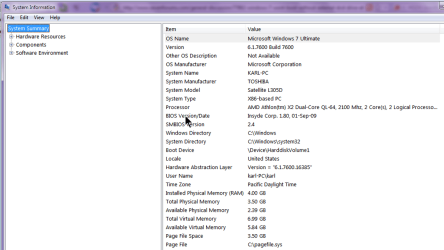
Use MSINFO32 for information about your computer.
I've attached a copy of the startup display page from my laptop.
 

Attachments

  • msinfo32bios.png
    msinfo32bios.png
    63.7 KB · Views: 45

My Computer My Computer

Computer Manufacturer/Model Number
Toshiba Satellite S875D-S7239 laptop
OS
MS Windows 7 Ultimate SP1 64-bit
CPU
AMD A10-4600M
Motherboard
AMD Pumori (Socket FT1)
Memory
6.00 GB Dual-Channel DDR3 @ 798MHz (11-11-12-28)
Graphics Card(s)
AMD Radeon HD 7660G
Sound Card
High Definition Audio Device
Monitor(s) Displays
Generic PnP Monitor (1600x900@60Hz)
Screen Resolution
1600x900@60Hz
Hard Drives
SSD 119GB Corsair CSSD-V128GB2 ATA Device
Keyboard
Standard PS/2 Keyboard
Mouse
HP Wireless Optical Mobile Mouse Model FHA-3410
Internet Speed
What the local pub, local coffee shop offers.
Other Info
Optical Drive:MATSHITA BD-CMB UJ160B ATA Device


Also have an Asus ha1002xp netbook with Win 7 Ultimate installed.
I will look for an answer that might help. until then I hope someone else joins in.

Is the external DVD going in through USB?


Edit: looking for correct answer :)
 

My Computer My Computer

Computer type
Laptop
Computer Manufacturer/Model Number
ASUS G60-RBBX05
OS
Win7 Home Premium 64x
CPU
Intel Core 2 Duo P7450 / 2.13 GHz (2.29 with Extreme Turbo)
Memory
4 GB PC-6400 Hyundai (2X2) at 800Mhz
Graphics Card(s)
NVIDIA GeForce GTX 260M 1GB DDR3 VRAM
Monitor(s) Displays
16" LED Backlit
Screen Resolution
1366 x 768 on laptop 1600x1050 max res on 22" external mon
Hard Drives
OCZ Agility 3 60GB SSD / 320 GB - Serial ATA-150 - 7200 rpm
PSU
6-cell Lithium ion { lasts 1.5 hours }
Case
ASUS G60 Laptop
Keyboard
Chicklet type back-lit (white light) keyboard
Mouse
Logitech G9 Laser Mouse 3200dpi and 1000 reports per minute
Internet Speed
Comcast 8.60mb/s up - 3.11mb/s down
Antivirus
MSE
Browser
Firefox
Other Info
General mid-budget gaming Comp. Low batterylife - High FrameRates - currently overheating problems :(

2nd Rig: Case: Rosewill BLACKHAWK Gaming ATX Mid Tower Computer Case

Mobo: GIGABYTE GA-990FXA-UD3
CPU: AMD FX-6200 Zambezi 3.8GHz (4.1GHz Turbo)
Heatsink: COOLER MASTER V8 CPU Cooler
RAM: Patriot Viper 3 8GB (2 x 4GB) 240-Pin DDR3 SDRAM 1866 (PC3 15000)
GPU: SAPPHIRE Radeon HD 6850 1GB 2

My Computer My Computer

Computer type
Laptop
Computer Manufacturer/Model Number
ASUS G60-RBBX05
OS
Win7 Home Premium 64x
CPU
Intel Core 2 Duo P7450 / 2.13 GHz (2.29 with Extreme Turbo)
Memory
4 GB PC-6400 Hyundai (2X2) at 800Mhz
Graphics Card(s)
NVIDIA GeForce GTX 260M 1GB DDR3 VRAM
Monitor(s) Displays
16" LED Backlit
Screen Resolution
1366 x 768 on laptop 1600x1050 max res on 22" external mon
Hard Drives
OCZ Agility 3 60GB SSD / 320 GB - Serial ATA-150 - 7200 rpm
PSU
6-cell Lithium ion { lasts 1.5 hours }
Case
ASUS G60 Laptop
Keyboard
Chicklet type back-lit (white light) keyboard
Mouse
Logitech G9 Laser Mouse 3200dpi and 1000 reports per minute
Internet Speed
Comcast 8.60mb/s up - 3.11mb/s down
Antivirus
MSE
Browser
Firefox
Other Info
General mid-budget gaming Comp. Low batterylife - High FrameRates - currently overheating problems :(

2nd Rig: Case: Rosewill BLACKHAWK Gaming ATX Mid Tower Computer Case

Mobo: GIGABYTE GA-990FXA-UD3
CPU: AMD FX-6200 Zambezi 3.8GHz (4.1GHz Turbo)
Heatsink: COOLER MASTER V8 CPU Cooler
RAM: Patriot Viper 3 8GB (2 x 4GB) 240-Pin DDR3 SDRAM 1866 (PC3 15000)
GPU: SAPPHIRE Radeon HD 6850 1GB 2
I will look for an answer that might help. until then I hope someone else joins in.

Is the external DVD going in through USB?


Edit: looking for correct answer :)

Yes, external DVD via USB. Thanks!
 

My Computer My Computer

Computer Manufacturer/Model Number
Acer Aspire Revo
OS
windows 7 Home Premium 32 bit
CPU
Intel Atom processor 230
Memory
2GB DDR2
Graphics Card(s)
NVIDIA ION built in
Monitor(s) Displays
Acer (external)
Hard Drives
160 GB HDD (Hitachi)
Emma,
Use MSINFO32 for information about your computer.
I've attached a copy of the startup display page from my laptop.


OK thanks, how do I reach that info. Sorry to be a dummy!
 

My Computer My Computer

Computer Manufacturer/Model Number
Acer Aspire Revo
OS
windows 7 Home Premium 32 bit
CPU
Intel Atom processor 230
Memory
2GB DDR2
Graphics Card(s)
NVIDIA ION built in
Monitor(s) Displays
Acer (external)
Hard Drives
160 GB HDD (Hitachi)

My Computer My Computer

Computer Manufacturer/Model Number
Acer Aspire Revo
OS
windows 7 Home Premium 32 bit
CPU
Intel Atom processor 230
Memory
2GB DDR2
Graphics Card(s)
NVIDIA ION built in
Monitor(s) Displays
Acer (external)
Hard Drives
160 GB HDD (Hitachi)

My Computer My Computer

Computer type
Laptop
Computer Manufacturer/Model Number
ASUS G60-RBBX05
OS
Win7 Home Premium 64x
CPU
Intel Core 2 Duo P7450 / 2.13 GHz (2.29 with Extreme Turbo)
Memory
4 GB PC-6400 Hyundai (2X2) at 800Mhz
Graphics Card(s)
NVIDIA GeForce GTX 260M 1GB DDR3 VRAM
Monitor(s) Displays
16" LED Backlit
Screen Resolution
1366 x 768 on laptop 1600x1050 max res on 22" external mon
Hard Drives
OCZ Agility 3 60GB SSD / 320 GB - Serial ATA-150 - 7200 rpm
PSU
6-cell Lithium ion { lasts 1.5 hours }
Case
ASUS G60 Laptop
Keyboard
Chicklet type back-lit (white light) keyboard
Mouse
Logitech G9 Laser Mouse 3200dpi and 1000 reports per minute
Internet Speed
Comcast 8.60mb/s up - 3.11mb/s down
Antivirus
MSE
Browser
Firefox
Other Info
General mid-budget gaming Comp. Low batterylife - High FrameRates - currently overheating problems :(

2nd Rig: Case: Rosewill BLACKHAWK Gaming ATX Mid Tower Computer Case

Mobo: GIGABYTE GA-990FXA-UD3
CPU: AMD FX-6200 Zambezi 3.8GHz (4.1GHz Turbo)
Heatsink: COOLER MASTER V8 CPU Cooler
RAM: Patriot Viper 3 8GB (2 x 4GB) 240-Pin DDR3 SDRAM 1866 (PC3 15000)
GPU: SAPPHIRE Radeon HD 6850 1GB 2
Emma,
Use MSINFO32 for information about your computer.
I've attached a copy of the startup display page from my laptop.


OK thanks, how do I reach that info. Sorry to be a dummy!


OK, found it. But not sure how to recreate a screen print here.


OS Name Microsoft Windows 7 Home Premium
Version 6.1.7600 Build 7600
Other OS Description Not Available
OS Manufacturer Microsoft Corporation
System Name FAMILY
System Manufacturer Acer
System Model Aspire R3600
System Type X86-based PC
Processor Intel(R) Atom(TM) CPU 230 @ 1.60GHz, 1600 Mhz, 1 Core(s), 2 Logical Processor(s)
BIOS Version/Date American Megatrends Inc. P01-A2, 30/04/2009
SMBIOS Version 2.6
Windows Directory C:\Windows
System Directory C:\Windows\system32
Boot Device \Device\HarddiskVolume2
Locale United Kingdom
Hardware Abstraction Layer Version = "6.1.7600.16385"
User Name Family\Emma
Time Zone GMT Daylight Time
Installed Physical Memory (RAM) 2.00 GB
Total Physical Memory 1.75 GB
Available Physical Memory 870 MB
Total Virtual Memory 3.50 GB


Will that do???:eek:
 

My Computer My Computer

Computer Manufacturer/Model Number
Acer Aspire Revo
OS
windows 7 Home Premium 32 bit
CPU
Intel Atom processor 230
Memory
2GB DDR2
Graphics Card(s)
NVIDIA ION built in
Monitor(s) Displays
Acer (external)
Hard Drives
160 GB HDD (Hitachi)
Boot Device \Device\HarddiskVolume2 I think this should say Volume1

I had posted something earlier about the Boot Record, but I deleted it as I dont know if this might be the cause.

Can someone advise?
 

My Computer My Computer

Computer type
Laptop
Computer Manufacturer/Model Number
ASUS G60-RBBX05
OS
Win7 Home Premium 64x
CPU
Intel Core 2 Duo P7450 / 2.13 GHz (2.29 with Extreme Turbo)
Memory
4 GB PC-6400 Hyundai (2X2) at 800Mhz
Graphics Card(s)
NVIDIA GeForce GTX 260M 1GB DDR3 VRAM
Monitor(s) Displays
16" LED Backlit
Screen Resolution
1366 x 768 on laptop 1600x1050 max res on 22" external mon
Hard Drives
OCZ Agility 3 60GB SSD / 320 GB - Serial ATA-150 - 7200 rpm
PSU
6-cell Lithium ion { lasts 1.5 hours }
Case
ASUS G60 Laptop
Keyboard
Chicklet type back-lit (white light) keyboard
Mouse
Logitech G9 Laser Mouse 3200dpi and 1000 reports per minute
Internet Speed
Comcast 8.60mb/s up - 3.11mb/s down
Antivirus
MSE
Browser
Firefox
Other Info
General mid-budget gaming Comp. Low batterylife - High FrameRates - currently overheating problems :(

2nd Rig: Case: Rosewill BLACKHAWK Gaming ATX Mid Tower Computer Case

Mobo: GIGABYTE GA-990FXA-UD3
CPU: AMD FX-6200 Zambezi 3.8GHz (4.1GHz Turbo)
Heatsink: COOLER MASTER V8 CPU Cooler
RAM: Patriot Viper 3 8GB (2 x 4GB) 240-Pin DDR3 SDRAM 1866 (PC3 15000)
GPU: SAPPHIRE Radeon HD 6850 1GB 2

My Computer My Computer

Computer Manufacturer/Model Number
Custom
OS
Windows 7 Professional x64
CPU
Intel i7 2600K OC'd @ 4620 MHz
Motherboard
Asus P8Z68-V Pro
Memory
16GB GSkill Sniper 2133 Mhz (4x4GB)
Graphics Card(s)
EVGA GeForce GTX 480 SuperClocked+
Sound Card
Realtek High Definition Audio
Monitor(s) Displays
2x Acer S273HLbmii 27"
Screen Resolution
2 x 1920x1080
Hard Drives
64GB Crucial M4 SSD

Storage: Hitachi 1TB 5400RPM, Samsung 1.5TB 5400RPM
PSU
Corsair HW Series 750w (modular)
Case
Cooler Master HAF 932 Advanced Blue Edition
Cooling
CM Hyper 212+ CPU cooler, 3x 230mm + 1x 140mm case fans
Keyboard
Logitech MK320 (wireless)
Mouse
Logitech MK320 (wireless)
Internet Speed
30 Mb/s : 2 Mb/s
Thorsen,

I've not had this particular problem (oh yes, your are correct -that points to the wrong drive and is the source of the problem), however,


CREATE A SYSTEM REPAIR DISK
START | type System Repair | Enter key | Create Disk button


After making the system repair disk, then a boot from the system repair disk and choosing the system repair option should get there. I don't have my repair disk with me right now the go thru the step-by-step.


Fixing the problem may require repeating the repair several times.


My Computer My Computer

Computer Manufacturer/Model Number
Toshiba Satellite S875D-S7239 laptop
OS
MS Windows 7 Ultimate SP1 64-bit
CPU
AMD A10-4600M
Motherboard
AMD Pumori (Socket FT1)
Memory
6.00 GB Dual-Channel DDR3 @ 798MHz (11-11-12-28)
Graphics Card(s)
AMD Radeon HD 7660G
Sound Card
High Definition Audio Device
Monitor(s) Displays
Generic PnP Monitor (1600x900@60Hz)
Screen Resolution
1600x900@60Hz
Hard Drives
SSD 119GB Corsair CSSD-V128GB2 ATA Device
Keyboard
Standard PS/2 Keyboard
Mouse
HP Wireless Optical Mobile Mouse Model FHA-3410
Internet Speed
What the local pub, local coffee shop offers.
Other Info
Optical Drive:MATSHITA BD-CMB UJ160B ATA Device


Also have an Asus ha1002xp netbook with Win 7 Ultimate installed.
Jonathan,
Thanks. Forgot to mention marking the partition as active.
 

My Computer My Computer

Computer Manufacturer/Model Number
Toshiba Satellite S875D-S7239 laptop
OS
MS Windows 7 Ultimate SP1 64-bit
CPU
AMD A10-4600M
Motherboard
AMD Pumori (Socket FT1)
Memory
6.00 GB Dual-Channel DDR3 @ 798MHz (11-11-12-28)
Graphics Card(s)
AMD Radeon HD 7660G
Sound Card
High Definition Audio Device
Monitor(s) Displays
Generic PnP Monitor (1600x900@60Hz)
Screen Resolution
1600x900@60Hz
Hard Drives
SSD 119GB Corsair CSSD-V128GB2 ATA Device
Keyboard
Standard PS/2 Keyboard
Mouse
HP Wireless Optical Mobile Mouse Model FHA-3410
Internet Speed
What the local pub, local coffee shop offers.
Other Info
Optical Drive:MATSHITA BD-CMB UJ160B ATA Device


Also have an Asus ha1002xp netbook with Win 7 Ultimate installed.
:) it seems we are all on the right track I just dont know enough yet to say full-speed ahead. thanks for adding in guys
 

My Computer My Computer

Computer type
Laptop
Computer Manufacturer/Model Number
ASUS G60-RBBX05
OS
Win7 Home Premium 64x
CPU
Intel Core 2 Duo P7450 / 2.13 GHz (2.29 with Extreme Turbo)
Memory
4 GB PC-6400 Hyundai (2X2) at 800Mhz
Graphics Card(s)
NVIDIA GeForce GTX 260M 1GB DDR3 VRAM
Monitor(s) Displays
16" LED Backlit
Screen Resolution
1366 x 768 on laptop 1600x1050 max res on 22" external mon
Hard Drives
OCZ Agility 3 60GB SSD / 320 GB - Serial ATA-150 - 7200 rpm
PSU
6-cell Lithium ion { lasts 1.5 hours }
Case
ASUS G60 Laptop
Keyboard
Chicklet type back-lit (white light) keyboard
Mouse
Logitech G9 Laser Mouse 3200dpi and 1000 reports per minute
Internet Speed
Comcast 8.60mb/s up - 3.11mb/s down
Antivirus
MSE
Browser
Firefox
Other Info
General mid-budget gaming Comp. Low batterylife - High FrameRates - currently overheating problems :(

2nd Rig: Case: Rosewill BLACKHAWK Gaming ATX Mid Tower Computer Case

Mobo: GIGABYTE GA-990FXA-UD3
CPU: AMD FX-6200 Zambezi 3.8GHz (4.1GHz Turbo)
Heatsink: COOLER MASTER V8 CPU Cooler
RAM: Patriot Viper 3 8GB (2 x 4GB) 240-Pin DDR3 SDRAM 1866 (PC3 15000)
GPU: SAPPHIRE Radeon HD 6850 1GB 2
I think part of the problem on this case is that this is a net-top and has no internal DVD drive. so when 7 was installed it said the external drive was the boot device I guess.
 

My Computer My Computer

Computer type
Laptop
Computer Manufacturer/Model Number
ASUS G60-RBBX05
OS
Win7 Home Premium 64x
CPU
Intel Core 2 Duo P7450 / 2.13 GHz (2.29 with Extreme Turbo)
Memory
4 GB PC-6400 Hyundai (2X2) at 800Mhz
Graphics Card(s)
NVIDIA GeForce GTX 260M 1GB DDR3 VRAM
Monitor(s) Displays
16" LED Backlit
Screen Resolution
1366 x 768 on laptop 1600x1050 max res on 22" external mon
Hard Drives
OCZ Agility 3 60GB SSD / 320 GB - Serial ATA-150 - 7200 rpm
PSU
6-cell Lithium ion { lasts 1.5 hours }
Case
ASUS G60 Laptop
Keyboard
Chicklet type back-lit (white light) keyboard
Mouse
Logitech G9 Laser Mouse 3200dpi and 1000 reports per minute
Internet Speed
Comcast 8.60mb/s up - 3.11mb/s down
Antivirus
MSE
Browser
Firefox
Other Info
General mid-budget gaming Comp. Low batterylife - High FrameRates - currently overheating problems :(

2nd Rig: Case: Rosewill BLACKHAWK Gaming ATX Mid Tower Computer Case

Mobo: GIGABYTE GA-990FXA-UD3
CPU: AMD FX-6200 Zambezi 3.8GHz (4.1GHz Turbo)
Heatsink: COOLER MASTER V8 CPU Cooler
RAM: Patriot Viper 3 8GB (2 x 4GB) 240-Pin DDR3 SDRAM 1866 (PC3 15000)
GPU: SAPPHIRE Radeon HD 6850 1GB 2
Back
Top