Solved Windows 7 wont update!

Hiacios

New member
Local time
8:39 PM
Messages
6
I have a problem with Windows 7 updates not starting once I login. I have just installed it on my computer and it wont start looking for updates by itself, even when I click the update button it just says "Check for updates...." but never finds any. I have not messed with windows other then connecting it to my network
 

My Computer

Computer type
PC/Desktop
OS
Windows 7 64bit
Hello!

Just to be sure do you have all the latest drivers installed on your PC? [YES/NO]

If no, please tell me your Manufacturer.

Here are a couple of Methods that could work for you. Please let me know if your issue does -OR- doesn't get resolved.

Method 1: Difficulty: Easy

  1. Download the following tool below.
  2. Download this tool: Microsoft Fixit Tool
  3. Run the file once it finishes downloading.
  4. Once the window appears on your screen, click the "Next" Button.
  5. Let the program scan for errors, DO NOT click "Cancel". (This process may take some time.)
  6. Once the program finishes scanning, it will list the following errors that have been "Fixed" or "Not Fixed".
  7. If any errors were "Not Fixed", report them to me here. Left-Click the "Close the troubleshooter" Button.
  8. Restart your computer. Try to update your Windows.

    If Method 1 doesn't work proceed to Method 2.

Method 2: Difficulty: Moderate

  1. Press the Windows Key and the "R" Key simultaneously. [Win+R]
  2. A "Run" Box should appear. Type "services.msc" into the search box and press the "OK" button.
  3. The "Services" window should appear on your screen. Scroll down to "Windows Update" Service in the Services (Local) section.
  4. Right-Click on "Windows Update", then Left-Click "Stop" button. Please wait until the service completely stops. Do not close the Window.
  5. Press the Windows Key and the "R" Key simultaneously. [Win+R] again.
  6. Remove "services.msc" then type "C:\Windows\SoftwareDistribution\" into the search bar then Left-Click "OK". Windows Explorer should appear on your screen.
  7. Delete all contents within this folder. Left-Click + Hold + Drag until you completely highlight all the contents. Let go of Left-Click and press the "Delete" Button and Left-Click "Yes".
  8. Close Windows Explorer and return to the "Services" Window. Right-Click "Windows Update" then Left-Click "Start". Wait for the service to completely start then close the window.
  9. Restart your computer. Then try to update Windows.
 
Last edited:

My Computer

Computer type
PC/Desktop
Computer Manufacturer/Model Number
HP
OS
Windows 7 Ultimate x64 (v6.1)
CPU
Intel(R) Core(TM) i5-3570k CPU
Motherboard
ASUS
Memory
8GB x 2
Graphics Card(s)
Nvidia GTX 980
Hard Drives
SSD Samsung 850 EVO - 250 GB
HDD Western Digital - 1 TB
Antivirus
Microsoft Essentials
Browser
IE 11, Google Chrome
Ok, I've just ran the Microsoft Fixit Tool and here is what it found.

CBYPgEs.png


Here is my motherboard info.
Manufacturer Intel Corporation
Model DG41RQ (LGA775)
Version AAE54511-203
Chipset Vendor Intel
Chipset Model G41
Chipset Revision A3
Southbridge Vendor Intel
Southbridge Model 82801GB (ICH7/R)
Southbridge Revision A1

BIOS
Brand Intel Corp.
Version RQG4110H.86A.0009.2009.0108.1005
Date 1/8/2009

I have did the 2nd method before but it didn't fix Windows Update.
 

My Computer

Computer type
PC/Desktop
OS
Windows 7 64bit
Hello!

Your image seems to not be working. Try uploading on Imgur: The most awesome images on the Internet.

I will write Method 3 very soon, it's a little complicated so it will take some time to write.

EDIT: Your image is working now. Sorry. :P
 

My Computer

Computer type
PC/Desktop
Computer Manufacturer/Model Number
HP
OS
Windows 7 Ultimate x64 (v6.1)
CPU
Intel(R) Core(TM) i5-3570k CPU
Motherboard
ASUS
Memory
8GB x 2
Graphics Card(s)
Nvidia GTX 980
Hard Drives
SSD Samsung 850 EVO - 250 GB
HDD Western Digital - 1 TB
Antivirus
Microsoft Essentials
Browser
IE 11, Google Chrome
Now this Method doesn't necessarily fix Windows Update (does after updates are done) but rather than a bypass or a workaround. I will provide images with this Method sense it's a little tricky.

I hope this works. 99% sure it will! Good luck!

Method 3: Difficulty: Somewhat Hard

  1. Please download the following tools below.
  2. Download: WSUS Offline Update
  3. Go to your downloads file. (Usually C:\Users\"Profile Name"\Downloads) and Right-Click "Extract All..."
  4. The Extract Window should appear on your screen. Click the "Browse" Button on the window. Navigate and Left-Click the "Desktop" icon then press the "OK" Button.
  5. Open the new folder that appears on your Desktop.
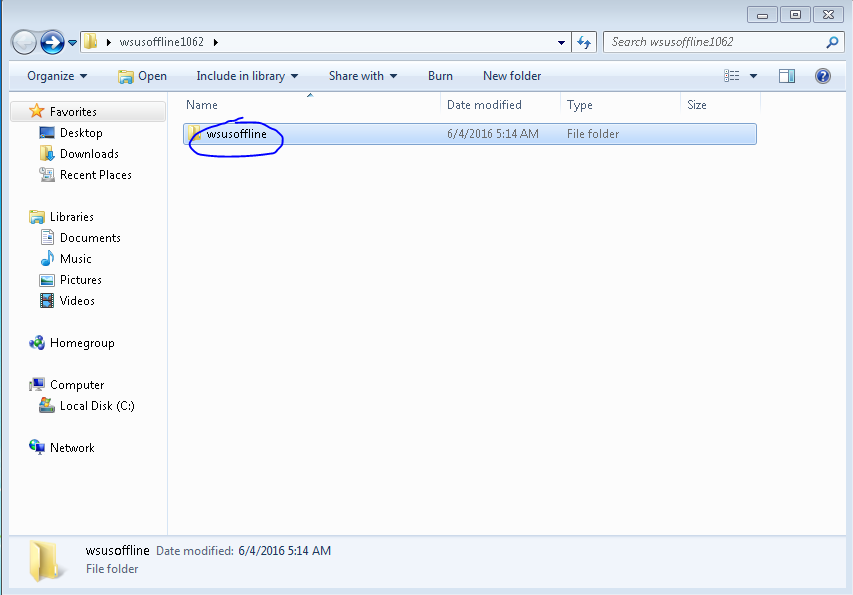
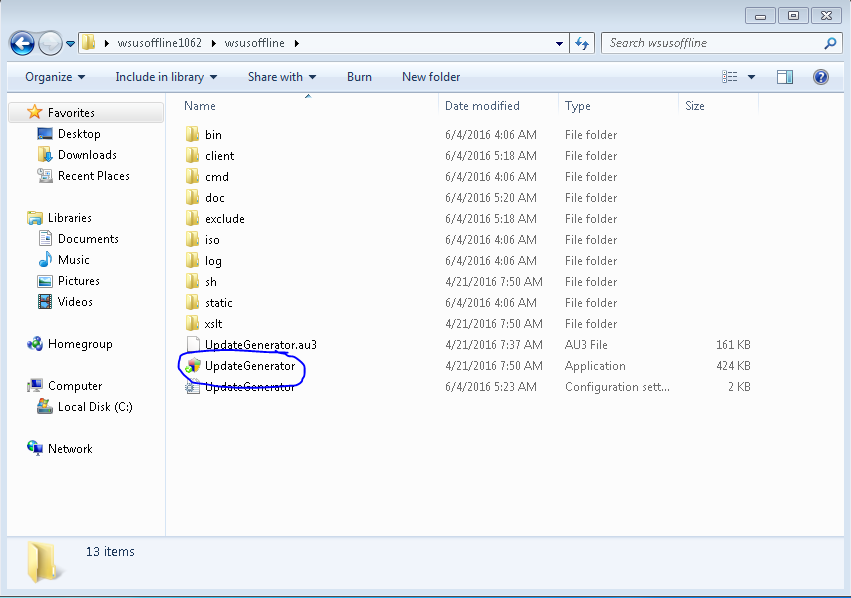
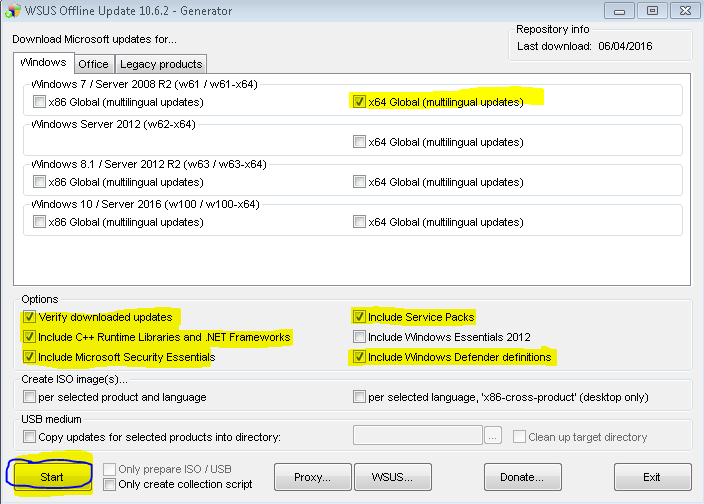
  6. Navigate to the following images below.

  • Navigate to...
    MlYebty.png
  • Navigate to...
    sx6B56U.png
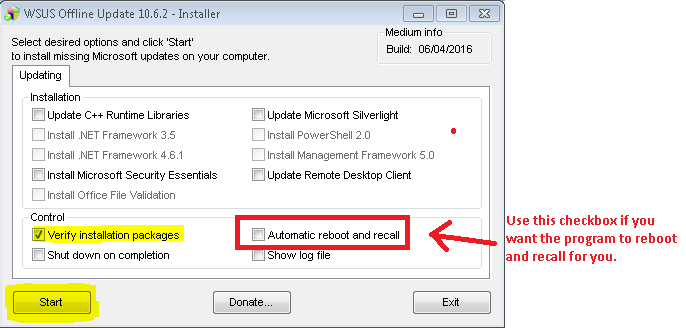
  • Check mark these boxes and click start...
    8hSAMcC.png
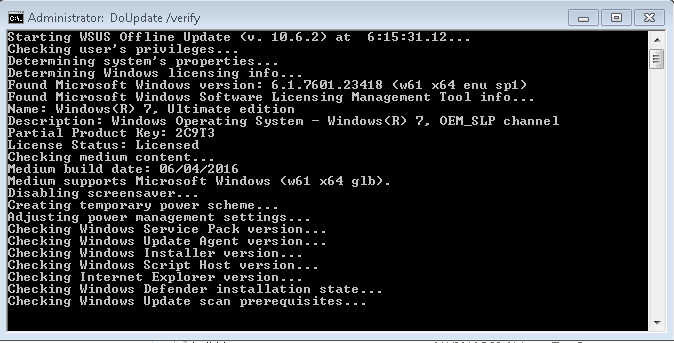
  • This cmd will download all Windows Updates from Microsoft's Database. Please do not exit out of the cmd, it will take a while to complete.
    y6K1WI5.png
  • After the downloading is done. Close the program and navigate to the following images.

  • Navigate to...
    tLoTbfc.png
  • Navigate to...
    OsVD1N8.png
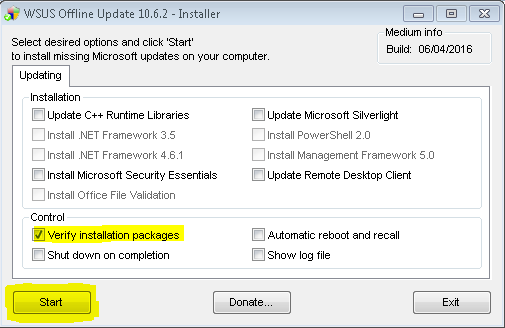
  • Check mark the following boxes and click "Start". Check mark the other boxes once you have SP1 installed.
    gRV6tml.png

    -OR-
    DlOR6NR.png
  • This cmd will install all downloaded updates. You might have to run this installer more than once due to the fact that SP1 has to be installed first. Then Microsoft Security Updates.
    hdNaI0S.png

  • You will have to restart every time the installer completes a certain section of updates.
 
Last edited:

My Computer

Computer type
PC/Desktop
Computer Manufacturer/Model Number
HP
OS
Windows 7 Ultimate x64 (v6.1)
CPU
Intel(R) Core(TM) i5-3570k CPU
Motherboard
ASUS
Memory
8GB x 2
Graphics Card(s)
Nvidia GTX 980
Hard Drives
SSD Samsung 850 EVO - 250 GB
HDD Western Digital - 1 TB
Antivirus
Microsoft Essentials
Browser
IE 11, Google Chrome
Just try running
KB971033 1st,
that error code relates to an unlicenced/unactivated OS.

Roy
 

My Computer

Computer type
PC/Desktop
Computer Manufacturer/Model Number
medionl/Aspire 6930G/acer x55a
OS
W7 home premium 32bit/W7HP 64bit/w10 tp insider ring
CPU
E5300 dual core
Motherboard
medion MS7366
Memory
3gb
Graphics Card(s)
Nvidia Geforce 7100 Nforce 630i
Monitor(s) Displays
avixc
Internet Speed
n (isp resticted to 72)
Antivirus
mse/pands
Browser
palemoon
Other Info
Belkin Fd7050 n USB using Railink RT2870 drivers, more upto date
Like I said Method 3 is a workaround so yeah. It works because I've done it before and it's perfectly legal.
 

My Computer

Computer type
PC/Desktop
Computer Manufacturer/Model Number
HP
OS
Windows 7 Ultimate x64 (v6.1)
CPU
Intel(R) Core(TM) i5-3570k CPU
Motherboard
ASUS
Memory
8GB x 2
Graphics Card(s)
Nvidia GTX 980
Hard Drives
SSD Samsung 850 EVO - 250 GB
HDD Western Digital - 1 TB
Antivirus
Microsoft Essentials
Browser
IE 11, Google Chrome

My Computer

Computer type
PC/Desktop
OS
Windows 7 64bit
Not saying its not legal,
But if you read the detail it checks for a valid OS, if KB971033 is not installed it will FAIL.

Roy
 

My Computer

Computer type
PC/Desktop
Computer Manufacturer/Model Number
medionl/Aspire 6930G/acer x55a
OS
W7 home premium 32bit/W7HP 64bit/w10 tp insider ring
CPU
E5300 dual core
Motherboard
medion MS7366
Memory
3gb
Graphics Card(s)
Nvidia Geforce 7100 Nforce 630i
Monitor(s) Displays
avixc
Internet Speed
n (isp resticted to 72)
Antivirus
mse/pands
Browser
palemoon
Other Info
Belkin Fd7050 n USB using Railink RT2870 drivers, more upto date
Yeah but once you install it, it's too late, even if you uninstall it, it won't work. It's tied to the registry. He would have to do this or reinstall windows and make sure not to download that update.

Or mess with the registry which is not suggested.

EDIT:
Plus I think you have it backwards bro, if you install it.. it will Fail, not the other way around. Or I might be wrong. lmao my memory is bad. haha
 

My Computer

Computer type
PC/Desktop
Computer Manufacturer/Model Number
HP
OS
Windows 7 Ultimate x64 (v6.1)
CPU
Intel(R) Core(TM) i5-3570k CPU
Motherboard
ASUS
Memory
8GB x 2
Graphics Card(s)
Nvidia GTX 980
Hard Drives
SSD Samsung 850 EVO - 250 GB
HDD Western Digital - 1 TB
Antivirus
Microsoft Essentials
Browser
IE 11, Google Chrome
WAT (kb971033) is part of the Anti-piracy check, thats why its used to validate systems ,if its not installed then MS takes a dim view of the users comp.

Roy
 

My Computer

Computer type
PC/Desktop
Computer Manufacturer/Model Number
medionl/Aspire 6930G/acer x55a
OS
W7 home premium 32bit/W7HP 64bit/w10 tp insider ring
CPU
E5300 dual core
Motherboard
medion MS7366
Memory
3gb
Graphics Card(s)
Nvidia Geforce 7100 Nforce 630i
Monitor(s) Displays
avixc
Internet Speed
n (isp resticted to 72)
Antivirus
mse/pands
Browser
palemoon
Other Info
Belkin Fd7050 n USB using Railink RT2870 drivers, more upto date
I would suggest doing as torchwood recommends and install KB971033. Then reboot and check Windows 7 Update again.

I know of know good reason to try and work around this KB.

I will go back to watching.
 

My Computer

Computer type
PC/Desktop
Computer Manufacturer/Model Number
Home made Desktop
OS
Windows 10 Pro. 64/ version 1709 Windows 7 Pro/64
CPU
Intel i7-6800K @ 4.3
Motherboard
ASUS X-99 Deluxe II
Memory
Corsair Platinum 16 gig @2400
Graphics Card(s)
EVGA GTX 1070 OC
Monitor(s) Displays
Asus 27" LED LCD/VE278Q
Screen Resolution
1920-1080 or 1280-720 HDMI
Hard Drives
INTEL SSD 730-240 Gb Sata 3.0/
PSU
EVGA Platium 1200W
Case
Phanteks Luxe Tempered Glass 8 fans/ one radiator
Cooling
XSPC/ Water Cooled CPU
Keyboard
Das 4 Professional
Mouse
Logitech M705/MX Anywhere 2-S
Internet Speed
100 mbits
Antivirus
Microsoft Security Essentials/ Malwarebytes Premium 3.0/ SAS
Browser
I.E. 11 default/Firefox/ ISP Time Warner Cable/Spectrum
Other Info
LG BluRay Burner/
Sound system-KLipsch-THX/
Icy Dock ssd Hot Swap bays.
Oh alright, It's just that I've seen other users install this KB in the past and still didn't work for them so yeah. My method also works fine but whatevs.

EDIT: After I installed all updates with WSUS, my Windows Updater started to work again. Just showing how I fixed my problem (Which was similar to his), that's all.
 

My Computer

Computer type
PC/Desktop
Computer Manufacturer/Model Number
HP
OS
Windows 7 Ultimate x64 (v6.1)
CPU
Intel(R) Core(TM) i5-3570k CPU
Motherboard
ASUS
Memory
8GB x 2
Graphics Card(s)
Nvidia GTX 980
Hard Drives
SSD Samsung 850 EVO - 250 GB
HDD Western Digital - 1 TB
Antivirus
Microsoft Essentials
Browser
IE 11, Google Chrome
It worked! thank you so much for helping me Tyler1118 you are the best!!!!!
 

My Computer

Computer type
PC/Desktop
OS
Windows 7 64bit

My Computer

Computer type
PC/Desktop
Computer Manufacturer/Model Number
medionl/Aspire 6930G/acer x55a
OS
W7 home premium 32bit/W7HP 64bit/w10 tp insider ring
CPU
E5300 dual core
Motherboard
medion MS7366
Memory
3gb
Graphics Card(s)
Nvidia Geforce 7100 Nforce 630i
Monitor(s) Displays
avixc
Internet Speed
n (isp resticted to 72)
Antivirus
mse/pands
Browser
palemoon
Other Info
Belkin Fd7050 n USB using Railink RT2870 drivers, more upto date
It worked! thank you so much for helping me Tyler1118 you are the best!!!!!

No problem, just make sure you have all the updates installed or try using Windows Update now and see if it works. ;)
 

My Computer

Computer type
PC/Desktop
Computer Manufacturer/Model Number
HP
OS
Windows 7 Ultimate x64 (v6.1)
CPU
Intel(R) Core(TM) i5-3570k CPU
Motherboard
ASUS
Memory
8GB x 2
Graphics Card(s)
Nvidia GTX 980
Hard Drives
SSD Samsung 850 EVO - 250 GB
HDD Western Digital - 1 TB
Antivirus
Microsoft Essentials
Browser
IE 11, Google Chrome
:cool: :cool: :cool: :cool: :cool: :cool: :cool: :cool: :cool: :cool: :cool: :cool:
 

My Computer

Computer type
PC/Desktop
Computer Manufacturer/Model Number
HP
OS
Windows 7 Ultimate x64 (v6.1)
CPU
Intel(R) Core(TM) i5-3570k CPU
Motherboard
ASUS
Memory
8GB x 2
Graphics Card(s)
Nvidia GTX 980
Hard Drives
SSD Samsung 850 EVO - 250 GB
HDD Western Digital - 1 TB
Antivirus
Microsoft Essentials
Browser
IE 11, Google Chrome
And if your system specs are correct YOU DO NOT HAVE THAT KB installed.

Roy
 

My Computer

Computer type
PC/Desktop
Computer Manufacturer/Model Number
medionl/Aspire 6930G/acer x55a
OS
W7 home premium 32bit/W7HP 64bit/w10 tp insider ring
CPU
E5300 dual core
Motherboard
medion MS7366
Memory
3gb
Graphics Card(s)
Nvidia Geforce 7100 Nforce 630i
Monitor(s) Displays
avixc
Internet Speed
n (isp resticted to 72)
Antivirus
mse/pands
Browser
palemoon
Other Info
Belkin Fd7050 n USB using Railink RT2870 drivers, more upto date
Back
Top