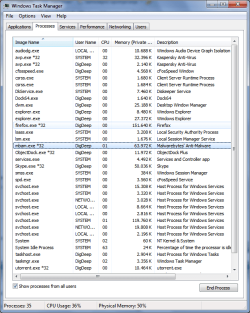
Windows 7 x64 have two explorer.exe

DigDeep

New member
Member
VIP
Local time
9:35 PM
Messages
101
Location
Kočevje
My windows 7 sometimes uses two explorer.exe and then it starting to freeze a lot.
What can I do to have only one explorer.exe?
 

Attachments

  • explorer.png
    explorer.png
    31.4 KB · Views: 808

My Computer My Computer

Computer type
PC/Desktop
Computer Manufacturer/Model Number
Custom build
OS
Windows 7 SP1 x64 Ultimate
CPU
FX 8320 4ghz
Motherboard
Gigabyte 970A UD3P
Memory
Crucial Ballistix Tactical 8GB 240-Pin DDR3 1600 Mhz
Graphics Card(s)
Sapphire R9 270 Dual X
Sound Card
VIA HD Audio
Monitor(s) Displays
Samsung SyncMaster 2032BW
Screen Resolution
1680 * 1050
Hard Drives
WD Blue WD10EZEX
PSU
Energon 650w
Case
Aerocool Strike X One
Cooling
Xigmatek Dark Knight SD1283 Night Hawk Edition
Keyboard
Typhoon CarbonKey
Mouse
Trust GXT 25 Gaming Mouse
Internet Speed
120mb/4mb
Antivirus
Comodo Internet Security 8.1
Browser
Firefox
Other Info
CfosSpeed 10
Do you have a copy of explorer somewhere? Kill one of explorer.exe in taskmanager, if its the wrong one, go to file, new task, write explorer, hit enter
 

My Computer My Computer

Computer Manufacturer/Model Number
Micro-Star International/MS-7529
OS
Windows 7 Ultimate x32
CPU
DualCore Intel Pentium E2200, 2218 MHz (11 x 202)
Motherboard
MSI G31M3 V2 (MS-7529) (2 PCI, 1 PCI-E x16,2 DDR2 DIMM)
Memory
2 GB DDR2-800 DDR2 SDRAM
Graphics Card(s)
nVIDIA GeForce 9500GT 1GB
Sound Card
Realtek ALC888/1200 @ Intel 82801GB ICH7
Monitor(s) Displays
Samsung SyncMaster 2253BW (Digital) 22'' LCD
Screen Resolution
1680x1050
Hard Drives
SAMSUNG HD322IJ ATA Device (298 GB , IDE)
Hi,
found this:

"Explorer.exe is known to keep crashing in Windows 7 x64. Fortunately, it's really easy to fix it. The problem is that explorer.exe is located in the SysWOW64 directory, but Windows looks for it in Windows\System32. Since there is no explorer.exe there, it keeps crashing. To fix this all you need to do is copy (not move!) explorer.exe from the SysWOW64 folder and paste it into the Windows\System32 folder. That should eliminate the crashes."

Source: Explorer.exe - What is explorer.exe? - Windows Explorer
 

My Computer My Computer

OS
Home Premium
Hi,
found this:

"Explorer.exe is known to keep crashing in Windows 7 x64. Fortunately, it's really easy to fix it. The problem is that explorer.exe is located in the SysWOW64 directory, but Windows looks for it in Windows\System32. Since there is no explorer.exe there, it keeps crashing. To fix this all you need to do is copy (not move!) explorer.exe from the SysWOW64 folder and paste it into the Windows\System32 folder. That should eliminate the crashes."

Source: Explorer.exe - What is explorer.exe? - Windows Explorer

I tried to do that, but when I want to copy explore.exe from SysWOW64 to windows it says if I want to overwrite the file, but the file in the windows folder is not the same size as it is in SysWOW64. What should I do?
 

My Computer My Computer

Computer type
PC/Desktop
Computer Manufacturer/Model Number
Custom build
OS
Windows 7 SP1 x64 Ultimate
CPU
FX 8320 4ghz
Motherboard
Gigabyte 970A UD3P
Memory
Crucial Ballistix Tactical 8GB 240-Pin DDR3 1600 Mhz
Graphics Card(s)
Sapphire R9 270 Dual X
Sound Card
VIA HD Audio
Monitor(s) Displays
Samsung SyncMaster 2032BW
Screen Resolution
1680 * 1050
Hard Drives
WD Blue WD10EZEX
PSU
Energon 650w
Case
Aerocool Strike X One
Cooling
Xigmatek Dark Knight SD1283 Night Hawk Edition
Keyboard
Typhoon CarbonKey
Mouse
Trust GXT 25 Gaming Mouse
Internet Speed
120mb/4mb
Antivirus
Comodo Internet Security 8.1
Browser
Firefox
Other Info
CfosSpeed 10
Do you have a copy of explorer somewhere? Kill one of explorer.exe in taskmanager, if its the wrong one, go to file, new task, write explorer, hit enter

Yes I can to that, but I want solution.
 

My Computer My Computer

Computer type
PC/Desktop
Computer Manufacturer/Model Number
Custom build
OS
Windows 7 SP1 x64 Ultimate
CPU
FX 8320 4ghz
Motherboard
Gigabyte 970A UD3P
Memory
Crucial Ballistix Tactical 8GB 240-Pin DDR3 1600 Mhz
Graphics Card(s)
Sapphire R9 270 Dual X
Sound Card
VIA HD Audio
Monitor(s) Displays
Samsung SyncMaster 2032BW
Screen Resolution
1680 * 1050
Hard Drives
WD Blue WD10EZEX
PSU
Energon 650w
Case
Aerocool Strike X One
Cooling
Xigmatek Dark Knight SD1283 Night Hawk Edition
Keyboard
Typhoon CarbonKey
Mouse
Trust GXT 25 Gaming Mouse
Internet Speed
120mb/4mb
Antivirus
Comodo Internet Security 8.1
Browser
Firefox
Other Info
CfosSpeed 10
The problem is not two "explorer.exe" okay...
 

My Computer My Computer

Computer type
PC/Desktop
Computer Manufacturer/Model Number
Alienware Aurora ALX R4
OS
Windows 10 Pro (x64)
CPU
Intel Core i7-3930K (3.2GHz - 4.5GHz)
Motherboard
Alienware Aurora-R4 x79
Memory
4x Samsung 4GB PC3-12800 DDR3 (16GB 1600MHz)
Graphics Card(s)
Nvidia Geforce GTX 690
Sound Card
SteelSeries Siberia Elite
Monitor(s) Displays
Dell UltraSharp U3011
Screen Resolution
2560x1600
Hard Drives
Samsung 850 Pro 256 GB, Seagate 1TB Desktop Hybrid HDD, 2x Western Digital 4TB Green HDD
PSU
875W Some Dell PSU <.<
Case
Alienware Aurora ALX
Cooling
Custom Liquid Cooling (EK CPU & GPU blocks) dual EK 480RAD
Keyboard
Logitech G710+ Mechanical
Mouse
Logitech G700s
Internet Speed
Verizon Fios (50 mbps average)
Other Info
Server: Intel NUC D54250WYK: i5-4250U, 16GB, 256 GB mSATA, Windows Server 2012 R2
Ups I tried to copy it from SysWOW64 to windows not windows/system32.

Will ty to copy to syste32(there is no explorer.exe ,and see what will happen
 

My Computer My Computer

Computer type
PC/Desktop
Computer Manufacturer/Model Number
Custom build
OS
Windows 7 SP1 x64 Ultimate
CPU
FX 8320 4ghz
Motherboard
Gigabyte 970A UD3P
Memory
Crucial Ballistix Tactical 8GB 240-Pin DDR3 1600 Mhz
Graphics Card(s)
Sapphire R9 270 Dual X
Sound Card
VIA HD Audio
Monitor(s) Displays
Samsung SyncMaster 2032BW
Screen Resolution
1680 * 1050
Hard Drives
WD Blue WD10EZEX
PSU
Energon 650w
Case
Aerocool Strike X One
Cooling
Xigmatek Dark Knight SD1283 Night Hawk Edition
Keyboard
Typhoon CarbonKey
Mouse
Trust GXT 25 Gaming Mouse
Internet Speed
120mb/4mb
Antivirus
Comodo Internet Security 8.1
Browser
Firefox
Other Info
CfosSpeed 10
That is normal. You will have 1 instance for the shell - this is the desktop and taskbar. When you open My Computer to browse folder contents, another instance will appear. No matter how many folders you have open, there will only be 2 instances of explorer.exe in the Task Manager.

To verify this, close all open applications. Open the Task Manager and note that there is only 1 instance of explorer.exe running. Now open 1 or more folders. You should now have 2 instances running. Right-click on the one that has just come up and select End Process. All the folders you have had open should close, and you should be back to just the 1 instance of this process in the Task Manager.
 

My Computer My Computer

Computer type
PC/Desktop
Computer Manufacturer/Model Number
Dwarf Dwf/11/2012 r09/2013
OS
Windows 8.1 Pro RTM x64
CPU
Intel Core-i5-3570K 4-core @ 3.4GHz (Ivy Bridge) (OC 4.4GHz)
Motherboard
ASRock Z77 Extreme4-M
Memory
4 x 4GB DDR3-1600 Corsair Vengeance CMZ8GX3M2A1600C9B (16GB)
Graphics Card(s)
MSI GeForce GTX770 Gaming OC 2GB
Sound Card
Realtek High Definition on board solution (ALC 898)
Monitor(s) Displays
ViewSonic VA1912w Widescreen (VGA)
Screen Resolution
1440x900
Hard Drives
OCZ Agility 3 SSD 120GB SATA III x2 (RAID 0)
Samsung HD501LJ 500GB SATA II x2
Hitachi HDS721010CLA332 1TB SATA II
Iomega 1.5TB Ext USB 2.0
WD 2.0TB Ext USB 3.0
PSU
XFX Pro Series 850W Semi-Modular
Case
Gigabyte IF233
Cooling
1 x 120mm Front Inlet 1 x 120mm Rear Exhaust
Keyboard
Microsoft Comfort Curve Keyboard 3000 (USB)
Mouse
Microsoft Comfort Mouse 3000 for Business (USB)
Internet Speed
NetGear DG834Gv3 ADSL Modem/Router (Ethernet) ~4.0 Mb/s (O2)
Antivirus
Avast! 8.0.1497
Browser
IE 11
Other Info
Optical Drive: HL-DT-ST BD-RE BH10LS30 SATA Bluray
Lexmark S305 Printer/Scanner/Copier (USB)
WEI Score: 8.1/8.1/8.5/8.5/8.25
Asus Eee PC 1011PX Netbook (Windows 7 x86 Starter)
  • Like
Reactions: Dom
I think thats not true. You should allways have only one explorer.exe, no matter what.
Today it showed three instances of explorer.exe


Welcome to Microsoft Answers Forum.
I would suggest you to run online virus scan to see if any virus is causing the problem, Both 32 bit and 64 bit has the same base for its design. No matter how many explorer windows you have opened, it should show only one instance of explorer.exe in task manager, the following link will help you to run online virus scan.
 

My Computer My Computer

Computer type
PC/Desktop
Computer Manufacturer/Model Number
Custom build
OS
Windows 7 SP1 x64 Ultimate
CPU
FX 8320 4ghz
Motherboard
Gigabyte 970A UD3P
Memory
Crucial Ballistix Tactical 8GB 240-Pin DDR3 1600 Mhz
Graphics Card(s)
Sapphire R9 270 Dual X
Sound Card
VIA HD Audio
Monitor(s) Displays
Samsung SyncMaster 2032BW
Screen Resolution
1680 * 1050
Hard Drives
WD Blue WD10EZEX
PSU
Energon 650w
Case
Aerocool Strike X One
Cooling
Xigmatek Dark Knight SD1283 Night Hawk Edition
Keyboard
Typhoon CarbonKey
Mouse
Trust GXT 25 Gaming Mouse
Internet Speed
120mb/4mb
Antivirus
Comodo Internet Security 8.1
Browser
Firefox
Other Info
CfosSpeed 10
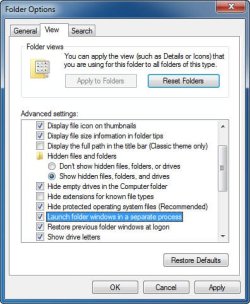
In Folder Options > View, do you have "Launch folder windows in a separate process" checked?
If so you will will have multiple explorer.exe processes shown in taskmanager.
 

My Computer My Computer

Computer type
PC/Desktop
Computer Manufacturer/Model Number
Alienware Aurora ALX R4
OS
Windows 10 Pro (x64)
CPU
Intel Core i7-3930K (3.2GHz - 4.5GHz)
Motherboard
Alienware Aurora-R4 x79
Memory
4x Samsung 4GB PC3-12800 DDR3 (16GB 1600MHz)
Graphics Card(s)
Nvidia Geforce GTX 690
Sound Card
SteelSeries Siberia Elite
Monitor(s) Displays
Dell UltraSharp U3011
Screen Resolution
2560x1600
Hard Drives
Samsung 850 Pro 256 GB, Seagate 1TB Desktop Hybrid HDD, 2x Western Digital 4TB Green HDD
PSU
875W Some Dell PSU <.<
Case
Alienware Aurora ALX
Cooling
Custom Liquid Cooling (EK CPU & GPU blocks) dual EK 480RAD
Keyboard
Logitech G710+ Mechanical
Mouse
Logitech G700s
Internet Speed
Verizon Fios (50 mbps average)
Other Info
Server: Intel NUC D54250WYK: i5-4250U, 16GB, 256 GB mSATA, Windows Server 2012 R2
  • Like
Reactions: Dom
Sure you didnt have 2 Inter Explorers open, or had a Inter Explorer based program open
 

My Computer My Computer

OS
Windows 7 Ultimate 64 Bit
In Folder Options > View, do you have "Launch folder windows in a separate process" checked?
If so you will will have multiple explorer.exe processes shown in taskmanager.


No its not checked.

I was Ok for about 10 hours.
SHould I delete explorer.exe from C:\Windows\SysWOW64 and C:\Windows\System32 and leave it only in C:\Windows
Because I have explorer.exe in all of this folders. At first I have it only in C:\Windows and C:\Windows\SysWOW64 , but then I copied it to system32 folder, because one user said it will help.

By the way explorer.exe from windows and SysWOW64 are not the same size.

And when I kill explorer.exe from task manager nothing happens, desktop is still there, and that process of explorer.exe is about 17.000kb
 

My Computer My Computer

Computer type
PC/Desktop
Computer Manufacturer/Model Number
Custom build
OS
Windows 7 SP1 x64 Ultimate
CPU
FX 8320 4ghz
Motherboard
Gigabyte 970A UD3P
Memory
Crucial Ballistix Tactical 8GB 240-Pin DDR3 1600 Mhz
Graphics Card(s)
Sapphire R9 270 Dual X
Sound Card
VIA HD Audio
Monitor(s) Displays
Samsung SyncMaster 2032BW
Screen Resolution
1680 * 1050
Hard Drives
WD Blue WD10EZEX
PSU
Energon 650w
Case
Aerocool Strike X One
Cooling
Xigmatek Dark Knight SD1283 Night Hawk Edition
Keyboard
Typhoon CarbonKey
Mouse
Trust GXT 25 Gaming Mouse
Internet Speed
120mb/4mb
Antivirus
Comodo Internet Security 8.1
Browser
Firefox
Other Info
CfosSpeed 10
SHould I delete explorer.exe from C:\Windows\SysWOW64 and C:\Windows\System32 and leave it only in C:\Windows
Because I have explorer.exe in all of this folders. At first I have it only in C:\Windows and C:\Windows\SysWOW64 , but then I copied it to system32 folder, because one user said it will help.

No to all. The one located in SysWOW64 is the 32 bit version of Explorer.
 

My Computer My Computer

Computer type
PC/Desktop
Computer Manufacturer/Model Number
Alienware Aurora ALX R4
OS
Windows 10 Pro (x64)
CPU
Intel Core i7-3930K (3.2GHz - 4.5GHz)
Motherboard
Alienware Aurora-R4 x79
Memory
4x Samsung 4GB PC3-12800 DDR3 (16GB 1600MHz)
Graphics Card(s)
Nvidia Geforce GTX 690
Sound Card
SteelSeries Siberia Elite
Monitor(s) Displays
Dell UltraSharp U3011
Screen Resolution
2560x1600
Hard Drives
Samsung 850 Pro 256 GB, Seagate 1TB Desktop Hybrid HDD, 2x Western Digital 4TB Green HDD
PSU
875W Some Dell PSU <.<
Case
Alienware Aurora ALX
Cooling
Custom Liquid Cooling (EK CPU & GPU blocks) dual EK 480RAD
Keyboard
Logitech G710+ Mechanical
Mouse
Logitech G700s
Internet Speed
Verizon Fios (50 mbps average)
Other Info
Server: Intel NUC D54250WYK: i5-4250U, 16GB, 256 GB mSATA, Windows Server 2012 R2
just hit end task by right clicking and go down to where it says end and it will restart and it should woek.
 

My Computer My Computer

Computer Manufacturer/Model Number
Acer
OS
Windows 7 Ultimate 64bit
CPU
AMD Athlon(tm) Processor TF-20, ~1.6GHz
Memory
2048MB RAM
Graphics Card(s)
ATI Radeon HD 3200 Graphics
Sound Card
Speakers (High Definition Audio Device)
Screen Resolution
1366x768
Hard Drives
237 GB
Case
Laptop
Mouse
Logitech
In Folder Options > View, do you have "Launch folder windows in a separate process" checked?
.. Can hardly remember EVER seeing 2 (or more) explorer.exe on my box, meh; but, it's happening now. Came here via Google query for: 2 explorer.exe running windows 7, btw.

I'm not exactly sure HOW Folder Options might've been changed (automagically) upon the installation of Clover 3, but it seems to be the case. Uninstalled the (still buggy :)) software & hoping that changing (back) the option will *fix* teh issue, tnx!..:)

Just posting in case someone's had a similar experience!

P.S.
Can't remember how I used to have it set.. and/or the default Windows preference/setting. :-f
 

Attachments

  • 2014-06-21_4-37-14.jpg
    2014-06-21_4-37-14.jpg
    40.3 KB · Views: 23

My Computer My Computer

Computer type
PC/Desktop
Computer Manufacturer/Model Number
Custom
OS
Windows 7 Professional x64 Service Pack 1
CPU
i7-3770 Ivy, MSI OC genie OC'd (default)
Motherboard
Z68A-G43 (G3), MSI
Memory
Vengeance 2x4GB 2133MHz (OC'd)
Graphics Card(s)
GTX 650 Gainward
Monitor(s) Displays
BenQ E2200HD
Screen Resolution
1920x1080
Hard Drives
WD 1TB 64MB sATA; LC-Power LC-PRO-25WU; IT-350SA
PSU
LC7600v2.3
Case
ALTO winwin.rs/
Cooling
Stock / standard
Keyboard
Logitech Alto
Mouse
Genius DeathTaker
Internet Speed
25 (megabits / second) = 3125 KBps = (25.600/2.048)
Antivirus
Comodo
Browser
Mozilla
Other Info
http://valid.canardpc.com/mcdty0
Windows 7 x64 multiple explorer.exe*32's present in task mgr

I switched to WIN 7 Pro 64 bit more than a year ago. a clean install of a legit copy. When I open windows, I open cmd.exe and task mgr before anything else, and by habit peruse task mgr processes list at start up and periodically.
Recently, I've noticed, besides exlorer.exe, 2 to 5(or more?) additional instances of explorer.exe*32.
with no apps open besides command prompt, chrome browser. no windows folders open
sometimes I can end task a few of them, but not all; once this lead to a windows shutdow, when I persistently tried to close them all;
they are sucking system resources to varying degrees. I have done virus(aVast) and Spybot S&D scans, which found no alarms. Any tips or explanations appreciated.
TIA.

 

My Computer My Computer

Computer type
PC/Desktop
Computer Manufacturer/Model Number
custom build
OS
WIN 7 Pro 64 bit
CPU
AMD Athlon X2 250
Motherboard
GA MA780G-UD3H
Memory
4GB
Graphics Card(s)
NVIDIA GeForce GT 610
Hard Drives
WDC WD500AAKS-00M9A0 ATA
WDC WD10EZEX-00BN5A0 ATA
Antivirus
Avast Free, Spybot Search & destroy
Browser
Chrome, Firefox, Iron
Back
Top