Windows 7 x64 professional screensaver issues

twistedvincent

New member
Member
Local time
6:28 AM
Messages
50
I did a windows anytime upgrade from home premium to professional. The problem I'm having is my screensavers don't want to start. If I set them to start in 10 minutes or more I get nothing but a black screen and it makes me log on again(which it is NOT set to do) I have my power settings on "best performance".
Any suggestions??
 

My Computer My Computer

Computer type
PC/Desktop
Computer Manufacturer/Model Number
Gateway FX6840
OS
Windows 7
CPU
Intel Core i7 860 @ 2.80
Motherboard
Gateway FX6840
Memory
8GB
Graphics Card(s)
ATI Radeon HD 5770
Sound Card
Creative XB - X-FI
Monitor(s) Displays
26in Samsung Syncmaster 2693
Screen Resolution
1920x1280
Hard Drives
Seagate ST310000528AS
Hitachi HDS721010CLA332
Fantom Greendrive 500Gb External
Mouse
Logitech MX Performance
Internet Speed
7.1mg download
Hello, I see you have no replies. Let's see if we can't add some info to get this kick started.

You have a screen saver chosen. When it kicks in the screen just goes black. Can you wake the PC with mouse or keyboard at this point? You say "it makes me log on again". Let's get specific about what this means. You are unable to wake from this black screen, so must log on again? Using what method? There are certainly screen saver and power settings to explore, but lets get very specific, step by step, with any messages you see, etc. what happens.

The screen goes black after the period I have set for screen saver to come on. I have a screen saver set. After it goes black...

I think we can get you some help with more info. A Guy
 

My Computer My Computer

Computer type
PC/Desktop
OS
Windows 10 Home x64
CPU
INTEL Core i5-750 Quad-Core 3.37GHz
Motherboard
ASUS P7P55D
Memory
HyperX Fury Black Series 8GB (2 x 4GB) 1866Mhz
Graphics Card(s)
EVGA GeForce GTX 750 Superclocked 1GB 128-Bit GDDR5
Monitor(s) Displays
LG 32MA68HY 32" IPS
Screen Resolution
1920 x 1080
Hard Drives
Samsung 840 Evo 120GB, SEAGATE 500GB Barracuda® 7200.12, SATA 3 Gb/s, 7200 RPM, 16MB cache
PSU
ANTEC TruePower New TP-550, 80 PLUS, 550W
Case
ANTEC Three Hundred Illusion
Cooling
COOLER MASTER Hyper 212 Plus, 4 x 120mm 1 x 140mm Noctua's
Internet Speed
85 + Mbps
Antivirus
Avast
Browser
Vivaldi
Sorry I took so long to respond.....WAAY to much overtime.
Anyway, the screensaver situation is really strange. Thru trial and error I have got the screensavers running, but ONLY if the screensaver delay is below 10 minutes. Anything above and it won't activate. In addition, it requires me to log in after the 10 minute mark as well. I currently have the power settings at high performance and never putting the computer to sleep.

I really appreciate your help.
 

My Computer My Computer

Computer type
PC/Desktop
Computer Manufacturer/Model Number
Gateway FX6840
OS
Windows 7
CPU
Intel Core i7 860 @ 2.80
Motherboard
Gateway FX6840
Memory
8GB
Graphics Card(s)
ATI Radeon HD 5770
Sound Card
Creative XB - X-FI
Monitor(s) Displays
26in Samsung Syncmaster 2693
Screen Resolution
1920x1280
Hard Drives
Seagate ST310000528AS
Hitachi HDS721010CLA332
Fantom Greendrive 500Gb External
Mouse
Logitech MX Performance
Internet Speed
7.1mg download
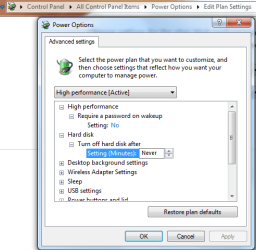
You might try the Advanced Power settings and make sure that the settings for Harddisk,Desktop background,and sleep settings are set to not turn on.
 

Attachments

  • power plan settings harddrive off-on.PNG
    power plan settings harddrive off-on.PNG
    18.8 KB · Views: 9

My Computer My Computer

Computer type
PC/Desktop
Computer Manufacturer/Model Number
Home built
OS
Windows 7 Ult, Windows 8.1 Pro,
CPU
Q9650-4.275GHz, E8600 4.5GHz, E6750-3.8GHz
Motherboard
Evga 780i FTW
Memory
G.Skill PC2 9600 1200Mhz 5 5 5 15 2T
Graphics Card(s)
GTX480
Sound Card
Asus Xonar D2
Monitor(s) Displays
HannsG
Screen Resolution
1680X1050
Hard Drives
GSkill Phoenix Pro 120GB SSD
PSU
ThermalTake Toughpower 1000Watt modular
Case
ThermalTake XaserV
Cooling
Xigmatek S1283
Keyboard
Logitech G15
Mouse
Logitech G9
Internet Speed
T1
^^ That's what I was going to suggest. There are a lot more fine-tuning options in the Advanced Settings portion of the power plan setup.
 

My Computer My Computer

OS
XP / Win7 x64 Pro
CPU
Intel Quad-Core Q9450 @ 3.2GHz
Motherboard
Asus P5-E
Memory
2x2GB GSkill DDR2
Graphics Card(s)
NVIDIA GeForce 8600 GTS (EVGA)
Monitor(s) Displays
Dell 2408WFP
Screen Resolution
1920x1200
Good call....I think.
Under "require a password on wakup"it's not giving me an option to turn it off. All I have is "yes". The drop down arrow isn't highlighted or clickable. I still can't delay the screensaver any longer than 10 minutes either.
 

My Computer My Computer

Computer type
PC/Desktop
Computer Manufacturer/Model Number
Gateway FX6840
OS
Windows 7
CPU
Intel Core i7 860 @ 2.80
Motherboard
Gateway FX6840
Memory
8GB
Graphics Card(s)
ATI Radeon HD 5770
Sound Card
Creative XB - X-FI
Monitor(s) Displays
26in Samsung Syncmaster 2693
Screen Resolution
1920x1280
Hard Drives
Seagate ST310000528AS
Hitachi HDS721010CLA332
Fantom Greendrive 500Gb External
Mouse
Logitech MX Performance
Internet Speed
7.1mg download
AH HA!!
I overlooked the "change settings that are currently unavailable" link. I shut off the password prompt so it looks like that should be OK. Now onto that pesky screensaver issue....
Thanks again for all your help
 

My Computer My Computer

Computer type
PC/Desktop
Computer Manufacturer/Model Number
Gateway FX6840
OS
Windows 7
CPU
Intel Core i7 860 @ 2.80
Motherboard
Gateway FX6840
Memory
8GB
Graphics Card(s)
ATI Radeon HD 5770
Sound Card
Creative XB - X-FI
Monitor(s) Displays
26in Samsung Syncmaster 2693
Screen Resolution
1920x1280
Hard Drives
Seagate ST310000528AS
Hitachi HDS721010CLA332
Fantom Greendrive 500Gb External
Mouse
Logitech MX Performance
Internet Speed
7.1mg download
Back
Top