Windows 7 x86 update problem 80070643 and 80071A91 errors

ArtoPower

New member
Local time
2:18 AM
Messages
30
Location
Almaty
Hi ! I have a problem with update centre , i can't install updates . 80070643 and 80071A91 errors.
Help please
 

My Computer

Computer type
Laptop
Computer Manufacturer/Model Number
Compaq Presario CQ56
OS
Windows 7 Ultimate x86
CPU
Pentium(R) Dual-Core CPU T4500 @ 2.30GHz
Motherboard
Hewlett-Packard 1605
Memory
2,00 GB
Graphics Card(s)
Mobile Intel(R) 4 Series Express Chipset Family
Sound Card
Realtek High Definition Audio
Screen Resolution
1366 x 768
Hard Drives
ST9320325AS
Mouse
Genius G500
Antivirus
Avast
Browser
Chrome
Check my logs ! i don't understand what to do .
 

Attachments

My Computer

Computer type
Laptop
Computer Manufacturer/Model Number
Compaq Presario CQ56
OS
Windows 7 Ultimate x86
CPU
Pentium(R) Dual-Core CPU T4500 @ 2.30GHz
Motherboard
Hewlett-Packard 1605
Memory
2,00 GB
Graphics Card(s)
Mobile Intel(R) 4 Series Express Chipset Family
Sound Card
Realtek High Definition Audio
Screen Resolution
1366 x 768
Hard Drives
ST9320325AS
Mouse
Genius G500
Antivirus
Avast
Browser
Chrome
You've done OK so far ;)

Here's the problem files from CheckSUR...
Code:
Unavailable repair files:
 winsxs\manifests\x86_41f1e8af60ae9c52aa7bbe14a2ea555a_31bf3856ad364e35_6.1.7601.18611_none_5d9fa57c0fa8044c.manifest
 winsxs\manifests\x86_1a019649949804ef251012d8a3375e2e_31bf3856ad364e35_6.1.7601.22819_none_9bc9714941f4772e.manifest
 winsxs\manifests\x86_microsoft-windows-directshow-dvdsupport_31bf3856ad364e35_6.1.7601.22819_none_56b81ffe4b33ded3.manifest
 winsxs\manifests\x86_microsoft-windows-directshow-dvdsupport_31bf3856ad364e35_6.1.7601.18611_none_56267efd321d772a.manifest

It also found another error - which we'll have to deal with later...
Code:
(f) CSI Payload File Missing 0x00000000 qdvd.dll x86_microsoft-windows-directshow-dvdsupport_31bf3856ad364e35_6.1.7601.17835_none_5614fae13229f515

I'll post a fix for the .manifest files later, and then we can come back to the other one
 

My Computer

Computer type
Laptop
Computer Manufacturer/Model Number
Asus K52F or Lenovo B51-80
OS
Win 7 x64 Home Premium (and x86 VirtualBox VM)/Win10
CPU
i3 370M/i7 6500U
Motherboard
Asus/Lenovo
Memory
8GB - finally :)/8GB
Graphics Card(s)
it's an i3, dude!/dual Intel&nVidia
Sound Card
onboard
Monitor(s) Displays
15.6" built-in
Screen Resolution
1366x768/1920x1080
Hard Drives
750GB Seagate internal
Sundry external drives attached to other computers on the local network
1TB SSD on the Lenovo
PSU
n/a
Internet Speed
as much as I can get - usually on a dongle/phone, so <1MB/s
Antivirus
MSE/Defender
Browser
IE11/12/Edge/Chrome/FF(if I must)
You've done OK so far ;)

Here's the problem files from CheckSUR...
Code:
Unavailable repair files:
 winsxs\manifests\x86_41f1e8af60ae9c52aa7bbe14a2ea555a_31bf3856ad364e35_6.1.7601.18611_none_5d9fa57c0fa8044c.manifest
 winsxs\manifests\x86_1a019649949804ef251012d8a3375e2e_31bf3856ad364e35_6.1.7601.22819_none_9bc9714941f4772e.manifest
 winsxs\manifests\x86_microsoft-windows-directshow-dvdsupport_31bf3856ad364e35_6.1.7601.22819_none_56b81ffe4b33ded3.manifest
 winsxs\manifests\x86_microsoft-windows-directshow-dvdsupport_31bf3856ad364e35_6.1.7601.18611_none_56267efd321d772a.manifest

It also found another error - which we'll have to deal with later...
Code:
(f) CSI Payload File Missing 0x00000000 qdvd.dll x86_microsoft-windows-directshow-dvdsupport_31bf3856ad364e35_6.1.7601.17835_none_5614fae13229f515

I'll post a fix for the .manifest files later, and then we can come back to the other one

Thanks , i will waiting:D
 

My Computer

Computer type
Laptop
Computer Manufacturer/Model Number
Compaq Presario CQ56
OS
Windows 7 Ultimate x86
CPU
Pentium(R) Dual-Core CPU T4500 @ 2.30GHz
Motherboard
Hewlett-Packard 1605
Memory
2,00 GB
Graphics Card(s)
Mobile Intel(R) 4 Series Express Chipset Family
Sound Card
Realtek High Definition Audio
Screen Resolution
1366 x 768
Hard Drives
ST9320325AS
Mouse
Genius G500
Antivirus
Avast
Browser
Chrome
You've done OK so far ;)

Here's the problem files from CheckSUR...
Code:
Unavailable repair files:
 winsxs\manifests\x86_41f1e8af60ae9c52aa7bbe14a2ea555a_31bf3856ad364e35_6.1.7601.18611_none_5d9fa57c0fa8044c.manifest
 winsxs\manifests\x86_1a019649949804ef251012d8a3375e2e_31bf3856ad364e35_6.1.7601.22819_none_9bc9714941f4772e.manifest
 winsxs\manifests\x86_microsoft-windows-directshow-dvdsupport_31bf3856ad364e35_6.1.7601.22819_none_56b81ffe4b33ded3.manifest
 winsxs\manifests\x86_microsoft-windows-directshow-dvdsupport_31bf3856ad364e35_6.1.7601.18611_none_56267efd321d772a.manifest

It also found another error - which we'll have to deal with later...
Code:
(f) CSI Payload File Missing 0x00000000 qdvd.dll x86_microsoft-windows-directshow-dvdsupport_31bf3856ad364e35_6.1.7601.17835_none_5614fae13229f515

I'll post a fix for the .manifest files later, and then we can come back to the other one

NoelDP hi ! You forget about me ? When you can help me ?:D
 

My Computer

Computer type
Laptop
Computer Manufacturer/Model Number
Compaq Presario CQ56
OS
Windows 7 Ultimate x86
CPU
Pentium(R) Dual-Core CPU T4500 @ 2.30GHz
Motherboard
Hewlett-Packard 1605
Memory
2,00 GB
Graphics Card(s)
Mobile Intel(R) 4 Series Express Chipset Family
Sound Card
Realtek High Definition Audio
Screen Resolution
1366 x 768
Hard Drives
ST9320325AS
Mouse
Genius G500
Antivirus
Avast
Browser
Chrome
Nah - had other stuff to do :(

back soon...
 

My Computer

Computer type
Laptop
Computer Manufacturer/Model Number
Asus K52F or Lenovo B51-80
OS
Win 7 x64 Home Premium (and x86 VirtualBox VM)/Win10
CPU
i3 370M/i7 6500U
Motherboard
Asus/Lenovo
Memory
8GB - finally :)/8GB
Graphics Card(s)
it's an i3, dude!/dual Intel&nVidia
Sound Card
onboard
Monitor(s) Displays
15.6" built-in
Screen Resolution
1366x768/1920x1080
Hard Drives
750GB Seagate internal
Sundry external drives attached to other computers on the local network
1TB SSD on the Lenovo
PSU
n/a
Internet Speed
as much as I can get - usually on a dongle/phone, so <1MB/s
Antivirus
MSE/Defender
Browser
IE11/12/Edge/Chrome/FF(if I must)
I've uploaded a file - apraa.zip - to my OneDrive at Noel's OneDrive
Please download and save it.
Right-click on the downloaded file, and select Extract all…
Extract to the default location - which will create a new folder apraa in the same place.
Open this folder - there should be one folder inside it (Manifests)

Copy the content of the manifests folder (.manifest files) into this folder:

C:\Windows\Temp\CheckSur\Winsxs\Manifests

Now run the CheckSUR tool again (it may take a while)

Post the new CheckSUR.log file, and the CheckSUR.persist.log file.
 

My Computer

Computer type
Laptop
Computer Manufacturer/Model Number
Asus K52F or Lenovo B51-80
OS
Win 7 x64 Home Premium (and x86 VirtualBox VM)/Win10
CPU
i3 370M/i7 6500U
Motherboard
Asus/Lenovo
Memory
8GB - finally :)/8GB
Graphics Card(s)
it's an i3, dude!/dual Intel&nVidia
Sound Card
onboard
Monitor(s) Displays
15.6" built-in
Screen Resolution
1366x768/1920x1080
Hard Drives
750GB Seagate internal
Sundry external drives attached to other computers on the local network
1TB SSD on the Lenovo
PSU
n/a
Internet Speed
as much as I can get - usually on a dongle/phone, so <1MB/s
Antivirus
MSE/Defender
Browser
IE11/12/Edge/Chrome/FF(if I must)
I've uploaded a file - apraa.zip - to my OneDrive at Noel's OneDrive
Please download and save it.
Right-click on the downloaded file, and select Extract all…
Extract to the default location - which will create a new folder apraa in the same place.
Open this folder - there should be one folder inside it (Manifests)

Copy the content of the manifests folder (.manifest files) into this folder:

C:\Windows\Temp\CheckSur\Winsxs\Manifests

Now run the CheckSUR tool again (it may take a while)

Post the new CheckSUR.log file, and the CheckSUR.persist.log file.
Thanks ! This is new logs
 

Attachments

My Computer

Computer type
Laptop
Computer Manufacturer/Model Number
Compaq Presario CQ56
OS
Windows 7 Ultimate x86
CPU
Pentium(R) Dual-Core CPU T4500 @ 2.30GHz
Motherboard
Hewlett-Packard 1605
Memory
2,00 GB
Graphics Card(s)
Mobile Intel(R) 4 Series Express Chipset Family
Sound Card
Realtek High Definition Audio
Screen Resolution
1366 x 768
Hard Drives
ST9320325AS
Mouse
Genius G500
Antivirus
Avast
Browser
Chrome
Good - CheckSUR is now happy about the registry and associated files.
That leaves us with these errors....
Code:
 Line 23: (f) CSI Payload File Missing 0x00000000 qdvd.dll x86_microsoft-windows-directshow-dvdsupport_31bf3856ad364e35_6.1.7601.18611_none_56267efd321d772a 
 Line 26: (f) CSI Payload File Missing 0x00000000 qdvd.dll x86_microsoft-windows-directshow-dvdsupport_31bf3856ad364e35_6.1.7601.17835_none_5614fae13229f515 
 Line 31: (f) CSI Payload File Missing 0x00000000 qdvd.dll x86_microsoft-windows-directshow-dvdsupport_31bf3856ad364e35_6.1.7601.22819_none_56b81ffe4b33ded3

I'll post a fix for these in a few minutes
 

My Computer

Computer type
Laptop
Computer Manufacturer/Model Number
Asus K52F or Lenovo B51-80
OS
Win 7 x64 Home Premium (and x86 VirtualBox VM)/Win10
CPU
i3 370M/i7 6500U
Motherboard
Asus/Lenovo
Memory
8GB - finally :)/8GB
Graphics Card(s)
it's an i3, dude!/dual Intel&nVidia
Sound Card
onboard
Monitor(s) Displays
15.6" built-in
Screen Resolution
1366x768/1920x1080
Hard Drives
750GB Seagate internal
Sundry external drives attached to other computers on the local network
1TB SSD on the Lenovo
PSU
n/a
Internet Speed
as much as I can get - usually on a dongle/phone, so <1MB/s
Antivirus
MSE/Defender
Browser
IE11/12/Edge/Chrome/FF(if I must)
I've uploaded a file - arpab.zip - to my OneDrive at Noel's OneDrive
Please download and save it.

Right-click on the saved file and select Extract all...
Change the target to C:\ and click on Extract
Close all windows (it would be a good idea to print these instructions!)

Now reboot to the Repair Environment - as soon as the machine restarts, start tapping F8 - this should bring up the Advanced Boot Menu, at the top of which should be the option 'Repair my Computer'
Pick that
You'll have to log in with your username and password.

Pick the option to use a Command Prompt
At the prompt type
DIR C:\arpab
hit the enter key - if you get a 'Not Found' error try
DIR D:\arpab
or
DIR E:\arpab


The drive letter in use when you find the folder will need to be substituted (for<drive>) into the following command...


XCOPY <drive>:\arpab <drive>:\windows\winsxs /y /i /s /v /h


(e.g. XCOPY P:\wfire P:\windows\winsxs /y /i /s /v /h )


run the command (it should take almost no time) and when the prompt returns, type
EXIT
and hit the Enter key to exit Command Prompt - reboot to Normal Mode Windows.

Now run SFC /SCANNOW in an Elevated Command Prompt
then reboot and upload the new CBS.log file to your reply
 

My Computer

Computer type
Laptop
Computer Manufacturer/Model Number
Asus K52F or Lenovo B51-80
OS
Win 7 x64 Home Premium (and x86 VirtualBox VM)/Win10
CPU
i3 370M/i7 6500U
Motherboard
Asus/Lenovo
Memory
8GB - finally :)/8GB
Graphics Card(s)
it's an i3, dude!/dual Intel&nVidia
Sound Card
onboard
Monitor(s) Displays
15.6" built-in
Screen Resolution
1366x768/1920x1080
Hard Drives
750GB Seagate internal
Sundry external drives attached to other computers on the local network
1TB SSD on the Lenovo
PSU
n/a
Internet Speed
as much as I can get - usually on a dongle/phone, so <1MB/s
Antivirus
MSE/Defender
Browser
IE11/12/Edge/Chrome/FF(if I must)
I've uploaded a file - arpab.zip - to my OneDrive at Noel's OneDrive
Please download and save it.

Right-click on the saved file and select Extract all...
Change the target to C:\ and click on Extract
Close all windows (it would be a good idea to print these instructions!)

Now reboot to the Repair Environment - as soon as the machine restarts, start tapping F8 - this should bring up the Advanced Boot Menu, at the top of which should be the option 'Repair my Computer'
Pick that
You'll have to log in with your username and password.

Pick the option to use a Command Prompt
At the prompt type
DIR C:\arpab
hit the enter key - if you get a 'Not Found' error try
DIR D:\arpab
or
DIR E:\arpab


The drive letter in use when you find the folder will need to be substituted (for<drive>) into the following command...


XCOPY <drive>:\arpab <drive>:\windows\winsxs /y /i /s /v /h


(e.g. XCOPY P:\wfire P:\windows\winsxs /y /i /s /v /h )


run the command (it should take almost no time) and when the prompt returns, type
EXIT
and hit the Enter key to exit Command Prompt - reboot to Normal Mode Windows.

Now run SFC /SCANNOW in an Elevated Command Prompt
then reboot and upload the new CBS.log file to your reply

I did everything that you have written!
 

My Computer

Computer type
Laptop
Computer Manufacturer/Model Number
Compaq Presario CQ56
OS
Windows 7 Ultimate x86
CPU
Pentium(R) Dual-Core CPU T4500 @ 2.30GHz
Motherboard
Hewlett-Packard 1605
Memory
2,00 GB
Graphics Card(s)
Mobile Intel(R) 4 Series Express Chipset Family
Sound Card
Realtek High Definition Audio
Screen Resolution
1366 x 768
Hard Drives
ST9320325AS
Mouse
Genius G500
Antivirus
Avast
Browser
Chrome
Still one error present :(
Code:
 Line 2138: 2015-01-25 17:59:04, Info                  CSI    000001f7 [SR] Repairing 1 components
 Line 2139: 2015-01-25 17:59:04, Info                  CSI    000001f8 [SR] Beginning Verify and Repair transaction
 Line 2140: 2015-01-25 17:59:04, Info                  CSI    000001f9 [SR] Cannot repair member file [l:16{8}]"qdvd.dll" of Microsoft-Windows-DirectShow-DVDSupport, Version = 6.1.7601.18611, pA = PROCESSOR_ARCHITECTURE_INTEL (0), Culture neutral, VersionScope = 1 nonSxS, PublicKeyToken = {l:8 b:31bf3856ad364e35}, Type neutral, TypeName neutral, PublicKey neutral in the store, file is missing
 Line 2141: 2015-01-25 17:59:04, Info                  CSI    000001fa [SR] Cannot repair member file [l:16{8}]"qdvd.dll" of Microsoft-Windows-DirectShow-DVDSupport, Version = 6.1.7601.18611, pA = PROCESSOR_ARCHITECTURE_INTEL (0), Culture neutral, VersionScope = 1 nonSxS, PublicKeyToken = {l:8 b:31bf3856ad364e35}, Type neutral, TypeName neutral, PublicKey neutral in the store, file is missing
 Line 2142: 2015-01-25 17:59:04, Info                  CSI    000001fb [SR] This component was referenced by [l:150{75}]"Package_1_for_KB3001554~31bf3856ad364e35~x86~~6.1.1.1.3001554-2_neutral_GDR"
 Line 2147: 2015-01-25 17:59:04, Info                  CSI    000001fd [SR] Repair complete

Before I go off on a tangent, please run the CheckSUR tool again, and post the new CheckSUR.log file
 

My Computer

Computer type
Laptop
Computer Manufacturer/Model Number
Asus K52F or Lenovo B51-80
OS
Win 7 x64 Home Premium (and x86 VirtualBox VM)/Win10
CPU
i3 370M/i7 6500U
Motherboard
Asus/Lenovo
Memory
8GB - finally :)/8GB
Graphics Card(s)
it's an i3, dude!/dual Intel&nVidia
Sound Card
onboard
Monitor(s) Displays
15.6" built-in
Screen Resolution
1366x768/1920x1080
Hard Drives
750GB Seagate internal
Sundry external drives attached to other computers on the local network
1TB SSD on the Lenovo
PSU
n/a
Internet Speed
as much as I can get - usually on a dongle/phone, so <1MB/s
Antivirus
MSE/Defender
Browser
IE11/12/Edge/Chrome/FF(if I must)
check please
 

Attachments

My Computer

Computer type
Laptop
Computer Manufacturer/Model Number
Compaq Presario CQ56
OS
Windows 7 Ultimate x86
CPU
Pentium(R) Dual-Core CPU T4500 @ 2.30GHz
Motherboard
Hewlett-Packard 1605
Memory
2,00 GB
Graphics Card(s)
Mobile Intel(R) 4 Series Express Chipset Family
Sound Card
Realtek High Definition Audio
Screen Resolution
1366 x 768
Hard Drives
ST9320325AS
Mouse
Genius G500
Antivirus
Avast
Browser
Chrome
Still one error present :(
Code:
 Line 2138: 2015-01-25 17:59:04, Info                  CSI    000001f7 [SR] Repairing 1 components
 Line 2139: 2015-01-25 17:59:04, Info                  CSI    000001f8 [SR] Beginning Verify and Repair transaction
 Line 2140: 2015-01-25 17:59:04, Info                  CSI    000001f9 [SR] Cannot repair member file [l:16{8}]"qdvd.dll" of Microsoft-Windows-DirectShow-DVDSupport, Version = 6.1.7601.18611, pA = PROCESSOR_ARCHITECTURE_INTEL (0), Culture neutral, VersionScope = 1 nonSxS, PublicKeyToken = {l:8 b:31bf3856ad364e35}, Type neutral, TypeName neutral, PublicKey neutral in the store, file is missing
 Line 2141: 2015-01-25 17:59:04, Info                  CSI    000001fa [SR] Cannot repair member file [l:16{8}]"qdvd.dll" of Microsoft-Windows-DirectShow-DVDSupport, Version = 6.1.7601.18611, pA = PROCESSOR_ARCHITECTURE_INTEL (0), Culture neutral, VersionScope = 1 nonSxS, PublicKeyToken = {l:8 b:31bf3856ad364e35}, Type neutral, TypeName neutral, PublicKey neutral in the store, file is missing
 Line 2142: 2015-01-25 17:59:04, Info                  CSI    000001fb [SR] This component was referenced by [l:150{75}]"Package_1_for_KB3001554~31bf3856ad364e35~x86~~6.1.1.1.3001554-2_neutral_GDR"
 Line 2147: 2015-01-25 17:59:04, Info                  CSI    000001fd [SR] Repair complete

Before I go off on a tangent, please run the CheckSUR tool again, and post the new CheckSUR.log file
This component was referenced by [l:150{75}]"Package_1_for_KB3001554
What if i remove this update KB3001554 ?
 

My Computer

Computer type
Laptop
Computer Manufacturer/Model Number
Compaq Presario CQ56
OS
Windows 7 Ultimate x86
CPU
Pentium(R) Dual-Core CPU T4500 @ 2.30GHz
Motherboard
Hewlett-Packard 1605
Memory
2,00 GB
Graphics Card(s)
Mobile Intel(R) 4 Series Express Chipset Family
Sound Card
Realtek High Definition Audio
Screen Resolution
1366 x 768
Hard Drives
ST9320325AS
Mouse
Genius G500
Antivirus
Avast
Browser
Chrome
No - That's exactly what may make the problem worse.

It looks like the substitution didn't work properly, so we have to figure out what went wrong...

Please open an Elevated Command Prompt, and run the following commands...

DIR C:\arpab
DIR C:\Windows\winsxs\arpab

post the results.
 

My Computer

Computer type
Laptop
Computer Manufacturer/Model Number
Asus K52F or Lenovo B51-80
OS
Win 7 x64 Home Premium (and x86 VirtualBox VM)/Win10
CPU
i3 370M/i7 6500U
Motherboard
Asus/Lenovo
Memory
8GB - finally :)/8GB
Graphics Card(s)
it's an i3, dude!/dual Intel&nVidia
Sound Card
onboard
Monitor(s) Displays
15.6" built-in
Screen Resolution
1366x768/1920x1080
Hard Drives
750GB Seagate internal
Sundry external drives attached to other computers on the local network
1TB SSD on the Lenovo
PSU
n/a
Internet Speed
as much as I can get - usually on a dongle/phone, so <1MB/s
Antivirus
MSE/Defender
Browser
IE11/12/Edge/Chrome/FF(if I must)
No - That's exactly what may make the problem worse.

It looks like the substitution didn't work properly, so we have to figure out what went wrong...

Please open an Elevated Command Prompt, and run the following commands...

DIR C:\arpab
DIR C:\Windows\winsxs\arpab

post the results.

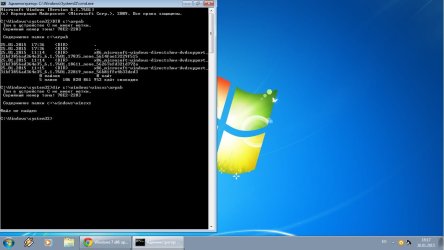
volume in device C have no tag
s/n of volume : 78E2-2283

contents of a folder C:\windows\winsxs

file ont found .

I translate this from russia language.
 

Attachments

  • cmd.jpg
    cmd.jpg
    74.3 KB · Views: 1

My Computer

Computer type
Laptop
Computer Manufacturer/Model Number
Compaq Presario CQ56
OS
Windows 7 Ultimate x86
CPU
Pentium(R) Dual-Core CPU T4500 @ 2.30GHz
Motherboard
Hewlett-Packard 1605
Memory
2,00 GB
Graphics Card(s)
Mobile Intel(R) 4 Series Express Chipset Family
Sound Card
Realtek High Definition Audio
Screen Resolution
1366 x 768
Hard Drives
ST9320325AS
Mouse
Genius G500
Antivirus
Avast
Browser
Chrome
My fault - I should have given you the detailed instructions....

Please try the two commands again


Here are some instructions to make life easier :)
1) To open an Elevated Command Prompt Window (the ECP window), click on Start, All Programs, Accessories – then right-click on Command Prompt, and select Run as Administrator. Accept the UAC prompt.
2) To run the commands easier, highlight the block of commands, and right-click on the highlight – select Copy. In the CP Window, click on the black/white icon at top left – select Paste. The commands will run but may not complete the last command, so hit the Enter Key once.
3) To copy the results... click on the Black/White icon in the top left, and select Edit... 'Select All', and hit the Enter key - then use Ctrl+V or r-click+Paste to paste it into your response.
 

My Computer

Computer type
Laptop
Computer Manufacturer/Model Number
Asus K52F or Lenovo B51-80
OS
Win 7 x64 Home Premium (and x86 VirtualBox VM)/Win10
CPU
i3 370M/i7 6500U
Motherboard
Asus/Lenovo
Memory
8GB - finally :)/8GB
Graphics Card(s)
it's an i3, dude!/dual Intel&nVidia
Sound Card
onboard
Monitor(s) Displays
15.6" built-in
Screen Resolution
1366x768/1920x1080
Hard Drives
750GB Seagate internal
Sundry external drives attached to other computers on the local network
1TB SSD on the Lenovo
PSU
n/a
Internet Speed
as much as I can get - usually on a dongle/phone, so <1MB/s
Antivirus
MSE/Defender
Browser
IE11/12/Edge/Chrome/FF(if I must)
My fault - I should have given you the detailed instructions....

Please try the two commands again


Here are some instructions to make life easier :)
1) To open an Elevated Command Prompt Window (the ECP window), click on Start, All Programs, Accessories – then right-click on Command Prompt, and select Run as Administrator. Accept the UAC prompt.
2) To run the commands easier, highlight the block of commands, and right-click on the highlight – select Copy. In the CP Window, click on the black/white icon at top left – select Paste. The commands will run but may not complete the last command, so hit the Enter Key once.
3) To copy the results... click on the Black/White icon in the top left, and select Edit... 'Select All', and hit the Enter key - then use Ctrl+V or r-click+Paste to paste it into your response.
it's the same

Microsoft Windows [Version 6.1.7601]
(c) Корпорация Майкрософт (Microsoft Corp.), 2009. Все права защищены.

C:\Windows\system32>DIR C:\arpab
Том в устройстве C не имеет метки.
Серийный номер тома: 78E2-2283

Содержимое папки C:\arpab

25.01.2015 17:36 <DIR> .
25.01.2015 17:36 <DIR> ..
25.01.2015 11:14 <DIR> x86_microsoft-windows-directshow-dvdsupport_
31bf3856ad364e35_6.1.7601.17835_none_5614fae13229f515
25.01.2015 11:14 <DIR> x86_microsoft-windows-directshow-dvdsupport_
31bf3856ad364e35_6.1.7601.18611_none_56267efd321d772a
25.01.2015 11:15 <DIR> x86_microsoft-windows-directshow-dvdsupport_
31bf3856ad364e35_6.1.7601.22819_none_56b81ffe4b33ded3
0 файлов 0 байт
5 папок 106*822*656*000 байт свободно

C:\Windows\system32>DIR C:\Windows\winsxs\arpab
Том в устройстве C не имеет метки.
Серийный номер тома: 78E2-2283

Содержимое папки C:\Windows\winsxs

Файл не найден

C:\Windows\system32>
 

My Computer

Computer type
Laptop
Computer Manufacturer/Model Number
Compaq Presario CQ56
OS
Windows 7 Ultimate x86
CPU
Pentium(R) Dual-Core CPU T4500 @ 2.30GHz
Motherboard
Hewlett-Packard 1605
Memory
2,00 GB
Graphics Card(s)
Mobile Intel(R) 4 Series Express Chipset Family
Sound Card
Realtek High Definition Audio
Screen Resolution
1366 x 768
Hard Drives
ST9320325AS
Mouse
Genius G500
Antivirus
Avast
Browser
Chrome
Hmmm - the source files are in the right place (C:\arpab)
but they don't seem to have copied properly to the target folders.

Are you sure you got the command correct while in the Repair Environment (post #10) ? Did you get any error messages? What drive letter did you find/use??
 

My Computer

Computer type
Laptop
Computer Manufacturer/Model Number
Asus K52F or Lenovo B51-80
OS
Win 7 x64 Home Premium (and x86 VirtualBox VM)/Win10
CPU
i3 370M/i7 6500U
Motherboard
Asus/Lenovo
Memory
8GB - finally :)/8GB
Graphics Card(s)
it's an i3, dude!/dual Intel&nVidia
Sound Card
onboard
Monitor(s) Displays
15.6" built-in
Screen Resolution
1366x768/1920x1080
Hard Drives
750GB Seagate internal
Sundry external drives attached to other computers on the local network
1TB SSD on the Lenovo
PSU
n/a
Internet Speed
as much as I can get - usually on a dongle/phone, so <1MB/s
Antivirus
MSE/Defender
Browser
IE11/12/Edge/Chrome/FF(if I must)
it was ok . all files copied. no error .
first time made XCOPY C:/aprab C:/windows/winsxs
was written OK without error
after i tried xcopy c:/arpab D:/windows/winsxs
it was ok too whitout error
:)
but sfc/scannow log was written that can't repair this files
 

My Computer

Computer type
Laptop
Computer Manufacturer/Model Number
Compaq Presario CQ56
OS
Windows 7 Ultimate x86
CPU
Pentium(R) Dual-Core CPU T4500 @ 2.30GHz
Motherboard
Hewlett-Packard 1605
Memory
2,00 GB
Graphics Card(s)
Mobile Intel(R) 4 Series Express Chipset Family
Sound Card
Realtek High Definition Audio
Screen Resolution
1366 x 768
Hard Drives
ST9320325AS
Mouse
Genius G500
Antivirus
Avast
Browser
Chrome
Back
Top