Windows Activation Technologies Update for Windows 7.

correct, the program itself gets patched with new crack methods. then it scans without need for Internet access. the scan itself is internal and does not need to connect to the net. when it says you are not valid, you can still use the machine normally you just cant update.

semantics do not cut it with me. it still goes online every 90 days to update itself. rather it has an online scanner or an offline scanner scanning to see if your copy of windows is legal it is still phoning home.
 

My Computer My Computer

OS
Windows 8 aka windows next
correct, the program itself gets patched with new crack methods. then it scans without need for Internet access. the scan itself is internal and does not need to connect to the net. when it says you are not valid, you can still use the machine normally you just cant update.

semantics do not cut it with me. it still goes online every 90 days to update itself. rather it has an online scanner or an offline scanner scanning to see if your copy of windows is legal it is still phoning home.
and the problem with that is?
 

My Computer My Computer

Computer Manufacturer/Model Number
The Cloud Windfoot Omega Build. Codename: Outpost
OS
Windows 7 Pro 64bit
CPU
Amd 550BE unlocked to Quadcore 3.1GHZ
Motherboard
GA-770TA-UD3 Rev 1.0
Memory
4GB OCZ platinum 1333
Graphics Card(s)
ATI 3850 512MB Asus
Sound Card
creative Xfi music
Monitor(s) Displays
samsung syncmaster T220+ Dell P780
Screen Resolution
1680x1050, 1280x960
Hard Drives
WD 250GB
segate 500GB
PSU
Ultra 500 watt
Case
some random case
Cooling
Coolmaster TX3
Keyboard
Microsoft natural ergonomic 4000
Mouse
Logitech G9
Internet Speed
Teksavvy 5Mbps down 700Kbps up
Other Info
there is a 80mm(8cm) intake fan on the side of the case and a 120mm(12cm) fan as exaust
Agreed, I don't care what protection tech I install as long as:


  • It's stable
  • It doesn't break Windows
  • It doesn't break other programs
  • It can be removed (but probably not)
 

My Computer My Computer

Computer Manufacturer/Model Number
Sony Vaio Z46GDU
OS
Windows 7 Ultimate x86-64
CPU
[email protected] 1066MHz FSB
Motherboard
Sony branded
Memory
6GB DDR3 1066MHz
Graphics Card(s)
9300M GS 256MB Dedicated (Speed) + Intel4500MHD (Stamina)
Sound Card
Realtek HD Audio
Monitor(s) Displays
13.1' WXGA
Screen Resolution
1600x900
Hard Drives
320GB 7200RPM w/ 16MB cache
Internet Speed
1MB/s
semantics do not cut it with me. it still goes online every 90 days to update itself. rather it has an online scanner or an offline scanner scanning to see if your copy of windows is legal it is still phoning home.

and the problem with that is?

Hi there
I think you might have missed the point here.

It's NOT activating windows - nobody really has an issue with that anymore - it's the application wanting to connect periodically to the Internet to continue to do all sorts of things -- and what if you CAN'T connect to the Internet for an extended period -- does Windows finally stop working or keep sending you "Nag reminders".

Once I've ACTIVATED windows legally --that's it. I don't want or NEED applications having to "randomly" connect to the Internet especially at times when losing the application might be totally inconvenient.

What if you have a dedicated SECURE machine that you NEVER want to connect to the Internet after initial activation?

Cheers
jimbo

Another question would be what if you have a internal secured network that cannot connect to the net for security reasons?
 

My Computer My Computer

Computer Manufacturer/Model Number
Custom builds... I build my own.
OS
Windows 7 Ultimate x86 & x64
CPU
Core i7-860, AMD Phenom II X4 955, AMD Athlon II X2 250
Motherboard
ASUS
Memory
Kingston HyperX
Graphics Card(s)
EVGA GeForce 9800 GTX, SAPPHIRE Radeon HD 5870
Sound Card
HT | OMEGA
Monitor(s) Displays
LCD
Hard Drives
Western Digital
PSU
OCZ Technology
Case
COOLER MASTER Storm Sniper, Storm Scout, Antec Skeleton
Internet Speed
DSL
semantics do not cut it with me. it still goes online every 90 days to update itself. rather it has an online scanner or an offline scanner scanning to see if your copy of windows is legal it is still phoning home.

and the problem with that is?

Hi there
I think you might have missed the point here.

It's NOT activating windows - nobody really has an issue with that anymore - it's the application wanting to connect periodically to the Internet to continue to do all sorts of things -- and what if you CAN'T connect to the Internet for an extended period -- does Windows finally stop working or keep sending you "Nag reminders".

Once I've ACTIVATED windows legally --that's it. I don't want or NEED applications having to "randomly" connect to the Internet especially at times when losing the application might be totally inconvenient.

What if you have a dedicated SECURE machine that you NEVER want to connect to the Internet after initial activation?

Cheers
jimbo

Another question would be what if you have a internal secured network that cannot connect to the net for security reasons?

I know of a couple of local companies that were talking about disconnecting their networks in response to...

Corporations, agencies infiltrated by `botnet' - Yahoo! News
it will only connect if it can. the scan is done internally, and if it can it will connect to get updated crack methods. of course i cant say that for sure since its new.
 

My Computer My Computer

Computer Manufacturer/Model Number
The Cloud Windfoot Omega Build. Codename: Outpost
OS
Windows 7 Pro 64bit
CPU
Amd 550BE unlocked to Quadcore 3.1GHZ
Motherboard
GA-770TA-UD3 Rev 1.0
Memory
4GB OCZ platinum 1333
Graphics Card(s)
ATI 3850 512MB Asus
Sound Card
creative Xfi music
Monitor(s) Displays
samsung syncmaster T220+ Dell P780
Screen Resolution
1680x1050, 1280x960
Hard Drives
WD 250GB
segate 500GB
PSU
Ultra 500 watt
Case
some random case
Cooling
Coolmaster TX3
Keyboard
Microsoft natural ergonomic 4000
Mouse
Logitech G9
Internet Speed
Teksavvy 5Mbps down 700Kbps up
Other Info
there is a 80mm(8cm) intake fan on the side of the case and a 120mm(12cm) fan as exaust
missing the point. i bought 7 home premium when it came out, so i am not worried about it being legal or not. the real issue is something phoning home every x amount of days to check your os or software. basically treating you as guilty until proven innocent.

this argument makes no sense. But let's say you are guilty - then don't install it. What if you're legit? Same answer, if you're that worked up about it. I'm not saying it's wrong to be concerned. I see a legit fear of legit owners possibly being downgraded because of some MS fubar, generally comparable to the old WGA fubar with XP. What are the chances every genuine 7 owner on the planet never has a problem with this incessant validation for as long as they use the OS? My guess is well above 0%.

Otherwise, I do not understand why the check (in and of itself) warrants a freak out. Again, I'm talking about just the check and not the fubars that may or may not result from it. You don't have to pull out your wallet and show your papers, you don't have to answer a knock on the door, you don't have to stop your car at a checkpoint, you don't have to do @#$%! anything except eat your cheese doodles and play COD.

But it's my software.

No. Someone made it and you bought a license to use it. You don't own 7. You don't have a God-given unalienable right to use it even after you paid for the license. You voluntary gave your money to someone and said - let me use that under your terms. If those terms are unacceptable, find another OS.

OK it's free pretzel day at Auntie Annie's and there are only a few hours left, so I've gotta take a shower and go. I would advise anyone who lives near an Auntie Annie's to do the same.


My Computer My Computer

Computer Manufacturer/Model Number
Colonel Travis 5000
OS
Black Label 7 x64
CPU
AMD Phenom II X6 1055t
Motherboard
GA-890FXA-UD5
Memory
8GB Corsair XMS3
Graphics Card(s)
Radeon HD 6790
Sound Card
X-FI Titanium Fatal1ty Pro
Monitor(s) Displays
Acer AJ15
Screen Resolution
1600x900
Hard Drives
OCZ Agility 3 SSD 120GB |
Corsair Force GT SSD 120 GB |
Barracuda 7200 SATA 300GB |
WD Caviar Green SATA 500GB
PSU
OCZ ModXStream 700W
Cooling
50 billion case fans
Internet Speed
35Mbps/35Mbps

My Computer My Computer

Computer Manufacturer/Model Number
Custom builds... I build my own.
OS
Windows 7 Ultimate x86 & x64
CPU
Core i7-860, AMD Phenom II X4 955, AMD Athlon II X2 250
Motherboard
ASUS
Memory
Kingston HyperX
Graphics Card(s)
EVGA GeForce 9800 GTX, SAPPHIRE Radeon HD 5870
Sound Card
HT | OMEGA
Monitor(s) Displays
LCD
Hard Drives
Western Digital
PSU
OCZ Technology
Case
COOLER MASTER Storm Sniper, Storm Scout, Antec Skeleton
Internet Speed
DSL
BTW: It's not showing up on my updates list. Which is why I ask if there is another way to tell if it is installed...
 

My Computer My Computer

Computer Manufacturer/Model Number
Custom builds... I build my own.
OS
Windows 7 Ultimate x86 & x64
CPU
Core i7-860, AMD Phenom II X4 955, AMD Athlon II X2 250
Motherboard
ASUS
Memory
Kingston HyperX
Graphics Card(s)
EVGA GeForce 9800 GTX, SAPPHIRE Radeon HD 5870
Sound Card
HT | OMEGA
Monitor(s) Displays
LCD
Hard Drives
Western Digital
PSU
OCZ Technology
Case
COOLER MASTER Storm Sniper, Storm Scout, Antec Skeleton
Internet Speed
DSL
If you unsure the update is it in your computer,
you could open
C:\Windows\System32\slui.exe

This tool would tell your Activation Status,
the windows called Windows Activation
 

My Computer My Computer

Computer Manufacturer/Model Number
Sony VGN-FW520D
OS
Windows 7 Ultimate SP1
CPU
Intel Core 2 Duo P7450 2.13GHz
Memory
4GB DDR2
Graphics Card(s)
ATI Mobility Radeon HD 4650 Graphics
Screen Resolution
1600x900
Hard Drives
500 GB SATA 5400 RPM
  • Like
Reactions: JMH
If you unsure the update is it in your computer,
you could open
C:\Windows\System32\slui.exe

This tool would tell your Activation Status,
the windows called Windows Activation

It just tells me I'm activated... same as my main computer for which I haven't installed the update to.

There has to be somewhere I can look that will tell me that it's the new version and not what came with the OS. Right?
 

My Computer My Computer

Computer Manufacturer/Model Number
Custom builds... I build my own.
OS
Windows 7 Ultimate x86 & x64
CPU
Core i7-860, AMD Phenom II X4 955, AMD Athlon II X2 250
Motherboard
ASUS
Memory
Kingston HyperX
Graphics Card(s)
EVGA GeForce 9800 GTX, SAPPHIRE Radeon HD 5870
Sound Card
HT | OMEGA
Monitor(s) Displays
LCD
Hard Drives
Western Digital
PSU
OCZ Technology
Case
COOLER MASTER Storm Sniper, Storm Scout, Antec Skeleton
Internet Speed
DSL
Hi there
I still think a lot of people have missed THREE very salient points.

1) You aren't always in a position to be able to connect to the internet -- often for quite extended periods.

2) SECURE networks often do not want machines to (or even ensure that they can't) connect to ANY external network - Internet or otherwise.

3) You might not want to have an Internet connected machine for all sorts of reasons at home for instance -- especially say with young children when you are away from home --there's no reason why say a young 5 or 6 year old can't use a computer for their homework like learning simple spreadsheets etc when you are away -- but I'd certainly like to be around when they use the Internet.

As I've said NOBODY really has problems with LEGITIMATE activation and MS as well as other corporations are entitled to protect "Their Intellectual Property" but it's the "Phoning Home" bit - especially at random intervals that I think is a STEP TOO FAR.


MS could easily block pirated copies of Windows when people attempt to do a Windows upgrade or come to an arrangement with somebody say like Google - when a search is requested via Windows then Google could easily check whether Windows was valid and if not just re-direct to MS who could block the product.

Nearly everybody who uses the Internet uses Google probably at least once a day.

Cheers
jimbo

.
 

My Computer My Computer

Computer type
PC/Desktop
Computer Manufacturer/Model Number
Custom built, several laptops HP/ASUS
OS
Linux CENTOS 7 / various Windows OS'es and servers
CPU
Intel i7 Intel i5
Memory
8GB, 16GB
Graphics Card(s)
On Motherboard
Sound Card
Realtek HD audio
Monitor(s) Displays
Apple Cinema display, Samsung LCD
Screen Resolution
1920 X 1080
Hard Drives
4 X 1TB SATA
Mouse
Toshiba wireless laser
Internet Speed
> 20MB up

My Computer My Computer

OS
Windows XP - Now Windows 7 Home Premium (64-bit).
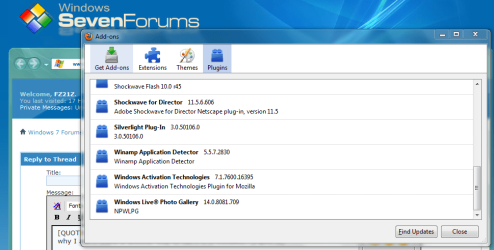
BTW: It's not showing up on my updates list. Which is why I ask if there is another way to tell if it is installed...
The online tool shows up in my Firefox plugins page...
 

Attachments

  • Capture.PNG
    Capture.PNG
    54.1 KB · Views: 325

My Computer My Computer

Computer Manufacturer/Model Number
Sony Vaio FZ21Z
OS
Windows 7 Ultimate x64 ®™
CPU
Intel Core 2 Duo (2.2 GHz)
Motherboard
Sony (Intel Chipset)
Memory
2x 2GB Corsair (667 MHz)
Graphics Card(s)
NVIDIA 8600M GS (256MB)
Sound Card
Sigmatel
Monitor(s) Displays
15.4" TFT X-Black
Screen Resolution
1280x800
Hard Drives
Western Digital 300GB Scorpio Black (7200rpm)
Mouse
Logitech Anywhere MX
Internet Speed
Sky 5MB
Hi there
1) You aren't always in a position to be able to connect to the internet -- often for quite extended periods.
90 days is 3 months, and I don't think I've ever gone 3 days without connecting to the net.

2) SECURE networks often do not want machines to (or even ensure that they can't) connect to ANY external network - Internet or otherwise.
So how would you go about updating the system?

3) You might not want to have an Internet connected machine for all sorts of reasons at home for instance
You might not need it connected at all times, but again, how would you update the system?

but it's the "Phoning Home" bit - especially at random intervals that I think is a STEP TOO FAR.
It's all about perspective I guess, as it's easy to put emphasis on it "phoning home" as being something sinister, when all it will do is download the latest definitions and scan the system, which took less than a minute using the online the tool.
 

My Computer My Computer

Computer Manufacturer/Model Number
Sony Vaio FZ21Z
OS
Windows 7 Ultimate x64 ®™
CPU
Intel Core 2 Duo (2.2 GHz)
Motherboard
Sony (Intel Chipset)
Memory
2x 2GB Corsair (667 MHz)
Graphics Card(s)
NVIDIA 8600M GS (256MB)
Sound Card
Sigmatel
Monitor(s) Displays
15.4" TFT X-Black
Screen Resolution
1280x800
Hard Drives
Western Digital 300GB Scorpio Black (7200rpm)
Mouse
Logitech Anywhere MX
Internet Speed
Sky 5MB
I installed it on my laptop.

http://download.microsoft.com/downl...8430-A67417AA88CD/WindowsActivationUpdate.exe

I think...

Is it normal for the screen to flicker a couple of times when you hit the close button?

If not...

How do you tell if it installed correctly?

More importantly, How do you tell if it installed at all?
Wow! :shocked: that was brave!

Wanted to see exactly what this update was going to do.... and what it did is exactly what I'm concerned about.

I am concerned by the fact that my screen turned off-on-off-on when I closed the installer.

I am also concerned by the fact that I cannot tell if it installed, or installed correctly.

My experiment with this update is over. I'm going to reinstall my laptop and not mess with this update.
 

My Computer My Computer

Computer Manufacturer/Model Number
Custom builds... I build my own.
OS
Windows 7 Ultimate x86 & x64
CPU
Core i7-860, AMD Phenom II X4 955, AMD Athlon II X2 250
Motherboard
ASUS
Memory
Kingston HyperX
Graphics Card(s)
EVGA GeForce 9800 GTX, SAPPHIRE Radeon HD 5870
Sound Card
HT | OMEGA
Monitor(s) Displays
LCD
Hard Drives
Western Digital
PSU
OCZ Technology
Case
COOLER MASTER Storm Sniper, Storm Scout, Antec Skeleton
Internet Speed
DSL
This update will be included with SP1 and check your activation status every 90 days after its installation indefinitely.
 
This update will be included with SP1 and check your activation status every 90 days after its installation indefinitely.

Is there anyway to tell if it is installed already?
 

My Computer My Computer

Computer Manufacturer/Model Number
Custom builds... I build my own.
OS
Windows 7 Ultimate x86 & x64
CPU
Core i7-860, AMD Phenom II X4 955, AMD Athlon II X2 250
Motherboard
ASUS
Memory
Kingston HyperX
Graphics Card(s)
EVGA GeForce 9800 GTX, SAPPHIRE Radeon HD 5870
Sound Card
HT | OMEGA
Monitor(s) Displays
LCD
Hard Drives
Western Digital
PSU
OCZ Technology
Case
COOLER MASTER Storm Sniper, Storm Scout, Antec Skeleton
Internet Speed
DSL
supposedly it was to be released on or after the 17th. patch tuesday was the 16th, and there have been no updates after the 16th. so i believe it is safe to say no one who didn't go out and deliberately download it received it. as for know if it is installed you can get a list of all patches / hot fixes for 7 from within 7 or there are third party apps for this.

Mine flickered at the end of the update then did nothing. It also doesn't show up on my list of hot fixes/patches.

Tried to install it again with no noticeable changes. Would be nice if M$ at least provided a place you could check for troubleshooting purposes.
 

My Computer My Computer

Computer Manufacturer/Model Number
Custom builds... I build my own.
OS
Windows 7 Ultimate x86 & x64
CPU
Core i7-860, AMD Phenom II X4 955, AMD Athlon II X2 250
Motherboard
ASUS
Memory
Kingston HyperX
Graphics Card(s)
EVGA GeForce 9800 GTX, SAPPHIRE Radeon HD 5870
Sound Card
HT | OMEGA
Monitor(s) Displays
LCD
Hard Drives
Western Digital
PSU
OCZ Technology
Case
COOLER MASTER Storm Sniper, Storm Scout, Antec Skeleton
Internet Speed
DSL

My Computer My Computer

Computer Manufacturer/Model Number
Custom builds... I build my own.
OS
Windows 7 Ultimate x86 & x64
CPU
Core i7-860, AMD Phenom II X4 955, AMD Athlon II X2 250
Motherboard
ASUS
Memory
Kingston HyperX
Graphics Card(s)
EVGA GeForce 9800 GTX, SAPPHIRE Radeon HD 5870
Sound Card
HT | OMEGA
Monitor(s) Displays
LCD
Hard Drives
Western Digital
PSU
OCZ Technology
Case
COOLER MASTER Storm Sniper, Storm Scout, Antec Skeleton
Internet Speed
DSL
Back
Top