Solved Windows Audio service stops itself.

fezbombmatt

New member
Member
VIP
Local time
8:58 AM
Messages
197
Recently the Windows Audio service keeps randomly stopping itself until its reached its second failure then stays stopped until i restart it myself.

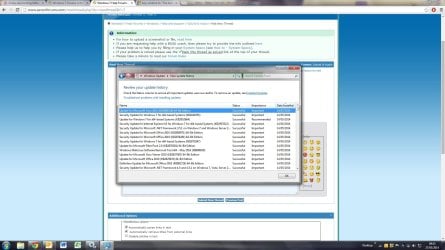
I am almost certain this started after i installed the Windows Updates on the 14/05 that i have print screened.

What should i do first try a system restore prior to this?
 

Attachments
  • updates.jpg
    updates.jpg
    186.7 KB · Views: 3

My Computer

Computer type
PC/Desktop
OS
windows 7 home premium 64bit
CPU
Amd phenom ii 560 3.30ghz
Motherboard
Asus m4a785td-v evo
Memory
Corsair TwinX 8GB (4x2)
Graphics Card(s)
AMD radeon HD 5670 1GB
Sound Card
None
Monitor(s) Displays
Hp
Hard Drives
WD Black Caviar 1TB 7200rpm
PSU
Corsair 500W
Case
CM Enforcer
Cooling
Stock HS, 200mm Front fan + 120mm Exhaust
Keyboard
Cyborg v7
Mouse
Laser Microsoft 6000
Internet Speed
5mb/s
Antivirus
Norton
Browser
Chrome
The problem with the System Restore process is: it is not perfect - so you end up with remnants of the updates.

You might want to look in the Windows Event logs to see if there is a reason listed for the Windows Audio service stopping (crashing?). If you do not find useful info in those logs, try uninstalling KB2926765, restart the computer and see if the Windows Audio service will stay started.

If the Windows Audio service still stops, you can work your way thru uninstalling each of the other recent updates. If you find the offending update, then you might have to wait for the audio drivers to be updated to get along with the latest round of updates.
 

My Computer

Computer type
Laptop
Computer Manufacturer/Model Number
Employer provided Dell Latitude
OS
W7 Pro SP1 64bit
CPU
i7
Memory
8GB
Graphics Card(s)
Intel HD Graphics
Hard Drives
crappy SSD
Antivirus
Employer mandated Symantec Endpoint Protection
Browser
Pale Moon 64bit, IE11 64bit & Chrome 64bit
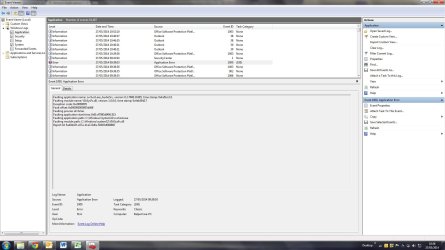
Not sure what i am checking in this log but i see an error here with my VIA application, And the time stamp looks about right to it failing.

My VIA driver hasn't changed but however i am having problem updating it. If you try to download the update from VIA downloads i get 10-15kB/s MAX :sarc:
 

Attachments

  • via.jpg
    via.jpg
    143.3 KB · Views: 3

My Computer

Computer type
PC/Desktop
OS
windows 7 home premium 64bit
CPU
Amd phenom ii 560 3.30ghz
Motherboard
Asus m4a785td-v evo
Memory
Corsair TwinX 8GB (4x2)
Graphics Card(s)
AMD radeon HD 5670 1GB
Sound Card
None
Monitor(s) Displays
Hp
Hard Drives
WD Black Caviar 1TB 7200rpm
PSU
Corsair 500W
Case
CM Enforcer
Cooling
Stock HS, 200mm Front fan + 120mm Exhaust
Keyboard
Cyborg v7
Mouse
Laser Microsoft 6000
Internet Speed
5mb/s
Antivirus
Norton
Browser
Chrome
...My VIA driver hasn't changed...
And that is the problem. The Windows OS has changed... so the driver must change too.

At least that's my guess :-)

Try DL-ing the file-of-interest several times (all at once). If you happen to get a faster/better connection, then cancel all of the slower downloads.
 
Last edited:

My Computer

Computer type
Laptop
Computer Manufacturer/Model Number
Employer provided Dell Latitude
OS
W7 Pro SP1 64bit
CPU
i7
Memory
8GB
Graphics Card(s)
Intel HD Graphics
Hard Drives
crappy SSD
Antivirus
Employer mandated Symantec Endpoint Protection
Browser
Pale Moon 64bit, IE11 64bit & Chrome 64bit
Thanks i assumed the driver would be an issue. I've contacted VIA and complained about the downloads section but they don't seem to be very helpful so far.
 

My Computer

Computer type
PC/Desktop
OS
windows 7 home premium 64bit
CPU
Amd phenom ii 560 3.30ghz
Motherboard
Asus m4a785td-v evo
Memory
Corsair TwinX 8GB (4x2)
Graphics Card(s)
AMD radeon HD 5670 1GB
Sound Card
None
Monitor(s) Displays
Hp
Hard Drives
WD Black Caviar 1TB 7200rpm
PSU
Corsair 500W
Case
CM Enforcer
Cooling
Stock HS, 200mm Front fan + 120mm Exhaust
Keyboard
Cyborg v7
Mouse
Laser Microsoft 6000
Internet Speed
5mb/s
Antivirus
Norton
Browser
Chrome
Question: my current driver date is March 2012 from my mobo website, latest driver from VIA is November 2012.
However VIA have stated this:

VIA HD audio support for the VT1705/VT1802P/VT1808S/VT1828S/VT1708S/VT2021 solutions.These are general sound effects drivers with common functions. System manufacturers and motherboard vendors customize audio hardware and software, so to ensure optimal sound quality and compatibility, we strongly recommend you obtain the system-validated and certified audio drivers directly from your system manufacturer or motherboard manufacturer, not from VIA.

Thoughts?
I hate drivers.
 

My Computer

Computer type
PC/Desktop
OS
windows 7 home premium 64bit
CPU
Amd phenom ii 560 3.30ghz
Motherboard
Asus m4a785td-v evo
Memory
Corsair TwinX 8GB (4x2)
Graphics Card(s)
AMD radeon HD 5670 1GB
Sound Card
None
Monitor(s) Displays
Hp
Hard Drives
WD Black Caviar 1TB 7200rpm
PSU
Corsair 500W
Case
CM Enforcer
Cooling
Stock HS, 200mm Front fan + 120mm Exhaust
Keyboard
Cyborg v7
Mouse
Laser Microsoft 6000
Internet Speed
5mb/s
Antivirus
Norton
Browser
Chrome
In that case, I would stick with the driver that you have and start backing out the latest round of updates until you find the offending update. Perhaps you will find that none of them cause the service to crash. Then you can install all of the updates again and try to find another cause for this services stopping.
 

My Computer

Computer type
Laptop
Computer Manufacturer/Model Number
Employer provided Dell Latitude
OS
W7 Pro SP1 64bit
CPU
i7
Memory
8GB
Graphics Card(s)
Intel HD Graphics
Hard Drives
crappy SSD
Antivirus
Employer mandated Symantec Endpoint Protection
Browser
Pale Moon 64bit, IE11 64bit & Chrome 64bit
In that case, I would stick with the driver that you have and start backing out the latest round of updates until you find the offending update. Perhaps you will find that none of them cause the service to crash. Then you can install all of the updates again and try to find another cause for this services stopping.

Well i have tried the latest driver from VIA direct as i finally managed to download it, turns out its fixed my problem AFAIK.

Why they recommend MOBO websites to download drivers from i dont know. an oldish board page isn't updated (at least mine anyway).

I think il go with Realtek boards next time.
 

My Computer

Computer type
PC/Desktop
OS
windows 7 home premium 64bit
CPU
Amd phenom ii 560 3.30ghz
Motherboard
Asus m4a785td-v evo
Memory
Corsair TwinX 8GB (4x2)
Graphics Card(s)
AMD radeon HD 5670 1GB
Sound Card
None
Monitor(s) Displays
Hp
Hard Drives
WD Black Caviar 1TB 7200rpm
PSU
Corsair 500W
Case
CM Enforcer
Cooling
Stock HS, 200mm Front fan + 120mm Exhaust
Keyboard
Cyborg v7
Mouse
Laser Microsoft 6000
Internet Speed
5mb/s
Antivirus
Norton
Browser
Chrome
Back
Top