Windows Calendar - Import into Windows 7

How to Import Windows Calendar from Vista into Windows 7

   Information
This will show you how to import Windows Calendar from Vista into Windows 7, and to enable using Windows Calendar from the toolbar button in Windows Mail in Windows 7 if you also imported it.

There is no Windows Calendar feature included in Windows 7 by default.
   Note
Credit to Greg S for researching and creating the WinCalEdit.zip file which allows the button in the desktop WinMail.exe interface to open Windows Calendar.
   Warning
If running 64bit Windows 7 it is essential to import Windows Calendar from a 64bit Vista installation into the normal 64bit program files. And the same for 32 to 32bit.


Step 1
  • In Vista open: Program Files --> Windows Calendar.
  • Copy the entire Windows Calendar folder.
  • Paste this folder into Program files in Win7.
  • Still in program files, open the pasted Windows Calendar folder --> Right click: WinCal --> Send to desktop as shortcut.
  • If desired create a Windows Calendar shortcut in Start menu programs as follows:
  • Choose View options to show hidden folders.
  • Open: Computer --> C: Drive --> Program Data --> Microsoft --> Windows --> Start Menu --> Programs.
  • Paste copy of WinCal shortcut into Start Menu Programs & re-name to: Windows Calendar.
Step 2
  • In Vista open: Control Panel --> Administrative Tools --> Task Scheduler.
  • In left window pane expand tree for: Task Scheduler Library --> Microsoft --> Windows.
  • Scroll down Windows tree to: WindowsCalendar --> Click to highlight --> In right window pane click: Export.
  • It opens a file named "Reminders - 'Your User name'.XML"
  • Save this file to desk top or storage folder.
Step 3
  • Open saved "Reminders.XML" file with Notepad, but do not set Notepad as default opener.
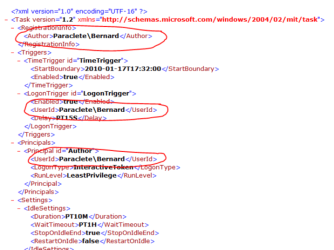
  • Wherever your user name and computer name appear, it must be changed to exactly match your user name and computer name in Windows 7. To find Computer name, right click: Computer --> Properties.
  • See following pic to find where changes need to be made. Note: This image shows "Reminder file" opened in normal view, but it must be opened with Notepad to make changes. Click image to enlarge.
RemindersXML.PNG


  • For example, "Paraclete/Bernard" becomes "Lizzi's Computer/Lizzi".​
  • Once changes are made click: Save. Changes will be saved as XML file.​
Step 4
  • In Windows 7 open: Control Panel --> Administrative Tools --> Task Scheduler.
  • In left window pane expand tree for: Task Scheduler Library --> Microsoft --> Windows.
  • Click: Windows to highlight --> Right click again & select: New Folder.
  • Name new folder exactly as follows: WindowsCalendar with no spaces.
  • Click: OK. The new WindowsCalendar folder is added to the Windows tree in the left pane.
Step 5
  • Click new folder: "WindowsCalendar" in the Windows tree to highlight --> Right click again to open menu.
  • Select: Import Task --> Browse to where you have saved the "Reminders - .XML" file.
  • Click: "Reminders - .XML" file to import it. If a message appears saying: "The format of the task is not valid" it means you have not changed the computer and user names correctly.
  • In bottom of new window that appears, open: Drop down menu --> Select: Windows 7 --> Click: OK.
Step 6
  • Open and run the regedit file WinCalEdit.zip attached here View attachment WinCalEdit.zip. This enables Windows Calendar to open in the desktop WinMail.exe interface.
Step 7
  • For help in using Windows Calendar go to the following web site here.
You're done. Cheers PB


Last edited by a moderator:
Thanks a lot poppa bear for that tuto...
 
Last edited:

My Computer

Computer type
PC/Desktop
Computer Manufacturer/Model Number
Custom Build
OS
Windows 7 Professional SP1 - x64 [Non-UEFI Boot]
CPU
Ivy Bridge Core i5 3570K (Delidded)
Motherboard
Asus P8Z77-V LE PLUS
Memory
G.Skill "Ares" DDR3 PC3-12800 - 1600MHz (16Gb)
Graphics Card(s)
Asus Dual-RX480-O4G
Sound Card
Creative Sound Blaster Z w/5.1 sound system
Monitor(s) Displays
Asus IPS 23"
Screen Resolution
16/9
Hard Drives
Internal:
500Go Sata 6Gb/s (x2)
500Go Sata 3Gb/s (x2)
SSD 60Go Sata 6Gb/s
PSU
In Win C 900W Series 80+ Platinum
Case
Thermaltake Chaser A71
Cooling
Custom Water Cooling Loop
Keyboard
Cooler Master QuickFire XTi
Mouse
Razer Imperator 2012 (4G)
Antivirus
MSE
Browser
IE 11.0.xxx Rtm
Other Info
"Raid0" with Intel Smart Response Technology (HDD/SSD)

My Computer

Computer Manufacturer/Model Number
Self-assembled
OS
Win7 Ultimate 64bit Retail
CPU
Intel i7 960 quad core
Motherboard
Intel DX58SO2 Extreme
Memory
12 GB Kingston DDR 3 1300
Graphics Card(s)
PCI Express Gigabyte GTX 550 Ti
Sound Card
Gigabyte GTX 550 Ti Graphics/5 Sound card
Monitor(s) Displays
Samsung WS Syncmaster S23A350H
Screen Resolution
1920 x 1080
Hard Drives
OS on 128 GB Corsair SSD SATA 3 + Storage on 1 TB Western Digital Black SATA 2
Case
Cooler Master CM690 II Advanced Mid Tower
Cooling
CPU, top, front and rear extractor fans
Keyboard
Microsoft Intellitype Wireless Multimedia
Mouse
Microsoft Intellipoint2 Wireless
Internet Speed
100 MB/sec Theoretical max. Actual average 0.5MB/sec
Other Info
Back-up PC with Vista Ultimate OEM 32bit. Intel i5 2400 Quad Core CPU, DH67CL mobo, 8 GB Kingston DDR3 1300 RAM,
Everything but the reminder thing worked.

It imported correctly and I even logged out and back in. But it doesn't come on. Sure enough when I open calendar it pops up
 

My Computer

Computer Manufacturer/Model Number
Toshiba
OS
Windows 7 Home Premium x64
CPU
AMD
Memory
4 GB
Graphics Card(s)
ATI Radeon Intergrated Graphics
Sound Card
Realtek
Screen Resolution
1366 X 768
Hard Drives
223 GB HDD
Everything but the reminder thing worked.

It imported correctly and I even logged out and back in. But it doesn't come on. Sure enough when I open calendar it pops up
Thanks for the feedback RJ12. Don't know if it's possible to fix that, but will have a look see. Similar to importing WinMail from Vista, not all features can necessarily be made to work in Win7.

This will probably sound weird, but I don't even use WinCal, and only included it for completeness, as an adjunct to my other post on importing WinMail from Vista found here. So unfortunately I'm not a full bottle on helping others use it. I usually just refer them to a tutorial on how to use it to which there is a link shown in the last step of this post.

Cheers PB :D
 

My Computer

Computer Manufacturer/Model Number
Self-assembled
OS
Win7 Ultimate 64bit Retail
CPU
Intel i7 960 quad core
Motherboard
Intel DX58SO2 Extreme
Memory
12 GB Kingston DDR 3 1300
Graphics Card(s)
PCI Express Gigabyte GTX 550 Ti
Sound Card
Gigabyte GTX 550 Ti Graphics/5 Sound card
Monitor(s) Displays
Samsung WS Syncmaster S23A350H
Screen Resolution
1920 x 1080
Hard Drives
OS on 128 GB Corsair SSD SATA 3 + Storage on 1 TB Western Digital Black SATA 2
Case
Cooler Master CM690 II Advanced Mid Tower
Cooling
CPU, top, front and rear extractor fans
Keyboard
Microsoft Intellitype Wireless Multimedia
Mouse
Microsoft Intellipoint2 Wireless
Internet Speed
100 MB/sec Theoretical max. Actual average 0.5MB/sec
Other Info
Back-up PC with Vista Ultimate OEM 32bit. Intel i5 2400 Quad Core CPU, DH67CL mobo, 8 GB Kingston DDR3 1300 RAM,
i just need to get my hands on these files now

anybody want to give me a PM ;) (RS or HF links ok :D )
 

My Computer

Computer Manufacturer/Model Number
Mesh Q4
OS
Win 7 Pro 32bit
CPU
Intel Quad Core 6600
Motherboard
Asus P5N-E SLI
Memory
4 GB
Graphics Card(s)
nVidia 8800GT
Sound Card
Onboard
Hard Drives
1TB Samsung Spinpoint,
1TB WD Eco Green
I do not have Vista but a clear Windows 7 Pro

I did installed Windows Mail, thanks to this forum, but I am unable to install Calendar because my Windows 7 is a clear version and I do not have Vista. Is there something that I can do to install calendar on my windows 7?
Thanks,
Raymond

NOTE: After I wrote the post above, I went to a place in the internet and found how to install Windows Calendar in the Desktop, and after that I did followed the instructions in this page on "How to Import Windows Calendar from Vista into Windows 7" and omited every thing related to Vista... and I got it! Now I can open Calendar from Windows Mail that I installed on my Windows 7 computer... It is incredible!
Thanks a lot.
 
Last edited:

My Computer

OS
Windows 7 Professional
Hi,
Have installed Windows Mail, to my "Win7 64 bit" PC, thank you fo rthe excellent Instructions on this Site.
However can not understand how to obtain a "Vista 64bit" "entire" Windows Mail Calender Folder to paste into C:\Program Files in my "Win 7 64bit".
Also the "WinCalEdit.zip" one is able to download, is it suitable for my "Win7 64bit" PC?, and were could I obtain a suitable WinCallEdit.zip please?
Thank you for any Help:confused:
 

My Computer

OS
Win 7 64 bit Ultimate
Mouse
Logitech
Hi,
Have installed Windows Mail, to my "Win7 64 bit" PC, thank you fo rthe excellent Instructions on this Site.
However can not understand how to obtain a "Vista 64bit" "entire" Windows Mail Calender Folder to paste into C:\Program Files in my "Win 7 64bit".
Also the "WinCalEdit.zip" one is able to download, is it suitable for my "Win7 64bit" PC?, and were could I obtain a suitable WinCallEdit.zip please?
Thank you for any Help:confused:
Yes, the WinCalEdit.zip works in both 32 & 64bit installations of Windows 7. See visitor message on your Public Profile, accessed by left clicking your forum user name in the left panel of your post.
 

My Computer

Computer Manufacturer/Model Number
Self-assembled
OS
Win7 Ultimate 64bit Retail
CPU
Intel i7 960 quad core
Motherboard
Intel DX58SO2 Extreme
Memory
12 GB Kingston DDR 3 1300
Graphics Card(s)
PCI Express Gigabyte GTX 550 Ti
Sound Card
Gigabyte GTX 550 Ti Graphics/5 Sound card
Monitor(s) Displays
Samsung WS Syncmaster S23A350H
Screen Resolution
1920 x 1080
Hard Drives
OS on 128 GB Corsair SSD SATA 3 + Storage on 1 TB Western Digital Black SATA 2
Case
Cooler Master CM690 II Advanced Mid Tower
Cooling
CPU, top, front and rear extractor fans
Keyboard
Microsoft Intellitype Wireless Multimedia
Mouse
Microsoft Intellipoint2 Wireless
Internet Speed
100 MB/sec Theoretical max. Actual average 0.5MB/sec
Other Info
Back-up PC with Vista Ultimate OEM 32bit. Intel i5 2400 Quad Core CPU, DH67CL mobo, 8 GB Kingston DDR3 1300 RAM,
Importing Windows Calendar into Win7 64 bit Ultimate

Thank you again Poppa Bear,
I have been successful to create the .XML File, and "Import Task" into the New Folder renamed WindowsCalendar, in Task Scheduler, as per instructions for Win 7, but am still unable to open the Calendar in Windows Mail when clicking on Icon?
After repeated Attempts, and rebooting, still no Luck,
Any further Help greatly appreciated,
Jutta
 

My Computer

OS
Win 7 64 bit Ultimate
Mouse
Logitech
Thank you again Poppa Bear,
I have been successful to create the .XML File, and "Import Task" into the New Folder renamed WindowsCalendar, in Task Scheduler, as per instructions for Win 7, but am still unable to open the Calendar in Windows Mail when clicking on Icon?
After repeated Attempts, and rebooting, still no Luck,
Any further Help greatly appreciated,
Jutta
Once the Windows Calendar folder is installed in the correct program files folder, all that's needed to open WinCal in the Windows Mail program is to run WinCalEdit.zip. Once the zip file is saved to desktop, extract the WinCalEdit file onto your desktop and click it to run. Then click "Yes" to modify the registry.

The only other thing that could stop it is if you have the Windows Calendar folder in the wrong set of progrram files. In a 64bit installation of Windows 7 you need to install the 64bit Windows Calendar folder into the normal Program Files, NOT the 32bit Program Files(x86).

All I can really suggest is to:
  • Make sure you've got the 64bit Windows Calendar folder in the correct program files.
  • Open the Windows Calendar folder in Program files and click WinCal file just to make sure Windows Calendar is working.
  • Run WinCalEdit.zip file again.
  • Reboot and see if it works.
Hope this helps. PB
 
Last edited:

My Computer

Computer Manufacturer/Model Number
Self-assembled
OS
Win7 Ultimate 64bit Retail
CPU
Intel i7 960 quad core
Motherboard
Intel DX58SO2 Extreme
Memory
12 GB Kingston DDR 3 1300
Graphics Card(s)
PCI Express Gigabyte GTX 550 Ti
Sound Card
Gigabyte GTX 550 Ti Graphics/5 Sound card
Monitor(s) Displays
Samsung WS Syncmaster S23A350H
Screen Resolution
1920 x 1080
Hard Drives
OS on 128 GB Corsair SSD SATA 3 + Storage on 1 TB Western Digital Black SATA 2
Case
Cooler Master CM690 II Advanced Mid Tower
Cooling
CPU, top, front and rear extractor fans
Keyboard
Microsoft Intellitype Wireless Multimedia
Mouse
Microsoft Intellipoint2 Wireless
Internet Speed
100 MB/sec Theoretical max. Actual average 0.5MB/sec
Other Info
Back-up PC with Vista Ultimate OEM 32bit. Intel i5 2400 Quad Core CPU, DH67CL mobo, 8 GB Kingston DDR3 1300 RAM,
Has anyone been able to get the Search Box in the upper right corner of the the calender window in Windows 7?
 

My Computer

OS
XP Pro 32bit, Vista Ultimate 64bit, Windows7 Ultimate 64bit
Poppa Bear,

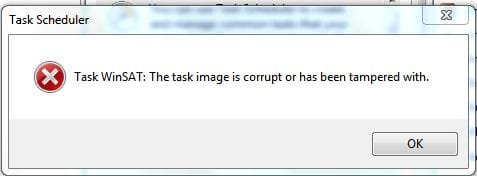
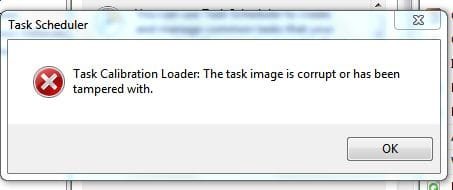
I'm just up to Step 2 and get the following when I call up Task Scheduler I get it OK but with this error constantly popping up and Windows Calendar is NOT in the list, despite doing Step 1.

Please note this is Win 7 SP1 (final) x86 on my Netbook & was an in situ upgrade install. I know if I run sfc /scannow it will probably undo my Windows Mail hack. Any way around it to repair this?

Edit: cured by simply deleting the offending XML files, however although it still shows a corruption error if I try to view current tasks over at the right. Anyway to repair just Task Scheduler I wonder? I have other Win 7 installations but they are x64.
I could easily import c:\windows\system32\tasks
 

Attachments

  • Capture.JPG
    Capture.JPG
    16 KB · Views: 635
  • Capture1.JPG
    Capture1.JPG
    17.2 KB · Views: 648
Last edited:

My Computer

Computer type
PC/Desktop
Computer Manufacturer/Model Number
Alienware® ALX X58
OS
Win 7 Ult SP1/Win 10 Pro (all x64)
CPU
Intel® Core™ i7-975 Extreme O/C to 4.02 GHz, 8MB Cache
Motherboard
Asus® P6T Deluxe V2 X58 LGA1366
Memory
24GB Corsair Vengeance DDR3 SDRAM at 1600MHz - 6 x 4096MB
Graphics Card(s)
1792 MB NVIDIA® GeForce® GTX 295 Dual Core
Sound Card
Onboard Soundmax® High-Definition 7.1 Performance Audio
Monitor(s) Displays
Samsung XL2370 LED backlit 23" W/S 2ms response time
Screen Resolution
1920 X 1080
Hard Drives
2 x 500gb SATA II
1 x 1TB SATA II
1 external eSATA LaCie 3TB
(Non-RAID)
PSU
Alienware® 1200 Watt Multi-GPU
Case
Alienware® P2 ALX Chassis with AlienIce™ 3.0 Video Cooling
Cooling
Alienware® High-Perf. Liquid Cooling + Acoustic Dampening
Keyboard
Microsoft® Wireless Entertainment 8000 + Logitech® G15 Wired
Mouse
Microsoft® Wireless Laser 8000 + Logitech® G9 Wired
Internet Speed
1Gb/s
Antivirus
McAfee LiveSafe
Browser
Firefox - latest
Other Info
Using non-RAID on purpose as I find RAID to be too temperamental.
Now set to AHCI
Poppa Bear,

I'm just up to Step 2 and get the following when I call up Task Scheduler I get it OK but with this error constantly popping up and Windows Calendar is NOT in the list, despite doing Step 1.

Please note this is Win 7 SP1 (final) x86 on my Netbook & was an in situ upgrade install. I know if I run sfc /scannow it will probably undo my Windows Mail hack. Any way around it to repair this?

Edit: cured by simply deleting the offending XML files, however although it still shows a corruption error if I try to view current tasks over at the right. Anyway to repair just Task Scheduler I wonder? I have other Win 7 installations but they are x64.
I could easily import c:\windows\system32\tasks
Hi Ex_Brit, unfortunately I haven't encountered this problem and regret can't throw any light on a solution for you. It may well have to do with SP1. I don't have SP1 installed but have installed all the updates available since originally installing Win7.

Also my Calendar is installed on a 32bit system, so not sure how it translates to 64bit. Sorry I can't be more helpful.
 

My Computer

Computer Manufacturer/Model Number
Self-assembled
OS
Win7 Ultimate 64bit Retail
CPU
Intel i7 960 quad core
Motherboard
Intel DX58SO2 Extreme
Memory
12 GB Kingston DDR 3 1300
Graphics Card(s)
PCI Express Gigabyte GTX 550 Ti
Sound Card
Gigabyte GTX 550 Ti Graphics/5 Sound card
Monitor(s) Displays
Samsung WS Syncmaster S23A350H
Screen Resolution
1920 x 1080
Hard Drives
OS on 128 GB Corsair SSD SATA 3 + Storage on 1 TB Western Digital Black SATA 2
Case
Cooler Master CM690 II Advanced Mid Tower
Cooling
CPU, top, front and rear extractor fans
Keyboard
Microsoft Intellitype Wireless Multimedia
Mouse
Microsoft Intellipoint2 Wireless
Internet Speed
100 MB/sec Theoretical max. Actual average 0.5MB/sec
Other Info
Back-up PC with Vista Ultimate OEM 32bit. Intel i5 2400 Quad Core CPU, DH67CL mobo, 8 GB Kingston DDR3 1300 RAM,
Well I'm a real dummy, after a reboot it's there...my bad, sorry. Not to mention that I was looking in the wrong place. ;-S
 
Last edited:

My Computer

Computer type
PC/Desktop
Computer Manufacturer/Model Number
Alienware® ALX X58
OS
Win 7 Ult SP1/Win 10 Pro (all x64)
CPU
Intel® Core™ i7-975 Extreme O/C to 4.02 GHz, 8MB Cache
Motherboard
Asus® P6T Deluxe V2 X58 LGA1366
Memory
24GB Corsair Vengeance DDR3 SDRAM at 1600MHz - 6 x 4096MB
Graphics Card(s)
1792 MB NVIDIA® GeForce® GTX 295 Dual Core
Sound Card
Onboard Soundmax® High-Definition 7.1 Performance Audio
Monitor(s) Displays
Samsung XL2370 LED backlit 23" W/S 2ms response time
Screen Resolution
1920 X 1080
Hard Drives
2 x 500gb SATA II
1 x 1TB SATA II
1 external eSATA LaCie 3TB
(Non-RAID)
PSU
Alienware® 1200 Watt Multi-GPU
Case
Alienware® P2 ALX Chassis with AlienIce™ 3.0 Video Cooling
Cooling
Alienware® High-Perf. Liquid Cooling + Acoustic Dampening
Keyboard
Microsoft® Wireless Entertainment 8000 + Logitech® G15 Wired
Mouse
Microsoft® Wireless Laser 8000 + Logitech® G9 Wired
Internet Speed
1Gb/s
Antivirus
McAfee LiveSafe
Browser
Firefox - latest
Other Info
Using non-RAID on purpose as I find RAID to be too temperamental.
Now set to AHCI
Still Looking for a solution to the missing Search Feature... Anyone?
 

My Computer

OS
XP Pro 32bit, Vista Ultimate 64bit, Windows7 Ultimate 64bit

My Computer

Computer type
PC/Desktop
Computer Manufacturer/Model Number
Alienware® ALX X58
OS
Win 7 Ult SP1/Win 10 Pro (all x64)
CPU
Intel® Core™ i7-975 Extreme O/C to 4.02 GHz, 8MB Cache
Motherboard
Asus® P6T Deluxe V2 X58 LGA1366
Memory
24GB Corsair Vengeance DDR3 SDRAM at 1600MHz - 6 x 4096MB
Graphics Card(s)
1792 MB NVIDIA® GeForce® GTX 295 Dual Core
Sound Card
Onboard Soundmax® High-Definition 7.1 Performance Audio
Monitor(s) Displays
Samsung XL2370 LED backlit 23" W/S 2ms response time
Screen Resolution
1920 X 1080
Hard Drives
2 x 500gb SATA II
1 x 1TB SATA II
1 external eSATA LaCie 3TB
(Non-RAID)
PSU
Alienware® 1200 Watt Multi-GPU
Case
Alienware® P2 ALX Chassis with AlienIce™ 3.0 Video Cooling
Cooling
Alienware® High-Perf. Liquid Cooling + Acoustic Dampening
Keyboard
Microsoft® Wireless Entertainment 8000 + Logitech® G15 Wired
Mouse
Microsoft® Wireless Laser 8000 + Logitech® G9 Wired
Internet Speed
1Gb/s
Antivirus
McAfee LiveSafe
Browser
Firefox - latest
Other Info
Using non-RAID on purpose as I find RAID to be too temperamental.
Now set to AHCI
Thanks for the feedback Ex_Brat... What it has to do with Windows Calendar is, in Vista, Windows Calendar has a Search Box on the right hand side of the blue Menu bar at the top. This Search option searches the calendar for the text entered. This function is missing when we add calendar back into Win7...
 

My Computer

OS
XP Pro 32bit, Vista Ultimate 64bit, Windows7 Ultimate 64bit
That search box, sorry, I misunderstood.
 

My Computer

Computer type
PC/Desktop
Computer Manufacturer/Model Number
Alienware® ALX X58
OS
Win 7 Ult SP1/Win 10 Pro (all x64)
CPU
Intel® Core™ i7-975 Extreme O/C to 4.02 GHz, 8MB Cache
Motherboard
Asus® P6T Deluxe V2 X58 LGA1366
Memory
24GB Corsair Vengeance DDR3 SDRAM at 1600MHz - 6 x 4096MB
Graphics Card(s)
1792 MB NVIDIA® GeForce® GTX 295 Dual Core
Sound Card
Onboard Soundmax® High-Definition 7.1 Performance Audio
Monitor(s) Displays
Samsung XL2370 LED backlit 23" W/S 2ms response time
Screen Resolution
1920 X 1080
Hard Drives
2 x 500gb SATA II
1 x 1TB SATA II
1 external eSATA LaCie 3TB
(Non-RAID)
PSU
Alienware® 1200 Watt Multi-GPU
Case
Alienware® P2 ALX Chassis with AlienIce™ 3.0 Video Cooling
Cooling
Alienware® High-Perf. Liquid Cooling + Acoustic Dampening
Keyboard
Microsoft® Wireless Entertainment 8000 + Logitech® G15 Wired
Mouse
Microsoft® Wireless Laser 8000 + Logitech® G9 Wired
Internet Speed
1Gb/s
Antivirus
McAfee LiveSafe
Browser
Firefox - latest
Other Info
Using non-RAID on purpose as I find RAID to be too temperamental.
Now set to AHCI
I've been Googling like crazy on that search missing question and no luck I'm afraid.
 

My Computer

Computer type
PC/Desktop
Computer Manufacturer/Model Number
Alienware® ALX X58
OS
Win 7 Ult SP1/Win 10 Pro (all x64)
CPU
Intel® Core™ i7-975 Extreme O/C to 4.02 GHz, 8MB Cache
Motherboard
Asus® P6T Deluxe V2 X58 LGA1366
Memory
24GB Corsair Vengeance DDR3 SDRAM at 1600MHz - 6 x 4096MB
Graphics Card(s)
1792 MB NVIDIA® GeForce® GTX 295 Dual Core
Sound Card
Onboard Soundmax® High-Definition 7.1 Performance Audio
Monitor(s) Displays
Samsung XL2370 LED backlit 23" W/S 2ms response time
Screen Resolution
1920 X 1080
Hard Drives
2 x 500gb SATA II
1 x 1TB SATA II
1 external eSATA LaCie 3TB
(Non-RAID)
PSU
Alienware® 1200 Watt Multi-GPU
Case
Alienware® P2 ALX Chassis with AlienIce™ 3.0 Video Cooling
Cooling
Alienware® High-Perf. Liquid Cooling + Acoustic Dampening
Keyboard
Microsoft® Wireless Entertainment 8000 + Logitech® G15 Wired
Mouse
Microsoft® Wireless Laser 8000 + Logitech® G9 Wired
Internet Speed
1Gb/s
Antivirus
McAfee LiveSafe
Browser
Firefox - latest
Other Info
Using non-RAID on purpose as I find RAID to be too temperamental.
Now set to AHCI
Back
Top