
Hey all,
I'm having a very strange problem that I can't seem to find a solution for so, I'm posting here as a last resort. Basically the default libraries for windows (7 64-bit home premium) (Documents, Music, Videos, ect) duplicated themselves and made these sort of "ghost" libraries.
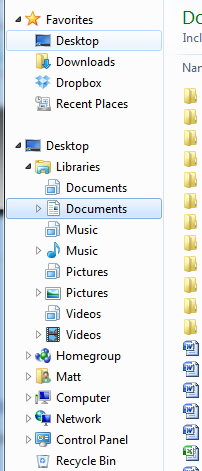
This is the 2nd time it's happened, the first time I restored my system to an earlier point before I had this issue and that worked for a few hours until it randomly happened again, I didn't install anything or make any changes to my PC since that restore.
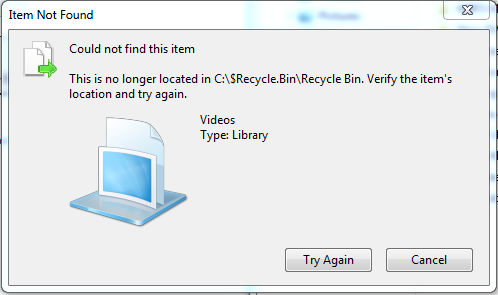
When I try to delete these new "ghost" libraries I get this error message.
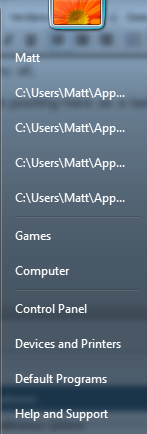
Also it messes up the directory listings in the start menu shortcut for the default libraries so, it instead shows some of a drive path however when clicked nothing happens.
I should probably mention I have an SSD with my OS and my most used programs on it and also a 1TB HDD which is used to store pretty much everything else. I apologize for some of the larger pictures I just needed them to help explain the situation.
I can't seem to find anything similar to issue online so hopefully someone here has an idea of what is going on, thanks in advanced.
I'm having a very strange problem that I can't seem to find a solution for so, I'm posting here as a last resort. Basically the default libraries for windows (7 64-bit home premium) (Documents, Music, Videos, ect) duplicated themselves and made these sort of "ghost" libraries.
This is the 2nd time it's happened, the first time I restored my system to an earlier point before I had this issue and that worked for a few hours until it randomly happened again, I didn't install anything or make any changes to my PC since that restore.
When I try to delete these new "ghost" libraries I get this error message.
Also it messes up the directory listings in the start menu shortcut for the default libraries so, it instead shows some of a drive path however when clicked nothing happens.
I should probably mention I have an SSD with my OS and my most used programs on it and also a 1TB HDD which is used to store pretty much everything else. I apologize for some of the larger pictures I just needed them to help explain the situation.
I can't seem to find anything similar to issue online so hopefully someone here has an idea of what is going on, thanks in advanced.
My Computer
- Computer type
- PC/Desktop
- Computer Manufacturer/Model Number
- Custom Build
- OS
- Windows 7 64-bit Home Premium
- CPU
- Intel i7 3600k 3.4ghz
- Motherboard
- Gigabyte: Ill fill in later.
- Memory
- 12gb G.Skill ill fill in later.
- Graphics Card(s)
- Nvidia GeForce GTX 560ti (sli)
- Hard Drives
- 240GB Kingston Hyper X SSD
1TB Western Digital 7200 RPM HDD
- Browser
- Firefox


