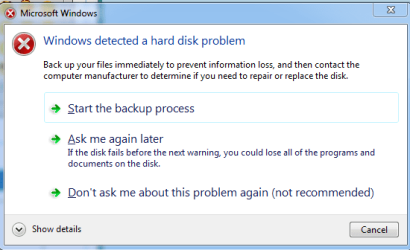
Windows detected a HD problem

mystvearn

New member
Member
VIP
Local time
1:10 AM
Messages
123
Hi, I am using a Dell AIO PC: Inspiron One 23 WLED Touch Screen PC.

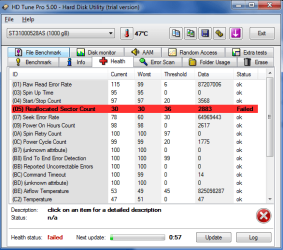
I keep getting this pop-up saying "windows detected a hard disk problem" from windows. I also get a warning from in DOS from Dell saying Hard disk problem. I've attached two screen shots of the software used. The HD is a SG 1 TB.

Prior to that, the machine came with 3 partitions (2 usable, 1 system restore) and no problems. I decided to remove all the installed crap, delete all partitions and make just one partition and reinstall everything again. Here is when I got the error problem.

When I try SG SMART test, the test just freezes there. Did the long test and updated the HD firmware as well. The long test was fine. Firmware installation was fine as well.

Is this really a imminent HD failure?
 

Attachments
  • 1.PNG
    1.PNG
    12.6 KB · Views: 9
  • 2.PNG
    2.PNG
    26 KB · Views: 12

My Computer

OS
Windows 7 64 bit Pro
Sound Card
On board
Monitor(s) Displays
Dual Monitor: Dell U2311H 23" monitor, LG M227WD
Screen Resolution
1920x1080x2 (landscape)
Keyboard
Microsoft Ergonomic Keyboard 4000
Mouse
Logitech M 705
Internet Speed
25mb/1mb
Other Info
Printer: HP F4180
Speakers: Creative Gigaworks T20 Series II
You need more help than I can give but I would immediately start backing up your data files to an external hard drive or at least to dvd's just in case. Better safe than sorry! Hopefully someone with more knowledge of your problem will come along soon. Is this machine still under warranty?
 

My Computer

Computer type
PC/Desktop
OS
Microsoft Windows 7 Home Premium 64-bit 7601 Multiprocessor Free Service Pack 1
CPU
Intel(R) Core(TM) i7-3770 CPU @ 3.40GHz
Motherboard
ASUSTeK COMPUTER INC. P8H77-M
Memory
8.00 GB
Graphics Card(s)
Intel(R) HD Graphics 4000
Sound Card
On Board
Monitor(s) Displays
Dell 24"
Screen Resolution
1920 x 1080
Hard Drives
(1) INTEL SSDSC2CT180A3 ATA Device (2) ST500DM002-1BD142 ATA Device (3) WDC WD3200AAKS-75L9A0 ATA Device (4) Generic- Compact Flash USB Device (5) Generic- MS/MS-Pro USB Device (6) Generic- SD/MMC USB Device (7) Generic- SM/xD-Picture USB
PSU
500w Corsair
Case
Cooler Master
Cooling
3 Fans
Keyboard
Logitech MK300
Mouse
Logitech WOM
Internet Speed
75Mb
Antivirus
Norton 360
Browser
Firefox, Opera, IE
A few clarifications required since I am wondering whether you used Seagate's SeaTools for DOS at all.

1. What is that SG Smart Test? Is there a program like that? Wherefrom did you download it?

2. You said you had deleted all partitions and did a clean install. Then what and wherefrom is that DOS from DELL?

3. What prompted you to update the firmware? I am just curious since no one will update the firmware unless there is a positive indication or recommendation that that particular model's firmware needs to be updated to remove any known bug/s. Can you just post the link from where you downloaded the firmware or any such recommendation?

I have an eye on that particular DELL AIO.. So naturally I am more curious.:)

If you hadn't run the manufacturer's SeaTools for DOS, do run it and check your HDD. In particular, I would recommend that you run the "Full Erase" in the Advanced features and then a clean install. SeaTools for DOS tutorial

In answer to mitchell65's post above:It appears to be a brand new machine so I do believe it is within warranty. Most probably the OP feels that he has voided the warranty with the clean install and firmware upgrade.
 

My Computer

OS
Windows 7 Home Premium 32 bit
You need more help than I can give but I would immediately start backing up your data files to an external hard drive or at least to dvd's just in case. Better safe than sorry! Hopefully someone with more knowledge of your problem will come along soon. Is this machine still under warranty?

Nothing important on it so that is fine.

A few clarifications required since I am wondering whether you used Seagate's SeaTools for DOS at all.

1. What is that SG Smart Test? Is there a program like that? Wherefrom did you download it?

2. You said you had deleted all partitions and did a clean install. Then what and wherefrom is that DOS from DELL?

3. What prompted you to update the firmware? I am just curious since no one will update the firmware unless there is a positive indication or recommendation that that particular model's firmware needs to be updated to remove any known bug/s. Can you just post the link from where you downloaded the firmware or any such recommendation?

I have an eye on that particular DELL AIO.. So naturally I am more curious.:)

If you hadn't run the manufacturer's SeaTools for DOS, do run it and check your HDD. In particular, I would recommend that you run the "Full Erase" in the Advanced features and then a clean install. SeaTools for DOS tutorial

In answer to mitchell65's post above:It appears to be a brand new machine so I do believe it is within warranty. Most probably the OP feels that he has voided the warranty with the clean install and firmware upgrade.

1. Downloaded it from SG. The SG windows software. There is a S.M.A.R.T. test in that. Also there is a firmware upgrade in that as well, so I just followed it. There was an important firmware update for the HD.

2. I get a message which looks like in DOS mode from dell saying Hard disk failure. Press F1 to continue, F2 to enter setup disk.

I've changed the HD with my previous desktop HD. WD Caviar black 2TB. Works well now. Unfortunately the machine is out of warranty. :( Bought it Oct 2010.

This Dell AIO is basically a 23" WLED touchscreen with computer bits mounted at the back. It comes with a Media center remote, HDMI in, RGB in, some wireless transmitter for cable in and TV in. Speakers are ok as well.

I would not buy this AIO pc in future or any of the same design. I believe HP also makes this kind of AIO where the stuff are all mounted at the back. There is no cooling for the HD and I think that was one of the reason why the HD failed. It was housed in a metal casing and no cooling. There is cooling for the CPU. If you are planning to backup a lot of stuff, make sure the PC is in a cool room to help with the cooling. There is no mesh cutout at the HD and dell relies on holes at the top for air.

If you are in a AIO I suggest the Lenovo ideacentre A720 as that has a base where the computer stuff are kept and a LCD mounted. It also offers better viewing angles compared to the Dell which is limited with a stand. In fact I am seriously considering AIO pc for my next build as a AIO takes care of the PC bit, comes with a webcam, the LCD bit and takes care of the tv and also can handle games and become the steam box. The integrated graphics are ok enough for casual steam games.
 

My Computer

OS
Windows 7 64 bit Pro
Sound Card
On board
Monitor(s) Displays
Dual Monitor: Dell U2311H 23" monitor, LG M227WD
Screen Resolution
1920x1080x2 (landscape)
Keyboard
Microsoft Ergonomic Keyboard 4000
Mouse
Logitech M 705
Internet Speed
25mb/1mb
Other Info
Printer: HP F4180
Speakers: Creative Gigaworks T20 Series II
Thanks for the info. I was thinking that this particular AIO was one of the recent product released with Windows 8.
 

My Computer

OS
Windows 7 Home Premium 32 bit
Thanks for the info. I was thinking that this particular AIO was one of the recent product released with Windows 8.

No, this one comes with Win7. However Dell, HP use the same design for their W8 versions. Best is to put W8 on this as the touch screen is nice. I for one hate smudges on my own monitor
 

My Computer

OS
Windows 7 64 bit Pro
Sound Card
On board
Monitor(s) Displays
Dual Monitor: Dell U2311H 23" monitor, LG M227WD
Screen Resolution
1920x1080x2 (landscape)
Keyboard
Microsoft Ergonomic Keyboard 4000
Mouse
Logitech M 705
Internet Speed
25mb/1mb
Other Info
Printer: HP F4180
Speakers: Creative Gigaworks T20 Series II
Back
Top