windows error recovery/boot problem

pedramaphotic

New member
Local time
4:45 PM
Messages
2
system recovery options
startup repair cannot repair this computer automatically

Problem signature
Startup repair offline
Problem signature 01 - 6.1.7600.16385
Problem signature 02 - 6.1.7600.16385
Problem signature 03 - unknown
Problem signature 04 - 21199787
Problem signature 05 - AutoFailover
Problem signature 06 - 5
Problem signature 07 - NoRootCause
OS Version - 6.1.7601.2.1.0.256.1
locale id - 1033


Last night after 1month of reseting my system manually from front button for monitor issues...i now can't get windows to run.
i have tried latest windows 7 version made bootable by rufus but still the repair finds no problems.
I have tried system repair but it fails after 5-10minutes.

There are other advanced system recovery options after system repairs fails but I don't
seem to get none of them to work....

Also my dvd/cd drive is broken

Please let me know if I have any options to get
this windows running back to normal.

i have worked hard on installing the right sofwares & really dont wanna lose data on my 1terabyte seagate HDD.

Thanks in advance for your help & advice.
 

My Computer

Computer type
PC/Desktop
OS
Windows 7 X64
Welcome to the Forum.

Please edit your profile with All the specs. System Info - See Your System Specs - Windows 7 Help Forums

Lets do the basic.
- Boot from win 7 installation disk, go to repair and launch a CMD window. Type:
chkdsk c: /f
Pay attention on the results

- If no bad blocks or bad clusters were found on disk check, type:
sfc /scannow
 

My Computers

System One System Two

  • Computer type
    PC/Desktop
    Computer Manufacturer/Model Number
    custom build
    OS
    Windows 7 HP 64
    CPU
    i5 6600K - 800MHz to 4200MHz
    Motherboard
    GA-Z170-HD3P
    Memory
    4+4G GSkill DDR4 3000
    Graphics Card(s)
    IG - Intel 530
    Monitor(s) Displays
    Samsung 226BW
    Screen Resolution
    1680x1050
    Hard Drives
    (1) -1 SM951 – 128GB M.2 AHCI PCIe SSD drive for Windows 7 and Lubuntu
    (2) -1 WD SATA 3 - 1T for Data
    (3) -1 WD SATA 3 - 1T for backup
    PSU
    Thermaltake 450W TR2 gold
    Keyboard
    Old and good Chicony mechanical keyboard
    Mouse
    Logitech mX performance - 9 buttons (had to disable some)
    Internet Speed
    500Mb/s
    Browser
    Firefox 64
    Other Info
    TinyWall firewall
  • Computer type
    Laptop
    System Manufacturer/Model Number
    Asus Q550LF
    OS
    Windows 7 Pro
    CPU
    i7-4500U 800MHz to 3.0GHz
    Motherboard
    Asus Q550LF
    Memory
    (4+4)G DDR3 1600
    Graphics Card(s)
    IG intel 4400 + NVIDIA GeForce GT 745M
    Sound Card
    Realtek
    Monitor(s) Displays
    LG Display LP156WF4-SPH1
    Screen Resolution
    1920 x 1080
    Hard Drives
    BX500 120G SSD for Windows and programs +
    1T HDD for data
    Internet Speed
    500 Mb/s
    Browser
    Firefox
    Other Info
    TinyWall firewall
new error

Welcome to the Forum.

Please edit your profile with All the specs. System Info - See Your System Specs - Windows 7 Help Forums

Lets do the basic.
- Boot from win 7 installation disk, go to repair and launch a CMD window. Type:
chkdsk c: /f
Pay attention on the results

- If no bad blocks or bad clusters were found on disk check, type:
sfc /scannow

OK sir , ASAP

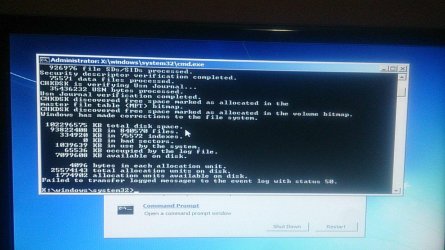
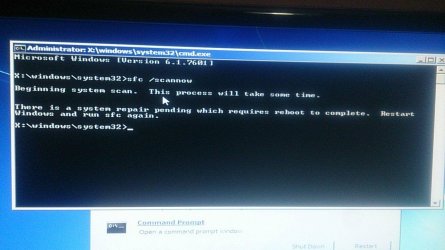
after chkdsk found no bad sectors(as the picture i took shows)i used scannow but it says a restart is needed but after each restart it still says a restart is needed...
 

Attachments

  • photo_2017-12-25_19-34-50.jpg
    photo_2017-12-25_19-34-50.jpg
    143.2 KB · Views: 0
  • photo_2017-12-25_19-39-43.jpg
    photo_2017-12-25_19-39-43.jpg
    120.8 KB · Views: 0

My Computer

Computer type
PC/Desktop
OS
Windows 7 X64
Please edit your profile with All the specs. System Info - See Your System Specs - Windows 7 Help Forums

The good news are that your disk is healthy. The problem is in Windows.
The message it says a restart is needed, is because you have an update pending to be installed.
Did you try to boot in safe mode (F8)?
 

My Computers

System One System Two

  • Computer type
    PC/Desktop
    Computer Manufacturer/Model Number
    custom build
    OS
    Windows 7 HP 64
    CPU
    i5 6600K - 800MHz to 4200MHz
    Motherboard
    GA-Z170-HD3P
    Memory
    4+4G GSkill DDR4 3000
    Graphics Card(s)
    IG - Intel 530
    Monitor(s) Displays
    Samsung 226BW
    Screen Resolution
    1680x1050
    Hard Drives
    (1) -1 SM951 – 128GB M.2 AHCI PCIe SSD drive for Windows 7 and Lubuntu
    (2) -1 WD SATA 3 - 1T for Data
    (3) -1 WD SATA 3 - 1T for backup
    PSU
    Thermaltake 450W TR2 gold
    Keyboard
    Old and good Chicony mechanical keyboard
    Mouse
    Logitech mX performance - 9 buttons (had to disable some)
    Internet Speed
    500Mb/s
    Browser
    Firefox 64
    Other Info
    TinyWall firewall
  • Computer type
    Laptop
    System Manufacturer/Model Number
    Asus Q550LF
    OS
    Windows 7 Pro
    CPU
    i7-4500U 800MHz to 3.0GHz
    Motherboard
    Asus Q550LF
    Memory
    (4+4)G DDR3 1600
    Graphics Card(s)
    IG intel 4400 + NVIDIA GeForce GT 745M
    Sound Card
    Realtek
    Monitor(s) Displays
    LG Display LP156WF4-SPH1
    Screen Resolution
    1920 x 1080
    Hard Drives
    BX500 120G SSD for Windows and programs +
    1T HDD for data
    Internet Speed
    500 Mb/s
    Browser
    Firefox
    Other Info
    TinyWall firewall
Back
Top