Windows Explorer Auto Arrange - Disable

How to Disable Auto Arrange in Windows 7 Explorer to have Free Sorting


   Information
In Windows 7, auto arrange is enabled by default so that all file and folder names in Windows Explorer are sorted alphabetically no matter what folder view you used.

This is basically like having how you can arrange icons how you like on your desktop in every folder in Windows Explorer now.

This will show you how to disable Auto Arrange in Windows 7 to be able to sort your files and folders in any random order and position you like in each opened folder in Windows Explorer and in the Pin to Start Menu area at the top of the Start Menu without it having to be sorted alphabetically by name. Windows 7 will also remember these random folder sortings (order and position), and open as how they were when the folder window was last closed.

   Note
When You Disable Auto Arrange:
  • While using Extra Large Icons, Large Icons, Medium Icons, Small Icons, and Extended Tiles folder views, you can arrange files/folders in any random order and position.
  • While using Details folder view, you can only arrange files/folders in any order and not in any random position.
  • While using Extra Large Icons, Large Icons, Medium Icons, Small Icons, and Extended Tiles folder views, you can click on View (Menu bar) and check Auto arrange to have the black indicator line back inbetween files/folders when arranging files/folders in any order. This turns off the ability to arrange files/folders by random positions though.
  • While using Extra Large Icons, Large Icons, Medium Icons, Small Icons, and Extended Tiles folder views, you can click on View (Menu bar) and uncheck Auto arrange to be able to arrange files/folders in any order and random positions.
  • The Auto arrange and Align to grid options can be turned on and off at will in the View (Menu bar and right click context menu) when available (not grayed out) while using Extra Large Icons, Large Icons, Medium Icons, Small Icons, or Extended Tiles folder views.
  • If you have items arranged by random positions and switch from a Extra Large Icons, Large Icons, Medium Icons, Small Icons, and Extended Tiles folder view to a List, Details, Extended Tiles, or Content folder view, the random positions will be reset but still placed in a order of arrangement instead.
  • If you unzip a file in a folder, move a folder, or rename a folder, it will refresh and auto arrange the files in that specific folder only after each time you do this. Auto arrange is still disabled for that folder, but you will need to arrange the files back to whatever non-auto arranged order you like again after unzipping a file in a folder, move a folder, or rename a folder.
   Warning
DO NOT USE this tutorial in any other OS than Windows 7.
  • While this tutorial will allow you to disable auto arrange in the main Libraries folder itself, it will not disable auto arrange in any of the other library folders (ex: Documents, Music, Pictures, Videos).
  • Free sorting is not available if you use "Group by" folder views instead of only "Sort by" folder views.
  • Free sorting is not available in the List and Content folder views.
  • When you disable Auto Arrange, you will have Extend Tiles folder view instead of Tiles available in all folders except the Computer windows.

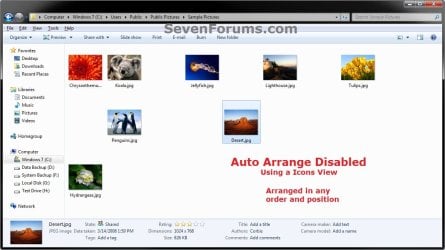
EXAMPLE: Auto Arrange Enabled and Disabled
NOTE: Notice in the screenshot with Auto Arrange disabled, the files can be dragged around the Windows Explorer window to sort how you like without having to be in alphabetical order.
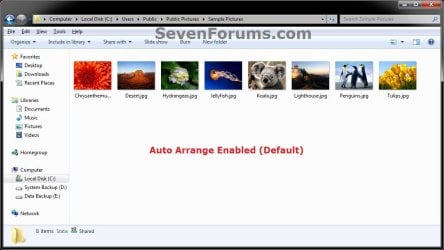
Default.jpg

Disabled-1.jpg

Disabled-2.jpg


OPTION ONE

To Disable Auto Arrange in Windows 7 Windows Explorer


   Warning
It is also recommended to create a restore point before doing this option in case you would like to undo any unwanted unknown side affects that OPTION TWO may not undo. This way, you could also do a system restore with this restore point to undo this option completely.


1. Click on the Download button below to download the BAT file below.
Disable_Windows_7_Explorer_Auto_Arrange.bat

Download


2. Save the .bat file to your desktop.

3. Close everything that you have running first, then run the downloaded .bat file.

4. If prompted, click on Run.
NOTE: If you like, you can stop getting the Run prompt by unblocking the downloaded .bat file.

5. You will now notice your screen flicker and a command prompt open as the explorer process is restarted.

6. Let the command prompt count down to finish on it's own without pressing a key.

7. When it's finished, you will see the Computer window open.

8. Auto arrange in Windows Explorer is now disabled.


OPTION TWO

To Enable Auto Arrange in Windows 7 Windows Explorer


NOTE: This is the default setting.
1. Click on the Download button below to download the BAT file below.
Enable_Windows_7_Explorer_Auto_Arrange.bat

Download


2. Save the .bat file to your desktop.

3. Close all opened explorer windows first, then run the downloaded .bat file.

4. If prompted, click on Run.
NOTE: If you like, you can stop getting the Run prompt by unblocking the downloaded .bat file.

5. You will now notice your screen flicker and a command prompt open as the explorer process is restarted.

6. When it's finished, you will see the Computer window open.

7. Auto arrange in Windows Explorer is now enabled again.
That's it,
Shawn


Attachments

Last edited:
still a puzzle as to why it wasn't showing as i was only setting up the folder views with large icons and clicking the apply to folders in folder options, whatever it was it works so im happy,
 

My Computer My Computer

At a glance

Microsoft Windows 7 Home Premium 64-bit 7600IIx4 amd athelon 635 processor2x2gbati radeon HD 5450
Computer Manufacturer/Model Number
Hewlett packard/p6512uk
OS
Microsoft Windows 7 Home Premium 64-bit 7600
CPU
IIx4 amd athelon 635 processor
Motherboard
FOXCONN 2AA9
Memory
2x2gb
Graphics Card(s)
ati radeon HD 5450
Sound Card
(1) Realtek High Definition Audio (2) AMD High Definition
Monitor(s) Displays
samsung lcd tv 32"
Screen Resolution
1360x 768
Hard Drives
(1) WDC WD10 01FAES-60Z2A0 SATA Disk Device (2) Maxtor OneTouch USB Device (3) ST310003 33AS USB Device (4) WD My Book 1111 USB Device
PSU
?
Cooling
air!
Keyboard
wireless hp
Mouse
wireless Hp,optical
Internet Speed
1.10mb/s
Antivirus
MSE
Browser
Firefox
Shawn and boobah

Great tutorial Shawn. Your a star :)
I have a new lappy with W7 and knew I would hate the folder handling. I posted a similar moan on the W8 forum if you remember.

I want Vista :)

Anyhow I have installed W7 on a spare machine specifically to try out all this folder stuff before applying it to the new PC.

It seems really good. I have put the three shortcuts (Docs/Music/Pics) from the my user name at the top of the start menu and find all three desktop folders allow free sorting. Nothing untoward happens dragging and dropping files from one to another, and dropping it into the appropriate folders in the left hand pane.

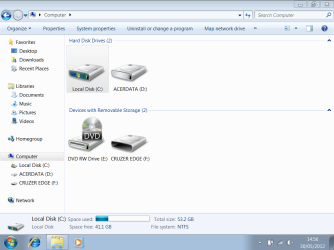
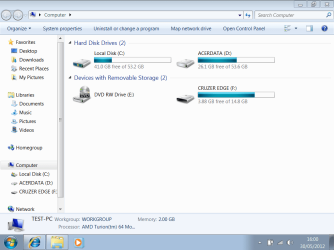
However , I have the same issue as boobah regarding no free space bars when showing computer drives.

boobah... I can't quite follow what you have done to resolve this as. I've tried various folder options and nothing seems to work. It would be great if you could write down please (click by click) what you did.

Edit... if you look at the picture you can see it shows a bar at the bottom for the selected drive.
 

Attachments

  • Capture.PNG
    Capture.PNG
    43.8 KB · Views: 365

My Computer My Computer

At a glance

Windows 7 Professional x64Intel Core i5 2430M (2.4GHz)4096Mb 1333Mhz DDR3 SDRAMIntel Integrated HD
Computer type
Laptop
Computer Manufacturer/Model Number
Dell
OS
Windows 7 Professional x64
CPU
Intel Core i5 2430M (2.4GHz)
Memory
4096Mb 1333Mhz DDR3 SDRAM
Graphics Card(s)
Intel Integrated HD
Monitor(s) Displays
17.3 Inch HD Anti Glare
Screen Resolution
1600 x 900
Hard Drives
320Gb 7200rpm serial ATA
Keyboard
Illuminated standard
Mouse
Microsoft 3500
Internet Speed
40Mb
Antivirus
Security Essentials
Browser
IE11 x64
@Mooly
Not exactly sure what boohbah did but I think the problem with you at least is Computer is not opening faster enough before the reg entries are entered. If I'm correct then editing the batch file should help.

Right click the bat file and click edit, find the line "explorer.exe shell:MyComputerFolder" and on the next line type "TIMEOUT 10" (without quotes). This will wait another 10 seconds for Computer to open but you may only need a couple so when the Computer window opens press any key to continue if it's still counting down.

If this doesn't help post back and boobah should be able to explain what he did.

For others.
If you want the black bar that boobah was referring too to show as default for all folders and lose the ability to arrange the folders in any position in all folders then edit the bat file and replace all occurrences of "/D 1124073476" with "/D 1124073473".

I'm 99% sure this was the original setting before the change was made and works under my quick test, boohbah should be able to confirm this.
 

My Computer My Computer

At a glance

Windows 7 Ultimate x64Intel Pentium Dual Core E5200 2.5GHz (3.77GHz...Corsair 4GB DDR2 (4x1GB CM2X1024-6400C4)Palit GeForce GTS 250 (1024MB)
Computer Manufacturer/Model Number
Self built
OS
Windows 7 Ultimate x64
CPU
Intel Pentium Dual Core E5200 2.5GHz (3.77GHz OC)
Motherboard
Asus P5Q-E
Memory
Corsair 4GB DDR2 (4x1GB CM2X1024-6400C4)
Graphics Card(s)
Palit GeForce GTS 250 (1024MB)
Sound Card
On Board (ADI AD2000B 8ch HD)
Monitor(s) Displays
Samsung 32in LCD TV
Screen Resolution
1360x768
Hard Drives
2 x 1TB Samsung 103SJ (Raid0)
2 x External 500GB Samsung 502IJ (NexStar 3 HD Enclosures)
PSU
550W Antec Neo HE 550
Case
Antec P180
Cooling
Xigmatex Red Scorpion CPU Cooler. 3x120mm Fans
Keyboard
Logitech MX5000 Laser (Combo)
Mouse
Logitech MX5000 Laser (Combo)
Internet Speed
ADSL2+ (avg 10 Mbps Down, 0.80 Mbps up)
Other Info
Gigabyte GN-WP01GS 54g Wireless Lan Card
Looks like we have another star here. Thanks Duzzy :)
 

Attachments

  • Capture 2.PNG
    Capture 2.PNG
    40.5 KB · Views: 344

My Computer My Computer

At a glance

Windows 7 Professional x64Intel Core i5 2430M (2.4GHz)4096Mb 1333Mhz DDR3 SDRAMIntel Integrated HD
Computer type
Laptop
Computer Manufacturer/Model Number
Dell
OS
Windows 7 Professional x64
CPU
Intel Core i5 2430M (2.4GHz)
Memory
4096Mb 1333Mhz DDR3 SDRAM
Graphics Card(s)
Intel Integrated HD
Monitor(s) Displays
17.3 Inch HD Anti Glare
Screen Resolution
1600 x 900
Hard Drives
320Gb 7200rpm serial ATA
Keyboard
Illuminated standard
Mouse
Microsoft 3500
Internet Speed
40Mb
Antivirus
Security Essentials
Browser
IE11 x64
No problem.
 

My Computer My Computer

At a glance

Windows 7 Ultimate x64Intel Pentium Dual Core E5200 2.5GHz (3.77GHz...Corsair 4GB DDR2 (4x1GB CM2X1024-6400C4)Palit GeForce GTS 250 (1024MB)
Computer Manufacturer/Model Number
Self built
OS
Windows 7 Ultimate x64
CPU
Intel Pentium Dual Core E5200 2.5GHz (3.77GHz OC)
Motherboard
Asus P5Q-E
Memory
Corsair 4GB DDR2 (4x1GB CM2X1024-6400C4)
Graphics Card(s)
Palit GeForce GTS 250 (1024MB)
Sound Card
On Board (ADI AD2000B 8ch HD)
Monitor(s) Displays
Samsung 32in LCD TV
Screen Resolution
1360x768
Hard Drives
2 x 1TB Samsung 103SJ (Raid0)
2 x External 500GB Samsung 502IJ (NexStar 3 HD Enclosures)
PSU
550W Antec Neo HE 550
Case
Antec P180
Cooling
Xigmatex Red Scorpion CPU Cooler. 3x120mm Fans
Keyboard
Logitech MX5000 Laser (Combo)
Mouse
Logitech MX5000 Laser (Combo)
Internet Speed
ADSL2+ (avg 10 Mbps Down, 0.80 Mbps up)
Other Info
Gigabyte GN-WP01GS 54g Wireless Lan Card
Thank you Dustin. I added a 5 second timeout to the BAT file for that to help make sure that it Computer opens before the registry entries are made. :)

While using Extra Large Icons, Large Icons, Medium Icons, Small Icons, and Extended Tiles folder views, you can click on View (Menu bar) and check Auto arrange to have the black indicator line back inbetween files/folders when arranging files/folders in any order. This turns off the ability to arrange files/folders by random positions though.
 

My Computer My Computer

At a glance

64-bit Windows 11 Pro for WorkstationsIntel i7-8700K OC'd to 5 GHz64 GB (4x16GB) G.SKILL TridentZ RGB DDR4 3600...ASUS ROG-STRIX-GTX1080TI-O11G-GAMING
Computer type
PC/Desktop
Computer Manufacturer/Model Number
Self built custom
OS
64-bit Windows 11 Pro for Workstations
CPU
Intel i7-8700K OC'd to 5 GHz
Motherboard
ASUS ROG Maximus XI Formula Z390
Memory
64 GB (4x16GB) G.SKILL TridentZ RGB DDR4 3600 MHz
Graphics Card(s)
ASUS ROG-STRIX-GTX1080TI-O11G-GAMING
Sound Card
Integrated
Monitor(s) Displays
2 x Samsung Odyssey G7 27"
Screen Resolution
2560x1440
Hard Drives
1TB Samsung 990 PRO M.2,
4TB Samsung 990 PRO PRO M.2,
TerraMaster F8 SSD Plus NAS
PSU
Seasonic Prime Titanium 850W
Case
Thermaltake Core P3
Cooling
Corsair Hydro H115i
Keyboard
Logitech wireless K800
Mouse
Logitech MX Master 4
Internet Speed
2 Gb/s Download and 100 Mb/s Upload
Antivirus
Malwarebyte Anti-Malware Premium
Browser
Google Chrome
Other Info
Logitech Z625 speaker system,
Logitech BRIO 4K Pro webcam,
HP Color LaserJet Pro MFP M477fdn,
APC SMART-UPS RT 1000 XL - SURT1000XLI,
Galaxy S23 Plus phone
That's great, thanks you two.

Shawn... showing my total lack of expertise here.

What would happen if you took (exported) the reg keys for explorer from a Vista PC and imported or merged them to a W7 installation. Is that kind of experimentation possible. It would be great to have the exact same folder handling that Vista provides.
 
Last edited:

My Computer My Computer

At a glance

Windows 7 Professional x64Intel Core i5 2430M (2.4GHz)4096Mb 1333Mhz DDR3 SDRAMIntel Integrated HD
Computer type
Laptop
Computer Manufacturer/Model Number
Dell
OS
Windows 7 Professional x64
CPU
Intel Core i5 2430M (2.4GHz)
Memory
4096Mb 1333Mhz DDR3 SDRAM
Graphics Card(s)
Intel Integrated HD
Monitor(s) Displays
17.3 Inch HD Anti Glare
Screen Resolution
1600 x 900
Hard Drives
320Gb 7200rpm serial ATA
Keyboard
Illuminated standard
Mouse
Microsoft 3500
Internet Speed
40Mb
Antivirus
Security Essentials
Browser
IE11 x64
Hello Mooly,

That would not be recommended since Vista does not have libraries like Windows 7 does. They may not work properly in Windows 7 and cause unknown issues.

If you wish to give it a play with, be sure to create a restore point first so that you could do a system restore if it messed things up. :)
 

My Computer My Computer

At a glance

64-bit Windows 11 Pro for WorkstationsIntel i7-8700K OC'd to 5 GHz64 GB (4x16GB) G.SKILL TridentZ RGB DDR4 3600...ASUS ROG-STRIX-GTX1080TI-O11G-GAMING
Computer type
PC/Desktop
Computer Manufacturer/Model Number
Self built custom
OS
64-bit Windows 11 Pro for Workstations
CPU
Intel i7-8700K OC'd to 5 GHz
Motherboard
ASUS ROG Maximus XI Formula Z390
Memory
64 GB (4x16GB) G.SKILL TridentZ RGB DDR4 3600 MHz
Graphics Card(s)
ASUS ROG-STRIX-GTX1080TI-O11G-GAMING
Sound Card
Integrated
Monitor(s) Displays
2 x Samsung Odyssey G7 27"
Screen Resolution
2560x1440
Hard Drives
1TB Samsung 990 PRO M.2,
4TB Samsung 990 PRO PRO M.2,
TerraMaster F8 SSD Plus NAS
PSU
Seasonic Prime Titanium 850W
Case
Thermaltake Core P3
Cooling
Corsair Hydro H115i
Keyboard
Logitech wireless K800
Mouse
Logitech MX Master 4
Internet Speed
2 Gb/s Download and 100 Mb/s Upload
Antivirus
Malwarebyte Anti-Malware Premium
Browser
Google Chrome
Other Info
Logitech Z625 speaker system,
Logitech BRIO 4K Pro webcam,
HP Color LaserJet Pro MFP M477fdn,
APC SMART-UPS RT 1000 XL - SURT1000XLI,
Galaxy S23 Plus phone
Hmmm... well I just might have a play at some future point.

It would all be done on what is now a "spare" old Vista laptop (that I have Acronis images of anyway ) so there is nothing to lose in that sense. In fact I have W7 on it now which is what I was playing with trying all this folder stuff out and which I installed using the recovery media ( a full W7 SP1 disc) supplied with the new PC and didn't activate or update it of course.

I just wondered whether it was all a waste of time trying to use registry keys from another OS but maybe not... who knows :)
 

My Computer My Computer

At a glance

Windows 7 Professional x64Intel Core i5 2430M (2.4GHz)4096Mb 1333Mhz DDR3 SDRAMIntel Integrated HD
Computer type
Laptop
Computer Manufacturer/Model Number
Dell
OS
Windows 7 Professional x64
CPU
Intel Core i5 2430M (2.4GHz)
Memory
4096Mb 1333Mhz DDR3 SDRAM
Graphics Card(s)
Intel Integrated HD
Monitor(s) Displays
17.3 Inch HD Anti Glare
Screen Resolution
1600 x 900
Hard Drives
320Gb 7200rpm serial ATA
Keyboard
Illuminated standard
Mouse
Microsoft 3500
Internet Speed
40Mb
Antivirus
Security Essentials
Browser
IE11 x64
Hmmm... well I just might have a play at some future point.

It would all be done on what is now a "spare" old Vista laptop (that I have Acronis images of anyway ) so there is nothing to lose in that sense. In fact I have W7 on it now which is what I was playing with trying all this folder stuff out and which I installed using the recovery media ( a full W7 SP1 disc) supplied with the new PC and didn't activate or update it of course.

I just wondered whether it was all a waste of time trying to use registry keys from another OS but maybe not... who knows :)

Please let us know how it went if you give it a play. :)
 
Last edited:

My Computer My Computer

At a glance

64-bit Windows 11 Pro for WorkstationsIntel i7-8700K OC'd to 5 GHz64 GB (4x16GB) G.SKILL TridentZ RGB DDR4 3600...ASUS ROG-STRIX-GTX1080TI-O11G-GAMING
Computer type
PC/Desktop
Computer Manufacturer/Model Number
Self built custom
OS
64-bit Windows 11 Pro for Workstations
CPU
Intel i7-8700K OC'd to 5 GHz
Motherboard
ASUS ROG Maximus XI Formula Z390
Memory
64 GB (4x16GB) G.SKILL TridentZ RGB DDR4 3600 MHz
Graphics Card(s)
ASUS ROG-STRIX-GTX1080TI-O11G-GAMING
Sound Card
Integrated
Monitor(s) Displays
2 x Samsung Odyssey G7 27"
Screen Resolution
2560x1440
Hard Drives
1TB Samsung 990 PRO M.2,
4TB Samsung 990 PRO PRO M.2,
TerraMaster F8 SSD Plus NAS
PSU
Seasonic Prime Titanium 850W
Case
Thermaltake Core P3
Cooling
Corsair Hydro H115i
Keyboard
Logitech wireless K800
Mouse
Logitech MX Master 4
Internet Speed
2 Gb/s Download and 100 Mb/s Upload
Antivirus
Malwarebyte Anti-Malware Premium
Browser
Google Chrome
Other Info
Logitech Z625 speaker system,
Logitech BRIO 4K Pro webcam,
HP Color LaserJet Pro MFP M477fdn,
APC SMART-UPS RT 1000 XL - SURT1000XLI,
Galaxy S23 Plus phone
I'm sure it is something I will try so of course I'll update on here. I want to get the new PC as I want it first and then.....
 

My Computer My Computer

At a glance

Windows 7 Professional x64Intel Core i5 2430M (2.4GHz)4096Mb 1333Mhz DDR3 SDRAMIntel Integrated HD
Computer type
Laptop
Computer Manufacturer/Model Number
Dell
OS
Windows 7 Professional x64
CPU
Intel Core i5 2430M (2.4GHz)
Memory
4096Mb 1333Mhz DDR3 SDRAM
Graphics Card(s)
Intel Integrated HD
Monitor(s) Displays
17.3 Inch HD Anti Glare
Screen Resolution
1600 x 900
Hard Drives
320Gb 7200rpm serial ATA
Keyboard
Illuminated standard
Mouse
Microsoft 3500
Internet Speed
40Mb
Antivirus
Security Essentials
Browser
IE11 x64
@mooly... not quite sure what i did to resolve it either, what i did do was...
as my window view settings had reset to default, i opened a window, set the folders to large icon and then clicked
organise/folder and search options/view tab then i clicked the apply to folders button,
when i went back into "computer" the space used bars were showing!
give it a whirl let us know if it worked for you
 

My Computer My Computer

At a glance

Microsoft Windows 7 Home Premium 64-bit 7600IIx4 amd athelon 635 processor2x2gbati radeon HD 5450
Computer Manufacturer/Model Number
Hewlett packard/p6512uk
OS
Microsoft Windows 7 Home Premium 64-bit 7600
CPU
IIx4 amd athelon 635 processor
Motherboard
FOXCONN 2AA9
Memory
2x2gb
Graphics Card(s)
ati radeon HD 5450
Sound Card
(1) Realtek High Definition Audio (2) AMD High Definition
Monitor(s) Displays
samsung lcd tv 32"
Screen Resolution
1360x 768
Hard Drives
(1) WDC WD10 01FAES-60Z2A0 SATA Disk Device (2) Maxtor OneTouch USB Device (3) ST310003 33AS USB Device (4) WD My Book 1111 USB Device
PSU
?
Cooling
air!
Keyboard
wireless hp
Mouse
wireless Hp,optical
Internet Speed
1.10mb/s
Antivirus
MSE
Browser
Firefox
boobah... adding the time delay as Duzzy suggested worked instantly for me.

I am experimenting with all this on an older laptop with limited performance by modern standards (amd64 turion mobile) so perhaps that had something to do with it.

One problem I have found is that although the folder placing is good the folders (random ones, no pattern to it) sometimes lose any custom icons that I have allocated.
 

My Computer My Computer

At a glance

Windows 7 Professional x64Intel Core i5 2430M (2.4GHz)4096Mb 1333Mhz DDR3 SDRAMIntel Integrated HD
Computer type
Laptop
Computer Manufacturer/Model Number
Dell
OS
Windows 7 Professional x64
CPU
Intel Core i5 2430M (2.4GHz)
Memory
4096Mb 1333Mhz DDR3 SDRAM
Graphics Card(s)
Intel Integrated HD
Monitor(s) Displays
17.3 Inch HD Anti Glare
Screen Resolution
1600 x 900
Hard Drives
320Gb 7200rpm serial ATA
Keyboard
Illuminated standard
Mouse
Microsoft 3500
Internet Speed
40Mb
Antivirus
Security Essentials
Browser
IE11 x64
hhmm not sure about that, personally im not keen on folders dotted about a window, i like rows neat and orderly,

a lot of my folders have custom icons also, but i didnt notice an issue when i was able to arrange higglety pigglety.
glad you sorted the space used bar, i hadnt noticed those posts til you mentioned duzzy's post
 

My Computer My Computer

At a glance

Microsoft Windows 7 Home Premium 64-bit 7600IIx4 amd athelon 635 processor2x2gbati radeon HD 5450
Computer Manufacturer/Model Number
Hewlett packard/p6512uk
OS
Microsoft Windows 7 Home Premium 64-bit 7600
CPU
IIx4 amd athelon 635 processor
Motherboard
FOXCONN 2AA9
Memory
2x2gb
Graphics Card(s)
ati radeon HD 5450
Sound Card
(1) Realtek High Definition Audio (2) AMD High Definition
Monitor(s) Displays
samsung lcd tv 32"
Screen Resolution
1360x 768
Hard Drives
(1) WDC WD10 01FAES-60Z2A0 SATA Disk Device (2) Maxtor OneTouch USB Device (3) ST310003 33AS USB Device (4) WD My Book 1111 USB Device
PSU
?
Cooling
air!
Keyboard
wireless hp
Mouse
wireless Hp,optical
Internet Speed
1.10mb/s
Antivirus
MSE
Browser
Firefox

My Computer My Computer

At a glance

Windows 7 Professional x64Intel Core i5 2430M (2.4GHz)4096Mb 1333Mhz DDR3 SDRAMIntel Integrated HD
Computer type
Laptop
Computer Manufacturer/Model Number
Dell
OS
Windows 7 Professional x64
CPU
Intel Core i5 2430M (2.4GHz)
Memory
4096Mb 1333Mhz DDR3 SDRAM
Graphics Card(s)
Intel Integrated HD
Monitor(s) Displays
17.3 Inch HD Anti Glare
Screen Resolution
1600 x 900
Hard Drives
320Gb 7200rpm serial ATA
Keyboard
Illuminated standard
Mouse
Microsoft 3500
Internet Speed
40Mb
Antivirus
Security Essentials
Browser
IE11 x64
deleting this identity
 
Last edited:

My Computer My Computer

At a glance

Windows 7 64bit
OS
Windows 7 64bit
Hello Emcitement,

Is this in a library by chance? If so, then that would be why since auto arrange isn't disabled in the library folders. Instead, you have to do it from within your actual C:\Users\(user-name)\Documents.

If you open it from the Start Menu often, then the tutorial below can help by having it open to your user folder instead of in the library. :)

http://www.sevenforums.com/tutorial...der-buttons-open-users-instead-libraries.html
 

My Computer My Computer

At a glance

64-bit Windows 11 Pro for WorkstationsIntel i7-8700K OC'd to 5 GHz64 GB (4x16GB) G.SKILL TridentZ RGB DDR4 3600...ASUS ROG-STRIX-GTX1080TI-O11G-GAMING
Computer type
PC/Desktop
Computer Manufacturer/Model Number
Self built custom
OS
64-bit Windows 11 Pro for Workstations
CPU
Intel i7-8700K OC'd to 5 GHz
Motherboard
ASUS ROG Maximus XI Formula Z390
Memory
64 GB (4x16GB) G.SKILL TridentZ RGB DDR4 3600 MHz
Graphics Card(s)
ASUS ROG-STRIX-GTX1080TI-O11G-GAMING
Sound Card
Integrated
Monitor(s) Displays
2 x Samsung Odyssey G7 27"
Screen Resolution
2560x1440
Hard Drives
1TB Samsung 990 PRO M.2,
4TB Samsung 990 PRO PRO M.2,
TerraMaster F8 SSD Plus NAS
PSU
Seasonic Prime Titanium 850W
Case
Thermaltake Core P3
Cooling
Corsair Hydro H115i
Keyboard
Logitech wireless K800
Mouse
Logitech MX Master 4
Internet Speed
2 Gb/s Download and 100 Mb/s Upload
Antivirus
Malwarebyte Anti-Malware Premium
Browser
Google Chrome
Other Info
Logitech Z625 speaker system,
Logitech BRIO 4K Pro webcam,
HP Color LaserJet Pro MFP M477fdn,
APC SMART-UPS RT 1000 XL - SURT1000XLI,
Galaxy S23 Plus phone
deleting this identity
 
Last edited:

My Computer My Computer

At a glance

Windows 7 64bit
OS
Windows 7 64bit
You're most welcome. :)
 

My Computer My Computer

At a glance

64-bit Windows 11 Pro for WorkstationsIntel i7-8700K OC'd to 5 GHz64 GB (4x16GB) G.SKILL TridentZ RGB DDR4 3600...ASUS ROG-STRIX-GTX1080TI-O11G-GAMING
Computer type
PC/Desktop
Computer Manufacturer/Model Number
Self built custom
OS
64-bit Windows 11 Pro for Workstations
CPU
Intel i7-8700K OC'd to 5 GHz
Motherboard
ASUS ROG Maximus XI Formula Z390
Memory
64 GB (4x16GB) G.SKILL TridentZ RGB DDR4 3600 MHz
Graphics Card(s)
ASUS ROG-STRIX-GTX1080TI-O11G-GAMING
Sound Card
Integrated
Monitor(s) Displays
2 x Samsung Odyssey G7 27"
Screen Resolution
2560x1440
Hard Drives
1TB Samsung 990 PRO M.2,
4TB Samsung 990 PRO PRO M.2,
TerraMaster F8 SSD Plus NAS
PSU
Seasonic Prime Titanium 850W
Case
Thermaltake Core P3
Cooling
Corsair Hydro H115i
Keyboard
Logitech wireless K800
Mouse
Logitech MX Master 4
Internet Speed
2 Gb/s Download and 100 Mb/s Upload
Antivirus
Malwarebyte Anti-Malware Premium
Browser
Google Chrome
Other Info
Logitech Z625 speaker system,
Logitech BRIO 4K Pro webcam,
HP Color LaserJet Pro MFP M477fdn,
APC SMART-UPS RT 1000 XL - SURT1000XLI,
Galaxy S23 Plus phone
Help!

Hello Brink,
I notice this has been discussed in this thread, but due to unintelligible language from some users, I really couldn't pinpoint the solution:
What I want to do is to have auto-arrange turned on, but no sorting be automatically selected. In other words, I want to move file order at my discretion, but have Windows automatically arrange my files to "fill" the grid after I have moved a file from one pace to another.
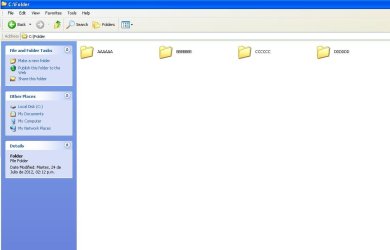
The attached files show (in Windows XP) what I want to replicate in Windows 7:

One show normal auto-arrange and sort by name behavior.
Two shows auto-arranged but not sorted by anything. So I can move folders or files, but do not need to "fill" the holes left by a moved file or folder.

Thanks for your great work!
 

Attachments

  • one.JPG
    one.JPG
    35.6 KB · Views: 174
  • two.JPG
    two.JPG
    34.4 KB · Views: 181

My Computer My Computer

At a glance

Windows 7 RCIntel Core 2 Quad Q66002 Gb Kingston, 3 Gb Supertalent With HeatsinkxFx GeForce 9600 GT 512Mb
OS
Windows 7 RC
CPU
Intel Core 2 Quad Q6600
Motherboard
ASUS D5W DH Deluxe
Memory
2 Gb Kingston, 3 Gb Supertalent With Heatsink
Graphics Card(s)
xFx GeForce 9600 GT 512Mb
Sound Card
Onboard
Monitor(s) Displays
LG Fantasy L1900R Ring
Hard Drives
Samsung HD321KJ SATA 320Gb
PSU
PowerCooler 550 Watt
Case
Vitsuba 8410?
Cooling
Fan-Based
Back
Top