Solved Windows Explorer Column, "Ext"

dcampbe1

New member
Local time
2:44 PM
Messages
23
The "Ext" column on windows explorer is AWOL. There is a "Type" column but it shows all extensions for a common file type association.

I want to sort, for example, all of JPG's, exclusive of other extensions such as GIF, BMP, etc.

The Type column doesn't distinguish between the various extensions common to the same association.

I did find an XP work-around that seems to add a column for Ext but doesn't seem to apply to Win-7.

Does anyone know how to achieve a similar thing in Win-7?
 

My Computer

Computer type
PC/Desktop
Computer Manufacturer/Model Number
Dell Vostro 460
OS
Win 7 Ultimate 64 bit
CPU
Intel i7
Memory
8gB

My Computer

Computer type
PC/Desktop
Computer Manufacturer/Model Number
Self built custom
OS
64-bit Windows 11 Pro for Workstations
CPU
Intel i7-8700K OC'd to 5 GHz
Motherboard
ASUS ROG Maximus XI Formula Z390
Memory
64 GB (4x16GB) G.SKILL TridentZ RGB DDR4 3600 MHz
Graphics Card(s)
ASUS ROG-STRIX-GTX1080TI-O11G-GAMING
Sound Card
Integrated
Monitor(s) Displays
2 x Samsung Odyssey G7 27"
Screen Resolution
2560x1440
Hard Drives
1TB Samsung 990 PRO M.2,
4TB Samsung 990 PRO PRO M.2,
TerraMaster F8 SSD Plus NAS
PSU
Seasonic Prime Titanium 850W
Case
Thermaltake Core P3
Cooling
Corsair Hydro H115i
Keyboard
Logitech wireless K800
Mouse
Logitech MX Master 4
Internet Speed
2 Gb/s Download and 100 Mb/s Upload
Antivirus
Malwarebyte Anti-Malware Premium
Browser
Google Chrome
Other Info
Logitech Z625 speaker system,
Logitech BRIO 4K Pro webcam,
HP Color LaserJet Pro MFP M477fdn,
APC SMART-UPS RT 1000 XL - SURT1000XLI,
Galaxy S23 Plus phone
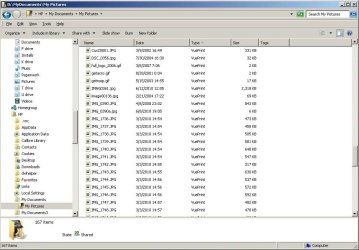
Thanks for the response, but that doesn't do it either. I will says it's closer than I've gotten so far. I followed your example, which I hadn't tried before on a directory of pictures. I grouped them by type which did group them -- sort of.

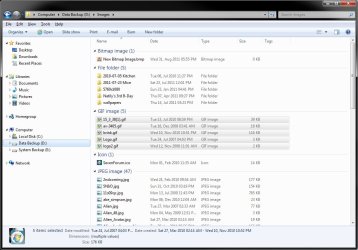
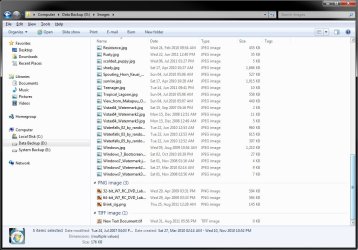
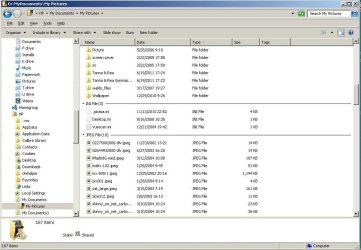
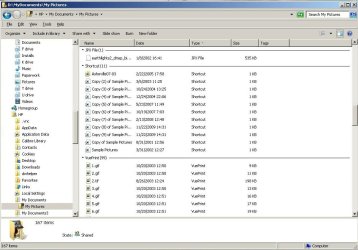
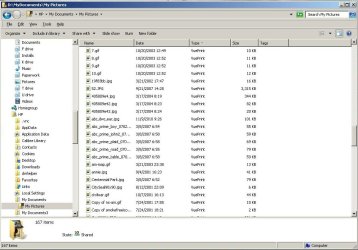
The HTML group contains HTML but also HTM. The VuePrint (my viewer) group contained gif, tif and jpg all scrambled together. There were no corresponding groups for those thee extensions.

My point is, there are extensions, i.e., htm, hta, html, & shtml, all of which are unique. Then there are types, Chrome html Documents, & VuePrint. The type refer to the associated Windows groups and extension refers to what's behind the last period of the file name.

Windows Explorer has some 250 column headers including Attributes, Comments, and Gender. Why not Ext? I would like to be able to click on the Ext column (for file extensions and NOT file types) and have it sorted so that all of the hta's are grouped together, htm's in another group and one for just html. That would put all my gif's together separate from the group of jpg's.

Since someone went to the trouble of writing a work-around to create an Ext column header for XP, it would seem reasonable that by now someone would have done the same for Vista/Win-7.

It is, after all, just as reasonable to expect an accurate and correct sorting of file extensions as for file names, or of gender for that matter.
 

My Computer

Computer type
PC/Desktop
Computer Manufacturer/Model Number
Dell Vostro 460
OS
Win 7 Ultimate 64 bit
CPU
Intel i7
Memory
8gB
Is this in a library folder or a regular folder in Windows Explorer.

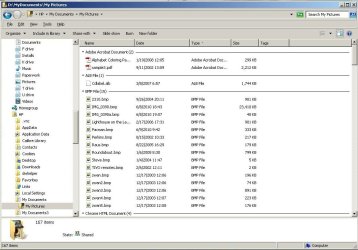
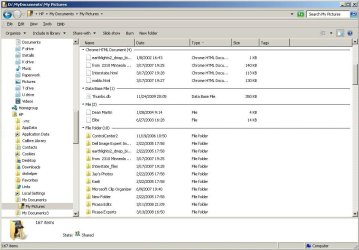
This is how my pictures folder looks with View -> Group by -> Type and View -> Sort by -> Name. Does your's look like this with all extensions separated? It doesn't matter if you use details or icon view.

1.jpg2.jpg
 

My Computer

Computer type
PC/Desktop
Computer Manufacturer/Model Number
Self built custom
OS
64-bit Windows 11 Pro for Workstations
CPU
Intel i7-8700K OC'd to 5 GHz
Motherboard
ASUS ROG Maximus XI Formula Z390
Memory
64 GB (4x16GB) G.SKILL TridentZ RGB DDR4 3600 MHz
Graphics Card(s)
ASUS ROG-STRIX-GTX1080TI-O11G-GAMING
Sound Card
Integrated
Monitor(s) Displays
2 x Samsung Odyssey G7 27"
Screen Resolution
2560x1440
Hard Drives
1TB Samsung 990 PRO M.2,
4TB Samsung 990 PRO PRO M.2,
TerraMaster F8 SSD Plus NAS
PSU
Seasonic Prime Titanium 850W
Case
Thermaltake Core P3
Cooling
Corsair Hydro H115i
Keyboard
Logitech wireless K800
Mouse
Logitech MX Master 4
Internet Speed
2 Gb/s Download and 100 Mb/s Upload
Antivirus
Malwarebyte Anti-Malware Premium
Browser
Google Chrome
Other Info
Logitech Z625 speaker system,
Logitech BRIO 4K Pro webcam,
HP Color LaserJet Pro MFP M477fdn,
APC SMART-UPS RT 1000 XL - SURT1000XLI,
Galaxy S23 Plus phone
Yes, that's the way mine look for all file extensions that are associated with unique type's. That is you have different file type associations for each of your extensions.

I have multiple extensions associated to each file type. Some of them do sort out into individual extensions, but other multiple extensions get grouped (and scrambled) into one file type.

It all boils down to the fact there's not a simple "Ext" column. Directory Opus has it, but then that's not Microsoft.

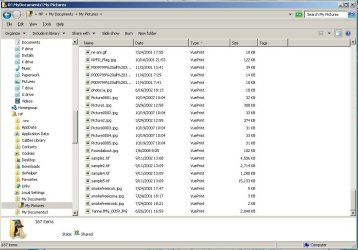
Here are screen shots showing what I'm getting by grouping by type and sorting by name. There were nine pages but I was allowed only five. If necessary, I'll upload the last four in another post. Let me know if these four suffice.
 

Attachments

  • PS19592.jpg
    PS19592.jpg
    92.8 KB · Views: 52
  • PS19593.jpg
    PS19593.jpg
    93.8 KB · Views: 35
  • PS19594.jpg
    PS19594.jpg
    90 KB · Views: 26
  • PS19595.jpg
    PS19595.jpg
    91.2 KB · Views: 28
  • PS19596.jpg
    PS19596.jpg
    94.8 KB · Views: 28

My Computer

Computer type
PC/Desktop
Computer Manufacturer/Model Number
Dell Vostro 460
OS
Win 7 Ultimate 64 bit
CPU
Intel i7
Memory
8gB
I decided to send the last four too to show that those extensions that were grouped under VuePro didn't show up elsewhere.

I fail to understand why so many column headers are available for Windows Explorer, some important and some not very. But Ext, not Type is vital if you want to keep all extensions sorted -- regardless of their association to file types.
 

Attachments

  • PS19600.jpg
    PS19600.jpg
    95.3 KB · Views: 16
  • PS19599.jpg
    PS19599.jpg
    98.1 KB · Views: 14
  • PS19598.jpg
    PS19598.jpg
    94.6 KB · Views: 17
  • PS19597.jpg
    PS19597.jpg
    92.5 KB · Views: 24

My Computer

Computer type
PC/Desktop
Computer Manufacturer/Model Number
Dell Vostro 460
OS
Win 7 Ultimate 64 bit
CPU
Intel i7
Memory
8gB
I'm not sure that there's anything you could do for the VuePro ones though.
 

My Computer

Computer type
PC/Desktop
Computer Manufacturer/Model Number
Self built custom
OS
64-bit Windows 11 Pro for Workstations
CPU
Intel i7-8700K OC'd to 5 GHz
Motherboard
ASUS ROG Maximus XI Formula Z390
Memory
64 GB (4x16GB) G.SKILL TridentZ RGB DDR4 3600 MHz
Graphics Card(s)
ASUS ROG-STRIX-GTX1080TI-O11G-GAMING
Sound Card
Integrated
Monitor(s) Displays
2 x Samsung Odyssey G7 27"
Screen Resolution
2560x1440
Hard Drives
1TB Samsung 990 PRO M.2,
4TB Samsung 990 PRO PRO M.2,
TerraMaster F8 SSD Plus NAS
PSU
Seasonic Prime Titanium 850W
Case
Thermaltake Core P3
Cooling
Corsair Hydro H115i
Keyboard
Logitech wireless K800
Mouse
Logitech MX Master 4
Internet Speed
2 Gb/s Download and 100 Mb/s Upload
Antivirus
Malwarebyte Anti-Malware Premium
Browser
Google Chrome
Other Info
Logitech Z625 speaker system,
Logitech BRIO 4K Pro webcam,
HP Color LaserJet Pro MFP M477fdn,
APC SMART-UPS RT 1000 XL - SURT1000XLI,
Galaxy S23 Plus phone
That would sure seem to be the case. The thing that got me going on this in the first place was when my son was trying to isolate html files to the exclusion of htm, hta, etc. That's when we discovered that windows explorer couldn't sort on extension such as exclusively html, but only by type which didn't work.

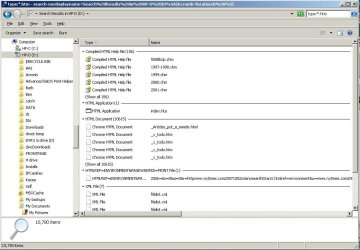
Before putting this issue to bed, I tried your suggestion of sort by name, group by type on a search of html. BTW, the search has the same weakness, in that it can only search by type and not be extension. The results prove that the problem is not just Vuepro, but a more systemic one that is best solved by simply adding an Extension column header to Windows Explorer or some work-around that would effect the same thing.

Here're the results of that HTML listing:
 

Attachments

  • PS19601.jpg
    PS19601.jpg
    83.4 KB · Views: 23

My Computer

Computer type
PC/Desktop
Computer Manufacturer/Model Number
Dell Vostro 460
OS
Win 7 Ultimate 64 bit
CPU
Intel i7
Memory
8gB
Strange, you should be able to search using *.htm just as well.

You might give the free program Explorer++ a try to see if you might like it better over Windows Explorer.
 

My Computer

Computer type
PC/Desktop
Computer Manufacturer/Model Number
Self built custom
OS
64-bit Windows 11 Pro for Workstations
CPU
Intel i7-8700K OC'd to 5 GHz
Motherboard
ASUS ROG Maximus XI Formula Z390
Memory
64 GB (4x16GB) G.SKILL TridentZ RGB DDR4 3600 MHz
Graphics Card(s)
ASUS ROG-STRIX-GTX1080TI-O11G-GAMING
Sound Card
Integrated
Monitor(s) Displays
2 x Samsung Odyssey G7 27"
Screen Resolution
2560x1440
Hard Drives
1TB Samsung 990 PRO M.2,
4TB Samsung 990 PRO PRO M.2,
TerraMaster F8 SSD Plus NAS
PSU
Seasonic Prime Titanium 850W
Case
Thermaltake Core P3
Cooling
Corsair Hydro H115i
Keyboard
Logitech wireless K800
Mouse
Logitech MX Master 4
Internet Speed
2 Gb/s Download and 100 Mb/s Upload
Antivirus
Malwarebyte Anti-Malware Premium
Browser
Google Chrome
Other Info
Logitech Z625 speaker system,
Logitech BRIO 4K Pro webcam,
HP Color LaserJet Pro MFP M477fdn,
APC SMART-UPS RT 1000 XL - SURT1000XLI,
Galaxy S23 Plus phone
Actually, it doesn't matter whether you search for htm or html, both results are the same.

This entire thread was based on my desire to find a fix for Windows 7 Windows Explorer. Because this forum is such a great source of problem solving for Windows 7 users, I was pretty confident that someone in the world had come up with a work-around, fix, patch or other Window Explorer solution.

As I said before, I have and use Directory Opus and love it. I personally use it virtually exclusively. Since I assist a lot of people with their problems though, including my son with his "can't isolate html files" problem, I set out to find a fix for the basic WE, not another program replacement.

One reason I had such high hopes was because someone had already created a mod for XP that gave WE an Ext column. See XRayz Software.

Please put this on your BOLO list of needed fixes. Thanks for all your time and effort.
 

My Computer

Computer type
PC/Desktop
Computer Manufacturer/Model Number
Dell Vostro 460
OS
Win 7 Ultimate 64 bit
CPU
Intel i7
Memory
8gB
You're welcome. I wish that I could have helped. Hopefully someone may come along and know a way to.
 

My Computer

Computer type
PC/Desktop
Computer Manufacturer/Model Number
Self built custom
OS
64-bit Windows 11 Pro for Workstations
CPU
Intel i7-8700K OC'd to 5 GHz
Motherboard
ASUS ROG Maximus XI Formula Z390
Memory
64 GB (4x16GB) G.SKILL TridentZ RGB DDR4 3600 MHz
Graphics Card(s)
ASUS ROG-STRIX-GTX1080TI-O11G-GAMING
Sound Card
Integrated
Monitor(s) Displays
2 x Samsung Odyssey G7 27"
Screen Resolution
2560x1440
Hard Drives
1TB Samsung 990 PRO M.2,
4TB Samsung 990 PRO PRO M.2,
TerraMaster F8 SSD Plus NAS
PSU
Seasonic Prime Titanium 850W
Case
Thermaltake Core P3
Cooling
Corsair Hydro H115i
Keyboard
Logitech wireless K800
Mouse
Logitech MX Master 4
Internet Speed
2 Gb/s Download and 100 Mb/s Upload
Antivirus
Malwarebyte Anti-Malware Premium
Browser
Google Chrome
Other Info
Logitech Z625 speaker system,
Logitech BRIO 4K Pro webcam,
HP Color LaserJet Pro MFP M477fdn,
APC SMART-UPS RT 1000 XL - SURT1000XLI,
Galaxy S23 Plus phone
Is this what you mean?

Capture.png
 

My Computer

Computer type
PC/Desktop
Computer Manufacturer/Model Number
Dwarf Dwf/11/2012 r09/2013
OS
Windows 8.1 Pro RTM x64
CPU
Intel Core-i5-3570K 4-core @ 3.4GHz (Ivy Bridge) (OC 4.4GHz)
Motherboard
ASRock Z77 Extreme4-M
Memory
4 x 4GB DDR3-1600 Corsair Vengeance CMZ8GX3M2A1600C9B (16GB)
Graphics Card(s)
MSI GeForce GTX770 Gaming OC 2GB
Sound Card
Realtek High Definition on board solution (ALC 898)
Monitor(s) Displays
ViewSonic VA1912w Widescreen (VGA)
Screen Resolution
1440x900
Hard Drives
OCZ Agility 3 SSD 120GB SATA III x2 (RAID 0)
Samsung HD501LJ 500GB SATA II x2
Hitachi HDS721010CLA332 1TB SATA II
Iomega 1.5TB Ext USB 2.0
WD 2.0TB Ext USB 3.0
PSU
XFX Pro Series 850W Semi-Modular
Case
Gigabyte IF233
Cooling
1 x 120mm Front Inlet 1 x 120mm Rear Exhaust
Keyboard
Microsoft Comfort Curve Keyboard 3000 (USB)
Mouse
Microsoft Comfort Mouse 3000 for Business (USB)
Internet Speed
NetGear DG834Gv3 ADSL Modem/Router (Ethernet) ~4.0 Mb/s (O2)
Antivirus
Avast! 8.0.1497
Browser
IE 11
Other Info
Optical Drive: HL-DT-ST BD-RE BH10LS30 SATA Bluray
Lexmark S305 Printer/Scanner/Copier (USB)
WEI Score: 8.1/8.1/8.5/8.5/8.25
Asus Eee PC 1011PX Netbook (Windows 7 x86 Starter)
Where in the world did that come from? Is that on Vista WE or another program?

That's exactly what I'm looking for if it's WE.

I'm in suspense!
 

My Computer

Computer type
PC/Desktop
Computer Manufacturer/Model Number
Dell Vostro 460
OS
Win 7 Ultimate 64 bit
CPU
Intel i7
Memory
8gB
Hello Dwarf,

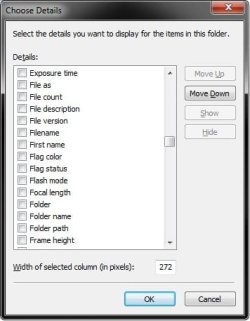
Strange. I don't have File extension listed in my "More" details window like yours above. :confused:

More.jpg
 

My Computer

Computer type
PC/Desktop
Computer Manufacturer/Model Number
Self built custom
OS
64-bit Windows 11 Pro for Workstations
CPU
Intel i7-8700K OC'd to 5 GHz
Motherboard
ASUS ROG Maximus XI Formula Z390
Memory
64 GB (4x16GB) G.SKILL TridentZ RGB DDR4 3600 MHz
Graphics Card(s)
ASUS ROG-STRIX-GTX1080TI-O11G-GAMING
Sound Card
Integrated
Monitor(s) Displays
2 x Samsung Odyssey G7 27"
Screen Resolution
2560x1440
Hard Drives
1TB Samsung 990 PRO M.2,
4TB Samsung 990 PRO PRO M.2,
TerraMaster F8 SSD Plus NAS
PSU
Seasonic Prime Titanium 850W
Case
Thermaltake Core P3
Cooling
Corsair Hydro H115i
Keyboard
Logitech wireless K800
Mouse
Logitech MX Master 4
Internet Speed
2 Gb/s Download and 100 Mb/s Upload
Antivirus
Malwarebyte Anti-Malware Premium
Browser
Google Chrome
Other Info
Logitech Z625 speaker system,
Logitech BRIO 4K Pro webcam,
HP Color LaserJet Pro MFP M477fdn,
APC SMART-UPS RT 1000 XL - SURT1000XLI,
Galaxy S23 Plus phone
I'm actually posting that from Windows 8 7989.

Check the available options for column headers. It could be that you were just thinking of Extension (which doesn't exist, thereby making you think that what you want to do can't be done) and File extension, which, as I have shown above and you have already affirmed as being what you want, does.

I did run this first, though (and got no error messages), so it might be worth a shot: http://www.xrayz.co.uk/extension-column/
 

My Computer

Computer type
PC/Desktop
Computer Manufacturer/Model Number
Dwarf Dwf/11/2012 r09/2013
OS
Windows 8.1 Pro RTM x64
CPU
Intel Core-i5-3570K 4-core @ 3.4GHz (Ivy Bridge) (OC 4.4GHz)
Motherboard
ASRock Z77 Extreme4-M
Memory
4 x 4GB DDR3-1600 Corsair Vengeance CMZ8GX3M2A1600C9B (16GB)
Graphics Card(s)
MSI GeForce GTX770 Gaming OC 2GB
Sound Card
Realtek High Definition on board solution (ALC 898)
Monitor(s) Displays
ViewSonic VA1912w Widescreen (VGA)
Screen Resolution
1440x900
Hard Drives
OCZ Agility 3 SSD 120GB SATA III x2 (RAID 0)
Samsung HD501LJ 500GB SATA II x2
Hitachi HDS721010CLA332 1TB SATA II
Iomega 1.5TB Ext USB 2.0
WD 2.0TB Ext USB 3.0
PSU
XFX Pro Series 850W Semi-Modular
Case
Gigabyte IF233
Cooling
1 x 120mm Front Inlet 1 x 120mm Rear Exhaust
Keyboard
Microsoft Comfort Curve Keyboard 3000 (USB)
Mouse
Microsoft Comfort Mouse 3000 for Business (USB)
Internet Speed
NetGear DG834Gv3 ADSL Modem/Router (Ethernet) ~4.0 Mb/s (O2)
Antivirus
Avast! 8.0.1497
Browser
IE 11
Other Info
Optical Drive: HL-DT-ST BD-RE BH10LS30 SATA Bluray
Lexmark S305 Printer/Scanner/Copier (USB)
WEI Score: 8.1/8.1/8.5/8.5/8.25
Asus Eee PC 1011PX Netbook (Windows 7 x86 Starter)
The biggest part of my problem is in explaining the difference between Type and Ext (called File Extension in Win-8). One of the links below shows a fix for WE that adds an Ext column but it's only good for XP and before. The program author informs me that he can't provide the same thing for Win-7/Vista because MS "took the ability away".

Why anyone would consider Ext, or File Extension any less important than name, size or attribute is beyond me.

Thanks Dwarf for the heads-up. Guess now I'll have to look forward to Win-8. Hopefully someone will come up with a "correction" to this WE flaw before then though.

I just caught the fact that you've tested the fix and got no errors. Is that on Win-7? And does it add the missing column?
 
Last edited:

My Computer

Computer type
PC/Desktop
Computer Manufacturer/Model Number
Dell Vostro 460
OS
Win 7 Ultimate 64 bit
CPU
Intel i7
Memory
8gB
Have you tried running/installing that extension anyway? Let me boot up my W7 installation, and I'll report back in a while.
 

My Computer

Computer type
PC/Desktop
Computer Manufacturer/Model Number
Dwarf Dwf/11/2012 r09/2013
OS
Windows 8.1 Pro RTM x64
CPU
Intel Core-i5-3570K 4-core @ 3.4GHz (Ivy Bridge) (OC 4.4GHz)
Motherboard
ASRock Z77 Extreme4-M
Memory
4 x 4GB DDR3-1600 Corsair Vengeance CMZ8GX3M2A1600C9B (16GB)
Graphics Card(s)
MSI GeForce GTX770 Gaming OC 2GB
Sound Card
Realtek High Definition on board solution (ALC 898)
Monitor(s) Displays
ViewSonic VA1912w Widescreen (VGA)
Screen Resolution
1440x900
Hard Drives
OCZ Agility 3 SSD 120GB SATA III x2 (RAID 0)
Samsung HD501LJ 500GB SATA II x2
Hitachi HDS721010CLA332 1TB SATA II
Iomega 1.5TB Ext USB 2.0
WD 2.0TB Ext USB 3.0
PSU
XFX Pro Series 850W Semi-Modular
Case
Gigabyte IF233
Cooling
1 x 120mm Front Inlet 1 x 120mm Rear Exhaust
Keyboard
Microsoft Comfort Curve Keyboard 3000 (USB)
Mouse
Microsoft Comfort Mouse 3000 for Business (USB)
Internet Speed
NetGear DG834Gv3 ADSL Modem/Router (Ethernet) ~4.0 Mb/s (O2)
Antivirus
Avast! 8.0.1497
Browser
IE 11
Other Info
Optical Drive: HL-DT-ST BD-RE BH10LS30 SATA Bluray
Lexmark S305 Printer/Scanner/Copier (USB)
WEI Score: 8.1/8.1/8.5/8.5/8.25
Asus Eee PC 1011PX Netbook (Windows 7 x86 Starter)
Just checked, and that option does not exist in W7, both before and after running that program. By no errors I mean that the program appears to run successfully.

Guess the option must have been added back to the Windows 8 Explorer.
 

My Computer

Computer type
PC/Desktop
Computer Manufacturer/Model Number
Dwarf Dwf/11/2012 r09/2013
OS
Windows 8.1 Pro RTM x64
CPU
Intel Core-i5-3570K 4-core @ 3.4GHz (Ivy Bridge) (OC 4.4GHz)
Motherboard
ASRock Z77 Extreme4-M
Memory
4 x 4GB DDR3-1600 Corsair Vengeance CMZ8GX3M2A1600C9B (16GB)
Graphics Card(s)
MSI GeForce GTX770 Gaming OC 2GB
Sound Card
Realtek High Definition on board solution (ALC 898)
Monitor(s) Displays
ViewSonic VA1912w Widescreen (VGA)
Screen Resolution
1440x900
Hard Drives
OCZ Agility 3 SSD 120GB SATA III x2 (RAID 0)
Samsung HD501LJ 500GB SATA II x2
Hitachi HDS721010CLA332 1TB SATA II
Iomega 1.5TB Ext USB 2.0
WD 2.0TB Ext USB 3.0
PSU
XFX Pro Series 850W Semi-Modular
Case
Gigabyte IF233
Cooling
1 x 120mm Front Inlet 1 x 120mm Rear Exhaust
Keyboard
Microsoft Comfort Curve Keyboard 3000 (USB)
Mouse
Microsoft Comfort Mouse 3000 for Business (USB)
Internet Speed
NetGear DG834Gv3 ADSL Modem/Router (Ethernet) ~4.0 Mb/s (O2)
Antivirus
Avast! 8.0.1497
Browser
IE 11
Other Info
Optical Drive: HL-DT-ST BD-RE BH10LS30 SATA Bluray
Lexmark S305 Printer/Scanner/Copier (USB)
WEI Score: 8.1/8.1/8.5/8.5/8.25
Asus Eee PC 1011PX Netbook (Windows 7 x86 Starter)
Thanks for letting me know. I don't think it was "added back" but rather added for the first time ever in Win-8. Other than running that patch, Ext has never been available as far as I know.

How nice to know someone at M$ finally woke up.

Thanks again, your input is very consoling.
 

My Computer

Computer type
PC/Desktop
Computer Manufacturer/Model Number
Dell Vostro 460
OS
Win 7 Ultimate 64 bit
CPU
Intel i7
Memory
8gB
Hi dcampbe, while waiting for Win8, you may want to try the next best fix:

Do some regedit so that the jpg, gif, png all have different type descriptions rather than just "VuePrint".
ie. change them to say "VuePrint GIF", "VuePrint JPG", "VuePrint PNG" etc.

The relevant keys will be at:
hkey_classes_root\
and
hkey_local_machine\software\classes\

As an experienced user, no doubt you'll appreciate the usual caution in using regedit.
 

My Computer

OS
Windows 7 Ultimate x64
Back
Top