
windows explorer crash

this might help you to help me if i have the icons on explorer crashs then restarts BUT IF I CHANGE THE ICONS
TO A LIST WITH NO ICONS IT DOES NOT CRASH BUT I WANT THE ICONS
 

My Computer

Computer Manufacturer/Model Number
PACKARD bell
OS
windows 7
CPU
4 CPU by Intel Core 2 Quad Q6600
Motherboard
Vegas 2 Motherboard Full ATX motherboard
Memory
3 gb ram
Graphics Card(s)
NVIDIA GeForce 8800
Hard Drives
500GB C D =500GB
Seagate Barracuda 7200.10 500 GB Hard Disk by 2
Other Info
8 in 1 Gigabyte GO-C81LA CardReader/Writer
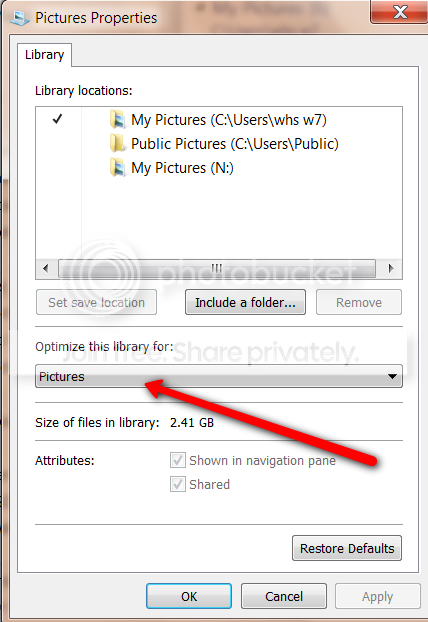
Go to your Pictures Library > Properties and see whether you have the same setting as in the picture.

2010-03-29_1752.png
 

My Computer

Computer Manufacturer/Model Number
HP, Dell, Gateway, Toshiba - 4 laptops and 2 desktops
OS
Vista, Windows7, Mint Mate, Zorin, Windows 8
CPU
from 1.6GHz Duo to i7
Monitor(s) Displays
2x HP w2207
Hard Drives
5x HDD, 7x SSD, 12x Externals
Keyboard
with trackball - no mices
Mouse
Trackball mice
Internet Speed
DSL 6000
my downloads is the folder with my pictures and videos it's not pictures that are causing the problem
as i went to my pictures folder that has alot picture even more then other folder
so it is something to to with the video's icon
 

My Computer

Computer Manufacturer/Model Number
PACKARD bell
OS
windows 7
CPU
4 CPU by Intel Core 2 Quad Q6600
Motherboard
Vegas 2 Motherboard Full ATX motherboard
Memory
3 gb ram
Graphics Card(s)
NVIDIA GeForce 8800
Hard Drives
500GB C D =500GB
Seagate Barracuda 7200.10 500 GB Hard Disk by 2
Other Info
8 in 1 Gigabyte GO-C81LA CardReader/Writer
i went into the folder my videos and that only has 4 videos in it and it explorer crashed
so it seems to crash with videos icon any way to fix this and also thanks so far for helping my hopefully with this info you can help more
by the way i have 7 video players
 

My Computer

Computer Manufacturer/Model Number
PACKARD bell
OS
windows 7
CPU
4 CPU by Intel Core 2 Quad Q6600
Motherboard
Vegas 2 Motherboard Full ATX motherboard
Memory
3 gb ram
Graphics Card(s)
NVIDIA GeForce 8800
Hard Drives
500GB C D =500GB
Seagate Barracuda 7200.10 500 GB Hard Disk by 2
Other Info
8 in 1 Gigabyte GO-C81LA CardReader/Writer
Have a look what your Videos library is set to. And move the videos to the Videos folder.
 

My Computer

Computer Manufacturer/Model Number
HP, Dell, Gateway, Toshiba - 4 laptops and 2 desktops
OS
Vista, Windows7, Mint Mate, Zorin, Windows 8
CPU
from 1.6GHz Duo to i7
Monitor(s) Displays
2x HP w2207
Hard Drives
5x HDD, 7x SSD, 12x Externals
Keyboard
with trackball - no mices
Mouse
Trackball mice
Internet Speed
DSL 6000
The problem is: A buggy codec, possibly combined with a buggy video file that is crashing the buggy codec.

Explorer is trying to decode the first frame of the video to get data for an icon and data about the file like size/length/fps etc. But the codec is crasgin on one or more files in that folder.

Options:

1) Try to track down the buggy codec and remove it.
2) Try to track down the possibly single file causing it and remove it.
3) Avoid it by not using Icon mode. (and keeping the preview screen off in that folder).

This issue in general was introduces in XP SP3, was present in vista and still exists in W7. It comes and goes depening on /exactly/ what codecs you have installed. There may be several for the same file type and the one that is "winning" is bad. Finding out which one is bad can take some spelunking but is possible using some downloaded tools if you are interested.
 

My Computer

Computer Manufacturer/Model Number
Scratch built
OS
Windows 7 x64 Ultimate
CPU
i7 960
Motherboard
Asus P6X58D
Memory
12 Gig Corsair Dominator
Graphics Card(s)
Nvidia 480
Sound Card
Maudio Delta 44 + breakout box
Monitor(s) Displays
Dell UltraSharp U2410 24in and Samsung 21 dual monitors
Screen Resolution
1920x1200 and 1280x1024
Hard Drives
Primary: Intel X-25M G2 160G SSD
Secondary: Segate baracuda 1.0 TB
HDs in AHCI mode.
PSU
Corasair TX850
Case
Cooler Master HAF
Cooling
Corsair H50
Keyboard
Logitech G15 + N52 game pad
Mouse
Logitech MX518
Internet Speed
15kbs down 4.5kbps up
Other Info
WEI 7.6
CPU & RAM 7.6
Graphics 7.9
Hard disk 7.7
i have installed real player and divx yesturday when it happenend
 

My Computer

Computer Manufacturer/Model Number
PACKARD bell
OS
windows 7
CPU
4 CPU by Intel Core 2 Quad Q6600
Motherboard
Vegas 2 Motherboard Full ATX motherboard
Memory
3 gb ram
Graphics Card(s)
NVIDIA GeForce 8800
Hard Drives
500GB C D =500GB
Seagate Barracuda 7200.10 500 GB Hard Disk by 2
Other Info
8 in 1 Gigabyte GO-C81LA CardReader/Writer
so all i need to do is unistall one of those and the problem is gone
 

My Computer

Computer Manufacturer/Model Number
PACKARD bell
OS
windows 7
CPU
4 CPU by Intel Core 2 Quad Q6600
Motherboard
Vegas 2 Motherboard Full ATX motherboard
Memory
3 gb ram
Graphics Card(s)
NVIDIA GeForce 8800
Hard Drives
500GB C D =500GB
Seagate Barracuda 7200.10 500 GB Hard Disk by 2
Other Info
8 in 1 Gigabyte GO-C81LA CardReader/Writer

My Computer

Computer Manufacturer/Model Number
PACKARD bell
OS
windows 7
CPU
4 CPU by Intel Core 2 Quad Q6600
Motherboard
Vegas 2 Motherboard Full ATX motherboard
Memory
3 gb ram
Graphics Card(s)
NVIDIA GeForce 8800
Hard Drives
500GB C D =500GB
Seagate Barracuda 7200.10 500 GB Hard Disk by 2
Other Info
8 in 1 Gigabyte GO-C81LA CardReader/Writer
dam weird i closed the folder and then explorer crashed
 

My Computer

Computer Manufacturer/Model Number
PACKARD bell
OS
windows 7
CPU
4 CPU by Intel Core 2 Quad Q6600
Motherboard
Vegas 2 Motherboard Full ATX motherboard
Memory
3 gb ram
Graphics Card(s)
NVIDIA GeForce 8800
Hard Drives
500GB C D =500GB
Seagate Barracuda 7200.10 500 GB Hard Disk by 2
Other Info
8 in 1 Gigabyte GO-C81LA CardReader/Writer
for now it's fixed thanks
 

My Computer

Computer Manufacturer/Model Number
PACKARD bell
OS
windows 7
CPU
4 CPU by Intel Core 2 Quad Q6600
Motherboard
Vegas 2 Motherboard Full ATX motherboard
Memory
3 gb ram
Graphics Card(s)
NVIDIA GeForce 8800
Hard Drives
500GB C D =500GB
Seagate Barracuda 7200.10 500 GB Hard Disk by 2
Other Info
8 in 1 Gigabyte GO-C81LA CardReader/Writer
I had the same problem and resolve uninstalling win 7 codec. So, if you have those codec installed, try remove them. I resolve installing another codec
 

My Computer

Computer Manufacturer/Model Number
Self made
OS
Windows 7 Ultimate 64-bit
CPU
Intel i7 3770k
Motherboard
ASRock Z68 Pro Gen.3
Memory
Corsair Vengeance 16GB 1600 Mhz
Graphics Card(s)
Asus GTX580 Direct Cu II
Sound Card
Asus Xonar D2
Monitor(s) Displays
Dell u2711 IPS 27"
Screen Resolution
2560X1440
Hard Drives
OCZ Vertex 4 256 Gb SSD
Case
Cooler Master Cosmos 1000
Keyboard
Logitech Illuminated Keyboard
Mouse
Logitech Laser Mouse M505
Internet Speed
Wifi operator
damn it is not fixed
 

My Computer

Computer Manufacturer/Model Number
PACKARD bell
OS
windows 7
CPU
4 CPU by Intel Core 2 Quad Q6600
Motherboard
Vegas 2 Motherboard Full ATX motherboard
Memory
3 gb ram
Graphics Card(s)
NVIDIA GeForce 8800
Hard Drives
500GB C D =500GB
Seagate Barracuda 7200.10 500 GB Hard Disk by 2
Other Info
8 in 1 Gigabyte GO-C81LA CardReader/Writer
Well, to start the road to fixing it for good, try making a new folder and put one file of each type that are in the big folder into it one by one and see if it crashes on a file type. If so we can see about finding and removing the cocec that may be causing it.

If that doesn't work it may be a specific file. Finding that then requires doing a binary search for it. Moving 1/2 the files out to aother folder then finding out which folder still has the problem, and then move half the files in that folder to anew folder and so on till your left iwth just one file inthe folder failing... Even with thousands of files it'll only take 10-15 times of that to find the specific file.
 

My Computer

Computer Manufacturer/Model Number
Scratch built
OS
Windows 7 x64 Ultimate
CPU
i7 960
Motherboard
Asus P6X58D
Memory
12 Gig Corsair Dominator
Graphics Card(s)
Nvidia 480
Sound Card
Maudio Delta 44 + breakout box
Monitor(s) Displays
Dell UltraSharp U2410 24in and Samsung 21 dual monitors
Screen Resolution
1920x1200 and 1280x1024
Hard Drives
Primary: Intel X-25M G2 160G SSD
Secondary: Segate baracuda 1.0 TB
HDs in AHCI mode.
PSU
Corasair TX850
Case
Cooler Master HAF
Cooling
Corsair H50
Keyboard
Logitech G15 + N52 game pad
Mouse
Logitech MX518
Internet Speed
15kbs down 4.5kbps up
Other Info
WEI 7.6
CPU & RAM 7.6
Graphics 7.9
Hard disk 7.7
any time i try to install real player the problem rises can i fix this problem with this
Codec Tweak Tool is a free utility able to detect and remove broken references to codecs and filters.
 

My Computer

Computer Manufacturer/Model Number
PACKARD bell
OS
windows 7
CPU
4 CPU by Intel Core 2 Quad Q6600
Motherboard
Vegas 2 Motherboard Full ATX motherboard
Memory
3 gb ram
Graphics Card(s)
NVIDIA GeForce 8800
Hard Drives
500GB C D =500GB
Seagate Barracuda 7200.10 500 GB Hard Disk by 2
Other Info
8 in 1 Gigabyte GO-C81LA CardReader/Writer
For playing a ton of esoteric formats like real, VLC has worked for me and it doesn't need or install any codecs. Not sure if it works for real streaming though and does not act as a plug-in for websites. It can play streaming media but you have ot enter the media URL into it seperately if you want ot use it for that.

But for playing .rm files it works ok.
 

My Computer

Computer Manufacturer/Model Number
Scratch built
OS
Windows 7 x64 Ultimate
CPU
i7 960
Motherboard
Asus P6X58D
Memory
12 Gig Corsair Dominator
Graphics Card(s)
Nvidia 480
Sound Card
Maudio Delta 44 + breakout box
Monitor(s) Displays
Dell UltraSharp U2410 24in and Samsung 21 dual monitors
Screen Resolution
1920x1200 and 1280x1024
Hard Drives
Primary: Intel X-25M G2 160G SSD
Secondary: Segate baracuda 1.0 TB
HDs in AHCI mode.
PSU
Corasair TX850
Case
Cooler Master HAF
Cooling
Corsair H50
Keyboard
Logitech G15 + N52 game pad
Mouse
Logitech MX518
Internet Speed
15kbs down 4.5kbps up
Other Info
WEI 7.6
CPU & RAM 7.6
Graphics 7.9
Hard disk 7.7

My Computer

Computer Manufacturer/Model Number
Asus
OS
Windows 7 Ultimate x64
CPU
Intel(R) Core(TM) i7-2670QM CPU @ 2.20GHz, 2201 Mh
Memory
12gb
Graphics Card(s)
Geforce gt540m
Sound Card
integrated
Monitor(s) Displays
Laptop
Screen Resolution
1280x800
Hard Drives
500 gb western digital
Mouse
microsoft optic mouse
Internet Speed
100 kb ps
Back
Top