Hi guys (no ladies here?),
I've not been back here a lot, I've been busy reinstalling stuff, scanning... I'll give you an update below.
First of all, sorry not to have mentioned you personally, Callender, when I said thanks. How unthoughtfull of me

!
Well the Windows updates all went smoothly. No hick-ups, hourah ! It was long (especially the update to SP1, it run overnight), but as long as nothing goes wrong, I don't mind.
Bit by bit I've been reinstalling my programs and also part of my personal stuff. Then I realized that my most important excel file (complex, password protected too...) was not on my back-up. It's a long, and not important story to tell why that happened, what matters is that I didn't have it any more.
So I looked on the internet to find some (free) software to possibly retrieve it.
I first installed Recuva. It found my file, 7 copies of it (probably saves I made) but all corrupted (overwritten by a Windows system file). I tried to retrieve them anyway, but Excel won't open them (also not with the repair function).
Then I tried EaseUS, Recovermyfiles, Remo, DataNumen Excel Repair but none were able to retrieve my file to a workable state. Also, I read somewhere on the internet that if Recuva has a go with a file it becomes unuseable for other software to recover the file. Not sure if that is true, but that is not a very nice thing to do, not letting others have a try after your passage... You can imagine the time I spent waiting for all these scan to be done.... The EaseUS scan took hours and hours and I only found out afterwards that the trial can only scan but not recover.
Then I downloaded Office Regenerator, XLS Regenerator, but the trials only let you scan, not save the fragments they've found. And for 1 file (sic !) I'm not going to buy an expensive program, even if this one file is the most important excel file I have.
I do have partial a paper print of the file, but not of the rest of it. It will take a long time to remake the file from scratch and the info that wasn't printed will be gone forever. I kept the "recovered" corrupt files that the programs above were able to retrieve on a USB stick, and I have not installed any more of my stuff on to the computer to not overwrite more of my reformatted hard drive. So if any of you have an idea how I could still retrieve this file, it would be welcome... !
Uninstalling all of the above programs left me with remnants in the regkeys (EaseUS in Local Machine, and Dexcelr -
DateNumenExcelRepair - in Users). Not sure how to eliminate those if I do not want to manually touch the regedit myself. Also, one of these programs installed
CodeMeter (it possible was installed with
EaseUS?). I was only able to get rid of it after reading lots of internet pages (not that easy..., if
doesn't show in control panel/programs), but there too, there is still a remnant in my regedit (Wibu-Systems in local machine). So uncivilized to leave a mess behind your passage...
So I found Advanced System Care, with IObit-uninstaller, but that didn't fix the problem either. A seperate feature of ASC was
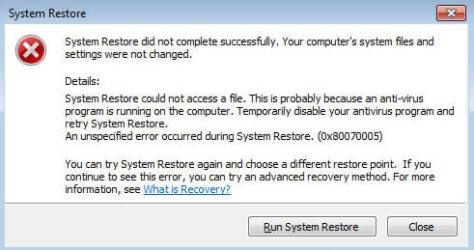
Driver Booster 4. I installed that, it found a lot of "very old" drivers. I had it run and install updates. So wrong !!! My machine rebooted, it seemed OK/normal. Right after that I installed a Windows update, and when my machine rebooted my screen resolution was at 800x600 and I couldn't move it up to the normal 1600x900. So something must have gone wrong with the driver updates. My device manager showed a driver problem with the ATI Mobility Radeon HD 5165 display adapter. I tried a system restore, but after logging in I got the error message 0x8007005.
Disabling Windows Security Essentials and Malwarebytes didn't help. Restore in safe mode didn't help either. So I
disabled the anti-malware in startup. That did the trick. I hate anti-virus software, always problems with it ! It's like putting locks everywhere in your house, prison bars before your front door and an iron fence around your garden, and then all of a sudden you get a warning sign "do not walk on the grass" and another "restricted parking area", and having trespassed you find yourself locked-out of the house, or not able to change the wall paper in the living room, and the toilet remains forever occupied. And all of this whereas you're all by yourself, in no company at all, so in no suspicious company, no intrusion... This time it just took over my pc, withdrawing the permission to execute a system restore on MY computer. I hate anti-malware software.... Working on a pc with anti-malware software means you're busy keeping it happy all day long, restrictions everywhere, and slow startup

.
Well you can imagine the first thing I did was getting rid of Driver Booster 4. My "very old" drivers are better than their new crap, all works just fine with them (well... I did install the latest Intel MEI driver manually as my Events log gave a warning for Local Manageability Service). From here:
Download Intel(R) ME: Management Engine Driver for Intel 5 Series Chipset-Based Desktop Boards.
So now hours later I can finally move ahead...
Oh uh yes, 5 times already I was asked to install Chrome when installing a program, the 6th I overlooked it. I uninstalled it immediately, and as uninstall via control panel alone doesn't eliminate all of it (I know this by experience, it's another one of these programs that leaves behind its eyes, trackers and dirt) I used IObit-uninstaller. It is just almost impossible to not get infected with this browser. It's like a da... virus
.
I forgot, my Toshiba reinstall came with a trial for Office Suite (that's 2007). So I activated it with my key and I can use those programs. But I used to have MS Office 2010 Pro Plus as well. The files are zipped on a CD-ROM. Belarc gave the key. But my first attempt to install Office 2010 Pro on my pc again from these files failed and downloading from the MS website asked for the key and it didn't accept mine. I have to dig into this a bit further to see what error messages I get. I left it alone because this missing excel file got my priority.
Icit2lol, I'll have a look at that Windows 7 optimization, but I'm not going to invest in a SSD. Indeed Toshiba installed a bunch of Toshiba stuff and I do not know if it is useful or not. I have the iso still on a bootable USB-stick, and also the file on my pc. And, to react to Callender's comment, I do intend to look into how to make system image back ups. I first want my pc to the state where I have all my stuff back on it (and I couldn't because I didn't want to overwrite even more old data if there is a possibility to retrieve my excel file).
Well that's it. So except for my own stupid mistake of not having a back up of 1 excel file, which let to hours of wasted scan time and uninstall, remnants in my registry and then system restore problems, there were no hick-ups (a part from reinstalling Office 2010, but I haven't explored that problem enough yet).
Judith


 !). In my case a 30 day trial of McAfee was proposed (outdated, but you will be prompted to update later on, after the Windows updates). Also Toshiba gives a pop-up window to register "my newly bought machine", but you can do that later, or not at all (it's for the warranty - after 8 years, lol! - and updates about Toshiba services). It gave me a Windows Office Suite trial, Works, Skype, eBay and Amazon, and some games from Windows and Wild Tangent, the latter if you register). That's all.