Windows Explorer

icon
 

My Computer

Computer type
Laptop
Computer Manufacturer/Model Number
Asus Notebook K52F/K62F Series
OS
Windows 7 Home Premium 64 bit
Memory
4.00 GB
Monitor(s) Displays
HP 2211
Keyboard
Microsoft Wireless MultiMedia Keyboard 1.1

Yes on the icon itself right click select properties select the Shortcut tab and see what the Target says
 

My Computer

Computer Manufacturer/Model Number
Custom Built
OS
Windows 7 Ultimate 32-Bit & Windows 7 Ultimate 64-Bit
CPU
Intel Core i7 CPU 950 @ 3.07GHz
Motherboard
ASUS P6T DELUXE V2
Memory
OCZ 6GB (3 x 2GB) 240-Pin DDR3 SDRAM DDR3 1600 OCZ3X1600R2
Graphics Card(s)
ATI Radeon HD 5700 Series
Sound Card
OnBoard
Hard Drives
WD6400AACS-00M3B0 (640GB SATA )
PSU
CORSAIR 850w
Case
NZXT LEXA
Cooling
Intel Stock Heatsink Fan
Keyboard
Microsoft Wireless Laser Keyboard 7000
Mouse
Microsoft Wireless Laser Mouse 7000
Icon (.ico)
 

My Computer

Computer type
Laptop
Computer Manufacturer/Model Number
Asus Notebook K52F/K62F Series
OS
Windows 7 Home Premium 64 bit
Memory
4.00 GB
Monitor(s) Displays
HP 2211
Keyboard
Microsoft Wireless MultiMedia Keyboard 1.1
Ok let's see something

Inside SystemLook

:regfind
PC Performer

:folderfind
PC Performer

Click Look
 

My Computer

Computer Manufacturer/Model Number
Custom Built
OS
Windows 7 Ultimate 32-Bit & Windows 7 Ultimate 64-Bit
CPU
Intel Core i7 CPU 950 @ 3.07GHz
Motherboard
ASUS P6T DELUXE V2
Memory
OCZ 6GB (3 x 2GB) 240-Pin DDR3 SDRAM DDR3 1600 OCZ3X1600R2
Graphics Card(s)
ATI Radeon HD 5700 Series
Sound Card
OnBoard
Hard Drives
WD6400AACS-00M3B0 (640GB SATA )
PSU
CORSAIR 850w
Case
NZXT LEXA
Cooling
Intel Stock Heatsink Fan
Keyboard
Microsoft Wireless Laser Keyboard 7000
Mouse
Microsoft Wireless Laser Mouse 7000

My Computer

Computer type
Laptop
Computer Manufacturer/Model Number
Asus Notebook K52F/K62F Series
OS
Windows 7 Home Premium 64 bit
Memory
4.00 GB
Monitor(s) Displays
HP 2211
Keyboard
Microsoft Wireless MultiMedia Keyboard 1.1
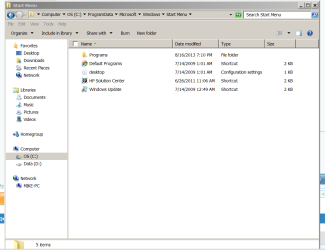
Can you open the folder in here C:\ProgramData\Microsoft\Windows\Start Menu
 

My Computer

Computer Manufacturer/Model Number
Custom Built
OS
Windows 7 Ultimate 32-Bit & Windows 7 Ultimate 64-Bit
CPU
Intel Core i7 CPU 950 @ 3.07GHz
Motherboard
ASUS P6T DELUXE V2
Memory
OCZ 6GB (3 x 2GB) 240-Pin DDR3 SDRAM DDR3 1600 OCZ3X1600R2
Graphics Card(s)
ATI Radeon HD 5700 Series
Sound Card
OnBoard
Hard Drives
WD6400AACS-00M3B0 (640GB SATA )
PSU
CORSAIR 850w
Case
NZXT LEXA
Cooling
Intel Stock Heatsink Fan
Keyboard
Microsoft Wireless Laser Keyboard 7000
Mouse
Microsoft Wireless Laser Mouse 7000
Capture.PNG
 

My Computer

Computer type
Laptop
Computer Manufacturer/Model Number
Asus Notebook K52F/K62F Series
OS
Windows 7 Home Premium 64 bit
Memory
4.00 GB
Monitor(s) Displays
HP 2211
Keyboard
Microsoft Wireless MultiMedia Keyboard 1.1
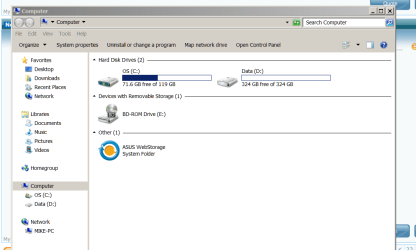
Is the D drive empty ?
 

My Computer

Computer Manufacturer/Model Number
Custom Built
OS
Windows 7 Ultimate 32-Bit & Windows 7 Ultimate 64-Bit
CPU
Intel Core i7 CPU 950 @ 3.07GHz
Motherboard
ASUS P6T DELUXE V2
Memory
OCZ 6GB (3 x 2GB) 240-Pin DDR3 SDRAM DDR3 1600 OCZ3X1600R2
Graphics Card(s)
ATI Radeon HD 5700 Series
Sound Card
OnBoard
Hard Drives
WD6400AACS-00M3B0 (640GB SATA )
PSU
CORSAIR 850w
Case
NZXT LEXA
Cooling
Intel Stock Heatsink Fan
Keyboard
Microsoft Wireless Laser Keyboard 7000
Mouse
Microsoft Wireless Laser Mouse 7000
Capture D drive.PNG
 

My Computer

Computer type
Laptop
Computer Manufacturer/Model Number
Asus Notebook K52F/K62F Series
OS
Windows 7 Home Premium 64 bit
Memory
4.00 GB
Monitor(s) Displays
HP 2211
Keyboard
Microsoft Wireless MultiMedia Keyboard 1.1
Capture computer.PNG
How come in computer it says D drive is empty, but that screen shot shows something there?
 

My Computer

Computer type
Laptop
Computer Manufacturer/Model Number
Asus Notebook K52F/K62F Series
OS
Windows 7 Home Premium 64 bit
Memory
4.00 GB
Monitor(s) Displays
HP 2211
Keyboard
Microsoft Wireless MultiMedia Keyboard 1.1

My Computer

Computer type
PC/Desktop
Computer Manufacturer/Model Number
Self Built
OS
Win 10 Pro x64
CPU
Intel I5-2500K @3.3GHz
Motherboard
Asrock P67 Extreme4
Memory
16GB G.Skill Ripjaws X (4x4GB)
Graphics Card(s)
EVGA GeForce 750 Ti SC 2GB
Sound Card
ASUS Xonar DG 5.1 Channels 24-bit 96KHz PCI Interface Sound
Monitor(s) Displays
auria eq2367
Screen Resolution
1920 x 1080
Hard Drives
250GB Samsung 850 EVO SSD
1TB WD Blue
1TB Hitachi
PSU
SeaSonic X 650W 80 Plus Gold
Case
Corsair Obsidian 750D
Cooling
Corsair H60, Three 140mm case fans
Keyboard
Logitech Wireless Keyboard K520
Mouse
Logitech Wireless Mouse M310
Internet Speed
Wave Broadband ~ 100 dn 5 up
Antivirus
Windows Defender, Malwarebytes Premium
Browser
Edge, IE11, Chrome
Other Info
Laptop specs: HP g7-1365dx /
CPU: AMD A6-3420M APU with Radeon(tm) HD Graphics /
RAM: Crucial 8Gb (2x4Gb) /
SSD: Crucial M4-CT128M4SSD2 ATA Device/ FW 000F /
GFX: AMD Radeon HD 6520G /
OS: Windows 10 Pro x64

My Computer

Computer Manufacturer/Model Number
Custom Built
OS
Windows 7 Ultimate 32-Bit & Windows 7 Ultimate 64-Bit
CPU
Intel Core i7 CPU 950 @ 3.07GHz
Motherboard
ASUS P6T DELUXE V2
Memory
OCZ 6GB (3 x 2GB) 240-Pin DDR3 SDRAM DDR3 1600 OCZ3X1600R2
Graphics Card(s)
ATI Radeon HD 5700 Series
Sound Card
OnBoard
Hard Drives
WD6400AACS-00M3B0 (640GB SATA )
PSU
CORSAIR 850w
Case
NZXT LEXA
Cooling
Intel Stock Heatsink Fan
Keyboard
Microsoft Wireless Laser Keyboard 7000
Mouse
Microsoft Wireless Laser Mouse 7000
i ran it, but, it won't let me fix things nor will it give me info, should i delete and reinstall?
 

My Computer

Computer type
Laptop
Computer Manufacturer/Model Number
Asus Notebook K52F/K62F Series
OS
Windows 7 Home Premium 64 bit
Memory
4.00 GB
Monitor(s) Displays
HP 2211
Keyboard
Microsoft Wireless MultiMedia Keyboard 1.1

My Computer

Computer Manufacturer/Model Number
Custom Built
OS
Windows 7 Ultimate 32-Bit & Windows 7 Ultimate 64-Bit
CPU
Intel Core i7 CPU 950 @ 3.07GHz
Motherboard
ASUS P6T DELUXE V2
Memory
OCZ 6GB (3 x 2GB) 240-Pin DDR3 SDRAM DDR3 1600 OCZ3X1600R2
Graphics Card(s)
ATI Radeon HD 5700 Series
Sound Card
OnBoard
Hard Drives
WD6400AACS-00M3B0 (640GB SATA )
PSU
CORSAIR 850w
Case
NZXT LEXA
Cooling
Intel Stock Heatsink Fan
Keyboard
Microsoft Wireless Laser Keyboard 7000
Mouse
Microsoft Wireless Laser Mouse 7000
ok, it says to start in graphics mode. What is that?
 

My Computer

Computer type
Laptop
Computer Manufacturer/Model Number
Asus Notebook K52F/K62F Series
OS
Windows 7 Home Premium 64 bit
Memory
4.00 GB
Monitor(s) Displays
HP 2211
Keyboard
Microsoft Wireless MultiMedia Keyboard 1.1
Graphics mode is GUI not command driven . Its like Windows
 

My Computer

Computer Manufacturer/Model Number
Custom Built
OS
Windows 7 Ultimate 32-Bit & Windows 7 Ultimate 64-Bit
CPU
Intel Core i7 CPU 950 @ 3.07GHz
Motherboard
ASUS P6T DELUXE V2
Memory
OCZ 6GB (3 x 2GB) 240-Pin DDR3 SDRAM DDR3 1600 OCZ3X1600R2
Graphics Card(s)
ATI Radeon HD 5700 Series
Sound Card
OnBoard
Hard Drives
WD6400AACS-00M3B0 (640GB SATA )
PSU
CORSAIR 850w
Case
NZXT LEXA
Cooling
Intel Stock Heatsink Fan
Keyboard
Microsoft Wireless Laser Keyboard 7000
Mouse
Microsoft Wireless Laser Mouse 7000
do i just open it from the cd drive?
 

My Computer

Computer type
Laptop
Computer Manufacturer/Model Number
Asus Notebook K52F/K62F Series
OS
Windows 7 Home Premium 64 bit
Memory
4.00 GB
Monitor(s) Displays
HP 2211
Keyboard
Microsoft Wireless MultiMedia Keyboard 1.1

My Computer

Computer Manufacturer/Model Number
Custom Built
OS
Windows 7 Ultimate 32-Bit & Windows 7 Ultimate 64-Bit
CPU
Intel Core i7 CPU 950 @ 3.07GHz
Motherboard
ASUS P6T DELUXE V2
Memory
OCZ 6GB (3 x 2GB) 240-Pin DDR3 SDRAM DDR3 1600 OCZ3X1600R2
Graphics Card(s)
ATI Radeon HD 5700 Series
Sound Card
OnBoard
Hard Drives
WD6400AACS-00M3B0 (640GB SATA )
PSU
CORSAIR 850w
Case
NZXT LEXA
Cooling
Intel Stock Heatsink Fan
Keyboard
Microsoft Wireless Laser Keyboard 7000
Mouse
Microsoft Wireless Laser Mouse 7000
This may sound completely idiotic, but is it possible a key on the keyboard is stuck somehow causing windows explorer to pop up? I know it sounds crazy, but just wondering...
Or have you tried with a different keyboard (preferably a non media keyboard) and still get the popups?

Could you maybe take a video of the issue? Or problem steps recorder?
 
Last edited:

My Computer

Computer type
PC/Desktop
Computer Manufacturer/Model Number
Custom Built
OS
Windows 10 Pro
CPU
AMD Ryzen 5 2400G Processor with Radeon RX Vega 11 Graphics
Motherboard
ASRock X470 Master SLI/AC AM4 AMD Promontory X470 SATA 6Gb/s
Memory
G.SKILL Ripjaws V Series 16GB (2 x 8GB) 288-Pin DDR4 SDRAM D
Graphics Card(s)
2047MB NVIDIA GeForce GTX 1060 6GB (EVGA)
Sound Card
Motherboard Built in
Monitor(s) Displays
Acer R240HY bidx 23.8-Inch IPS HDMI DVI VGA (1920 x 1080) Wi
Screen Resolution
1920 x 1080
Hard Drives
1TB Sandisk SSD PLUS (Main drive)
500 GB Seagate 7200 RPM (Games)
500 GB Western Digital 7200 RPM (Virtual Machines)
PSU
CORSAIR TX Series TX650M 650W 80+ Gold Modular Power Supply
Case
CORSAIR CARBIDE SPEC-02 Mid-Tower Gaming Case, Red LED Fan
Cooling
220mm, two 120mm, and four 60mm fans
Keyboard
Wired Dell keyboard
Mouse
Wireless Logitech mouse
Internet Speed
250mb down, 30mb up
Antivirus
Panda Cloud Antivirus
Browser
Chrome-ish x64
Other Info
Your awesome for reading this.
Finally got rescue disk to run, didn't take too long. Out of 5 items on the list, only 2 were checked. Disk Boot Sectors and Hidden Startup Objects. The other 3 that were not checked were, sda1--sda2--& sda5.
After it ran i thought maybe the other 3 were to be checked, i could be wrong, and i reran the scan, it got to 25% and for the next 3 hours it look like it was scanning, but thr % stayed the same and time to finish kept going up, finally i stopped it just to check if i was doig it right and if the time going up was normal. like i said, after 3 hours it had gone from 1 hr to finish to 12 hrs to finish. After i restarted to normal windows i was checking something and all of a sudden it stopped responding and went to blue screen for a second and restarted it self. ??????????
 

My Computer

Computer type
Laptop
Computer Manufacturer/Model Number
Asus Notebook K52F/K62F Series
OS
Windows 7 Home Premium 64 bit
Memory
4.00 GB
Monitor(s) Displays
HP 2211
Keyboard
Microsoft Wireless MultiMedia Keyboard 1.1
Back
Top