Windows Firewall - Restore Default Settings

How to Restore Default Windows Firewall Settings in Windows 7 and Windows 8

   Information
This will show you how to undo all of the changes you have made to the Windows Firewall settings and restore them back to the original default settings in Windows 7 and Windows 8.
   Warning
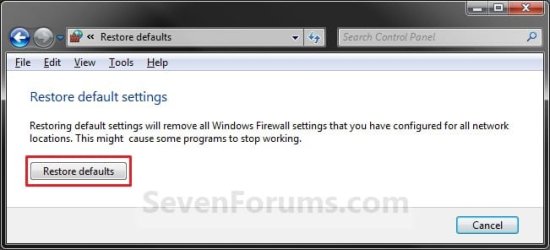
Restoring the default settings removes all of the Windows Firewall settings that you have made up to that point, for all network (Public and Private) location types. This might cause some programs that you have allowed through the firewall to stop working.

EXAMPLE: Default Windows Firewall Settings
NOTE: These are the On or Off, and notification settings.
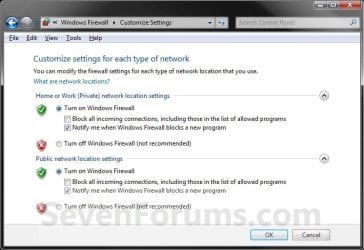
Default_Settings.jpg
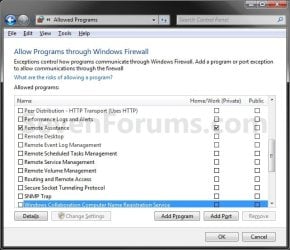
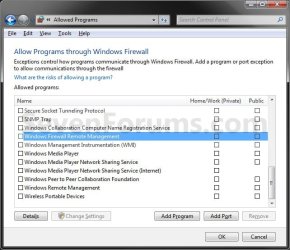
EXAMPLE: Default Windows Firewall Exceptions Settings
NOTE: These are the program exceptions that are allowed through Windows Firewall to have internet or network access.
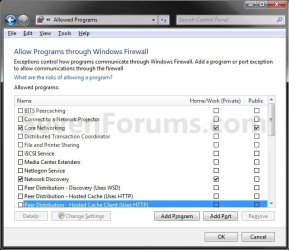
Default_Exceptions-1.jpg

Default_Exceptions-2.jpg

Default_Exceptions-3.jpg


OPTION ONE

To Reset Windows Firewall Settings to Default in Windows Firewall


1. Open the Control Panel (Icons View) in Windows 7 and Windows 8.

2. Click/tap on the Windows Firewall icon.

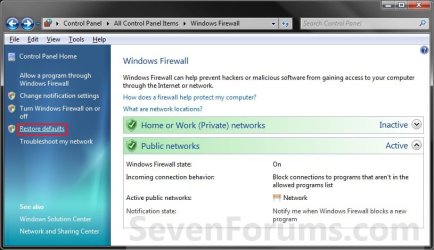
3. Click/tap on the Restore defaults link in the left pane. (See screenshot below)
Windows_Firewall_Defaults.jpg
4. Click/tap on the Restore defaults button. (See screenshot below)
Restore_Defaults.jpg
5. Click/tap on the Yes button to confirm. (See screenshot below)
Confirm_Default.jpg
6. Close the Windows Firewall window when done. (See screenshot below step 3)


OPTION TWO

To Reset Windows Firewall Settings to Default in Command Prompt


1. Open an elevated command prompt in Windows 7 or Windows 8.

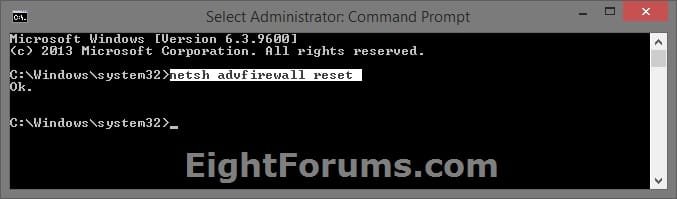
2. In the command prompt, copy and paste the command below, and press Enter. (see screenshot below)
netsh advfirewall reset

Reset_Windows_Firewall_Command.jpg
3. When finished, you can close the elevated command prompt.


   Note
Command information.

netsh advfirewall reset /?


Reset_Windows_Firewall_Command_Info.jpg


That's it,
Shawn


Last edited:
restore defaults

Hello Shawn
I tried to set Win 7 native firewall but I think I made some errors.
My question is,"If I click to 'restore daults' will this not allow some programs or just ask me to allow them once again.?"
I want to start from scratch, so to speak.
 

My Computer

Computer Manufacturer/Model Number
Dell
OS
Windows 7 Home premium 64 bit
CPU
Intel R i5 3.3Ghz
Motherboard
Dell 2.6
Memory
6 GB
Graphics Card(s)
Nvidea GT 420
Sound Card
Nvidea Hi Def
Monitor(s) Displays
Dell pnp
Hard Drives
Seagate 931 GB
PSU
Dell xps 8300
Case
Dell Balck
Cooling
unknown
Hello Peter,

This will reset Windows Firewall completely back to it's default settings. If anything loses internet/network connection afterwards, then you could just add it to the exception list for it to regain access again.

If you like, you might try either the free TinyWall or Windows 7 Firewall Control program. It'll help make using Windows Firewall easier. :)
 

My Computer

Computer type
PC/Desktop
Computer Manufacturer/Model Number
Self built custom
OS
64-bit Windows 11 Pro for Workstations
CPU
Intel i7-8700K OC'd to 5 GHz
Motherboard
ASUS ROG Maximus XI Formula Z390
Memory
64 GB (4x16GB) G.SKILL TridentZ RGB DDR4 3600 MHz
Graphics Card(s)
ASUS ROG-STRIX-GTX1080TI-O11G-GAMING
Sound Card
Integrated
Monitor(s) Displays
2 x Samsung Odyssey G7 27"
Screen Resolution
2560x1440
Hard Drives
1TB Samsung 990 PRO M.2,
4TB Samsung 990 PRO PRO M.2,
TerraMaster F8 SSD Plus NAS
PSU
Seasonic Prime Titanium 850W
Case
Thermaltake Core P3
Cooling
Corsair Hydro H115i
Keyboard
Logitech wireless K800
Mouse
Logitech MX Master 4
Internet Speed
2 Gb/s Download and 100 Mb/s Upload
Antivirus
Malwarebyte Anti-Malware Premium
Browser
Google Chrome
Other Info
Logitech Z625 speaker system,
Logitech BRIO 4K Pro webcam,
HP Color LaserJet Pro MFP M477fdn,
APC SMART-UPS RT 1000 XL - SURT1000XLI,
Galaxy S23 Plus phone
firewalls

That is good advice and much appreciated. The link was very clear.
I assume I remove Windows native firewall before installing the new one?
Thank you
 

My Computer

Computer Manufacturer/Model Number
Dell
OS
Windows 7 Home premium 64 bit
CPU
Intel R i5 3.3Ghz
Motherboard
Dell 2.6
Memory
6 GB
Graphics Card(s)
Nvidea GT 420
Sound Card
Nvidea Hi Def
Monitor(s) Displays
Dell pnp
Hard Drives
Seagate 931 GB
PSU
Dell xps 8300
Case
Dell Balck
Cooling
unknown
Nope. Those programs work with Windows Firewall to help make using it easier. That's all. :)
 

My Computer

Computer type
PC/Desktop
Computer Manufacturer/Model Number
Self built custom
OS
64-bit Windows 11 Pro for Workstations
CPU
Intel i7-8700K OC'd to 5 GHz
Motherboard
ASUS ROG Maximus XI Formula Z390
Memory
64 GB (4x16GB) G.SKILL TridentZ RGB DDR4 3600 MHz
Graphics Card(s)
ASUS ROG-STRIX-GTX1080TI-O11G-GAMING
Sound Card
Integrated
Monitor(s) Displays
2 x Samsung Odyssey G7 27"
Screen Resolution
2560x1440
Hard Drives
1TB Samsung 990 PRO M.2,
4TB Samsung 990 PRO PRO M.2,
TerraMaster F8 SSD Plus NAS
PSU
Seasonic Prime Titanium 850W
Case
Thermaltake Core P3
Cooling
Corsair Hydro H115i
Keyboard
Logitech wireless K800
Mouse
Logitech MX Master 4
Internet Speed
2 Gb/s Download and 100 Mb/s Upload
Antivirus
Malwarebyte Anti-Malware Premium
Browser
Google Chrome
Other Info
Logitech Z625 speaker system,
Logitech BRIO 4K Pro webcam,
HP Color LaserJet Pro MFP M477fdn,
APC SMART-UPS RT 1000 XL - SURT1000XLI,
Galaxy S23 Plus phone
firewall

You have been very helpful and thank you.
 

My Computer

Computer Manufacturer/Model Number
Dell
OS
Windows 7 Home premium 64 bit
CPU
Intel R i5 3.3Ghz
Motherboard
Dell 2.6
Memory
6 GB
Graphics Card(s)
Nvidea GT 420
Sound Card
Nvidea Hi Def
Monitor(s) Displays
Dell pnp
Hard Drives
Seagate 931 GB
PSU
Dell xps 8300
Case
Dell Balck
Cooling
unknown
You're most welcome Peter. :)
 

My Computer

Computer type
PC/Desktop
Computer Manufacturer/Model Number
Self built custom
OS
64-bit Windows 11 Pro for Workstations
CPU
Intel i7-8700K OC'd to 5 GHz
Motherboard
ASUS ROG Maximus XI Formula Z390
Memory
64 GB (4x16GB) G.SKILL TridentZ RGB DDR4 3600 MHz
Graphics Card(s)
ASUS ROG-STRIX-GTX1080TI-O11G-GAMING
Sound Card
Integrated
Monitor(s) Displays
2 x Samsung Odyssey G7 27"
Screen Resolution
2560x1440
Hard Drives
1TB Samsung 990 PRO M.2,
4TB Samsung 990 PRO PRO M.2,
TerraMaster F8 SSD Plus NAS
PSU
Seasonic Prime Titanium 850W
Case
Thermaltake Core P3
Cooling
Corsair Hydro H115i
Keyboard
Logitech wireless K800
Mouse
Logitech MX Master 4
Internet Speed
2 Gb/s Download and 100 Mb/s Upload
Antivirus
Malwarebyte Anti-Malware Premium
Browser
Google Chrome
Other Info
Logitech Z625 speaker system,
Logitech BRIO 4K Pro webcam,
HP Color LaserJet Pro MFP M477fdn,
APC SMART-UPS RT 1000 XL - SURT1000XLI,
Galaxy S23 Plus phone
Back
Top