Solved Windows getting stuck on Starting Windows

Xykhir

New member
Local time
9:25 AM
Messages
5
Okay, I've only upgraded to a new processor and tower. Ever since I swapped towers and processors I have not been able to load windows. It gets stuck on "Starting Windows" for hours and once Windows starts the Resolution is 640x480(go figure) and it runs really slow. I examined that my PS2 keyboard and mouse die at the usual time the computer should have already booted up at while the "Starting Windows" screen still appears. I've tried safe mode and all that other junk to have the same slow load time.
I tried a clean install of Windows 7, but the loading time is still super slow. Windows 7 Home Premium 32bit won't even install and 64bit takes hour to load and install. I tried debunking a bad power supply, bad ram, and bad hard drives/disk trays, but they're all good. It still does the same when I swap out the parts mentioned above. This motherboard previously worked in my last install of Windows and ran fine.
I have a hypothesis that where I'm using a 350watt Power Supply to run all my Tower lights/fans, My new Phenom x3 processor, and my Radeon HD 7770 that it's using too much power to supply fast hard drive speed, but I still think that it can't be due to that. Help would be appreciated as soon as possible. Thanks!
:)
 

My Computer My Computer

Computer type
PC/Desktop
Computer Manufacturer/Model Number
Custom Build
OS
Windows 7 Home Premium 64bit
CPU
Phenom III x3
Memory
4gb DDR2
Graphics Card(s)
Radeon HD 7770
Hard Drives
1tb Seagate
640gb Western Digital
250gb Western Digital(Laptop)
200gb Seagate
160gb Seagate
Antivirus
Avast
Browser
Mozilla Firefox/Google Chrome
Hey there and welcome to SF!

What your looking at with the power Draw is going to be worked out very roughly.

CPU = 60Mw
Gpu = 90- 120mw Depending on usage
Running 5 HDDS will vary to around 35MW, again depending on usage. So you may be ok or you may face an issue.

May i ask how you have tried Debunking all other issues?

May i suggest that you start with the bare basics of the system and start building it up?

So CPU, Mb, HDD, Psu and one stick of RAM.

This will do two things, one is to check your individual components to find out how they run piece by piece. The second is to identify when the issue actually arises, if at all.


If you are facing this issue when your running on the bare essentials, then you may actually be looking at a Bad HDD. So the drive itself may be getting old and crippled.


Let me think some more and i will try to some other ideas!

Cheers
 

My Computer My Computer

Computer type
PC/Desktop
Computer Manufacturer/Model Number
Custom Build
OS
Windows 8.1
CPU
Intel i5 3750k OC'd 4.0Ghz
Motherboard
P8Z77-V LX3
Memory
16GB Vengence Corsair
Graphics Card(s)
GTX 770 OC 2GB Windforce
Sound Card
C-Media 7.1 Surround Card
Monitor(s) Displays
Asus 3D 23" & BenQ 24" & LG 19"
Screen Resolution
1920*1080, 1920*1080, 1440*900
Hard Drives
Crucial 512GB SSD
WD 1.5 TB
WD 500Gb
PSU
850MW Silverstone
Case
inWin DragonRider
Cooling
4 * 140mm LED Akasa, One 140mm Fan Akasa
Keyboard
Corsair k95
Mouse
R.A.T 7 Contagion
Internet Speed
152 Mb Fiber Optic
Antivirus
ESET Nod32
Browser
Waterfox x64 / Chrome x64
Other Info
Freenas / Plex Media server
Q6600
6Gb DDR3
6TB ZFS Raid
500W PSu
2 x Intel NIC's
Alright, I scanned each and everyone of my hard drives through safe mode cmd. I unhooked each and everyone one of them one by one until my main hard drive was left. I also have 7 sticks of ram sitting in front of me. I tried each and everyone of the ram sticks to come up with the same problem(each one at a time). I also reseated the CMOS battery and even replaced it. I stuck my CPU into another computer of mine and it boots up to Windows fine. Right now my Radeon HD 7770 is unhooked. I'm currently hooking up my brother's 650W PSU to see if it works, I'll let you know what happens.
 

My Computer My Computer

Computer type
PC/Desktop
Computer Manufacturer/Model Number
Custom Build
OS
Windows 7 Home Premium 64bit
CPU
Phenom III x3
Memory
4gb DDR2
Graphics Card(s)
Radeon HD 7770
Hard Drives
1tb Seagate
640gb Western Digital
250gb Western Digital(Laptop)
200gb Seagate
160gb Seagate
Antivirus
Avast
Browser
Mozilla Firefox/Google Chrome
Alright, I scanned each and everyone of my hard drives through safe mode cmd. I unhooked each and everyone one of them one by one until my main hard drive was left. I also have 7 sticks of ram sitting in front of me. I tried each and everyone of the ram sticks to come up with the same problem(each one at a time). I also reseated the CMOS battery and even replaced it. I stuck my CPU into another computer of mine and it boots up to Windows fine. Right now my Radeon HD 7770 is unhooked. I'm currently hooking up my brother's 650W PSU to see if it works, I'll let you know what happens.


So if i am reading this correctly, Your now running on the bare minimum as i suggested and your still facing the issue?

That actually more implies it is a hardrive failure more then anything else. However the only way to check it would to be by running a R/W Analysis tool on the drive or running the OS from another HDD.

Have you tried using a different HDD as your primary for the OS?

I see that you are using a second computer with no issues, it doesn't actually sound like a component issue however, and i would like to guess that even using the 650 would not change the results.
 

My Computer My Computer

Computer type
PC/Desktop
Computer Manufacturer/Model Number
Custom Build
OS
Windows 8.1
CPU
Intel i5 3750k OC'd 4.0Ghz
Motherboard
P8Z77-V LX3
Memory
16GB Vengence Corsair
Graphics Card(s)
GTX 770 OC 2GB Windforce
Sound Card
C-Media 7.1 Surround Card
Monitor(s) Displays
Asus 3D 23" & BenQ 24" & LG 19"
Screen Resolution
1920*1080, 1920*1080, 1440*900
Hard Drives
Crucial 512GB SSD
WD 1.5 TB
WD 500Gb
PSU
850MW Silverstone
Case
inWin DragonRider
Cooling
4 * 140mm LED Akasa, One 140mm Fan Akasa
Keyboard
Corsair k95
Mouse
R.A.T 7 Contagion
Internet Speed
152 Mb Fiber Optic
Antivirus
ESET Nod32
Browser
Waterfox x64 / Chrome x64
Other Info
Freenas / Plex Media server
Q6600
6Gb DDR3
6TB ZFS Raid
500W PSu
2 x Intel NIC's
I just hooked up the 650W and the Windows is at "Starting Windows" the PS2 keyboard and Mouse lights kicked off as usual, so I have a feeling it won't load anytime soon. I have two HDD's set up with an OS. One for gaming and the other for work. I've tried booting up from both and still have the same problem.
 

My Computer My Computer

Computer type
PC/Desktop
Computer Manufacturer/Model Number
Custom Build
OS
Windows 7 Home Premium 64bit
CPU
Phenom III x3
Memory
4gb DDR2
Graphics Card(s)
Radeon HD 7770
Hard Drives
1tb Seagate
640gb Western Digital
250gb Western Digital(Laptop)
200gb Seagate
160gb Seagate
Antivirus
Avast
Browser
Mozilla Firefox/Google Chrome
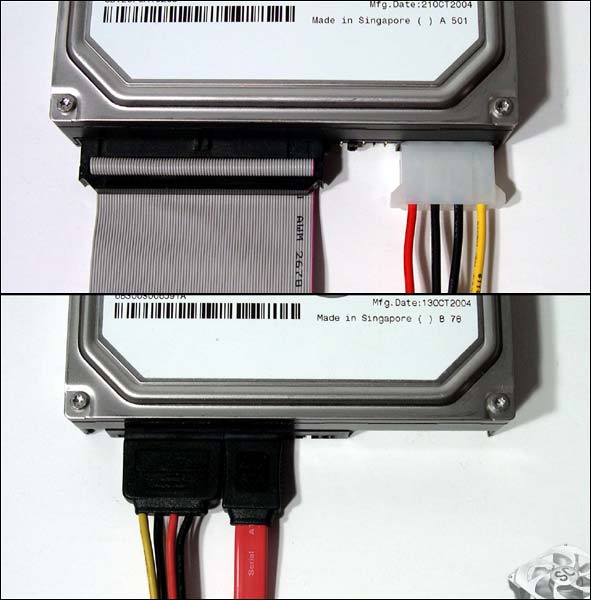
Xykhir are you running with SATA or PATA connections?

Sata connections can be identified as the bottom image whilst pata as the top.

sata-ide_lg.jpg
 

My Computer My Computer

Computer type
PC/Desktop
Computer Manufacturer/Model Number
Custom Build
OS
Windows 8.1
CPU
Intel i5 3750k OC'd 4.0Ghz
Motherboard
P8Z77-V LX3
Memory
16GB Vengence Corsair
Graphics Card(s)
GTX 770 OC 2GB Windforce
Sound Card
C-Media 7.1 Surround Card
Monitor(s) Displays
Asus 3D 23" & BenQ 24" & LG 19"
Screen Resolution
1920*1080, 1920*1080, 1440*900
Hard Drives
Crucial 512GB SSD
WD 1.5 TB
WD 500Gb
PSU
850MW Silverstone
Case
inWin DragonRider
Cooling
4 * 140mm LED Akasa, One 140mm Fan Akasa
Keyboard
Corsair k95
Mouse
R.A.T 7 Contagion
Internet Speed
152 Mb Fiber Optic
Antivirus
ESET Nod32
Browser
Waterfox x64 / Chrome x64
Other Info
Freenas / Plex Media server
Q6600
6Gb DDR3
6TB ZFS Raid
500W PSu
2 x Intel NIC's
Sata drives
 

My Computer My Computer

Computer type
PC/Desktop
Computer Manufacturer/Model Number
Custom Build
OS
Windows 7 Home Premium 64bit
CPU
Phenom III x3
Memory
4gb DDR2
Graphics Card(s)
Radeon HD 7770
Hard Drives
1tb Seagate
640gb Western Digital
250gb Western Digital(Laptop)
200gb Seagate
160gb Seagate
Antivirus
Avast
Browser
Mozilla Firefox/Google Chrome
Interesting,

To avoid me reposting more old posts can i get you to have a look through this post?

It's an older version of the same question. But i think it may be relevant to your issues.


Oh and can you make sure that your Bios settings for the HDD are set to SATA / Enhanced and not Compatible?
 

My Computer My Computer

Computer type
PC/Desktop
Computer Manufacturer/Model Number
Custom Build
OS
Windows 8.1
CPU
Intel i5 3750k OC'd 4.0Ghz
Motherboard
P8Z77-V LX3
Memory
16GB Vengence Corsair
Graphics Card(s)
GTX 770 OC 2GB Windforce
Sound Card
C-Media 7.1 Surround Card
Monitor(s) Displays
Asus 3D 23" & BenQ 24" & LG 19"
Screen Resolution
1920*1080, 1920*1080, 1440*900
Hard Drives
Crucial 512GB SSD
WD 1.5 TB
WD 500Gb
PSU
850MW Silverstone
Case
inWin DragonRider
Cooling
4 * 140mm LED Akasa, One 140mm Fan Akasa
Keyboard
Corsair k95
Mouse
R.A.T 7 Contagion
Internet Speed
152 Mb Fiber Optic
Antivirus
ESET Nod32
Browser
Waterfox x64 / Chrome x64
Other Info
Freenas / Plex Media server
Q6600
6Gb DDR3
6TB ZFS Raid
500W PSu
2 x Intel NIC's
I solved the issue. The USB plugs from my new tower were causing a short to my board, by disconnecting them my computer returned to it's normal speed. Thanks for your help though!
 

My Computer My Computer

Computer type
PC/Desktop
Computer Manufacturer/Model Number
Custom Build
OS
Windows 7 Home Premium 64bit
CPU
Phenom III x3
Memory
4gb DDR2
Graphics Card(s)
Radeon HD 7770
Hard Drives
1tb Seagate
640gb Western Digital
250gb Western Digital(Laptop)
200gb Seagate
160gb Seagate
Antivirus
Avast
Browser
Mozilla Firefox/Google Chrome
Alright then!

Bit of a strange one, I don't think anyone would've been able to help you with since thats a physical issue that we wouldn't know about!

Glad you got it all sorted though,

Happy Holidays!
 

My Computer My Computer

Computer type
PC/Desktop
Computer Manufacturer/Model Number
Custom Build
OS
Windows 8.1
CPU
Intel i5 3750k OC'd 4.0Ghz
Motherboard
P8Z77-V LX3
Memory
16GB Vengence Corsair
Graphics Card(s)
GTX 770 OC 2GB Windforce
Sound Card
C-Media 7.1 Surround Card
Monitor(s) Displays
Asus 3D 23" & BenQ 24" & LG 19"
Screen Resolution
1920*1080, 1920*1080, 1440*900
Hard Drives
Crucial 512GB SSD
WD 1.5 TB
WD 500Gb
PSU
850MW Silverstone
Case
inWin DragonRider
Cooling
4 * 140mm LED Akasa, One 140mm Fan Akasa
Keyboard
Corsair k95
Mouse
R.A.T 7 Contagion
Internet Speed
152 Mb Fiber Optic
Antivirus
ESET Nod32
Browser
Waterfox x64 / Chrome x64
Other Info
Freenas / Plex Media server
Q6600
6Gb DDR3
6TB ZFS Raid
500W PSu
2 x Intel NIC's
Back
Top