Windows Installer error 1601 and 1607!

spazgadget

Ooh, well lah-de-dah
Local time
12:36 PM
Messages
29
Location
Derby, England.
Hello,
After recently installing a new motherboard and processor and motherboard into my home build, I have experienced some problems with installing software: Here is some more detail:
I installed the new motherboard, and was forced to install windows onto a new partition because of driver troubles. The install went well, exept fo the fact that everything was saved onto what WAS the C: drive, and still had that system path. So to avoid a laborious task, i used Regedit to turn the NEW boot drive into the O: drive, and the partition with my stuff on back to the C: drive, which was a success. However, since then, I have not been able to install any software, as all of my windows installer files are suddenly missing from my O: drive.
I have tried:
CCleaner
SFC
Un-registering and re-registering msiexec.exe
repair install
full re-install of windows
altering the paths of the registries in regedit
Restarting the service with services.msc

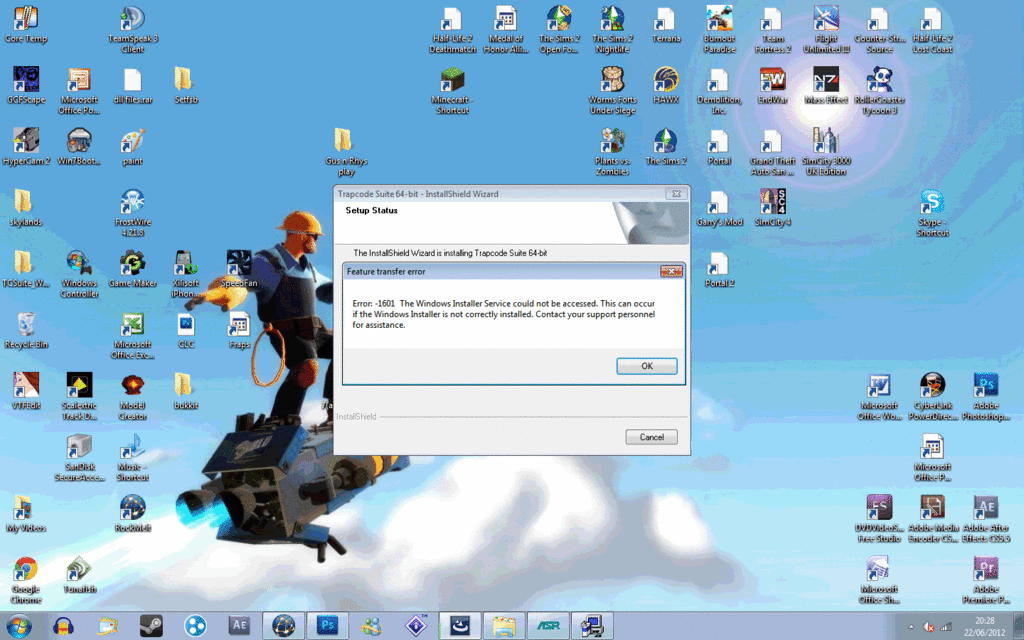
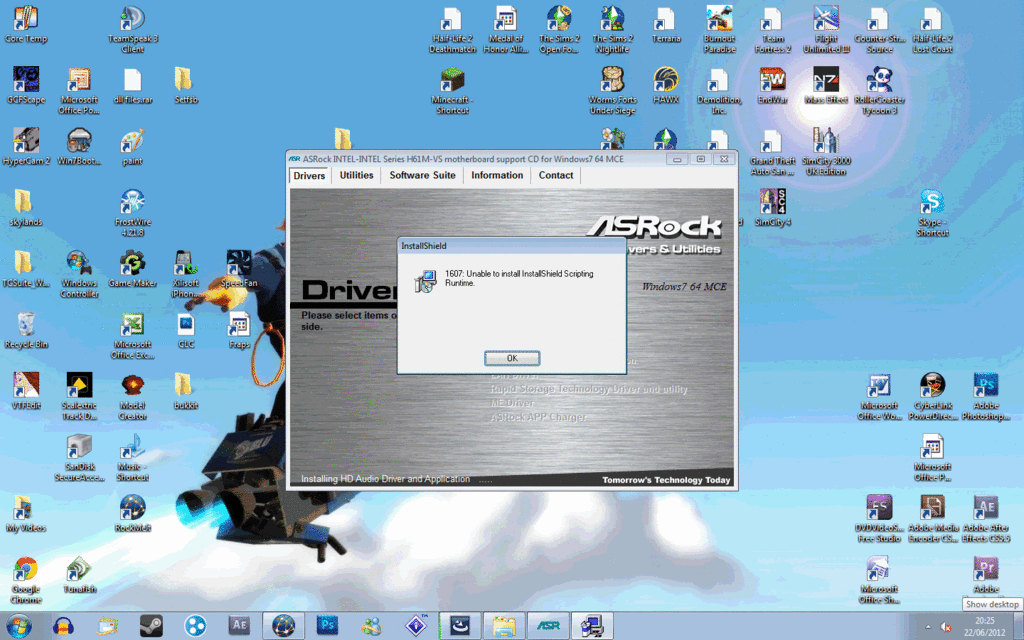
all to no avail. I cannot install anything that is MSI based, not even my sound driver! Every time I try, I just get either error 1601 or error 1607, or just simply 'Windows installer service could not be accessed'.

Please help, this is driving me crazy!!


-Spaz
 

My Computer My Computer

OS
Windows 7 Ultimate x64
CPU
Intel Celeron G630 @ 2.7Ghz
Motherboard
ASRock H61M-VS
Memory
6Gb DDR3 1333Mhz
Graphics Card(s)
1Gb Nvidia Geforce 8400GS
Sound Card
Trust SC-5100
Monitor(s) Displays
Venturer LCD TV (Main)+ Sony SDM-X52 (Secondary)
Screen Resolution
1440x900 + 1240x720
Hard Drives
1Tb Western Digital caviar Green HDD
PSU
250w PSU
Case
CASECOM
Cooling
Arctic Freezer-7 PRO Rev.2
Keyboard
Trust GXT-18
Mouse
Trust GXT-14

My Computer My Computer

Computer type
PC/Desktop
Computer Manufacturer/Model Number
Home made Desktop
OS
Windows 10 Pro. 64/ version 1709 Windows 7 Pro/64
CPU
Intel i7-6800K @ 4.3
Motherboard
ASUS X-99 Deluxe II
Memory
Corsair Platinum 16 gig @2400
Graphics Card(s)
EVGA GTX 1070 OC
Monitor(s) Displays
Asus 27" LED LCD/VE278Q
Screen Resolution
1920-1080 or 1280-720 HDMI
Hard Drives
INTEL SSD 730-240 Gb Sata 3.0/
PSU
EVGA Platium 1200W
Case
Phanteks Luxe Tempered Glass 8 fans/ one radiator
Cooling
XSPC/ Water Cooled CPU
Keyboard
Das 4 Professional
Mouse
Logitech M705/MX Anywhere 2-S
Internet Speed
100 mbits
Antivirus
Microsoft Security Essentials/ Malwarebytes Premium 3.0/ SAS
Browser
I.E. 11 default/Firefox/ ISP Time Warner Cable/Spectrum
Other Info
LG BluRay Burner/
Sound system-KLipsch-THX/
Icy Dock ssd Hot Swap bays.
Thanks for that, but as mentioned, everything has already been attempted.
 

My Computer My Computer

OS
Windows 7 Ultimate x64
CPU
Intel Celeron G630 @ 2.7Ghz
Motherboard
ASRock H61M-VS
Memory
6Gb DDR3 1333Mhz
Graphics Card(s)
1Gb Nvidia Geforce 8400GS
Sound Card
Trust SC-5100
Monitor(s) Displays
Venturer LCD TV (Main)+ Sony SDM-X52 (Secondary)
Screen Resolution
1440x900 + 1240x720
Hard Drives
1Tb Western Digital caviar Green HDD
PSU
250w PSU
Case
CASECOM
Cooling
Arctic Freezer-7 PRO Rev.2
Keyboard
Trust GXT-18
Mouse
Trust GXT-14
Anyone willing to offer help??
 

My Computer My Computer

OS
Windows 7 Ultimate x64
CPU
Intel Celeron G630 @ 2.7Ghz
Motherboard
ASRock H61M-VS
Memory
6Gb DDR3 1333Mhz
Graphics Card(s)
1Gb Nvidia Geforce 8400GS
Sound Card
Trust SC-5100
Monitor(s) Displays
Venturer LCD TV (Main)+ Sony SDM-X52 (Secondary)
Screen Resolution
1440x900 + 1240x720
Hard Drives
1Tb Western Digital caviar Green HDD
PSU
250w PSU
Case
CASECOM
Cooling
Arctic Freezer-7 PRO Rev.2
Keyboard
Trust GXT-18
Mouse
Trust GXT-14
Seriously, I am going mad without any sound/without the ability to install programs.
 

My Computer My Computer

OS
Windows 7 Ultimate x64
CPU
Intel Celeron G630 @ 2.7Ghz
Motherboard
ASRock H61M-VS
Memory
6Gb DDR3 1333Mhz
Graphics Card(s)
1Gb Nvidia Geforce 8400GS
Sound Card
Trust SC-5100
Monitor(s) Displays
Venturer LCD TV (Main)+ Sony SDM-X52 (Secondary)
Screen Resolution
1440x900 + 1240x720
Hard Drives
1Tb Western Digital caviar Green HDD
PSU
250w PSU
Case
CASECOM
Cooling
Arctic Freezer-7 PRO Rev.2
Keyboard
Trust GXT-18
Mouse
Trust GXT-14

My Computer My Computer

Computer type
PC/Desktop
Computer Manufacturer/Model Number
Me
OS
Win 7 Ultimate x64
CPU
FX-8350 @ 4.6 GHz so far
Motherboard
Asus M5A97 EVO
Memory
ADATA XPG V1 Series Black 8GB DDR3 1600
Graphics Card(s)
Sapphire R9 270x Dual-X
Sound Card
Xonar DGX w/ Corsair Vengence 1300
Monitor(s) Displays
Acer S232HL Abid
Screen Resolution
1920x1080
Hard Drives
120 GB OCZ Vertex 3
500 GB Seagate 7200.12
PSU
Antec Earthwatts 650W Green
Case
Antec Three Hundred
Cooling
Cooler Master 212 EVO
Keyboard
Logitech G510
Mouse
Logitech G500s
Internet Speed
35000/3000
Thanks, running it now, I sure hope it works :)

EDIT: It didn't work. Screnshots:
proof2.gif

proof1.gif
 
Last edited:

My Computer My Computer

OS
Windows 7 Ultimate x64
CPU
Intel Celeron G630 @ 2.7Ghz
Motherboard
ASRock H61M-VS
Memory
6Gb DDR3 1333Mhz
Graphics Card(s)
1Gb Nvidia Geforce 8400GS
Sound Card
Trust SC-5100
Monitor(s) Displays
Venturer LCD TV (Main)+ Sony SDM-X52 (Secondary)
Screen Resolution
1440x900 + 1240x720
Hard Drives
1Tb Western Digital caviar Green HDD
PSU
250w PSU
Case
CASECOM
Cooling
Arctic Freezer-7 PRO Rev.2
Keyboard
Trust GXT-18
Mouse
Trust GXT-14
I've just tried changing the path of msiexec.exe from c to o, but still ditto.
 

My Computer My Computer

OS
Windows 7 Ultimate x64
CPU
Intel Celeron G630 @ 2.7Ghz
Motherboard
ASRock H61M-VS
Memory
6Gb DDR3 1333Mhz
Graphics Card(s)
1Gb Nvidia Geforce 8400GS
Sound Card
Trust SC-5100
Monitor(s) Displays
Venturer LCD TV (Main)+ Sony SDM-X52 (Secondary)
Screen Resolution
1440x900 + 1240x720
Hard Drives
1Tb Western Digital caviar Green HDD
PSU
250w PSU
Case
CASECOM
Cooling
Arctic Freezer-7 PRO Rev.2
Keyboard
Trust GXT-18
Mouse
Trust GXT-14
Wish I had better news bu you simply cannot do what you tried to do without ruining your installation.

If you change your mobo you cannot expect Win7 to start up except by getting lucky. Otherwise the procedure is to SysPrep on the old hardware which prepares the installation for the change by removing drivers, Hardware ID, Security ID's and activation so it will start like a new installation but with all of your customizations.

Alternatives are Paragon Adaptive Restore CD which is no longer available except in Paragon Imaging apps, or imaging with Acronis True Image with Universal Restore which will sysprep during reimaging.

Any attempt to work around this by registry edits will fail sooner or later. Workarounds which work would be known to us already as we've been with the OS since before it's release and beta and know all of its tricks.

Your best bet is to get a perfect Clean Reinstall - Factory OEM Windows 7 which steps are the same for retail.
 
Back
Top