Solved Windows Live Mail Error ID: 0x80004005 Windows 7

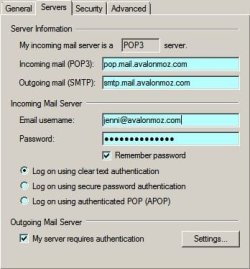
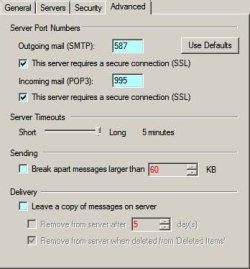
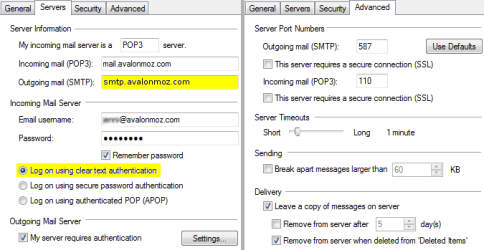
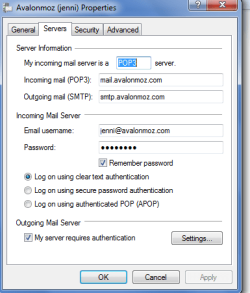
See attached image.

I didn't see anything about "log on using" in the Network Solutions (NS), so I highlighted the default.
In the settings for Outgoing Server requires authentication - should be "Use same settings as incoming...."

The ports on the advanced tab in my image match what NS provides
Pop-Imap settings
Step-by-Step instructions

Note that there is no mention of SSL - so leave it unchecked. Let me know how you make out after you apply the changes.
 

Attachments
  • jen.png
    jen.png
    12.3 KB · Views: 42

My Computer My Computer

At a glance

x64 (6.3.9600) Win8.1 Pro & soon dual boot x6...AMD A6-3420M APU with Radeon(tm) HD Graphics6.00 GBAMD Radeon(TM) HD 6520G
Computer type
Laptop
Computer Manufacturer/Model Number
HP Pavilion dv6-6c10us
OS
x64 (6.3.9600) Win8.1 Pro & soon dual boot x64 (6.1.7601) Win7_SP1 HomePrem
CPU
AMD A6-3420M APU with Radeon(tm) HD Graphics
Motherboard
Hewlett-Packard 1805
Memory
6.00 GB
Graphics Card(s)
AMD Radeon(TM) HD 6520G
Sound Card
(1) AMD High Definition Audio Device (2) IDT High Definiti
Monitor(s) Displays
HP W2072a 20" LCD (1600 x 900) @ 60 Hz
Screen Resolution
1366 x 768 x 32 bits (4294967296 colors) @ 60 Hz
Hard Drives
ST640LM0 00 HM641JI SATA Disk Device
Keyboard
Logitech k520 wireless KB
Mouse
Logitech m320 wireless mouse (bundled with KB)
Internet Speed
15/5 | 54 MB Wireless 'n'
Antivirus
Realtime: Defender or Avast | On-demand: Malwarebytes, ESET
Browser
IE 11 on Win8, IE 10 on win 7
Other Info
Media: [Gimp, Audacity, VLC] || Comm: [WEmail 2012, Skype] || Productivity: [OpenOffice,| Textpad] || Utils: [Sysinternals, cCleaner, Speccy, Defraggler]
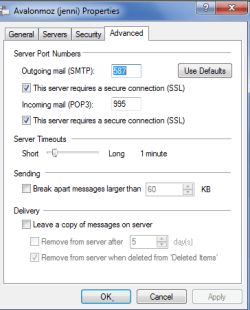
Hi Jenni, sorry for my delayed reply. You never tickd the 2 boxes ending ....SSL you will have to reinput 587 in the top box.


Hi Roderunner,

Sorry, I sent the wrong screen shot. I did it with SSL ticked, and then without. I deleted the account and reinput everything again. I have now tried every combination I can think of!

I have now discovered that it is sending e-mails if I put one in my outbox and it goes automatically. Even though it comes up with that error when I press send/receive.

So, we must be getting closer!?

Advanced with SSL.PNG

Do you have WLM? I can give you another avalonmoz email address and password to try on yours? Then we can tell if it something on my computer or with WLM?
 

My Computer My Computer

At a glance

Windows 7 Home Premium 64 bitIntel (R) Core (TM) i5-2450M CPU @2.5GHz
Computer Manufacturer/Model Number
Sony Vaio
OS
Windows 7 Home Premium 64 bit
CPU
Intel (R) Core (TM) i5-2450M CPU @2.5GHz
Hi Slartybart,

Thanks for the info. That is almost exactly how I started, only I had 2525 instead of 587. That is how it works on my cellphone and my tablet.

But on this brand new computer with Windows live mail I get this message

Unable to send or receive messages for the Avalonmoz (jenni) account. An unknown error has occurred.
Server: 'mail.avalonmoz.com'
Windows Live Mail Error ID: 0x80004005
Protocol: POP3
Port: 110
Secure(SSL): No

when I oress send/receive. But, if I put an e-mail in my outbox, it just whips it away and sends it automatically.

I attach the screen shots of my tab settings - just so you can see that I have got it right!
[/ATTACH]
 

Attachments

  • slartybart1.PNG
    slartybart1.PNG
    12.3 KB · Views: 13

My Computer My Computer

At a glance

Windows 7 Home Premium 64 bitIntel (R) Core (TM) i5-2450M CPU @2.5GHz
Computer Manufacturer/Model Number
Sony Vaio
OS
Windows 7 Home Premium 64 bit
CPU
Intel (R) Core (TM) i5-2450M CPU @2.5GHz
Move the slider in your image from 'Short' to 'Long'

Capture.JPG

Click the image to view larger.
 
Last edited:

My Computer My Computer

At a glance

Win7 H.Prem. 32bit+SP1
Computer Manufacturer/Model Number
Look in my Signature.
OS
Win7 H.Prem. 32bit+SP1
I've tried that, but I still get this:

Unable to send or receive messages for the Avalonmoz (jenni) account. The connection to the server has failed.
Server: 'pop.avalonmoz.com'
Windows Live Mail Error ID: 0x800CCC0E
Protocol: POP3
Port: 995
Secure(SSL): Yes
Socket Error: 10013
 

My Computer My Computer

At a glance

Windows 7 Home Premium 64 bitIntel (R) Core (TM) i5-2450M CPU @2.5GHz
Computer Manufacturer/Model Number
Sony Vaio
OS
Windows 7 Home Premium 64 bit
CPU
Intel (R) Core (TM) i5-2450M CPU @2.5GHz
Jenni, did you get my PM?
 

My Computer My Computer

At a glance

Win7 H.Prem. 32bit+SP1
Computer Manufacturer/Model Number
Look in my Signature.
OS
Win7 H.Prem. 32bit+SP1

NS allows either port 2525 or 587, it shouldn't matter unless your ISP applies some port filtering. The important thing in this test was that a msg in your outbox does get sent, so you're outbound configuration is fine.

The inbound config is causing you frustrations. I know you're changing and testing things and this should be easier - it's just a matter of getting the right combination
.....only I had 2525 instead of 587. .....
.....
Unable to send or receive messages for the Avalon account. An unknown error has occurred.
Server: 'mail.avalon.com'
Windows Live Mail Error ID: 0x80004005
Protocol: POP3
Port: 110
Secure(SSL): No

when I press send/receive. But, if I put an e-mail in my outbox, it just whips it away and sends it automatically.

According to Network solutions:
server should be mail.avalon.com
port should be 110
SSL should be NO

You offered Road runner an id to test on avalon - could you also PM me with the id and pw?

I set up an account in my WLM with as much information as I could glean from this conversation and got to the server without a problem - I just didn't have a real account to test.

thanks.
I've tried that, but I still get this:

Unable to send or receive messages for the Avalon account. The connection to the server has failed.
Server: 'pop.avalon.com'
Windows Live Mail Error ID: 0x800CCC0E
Protocol: POP3
Port: 995
Secure(SSL): Yes
Socket Error: 10013
 

My Computer My Computer

At a glance

x64 (6.3.9600) Win8.1 Pro & soon dual boot x6...AMD A6-3420M APU with Radeon(tm) HD Graphics6.00 GBAMD Radeon(TM) HD 6520G
Computer type
Laptop
Computer Manufacturer/Model Number
HP Pavilion dv6-6c10us
OS
x64 (6.3.9600) Win8.1 Pro & soon dual boot x64 (6.1.7601) Win7_SP1 HomePrem
CPU
AMD A6-3420M APU with Radeon(tm) HD Graphics
Motherboard
Hewlett-Packard 1805
Memory
6.00 GB
Graphics Card(s)
AMD Radeon(TM) HD 6520G
Sound Card
(1) AMD High Definition Audio Device (2) IDT High Definiti
Monitor(s) Displays
HP W2072a 20" LCD (1600 x 900) @ 60 Hz
Screen Resolution
1366 x 768 x 32 bits (4294967296 colors) @ 60 Hz
Hard Drives
ST640LM0 00 HM641JI SATA Disk Device
Keyboard
Logitech k520 wireless KB
Mouse
Logitech m320 wireless mouse (bundled with KB)
Internet Speed
15/5 | 54 MB Wireless 'n'
Antivirus
Realtime: Defender or Avast | On-demand: Malwarebytes, ESET
Browser
IE 11 on Win8, IE 10 on win 7
Other Info
Media: [Gimp, Audacity, VLC] || Comm: [WEmail 2012, Skype] || Productivity: [OpenOffice,| Textpad] || Utils: [Sysinternals, cCleaner, Speccy, Defraggler]
Hi guys,

Excuse my ignorance, but I don't know what a PM is?

I have this email address that we rarely use.

.....Details deleted.....

I have reentered so many times, even using the top numbers rather than the right hand ones in case it made any difference.

Point of interest is that I fired up my old laptop and that will not connect either. That has windows mail, not live mail. Our office computers are all working and my phone and tablet. I don't know if that gives any clues?
 
Last edited:

My Computer My Computer

At a glance

Windows 7 Home Premium 64 bitIntel (R) Core (TM) i5-2450M CPU @2.5GHz
Computer Manufacturer/Model Number
Sony Vaio
OS
Windows 7 Home Premium 64 bit
CPU
Intel (R) Core (TM) i5-2450M CPU @2.5GHz
Okay, PM must be a message on the forum - yes, I moved the slider to "long".

My old computer has been working fine with the old settings for 3 years.
 

My Computer My Computer

At a glance

Windows 7 Home Premium 64 bitIntel (R) Core (TM) i5-2450M CPU @2.5GHz
Computer Manufacturer/Model Number
Sony Vaio
OS
Windows 7 Home Premium 64 bit
CPU
Intel (R) Core (TM) i5-2450M CPU @2.5GHz
PM - Private messaging.

I suggest that you delete the post with the test account information. This is a public board.

I have copied the information and will test. Thanks
 

My Computer My Computer

At a glance

x64 (6.3.9600) Win8.1 Pro & soon dual boot x6...AMD A6-3420M APU with Radeon(tm) HD Graphics6.00 GBAMD Radeon(TM) HD 6520G
Computer type
Laptop
Computer Manufacturer/Model Number
HP Pavilion dv6-6c10us
OS
x64 (6.3.9600) Win8.1 Pro & soon dual boot x64 (6.1.7601) Win7_SP1 HomePrem
CPU
AMD A6-3420M APU with Radeon(tm) HD Graphics
Motherboard
Hewlett-Packard 1805
Memory
6.00 GB
Graphics Card(s)
AMD Radeon(TM) HD 6520G
Sound Card
(1) AMD High Definition Audio Device (2) IDT High Definiti
Monitor(s) Displays
HP W2072a 20" LCD (1600 x 900) @ 60 Hz
Screen Resolution
1366 x 768 x 32 bits (4294967296 colors) @ 60 Hz
Hard Drives
ST640LM0 00 HM641JI SATA Disk Device
Keyboard
Logitech k520 wireless KB
Mouse
Logitech m320 wireless mouse (bundled with KB)
Internet Speed
15/5 | 54 MB Wireless 'n'
Antivirus
Realtime: Defender or Avast | On-demand: Malwarebytes, ESET
Browser
IE 11 on Win8, IE 10 on win 7
Other Info
Media: [Gimp, Audacity, VLC] || Comm: [WEmail 2012, Skype] || Productivity: [OpenOffice,| Textpad] || Utils: [Sysinternals, cCleaner, Speccy, Defraggler]
I did that, thank you.
 

My Computer My Computer

At a glance

Windows 7 Home Premium 64 bitIntel (R) Core (TM) i5-2450M CPU @2.5GHz
Computer Manufacturer/Model Number
Sony Vaio
OS
Windows 7 Home Premium 64 bit
CPU
Intel (R) Core (TM) i5-2450M CPU @2.5GHz
I've sent you some emails on the test account - all went well using the NS setup information.

Both ports 587 and 2525 worked for my tests.

edit: Considering that you're experiencing eMail difficulties.....
 

Attachments

  • jb4.PNG
    jb4.PNG
    12.5 KB · Views: 12
  • jb3.PNG
    jb3.PNG
    7.7 KB · Views: 14
  • jb2.PNG
    jb2.PNG
    12.1 KB · Views: 13
  • jb1.PNG
    jb1.PNG
    10.7 KB · Views: 12

My Computer My Computer

At a glance

x64 (6.3.9600) Win8.1 Pro & soon dual boot x6...AMD A6-3420M APU with Radeon(tm) HD Graphics6.00 GBAMD Radeon(TM) HD 6520G
Computer type
Laptop
Computer Manufacturer/Model Number
HP Pavilion dv6-6c10us
OS
x64 (6.3.9600) Win8.1 Pro & soon dual boot x64 (6.1.7601) Win7_SP1 HomePrem
CPU
AMD A6-3420M APU with Radeon(tm) HD Graphics
Motherboard
Hewlett-Packard 1805
Memory
6.00 GB
Graphics Card(s)
AMD Radeon(TM) HD 6520G
Sound Card
(1) AMD High Definition Audio Device (2) IDT High Definiti
Monitor(s) Displays
HP W2072a 20" LCD (1600 x 900) @ 60 Hz
Screen Resolution
1366 x 768 x 32 bits (4294967296 colors) @ 60 Hz
Hard Drives
ST640LM0 00 HM641JI SATA Disk Device
Keyboard
Logitech k520 wireless KB
Mouse
Logitech m320 wireless mouse (bundled with KB)
Internet Speed
15/5 | 54 MB Wireless 'n'
Antivirus
Realtime: Defender or Avast | On-demand: Malwarebytes, ESET
Browser
IE 11 on Win8, IE 10 on win 7
Other Info
Media: [Gimp, Audacity, VLC] || Comm: [WEmail 2012, Skype] || Productivity: [OpenOffice,| Textpad] || Utils: [Sysinternals, cCleaner, Speccy, Defraggler]
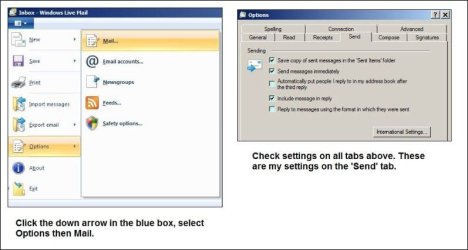
I went back to the beginning and searched for "error 0x80004005".

Try this:
open an elevated command prompt (run as administrator)
in the command prompt window type the following commands one at a time and then enter
cd C:\windows\SysWow64 - the prompt should show your current directory

regsvr32 jscript.dll - You should receive "DllRegisterServer succeeded" msg - continue to the next regsvr32 command

regsvr32 vbscript.dll - You should receive "DllRegisterServer succeeded" msg
If this doesn't work, there's two other things you can try, but this is step 1.
1) see if the dlls aren't registered for some reason - register them anew.
2) next step - check your system using SFC
3) check / correct policy settings.


It's odd that the old machine has the same problem.
.....
Point of interest is that I fired up my old laptop and that will not connect either. That has windows mail, not live mail. Our office computers are all working and my phone and tablet. I don't know if that gives any clues?
 

My Computer My Computer

At a glance

x64 (6.3.9600) Win8.1 Pro & soon dual boot x6...AMD A6-3420M APU with Radeon(tm) HD Graphics6.00 GBAMD Radeon(TM) HD 6520G
Computer type
Laptop
Computer Manufacturer/Model Number
HP Pavilion dv6-6c10us
OS
x64 (6.3.9600) Win8.1 Pro & soon dual boot x64 (6.1.7601) Win7_SP1 HomePrem
CPU
AMD A6-3420M APU with Radeon(tm) HD Graphics
Motherboard
Hewlett-Packard 1805
Memory
6.00 GB
Graphics Card(s)
AMD Radeon(TM) HD 6520G
Sound Card
(1) AMD High Definition Audio Device (2) IDT High Definiti
Monitor(s) Displays
HP W2072a 20" LCD (1600 x 900) @ 60 Hz
Screen Resolution
1366 x 768 x 32 bits (4294967296 colors) @ 60 Hz
Hard Drives
ST640LM0 00 HM641JI SATA Disk Device
Keyboard
Logitech k520 wireless KB
Mouse
Logitech m320 wireless mouse (bundled with KB)
Internet Speed
15/5 | 54 MB Wireless 'n'
Antivirus
Realtime: Defender or Avast | On-demand: Malwarebytes, ESET
Browser
IE 11 on Win8, IE 10 on win 7
Other Info
Media: [Gimp, Audacity, VLC] || Comm: [WEmail 2012, Skype] || Productivity: [OpenOffice,| Textpad] || Utils: [Sysinternals, cCleaner, Speccy, Defraggler]
I got your replies you sent from your tablet, so inbound and outbound are working with the test email through your servers. You previously said that mail in your outbox gets sent on the next automatic cycle, so we're only have to look at the inbound side on your PCs - the POP3 side.

There must be something on both your laptops that prevent both mail clients from connecting. We'll have to look at things other than the email clients (WLM and WinMail).

What anti-virus program do you have?
Is it set to scan eMail? If it is change it to NOT scan eMail and try WLM again.
 

My Computer My Computer

At a glance

x64 (6.3.9600) Win8.1 Pro & soon dual boot x6...AMD A6-3420M APU with Radeon(tm) HD Graphics6.00 GBAMD Radeon(TM) HD 6520G
Computer type
Laptop
Computer Manufacturer/Model Number
HP Pavilion dv6-6c10us
OS
x64 (6.3.9600) Win8.1 Pro & soon dual boot x64 (6.1.7601) Win7_SP1 HomePrem
CPU
AMD A6-3420M APU with Radeon(tm) HD Graphics
Motherboard
Hewlett-Packard 1805
Memory
6.00 GB
Graphics Card(s)
AMD Radeon(TM) HD 6520G
Sound Card
(1) AMD High Definition Audio Device (2) IDT High Definiti
Monitor(s) Displays
HP W2072a 20" LCD (1600 x 900) @ 60 Hz
Screen Resolution
1366 x 768 x 32 bits (4294967296 colors) @ 60 Hz
Hard Drives
ST640LM0 00 HM641JI SATA Disk Device
Keyboard
Logitech k520 wireless KB
Mouse
Logitech m320 wireless mouse (bundled with KB)
Internet Speed
15/5 | 54 MB Wireless 'n'
Antivirus
Realtime: Defender or Avast | On-demand: Malwarebytes, ESET
Browser
IE 11 on Win8, IE 10 on win 7
Other Info
Media: [Gimp, Audacity, VLC] || Comm: [WEmail 2012, Skype] || Productivity: [OpenOffice,| Textpad] || Utils: [Sysinternals, cCleaner, Speccy, Defraggler]
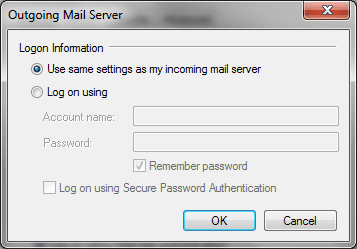
Hi Jenni,
when I was adding your account , I got this:-

Capture.JPG
 

My Computer My Computer

At a glance

Win7 H.Prem. 32bit+SP1
Computer Manufacturer/Model Number
Look in my Signature.
OS
Win7 H.Prem. 32bit+SP1
Jenni, try inputing these settings.

1.JPG 2.JPG
 

My Computer My Computer

At a glance

Win7 H.Prem. 32bit+SP1
Computer Manufacturer/Model Number
Look in my Signature.
OS
Win7 H.Prem. 32bit+SP1
Roderunner,

I've confirmed the settings in post#32. I think the alert dialog is a manifestation of WLM setup automation. It doesn't nor couldn't know about avalonmoz so it punts. You shouldn't get this message if you ticked "Configure manually"

Between the three of us, this issue will get resolved.

Lang may yer lum reek, laddie!
 

My Computer My Computer

At a glance

x64 (6.3.9600) Win8.1 Pro & soon dual boot x6...AMD A6-3420M APU with Radeon(tm) HD Graphics6.00 GBAMD Radeon(TM) HD 6520G
Computer type
Laptop
Computer Manufacturer/Model Number
HP Pavilion dv6-6c10us
OS
x64 (6.3.9600) Win8.1 Pro & soon dual boot x64 (6.1.7601) Win7_SP1 HomePrem
CPU
AMD A6-3420M APU with Radeon(tm) HD Graphics
Motherboard
Hewlett-Packard 1805
Memory
6.00 GB
Graphics Card(s)
AMD Radeon(TM) HD 6520G
Sound Card
(1) AMD High Definition Audio Device (2) IDT High Definiti
Monitor(s) Displays
HP W2072a 20" LCD (1600 x 900) @ 60 Hz
Screen Resolution
1366 x 768 x 32 bits (4294967296 colors) @ 60 Hz
Hard Drives
ST640LM0 00 HM641JI SATA Disk Device
Keyboard
Logitech k520 wireless KB
Mouse
Logitech m320 wireless mouse (bundled with KB)
Internet Speed
15/5 | 54 MB Wireless 'n'
Antivirus
Realtime: Defender or Avast | On-demand: Malwarebytes, ESET
Browser
IE 11 on Win8, IE 10 on win 7
Other Info
Media: [Gimp, Audacity, VLC] || Comm: [WEmail 2012, Skype] || Productivity: [OpenOffice,| Textpad] || Utils: [Sysinternals, cCleaner, Speccy, Defraggler]
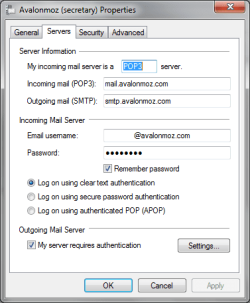
Hi Slartybart,
my post #35 was using the account name & password Jenni sent in an email.
You'll also notice the settings shown in my post #36 and your post #32 don't match.
Post #37 Between the three of us, this issue will get resolved.
I always thought 2's company, 3's a crowd.:D
 

My Computer My Computer

At a glance

Win7 H.Prem. 32bit+SP1
Computer Manufacturer/Model Number
Look in my Signature.
OS
Win7 H.Prem. 32bit+SP1
Hi Rode,

Yep, I know your settings don't match mine. I also know the following

  • post# 32 reflects what Network Solutions support page says to use
  • I successfully configured my WLM using Jenni's test account
  • I successfully sent and received mail through avalonmoz servers
  • most men fantasize about... nah, that's way off topic
  • "Lang may yer lum reek" is what Mr. Spok might say if he were a Scot :D
Post# 35 is a WLM red herring - an alert when WLM tries to automatically figure out the setting based on the domain. It knows about common domains - Yahoo, Hotmail, Gmail, etc. I click "configure manually" to avoid WLM doing things for me.

You have enough information to run the same tests I ran - try it both ways.
Since you already have an account setup - try it that way. When it fails, change the account settings to what's in post# 32... pay particular attention to the servers, the ports, and SSL. Then try a round trip test again

Round trip test a msg From:testid | To:testid on the account you set up.

Good luck.
 

My Computer My Computer

At a glance

x64 (6.3.9600) Win8.1 Pro & soon dual boot x6...AMD A6-3420M APU with Radeon(tm) HD Graphics6.00 GBAMD Radeon(TM) HD 6520G
Computer type
Laptop
Computer Manufacturer/Model Number
HP Pavilion dv6-6c10us
OS
x64 (6.3.9600) Win8.1 Pro & soon dual boot x64 (6.1.7601) Win7_SP1 HomePrem
CPU
AMD A6-3420M APU with Radeon(tm) HD Graphics
Motherboard
Hewlett-Packard 1805
Memory
6.00 GB
Graphics Card(s)
AMD Radeon(TM) HD 6520G
Sound Card
(1) AMD High Definition Audio Device (2) IDT High Definiti
Monitor(s) Displays
HP W2072a 20" LCD (1600 x 900) @ 60 Hz
Screen Resolution
1366 x 768 x 32 bits (4294967296 colors) @ 60 Hz
Hard Drives
ST640LM0 00 HM641JI SATA Disk Device
Keyboard
Logitech k520 wireless KB
Mouse
Logitech m320 wireless mouse (bundled with KB)
Internet Speed
15/5 | 54 MB Wireless 'n'
Antivirus
Realtime: Defender or Avast | On-demand: Malwarebytes, ESET
Browser
IE 11 on Win8, IE 10 on win 7
Other Info
Media: [Gimp, Audacity, VLC] || Comm: [WEmail 2012, Skype] || Productivity: [OpenOffice,| Textpad] || Utils: [Sysinternals, cCleaner, Speccy, Defraggler]
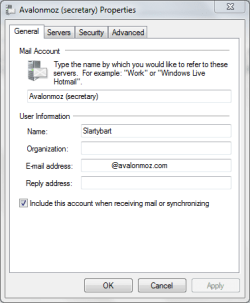
Hi there, sorry - I didn't get on to my computer yesterday.

Thank you so much for your efforts.

I got the instructions from you, Slartybart, but I don't actually know how to start with a command prompt.

It certainly seems that it is a setting on my computers that is the problem. I bought Norton 360 when I bought this new laptop. My old one is Vista and started with Norton, then I changed to Kaspersky because we can actually buy the cd here in Mozambique.

Is there a way that you can access my computer? I remember, a few years back, a chap in India did a remote entry to one of our computers for some reason, and we could see him typing on our screen. Would that be easier than trying to get me to fllow the steps?

This is brand new, so there is nothing sensitive on it?
 

My Computer My Computer

At a glance

Windows 7 Home Premium 64 bitIntel (R) Core (TM) i5-2450M CPU @2.5GHz
Computer Manufacturer/Model Number
Sony Vaio
OS
Windows 7 Home Premium 64 bit
CPU
Intel (R) Core (TM) i5-2450M CPU @2.5GHz
Back
Top