
Solved Windows Live Mail Error ID: 0x80004005 Windows 7

Hey, I should be thanking you for your patience....I am so very grateful that you are helping. I am so lost without the normal e-mail comms.

I am back at my computer now and will go through everything.

I had a look at gmail account and it is IMAP. I tested it and it came up with this error message.
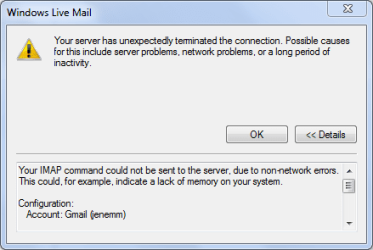
gmail error message.PNG

However, I did receive test e-mails as you can see below. But, these do not show in the inbox - only in the All mail box.

Gmailmail received.PNG

Also, I bought a program for my tablet but it needs a big download - so they suggest downloading onto your computer - and then moving it to the tablet. I did this (following the instructions :D carefully) and it came up with this (somewhat familiar) error message.
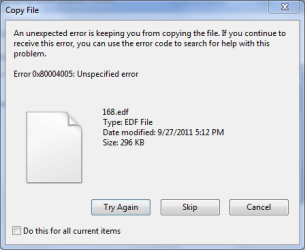
trying to copy file.PNG

However, the files had downloaded (twice actually) and I can open them. I have not tried to transfer them to my tablet yet.

I just thought it might help shed some light on the cause of the problem. I seem to be getting lots of warnings for things!!

Okay, I'll get on to the "boot" etc now......
 

My Computer My Computer

At a glance

Windows 7 Home Premium 64 bitIntel (R) Core (TM) i5-2450M CPU @2.5GHz
Computer Manufacturer/Model Number
Sony Vaio
OS
Windows 7 Home Premium 64 bit
CPU
Intel (R) Core (TM) i5-2450M CPU @2.5GHz
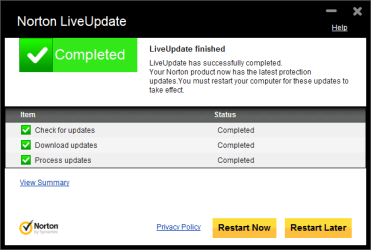
Righto, Norton Live update completed - no updates found - it seems to update automatically by itself fairly often


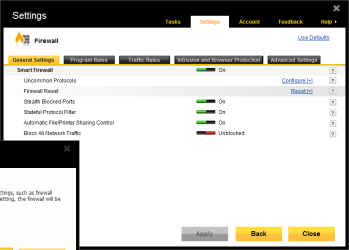
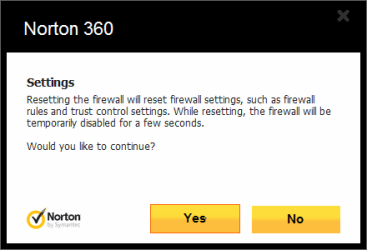
Manage firewall - mine was a bit different to the one in the help screen - but I found it!!

Firewall reset1.PNG

Firewall reset2.PNG

The only point to note is that when I press the "yes" button, I don't get anything else. No confirmation or anything. But, no error messages either!!

Norton connectivity less sucessful:

[/ATTACH][/ATTACH]
 

Attachments

  • nortontroubleshoot2.PNG
    nortontroubleshoot2.PNG
    5.5 KB · Views: 8
  • Nortontroubleshooter1.PNG
    Nortontroubleshooter1.PNG
    34 KB · Views: 2

My Computer My Computer

At a glance

Windows 7 Home Premium 64 bitIntel (R) Core (TM) i5-2450M CPU @2.5GHz
Computer Manufacturer/Model Number
Sony Vaio
OS
Windows 7 Home Premium 64 bit
CPU
Intel (R) Core (TM) i5-2450M CPU @2.5GHz
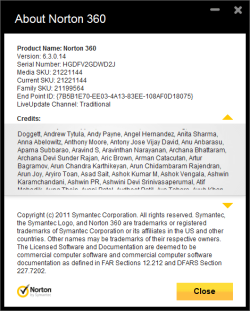
This is my About Norton screen

About Norton.PNG
 

My Computer My Computer

At a glance

Windows 7 Home Premium 64 bitIntel (R) Core (TM) i5-2450M CPU @2.5GHz
Computer Manufacturer/Model Number
Sony Vaio
OS
Windows 7 Home Premium 64 bit
CPU
Intel (R) Core (TM) i5-2450M CPU @2.5GHz
That's what folks do around here - they work through issues with other members. Let me know when you're finished post 59 & 60.

Note: Don't believe Norton - run Live Update until it says there are no more updates. This has bit me a few times in the past.

There seems to be more going on with your system than just WLM. If the next steps don't resolve the issues, I'm afraid we'll have to use a bigger hammer. Luckily, another member wrote a tutorial on the process - it is a bit technical, but the tut goes step-by-step.

After Windows Update and Norton Live update are completed and you're restarted your machine, try some test eMail again. That's the method - change or update and then test eMail - both directions (send / receive).

If the issue persists run the System File Checker (SFC)
Open an elevated (right click - run as administrator)
Command Prompt form your Start Menu - All Programs - Accessories
picture.php


Type the following command into the Command Prompt window and hit enter
SFC /Scannow

SFC works in small chunks - run it a few times, rebooting restarting your machine between runs - until it reports no inconsistencies - usually 3 times is enough. It does take a while.
picture.php

Cross fingers, Try eMail
 

My Computer My Computer

At a glance

x64 (6.3.9600) Win8.1 Pro & soon dual boot x6...AMD A6-3420M APU with Radeon(tm) HD Graphics6.00 GBAMD Radeon(TM) HD 6520G
Computer type
Laptop
Computer Manufacturer/Model Number
HP Pavilion dv6-6c10us
OS
x64 (6.3.9600) Win8.1 Pro & soon dual boot x64 (6.1.7601) Win7_SP1 HomePrem
CPU
AMD A6-3420M APU with Radeon(tm) HD Graphics
Motherboard
Hewlett-Packard 1805
Memory
6.00 GB
Graphics Card(s)
AMD Radeon(TM) HD 6520G
Sound Card
(1) AMD High Definition Audio Device (2) IDT High Definiti
Monitor(s) Displays
HP W2072a 20" LCD (1600 x 900) @ 60 Hz
Screen Resolution
1366 x 768 x 32 bits (4294967296 colors) @ 60 Hz
Hard Drives
ST640LM0 00 HM641JI SATA Disk Device
Keyboard
Logitech k520 wireless KB
Mouse
Logitech m320 wireless mouse (bundled with KB)
Internet Speed
15/5 | 54 MB Wireless 'n'
Antivirus
Realtime: Defender or Avast | On-demand: Malwarebytes, ESET
Browser
IE 11 on Win8, IE 10 on win 7
Other Info
Media: [Gimp, Audacity, VLC] || Comm: [WEmail 2012, Skype] || Productivity: [OpenOffice,| Textpad] || Utils: [Sysinternals, cCleaner, Speccy, Defraggler]
Hi Slartybart,

I've been away for a few days. Going to try the command prompt now.

Hold thumbs!!
 

My Computer My Computer

At a glance

Windows 7 Home Premium 64 bitIntel (R) Core (TM) i5-2450M CPU @2.5GHz
Computer Manufacturer/Model Number
Sony Vaio
OS
Windows 7 Home Premium 64 bit
CPU
Intel (R) Core (TM) i5-2450M CPU @2.5GHz
Okay,

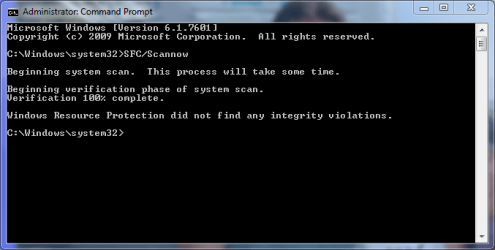
Well, I worked through all the steps. The first command prompt in Post 59 gave me this result:

Command Prompt 1.PNG

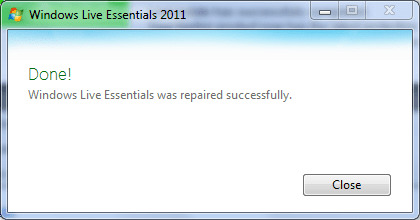
Then I did all the repairs and updates:

2OctWLMrepair.PNG
2OctNortonupdate1.PNG


Then I did the second command prompt:
2OctCommandPrompt.PNG

And I re updated and repaired and rebooted and re - commanded three times. The first two times I did get Norton updates, but the last didn't have any new ones.

2Octafterfirstscan.PNG

I'll have to continue on another page - I need to add the other screens.....
 

Attachments

  • Nortontroubleshooter3.PNG
    Nortontroubleshooter3.PNG
    39.7 KB · Views: 8

My Computer My Computer

At a glance

Windows 7 Home Premium 64 bitIntel (R) Core (TM) i5-2450M CPU @2.5GHz
Computer Manufacturer/Model Number
Sony Vaio
OS
Windows 7 Home Premium 64 bit
CPU
Intel (R) Core (TM) i5-2450M CPU @2.5GHz
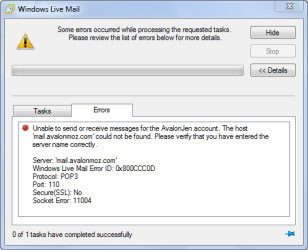
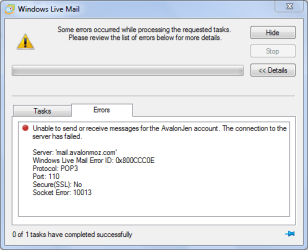
Then I still get this from my e-mail.

2Octaftersecondscan.PNG

I took off the gmail account completely before I started.
 

My Computer My Computer

At a glance

Windows 7 Home Premium 64 bitIntel (R) Core (TM) i5-2450M CPU @2.5GHz
Computer Manufacturer/Model Number
Sony Vaio
OS
Windows 7 Home Premium 64 bit
CPU
Intel (R) Core (TM) i5-2450M CPU @2.5GHz
Well that was a lot.
  • "The first command prompt in Post 59 gave me this result:"
    there's a typo in the command - no space between regsvr32 jscript.dll
  • Norton Live Update - all good
  • SFC /scannow - no integrity issues - all good
  • Norton Live Update (LU) - even better, that's why I said "Don't trust Norton - run LU until it says 'There are no more updates"
  • Socket error 1104 - investigating
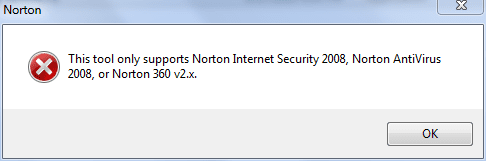
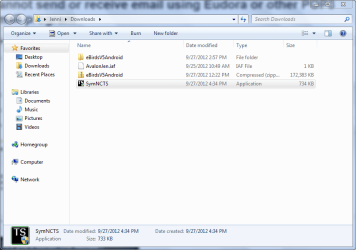
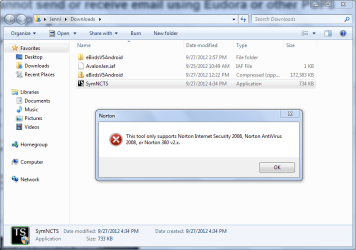
  • Not sure what SymNCT is - but it didn't run because it's specific to a differnt Norton product
  • Removed Gmail account - good
  • Socket error 10013 - investigating
It only looks like the same problem, they are different error codes and socket errors. We're making progress, but still haven't found the core issue WLM won't receive msgs.

If this is still a "new" machine - there aren't any critical things on it, then try removing all accounts from WLM, restart the machine, restart WLM and import AvalonJen.iaf. I'd like to see only one account in WLM, AvaolonJen.
   Warning
Removing accounts also removes mail asscociated with that account (I think). but to be safe, export any messages before removing the account.

Log onto your eMaill account using the web client and move any msgs in the inbox to another folder (you might have to create a folder first). I'm looking for an empty inbox on the server side. Test eMail again

I'll post back after I do more reading - the initial indication from other solutions is a clean Windows re-install might be required. I'm holding off on that until you (we?) try other less drastic solutions.

Until then - try the ResetScripts.bat file attached. This batch file contains the commands in post# 57.
Open an elevated Command Prompt (right click - run as administrator)
Type:
%userprofile%\Downloads\ResetScripts
   Tip
You can copy and paste in a Command Prompt (CP)window. You need to configure Command Prompt (it's easy)- see http://www.sevenforums.com/tutorials/21874-command-prompt-copy-clipboard.html Steps 4 -> 7
It's a different editor, so Ctrl-C | Ctrl-V don't work. Inside the CP window,
hightlight and enter = copy
right click = paste

There's still a follow up if that doesn't help. I need to find it again and write another batch file for you.

As always, try one solution (remove accounts....), restart, test eMail
- then try another (RestScripts.....)

Thanks, you're doing great.

Bill
.
 

Attachments

My Computer My Computer

At a glance

x64 (6.3.9600) Win8.1 Pro & soon dual boot x6...AMD A6-3420M APU with Radeon(tm) HD Graphics6.00 GBAMD Radeon(TM) HD 6520G
Computer type
Laptop
Computer Manufacturer/Model Number
HP Pavilion dv6-6c10us
OS
x64 (6.3.9600) Win8.1 Pro & soon dual boot x64 (6.1.7601) Win7_SP1 HomePrem
CPU
AMD A6-3420M APU with Radeon(tm) HD Graphics
Motherboard
Hewlett-Packard 1805
Memory
6.00 GB
Graphics Card(s)
AMD Radeon(TM) HD 6520G
Sound Card
(1) AMD High Definition Audio Device (2) IDT High Definiti
Monitor(s) Displays
HP W2072a 20" LCD (1600 x 900) @ 60 Hz
Screen Resolution
1366 x 768 x 32 bits (4294967296 colors) @ 60 Hz
Hard Drives
ST640LM0 00 HM641JI SATA Disk Device
Keyboard
Logitech k520 wireless KB
Mouse
Logitech m320 wireless mouse (bundled with KB)
Internet Speed
15/5 | 54 MB Wireless 'n'
Antivirus
Realtime: Defender or Avast | On-demand: Malwarebytes, ESET
Browser
IE 11 on Win8, IE 10 on win 7
Other Info
Media: [Gimp, Audacity, VLC] || Comm: [WEmail 2012, Skype] || Productivity: [OpenOffice,| Textpad] || Utils: [Sysinternals, cCleaner, Speccy, Defraggler]
And of course there is still the possibility that Norton is the culprit.

If you still have th Norton CD or license key (if you downloaded it from their shop) - try uninstalling Norton completely, restart, Download and Run the Norton Removal Tool (select correct tool for your Norton product)

And...... try eMail again.

Please let me know if anything changes - thanks
 

My Computer My Computer

At a glance

x64 (6.3.9600) Win8.1 Pro & soon dual boot x6...AMD A6-3420M APU with Radeon(tm) HD Graphics6.00 GBAMD Radeon(TM) HD 6520G
Computer type
Laptop
Computer Manufacturer/Model Number
HP Pavilion dv6-6c10us
OS
x64 (6.3.9600) Win8.1 Pro & soon dual boot x64 (6.1.7601) Win7_SP1 HomePrem
CPU
AMD A6-3420M APU with Radeon(tm) HD Graphics
Motherboard
Hewlett-Packard 1805
Memory
6.00 GB
Graphics Card(s)
AMD Radeon(TM) HD 6520G
Sound Card
(1) AMD High Definition Audio Device (2) IDT High Definiti
Monitor(s) Displays
HP W2072a 20" LCD (1600 x 900) @ 60 Hz
Screen Resolution
1366 x 768 x 32 bits (4294967296 colors) @ 60 Hz
Hard Drives
ST640LM0 00 HM641JI SATA Disk Device
Keyboard
Logitech k520 wireless KB
Mouse
Logitech m320 wireless mouse (bundled with KB)
Internet Speed
15/5 | 54 MB Wireless 'n'
Antivirus
Realtime: Defender or Avast | On-demand: Malwarebytes, ESET
Browser
IE 11 on Win8, IE 10 on win 7
Other Info
Media: [Gimp, Audacity, VLC] || Comm: [WEmail 2012, Skype] || Productivity: [OpenOffice,| Textpad] || Utils: [Sysinternals, cCleaner, Speccy, Defraggler]
If you uninstalled Norton, you should re-install it or another AV product.

If you re-install norton - choose custom install and do not select eMaill scan.
 

My Computer My Computer

At a glance

x64 (6.3.9600) Win8.1 Pro & soon dual boot x6...AMD A6-3420M APU with Radeon(tm) HD Graphics6.00 GBAMD Radeon(TM) HD 6520G
Computer type
Laptop
Computer Manufacturer/Model Number
HP Pavilion dv6-6c10us
OS
x64 (6.3.9600) Win8.1 Pro & soon dual boot x64 (6.1.7601) Win7_SP1 HomePrem
CPU
AMD A6-3420M APU with Radeon(tm) HD Graphics
Motherboard
Hewlett-Packard 1805
Memory
6.00 GB
Graphics Card(s)
AMD Radeon(TM) HD 6520G
Sound Card
(1) AMD High Definition Audio Device (2) IDT High Definiti
Monitor(s) Displays
HP W2072a 20" LCD (1600 x 900) @ 60 Hz
Screen Resolution
1366 x 768 x 32 bits (4294967296 colors) @ 60 Hz
Hard Drives
ST640LM0 00 HM641JI SATA Disk Device
Keyboard
Logitech k520 wireless KB
Mouse
Logitech m320 wireless mouse (bundled with KB)
Internet Speed
15/5 | 54 MB Wireless 'n'
Antivirus
Realtime: Defender or Avast | On-demand: Malwarebytes, ESET
Browser
IE 11 on Win8, IE 10 on win 7
Other Info
Media: [Gimp, Audacity, VLC] || Comm: [WEmail 2012, Skype] || Productivity: [OpenOffice,| Textpad] || Utils: [Sysinternals, cCleaner, Speccy, Defraggler]
Hi there,

Right,

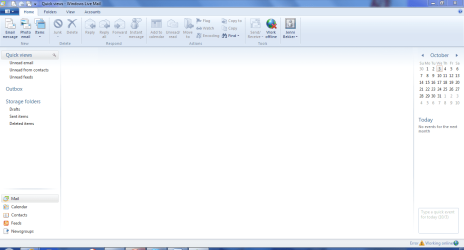
I took all acounts off WLM
noaccounts.PNG

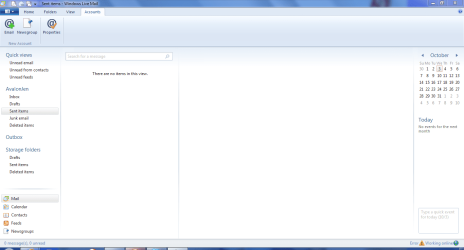
Then I imported the iaf file again
iaf imported.PNG

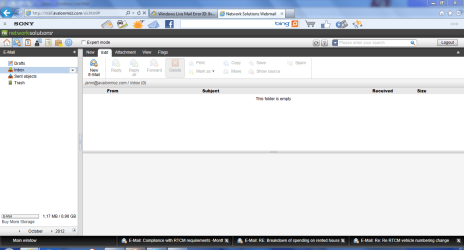
Then I went onto Network solutions and emptied my inbox
emptyinbox.PNG

.....and then I ran out of time, so I will continue later.....
 

My Computer My Computer

At a glance

Windows 7 Home Premium 64 bitIntel (R) Core (TM) i5-2450M CPU @2.5GHz
Computer Manufacturer/Model Number
Sony Vaio
OS
Windows 7 Home Premium 64 bit
CPU
Intel (R) Core (TM) i5-2450M CPU @2.5GHz
All good - next steps
  1. test email with current clean WLM & Netsol
    Post any errors
  2. Post 68 - ResetScripts.bat (still looking for 2nd stage notes - it's ok to just resetscripts for now)
    test email after script reset
    post any errors
  3. Post 69 - Norton - uninstall and removal tool
    test email after removing norton
    post any errors
If at any point WLM starts working - you can stop.


After we get done the resolution attempts above, there are only two more possible resolutions to try before I give up and say "Factory restore your machine", remove norton, install WLM, import AvalonJen.iaf, and try eMail. But let's keep plugging away - we've come this far ;)
I have to duck out for a while... I'll check back on the progress you make

.
 

My Computer My Computer

At a glance

x64 (6.3.9600) Win8.1 Pro & soon dual boot x6...AMD A6-3420M APU with Radeon(tm) HD Graphics6.00 GBAMD Radeon(TM) HD 6520G
Computer type
Laptop
Computer Manufacturer/Model Number
HP Pavilion dv6-6c10us
OS
x64 (6.3.9600) Win8.1 Pro & soon dual boot x64 (6.1.7601) Win7_SP1 HomePrem
CPU
AMD A6-3420M APU with Radeon(tm) HD Graphics
Motherboard
Hewlett-Packard 1805
Memory
6.00 GB
Graphics Card(s)
AMD Radeon(TM) HD 6520G
Sound Card
(1) AMD High Definition Audio Device (2) IDT High Definiti
Monitor(s) Displays
HP W2072a 20" LCD (1600 x 900) @ 60 Hz
Screen Resolution
1366 x 768 x 32 bits (4294967296 colors) @ 60 Hz
Hard Drives
ST640LM0 00 HM641JI SATA Disk Device
Keyboard
Logitech k520 wireless KB
Mouse
Logitech m320 wireless mouse (bundled with KB)
Internet Speed
15/5 | 54 MB Wireless 'n'
Antivirus
Realtime: Defender or Avast | On-demand: Malwarebytes, ESET
Browser
IE 11 on Win8, IE 10 on win 7
Other Info
Media: [Gimp, Audacity, VLC] || Comm: [WEmail 2012, Skype] || Productivity: [OpenOffice,| Textpad] || Utils: [Sysinternals, cCleaner, Speccy, Defraggler]
I just wanted to say that I read thru this entire topic from start to end to try to fix my own problem. I too have a Network Solutions account. It was set up on my laptop and has been working just fine with WLM for quite some time then about 2 weeks ago I started getting the same prolems and error as sonyvaio2012. All other items (iPad, iPhone, etc) were working just fine, only problem was with WLM.

I tried pretty much everything suggested prior. What finally worked for me was completely emptying my NS inbox.

Weird huh?

Thanks for helping more than just one!
 

My Computer My Computer

At a glance

Win7 Home Premium 64 bit
OS
Win7 Home Premium 64 bit
Hello there,

Yes, that is funny. What is now happening is that I can now receive emails - also seems to be since I emptied my NS inbox.

It does still seem to be doing some qwerky things, so I am working through checking that out. But, whew, what a reflief!!
 

My Computer My Computer

At a glance

Windows 7 Home Premium 64 bitIntel (R) Core (TM) i5-2450M CPU @2.5GHz
Computer Manufacturer/Model Number
Sony Vaio
OS
Windows 7 Home Premium 64 bit
CPU
Intel (R) Core (TM) i5-2450M CPU @2.5GHz
Hi Slartybart,

Well, I am very chuffed to report that I can now send and receive e-mails!!! :party:

After my last post to you I was away and when I came back to do the next steps - my emails came through!! It seems to be since I emptied my inbox - and that seems to be the case for the other person with the same problem.

It was still doing a couple of strange things - like still asking for my password even though the remember box was ticked. But, today it didn't do that!

I have downloaded my contacts into a .vcf file and when I tried to import them to WLM it said it was importing, but nothing happened and no contacts came in. Do you have any idea how I can get this to work?

I am so very grateful for your help. Your time and effort on my behalf is much appreciated - thank you.
 

My Computer My Computer

At a glance

Windows 7 Home Premium 64 bitIntel (R) Core (TM) i5-2450M CPU @2.5GHz
Computer Manufacturer/Model Number
Sony Vaio
OS
Windows 7 Home Premium 64 bit
CPU
Intel (R) Core (TM) i5-2450M CPU @2.5GHz
Solved - Windows Live Mail (WLM) | Network Solutions (NetSol) Domain

Hi Jen,

Sorry for the delayed response-I was having network issues of my own and could not connect.

Glad to hear WLM is working for both you and for sefirothe.

WLM is a bit odd when importing Contacts. It seems to be a hybrid of Outlook, Outlook Express, and HotMail, but not Windows Mail. Try exporting your contacts to a Comma Seperated Values (.CSV) file and importing that file to WLM.

If you're satisfied that the issue is resolved, please mark this thread as Solved. Clicking here will add cred to the solution in post #72.

I think the total solution involves many of the steps previously taken, emptying the NetSol inbox might be the first step other folks take - then follow the thread if that doesn't fix it right off.

You are welcome and thank you for your diligence and patience. Your effort helped sefirothe.

Bill
.
 

My Computer My Computer

At a glance

x64 (6.3.9600) Win8.1 Pro & soon dual boot x6...AMD A6-3420M APU with Radeon(tm) HD Graphics6.00 GBAMD Radeon(TM) HD 6520G
Computer type
Laptop
Computer Manufacturer/Model Number
HP Pavilion dv6-6c10us
OS
x64 (6.3.9600) Win8.1 Pro & soon dual boot x64 (6.1.7601) Win7_SP1 HomePrem
CPU
AMD A6-3420M APU with Radeon(tm) HD Graphics
Motherboard
Hewlett-Packard 1805
Memory
6.00 GB
Graphics Card(s)
AMD Radeon(TM) HD 6520G
Sound Card
(1) AMD High Definition Audio Device (2) IDT High Definiti
Monitor(s) Displays
HP W2072a 20" LCD (1600 x 900) @ 60 Hz
Screen Resolution
1366 x 768 x 32 bits (4294967296 colors) @ 60 Hz
Hard Drives
ST640LM0 00 HM641JI SATA Disk Device
Keyboard
Logitech k520 wireless KB
Mouse
Logitech m320 wireless mouse (bundled with KB)
Internet Speed
15/5 | 54 MB Wireless 'n'
Antivirus
Realtime: Defender or Avast | On-demand: Malwarebytes, ESET
Browser
IE 11 on Win8, IE 10 on win 7
Other Info
Media: [Gimp, Audacity, VLC] || Comm: [WEmail 2012, Skype] || Productivity: [OpenOffice,| Textpad] || Utils: [Sysinternals, cCleaner, Speccy, Defraggler]
I created a new file and moved all of the inbox messages to it.

It worked for me and I now can recieve Emails for my hotmail account via WLM.

I would guess that the number of messages in the inbox and the memory required to load it was more than WLM could handle.
 

My Computer My Computer

At a glance

Windows 7 home premium 32bit
OS
Windows 7 home premium 32bit
Hi there, I'm now stuck on this issue. I have tried to import my contatcs, but it won't do anything. I posted the following new thread - but nobody has answered me yet. Can you offer any advice on this?

I have saved my gmail contacts as a .csv file in excel. But, it does give this error message:


Although the data is there in excel:


Then I try to import to Windows Live Mail as so:


And it says "importing"..... and then nothing else. No contacts come in and no other message.

Please can somebody tell me what I'm doing wrong?
 

My Computer My Computer

At a glance

Windows 7 Home Premium 64 bitIntel (R) Core (TM) i5-2450M CPU @2.5GHz
Computer Manufacturer/Model Number
Sony Vaio
OS
Windows 7 Home Premium 64 bit
CPU
Intel (R) Core (TM) i5-2450M CPU @2.5GHz
You did the right thing by opening a new thread for a new issue.

I answered your query here and will follow that thread for the contacts issue.

That should do the trick and your contacts will show up in WLM.
 

My Computer My Computer

At a glance

x64 (6.3.9600) Win8.1 Pro & soon dual boot x6...AMD A6-3420M APU with Radeon(tm) HD Graphics6.00 GBAMD Radeon(TM) HD 6520G
Computer type
Laptop
Computer Manufacturer/Model Number
HP Pavilion dv6-6c10us
OS
x64 (6.3.9600) Win8.1 Pro & soon dual boot x64 (6.1.7601) Win7_SP1 HomePrem
CPU
AMD A6-3420M APU with Radeon(tm) HD Graphics
Motherboard
Hewlett-Packard 1805
Memory
6.00 GB
Graphics Card(s)
AMD Radeon(TM) HD 6520G
Sound Card
(1) AMD High Definition Audio Device (2) IDT High Definiti
Monitor(s) Displays
HP W2072a 20" LCD (1600 x 900) @ 60 Hz
Screen Resolution
1366 x 768 x 32 bits (4294967296 colors) @ 60 Hz
Hard Drives
ST640LM0 00 HM641JI SATA Disk Device
Keyboard
Logitech k520 wireless KB
Mouse
Logitech m320 wireless mouse (bundled with KB)
Internet Speed
15/5 | 54 MB Wireless 'n'
Antivirus
Realtime: Defender or Avast | On-demand: Malwarebytes, ESET
Browser
IE 11 on Win8, IE 10 on win 7
Other Info
Media: [Gimp, Audacity, VLC] || Comm: [WEmail 2012, Skype] || Productivity: [OpenOffice,| Textpad] || Utils: [Sysinternals, cCleaner, Speccy, Defraggler]
Live Mail Error Code 0X800CC0C

Signed up for some "Free" software that you had to buy that would fix the software. HA. No good. Turned out that Comcast had changed the port for outbound emails.
 

My Computer My Computer

At a glance

Window7
OS
Window7
Back
Top