Windows Live Messenger - Manually Uninstall

How to Manually Uninstall Windows Live Messenger

   Information
This article will show you how to manually remove Windows Live Messenger completely. This is helpful when you have issues with Messenger not able to uninstall normally, and reinstalling fails.

You will need to be logged in as an administrator to be able to do this.


Here's How:
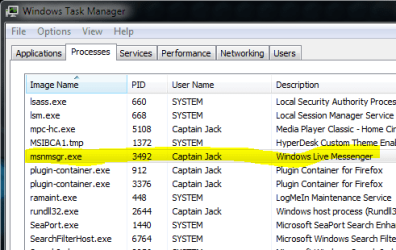
1. First we have to shutdown Windows Live Messenger if it's running. Press Ctrl+Alt+Del and Select Start Task Manager then click on Processes Tab find msnmsgr.exe and click on End Process.
1.PNG
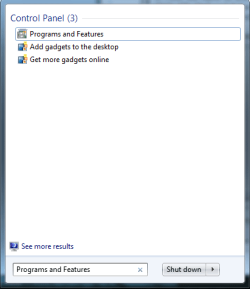
2. Then we have to remove Windows Live Messenger from Programs and Features. So go to Start then under search type in Programs and Features
2.png
3. Under Programs and Features look for Windows Live Essentials then click of Uninstall

4. Then it will give you an option to Remove all the Windows Live Programs like Windows Live Mail, Windows Live Writer etc. You might wanna remove all of them then it will more smooth.

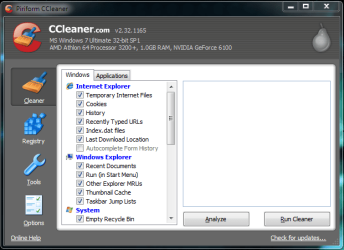
5. Once the Uninstall is completely then download and install CCleaner. Once it's uninstalled, then run CCleaner.
3.PNG
6. Click on Run Cleaner to make sure all the Temp files are removed.


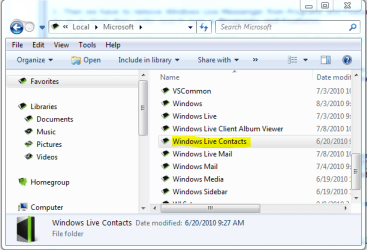
7. Now we have to remove the Contact cache folders located under Application Data folder for that go to Start under search type in %USERPROFILE%\AppData\Local\Microsoft\ and Hit Enter and Delete the Windows Live Contacts folder.
4.PNG

8. Now we have to delete few left over keys in Registry make sure you make a backup of the Registry.


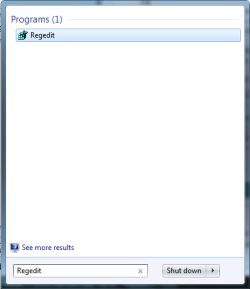
9. Now go to Start and under search type in Regedit and press enter.
5.png
10. If prompted by UAC, then click on Yes.


11. In regedit, navigate to each location below.

  • HKEY_LOCAL_MACHINE\Software\Microsoft\Windows Live and Delete Messenger folder
  • HKEY_LOCAL_MACHINE\Software\Microsoft and Delete MSNMessenger
  • HKEY_CURRENT_USER\Software\Microsoft and Delete MSNMessenger
  • HKEY_CURRENT_USER\Software\Microsoft\Windows Live\Communications Clients and Delete Shared
  • HKEY_CURRENT_USER\Software\Microsoft and Delete IdentityCRL
12. Now reboot your computer​


Hope this helps,

Captain


Last edited by a moderator:
Nice work Capt. :thumbsup:
 

My Computer

Computer type
PC/Desktop
Computer Manufacturer/Model Number
Self Built
OS
Win 10 Pro x64
CPU
Intel I5-2500K @3.3GHz
Motherboard
Asrock P67 Extreme4
Memory
16GB G.Skill Ripjaws X (4x4GB)
Graphics Card(s)
EVGA GeForce 750 Ti SC 2GB
Sound Card
ASUS Xonar DG 5.1 Channels 24-bit 96KHz PCI Interface Sound
Monitor(s) Displays
auria eq2367
Screen Resolution
1920 x 1080
Hard Drives
250GB Samsung 850 EVO SSD
1TB WD Blue
1TB Hitachi
PSU
SeaSonic X 650W 80 Plus Gold
Case
Corsair Obsidian 750D
Cooling
Corsair H60, Three 140mm case fans
Keyboard
Logitech Wireless Keyboard K520
Mouse
Logitech Wireless Mouse M310
Internet Speed
Wave Broadband ~ 100 dn 5 up
Antivirus
Windows Defender, Malwarebytes Premium
Browser
Edge, IE11, Chrome
Other Info
Laptop specs: HP g7-1365dx /
CPU: AMD A6-3420M APU with Radeon(tm) HD Graphics /
RAM: Crucial 8Gb (2x4Gb) /
SSD: Crucial M4-CT128M4SSD2 ATA Device/ FW 000F /
GFX: AMD Radeon HD 6520G /
OS: Windows 10 Pro x64
Excellent job. :thumbsup:
 

My Computer

Computer Manufacturer/Model Number
Home built
OS
Windows 7 Ultimate 32 bit
CPU
Intel(R) Pentium(R) 4 CPU 3.00GHz
Motherboard
ASUS P4P800-VM Motherboard Chipset: Intel 865G + ICH5
Memory
2.50 GB RAM
Graphics Card(s)
NVIDIA GeForce 7600 GS
Sound Card
SoundMax Integrated Digital Audio (Chip)
Monitor(s) Displays
ViewSonic VX 1962 wm
Screen Resolution
1680 X 1050
Hard Drives
Seagate Barracuda 7200.10 80 GB
ST380215A ATA Device 18.6 GB
Western Digital "My Book" external hard drive 750 GB
Cooling
Fan based
Keyboard
Microsoft Comfort Curve Keyboard 2000 v10 USB
Mouse
Logitec optic USB
Internet Speed
3.01 Mb/s download 0.64 Mb/s upload

My Computer

Computer Manufacturer/Model Number
Samsung NP550P5C-S02IN
OS
Windows 7 Ultimate - 64-bit | Windows 8 Pro - 64-bit
CPU
Intel® Core™ i7 Processor 3,610QM (2.30Hz, 6MB L3 Cach
Memory
8 GB
Graphics Card(s)
NVIDIA® GeForce® GT 650M 2GB Graphics, Optimus™ techno
Sound Card
SoundAlive™ JBL 3 Speakers (With sub-Woofer)
Monitor(s) Displays
39.62cm (15.6) SuperBright 300nit HD+ LED Display
Screen Resolution
1,600 x 900, Anti-Reflective
Hard Drives
1TB S-ATA II Hard Drive (5,400RPM)
If you use Hotmail and prefer using Windows Live Messenger on your desktop instead of in your browser, it is easy to turn it off. Just hover over your name in the top right corner of Hotmail (or any other Windows Live web app) and select Sign out of Messenger. Alternatively, you can select Appear offline.
 

My Computer

OS
Windows 7 & Windows Vista Ultimate
Very good work Cap'n, well done!
 

My Computer

Computer Manufacturer/Model Number
* BFK Customs *
OS
W 7 64-bit Ultimate
CPU
Intel Q9550 Yorkfield
Motherboard
ASUS P5Q Pro
Memory
8GB Dominator 8500C5D
Graphics Card(s)
ATI : XFX 5870
Sound Card
Realtek HD Audio 7-1
Monitor(s) Displays
1x 47" LCD HDMI & 3x 26" LCD HDMI
Screen Resolution
1920x1080P & 1920x1200
Hard Drives
1x 80GB Intel X25-M G2 SSD : 1x 500GB & 1x 640GB WD Caviar Black(s)
PSU
Corsair 620HX
Case
Cooler Master RC-690
Cooling
Tuniq Tower 120, 2x 140mm and 3x 120mm case fans
Keyboard
Microsoft 500
Mouse
Razer Diamondback 3G
Internet Speed
14 Mb/s
Other Info
1x Koutech 3Gb/s SATA HDD Hot Swap Rack
Nice tutorial Capt.Jack Sparrow.

@Corrine: Nice tips too!
 

My Computer

Computer Manufacturer/Model Number
COMPAQ Presario Laptop
OS
Windows 7 Ultimate 64 bit, Mac OS X 10.6
CPU
Intel Pentium Dual Core @2.0GHz
Motherboard
Compaq Generic
Memory
12GB
Graphics Card(s)
NVIDIA Graphics For Mobile 512MB VRAM
Sound Card
IDT High definition Audio
Monitor(s) Displays
Laptop LCD Display
Screen Resolution
1280*800 Bright View Widescreen
Hard Drives
500 GB Primary Master@7200rpm + 1 TB External HDD
Cooling
Direct ; generic fan
Keyboard
Generic Laptop Keyboard
Mouse
Touch Pad
Internet Speed
3.1 Mbps wireless Broadband
Other Info
Generic Dock
Great job Capt. Jack...
I know we've been through a few of those together with different OP's and this tutorial will help tremendously.
Corrine's tip on signing off or working off line is great.
I have hotmail and was never interested in WLM having too much fun here in 7 Forum.
 

My Computer

Computer Manufacturer/Model Number
HP M9077c
OS
Windows 7 Home Premium 64bit
CPU
Intel(R)Core(TM)2 quad [email protected] 2.39GHz
Motherboard
ASUSeK
Memory
6GB DDR2 6400
Graphics Card(s)
GeForce 8500/512MB
Sound Card
Realtek High Def Audio
Monitor(s) Displays
HP w2408 LCD 24" widescreen
Screen Resolution
1920x1200
Cooling
6 pack of Bud
Keyboard
MS wireless Inteli
Mouse
MS wireless Inteli
Good one Capt. :D

A Guy
 

My Computer

Computer type
PC/Desktop
OS
Windows 10 Home x64
CPU
INTEL Core i5-750 Quad-Core 3.37GHz
Motherboard
ASUS P7P55D
Memory
HyperX Fury Black Series 8GB (2 x 4GB) 1866Mhz
Graphics Card(s)
EVGA GeForce GTX 750 Superclocked 1GB 128-Bit GDDR5
Monitor(s) Displays
LG 32MA68HY 32" IPS
Screen Resolution
1920 x 1080
Hard Drives
Samsung 840 Evo 120GB, SEAGATE 500GB Barracuda® 7200.12, SATA 3 Gb/s, 7200 RPM, 16MB cache
PSU
ANTEC TruePower New TP-550, 80 PLUS, 550W
Case
ANTEC Three Hundred Illusion
Cooling
COOLER MASTER Hyper 212 Plus, 4 x 120mm 1 x 140mm Noctua's
Internet Speed
85 + Mbps
Antivirus
Avast
Browser
Vivaldi
Thanks All ! :)
 

My Computer

Computer Manufacturer/Model Number
Samsung NP550P5C-S02IN
OS
Windows 7 Ultimate - 64-bit | Windows 8 Pro - 64-bit
CPU
Intel® Core™ i7 Processor 3,610QM (2.30Hz, 6MB L3 Cach
Memory
8 GB
Graphics Card(s)
NVIDIA® GeForce® GT 650M 2GB Graphics, Optimus™ techno
Sound Card
SoundAlive™ JBL 3 Speakers (With sub-Woofer)
Monitor(s) Displays
39.62cm (15.6) SuperBright 300nit HD+ LED Display
Screen Resolution
1,600 x 900, Anti-Reflective
Hard Drives
1TB S-ATA II Hard Drive (5,400RPM)
Have you ever used...Revo Unstaller ? I've found it to work great..
It's also a Free program.
I might add here.. I have NO affiliation with them.
Capt. this is a wonderful tutorial on this matter.
 

My Computer

Computer type
Laptop
Computer Manufacturer/Model Number
Gateway 17.3" LCD Intel Dual-Core, 8GB RAM 1TB HDD Windows 8 Laptop
OS
Windows 8 - 64-bit
CPU
2.2GHz Intel Pentium dual-core B960 processor with 2MB L3 ca
Memory
8GB DDR3
Graphics Card(s)
Intel HD Graphics with 128MB of dedicated system memory
Monitor(s) Displays
17.3" Ultrabright HD widescreen LED-backlit LCD
Screen Resolution
1280 X 1024
Hard Drives
1TB hard drive-1000 GB HDD
DVD-Super Multi DL drive
PSU
Intel B960 processor
Case
XXXXX
Cooling
XXXXX
Keyboard
Multi Gesture Touchpad
Mouse
USB - portable mouse... I added this
Antivirus
Avast
Browser
I E 10
Other Info
I see nothing about Motherboard info.
I'm not sure about Sound Card
Ports :(3) USB 2.0, (1) HDMI, (1) VGA, (1) Headphone out, (1) Microphone in, (1) Ethernet LAN

•Fast Wi-Fi wireless and wired Gigabit Ethernet networking
•HDMI output
•Kensington lock slot
I have no idea what all this actually means
Have you ever used...Revo Unstaller ? I've found it to work great..
It's also a Free program.
I might add here.. I have NO affiliation with them.
Capt. this is a wonderful tutorial on this matter.

Thanks LPt ... I used to use Revo Uninstaller myself it's a great software. But sometime it won't remove all the files that has to be remove in order to get Live Messenger working again after the reinstall. Such cases you could use this article. And the Free edtion is not very friendly on 64-Bit editions
 

My Computer

Computer Manufacturer/Model Number
Samsung NP550P5C-S02IN
OS
Windows 7 Ultimate - 64-bit | Windows 8 Pro - 64-bit
CPU
Intel® Core™ i7 Processor 3,610QM (2.30Hz, 6MB L3 Cach
Memory
8 GB
Graphics Card(s)
NVIDIA® GeForce® GT 650M 2GB Graphics, Optimus™ techno
Sound Card
SoundAlive™ JBL 3 Speakers (With sub-Woofer)
Monitor(s) Displays
39.62cm (15.6) SuperBright 300nit HD+ LED Display
Screen Resolution
1,600 x 900, Anti-Reflective
Hard Drives
1TB S-ATA II Hard Drive (5,400RPM)
Capt.. some very good points.. you've made.. I'll follow your maual uninstall for I M.
 

My Computer

Computer type
Laptop
Computer Manufacturer/Model Number
Gateway 17.3" LCD Intel Dual-Core, 8GB RAM 1TB HDD Windows 8 Laptop
OS
Windows 8 - 64-bit
CPU
2.2GHz Intel Pentium dual-core B960 processor with 2MB L3 ca
Memory
8GB DDR3
Graphics Card(s)
Intel HD Graphics with 128MB of dedicated system memory
Monitor(s) Displays
17.3" Ultrabright HD widescreen LED-backlit LCD
Screen Resolution
1280 X 1024
Hard Drives
1TB hard drive-1000 GB HDD
DVD-Super Multi DL drive
PSU
Intel B960 processor
Case
XXXXX
Cooling
XXXXX
Keyboard
Multi Gesture Touchpad
Mouse
USB - portable mouse... I added this
Antivirus
Avast
Browser
I E 10
Other Info
I see nothing about Motherboard info.
I'm not sure about Sound Card
Ports :(3) USB 2.0, (1) HDMI, (1) VGA, (1) Headphone out, (1) Microphone in, (1) Ethernet LAN

•Fast Wi-Fi wireless and wired Gigabit Ethernet networking
•HDMI output
•Kensington lock slot
I have no idea what all this actually means
Solved.. thanks so much.
 

My Computer

Computer type
Laptop
Computer Manufacturer/Model Number
Gateway 17.3" LCD Intel Dual-Core, 8GB RAM 1TB HDD Windows 8 Laptop
OS
Windows 8 - 64-bit
CPU
2.2GHz Intel Pentium dual-core B960 processor with 2MB L3 ca
Memory
8GB DDR3
Graphics Card(s)
Intel HD Graphics with 128MB of dedicated system memory
Monitor(s) Displays
17.3" Ultrabright HD widescreen LED-backlit LCD
Screen Resolution
1280 X 1024
Hard Drives
1TB hard drive-1000 GB HDD
DVD-Super Multi DL drive
PSU
Intel B960 processor
Case
XXXXX
Cooling
XXXXX
Keyboard
Multi Gesture Touchpad
Mouse
USB - portable mouse... I added this
Antivirus
Avast
Browser
I E 10
Other Info
I see nothing about Motherboard info.
I'm not sure about Sound Card
Ports :(3) USB 2.0, (1) HDMI, (1) VGA, (1) Headphone out, (1) Microphone in, (1) Ethernet LAN

•Fast Wi-Fi wireless and wired Gigabit Ethernet networking
•HDMI output
•Kensington lock slot
I have no idea what all this actually means

My Computer

Computer Manufacturer/Model Number
Samsung NP550P5C-S02IN
OS
Windows 7 Ultimate - 64-bit | Windows 8 Pro - 64-bit
CPU
Intel® Core™ i7 Processor 3,610QM (2.30Hz, 6MB L3 Cach
Memory
8 GB
Graphics Card(s)
NVIDIA® GeForce® GT 650M 2GB Graphics, Optimus™ techno
Sound Card
SoundAlive™ JBL 3 Speakers (With sub-Woofer)
Monitor(s) Displays
39.62cm (15.6) SuperBright 300nit HD+ LED Display
Screen Resolution
1,600 x 900, Anti-Reflective
Hard Drives
1TB S-ATA II Hard Drive (5,400RPM)
Unfortunately, the Capt's MSN uninstall didn't work for me!

I've reloaded Win-7 Ultimate and 4-hours of updates (now current), after experiencing both my motherboard and 2-hardrives fail, after a major lightening storm! Sadly, my condo building is not grounded...and cannot be changed.
I am the administrator.

msnmsgr does _not appear in Task Manager, nor does it appear Programs & Features
Task Mgr.PNG

I'm perplexed!
 

My Computer

Computer Manufacturer/Model Number
home built
OS
Windows 7 Ultimate
CPU
E8400
Motherboard
Asus P5Q Pro Turbo
Memory
OCZ Reaper DDR2 1066
Graphics Card(s)
Radeon HD4870
Sound Card
VIA HD onboard
Monitor(s) Displays
Samsung 940BW
Screen Resolution
1440x900
Hard Drives
3- Samsung Barracuda 500GB (1 external), SATA II
1-WD Caviar 350GB
PSU
PCP&C 500W
Case
Thermaltake M5
Cooling
Intel OEM
Keyboard
SUH
Mouse
Genius
Hello Grathiam,

Have you already tried to reinstall Windows Live Messenger to repair it, then see if it may uninstall normally through Programs and Features?

Windows Live Messenger Free Download
 

My Computer

Computer type
PC/Desktop
Computer Manufacturer/Model Number
Self built custom
OS
64-bit Windows 11 Pro for Workstations
CPU
Intel i7-8700K OC'd to 5 GHz
Motherboard
ASUS ROG Maximus XI Formula Z390
Memory
64 GB (4x16GB) G.SKILL TridentZ RGB DDR4 3600 MHz
Graphics Card(s)
ASUS ROG-STRIX-GTX1080TI-O11G-GAMING
Sound Card
Integrated
Monitor(s) Displays
2 x Samsung Odyssey G7 27"
Screen Resolution
2560x1440
Hard Drives
1TB Samsung 990 PRO M.2,
4TB Samsung 990 PRO PRO M.2,
TerraMaster F8 SSD Plus NAS
PSU
Seasonic Prime Titanium 850W
Case
Thermaltake Core P3
Cooling
Corsair Hydro H115i
Keyboard
Logitech wireless K800
Mouse
Logitech MX Master 4
Internet Speed
2 Gb/s Download and 100 Mb/s Upload
Antivirus
Malwarebyte Anti-Malware Premium
Browser
Google Chrome
Other Info
Logitech Z625 speaker system,
Logitech BRIO 4K Pro webcam,
HP Color LaserJet Pro MFP M477fdn,
APC SMART-UPS RT 1000 XL - SURT1000XLI,
Galaxy S23 Plus phone
Hello Grathiam,
Have you already tried to reinstall Windows Live Messenger to repair it, then see if it may uninstall normally through Programs and Features? Windows Live Messenger Free Download
-----------------------------

Brink, Thanks and I appreciate your suggestion, but it didn't work:

I did load Live Messenger, from the linked site. So, now I have skydrive, Live, Live Mail, Messenger,
Photo Gallery and Movie Maker on my HD. I don't want any of these programs.

When I click on the 'e' (internet explorer) icon in the bottom tray, MSN is loaded, but I cannot access nor find Internet Explorer anywhere. The task Manager does not list MSN nor Win Essentials, _HOWEVER_,
Win Essentials now listed in Control Panel-Programs. So, I deleted Essentials, _yet_ MSN is still active and appears upon clicking the 'e' in the bottom tray. MSN is not listed in taskmgr nor CNTL panel.

I'm still perplexed ;-)
 

Attachments

  • MSN.PNG
    MSN.PNG
    17 KB · Views: 172
  • taskmgr.PNG
    taskmgr.PNG
    12.7 KB · Views: 373

My Computer

Computer Manufacturer/Model Number
home built
OS
Windows 7 Ultimate
CPU
E8400
Motherboard
Asus P5Q Pro Turbo
Memory
OCZ Reaper DDR2 1066
Graphics Card(s)
Radeon HD4870
Sound Card
VIA HD onboard
Monitor(s) Displays
Samsung 940BW
Screen Resolution
1440x900
Hard Drives
3- Samsung Barracuda 500GB (1 external), SATA II
1-WD Caviar 350GB
PSU
PCP&C 500W
Case
Thermaltake M5
Cooling
Intel OEM
Keyboard
SUH
Mouse
Genius
That looks like you just opened Internet Explorer to MSN as your homepage.
 

My Computer

Computer type
PC/Desktop
Computer Manufacturer/Model Number
Self built custom
OS
64-bit Windows 11 Pro for Workstations
CPU
Intel i7-8700K OC'd to 5 GHz
Motherboard
ASUS ROG Maximus XI Formula Z390
Memory
64 GB (4x16GB) G.SKILL TridentZ RGB DDR4 3600 MHz
Graphics Card(s)
ASUS ROG-STRIX-GTX1080TI-O11G-GAMING
Sound Card
Integrated
Monitor(s) Displays
2 x Samsung Odyssey G7 27"
Screen Resolution
2560x1440
Hard Drives
1TB Samsung 990 PRO M.2,
4TB Samsung 990 PRO PRO M.2,
TerraMaster F8 SSD Plus NAS
PSU
Seasonic Prime Titanium 850W
Case
Thermaltake Core P3
Cooling
Corsair Hydro H115i
Keyboard
Logitech wireless K800
Mouse
Logitech MX Master 4
Internet Speed
2 Gb/s Download and 100 Mb/s Upload
Antivirus
Malwarebyte Anti-Malware Premium
Browser
Google Chrome
Other Info
Logitech Z625 speaker system,
Logitech BRIO 4K Pro webcam,
HP Color LaserJet Pro MFP M477fdn,
APC SMART-UPS RT 1000 XL - SURT1000XLI,
Galaxy S23 Plus phone
That looks like you just opened Internet Explorer to MSN as your homepage.

Brink,
I appreciate all the time you've spent seeking to resolve my problem.
Yes, I realize that IE-10 is set to open MSN. I err'ed when initially re-loading updates on my replacement
Win-7 Ultimate install!!
I've tried the above Capt's guide to uninstalling MSN, as well as other uninstall guides I've found online.
None worked! MSN never appears in taskmgr or CNTL Panel-Programs

I tried changing the 'Home Page' in IE-10 from 'http://www.msn.com/?st=1' to 'about:blank' {w/o quotes}, which I use on IE-9, on my laptop. But, the 'about:blank' change wasn't accepted on my copy of IE-10. I need/want one click access to IE, which resides in the left bottom tray, with a Firefox.

I also tried to uninstall the Win-7 updates which first added IE-9, then IE-10 to my new Win-7 install, hoping I could just do a re-install of IE (hopefully just IE-9). Unlike Microsoft's online guide which said that updates could be deleted, I followed their guide and it doesn't work, at least on my Win-7 Ultimate. I was hoping to

I cannot see link on MSN which will allow me to access IE-10 and change the home page or find a way to get ride of MSN...a program I've never wanted to use.

SO...Doctor Brink...I dislike having taken so much of your time, but I'm still stymied and now feeling not only perplexed, but ignorant ;-)

Thank you, jay

I
 

My Computer

Computer Manufacturer/Model Number
home built
OS
Windows 7 Ultimate
CPU
E8400
Motherboard
Asus P5Q Pro Turbo
Memory
OCZ Reaper DDR2 1066
Graphics Card(s)
Radeon HD4870
Sound Card
VIA HD onboard
Monitor(s) Displays
Samsung 940BW
Screen Resolution
1440x900
Hard Drives
3- Samsung Barracuda 500GB (1 external), SATA II
1-WD Caviar 350GB
PSU
PCP&C 500W
Case
Thermaltake M5
Cooling
Intel OEM
Keyboard
SUH
Mouse
Genius
Back
Top