
You are using an out of date browser. It may not display this or other websites correctly.
You should upgrade or use an alternative browser.
You should upgrade or use an alternative browser.
Windows Live Messenger
- Thread starter vernod
- Start date

Uninstall Windows Live Essentials... 
My Computer
- Computer type
- PC/Desktop
- Computer Manufacturer/Model Number
- LENOVO K450 @3.0GHZ
- OS
- 64-bit Windows 8.1 Pro
- CPU
- Core(TM) i5 CPU 4330 Haswell @ 3.20GHz
- Motherboard
- LENOVO
- Memory
- 12.00 GB
- Graphics Card(s)
- Intel(R) HD Graphics
- Sound Card
- Intel HD integtrated
- Monitor(s) Displays
- HP 25' ISP Monitor
- Screen Resolution
- 1900/1020
- Hard Drives
- (1) ST1000DM003-1CH162 (2) Generic STORAGE DEVICE USB Device (3) Generic STORAGE DEVICE USB Device
- Internet Speed
- 100mb down/10mb up

Hi Guys,
Any tips on how to remove/disable Windows Live Messenger in Windows 7? Its very annoying having it pop up every time I go to hotmail.
Thx,
Vern
Hello Vern,
As far as I know, Windows 7 does not come with Live Messenger by default.
I think you selected Windows Live Messenger (and possibly other Windows Live software) when installing Windows Live Mail.
You should be able to uninstall the Windows Live Messenger:
Go to the Start Menu-Control Panel-Programs and features- and uninstall it.
Best regards,
zx81
My Computer
- Computer Manufacturer/Model Number
- Dell Inpspiron 1720
- OS
- Windows 7 Home Premium x64
- CPU
- Intel 1720 Core 2 Duo 2.00GHz,800,2M
- Memory
- 4GB 667MHz DDR2 SDRAM (2x2048)
- Graphics Card(s)
- NVIDIA Geforce Go 8600M GT 256MB DDR2
- Sound Card
- SigmaTel
- Monitor(s) Displays
- 17.0" Widescreen WXGA+ (1440x900) TFT with TrueLife
- Screen Resolution
- 1440x900
- Hard Drives
- 2x160GB 5400RPM Serial ATA
- Mouse
- Logitech

- you can stop it from loading automatically via the start-up option in "msconfig"..
- it's also one of the options under the messenger's "tools":
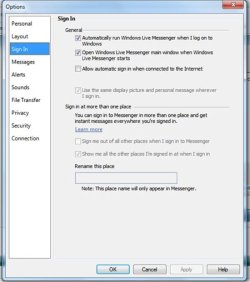
- it's also one of the options under the messenger's "tools":
My Computer
- Computer type
- PC/Desktop
- Computer Manufacturer/Model Number
- benchtec, built to personal specs
- OS
- Windows10 Pro - 64Bit vs.10547
- CPU
- i7-965 Extreme Edition (8 Cores) at 3.3GHz (no OC)
- Motherboard
- BloodRageX58 (Socket1366)
- Memory
- 12G Corsair Dominator DDR3 - tripled
- Graphics Card(s)
- 2xAMD SapphireNITRO R9 380(4G) crossfire
- Sound Card
- Sonar(SB)X-Fi onboard
- Monitor(s) Displays
- SyncMaster P2050 20"
- Screen Resolution
- 1600x900 (widescreen)
- Hard Drives
- 480G\OCZSolid3SSD, 64G\OCZVertex3SSD,60G\OCZVertex2SSD, 1TB\spinpointF1SATAHDD
- PSU
- 1200w Power Station Gold
- Case
- ANTEC 900/2 all blue lights, etc..
- Cooling
- Noctua SE1366 NH-U12P - a tight fit, but a monster cooler!!
- Keyboard
- Logitech G19 (wired)
- Mouse
- Logitech G9 Laser (wired)
- Internet Speed
- 150mb unlimited
- Browser
- IE11(RP)
- Other Info
- Xbox One, Nokia735 Windows10 mobile, LG HD/DVD/Blu-Ray r/w, CyberlinkPowerDVD15, LogitechZ5500-SS(5.1), LogitechG35Phones-SS(7.1),MSOffice 2007,CorelDrawX7,Painter2016, Wacom Intuos Pro-SE
mosterholt
New member
- Local time
- 4:46 PM
- Messages
- 5
- you can stop it from loading automatically via the start-up option in "msconfig"..
- it's also one of the options under the messenger's "tools":
View attachment 38724
Call me dumb but I can't find the "tools" for messenger. I've clicked on everything about the stupid program that lets me do it but I'm having no such luck finding it. I'm going to try msconfig, maybe I'll have better luck with that.
My Computer
- OS
- Windows 7 Ultimate
- CPU
- Athlon 4400
- Motherboard
- Asus
- Memory
- 2 Gb
- Graphics Card(s)
- Asus 9600GT
- Monitor(s) Displays
- Samsung

Hello Vern,
As far as I know, Windows 7 does not come with Live Messenger by default.
I think you selected Windows Live Messenger (and possibly other Windows Live software) when installing Windows Live Mail.
You should be able to uninstall the Windows Live Messenger:
Go to the Start Menu-Control Panel-Programs and features- and uninstall it.
Best regards,
zx81
OEM's are shipping it as default, or at least i know Toshiba are
My Computer
- Computer type
- PC/Desktop
- Computer Manufacturer/Model Number
- Medion Erazer (note to self: insert model number) - with custom additions
- OS
- Windows 10 Pro x64
- CPU
- Intel Core i5 7400 @ 3.00GHz
- Motherboard
- OEM supllied with PC
- Memory
- 8GB 2133Mhz DDR4 (OEM supplied)
- Graphics Card(s)
- Gygabyte Windforce GTX 1050Ti (Factory Overclocked)
- Sound Card
- Realtek
- Monitor(s) Displays
- Acer Al1980 + HKC
- Screen Resolution
- 1360*768(HKC) / 1280*1024(Acer)
- Hard Drives
- 1TB Toshiba
1TB WD Caviar Green
120GB Samsung Evo 840
- PSU
- OEM supplied (no power rating on case)
- Case
- OEM Supplied
- Cooling
- Stock
- Keyboard
- Logitech Wireless
- Mouse
- Logitect Wireless
- Internet Speed
- 40Mb/s Down 10Mb/s Up
- Antivirus
- Defender
- Browser
- Firefox

to remove Messenger, go to the Control Panel and select Programs and Features
in the list, select Windows Live Essentials and then click on the Change/Remove option..
..opt to uninstall when the choice box appears, and you'll be given the list of programs that come with Live Essentials
- select Messenger from the list and proceed to uninstall - the remaining Live Essential programs will be unaffected..
in the list, select Windows Live Essentials and then click on the Change/Remove option..
..opt to uninstall when the choice box appears, and you'll be given the list of programs that come with Live Essentials
- select Messenger from the list and proceed to uninstall - the remaining Live Essential programs will be unaffected..
My Computer
- Computer type
- PC/Desktop
- Computer Manufacturer/Model Number
- benchtec, built to personal specs
- OS
- Windows10 Pro - 64Bit vs.10547
- CPU
- i7-965 Extreme Edition (8 Cores) at 3.3GHz (no OC)
- Motherboard
- BloodRageX58 (Socket1366)
- Memory
- 12G Corsair Dominator DDR3 - tripled
- Graphics Card(s)
- 2xAMD SapphireNITRO R9 380(4G) crossfire
- Sound Card
- Sonar(SB)X-Fi onboard
- Monitor(s) Displays
- SyncMaster P2050 20"
- Screen Resolution
- 1600x900 (widescreen)
- Hard Drives
- 480G\OCZSolid3SSD, 64G\OCZVertex3SSD,60G\OCZVertex2SSD, 1TB\spinpointF1SATAHDD
- PSU
- 1200w Power Station Gold
- Case
- ANTEC 900/2 all blue lights, etc..
- Cooling
- Noctua SE1366 NH-U12P - a tight fit, but a monster cooler!!
- Keyboard
- Logitech G19 (wired)
- Mouse
- Logitech G9 Laser (wired)
- Internet Speed
- 150mb unlimited
- Browser
- IE11(RP)
- Other Info
- Xbox One, Nokia735 Windows10 mobile, LG HD/DVD/Blu-Ray r/w, CyberlinkPowerDVD15, LogitechZ5500-SS(5.1), LogitechG35Phones-SS(7.1),MSOffice 2007,CorelDrawX7,Painter2016, Wacom Intuos Pro-SE

If you are removing it I recommend revo uninstaller. It is freeware and very good at it's job and will scan for leftovers when removal is complete.
My Computer
- Computer Manufacturer/Model Number
- Custom Build.
- OS
- Windows 7 Ultimate x64.
- CPU
- i5 760 @ 4.2Ghz. 1.18v
- Motherboard
- Gigabyte - H55M-USB3
- Memory
- 4g Corsair xms3 ddr3, 1600Mhz.
- Graphics Card(s)
- Gigabyte GTX-560Ti soc edition
- Sound Card
- Asus Xonar Dx - Logitech Z5500.
- Monitor(s) Displays
- Acer 22" LCD Wide screen 1680-1050 -Samsung 42" Plasma....
- Screen Resolution
- 1680/1050 -----1920/1080p.
- Hard Drives
- 2x 2TB Seagate Go Flex,
1x 1TB Seagate,
1x 640WD Black,
x16 Gig sandisc flash drive,
1x8Gig sandisc flash drive.
- PSU
- XigmaTek 80plus NRP-PC702 - 700w dual 30a.
- Case
- Venus Gamers Midi Tower Case with LED Display
- Cooling
- Arctic Freezer 7 Pro Rev 2... x2 Arctic F8 case fans........
- Keyboard
- Logitech G15-v2 Gaming.
- Mouse
- Microsoft Sidewinder X8.
- Internet Speed
- Virgin Media - 50mb down- 8mb up.
- Other Info
- x2 Xbox 360 wireless controllers...
Dual layer optical disc drive...
Chrome 79million
A.V = MSE
mosterholt
New member
- Local time
- 4:46 PM
- Messages
- 5
to remove Messenger, go to the Control Panel and select Programs and Features
in the list, select Windows Live Essentials and then click on the Change/Remove option..
..opt to uninstall when the choice box appears, and you'll be given the list of programs that come with Live Essentials
- select Messenger from the list and proceed to uninstall - the remaining Live Essential programs will be unaffected..
Sweet, that did it. Thanks!
My Computer
- OS
- Windows 7 Ultimate
- CPU
- Athlon 4400
- Motherboard
- Asus
- Memory
- 2 Gb
- Graphics Card(s)
- Asus 9600GT
- Monitor(s) Displays
- Samsung
Similar threads
- Replies
- 4
- Views
- 1K
- Replies
- 6
- Views
- 3K

