"Windows mail could not be started. error 80041161

Ok, sorry to tell you this, but....

Completely uninstall Windows Essentails (WE) through Control Panel -> Progams and Features .......

What has to be done will be ....

Thanks.
 

My Computer My Computer

At a glance

Microsoft Windows 7 Home Premium 64-bit 7601 ...Intel(R) Core(TM) i3 CPU M 370 @ 2.40GHz4.00 GBNVIDIA GeForce GT 425M
Computer type
Laptop
Computer Manufacturer/Model Number
Acer 5745DG
OS
Microsoft Windows 7 Home Premium 64-bit 7601 Multiprocessor Free Service Pack 1
CPU
Intel(R) Core(TM) i3 CPU M 370 @ 2.40GHz
Motherboard
Acer ZR7D
Memory
4.00 GB
Graphics Card(s)
NVIDIA GeForce GT 425M
Sound Card
(1) High Definition Audio Device (2) NVIDIA High Definitio
Screen Resolution
1366 x 768 x 32 bits (4294967296 colors) @ 119 Hz
Hard Drives
WDC WD3200BEVT-22A23T0
3 partitions
S/N W -DXW167AM03248
Size 298.09 GB
Internet Speed
6690
Antivirus
Avast Pro
Browser
Firefox 28
Other Info
Sound:
Card 1 - Microsoft High Definition Audio Device
Card 2 - High Definition Audio Device
Card 3 - High Definition Audio Device
Card 4 - NVIDIA Virtual Audio Device (Wave Extensible) (WDM)
Card 5 - NVIDIA High Definition Audio
Card 6 - NVIDIA High Definition Audio
VideoController1 - NVIDIA GeForce GT 425M
Video Processor - GeForce GT 425M
Video Driver Version - 9.18.13.2723
Video Driv
You're welcome. I'm just sorry you have to do it AGAIN, having just reinstalled with the web install.
3rd time is the charm they say.

Sometimes, the offline full install works.... sometimes not.

You might need a bigger hammer - I have one you can borrow.

Take the "proper" way first - seeing if the full offline install gets you there.
 

My Computer My Computer

At a glance

x64 (6.3.9600) Win8.1 Pro & soon dual boot x6...AMD A6-3420M APU with Radeon(tm) HD Graphics6.00 GBAMD Radeon(TM) HD 6520G
Computer type
Laptop
Computer Manufacturer/Model Number
HP Pavilion dv6-6c10us
OS
x64 (6.3.9600) Win8.1 Pro & soon dual boot x64 (6.1.7601) Win7_SP1 HomePrem
CPU
AMD A6-3420M APU with Radeon(tm) HD Graphics
Motherboard
Hewlett-Packard 1805
Memory
6.00 GB
Graphics Card(s)
AMD Radeon(TM) HD 6520G
Sound Card
(1) AMD High Definition Audio Device (2) IDT High Definiti
Monitor(s) Displays
HP W2072a 20" LCD (1600 x 900) @ 60 Hz
Screen Resolution
1366 x 768 x 32 bits (4294967296 colors) @ 60 Hz
Hard Drives
ST640LM0 00 HM641JI SATA Disk Device
Keyboard
Logitech k520 wireless KB
Mouse
Logitech m320 wireless mouse (bundled with KB)
Internet Speed
15/5 | 54 MB Wireless 'n'
Antivirus
Realtime: Defender or Avast | On-demand: Malwarebytes, ESET
Browser
IE 11 on Win8, IE 10 on win 7
Other Info
Media: [Gimp, Audacity, VLC] || Comm: [WEmail 2012, Skype] || Productivity: [OpenOffice,| Textpad] || Utils: [Sysinternals, cCleaner, Speccy, Defraggler]
Well thanks for the route to follow - unfortunately after:
Uninstalling Windows Live Essentials twice - ticking the three elements listed, then again ticking the other three, until the Control Panel ceased to display Win Essentials in the list of installed programs.

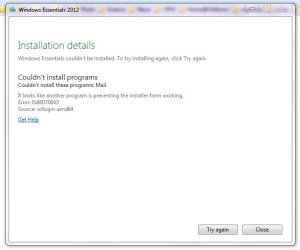
Then shutting the WiFi, shutting MBAM, shutting Avast, and running the downloaded wlsetup-all.exe (install all, recommended). This attached message was displayed.

Then re-booting, confirming that WLE was listed again in installed programs, restarting WiFi & Avast. Trying to run wlmail.exe failed probably because it is a 2010 file from the earlier version which did not get uninstalled. I deleted that file by hand. Run through the above again and the same 'Could not install' message is displayed.

I have not done a manual trawl through the Registry to see if references to wlmail remain, but I would hesitate to touch them anyway.

Further hints welcomed.
 

Attachments

  • InstallWinEssentialsFailed.jpg
    InstallWinEssentialsFailed.jpg
    22 KB · Views: 29

My Computer My Computer

At a glance

Microsoft Windows 7 Home Premium 64-bit 7601 ...Intel(R) Core(TM) i3 CPU M 370 @ 2.40GHz4.00 GBNVIDIA GeForce GT 425M
Computer type
Laptop
Computer Manufacturer/Model Number
Acer 5745DG
OS
Microsoft Windows 7 Home Premium 64-bit 7601 Multiprocessor Free Service Pack 1
CPU
Intel(R) Core(TM) i3 CPU M 370 @ 2.40GHz
Motherboard
Acer ZR7D
Memory
4.00 GB
Graphics Card(s)
NVIDIA GeForce GT 425M
Sound Card
(1) High Definition Audio Device (2) NVIDIA High Definitio
Screen Resolution
1366 x 768 x 32 bits (4294967296 colors) @ 119 Hz
Hard Drives
WDC WD3200BEVT-22A23T0
3 partitions
S/N W -DXW167AM03248
Size 298.09 GB
Internet Speed
6690
Antivirus
Avast Pro
Browser
Firefox 28
Other Info
Sound:
Card 1 - Microsoft High Definition Audio Device
Card 2 - High Definition Audio Device
Card 3 - High Definition Audio Device
Card 4 - NVIDIA Virtual Audio Device (Wave Extensible) (WDM)
Card 5 - NVIDIA High Definition Audio
Card 6 - NVIDIA High Definition Audio
VideoController1 - NVIDIA GeForce GT 425M
Video Processor - GeForce GT 425M
Video Driver Version - 9.18.13.2723
Video Driv
Ok I wondered where you went.

Stay out of the registry.

You gave me new information from that install attempt and actions already taken.

Let me review the posts one more time
I assume you meant 2011 not 2010 [it is a 2010 file from the earlier version]
 

My Computer My Computer

At a glance

x64 (6.3.9600) Win8.1 Pro & soon dual boot x6...AMD A6-3420M APU with Radeon(tm) HD Graphics6.00 GBAMD Radeon(TM) HD 6520G
Computer type
Laptop
Computer Manufacturer/Model Number
HP Pavilion dv6-6c10us
OS
x64 (6.3.9600) Win8.1 Pro & soon dual boot x64 (6.1.7601) Win7_SP1 HomePrem
CPU
AMD A6-3420M APU with Radeon(tm) HD Graphics
Motherboard
Hewlett-Packard 1805
Memory
6.00 GB
Graphics Card(s)
AMD Radeon(TM) HD 6520G
Sound Card
(1) AMD High Definition Audio Device (2) IDT High Definiti
Monitor(s) Displays
HP W2072a 20" LCD (1600 x 900) @ 60 Hz
Screen Resolution
1366 x 768 x 32 bits (4294967296 colors) @ 60 Hz
Hard Drives
ST640LM0 00 HM641JI SATA Disk Device
Keyboard
Logitech k520 wireless KB
Mouse
Logitech m320 wireless mouse (bundled with KB)
Internet Speed
15/5 | 54 MB Wireless 'n'
Antivirus
Realtime: Defender or Avast | On-demand: Malwarebytes, ESET
Browser
IE 11 on Win8, IE 10 on win 7
Other Info
Media: [Gimp, Audacity, VLC] || Comm: [WEmail 2012, Skype] || Productivity: [OpenOffice,| Textpad] || Utils: [Sysinternals, cCleaner, Speccy, Defraggler]
I'm confused by your reference to three elements and the other three elements but suspect you only mean that you uninstalled 3 components at a time. There is an uninstall all in v2012 - was it not availalbe in v2011? It is possbile that MS added that option in v2012.
Well thanks for the route to follow - unfortunately after:
Uninstalling Windows Live Essentials twice - ticking the three elements listed, then again ticking the other three, until the Control Panel ceased to display Win Essentials in the list of installed programs.

These step weren't necessary, but caused no harm either.
I thought you already had the offline install program.
edit: Sorry I misread what you wrote. You said and running the downloaded wlsetup-all.exe
- I read you downloaded and ran the ...... my mistake.
Then shutting the WiFi, shutting MBAM, shutting Avast, and running the downloaded wlsetup-all.exe (install all, recommended). This attached message was displayed.

What file did you did by hand?
I searched for "that file" on my system and couldn't find it. :sarc: (sarcasm alert!)
Then re-booting, confirming that WLE was listed again in installed programs, restarting WiFi & Avast. Trying to run wlmail.exe failed probably because it is a 2010 file from the earlier version which did not get uninstalled. I deleted that file by hand. Run through the above again and the same 'Could not install' message is displayed.


Good stay out of the registry.
I have not done a manual trawl through the Registry to see if references to wlmail remain, but I would hesitate to touch them anyway.

Further hints welcomed.

It might be a previous stuck install - let's take this one step at a time.
I'll let you know the steps, don't do any more than what I request. OK?

I should note that evenutally your WE will work, but my steps only require one or two attempts to install. Doing more than requested.... well that might require 10 or 20 attempts.

Fair enough?

 
Last edited:

My Computer My Computer

At a glance

x64 (6.3.9600) Win8.1 Pro & soon dual boot x6...AMD A6-3420M APU with Radeon(tm) HD Graphics6.00 GBAMD Radeon(TM) HD 6520G
Computer type
Laptop
Computer Manufacturer/Model Number
HP Pavilion dv6-6c10us
OS
x64 (6.3.9600) Win8.1 Pro & soon dual boot x64 (6.1.7601) Win7_SP1 HomePrem
CPU
AMD A6-3420M APU with Radeon(tm) HD Graphics
Motherboard
Hewlett-Packard 1805
Memory
6.00 GB
Graphics Card(s)
AMD Radeon(TM) HD 6520G
Sound Card
(1) AMD High Definition Audio Device (2) IDT High Definiti
Monitor(s) Displays
HP W2072a 20" LCD (1600 x 900) @ 60 Hz
Screen Resolution
1366 x 768 x 32 bits (4294967296 colors) @ 60 Hz
Hard Drives
ST640LM0 00 HM641JI SATA Disk Device
Keyboard
Logitech k520 wireless KB
Mouse
Logitech m320 wireless mouse (bundled with KB)
Internet Speed
15/5 | 54 MB Wireless 'n'
Antivirus
Realtime: Defender or Avast | On-demand: Malwarebytes, ESET
Browser
IE 11 on Win8, IE 10 on win 7
Other Info
Media: [Gimp, Audacity, VLC] || Comm: [WEmail 2012, Skype] || Productivity: [OpenOffice,| Textpad] || Utils: [Sysinternals, cCleaner, Speccy, Defraggler]
The error msg comes from the Microsoft installer that driving the WE install, not directly from WE.

It might be looking for the file you deleted, I'm not certain please let me know the name of the file you deleted.

Did you hit the try again button?

If you already trid that, then you might try a Restore Point.

The easiest thing to do might be to use a Restore Point (System Protection)
http://www.sevenforums.com/tutorials/700-system-restore.html

Pick a restore point just before your last attempt. Then things should be better.
 

My Computer My Computer

At a glance

x64 (6.3.9600) Win8.1 Pro & soon dual boot x6...AMD A6-3420M APU with Radeon(tm) HD Graphics6.00 GBAMD Radeon(TM) HD 6520G
Computer type
Laptop
Computer Manufacturer/Model Number
HP Pavilion dv6-6c10us
OS
x64 (6.3.9600) Win8.1 Pro & soon dual boot x64 (6.1.7601) Win7_SP1 HomePrem
CPU
AMD A6-3420M APU with Radeon(tm) HD Graphics
Motherboard
Hewlett-Packard 1805
Memory
6.00 GB
Graphics Card(s)
AMD Radeon(TM) HD 6520G
Sound Card
(1) AMD High Definition Audio Device (2) IDT High Definiti
Monitor(s) Displays
HP W2072a 20" LCD (1600 x 900) @ 60 Hz
Screen Resolution
1366 x 768 x 32 bits (4294967296 colors) @ 60 Hz
Hard Drives
ST640LM0 00 HM641JI SATA Disk Device
Keyboard
Logitech k520 wireless KB
Mouse
Logitech m320 wireless mouse (bundled with KB)
Internet Speed
15/5 | 54 MB Wireless 'n'
Antivirus
Realtime: Defender or Avast | On-demand: Malwarebytes, ESET
Browser
IE 11 on Win8, IE 10 on win 7
Other Info
Media: [Gimp, Audacity, VLC] || Comm: [WEmail 2012, Skype] || Productivity: [OpenOffice,| Textpad] || Utils: [Sysinternals, cCleaner, Speccy, Defraggler]
Rode: You're driving, let me know if you need any help
Can you be more specific please. I apologise for the delay due to BT fixing my phone line.
 

My Computer My Computer

At a glance

Win7 H.Prem. 32bit+SP1
Computer Manufacturer/Model Number
Look in my Signature.
OS
Win7 H.Prem. 32bit+SP1
Hi muymalestado
It could be your trying to install the wrong version for your location. Try this link.
 

My Computer My Computer

At a glance

Win7 H.Prem. 32bit+SP1
Computer Manufacturer/Model Number
Look in my Signature.
OS
Win7 H.Prem. 32bit+SP1
I'm confused by your reference to three elements and the other three elements but suspect you only mean that you uninstalled 3 components at a time. There is an uninstall all in v2012 - was it not availalbe in v2011? It is possbile that MS added that option in v2012.
Well thanks for the route to follow - unfortunately after:
Uninstalling Windows Live Essentials twice - ticking the three elements listed, then again ticking the other three, until the Control Panel ceased to display Win Essentials in the list of installed programs.

These step weren't necessary, but caused no harm either.
I thought you already had the offline install program.
edit: Sorry I misread what you wrote. You said and running the downloaded wlsetup-all.exe
- I read you downloaded and ran the ...... my mistake.
Then shutting the WiFi, shutting MBAM, shutting Avast, and running the downloaded wlsetup-all.exe (install all, recommended). This attached message was displayed.

The three elements thing: Uninstalling WLE Win7 displayed a list of three items to uninstall, each with a tick-box, if I mind right these were Writer, Messenger, and one other. After completing this uninstall WLE was still listed as uninstallable.

The second uninstall displayed another list of three items each with a tick-box, WLmail, and two others.

You can see my note taking is not up to much.


What file did you did by hand?
I searched for "that file" on my system and couldn't find it. :sarc: (sarcasm alert!)
Then re-booting, confirming that WLE was listed again in installed programs, restarting WiFi & Avast. Trying to run wlmail.exe failed probably because it is a 2010 file from the earlier version which did not get uninstalled. I deleted that file by hand. Run through the above again and the same 'Could not install' message is displayed.

This wlmail.exe was dated 2010 and seemed to be an orphan, ie., not surrounded by 100 DLL's and other files. Searching the C:\ drive revealed no other wlmail.exe after the early, failed attempts to install WLE.

Good stay out of the registry.
I have not done a manual trawl through the Registry to see if references to wlmail remain, but I would hesitate to touch them anyway.

Could not resist looking through the registry - without making any alterations, just F3 searches for 'wlmail.exe'. There are quite a few keys and values with that text and with the folder location from which that file was deleted. I can restore the file, but we've been there before with no success in the un-install/install attempts to date.


Further hints welcomed.

It might be a previous stuck install - let's take this one step at a time.
I'll let you know the steps, don't do any more than what I request. OK?

I should note that evenutally your WE will work, but my steps only require one or two attempts to install. Doing more than requested.... well that might require 10 or 20 attempts.

Fair enough?

I did not at any stage select the 'Try Again' option. One install only of the downloaded wlsetup-all.exe was tried.

I take great heart from your saying that eventually WE will work. Thanks for your efforts. I am pleased someone on this planet has that much patience; and nous.
 

My Computer My Computer

At a glance

Microsoft Windows 7 Home Premium 64-bit 7601 ...Intel(R) Core(TM) i3 CPU M 370 @ 2.40GHz4.00 GBNVIDIA GeForce GT 425M
Computer type
Laptop
Computer Manufacturer/Model Number
Acer 5745DG
OS
Microsoft Windows 7 Home Premium 64-bit 7601 Multiprocessor Free Service Pack 1
CPU
Intel(R) Core(TM) i3 CPU M 370 @ 2.40GHz
Motherboard
Acer ZR7D
Memory
4.00 GB
Graphics Card(s)
NVIDIA GeForce GT 425M
Sound Card
(1) High Definition Audio Device (2) NVIDIA High Definitio
Screen Resolution
1366 x 768 x 32 bits (4294967296 colors) @ 119 Hz
Hard Drives
WDC WD3200BEVT-22A23T0
3 partitions
S/N W -DXW167AM03248
Size 298.09 GB
Internet Speed
6690
Antivirus
Avast Pro
Browser
Firefox 28
Other Info
Sound:
Card 1 - Microsoft High Definition Audio Device
Card 2 - High Definition Audio Device
Card 3 - High Definition Audio Device
Card 4 - NVIDIA Virtual Audio Device (Wave Extensible) (WDM)
Card 5 - NVIDIA High Definition Audio
Card 6 - NVIDIA High Definition Audio
VideoController1 - NVIDIA GeForce GT 425M
Video Processor - GeForce GT 425M
Video Driver Version - 9.18.13.2723
Video Driv
The difference in our time zones will make this a slow process, I think rodeRunner is closer and has enough knowledge to guide you, so after I reply to your post, I'll back out to the sidelines.

If this doesn't work, RodeRunner will assist you further.

RodeRunner suggested: It could be your trying to install the wrong version for your location. Try this link.

This might be really easy.

Try installing WE using wlsetup-all.exe one more time

If you get the same message, hit the Try Again button.
and we shall see on your next post if you have a working WE
 

My Computer My Computer

At a glance

x64 (6.3.9600) Win8.1 Pro & soon dual boot x6...AMD A6-3420M APU with Radeon(tm) HD Graphics6.00 GBAMD Radeon(TM) HD 6520G
Computer type
Laptop
Computer Manufacturer/Model Number
HP Pavilion dv6-6c10us
OS
x64 (6.3.9600) Win8.1 Pro & soon dual boot x64 (6.1.7601) Win7_SP1 HomePrem
CPU
AMD A6-3420M APU with Radeon(tm) HD Graphics
Motherboard
Hewlett-Packard 1805
Memory
6.00 GB
Graphics Card(s)
AMD Radeon(TM) HD 6520G
Sound Card
(1) AMD High Definition Audio Device (2) IDT High Definiti
Monitor(s) Displays
HP W2072a 20" LCD (1600 x 900) @ 60 Hz
Screen Resolution
1366 x 768 x 32 bits (4294967296 colors) @ 60 Hz
Hard Drives
ST640LM0 00 HM641JI SATA Disk Device
Keyboard
Logitech k520 wireless KB
Mouse
Logitech m320 wireless mouse (bundled with KB)
Internet Speed
15/5 | 54 MB Wireless 'n'
Antivirus
Realtime: Defender or Avast | On-demand: Malwarebytes, ESET
Browser
IE 11 on Win8, IE 10 on win 7
Other Info
Media: [Gimp, Audacity, VLC] || Comm: [WEmail 2012, Skype] || Productivity: [OpenOffice,| Textpad] || Utils: [Sysinternals, cCleaner, Speccy, Defraggler]
Before you follow Post# 30 you might run Revo Uninstaller: Download Revo Uninstaller Freeware - Free and Full Download - Uninstall software, remove programs, solve uninstall problems

Select the FREE version and pay attention during the install.

Some free software offers extra stuff
- untick any thing that isn't Revo uninstaller.

Other free software offers an upgrade or trial of their paid version
- decline if offered

Take a look the the how-to page: Revo Uninstaller Pro - How To if you need more information about running Revo.

If you've already followed post# 30, post the results
-don't worry about the order, I tought I'd try to catch you before then

I'm not sure if RodeRunner is busy, but he wanted to drive the thread.
His timezone is closer to yours and it would make it easier.

I'll check back in a day or two to see if either of you have posted anything, ok?
 

My Computer My Computer

At a glance

x64 (6.3.9600) Win8.1 Pro & soon dual boot x6...AMD A6-3420M APU with Radeon(tm) HD Graphics6.00 GBAMD Radeon(TM) HD 6520G
Computer type
Laptop
Computer Manufacturer/Model Number
HP Pavilion dv6-6c10us
OS
x64 (6.3.9600) Win8.1 Pro & soon dual boot x64 (6.1.7601) Win7_SP1 HomePrem
CPU
AMD A6-3420M APU with Radeon(tm) HD Graphics
Motherboard
Hewlett-Packard 1805
Memory
6.00 GB
Graphics Card(s)
AMD Radeon(TM) HD 6520G
Sound Card
(1) AMD High Definition Audio Device (2) IDT High Definiti
Monitor(s) Displays
HP W2072a 20" LCD (1600 x 900) @ 60 Hz
Screen Resolution
1366 x 768 x 32 bits (4294967296 colors) @ 60 Hz
Hard Drives
ST640LM0 00 HM641JI SATA Disk Device
Keyboard
Logitech k520 wireless KB
Mouse
Logitech m320 wireless mouse (bundled with KB)
Internet Speed
15/5 | 54 MB Wireless 'n'
Antivirus
Realtime: Defender or Avast | On-demand: Malwarebytes, ESET
Browser
IE 11 on Win8, IE 10 on win 7
Other Info
Media: [Gimp, Audacity, VLC] || Comm: [WEmail 2012, Skype] || Productivity: [OpenOffice,| Textpad] || Utils: [Sysinternals, cCleaner, Speccy, Defraggler]
Malwarebytes Pro is the exception to this rule. It plays well with others.
http://www.sevenforums.com/system-s...re-malwarebytes-can-i-have-running-avast.html
The thread in your link is dated Oct 2011 & both programs will have been updated since then.

Malwarebytes is not an Antivirus program, it is an Antimalware program (tough distinction these days ;) ).

https://helpdesk.malwarebytes.org/e...ytes-Anti-Malware-replace-antivirus-software-

The pro version is known to work alongside all major antivirus programs. if the antivirus program (Avast is not one) does have issues with it, an exclusion can be set. I have not only Avast, and Malwarebytes Pro running always, but Superantispyware Pro as well. Never a conflict amongst the 3.

A Guy
 

My Computer My Computer

At a glance

Windows 10 Home x64INTEL Core i5-750 Quad-Core 3.37GHzHyperX Fury Black Series 8GB (2 x 4GB) 1866MhzEVGA GeForce GTX 750 Superclocked 1GB 128-Bit...
Computer type
PC/Desktop
OS
Windows 10 Home x64
CPU
INTEL Core i5-750 Quad-Core 3.37GHz
Motherboard
ASUS P7P55D
Memory
HyperX Fury Black Series 8GB (2 x 4GB) 1866Mhz
Graphics Card(s)
EVGA GeForce GTX 750 Superclocked 1GB 128-Bit GDDR5
Monitor(s) Displays
LG 32MA68HY 32" IPS
Screen Resolution
1920 x 1080
Hard Drives
Samsung 840 Evo 120GB, SEAGATE 500GB Barracuda® 7200.12, SATA 3 Gb/s, 7200 RPM, 16MB cache
PSU
ANTEC TruePower New TP-550, 80 PLUS, 550W
Case
ANTEC Three Hundred Illusion
Cooling
COOLER MASTER Hyper 212 Plus, 4 x 120mm 1 x 140mm Noctua's
Internet Speed
85 + Mbps
Antivirus
Avast
Browser
Vivaldi
Thanks A Guy. For the duration of this incident I will have MBAM deactivated and rely on Avast.
 

My Computer My Computer

At a glance

Microsoft Windows 7 Home Premium 64-bit 7601 ...Intel(R) Core(TM) i3 CPU M 370 @ 2.40GHz4.00 GBNVIDIA GeForce GT 425M
Computer type
Laptop
Computer Manufacturer/Model Number
Acer 5745DG
OS
Microsoft Windows 7 Home Premium 64-bit 7601 Multiprocessor Free Service Pack 1
CPU
Intel(R) Core(TM) i3 CPU M 370 @ 2.40GHz
Motherboard
Acer ZR7D
Memory
4.00 GB
Graphics Card(s)
NVIDIA GeForce GT 425M
Sound Card
(1) High Definition Audio Device (2) NVIDIA High Definitio
Screen Resolution
1366 x 768 x 32 bits (4294967296 colors) @ 119 Hz
Hard Drives
WDC WD3200BEVT-22A23T0
3 partitions
S/N W -DXW167AM03248
Size 298.09 GB
Internet Speed
6690
Antivirus
Avast Pro
Browser
Firefox 28
Other Info
Sound:
Card 1 - Microsoft High Definition Audio Device
Card 2 - High Definition Audio Device
Card 3 - High Definition Audio Device
Card 4 - NVIDIA Virtual Audio Device (Wave Extensible) (WDM)
Card 5 - NVIDIA High Definition Audio
Card 6 - NVIDIA High Definition Audio
VideoController1 - NVIDIA GeForce GT 425M
Video Processor - GeForce GT 425M
Video Driver Version - 9.18.13.2723
Video Driv
If you wish, but I don't think it is an issue. For troubleshooting, eliminating all possible conflicts it is not a bad thing. A Guy
 

My Computer My Computer

At a glance

Windows 10 Home x64INTEL Core i5-750 Quad-Core 3.37GHzHyperX Fury Black Series 8GB (2 x 4GB) 1866MhzEVGA GeForce GTX 750 Superclocked 1GB 128-Bit...
Computer type
PC/Desktop
OS
Windows 10 Home x64
CPU
INTEL Core i5-750 Quad-Core 3.37GHz
Motherboard
ASUS P7P55D
Memory
HyperX Fury Black Series 8GB (2 x 4GB) 1866Mhz
Graphics Card(s)
EVGA GeForce GTX 750 Superclocked 1GB 128-Bit GDDR5
Monitor(s) Displays
LG 32MA68HY 32" IPS
Screen Resolution
1920 x 1080
Hard Drives
Samsung 840 Evo 120GB, SEAGATE 500GB Barracuda® 7200.12, SATA 3 Gb/s, 7200 RPM, 16MB cache
PSU
ANTEC TruePower New TP-550, 80 PLUS, 550W
Case
ANTEC Three Hundred Illusion
Cooling
COOLER MASTER Hyper 212 Plus, 4 x 120mm 1 x 140mm Noctua's
Internet Speed
85 + Mbps
Antivirus
Avast
Browser
Vivaldi
OK - thanks Slarty for hanging on.

Revo uninstall of WLE seemed to run to completion. No errors.

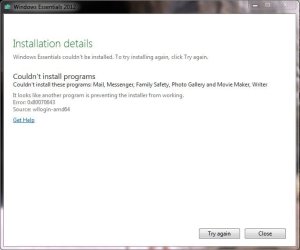
WLSETUP-ALL.EXE from the English site could not install WLE, as per error panel attached.

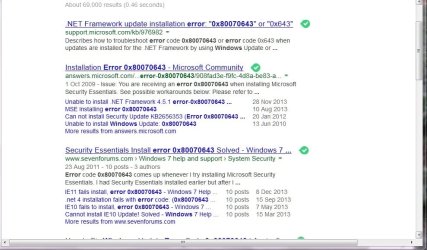
The error 0x80070643 is a failure of .NET Framework.

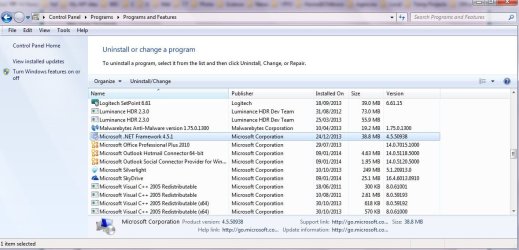
Attempts to install that failed. Somehow Control Panel says it is installed and ready to be uninstalled, as per image attached.

Images may appear in reverse order.

So, WLE is still resisting. Now .NET Framework rears its head!?

Any advance welcome.
 

Attachments

  • WLE failed #1install_28-01-2014.jpg
    WLE failed #1install_28-01-2014.jpg
    21.9 KB · Views: 18
  • WLE failed #2error80070643__28-01-2014.jpg
    WLE failed #2error80070643__28-01-2014.jpg
    83 KB · Views: 1
  • WLE failed #3error80070643__28-01-2014.jpg
    WLE failed #3error80070643__28-01-2014.jpg
    98.5 KB · Views: 1

My Computer My Computer

At a glance

Microsoft Windows 7 Home Premium 64-bit 7601 ...Intel(R) Core(TM) i3 CPU M 370 @ 2.40GHz4.00 GBNVIDIA GeForce GT 425M
Computer type
Laptop
Computer Manufacturer/Model Number
Acer 5745DG
OS
Microsoft Windows 7 Home Premium 64-bit 7601 Multiprocessor Free Service Pack 1
CPU
Intel(R) Core(TM) i3 CPU M 370 @ 2.40GHz
Motherboard
Acer ZR7D
Memory
4.00 GB
Graphics Card(s)
NVIDIA GeForce GT 425M
Sound Card
(1) High Definition Audio Device (2) NVIDIA High Definitio
Screen Resolution
1366 x 768 x 32 bits (4294967296 colors) @ 119 Hz
Hard Drives
WDC WD3200BEVT-22A23T0
3 partitions
S/N W -DXW167AM03248
Size 298.09 GB
Internet Speed
6690
Antivirus
Avast Pro
Browser
Firefox 28
Other Info
Sound:
Card 1 - Microsoft High Definition Audio Device
Card 2 - High Definition Audio Device
Card 3 - High Definition Audio Device
Card 4 - NVIDIA Virtual Audio Device (Wave Extensible) (WDM)
Card 5 - NVIDIA High Definition Audio
Card 6 - NVIDIA High Definition Audio
VideoController1 - NVIDIA GeForce GT 425M
Video Processor - GeForce GT 425M
Video Driver Version - 9.18.13.2723
Video Driv
Ok, we'll worry about .NET 4.5 much later.

Any chance that you clicked on the Get Help link in the last shot?

I think it's a general installer issue (I have the feeling I've typed that before) - if that window is still up, click on
Get Help, let me know what MS tells you. If you've already closed the window, I can look up the error code.

I think thre's a MS fixit - but need to check.
 

My Computer My Computer

At a glance

x64 (6.3.9600) Win8.1 Pro & soon dual boot x6...AMD A6-3420M APU with Radeon(tm) HD Graphics6.00 GBAMD Radeon(TM) HD 6520G
Computer type
Laptop
Computer Manufacturer/Model Number
HP Pavilion dv6-6c10us
OS
x64 (6.3.9600) Win8.1 Pro & soon dual boot x64 (6.1.7601) Win7_SP1 HomePrem
CPU
AMD A6-3420M APU with Radeon(tm) HD Graphics
Motherboard
Hewlett-Packard 1805
Memory
6.00 GB
Graphics Card(s)
AMD Radeon(TM) HD 6520G
Sound Card
(1) AMD High Definition Audio Device (2) IDT High Definiti
Monitor(s) Displays
HP W2072a 20" LCD (1600 x 900) @ 60 Hz
Screen Resolution
1366 x 768 x 32 bits (4294967296 colors) @ 60 Hz
Hard Drives
ST640LM0 00 HM641JI SATA Disk Device
Keyboard
Logitech k520 wireless KB
Mouse
Logitech m320 wireless mouse (bundled with KB)
Internet Speed
15/5 | 54 MB Wireless 'n'
Antivirus
Realtime: Defender or Avast | On-demand: Malwarebytes, ESET
Browser
IE 11 on Win8, IE 10 on win 7
Other Info
Media: [Gimp, Audacity, VLC] || Comm: [WEmail 2012, Skype] || Productivity: [OpenOffice,| Textpad] || Utils: [Sysinternals, cCleaner, Speccy, Defraggler]

My Computer My Computer

At a glance

x64 (6.3.9600) Win8.1 Pro & soon dual boot x6...AMD A6-3420M APU with Radeon(tm) HD Graphics6.00 GBAMD Radeon(TM) HD 6520G
Computer type
Laptop
Computer Manufacturer/Model Number
HP Pavilion dv6-6c10us
OS
x64 (6.3.9600) Win8.1 Pro & soon dual boot x64 (6.1.7601) Win7_SP1 HomePrem
CPU
AMD A6-3420M APU with Radeon(tm) HD Graphics
Motherboard
Hewlett-Packard 1805
Memory
6.00 GB
Graphics Card(s)
AMD Radeon(TM) HD 6520G
Sound Card
(1) AMD High Definition Audio Device (2) IDT High Definiti
Monitor(s) Displays
HP W2072a 20" LCD (1600 x 900) @ 60 Hz
Screen Resolution
1366 x 768 x 32 bits (4294967296 colors) @ 60 Hz
Hard Drives
ST640LM0 00 HM641JI SATA Disk Device
Keyboard
Logitech k520 wireless KB
Mouse
Logitech m320 wireless mouse (bundled with KB)
Internet Speed
15/5 | 54 MB Wireless 'n'
Antivirus
Realtime: Defender or Avast | On-demand: Malwarebytes, ESET
Browser
IE 11 on Win8, IE 10 on win 7
Other Info
Media: [Gimp, Audacity, VLC] || Comm: [WEmail 2012, Skype] || Productivity: [OpenOffice,| Textpad] || Utils: [Sysinternals, cCleaner, Speccy, Defraggler]
In post 35 you said: The error 0x80070643 is a failure of .NET Framework.

Is that based on your search results?
If you read the link I posted above, you'll see that 0x80070643 is a general msi error. It shows up in a search with .NET only because the MS Fixit applies to it as well.
Anyway, .NET seems to be fine - WE is having fits with the installer and hopefully the MS Fixit gets you past that.

Oh, I should mention that all you have to do is run the MS Fixit, you don't and shouldn't worry about anything else on that page, just the big green RUN NOW button.


Restart the machine after the MS Fixit is done.


Thanks
 

My Computer My Computer

At a glance

x64 (6.3.9600) Win8.1 Pro & soon dual boot x6...AMD A6-3420M APU with Radeon(tm) HD Graphics6.00 GBAMD Radeon(TM) HD 6520G
Computer type
Laptop
Computer Manufacturer/Model Number
HP Pavilion dv6-6c10us
OS
x64 (6.3.9600) Win8.1 Pro & soon dual boot x64 (6.1.7601) Win7_SP1 HomePrem
CPU
AMD A6-3420M APU with Radeon(tm) HD Graphics
Motherboard
Hewlett-Packard 1805
Memory
6.00 GB
Graphics Card(s)
AMD Radeon(TM) HD 6520G
Sound Card
(1) AMD High Definition Audio Device (2) IDT High Definiti
Monitor(s) Displays
HP W2072a 20" LCD (1600 x 900) @ 60 Hz
Screen Resolution
1366 x 768 x 32 bits (4294967296 colors) @ 60 Hz
Hard Drives
ST640LM0 00 HM641JI SATA Disk Device
Keyboard
Logitech k520 wireless KB
Mouse
Logitech m320 wireless mouse (bundled with KB)
Internet Speed
15/5 | 54 MB Wireless 'n'
Antivirus
Realtime: Defender or Avast | On-demand: Malwarebytes, ESET
Browser
IE 11 on Win8, IE 10 on win 7
Other Info
Media: [Gimp, Audacity, VLC] || Comm: [WEmail 2012, Skype] || Productivity: [OpenOffice,| Textpad] || Utils: [Sysinternals, cCleaner, Speccy, Defraggler]
Thank you Slarty. Agreed that the 0x80070643 error seems to be a general one. I did try the Get Help link, which shows .Net problems and MS Fixit. I got MS Fixit both from searches for 0x80070643 error and your link in #37.

I tried downloading Fixit install files, disabling firewall/virus/WiFi/etc and running Fixit for uninstalling and installing. Then re-enabling WiFi/virus (router is a good firewall). Then installing WLE. Message came back that Windows Firewall should be started - did that and tried install of WLE to get same 0x80070643 error panel again.

Also tried clean boot + install WLE and got Win7 with a mouse and touchpad, both, without any click action. The pointer moved OK, but no click did anything. Using MSConfig to do a Normal boot to bring everything back.
 

My Computer My Computer

At a glance

Microsoft Windows 7 Home Premium 64-bit 7601 ...Intel(R) Core(TM) i3 CPU M 370 @ 2.40GHz4.00 GBNVIDIA GeForce GT 425M
Computer type
Laptop
Computer Manufacturer/Model Number
Acer 5745DG
OS
Microsoft Windows 7 Home Premium 64-bit 7601 Multiprocessor Free Service Pack 1
CPU
Intel(R) Core(TM) i3 CPU M 370 @ 2.40GHz
Motherboard
Acer ZR7D
Memory
4.00 GB
Graphics Card(s)
NVIDIA GeForce GT 425M
Sound Card
(1) High Definition Audio Device (2) NVIDIA High Definitio
Screen Resolution
1366 x 768 x 32 bits (4294967296 colors) @ 119 Hz
Hard Drives
WDC WD3200BEVT-22A23T0
3 partitions
S/N W -DXW167AM03248
Size 298.09 GB
Internet Speed
6690
Antivirus
Avast Pro
Browser
Firefox 28
Other Info
Sound:
Card 1 - Microsoft High Definition Audio Device
Card 2 - High Definition Audio Device
Card 3 - High Definition Audio Device
Card 4 - NVIDIA Virtual Audio Device (Wave Extensible) (WDM)
Card 5 - NVIDIA High Definition Audio
Card 6 - NVIDIA High Definition Audio
VideoController1 - NVIDIA GeForce GT 425M
Video Processor - GeForce GT 425M
Video Driver Version - 9.18.13.2723
Video Driv
Ok, so you ran the MS Fixit from a download.

When you're back up in normal mode

Let's try this,
save any work and close all open windows
Make sure WiFi / Firewall / AV are up and running

run the MS Fixit from the web (Run instead of download)
restart immediately after MS Fixit finishes

Then follow OPTION TWO and OPTION THREE in: http://www.sevenforums.com/tutorials/1538-sfc-scannow-command-system-file-checker.html

Option Three is important for me on this side of your monitor.
The steps create a file named sfcdetails.txt that you need to attach to your next post after runnning SFC

Use the paperclip on the post menu to attach the file which should be on your desktop.

Thanks

Bill
 

My Computer My Computer

At a glance

x64 (6.3.9600) Win8.1 Pro & soon dual boot x6...AMD A6-3420M APU with Radeon(tm) HD Graphics6.00 GBAMD Radeon(TM) HD 6520G
Computer type
Laptop
Computer Manufacturer/Model Number
HP Pavilion dv6-6c10us
OS
x64 (6.3.9600) Win8.1 Pro & soon dual boot x64 (6.1.7601) Win7_SP1 HomePrem
CPU
AMD A6-3420M APU with Radeon(tm) HD Graphics
Motherboard
Hewlett-Packard 1805
Memory
6.00 GB
Graphics Card(s)
AMD Radeon(TM) HD 6520G
Sound Card
(1) AMD High Definition Audio Device (2) IDT High Definiti
Monitor(s) Displays
HP W2072a 20" LCD (1600 x 900) @ 60 Hz
Screen Resolution
1366 x 768 x 32 bits (4294967296 colors) @ 60 Hz
Hard Drives
ST640LM0 00 HM641JI SATA Disk Device
Keyboard
Logitech k520 wireless KB
Mouse
Logitech m320 wireless mouse (bundled with KB)
Internet Speed
15/5 | 54 MB Wireless 'n'
Antivirus
Realtime: Defender or Avast | On-demand: Malwarebytes, ESET
Browser
IE 11 on Win8, IE 10 on win 7
Other Info
Media: [Gimp, Audacity, VLC] || Comm: [WEmail 2012, Skype] || Productivity: [OpenOffice,| Textpad] || Utils: [Sysinternals, cCleaner, Speccy, Defraggler]
Back
Top