Windows "not genuine" but can't run legitcheck.hta - HELP!

You could remove the folder relating to the power settings by going into
mycomp/c/programfilesx86/Xara/simplitech.

Roy

Nope it's not there!

Wait I did a search with Everything desktop search and discovered that there are TWO instances:
C:\ProgramData\MAGIX
C:\Users\Alec\AppData\Roaming\MAGIX

It it safe to simply delete both these directories in Windows Explorer, or will that screw up my registry?
 

My Computer My Computer

At a glance

Windows 7 x64 Professional (SP1)Intel Core i5 CPU 750 @2.67GHz8GBATI Radeon HD 5700 series
Computer type
PC/Desktop
Computer Manufacturer/Model Number
custom
OS
Windows 7 x64 Professional (SP1)
CPU
Intel Core i5 CPU 750 @2.67GHz
Motherboard
Intel
Memory
8GB
Graphics Card(s)
ATI Radeon HD 5700 series
Hard Drives
INTEL SSD ATA 256GB
MAGIX is a very different thing to Xara.
NEVER just 'delete' files or folders from the ProgramData or AppData folders - unless you know that they have already been uninstalled using proper methods.
 

My Computer My Computer

At a glance

Win 7 x64 Home Premium (and x86 VirtualBox VM...i3 370M/i7 6500U8GB - finally :)/8GBit's an i3, dude!/dual Intel&nVidia
Computer type
Laptop
Computer Manufacturer/Model Number
Asus K52F or Lenovo B51-80
OS
Win 7 x64 Home Premium (and x86 VirtualBox VM)/Win10
CPU
i3 370M/i7 6500U
Motherboard
Asus/Lenovo
Memory
8GB - finally :)/8GB
Graphics Card(s)
it's an i3, dude!/dual Intel&nVidia
Sound Card
onboard
Monitor(s) Displays
15.6" built-in
Screen Resolution
1366x768/1920x1080
Hard Drives
750GB Seagate internal
Sundry external drives attached to other computers on the local network
1TB SSD on the Lenovo
PSU
n/a
Internet Speed
as much as I can get - usually on a dongle/phone, so <1MB/s
Antivirus
MSE/Defender
Browser
IE11/12/Edge/Chrome/FF(if I must)
running services

OK, so what have you got running

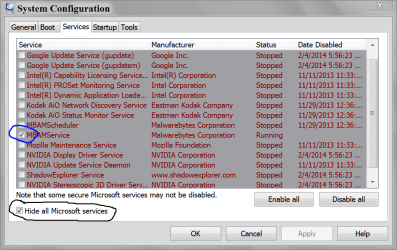
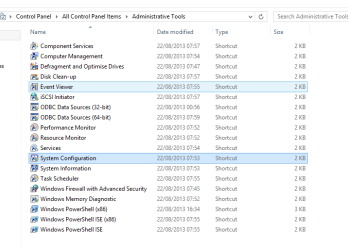
ControlPanel/Adminservices/systemconfig/services(tick hide all MS services).
 

My Computer My Computer

At a glance

W7 home premium 32bit/W7HP 64bit/w10 tp insid...E5300 dual core3gbNvidia Geforce 7100 Nforce 630i
Computer type
PC/Desktop
Computer Manufacturer/Model Number
medionl/Aspire 6930G/acer x55a
OS
W7 home premium 32bit/W7HP 64bit/w10 tp insider ring
CPU
E5300 dual core
Motherboard
medion MS7366
Memory
3gb
Graphics Card(s)
Nvidia Geforce 7100 Nforce 630i
Monitor(s) Displays
avixc
Internet Speed
n (isp resticted to 72)
Antivirus
mse/pands
Browser
palemoon
Other Info
Belkin Fd7050 n USB using Railink RT2870 drivers, more upto date
OK, so what have you got running

ControlPanel/Adminservices/systemconfig/services(tick hide all MS services).

I'm not sure if this is the same place, but I went here:
Start > Control Panel > Administrative Tools > Services

I couldn't find anywhere to tick to hide MS services but I managed to export the list which looks like the attached text file.

J
 

Attachments

My Computer My Computer

At a glance

Windows 7 x64 Professional (SP1)Intel Core i5 CPU 750 @2.67GHz8GBATI Radeon HD 5700 series
Computer type
PC/Desktop
Computer Manufacturer/Model Number
custom
OS
Windows 7 x64 Professional (SP1)
CPU
Intel Core i5 CPU 750 @2.67GHz
Motherboard
Intel
Memory
8GB
Graphics Card(s)
ATI Radeon HD 5700 series
Hard Drives
INTEL SSD ATA 256GB
This picture should help.

MSCONFIG SERVICES.PNG
 

My Computer My Computer

At a glance

Windows 10 Pro. 64/ version 1709 Windows 7 Pr...Intel i7-6800K @ 4.3Corsair Platinum 16 gig @2400EVGA GTX 1070 OC
Computer type
PC/Desktop
Computer Manufacturer/Model Number
Home made Desktop
OS
Windows 10 Pro. 64/ version 1709 Windows 7 Pro/64
CPU
Intel i7-6800K @ 4.3
Motherboard
ASUS X-99 Deluxe II
Memory
Corsair Platinum 16 gig @2400
Graphics Card(s)
EVGA GTX 1070 OC
Monitor(s) Displays
Asus 27" LED LCD/VE278Q
Screen Resolution
1920-1080 or 1280-720 HDMI
Hard Drives
INTEL SSD 730-240 Gb Sata 3.0/
PSU
EVGA Platium 1200W
Case
Phanteks Luxe Tempered Glass 8 fans/ one radiator
Cooling
XSPC/ Water Cooled CPU
Keyboard
Das 4 Professional
Mouse
Logitech M705/MX Anywhere 2-S
Internet Speed
100 mbits
Antivirus
Microsoft Security Essentials/ Malwarebytes Premium 3.0/ SAS
Browser
I.E. 11 default/Firefox/ ISP Time Warner Cable/Spectrum
Other Info
LG BluRay Burner/
Sound system-KLipsch-THX/
Icy Dock ssd Hot Swap bays.
screenshot

from here

its easier to copy if you use the snipping tool, and upload it from your pictures file.
 

Attachments

  • atms.PNG
    atms.PNG
    15.3 KB · Views: 1

My Computer My Computer

At a glance

W7 home premium 32bit/W7HP 64bit/w10 tp insid...E5300 dual core3gbNvidia Geforce 7100 Nforce 630i
Computer type
PC/Desktop
Computer Manufacturer/Model Number
medionl/Aspire 6930G/acer x55a
OS
W7 home premium 32bit/W7HP 64bit/w10 tp insider ring
CPU
E5300 dual core
Motherboard
medion MS7366
Memory
3gb
Graphics Card(s)
Nvidia Geforce 7100 Nforce 630i
Monitor(s) Displays
avixc
Internet Speed
n (isp resticted to 72)
Antivirus
mse/pands
Browser
palemoon
Other Info
Belkin Fd7050 n USB using Railink RT2870 drivers, more upto date

My Computer My Computer

At a glance

Windows 10 Pro. 64/ version 1709 Windows 7 Pr...Intel i7-6800K @ 4.3Corsair Platinum 16 gig @2400EVGA GTX 1070 OC
Computer type
PC/Desktop
Computer Manufacturer/Model Number
Home made Desktop
OS
Windows 10 Pro. 64/ version 1709 Windows 7 Pro/64
CPU
Intel i7-6800K @ 4.3
Motherboard
ASUS X-99 Deluxe II
Memory
Corsair Platinum 16 gig @2400
Graphics Card(s)
EVGA GTX 1070 OC
Monitor(s) Displays
Asus 27" LED LCD/VE278Q
Screen Resolution
1920-1080 or 1280-720 HDMI
Hard Drives
INTEL SSD 730-240 Gb Sata 3.0/
PSU
EVGA Platium 1200W
Case
Phanteks Luxe Tempered Glass 8 fans/ one radiator
Cooling
XSPC/ Water Cooled CPU
Keyboard
Das 4 Professional
Mouse
Logitech M705/MX Anywhere 2-S
Internet Speed
100 mbits
Antivirus
Microsoft Security Essentials/ Malwarebytes Premium 3.0/ SAS
Browser
I.E. 11 default/Firefox/ ISP Time Warner Cable/Spectrum
Other Info
LG BluRay Burner/
Sound system-KLipsch-THX/
Icy Dock ssd Hot Swap bays.
Registry cleaning was mentioned on page 1, IF one is going to use any registry cleaner/editor, I highly recommend exercising great caution. Get the advice of those who have been using such a long time before venturing into such utilities. I can tell you that from personal experience from my distant past that nonCareful use could lead to one either restoring the backup image or rolling back to the known good SRP/Configuration [via F8] or finding and ReInstalling the OEM or MS OS.
 
Last edited:

My Computer My Computer

At a glance

Windows 7 Professional 64-bitDesktop i5; Acers i5 & i7desktop 16GB; 1 Acer 8GB & 1 Acer 16GB
Computer type
PC/Desktop
Computer Manufacturer/Model Number
Antec desktop; Acer Aspire laptops
OS
Windows 7 Professional 64-bit
CPU
Desktop i5; Acers i5 & i7
Memory
desktop 16GB; 1 Acer 8GB & 1 Acer 16GB
Hard Drives
1TB split into 2 equal partitions [OS and data] usable by RJS
Internet Speed
AT&T DSL
Browser
FF, GChrome, msIE
Other Info
Windows 7 Firewall, Emsisoft AM/AV, MSE [scan-only], SpywareBlaster, Ruiware/BillP combine
If you need to use a registry cleaner - you almost certainly don't know enough about the registry to do so safely.
If you know enough to edit the registry safely, then you don't need a registry cleaner.


ALL registry cleaners are unsafe - most are VERY unsafe.

Highly competent technicians may use a registry cleaner to winnow out the chaff - but I guarantee that they will manually check every 'bad' entry before deleting it!!
 

My Computer My Computer

At a glance

Win 7 x64 Home Premium (and x86 VirtualBox VM...i3 370M/i7 6500U8GB - finally :)/8GBit's an i3, dude!/dual Intel&nVidia
Computer type
Laptop
Computer Manufacturer/Model Number
Asus K52F or Lenovo B51-80
OS
Win 7 x64 Home Premium (and x86 VirtualBox VM)/Win10
CPU
i3 370M/i7 6500U
Motherboard
Asus/Lenovo
Memory
8GB - finally :)/8GB
Graphics Card(s)
it's an i3, dude!/dual Intel&nVidia
Sound Card
onboard
Monitor(s) Displays
15.6" built-in
Screen Resolution
1366x768/1920x1080
Hard Drives
750GB Seagate internal
Sundry external drives attached to other computers on the local network
1TB SSD on the Lenovo
PSU
n/a
Internet Speed
as much as I can get - usually on a dongle/phone, so <1MB/s
Antivirus
MSE/Defender
Browser
IE11/12/Edge/Chrome/FF(if I must)
1. Unfortunately I have now already run a registry cleaner (as apparently recommended in another forum - although it now appears that I may have misunderstood)

2. Problem I am now getting Windows Explorer error message that goes into a loop. Worse my antivirus software AVG Cloudcare does not appear to be being loaded.

HELP!

What should I do now?

I have booted into Safe Mode and have fired up AVG and have run scan...
 

My Computer My Computer

At a glance

Windows 7 x64 Professional (SP1)Intel Core i5 CPU 750 @2.67GHz8GBATI Radeon HD 5700 series
Computer type
PC/Desktop
Computer Manufacturer/Model Number
custom
OS
Windows 7 x64 Professional (SP1)
CPU
Intel Core i5 CPU 750 @2.67GHz
Motherboard
Intel
Memory
8GB
Graphics Card(s)
ATI Radeon HD 5700 series
Hard Drives
INTEL SSD ATA 256GB
You seem to going in circles. Lets get a starting point again.

What registry cleaner was used??


Remove AVG using their on line removal tool.

AVG | Download tools and utilities

Download and install MSE, update it and run complete scan.

Microsoft Security Essentials - Microsoft Windows


Did you remove ever thing that Malwarebytes found??


Now use this free online scan. Eset.

Free Virus Scan | Online Virus Scanner from ESET

I have always removed everything the Eset finds and never had a problem.


When done get back to us on what was found and how things are working.

P/S
Run one scan at a time. It will take longer this way but that is what I recommend.
 

My Computer My Computer

At a glance

Windows 10 Pro. 64/ version 1709 Windows 7 Pr...Intel i7-6800K @ 4.3Corsair Platinum 16 gig @2400EVGA GTX 1070 OC
Computer type
PC/Desktop
Computer Manufacturer/Model Number
Home made Desktop
OS
Windows 10 Pro. 64/ version 1709 Windows 7 Pro/64
CPU
Intel i7-6800K @ 4.3
Motherboard
ASUS X-99 Deluxe II
Memory
Corsair Platinum 16 gig @2400
Graphics Card(s)
EVGA GTX 1070 OC
Monitor(s) Displays
Asus 27" LED LCD/VE278Q
Screen Resolution
1920-1080 or 1280-720 HDMI
Hard Drives
INTEL SSD 730-240 Gb Sata 3.0/
PSU
EVGA Platium 1200W
Case
Phanteks Luxe Tempered Glass 8 fans/ one radiator
Cooling
XSPC/ Water Cooled CPU
Keyboard
Das 4 Professional
Mouse
Logitech M705/MX Anywhere 2-S
Internet Speed
100 mbits
Antivirus
Microsoft Security Essentials/ Malwarebytes Premium 3.0/ SAS
Browser
I.E. 11 default/Firefox/ ISP Time Warner Cable/Spectrum
Other Info
LG BluRay Burner/
Sound system-KLipsch-THX/
Icy Dock ssd Hot Swap bays.
The Registry Cleaner I used is called "Remove Tuneup Utilities 2014. It was installed accidentally when trying to install "Advanced Uninstaller PRO 11" which someone on a different forum (TalkGraphics) recommended being as it manages to remove crud from your registry that it seems almost every program leaves behind when being uninstalled.

I shall now go ahead and reboot into Safe Mode with networking and do as you suggestion Layback. More shortly.

EDIT01
Not looking good. The window that pops up when you first log in using "F8/Safe Mode with networking" is freezing on the screen. Cntl/Alt/Delete task manager says it is not responding.

...And now I cant get any of my browsers to open.

...Gads and now I'm finding it hard to reboot from even from Safe Mode.

EDIT02
Okay I have rebooted back into Safe Mode. The reboot too rather a long time (about 3 mins?). And then I couldn't open a browser. So I am attempting to reboot again

EDIT03
Tricky. It has rebooted (v slowly) back to that window in Safe Mode called "Windows Help and Support", except that the window is all white with no text in it - I.e. it has screen has seized up.

When I hit Control/Alt/Delete it's clear that that area of the screen has seized up as ONLY that area of the screen changes colour. Also, within Windows Task Manager > Applications it says "Windows Help and Support" - "Not responding".

I am now wondering if I should reinstall window from scratch? And if so whether I would be better off upgrading to Windows 8.??

I do still have my Windows 7 x64 original CD etc. However re-installing Windows would lose me about 3 or 4 days of my life !!

I think I also have a Macrium Reflect Free rescue CD (from about 18 months ago)...

EDIT04
I did manage to run a copy of RKILL which I had previously downloaded, but I can't get any browsers to open.

EDIT05
This is hopeless. I am now trying to re-boot of a Windows Repair CD.

EDIT06
OK I ran a microsoft hardware check but it seemed be okay. (Although I'm not 100% sure because I never saw any final report)

EDIT08

I managed to download Microsoft Security Essential onto a different PC and copy it over. I then managed to install MSE. However it seized up during the update. [grrr]

 
Last edited:

My Computer My Computer

At a glance

Windows 7 x64 Professional (SP1)Intel Core i5 CPU 750 @2.67GHz8GBATI Radeon HD 5700 series
Computer type
PC/Desktop
Computer Manufacturer/Model Number
custom
OS
Windows 7 x64 Professional (SP1)
CPU
Intel Core i5 CPU 750 @2.67GHz
Motherboard
Intel
Memory
8GB
Graphics Card(s)
ATI Radeon HD 5700 series
Hard Drives
INTEL SSD ATA 256GB
Is any body out there? I'm becoming increasingly desperate... !!
 

My Computer My Computer

At a glance

Windows 7 x64 Professional (SP1)Intel Core i5 CPU 750 @2.67GHz8GBATI Radeon HD 5700 series
Computer type
PC/Desktop
Computer Manufacturer/Model Number
custom
OS
Windows 7 x64 Professional (SP1)
CPU
Intel Core i5 CPU 750 @2.67GHz
Motherboard
Intel
Memory
8GB
Graphics Card(s)
ATI Radeon HD 5700 series
Hard Drives
INTEL SSD ATA 256GB
I'm now not even sure if my PC is actually on line.
I can't open any browsers.
I just tried running CMD and thing tried running > ping google.com but it said it cant find the host google.com. Sound NOT online to me - although it IS connected to the rest of the network (e.g.to this laptop that I am writing this thread through)...
 

My Computer My Computer

At a glance

Windows 7 x64 Professional (SP1)Intel Core i5 CPU 750 @2.67GHz8GBATI Radeon HD 5700 series
Computer type
PC/Desktop
Computer Manufacturer/Model Number
custom
OS
Windows 7 x64 Professional (SP1)
CPU
Intel Core i5 CPU 750 @2.67GHz
Motherboard
Intel
Memory
8GB
Graphics Card(s)
ATI Radeon HD 5700 series
Hard Drives
INTEL SSD ATA 256GB
In desperation I have rebooted off my original Windows 7 DVD and I am now running System Recover Options. I found a system image on my external hard disk dated 17-03-2015, so I am now "Re-imaging" my computer from the System Image.

The obvious problem with this is that if I had a virus/malware on the 17th of March I am back to square one.
 

My Computer My Computer

At a glance

Windows 7 x64 Professional (SP1)Intel Core i5 CPU 750 @2.67GHz8GBATI Radeon HD 5700 series
Computer type
PC/Desktop
Computer Manufacturer/Model Number
custom
OS
Windows 7 x64 Professional (SP1)
CPU
Intel Core i5 CPU 750 @2.67GHz
Motherboard
Intel
Memory
8GB
Graphics Card(s)
ATI Radeon HD 5700 series
Hard Drives
INTEL SSD ATA 256GB
If you back up had those two registry cleaners used you probably be in the same nightmare you are already having.

If it was my computer I would just do a Clean Install and complete all updates.

http://www.sevenforums.com/tutorials/1649-clean-install-windows-7-a.html

I would not put any thing from the backup on my new install until I was positive all infection were gone. (personal date, pictures ect.)

I would then install MSE and Marwarebytes and update both.

Note: Stay away from all IObits programs of any kind.
 

My Computer My Computer

At a glance

Windows 10 Pro. 64/ version 1709 Windows 7 Pr...Intel i7-6800K @ 4.3Corsair Platinum 16 gig @2400EVGA GTX 1070 OC
Computer type
PC/Desktop
Computer Manufacturer/Model Number
Home made Desktop
OS
Windows 10 Pro. 64/ version 1709 Windows 7 Pro/64
CPU
Intel i7-6800K @ 4.3
Motherboard
ASUS X-99 Deluxe II
Memory
Corsair Platinum 16 gig @2400
Graphics Card(s)
EVGA GTX 1070 OC
Monitor(s) Displays
Asus 27" LED LCD/VE278Q
Screen Resolution
1920-1080 or 1280-720 HDMI
Hard Drives
INTEL SSD 730-240 Gb Sata 3.0/
PSU
EVGA Platium 1200W
Case
Phanteks Luxe Tempered Glass 8 fans/ one radiator
Cooling
XSPC/ Water Cooled CPU
Keyboard
Das 4 Professional
Mouse
Logitech M705/MX Anywhere 2-S
Internet Speed
100 mbits
Antivirus
Microsoft Security Essentials/ Malwarebytes Premium 3.0/ SAS
Browser
I.E. 11 default/Firefox/ ISP Time Warner Cable/Spectrum
Other Info
LG BluRay Burner/
Sound system-KLipsch-THX/
Icy Dock ssd Hot Swap bays.
I'm heading that direction fast. Do you prefer MSE to other anti-virus software?
(I read a lot of poor reviews of MSE about 18 months ago...)
 

My Computer My Computer

At a glance

Windows 7 x64 Professional (SP1)Intel Core i5 CPU 750 @2.67GHz8GBATI Radeon HD 5700 series
Computer type
PC/Desktop
Computer Manufacturer/Model Number
custom
OS
Windows 7 x64 Professional (SP1)
CPU
Intel Core i5 CPU 750 @2.67GHz
Motherboard
Intel
Memory
8GB
Graphics Card(s)
ATI Radeon HD 5700 series
Hard Drives
INTEL SSD ATA 256GB
If I do a fresh install I am tempted to move to Win8.1 (mainly to keep my personal skills up-to-date).
But either way, how do I know for sure that there are no viruses on my personal data?
(I am told that it is a mistake to even scan all my old emails)
 

My Computer My Computer

At a glance

Windows 7 x64 Professional (SP1)Intel Core i5 CPU 750 @2.67GHz8GBATI Radeon HD 5700 series
Computer type
PC/Desktop
Computer Manufacturer/Model Number
custom
OS
Windows 7 x64 Professional (SP1)
CPU
Intel Core i5 CPU 750 @2.67GHz
Motherboard
Intel
Memory
8GB
Graphics Card(s)
ATI Radeon HD 5700 series
Hard Drives
INTEL SSD ATA 256GB
I have no idea why one would save old emails.

MSE works for me. It also causes no problems.

If you feel uncomfortable using old data on your system then don't use it.
Just get rid of it. Their is no 100% positive safe.

If you want to use Windows 8 then just use it.

Their is a sister forum you can check out.

Windows 8 Forums
 

My Computer My Computer

At a glance

Windows 10 Pro. 64/ version 1709 Windows 7 Pr...Intel i7-6800K @ 4.3Corsair Platinum 16 gig @2400EVGA GTX 1070 OC
Computer type
PC/Desktop
Computer Manufacturer/Model Number
Home made Desktop
OS
Windows 10 Pro. 64/ version 1709 Windows 7 Pro/64
CPU
Intel i7-6800K @ 4.3
Motherboard
ASUS X-99 Deluxe II
Memory
Corsair Platinum 16 gig @2400
Graphics Card(s)
EVGA GTX 1070 OC
Monitor(s) Displays
Asus 27" LED LCD/VE278Q
Screen Resolution
1920-1080 or 1280-720 HDMI
Hard Drives
INTEL SSD 730-240 Gb Sata 3.0/
PSU
EVGA Platium 1200W
Case
Phanteks Luxe Tempered Glass 8 fans/ one radiator
Cooling
XSPC/ Water Cooled CPU
Keyboard
Das 4 Professional
Mouse
Logitech M705/MX Anywhere 2-S
Internet Speed
100 mbits
Antivirus
Microsoft Security Essentials/ Malwarebytes Premium 3.0/ SAS
Browser
I.E. 11 default/Firefox/ ISP Time Warner Cable/Spectrum
Other Info
LG BluRay Burner/
Sound system-KLipsch-THX/
Icy Dock ssd Hot Swap bays.
Back
Top