Windows.old Folder - Delete

How to Delete the Windows.old Folder in Windows 7

   Information
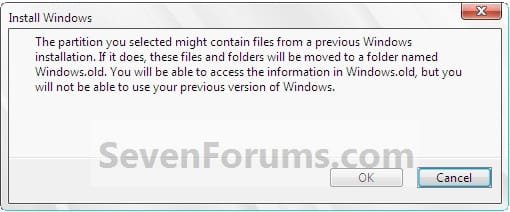
If you performed repair install, upgrade install, or a custom install without formatting the drive for a clean install and selected to install Windows 7 on the same partition of the previous Windows installation, then you may have a C:\Windows.old folder left over in your new installation.

If you already had a C:\Windows.old folder in the installation that you performed a repair install, upgrade install, or a custom install on, then it would be renamed to say C:\Windows.old.000 (older previous installation) in addition to the C:\Windows.old folder. The most recent previous installation will always be in the C:\Windows.old folder.

This will show you how to delete the Windows.old folder(s) generated during the installation to free up the hard drive space that the Windows.old folder(s) takes.
Install.jpg

   Note
The C:\Windows.old folder contains folders and files from the previous Windows installation. Be sure to copy any files or data that you may still want to keep to another location before deleting this folder.
   Tip
For how to

restore a Windows 7-based computer to a previous Windows installation by using the Windows.old folder, see: How to restore a Windows 7-based computer to a previous Windows installation by using the Windows.old folder
   Warning
Be sure to copy any files that you want out of the Windows.old folder before you delete it. Once deleted, they are gone.

You must logged in as an administrator to be able to do the steps in this tutorial.


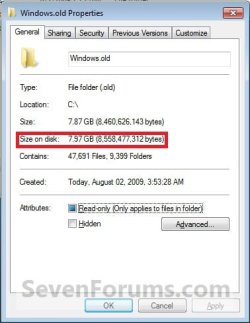
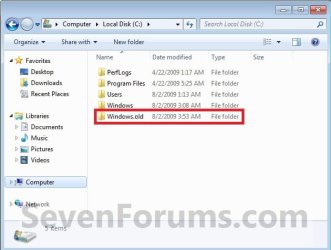
EXAMPLE: Windows.old Folder
NOTE: Notice how much space this folder uses.
Windows7-1.jpgWindows7-1B.jpg


OPTION ONE

Delete "Windows.old" Folder Using Disk Cleanup


1. Open Disk Cleanup.
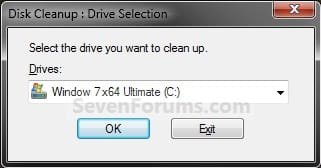
2. If prompted, select the Windows 7 C: drive, and click on OK. (see screenshot below)
NOTE: You will only see this if you have more than one HDD or partition with a drive letter.
Step1.jpg
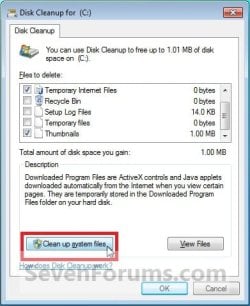
3. Click on the Clean up system files button. (see screenshot below)
Windows7-2.jpg
4. If prompted by UAC, then click on Yes.

5. Repeat step 2 above.

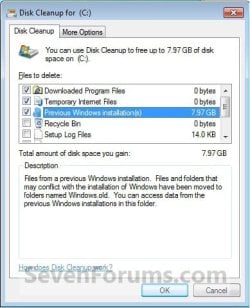
6. Check the Previous Windows installations box, and click on OK. (see screenshot below)
Windows7-3.jpg
7. Click on Delete Files. (see screenshot below)
Windows7-4.jpg
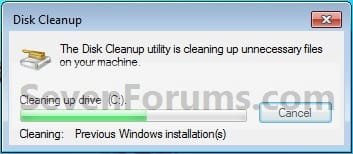
8. When Disk Cleanup finishes, the C:\Windows.old folder(s) will be deleted.
Windows7-5.jpg


OPTION TWO

Delete "Windows.old" Folder Using Elevated Command Prompt


1. Open a Elevated command prompt.

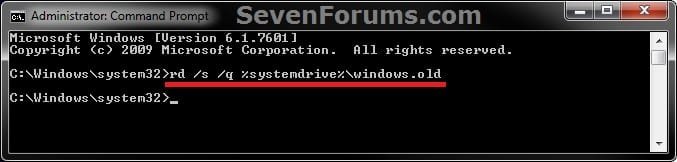
2. In the elevated command prompt, copy and paste the command below, and press Enter. (see screenshot below)
NOTE: If you had another say windows.old.000 folder that you also wanted to delete, then you could repeat this command substituting that name instead to also delete it.
RD /S /Q %SystemDrive%\windows.old
ELVTD_CMD.jpg
3. Close the command prompt.


OPTION THREE

Delete "Windows.old" Folder Using Command Prompt at Boot


NOTE: This would be a good option to do if OPTION ONE or OPTION TWO was unable to delete your C:\Windows.old folder.
1. Open the Disk Management (diskmgmt.msc), and make note of the name (ex: none) and total size (ex: 126 GB) of your Windows 7 drive. (see screenshot below)
NOTE: You will need to know this in step 3C.
Disk_Mangement.jpg
2. Using either you Windows 7 installation DVD or system repair disc, boot to a command prompt at boot (click on link for how).

3. To Verify the Windows 7 Drive Letter at Boot
NOTE: The Windows 7 drive letter may not always be C: at boot like it is while Windows is started, so be sure to verify it's drive letter before doing the command in step 4 for it to work.
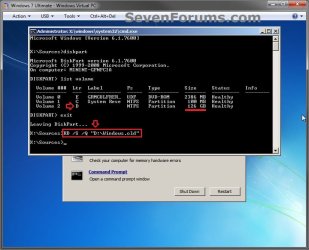
A) In the command prompt, type diskpart and press enter. (see screenshot below)

B) In the command prompt, type list volume and press enter. (see screenshot below)

C) From the listed volumes, look for and verify the drive letter (ex: D: ) of your Windows 7 drive (ex: 126 GB w/ no name). (see screenshot below)

D) In the command prompt, type exit and press enter. (see screenshot below)
CMD-1.jpg
4. To Delete the "Windows.old" Folder
A) In the command prompt, type the command below and press enter. (see screenshot below)
NOTE: Be sure to substitute D in the command below with the actual drive letter of your Windows 7 drive as displayed from step 3 above instead. If you had another say windows.old.000 folder that you also want to delete, then you could repeat this command substituting that name instead of Windows.old to also delete it.
RD /S /Q "D:\Windows.old"
B) Close the command prompt window.
CMD-2.jpg
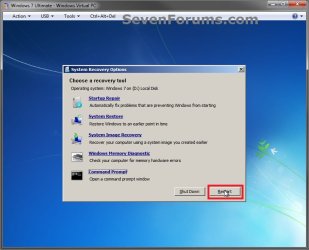
5. Click on the Restart button to restart the computer and start Windows 7, and to verify that the Windows.old folder has been deleted.
CMD-3.jpg
That's it,
Shawn


Last edited:
Hello pauLoz, and welcome to Seven Forums.

No, it will not cause any issues. The Windows.old folder only contains a copy of your previous installation, and has no affect on the current one other than the amount of HDD space it uses.

Hope this helps, :)
Shawn
 

My Computer

Computer type
PC/Desktop
Computer Manufacturer/Model Number
Self built custom
OS
64-bit Windows 11 Pro for Workstations
CPU
Intel i7-8700K OC'd to 5 GHz
Motherboard
ASUS ROG Maximus XI Formula Z390
Memory
64 GB (4x16GB) G.SKILL TridentZ RGB DDR4 3600 MHz
Graphics Card(s)
ASUS ROG-STRIX-GTX1080TI-O11G-GAMING
Sound Card
Integrated
Monitor(s) Displays
2 x Samsung Odyssey G7 27"
Screen Resolution
2560x1440
Hard Drives
1TB Samsung 990 PRO M.2,
4TB Samsung 990 PRO PRO M.2,
TerraMaster F8 SSD Plus NAS
PSU
Seasonic Prime Titanium 850W
Case
Thermaltake Core P3
Cooling
Corsair Hydro H115i
Keyboard
Logitech wireless K800
Mouse
Logitech MX Master 4
Internet Speed
2 Gb/s Download and 100 Mb/s Upload
Antivirus
Malwarebyte Anti-Malware Premium
Browser
Google Chrome
Other Info
Logitech Z625 speaker system,
Logitech BRIO 4K Pro webcam,
HP Color LaserJet Pro MFP M477fdn,
APC SMART-UPS RT 1000 XL - SURT1000XLI,
Galaxy S23 Plus phone
You're most welcome. :)
 

My Computer

Computer type
PC/Desktop
Computer Manufacturer/Model Number
Self built custom
OS
64-bit Windows 11 Pro for Workstations
CPU
Intel i7-8700K OC'd to 5 GHz
Motherboard
ASUS ROG Maximus XI Formula Z390
Memory
64 GB (4x16GB) G.SKILL TridentZ RGB DDR4 3600 MHz
Graphics Card(s)
ASUS ROG-STRIX-GTX1080TI-O11G-GAMING
Sound Card
Integrated
Monitor(s) Displays
2 x Samsung Odyssey G7 27"
Screen Resolution
2560x1440
Hard Drives
1TB Samsung 990 PRO M.2,
4TB Samsung 990 PRO PRO M.2,
TerraMaster F8 SSD Plus NAS
PSU
Seasonic Prime Titanium 850W
Case
Thermaltake Core P3
Cooling
Corsair Hydro H115i
Keyboard
Logitech wireless K800
Mouse
Logitech MX Master 4
Internet Speed
2 Gb/s Download and 100 Mb/s Upload
Antivirus
Malwarebyte Anti-Malware Premium
Browser
Google Chrome
Other Info
Logitech Z625 speaker system,
Logitech BRIO 4K Pro webcam,
HP Color LaserJet Pro MFP M477fdn,
APC SMART-UPS RT 1000 XL - SURT1000XLI,
Galaxy S23 Plus phone
Thanks ! Now I have 300 GB free !
 

My Computer

Computer type
PC/Desktop
Computer Manufacturer/Model Number
Custom Build
OS
Windows 7 Ultimate 64bit
CPU
AMD FX 4100 Quad Core 3.6 GHz
Motherboard
AsusTek M5A78L-ML-E
Memory
8 GB 1600 MHz DDR3
Graphics Card(s)
Sapphire R9 280 Dual-X 3GB
Sound Card
Built-In my MOBO
Monitor(s) Displays
LG Flatron W2046S
Screen Resolution
1600x900
Hard Drives
Seagate Barracuda 2TB
PSU
Some Asus 500w
Case
Thermaltake Commander MS-I
Cooling
3 Blue LED fans and a Hyper 212 EVO
Keyboard
Steelseries Shift
Mouse
Razer DeathAdder Chroma
Internet Speed
5-10 MBit/s ,ethernet
Antivirus
I don't use them anymore.
Browser
Mozilla Firefox,Google Chrome
Other Info
My main hobbies are gaming and drinking.
Argh! Can't add to your reputation on this thread!

Thank you Brink for going above and beyond the call of duty to provide tutorials such as this (and the many others that I link unsavvy users to) that are very easy to follow for even the totally clueless.

DonnaB :geek:
 

My Computer

Computer type
Laptop
OS
Win7 64-bit, Vista 32-bit, XP 32-bit, W2K 32-bit (VM)
Antivirus
Avast, MSE
Browser
Firefox
Other Info
Multiple systems. Too many specs to name.
You're most welcome Donna. I'm glad it could help. :)
 

My Computer

Computer type
PC/Desktop
Computer Manufacturer/Model Number
Self built custom
OS
64-bit Windows 11 Pro for Workstations
CPU
Intel i7-8700K OC'd to 5 GHz
Motherboard
ASUS ROG Maximus XI Formula Z390
Memory
64 GB (4x16GB) G.SKILL TridentZ RGB DDR4 3600 MHz
Graphics Card(s)
ASUS ROG-STRIX-GTX1080TI-O11G-GAMING
Sound Card
Integrated
Monitor(s) Displays
2 x Samsung Odyssey G7 27"
Screen Resolution
2560x1440
Hard Drives
1TB Samsung 990 PRO M.2,
4TB Samsung 990 PRO PRO M.2,
TerraMaster F8 SSD Plus NAS
PSU
Seasonic Prime Titanium 850W
Case
Thermaltake Core P3
Cooling
Corsair Hydro H115i
Keyboard
Logitech wireless K800
Mouse
Logitech MX Master 4
Internet Speed
2 Gb/s Download and 100 Mb/s Upload
Antivirus
Malwarebyte Anti-Malware Premium
Browser
Google Chrome
Other Info
Logitech Z625 speaker system,
Logitech BRIO 4K Pro webcam,
HP Color LaserJet Pro MFP M477fdn,
APC SMART-UPS RT 1000 XL - SURT1000XLI,
Galaxy S23 Plus phone
Which Files Might I Want to Copy?

Thank you, Brink for this tutorial,

In the preface you include this warning:

Warning
Be sure to copy any files that you want out of the Windows.old folder before you delete it. Once deleted, they are gone.

Windows.old is a huge directory. TreeSize Free makes it 11.4 Gb and 65,804 files. How do I know if any of these 65,804 files are worth saving?

I tried a quick search, but this is not an easy question for which to formulate a search strategy that will give quick access to any posts that address this question.

thanks,

baumgrenze
 

My Computer

Computer type
PC/Desktop
Computer Manufacturer/Model Number
Custom built by GamePC/Solid Electric - Palo Alto - on 03/10/08
OS
Win 7 Pro 64
CPU
Intel Core 2 Quad Q6600 (2.4 GHz) Quad Core
Motherboard
Gigabyte GA-P35-DS3P Intel P35 ATX (rev. 2.1)
Memory
2 x Crucial 4GB Kit (2GBx2) DDR2 CT2KIT25664AA800
Graphics Card(s)
Sapphire Radeon HD 3870 PCIe 512 Mb
Sound Card
RealTek audio on MOBO + EDIROL UA-1EX
Monitor(s) Displays
Samsung S24A450BW 24" LED monitor
Screen Resolution
1600 x 1200 at 75 Hz
Hard Drives
2 Crucial 128 Gb SSD (CT128M550SSD1)
one mounted and running Win7/Pro x64
one disconnected containing only Win10/Pro upgrade - in process
1 1TB WD Caviar Black (WD1003FZEX-00MK2A0) (Data drive)
1 2TB Seagate 2TB (PN/ 9JB1N3-576 - ST2000DM001-1ER
PSU
Seasonic S12-HT 650W 80% Efficiency Power Supply
Case
Lian Li PC-B25B
Cooling
Gigabyte Silent-Pipe
Keyboard
Dell MS Comfort
Mouse
HP x4000 wireless
Internet Speed
Sonic FTTN @ 23 Mbps
Antivirus
Avast
Browser
SeaMonkey
Other Info
BIOS: Award Software International, Inc. F6 06/18/2009

System Specs - Updated on 09//16/19
Hello Baumgrenze,

You would really only need to see if there are any files in any of the user folders (ex: Documents, Music, etc...) from within the Windows.old folder that you may want.

You wouldn't need any of the system files. :)
 

My Computer

Computer type
PC/Desktop
Computer Manufacturer/Model Number
Self built custom
OS
64-bit Windows 11 Pro for Workstations
CPU
Intel i7-8700K OC'd to 5 GHz
Motherboard
ASUS ROG Maximus XI Formula Z390
Memory
64 GB (4x16GB) G.SKILL TridentZ RGB DDR4 3600 MHz
Graphics Card(s)
ASUS ROG-STRIX-GTX1080TI-O11G-GAMING
Sound Card
Integrated
Monitor(s) Displays
2 x Samsung Odyssey G7 27"
Screen Resolution
2560x1440
Hard Drives
1TB Samsung 990 PRO M.2,
4TB Samsung 990 PRO PRO M.2,
TerraMaster F8 SSD Plus NAS
PSU
Seasonic Prime Titanium 850W
Case
Thermaltake Core P3
Cooling
Corsair Hydro H115i
Keyboard
Logitech wireless K800
Mouse
Logitech MX Master 4
Internet Speed
2 Gb/s Download and 100 Mb/s Upload
Antivirus
Malwarebyte Anti-Malware Premium
Browser
Google Chrome
Other Info
Logitech Z625 speaker system,
Logitech BRIO 4K Pro webcam,
HP Color LaserJet Pro MFP M477fdn,
APC SMART-UPS RT 1000 XL - SURT1000XLI,
Galaxy S23 Plus phone
Have You Ever Seen This in a Failed Install - Local Settings

Thank you Brink for such a prompt reply.

In working through how to delete Windows.old, I looked at Windows.old using ZTree with administrative privileges.

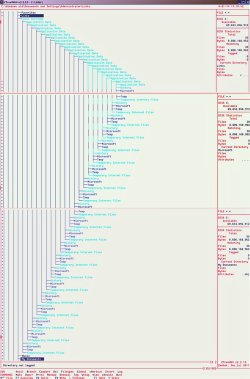
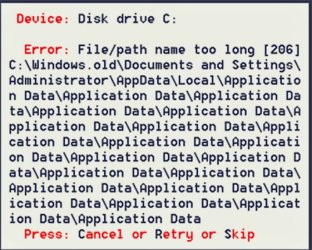
Have you ever seen anything like this mess of sub-folders upon sub-folders under Local Settings? My guess is that this crazy reduplication led to the failed install. I'm not sure this is the full tree. I began hitting an error message when I tried to log each Local Settings folder in a stepwise use of the + key. I guess since MS has gone on to Windows 8, they would have no interest in seeing this, but clearly something very bad happened as the installation routine ran. I thought it might be worth documenting, just for the record.

I managed to use the same DigitalRiver ISO to do a clean install on the SSD the next time I tried.

Thanks,

baumgrenze

See attached images:
 

Attachments

  • ZTreeWinOldCrazyTreeStructureLocalSettings.jpg
    ZTreeWinOldCrazyTreeStructureLocalSettings.jpg
    311.4 KB · Views: 131
  • FilePathnameTooLogZTree&WinOld.jpg
    FilePathnameTooLogZTree&WinOld.jpg
    210.2 KB · Views: 179

My Computer

Computer type
PC/Desktop
Computer Manufacturer/Model Number
Custom built by GamePC/Solid Electric - Palo Alto - on 03/10/08
OS
Win 7 Pro 64
CPU
Intel Core 2 Quad Q6600 (2.4 GHz) Quad Core
Motherboard
Gigabyte GA-P35-DS3P Intel P35 ATX (rev. 2.1)
Memory
2 x Crucial 4GB Kit (2GBx2) DDR2 CT2KIT25664AA800
Graphics Card(s)
Sapphire Radeon HD 3870 PCIe 512 Mb
Sound Card
RealTek audio on MOBO + EDIROL UA-1EX
Monitor(s) Displays
Samsung S24A450BW 24" LED monitor
Screen Resolution
1600 x 1200 at 75 Hz
Hard Drives
2 Crucial 128 Gb SSD (CT128M550SSD1)
one mounted and running Win7/Pro x64
one disconnected containing only Win10/Pro upgrade - in process
1 1TB WD Caviar Black (WD1003FZEX-00MK2A0) (Data drive)
1 2TB Seagate 2TB (PN/ 9JB1N3-576 - ST2000DM001-1ER
PSU
Seasonic S12-HT 650W 80% Efficiency Power Supply
Case
Lian Li PC-B25B
Cooling
Gigabyte Silent-Pipe
Keyboard
Dell MS Comfort
Mouse
HP x4000 wireless
Internet Speed
Sonic FTTN @ 23 Mbps
Antivirus
Avast
Browser
SeaMonkey
Other Info
BIOS: Award Software International, Inc. F6 06/18/2009

System Specs - Updated on 09//16/19
Yeah, something bad happened there. Luckily, you can just delete the Windows.old folder to get rid of it all.
 

My Computer

Computer type
PC/Desktop
Computer Manufacturer/Model Number
Self built custom
OS
64-bit Windows 11 Pro for Workstations
CPU
Intel i7-8700K OC'd to 5 GHz
Motherboard
ASUS ROG Maximus XI Formula Z390
Memory
64 GB (4x16GB) G.SKILL TridentZ RGB DDR4 3600 MHz
Graphics Card(s)
ASUS ROG-STRIX-GTX1080TI-O11G-GAMING
Sound Card
Integrated
Monitor(s) Displays
2 x Samsung Odyssey G7 27"
Screen Resolution
2560x1440
Hard Drives
1TB Samsung 990 PRO M.2,
4TB Samsung 990 PRO PRO M.2,
TerraMaster F8 SSD Plus NAS
PSU
Seasonic Prime Titanium 850W
Case
Thermaltake Core P3
Cooling
Corsair Hydro H115i
Keyboard
Logitech wireless K800
Mouse
Logitech MX Master 4
Internet Speed
2 Gb/s Download and 100 Mb/s Upload
Antivirus
Malwarebyte Anti-Malware Premium
Browser
Google Chrome
Other Info
Logitech Z625 speaker system,
Logitech BRIO 4K Pro webcam,
HP Color LaserJet Pro MFP M477fdn,
APC SMART-UPS RT 1000 XL - SURT1000XLI,
Galaxy S23 Plus phone
Windows.old

Option two knocked it out of the park! Once again, Brink rules!

Thanks a bunch...:thumbsup:
 

My Computer

Computer Manufacturer/Model Number
BIOSTAR Group A55MH
OS
Windows 7 Ultimate 64-bit
CPU
2.90 gigahertz AMD A8-3850 APU with Radeon HD Graphics
Motherboard
BIOSTAR Group A55MH Bus Clock: 100 megahertz BIOS: American
Memory
8170 Megabytes Usable Installed Memory
Graphics Card(s)
ATI Radeon HD 5450 [Display adapter]
Sound Card
AMD High Definition Audio Device
Monitor(s) Displays
Samsung SyncMaster [Monitor] (19.1"vis, s/n HA19HVDP427004,
Screen Resolution
1440x900
Hard Drives
1500.20 Gigabytes Usable Hard Drive Capacity
1104.84 Gigabytes Hard Drive Free Space
Case
DELL Dimension 3000
Keyboard
HP KB 0228
Mouse
GH optical-wired
Internet Speed
50+MB
Window old files

Thank you very much. It sure comes in handy. I just right click and
it delete it, without problem. :)
 
Last edited:

My Computer

Computer type
PC/Desktop
Computer Manufacturer/Model Number
Custom Build
OS
Window 7 Ultimate 32bit
CPU
Pentium Dual Core
Motherboard
Asustek
Memory
2gig
Graphics Card(s)
Nvidia
Sound Card
Asutech
Monitor(s) Displays
Viewsonic
Screen Resolution
-
Hard Drives
WD 500gigs
Antivirus
Asus
Browser
Firefox
I might be mistakened but I believe that the Windows.old folder has no additional permissions applied to it...you should be able to just delte the folder like any other
Nope, that's not true. In the System32 folder, there is the "Macromedia" with "flash" and a couple of other things that will not let you just delete the folder. You can even go to each item in the root folder, and there will be one, or two, item(s) that will not let you delete them, and you can't gain the permissions to do so. The methods described above are the only really clean methods to do this. The "disk cleanup" method is the one I use mostly. The cmd prompt method I'm gonna try the next upgrade that I do.
 

My Computer

Computer Manufacturer/Model Number
BIOSTAR Group A55MH
OS
Windows 7 Ultimate 64-bit
CPU
2.90 gigahertz AMD A8-3850 APU with Radeon HD Graphics
Motherboard
BIOSTAR Group A55MH Bus Clock: 100 megahertz BIOS: American
Memory
8170 Megabytes Usable Installed Memory
Graphics Card(s)
ATI Radeon HD 5450 [Display adapter]
Sound Card
AMD High Definition Audio Device
Monitor(s) Displays
Samsung SyncMaster [Monitor] (19.1"vis, s/n HA19HVDP427004,
Screen Resolution
1440x900
Hard Drives
1500.20 Gigabytes Usable Hard Drive Capacity
1104.84 Gigabytes Hard Drive Free Space
Case
DELL Dimension 3000
Keyboard
HP KB 0228
Mouse
GH optical-wired
Internet Speed
50+MB

My Computer

Computer Manufacturer/Model Number
BIOSTAR Group A55MH
OS
Windows 7 Ultimate 64-bit
CPU
2.90 gigahertz AMD A8-3850 APU with Radeon HD Graphics
Motherboard
BIOSTAR Group A55MH Bus Clock: 100 megahertz BIOS: American
Memory
8170 Megabytes Usable Installed Memory
Graphics Card(s)
ATI Radeon HD 5450 [Display adapter]
Sound Card
AMD High Definition Audio Device
Monitor(s) Displays
Samsung SyncMaster [Monitor] (19.1"vis, s/n HA19HVDP427004,
Screen Resolution
1440x900
Hard Drives
1500.20 Gigabytes Usable Hard Drive Capacity
1104.84 Gigabytes Hard Drive Free Space
Case
DELL Dimension 3000
Keyboard
HP KB 0228
Mouse
GH optical-wired
Internet Speed
50+MB
Thanks a bunch, getting this old computer back and running for my parents. Used method one and worked the first try!
 

My Computer

Computer type
PC/Desktop
Computer Manufacturer/Model Number
Custom Build
OS
Windows 7 Ultimate x64
CPU
Intel Core i5-3570K Quad-Core Processor 3.4GHz
Motherboard
ASUS P8Z77-V
Memory
8GB Corsair Vengance 1600MHz
Graphics Card(s)
EVGA GeForce GTX 970 Super Clocked ACX 2.0 4GB GDDR5
Monitor(s) Displays
HANNS-G HL229
Screen Resolution
1920 x 1080
Hard Drives
WD Blue 1TB, WD Blue 500GB, 120GB - Samsung 840 Series SSD (not hooked up.)
PSU
OCZ 600W
Case
Antec Twelve Hundred V3 Black Steel ATX Full Tower
Keyboard
Logitech G105 - Call of Duty MW3 Edition
Mouse
Etekcity® Scroll FLY 3200 DPI Wired
Internet Speed
28Mbps
Antivirus
Malwarebytes
Browser
Google Chrome
Glad it could help WIRide, and welcome to Seven Forums. :)
 

My Computer

Computer type
PC/Desktop
Computer Manufacturer/Model Number
Self built custom
OS
64-bit Windows 11 Pro for Workstations
CPU
Intel i7-8700K OC'd to 5 GHz
Motherboard
ASUS ROG Maximus XI Formula Z390
Memory
64 GB (4x16GB) G.SKILL TridentZ RGB DDR4 3600 MHz
Graphics Card(s)
ASUS ROG-STRIX-GTX1080TI-O11G-GAMING
Sound Card
Integrated
Monitor(s) Displays
2 x Samsung Odyssey G7 27"
Screen Resolution
2560x1440
Hard Drives
1TB Samsung 990 PRO M.2,
4TB Samsung 990 PRO PRO M.2,
TerraMaster F8 SSD Plus NAS
PSU
Seasonic Prime Titanium 850W
Case
Thermaltake Core P3
Cooling
Corsair Hydro H115i
Keyboard
Logitech wireless K800
Mouse
Logitech MX Master 4
Internet Speed
2 Gb/s Download and 100 Mb/s Upload
Antivirus
Malwarebyte Anti-Malware Premium
Browser
Google Chrome
Other Info
Logitech Z625 speaker system,
Logitech BRIO 4K Pro webcam,
HP Color LaserJet Pro MFP M477fdn,
APC SMART-UPS RT 1000 XL - SURT1000XLI,
Galaxy S23 Plus phone
Great Help

Option One did the job!
 

My Computer

Computer type
PC/Desktop
Computer Manufacturer/Model Number
Asus
OS
Win7 Home, 64bit
Memory
4
Antivirus
MS Security
Browser
Chrome
Glad it could help Lawsee, and welcome to Seven Forums. :party:
 

My Computer

Computer type
PC/Desktop
Computer Manufacturer/Model Number
Self built custom
OS
64-bit Windows 11 Pro for Workstations
CPU
Intel i7-8700K OC'd to 5 GHz
Motherboard
ASUS ROG Maximus XI Formula Z390
Memory
64 GB (4x16GB) G.SKILL TridentZ RGB DDR4 3600 MHz
Graphics Card(s)
ASUS ROG-STRIX-GTX1080TI-O11G-GAMING
Sound Card
Integrated
Monitor(s) Displays
2 x Samsung Odyssey G7 27"
Screen Resolution
2560x1440
Hard Drives
1TB Samsung 990 PRO M.2,
4TB Samsung 990 PRO PRO M.2,
TerraMaster F8 SSD Plus NAS
PSU
Seasonic Prime Titanium 850W
Case
Thermaltake Core P3
Cooling
Corsair Hydro H115i
Keyboard
Logitech wireless K800
Mouse
Logitech MX Master 4
Internet Speed
2 Gb/s Download and 100 Mb/s Upload
Antivirus
Malwarebyte Anti-Malware Premium
Browser
Google Chrome
Other Info
Logitech Z625 speaker system,
Logitech BRIO 4K Pro webcam,
HP Color LaserJet Pro MFP M477fdn,
APC SMART-UPS RT 1000 XL - SURT1000XLI,
Galaxy S23 Plus phone
Great thread but still have problem. Tried all three options and all seem to hang in process. Maybe because I'm not sure how long they should take, computer even went to sleep in one or two (not sure which). Finally tried "Take Ownership" which worked on files and some folders but seem to hang also on folders with large amount of content. Wondering if I'm just inpatient and if anybody has idea how long the process should take in some process. Like maybe "Disk Cleanup" to insert the previous version box in window to allow removal or one of the other option times.
 

My Computer

Computer type
PC/Desktop
Computer Manufacturer/Model Number
Compaq
OS
Windows 7 Home Premium 32bit.
CPU
AMD Athlon x2 2.30 GHz
Memory
4 GB Ram
Hello Stuggling7, and welcome to Seven Forums. :)

Normally, it doesn't take long at all for it delete the folder. If you have any disk corruption or folder/file access issues, then it could take longer.

You might let it sit up to 10 minutes at most to see if you have any progress.
 

My Computer

Computer type
PC/Desktop
Computer Manufacturer/Model Number
Self built custom
OS
64-bit Windows 11 Pro for Workstations
CPU
Intel i7-8700K OC'd to 5 GHz
Motherboard
ASUS ROG Maximus XI Formula Z390
Memory
64 GB (4x16GB) G.SKILL TridentZ RGB DDR4 3600 MHz
Graphics Card(s)
ASUS ROG-STRIX-GTX1080TI-O11G-GAMING
Sound Card
Integrated
Monitor(s) Displays
2 x Samsung Odyssey G7 27"
Screen Resolution
2560x1440
Hard Drives
1TB Samsung 990 PRO M.2,
4TB Samsung 990 PRO PRO M.2,
TerraMaster F8 SSD Plus NAS
PSU
Seasonic Prime Titanium 850W
Case
Thermaltake Core P3
Cooling
Corsair Hydro H115i
Keyboard
Logitech wireless K800
Mouse
Logitech MX Master 4
Internet Speed
2 Gb/s Download and 100 Mb/s Upload
Antivirus
Malwarebyte Anti-Malware Premium
Browser
Google Chrome
Other Info
Logitech Z625 speaker system,
Logitech BRIO 4K Pro webcam,
HP Color LaserJet Pro MFP M477fdn,
APC SMART-UPS RT 1000 XL - SURT1000XLI,
Galaxy S23 Plus phone
Back
Top