
Solved Windows partion extend problem

xmOD

New member
Local time
8:52 PM
Messages
7
Location
India
Hey guys,

This is my first post on the forums. I stumbled upon the forum looking for help and have visited quite a few times. So i finally registered :D

neways..

So the problem:
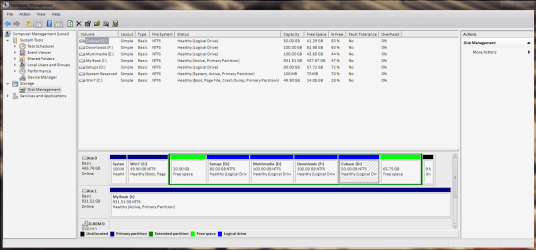
My Windows 7 partition is 50gig in size. Am running out of space and I do have more space available but cant use it for the partition.
I tried creating "unallocated space" after the win7 partition but still cant extend my primary partition.
Is there any way to get around this? Or do i have to do a clean install again cause that is the last option am considering..

am posting a screenshot of my storage table to help..
 

Attachments
  • storage.PNG
    storage.PNG
    41.4 KB · Views: 21

My Computer

Computer Manufacturer/Model Number
Custom Rig
OS
Windows 7 Ultimate x64
CPU
Intel i7 950
Motherboard
Gigabyte X58A-UD3R
Memory
Corsair Dominator 6GB
Graphics Card(s)
ATI Radeon HD5770
Sound Card
M-Audio Audiophile 2496
Monitor(s) Displays
BenQ 24" Full HD LCD Display
Screen Resolution
1920x1080
Hard Drives
1xWestern Digital 500GB
1xWestern Digital 1TB (External)
PSU
Corsair GS600
Case
Cooler Master CM690II Advanced
Cooling
1xNoctua NH-D14, 3x120mm Noctua NF-P12, 1xNoctua NF-P14 FLX
Keyboard
Logitech MK320
Mouse
Logitech Wireless Mouse
Internet Speed
10Mbps
Use free Partition Wizard bootable CD: Partition Wizard

Download ISO file, burn to CD using Windows Image Burner or ImgBurn at 4x speed.

Back up your files and a Win7 backup image externally.

Boot PW CD, select 1 for screen res, rightclick on G partition, select Move/Resize, leftclick-hold on G partition to drag all the way to the right to take up the Unallocated space, release, click OK.

Repeat this step with F partition, dragging it intact to the right up against G, click OK. Then do the same with E and D, clicking OK after each.

When all Logical sub-partitions are dragged to the right, you should have 85.75gb of Unallocated space to the right of C.

Finally rightclick on C, select Resize, slide right grey border to right to take up the 85.75 gb unallocated space, click OK, then click Apply all steps.
 
Last edited:
You would probably have more space if you stop using partitions in such a hectic manner. Seriously what is wrong with having one partition for everything? It just a giant waste of space if you ask me.
 

My Computer

Computer type
PC/Desktop
Computer Manufacturer/Model Number
Alienware Aurora ALX R4
OS
Windows 10 Pro (x64)
CPU
Intel Core i7-3930K (3.2GHz - 4.5GHz)
Motherboard
Alienware Aurora-R4 x79
Memory
4x Samsung 4GB PC3-12800 DDR3 (16GB 1600MHz)
Graphics Card(s)
Nvidia Geforce GTX 690
Sound Card
SteelSeries Siberia Elite
Monitor(s) Displays
Dell UltraSharp U3011
Screen Resolution
2560x1600
Hard Drives
Samsung 850 Pro 256 GB, Seagate 1TB Desktop Hybrid HDD, 2x Western Digital 4TB Green HDD
PSU
875W Some Dell PSU <.<
Case
Alienware Aurora ALX
Cooling
Custom Liquid Cooling (EK CPU & GPU blocks) dual EK 480RAD
Keyboard
Logitech G710+ Mechanical
Mouse
Logitech G700s
Internet Speed
Verizon Fios (50 mbps average)
Other Info
Server: Intel NUC D54250WYK: i5-4250U, 16GB, 256 GB mSATA, Windows Server 2012 R2
You would probably have more space if you stop using partitions in such a hectic manner.

the only reason i use these partitions is cause they give me a lotta freedom to work. if for example i gotta reinstall windows and gotta format the win7 partition then all others stay unaffected. makes using the computer more convenient i think but as this was the first time installing win7, i though 50gig should be enough as it was with my winxp.

Use free Partition Wizard bootable CD: Partition Wizard

I used Gparted to create the empty space next to the C drive but even after the free space it does'nt let me extend the C drive. I'l try with partition wizard as well :)


My Computer

Computer Manufacturer/Model Number
Custom Rig
OS
Windows 7 Ultimate x64
CPU
Intel i7 950
Motherboard
Gigabyte X58A-UD3R
Memory
Corsair Dominator 6GB
Graphics Card(s)
ATI Radeon HD5770
Sound Card
M-Audio Audiophile 2496
Monitor(s) Displays
BenQ 24" Full HD LCD Display
Screen Resolution
1920x1080
Hard Drives
1xWestern Digital 500GB
1xWestern Digital 1TB (External)
PSU
Corsair GS600
Case
Cooler Master CM690II Advanced
Cooling
1xNoctua NH-D14, 3x120mm Noctua NF-P12, 1xNoctua NF-P14 FLX
Keyboard
Logitech MK320
Mouse
Logitech Wireless Mouse
Internet Speed
10Mbps
Partition Wizard worked really well. took a min to resize the partition.

Thx a lot gregrocker
 

My Computer

Computer Manufacturer/Model Number
Custom Rig
OS
Windows 7 Ultimate x64
CPU
Intel i7 950
Motherboard
Gigabyte X58A-UD3R
Memory
Corsair Dominator 6GB
Graphics Card(s)
ATI Radeon HD5770
Sound Card
M-Audio Audiophile 2496
Monitor(s) Displays
BenQ 24" Full HD LCD Display
Screen Resolution
1920x1080
Hard Drives
1xWestern Digital 500GB
1xWestern Digital 1TB (External)
PSU
Corsair GS600
Case
Cooler Master CM690II Advanced
Cooling
1xNoctua NH-D14, 3x120mm Noctua NF-P12, 1xNoctua NF-P14 FLX
Keyboard
Logitech MK320
Mouse
Logitech Wireless Mouse
Internet Speed
10Mbps
Another method to consider since you like to keep your OS/Programs partition lean and already have the knack for storing your data elsewhere: Link your named User folder with alll of its data folders to another partition, or store the folders themselves elsewhere:
User Folders - Change Default Location
http://www.sevenforums.com/tutorials/87555-user-profile-change-default-location.html

Although you still need to back up your data, this method allows you to reimage your OS/programs partition and your data will be waiting and current in its separate partition "vault."

Glad you like Partition Wizard CD, which has helped with hundreds of complicated partitioning operations here without fail.
 
Thx a lot again gregrocker!
I am gonna change the user profile location now, saves a bit more space. Most of the space in the Win7 partition goes to windows updates otherwise i dont really use it for anything else. is there any way to get around the updates?
 

My Computer

Computer Manufacturer/Model Number
Custom Rig
OS
Windows 7 Ultimate x64
CPU
Intel i7 950
Motherboard
Gigabyte X58A-UD3R
Memory
Corsair Dominator 6GB
Graphics Card(s)
ATI Radeon HD5770
Sound Card
M-Audio Audiophile 2496
Monitor(s) Displays
BenQ 24" Full HD LCD Display
Screen Resolution
1920x1080
Hard Drives
1xWestern Digital 500GB
1xWestern Digital 1TB (External)
PSU
Corsair GS600
Case
Cooler Master CM690II Advanced
Cooling
1xNoctua NH-D14, 3x120mm Noctua NF-P12, 1xNoctua NF-P14 FLX
Keyboard
Logitech MK320
Mouse
Logitech Wireless Mouse
Internet Speed
10Mbps
No way. Windows Updates keep your firewall fortified with the latest defenses against security threats. Set Updates to Automatic and make sure now you have SP1.

We recommend a lightweight free AV like MS Security Essentials with the Win7 firewall for best performance while staying safe.

Keep plenty of disk space apportioned to System Restore points in Control Panel>System Protection, and save a Win7 backup image externally so if Win7 becomes irreparable you can reimage your OS partition in 20 minutes using DVD and stored image.
 
What do you recommend for the backup image? How do i create one? is there any tool inside windows to do this?

EDIT: Nevamind, I found the native windows tool to do it and made a system image as well!
 
Last edited:

My Computer

Computer Manufacturer/Model Number
Custom Rig
OS
Windows 7 Ultimate x64
CPU
Intel i7 950
Motherboard
Gigabyte X58A-UD3R
Memory
Corsair Dominator 6GB
Graphics Card(s)
ATI Radeon HD5770
Sound Card
M-Audio Audiophile 2496
Monitor(s) Displays
BenQ 24" Full HD LCD Display
Screen Resolution
1920x1080
Hard Drives
1xWestern Digital 500GB
1xWestern Digital 1TB (External)
PSU
Corsair GS600
Case
Cooler Master CM690II Advanced
Cooling
1xNoctua NH-D14, 3x120mm Noctua NF-P12, 1xNoctua NF-P14 FLX
Keyboard
Logitech MK320
Mouse
Logitech Wireless Mouse
Internet Speed
10Mbps
Do you recommend the windows image backup tool or the acronis app? :)
 

My Computer

Computer Manufacturer/Model Number
Custom Rig
OS
Windows 7 Ultimate x64
CPU
Intel i7 950
Motherboard
Gigabyte X58A-UD3R
Memory
Corsair Dominator 6GB
Graphics Card(s)
ATI Radeon HD5770
Sound Card
M-Audio Audiophile 2496
Monitor(s) Displays
BenQ 24" Full HD LCD Display
Screen Resolution
1920x1080
Hard Drives
1xWestern Digital 500GB
1xWestern Digital 1TB (External)
PSU
Corsair GS600
Case
Cooler Master CM690II Advanced
Cooling
1xNoctua NH-D14, 3x120mm Noctua NF-P12, 1xNoctua NF-P14 FLX
Keyboard
Logitech MK320
Mouse
Logitech Wireless Mouse
Internet Speed
10Mbps
I use Win7 backup imaging unless I need more flexibility about where I reimage to, or what partiitons I wish to choose - in which case I use Acronis TI. I can easily convert Win7 .vhd images to Acronis .tib if I need to do this.

So if you don't think you will need to do tricky reimaging to another partition, Win7 suffices and is reliable.
 
Back
Top