
Well, I don't really know where to turn after what I've tried to do.
Frankly, the test simply doesn't run. I have no trouble running it through WinSAT, but these results aren't being recorded. I deleted any of the existing XML documents in my performance folder too. This is a strange problem because this is a clean install, and I'm not having any driver issues (Using the same drivers as my previous install.. it worked fine.)
A screenshot.. I couldn't find another with my exact same issue.. Also note this is a desktop, not a laptop..
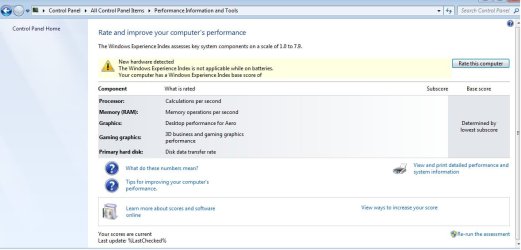
Ahh, in addition I would like to add that the run and re-run buttons simply do nothing when clicked on. The numbers remain blank regardless of if I run winSAT or not, but WinSAT posts results upon completing its rounds, without presenting a single error.
Frankly, the test simply doesn't run. I have no trouble running it through WinSAT, but these results aren't being recorded. I deleted any of the existing XML documents in my performance folder too. This is a strange problem because this is a clean install, and I'm not having any driver issues (Using the same drivers as my previous install.. it worked fine.)
A screenshot.. I couldn't find another with my exact same issue.. Also note this is a desktop, not a laptop..
Ahh, in addition I would like to add that the run and re-run buttons simply do nothing when clicked on. The numbers remain blank regardless of if I run winSAT or not, but WinSAT posts results upon completing its rounds, without presenting a single error.
My Computer
- OS
- Windows 7 64 Bit


