
Hello folks.
Can you help me please to fix this problem. It just happen from nowhere.. One day, like others, i wanted to print one image. I open picture with windows photo viewer and i wanted print it. When i push print nothing happens. Half second print show that it start but then it come back to same window.
I can tell this is not printer problem or.. I don't know. I think somehow windows photo viewer get error because if i print with PAINT everything working fine.
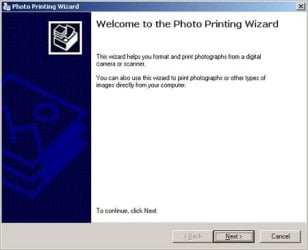
I start google search and i found one file: photowiz.dll - i download this file from one forum. Second i take original photowiz.dll from system32 folder where it was. I put this file in my desktop and copy downloaded file to system32. This fix my problem but it not was same. When i change file it not was original window from where i can start print but it start show me print wizard. And every time if i want to print i need go true this wizard.
So.. From where i can get original photowiz.dll file? Because i think this is my problem.
Windows 7 ultimate 32bit.
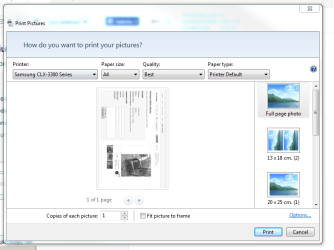
+ i add two images how it looks before and after.
Thanks.
Can you help me please to fix this problem. It just happen from nowhere.. One day, like others, i wanted to print one image. I open picture with windows photo viewer and i wanted print it. When i push print nothing happens. Half second print show that it start but then it come back to same window.
I can tell this is not printer problem or.. I don't know. I think somehow windows photo viewer get error because if i print with PAINT everything working fine.
I start google search and i found one file: photowiz.dll - i download this file from one forum. Second i take original photowiz.dll from system32 folder where it was. I put this file in my desktop and copy downloaded file to system32. This fix my problem but it not was same. When i change file it not was original window from where i can start print but it start show me print wizard. And every time if i want to print i need go true this wizard.
So.. From where i can get original photowiz.dll file? Because i think this is my problem.
Windows 7 ultimate 32bit.
+ i add two images how it looks before and after.
Thanks.
Attachments
My Computer
- OS
- windows 7 32bit ultimate


