
windows shut down too long

tz frantic

New member
Local time
3:38 PM
Messages
233
windows takes 2mins and 30 seconds to shutdown
but it only takes 40 secs to start up
can someone help me this is only starting to happen today
 

My Computer

Computer Manufacturer/Model Number
PACKARD bell
OS
windows 7
CPU
4 CPU by Intel Core 2 Quad Q6600
Motherboard
Vegas 2 Motherboard Full ATX motherboard
Memory
3 gb ram
Graphics Card(s)
NVIDIA GeForce 8800
Hard Drives
500GB C D =500GB
Seagate Barracuda 7200.10 500 GB Hard Disk by 2
Other Info
8 in 1 Gigabyte GO-C81LA CardReader/Writer
i found some thing Virtual Memory Paging File - Clear at Shutdown - Vista Forums i today change that
to clear at shutdown but people say if yyou don't clear it gets frag easy any sugestions also my
main drive is c should i have my pagefile on d drive instead i heard that putting on the d drive is better
then on your main drive c is this true
 

My Computer

Computer Manufacturer/Model Number
PACKARD bell
OS
windows 7
CPU
4 CPU by Intel Core 2 Quad Q6600
Motherboard
Vegas 2 Motherboard Full ATX motherboard
Memory
3 gb ram
Graphics Card(s)
NVIDIA GeForce 8800
Hard Drives
500GB C D =500GB
Seagate Barracuda 7200.10 500 GB Hard Disk by 2
Other Info
8 in 1 Gigabyte GO-C81LA CardReader/Writer
Welcome!

It sounds like a certain process is causing the hang.

Before you shutdown next time, end half the processes in Task Manager>Processes tab. Be sure to write down which ones!

If the hang stops, we can work on narrowing down which process is the issue.

Alternatively, you could try a System Restore to get back before the hangs.

Good luck!
~JK

Edit: I saw your second post. You may seem some performance increase if the page file is on a separate physical drive. However, if your main OS drive is 7200 RPM, and your secondary drive is only 5200 RPM, the performance may not increase at all.
 

My Computer

Computer Manufacturer/Model Number
Custom
OS
Windows 7 Professional x64
CPU
Intel i7 2600K OC'd @ 4620 MHz
Motherboard
Asus P8Z68-V Pro
Memory
16GB GSkill Sniper 2133 Mhz (4x4GB)
Graphics Card(s)
EVGA GeForce GTX 480 SuperClocked+
Sound Card
Realtek High Definition Audio
Monitor(s) Displays
2x Acer S273HLbmii 27"
Screen Resolution
2 x 1920x1080
Hard Drives
64GB Crucial M4 SSD

Storage: Hitachi 1TB 5400RPM, Samsung 1.5TB 5400RPM
PSU
Corsair HW Series 750w (modular)
Case
Cooler Master HAF 932 Advanced Blue Edition
Cooling
CM Hyper 212+ CPU cooler, 3x 230mm + 1x 140mm case fans
Keyboard
Logitech MK320 (wireless)
Mouse
Logitech MK320 (wireless)
Internet Speed
30 Mb/s : 2 Mb/s
i found some thing Virtual Memory Paging File - Clear at Shutdown - Vista Forums i today change that
to clear at shutdown but people say if yyou don't clear it gets frag easy any sugestions also my
main drive is c should i have my pagefile on d drive instead i heard that putting on the d drive is better
then on your main drive c is this true
 

My Computer

Computer Manufacturer/Model Number
PACKARD bell
OS
windows 7
CPU
4 CPU by Intel Core 2 Quad Q6600
Motherboard
Vegas 2 Motherboard Full ATX motherboard
Memory
3 gb ram
Graphics Card(s)
NVIDIA GeForce 8800
Hard Drives
500GB C D =500GB
Seagate Barracuda 7200.10 500 GB Hard Disk by 2
Other Info
8 in 1 Gigabyte GO-C81LA CardReader/Writer
also thanks but i think it could be the above issue to clear at shutdown but people say if yyou don't clear it gets frag easy any sugestions also my
main drive is c should i have my pagefile on d drive instead i heard that putting on the d drive is better
then on your main drive c is this true any help on this matter

also i love this site always helped me thanks
 

My Computer

Computer Manufacturer/Model Number
PACKARD bell
OS
windows 7
CPU
4 CPU by Intel Core 2 Quad Q6600
Motherboard
Vegas 2 Motherboard Full ATX motherboard
Memory
3 gb ram
Graphics Card(s)
NVIDIA GeForce 8800
Hard Drives
500GB C D =500GB
Seagate Barracuda 7200.10 500 GB Hard Disk by 2
Other Info
8 in 1 Gigabyte GO-C81LA CardReader/Writer
Turn off "Clear pagefile at shutdown" you don't need it and you certainly do not need to worry about it fragmenting. Putting the pagefile on another partition won't matter either, unless the partition is on another physical HDD.
 

My Computer

Computer type
PC/Desktop
Computer Manufacturer/Model Number
Alienware Aurora ALX R4
OS
Windows 10 Pro (x64)
CPU
Intel Core i7-3930K (3.2GHz - 4.5GHz)
Motherboard
Alienware Aurora-R4 x79
Memory
4x Samsung 4GB PC3-12800 DDR3 (16GB 1600MHz)
Graphics Card(s)
Nvidia Geforce GTX 690
Sound Card
SteelSeries Siberia Elite
Monitor(s) Displays
Dell UltraSharp U3011
Screen Resolution
2560x1600
Hard Drives
Samsung 850 Pro 256 GB, Seagate 1TB Desktop Hybrid HDD, 2x Western Digital 4TB Green HDD
PSU
875W Some Dell PSU <.<
Case
Alienware Aurora ALX
Cooling
Custom Liquid Cooling (EK CPU & GPU blocks) dual EK 480RAD
Keyboard
Logitech G710+ Mechanical
Mouse
Logitech G700s
Internet Speed
Verizon Fios (50 mbps average)
Other Info
Server: Intel NUC D54250WYK: i5-4250U, 16GB, 256 GB mSATA, Windows Server 2012 R2
if i have a large pagefile for the hdd d drive and a small for one for c will this dedrease the perform or
not is the page file for hdd d drive still used for the appl on the computer
 

My Computer

Computer Manufacturer/Model Number
PACKARD bell
OS
windows 7
CPU
4 CPU by Intel Core 2 Quad Q6600
Motherboard
Vegas 2 Motherboard Full ATX motherboard
Memory
3 gb ram
Graphics Card(s)
NVIDIA GeForce 8800
Hard Drives
500GB C D =500GB
Seagate Barracuda 7200.10 500 GB Hard Disk by 2
Other Info
8 in 1 Gigabyte GO-C81LA CardReader/Writer
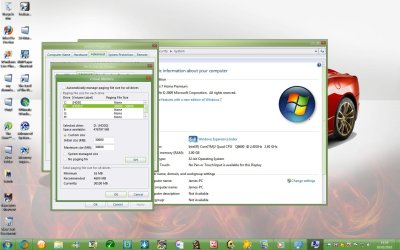
i mean if i have a large page file for the d drive and a small pagefile for c will the c drive go slower
or does it matter where the pagefile comes from
and is the pagefile for the whole system to use
 

My Computer

Computer Manufacturer/Model Number
PACKARD bell
OS
windows 7
CPU
4 CPU by Intel Core 2 Quad Q6600
Motherboard
Vegas 2 Motherboard Full ATX motherboard
Memory
3 gb ram
Graphics Card(s)
NVIDIA GeForce 8800
Hard Drives
500GB C D =500GB
Seagate Barracuda 7200.10 500 GB Hard Disk by 2
Other Info
8 in 1 Gigabyte GO-C81LA CardReader/Writer
I'm not really sure, but I have a good guess the page file is not what your problem is.

It sounds like a program you have installed causing the issue.
 

My Computer

Computer Manufacturer/Model Number
Custom
OS
Windows 7 Professional x64
CPU
Intel i7 2600K OC'd @ 4620 MHz
Motherboard
Asus P8Z68-V Pro
Memory
16GB GSkill Sniper 2133 Mhz (4x4GB)
Graphics Card(s)
EVGA GeForce GTX 480 SuperClocked+
Sound Card
Realtek High Definition Audio
Monitor(s) Displays
2x Acer S273HLbmii 27"
Screen Resolution
2 x 1920x1080
Hard Drives
64GB Crucial M4 SSD

Storage: Hitachi 1TB 5400RPM, Samsung 1.5TB 5400RPM
PSU
Corsair HW Series 750w (modular)
Case
Cooler Master HAF 932 Advanced Blue Edition
Cooling
CM Hyper 212+ CPU cooler, 3x 230mm + 1x 140mm case fans
Keyboard
Logitech MK320 (wireless)
Mouse
Logitech MK320 (wireless)
Internet Speed
30 Mb/s : 2 Mb/s

My Computer

Computer Manufacturer/Model Number
PACKARD bell
OS
windows 7
CPU
4 CPU by Intel Core 2 Quad Q6600
Motherboard
Vegas 2 Motherboard Full ATX motherboard
Memory
3 gb ram
Graphics Card(s)
NVIDIA GeForce 8800
Hard Drives
500GB C D =500GB
Seagate Barracuda 7200.10 500 GB Hard Disk by 2
Other Info
8 in 1 Gigabyte GO-C81LA CardReader/Writer
i mean if i have a large page file for the d drive and a small pagefile for c will the c drive go slower
or does it matter where the pagefile comes from
and is the pagefile for the whole system to use
 

My Computer

Computer Manufacturer/Model Number
PACKARD bell
OS
windows 7
CPU
4 CPU by Intel Core 2 Quad Q6600
Motherboard
Vegas 2 Motherboard Full ATX motherboard
Memory
3 gb ram
Graphics Card(s)
NVIDIA GeForce 8800
Hard Drives
500GB C D =500GB
Seagate Barracuda 7200.10 500 GB Hard Disk by 2
Other Info
8 in 1 Gigabyte GO-C81LA CardReader/Writer
Whatever the slowest drive is, that is the drive you will get the worst performance from if you have a page file on it.

The more the system needs to read from a slow drive, the slower things will be.
 

My Computer

Computer Manufacturer/Model Number
Custom
OS
Windows 7 Professional x64
CPU
Intel i7 2600K OC'd @ 4620 MHz
Motherboard
Asus P8Z68-V Pro
Memory
16GB GSkill Sniper 2133 Mhz (4x4GB)
Graphics Card(s)
EVGA GeForce GTX 480 SuperClocked+
Sound Card
Realtek High Definition Audio
Monitor(s) Displays
2x Acer S273HLbmii 27"
Screen Resolution
2 x 1920x1080
Hard Drives
64GB Crucial M4 SSD

Storage: Hitachi 1TB 5400RPM, Samsung 1.5TB 5400RPM
PSU
Corsair HW Series 750w (modular)
Case
Cooler Master HAF 932 Advanced Blue Edition
Cooling
CM Hyper 212+ CPU cooler, 3x 230mm + 1x 140mm case fans
Keyboard
Logitech MK320 (wireless)
Mouse
Logitech MK320 (wireless)
Internet Speed
30 Mb/s : 2 Mb/s
so should i locate my page file on the d drive because the c drive is nearly full
 

My Computer

Computer Manufacturer/Model Number
PACKARD bell
OS
windows 7
CPU
4 CPU by Intel Core 2 Quad Q6600
Motherboard
Vegas 2 Motherboard Full ATX motherboard
Memory
3 gb ram
Graphics Card(s)
NVIDIA GeForce 8800
Hard Drives
500GB C D =500GB
Seagate Barracuda 7200.10 500 GB Hard Disk by 2
Other Info
8 in 1 Gigabyte GO-C81LA CardReader/Writer
Sure, if you want. That's fine. :)
 

My Computer

Computer Manufacturer/Model Number
Custom
OS
Windows 7 Professional x64
CPU
Intel i7 2600K OC'd @ 4620 MHz
Motherboard
Asus P8Z68-V Pro
Memory
16GB GSkill Sniper 2133 Mhz (4x4GB)
Graphics Card(s)
EVGA GeForce GTX 480 SuperClocked+
Sound Card
Realtek High Definition Audio
Monitor(s) Displays
2x Acer S273HLbmii 27"
Screen Resolution
2 x 1920x1080
Hard Drives
64GB Crucial M4 SSD

Storage: Hitachi 1TB 5400RPM, Samsung 1.5TB 5400RPM
PSU
Corsair HW Series 750w (modular)
Case
Cooler Master HAF 932 Advanced Blue Edition
Cooling
CM Hyper 212+ CPU cooler, 3x 230mm + 1x 140mm case fans
Keyboard
Logitech MK320 (wireless)
Mouse
Logitech MK320 (wireless)
Internet Speed
30 Mb/s : 2 Mb/s
also can i disable pageing file for c drive only and then leave paging file on for d
 

My Computer

Computer Manufacturer/Model Number
PACKARD bell
OS
windows 7
CPU
4 CPU by Intel Core 2 Quad Q6600
Motherboard
Vegas 2 Motherboard Full ATX motherboard
Memory
3 gb ram
Graphics Card(s)
NVIDIA GeForce 8800
Hard Drives
500GB C D =500GB
Seagate Barracuda 7200.10 500 GB Hard Disk by 2
Other Info
8 in 1 Gigabyte GO-C81LA CardReader/Writer
No, the paging file is virtual memory.

You don't have RAM specific to drives; the RAM is used by the OS for the processes that need it.

Off topic: please try to combine questions in a single post. That makes it a lot easier to follow the thread, and answer your questions.

Thank you!
 

My Computer

Computer Manufacturer/Model Number
Custom
OS
Windows 7 Professional x64
CPU
Intel i7 2600K OC'd @ 4620 MHz
Motherboard
Asus P8Z68-V Pro
Memory
16GB GSkill Sniper 2133 Mhz (4x4GB)
Graphics Card(s)
EVGA GeForce GTX 480 SuperClocked+
Sound Card
Realtek High Definition Audio
Monitor(s) Displays
2x Acer S273HLbmii 27"
Screen Resolution
2 x 1920x1080
Hard Drives
64GB Crucial M4 SSD

Storage: Hitachi 1TB 5400RPM, Samsung 1.5TB 5400RPM
PSU
Corsair HW Series 750w (modular)
Case
Cooler Master HAF 932 Advanced Blue Edition
Cooling
CM Hyper 212+ CPU cooler, 3x 230mm + 1x 140mm case fans
Keyboard
Logitech MK320 (wireless)
Mouse
Logitech MK320 (wireless)
Internet Speed
30 Mb/s : 2 Mb/s
so it does not mater where the page file is as long as i have a big one
so can i set my c drive to 16mb and haave the D drive page file at 20GB and would that be fine for my system
to operate fast as possible i do i have to set it bigger for my system to be better
 
Last edited:

My Computer

Computer Manufacturer/Model Number
PACKARD bell
OS
windows 7
CPU
4 CPU by Intel Core 2 Quad Q6600
Motherboard
Vegas 2 Motherboard Full ATX motherboard
Memory
3 gb ram
Graphics Card(s)
NVIDIA GeForce 8800
Hard Drives
500GB C D =500GB
Seagate Barracuda 7200.10 500 GB Hard Disk by 2
Other Info
8 in 1 Gigabyte GO-C81LA CardReader/Writer
khg
 

My Computer

Computer Manufacturer/Model Number
PACKARD bell
OS
windows 7
CPU
4 CPU by Intel Core 2 Quad Q6600
Motherboard
Vegas 2 Motherboard Full ATX motherboard
Memory
3 gb ram
Graphics Card(s)
NVIDIA GeForce 8800
Hard Drives
500GB C D =500GB
Seagate Barracuda 7200.10 500 GB Hard Disk by 2
Other Info
8 in 1 Gigabyte GO-C81LA CardReader/Writer
wait...
Is C and D different Hard drives or Different partitions on the same hard drive?

If it is different partitions on the same drive, then putting page file on different partition other then system one in the same drive slows down it. (so in this case put page file in system partition (OS))


If it is different Hard drives then turn off page file on OS drive and put it in another hard drive.

P.S. to your first question, Try this one: http://www.sevenforums.com/tutorials/717-shut-down-speed-up.html
 

My Computer

OS
Windows 7 Ultimate x86 SP1
they different hard drives here it is this is ok what i done right
 

Attachments

  • Untitled.jpg
    Untitled.jpg
    135.2 KB · Views: 32

My Computer

Computer Manufacturer/Model Number
PACKARD bell
OS
windows 7
CPU
4 CPU by Intel Core 2 Quad Q6600
Motherboard
Vegas 2 Motherboard Full ATX motherboard
Memory
3 gb ram
Graphics Card(s)
NVIDIA GeForce 8800
Hard Drives
500GB C D =500GB
Seagate Barracuda 7200.10 500 GB Hard Disk by 2
Other Info
8 in 1 Gigabyte GO-C81LA CardReader/Writer
Back
Top