
windows start up line ||||||||||||||

Adrianaopdeit

New member
Local time
4:11 AM
Messages
4
please help me with this, there´s a blank line after windows start up , i update the BIOS of my toshiba satellite pro u405 sp2801, and it fix the problem with the keyboard and touch pad but now that line is appearing. Please help me :cry:.
Heres is a link of the windows start up.
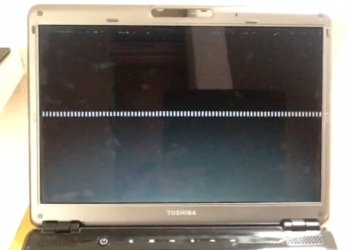
white line.jpg

 
Last edited by a moderator:

My Computer

Computer Manufacturer/Model Number
Toshiba u405-sp2801
OS
windows seven professional 32 bit
CPU
intel (R) core (TM)2 Duo CPU T8100 2.10 ghz
Memory
2048 MB
Graphics Card(s)
Mobile intel 965 express chipset family v 8.15.10
Sound Card
conexant high definition smart audio 221 v 4.98.6.61
Screen Resolution
1280X800
Hard Drives
231 gb
i wouldnt worry, your computer appears to boot fine. I think it might just be windows leaving the start up phase, and something to do with the graphical process rendering windows.
 

My Computer

Computer type
PC/Desktop
Computer Manufacturer/Model Number
Built by badgers!!!
OS
Windows 7 Ultimate x64, & Mac OS X 10.9.2
CPU
Intel Core i5 2500k
Motherboard
Asus P8z68 LE
Memory
Corsair Vengence 8gb 1866mhz
Graphics Card(s)
Nvidia GTX 770 OC
Monitor(s) Displays
2x ASUS LED 22" IPS
Screen Resolution
3840x1080
Hard Drives
240GB Crucial M500 SSD
120gb Corsair Force 3 SSD
1TB Western Digital
PSU
Corsair HX650w Modular
Case
Corsair Air 540
Cooling
Corsair H60 Push/Pull
Keyboard
Corsair K70/ Logitech G27 wheel
Mouse
Saitek R.A.T 9
Internet Speed
Too slow!
Other Info
AMD fusion E350N Home server-Windows Home Server 2011 (also made by badgers!)
2011 Macbook 2.4ghz Core2Duo, 4gb ddr3, 120gb Ocz Vertex SSD
It is not unusual to see those lines at boot on XP.
 

My Computer

OS
Windows 7 Professional
i wouldnt worry, your computer appears to boot fine. I think it might just be windows leaving the start up phase, and something to do with the graphical process rendering windows.
I agree, I have seen this happen before and as long as everything is working fine I wouldn't worry about it
 

My Computer

Computer Manufacturer/Model Number
Alienware m15x (my main PC)
OS
Windows 7 Ultimate x64
CPU
Intel Core i7 740QM
Memory
G. Skill 8GB (2x4GB) DDR3 @ 1333MHz
Graphics Card(s)
nVidia GeForce GTX 460M
Sound Card
IDT Integrated HD Audio
Monitor(s) Displays
15.6HDF+ WLED
Screen Resolution
1600 x 900
Hard Drives
240GB OCZ Agility 3 SSD
Mouse
Razer Orochi
Internet Speed
50Mb/s
Other Info
Intel Ultimate N Wi-Fi Link 5300, Bluetooth 2.0
ok now the white line in the middle is gone but the ones on top aren't gone. I unistalled the driver of chipset familiy 965 and let windows update to install the driver. that make the white line go. but the other ones remain.
 

My Computer

Computer Manufacturer/Model Number
Toshiba u405-sp2801
OS
windows seven professional 32 bit
CPU
intel (R) core (TM)2 Duo CPU T8100 2.10 ghz
Memory
2048 MB
Graphics Card(s)
Mobile intel 965 express chipset family v 8.15.10
Sound Card
conexant high definition smart audio 221 v 4.98.6.61
Screen Resolution
1280X800
Hard Drives
231 gb
Back
Top