Windows Update Agent 7.6.7600.320 Keep breaking WU Windows 7 Starter

OK after searching for updates for about 4 hours it finally found 206 updates. Will install them a little bit at the time. Starting to think the only thing broken was my lack of patience.
 

My Computer My Computer

At a glance

Win 7 Pro x 64, Win 7 Starter
OS
Win 7 Pro x 64, Win 7 Starter
OK after searching for updates for about 4 hours it finally found 206 updates. Will install them a little bit at the time. Starting to think the only thing broken was my lack of patience.
I have the advantage of being so old that I fall asleep waiting on stuff like that :-)
 

My Computer My Computer

At a glance

W7 Pro SP1 64biti78GBIntel HD Graphics
Computer type
Laptop
Computer Manufacturer/Model Number
Employer provided Dell Latitude
OS
W7 Pro SP1 64bit
CPU
i7
Memory
8GB
Graphics Card(s)
Intel HD Graphics
Hard Drives
crappy SSD
Antivirus
Employer mandated Symantec Endpoint Protection
Browser
Pale Moon 64bit, IE11 64bit & Chrome 64bit
So far today everything is working. My plan is to install Windows 10 on this PC. This way I can learn to master Windows 10 & be able to support my sons laptop with Windows 10. That PC had Windows 8 originally but Windows 10 slipped my defenses when the Get Windows 10 app was installed.

Thanks.
 

My Computer My Computer

At a glance

Win 7 Pro x 64, Win 7 Starter
OS
Win 7 Pro x 64, Win 7 Starter
I had this problem as well as tried numerous fixes. What fixed it was upgrading the MS Windows Update Agento to the June2015 version. Go to https://support.microsoft.com/en-us/kb/3050265 and down to Method 2 and download the appropriate file for the version of Windows you have. Reboot your computer then install the update. Then reboot one more time. You should see the bunch of updates right away as soon as you check for updates.
You might as well use the one that came out today :-)
https://support.microsoft.com/en-us/kb/3083324

not yet a good idea. Microsoft has stated in MS KB article 3083224 that it does NOT replace any previous Windows Client update.

Update replacement information

This update doesn't replace a previously released update.

However, I had the KB3075851 update installed on all of my Win7 machines and did not experience any problems. Once I had the KB3075851 update installed & rebooted, Windows Update no longer offered the previous Windows Client Updates (KB3050265 and KB3065987v1 & KB3065987v2) and I uninstalled/removed those older Windows Client updates.

so gugarci, if you had previous Windows Client Updates like KB3065987 and/or KB3050265 installed on your computer, uninstall/remove them, reboot and install the KB3075851 update.

Though installing any new Windows Client Update like KB3083324 may clear/delete the Windows Update history (and that big DataStore.edb file) from the \Windows\SoftwareDistribution\DataStore folder.
 

My Computer My Computer

At a glance

Windows 7 SP1 Home Premium 64bit [x64]Intel(R) Core(TM) i5-2310 CPU @ 2.90GHz6 GBIntel HD Graphics 2000
Computer type
PC/Desktop
Computer Manufacturer/Model Number
Dell Inspiron 620
OS
Windows 7 SP1 Home Premium 64bit [x64]
CPU
Intel(R) Core(TM) i5-2310 CPU @ 2.90GHz
Memory
6 GB
Graphics Card(s)
Intel HD Graphics 2000
Sound Card
Conexant CX20641 HD Audio
Hard Drives
Western Digital 1TB (1024GB) WD10EALX-759BA1
Internet Speed
Spectrum Cable Internet up to 100Mbps
Thanks everyone I'm all set for now. I no longer need help on this forum since this laptop is now running Windows 10. Yesterday I installed the Windows 10 app & this morning I forcibly installed Windows 10 using the Media Tool https://www.microsoft.com/en-us/software-download/windows10

Just had to deal with a missing ACPI error message. But installing the Windows 8 drivers for my ASUS 1015PEM fixed the issue.

Thanks.
 

My Computer My Computer

At a glance

Win 7 Pro x 64, Win 7 Starter
OS
Win 7 Pro x 64, Win 7 Starter
I had this problem as well as tried numerous fixes. What fixed it was upgrading the MS Windows Update Agento to the June2015 version. Go to https://support.microsoft.com/en-us/kb/3050265 and down to Method 2 and download the appropriate file for the version of Windows you have. Reboot your computer then install the update. Then reboot one more time. You should see the bunch of updates right away as soon as you check for updates.
You might as well use the one that came out today :-)
https://support.microsoft.com/en-us/kb/3083324

not yet a good idea. Microsoft has stated in MS KB article 3083224 that it does NOT replace any previous Windows Client update.

Update replacement information

This update doesn't replace a previously released update.
However, I had the KB3075851 update installed on all of my Win7 machines and did not experience any problems. Once I had the KB3075851 update installed & rebooted, Windows Update no longer offered the previous Windows Client Updates (KB3050265 and KB3065987v1 & KB3065987v2) and I uninstalled/removed those older Windows Client updates.

so gugarci, if you had previous Windows Client Updates like KB3065987 and/or KB3050265 installed on your computer, uninstall/remove them, reboot and install the KB3075851 update.

Though installing any new Windows Client Update like KB3083324 may clear/delete the Windows Update history (and that big DataStore.edb file) from the \Windows\SoftwareDistribution\DataStore folder.

edit: the document has been updated to state that it is replacing previous WU clients. It find it odd that the WU catalog says it is a replacement as soon as the update is released and yet MS seems to wait a day or two before claiming that on the KB articles. Anyway, the December WU client is out now. (https://support.microsoft.com/en-us/kb/3112343)
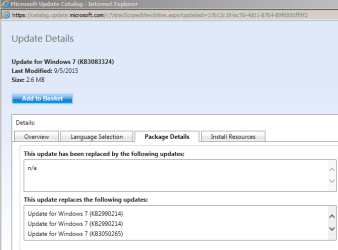
I realize that the OP no longer needs our help, but that statement is not correct. What you quoted simply means that MS did not reuse the KB number. The statement that you quoted is on most of the series of WU client updates. If you look at the MS catalog, you will see that KB3083324 does indeed replace all previous WU clients:

WU.PNG

WU2.PNG


edit: https://support.microsoft.com/en-us/kb/3083324 is being offered again. The download links work now.
 
Last edited:

My Computer My Computer

At a glance

W7 Pro SP1 64biti78GBIntel HD Graphics
Computer type
Laptop
Computer Manufacturer/Model Number
Employer provided Dell Latitude
OS
W7 Pro SP1 64bit
CPU
i7
Memory
8GB
Graphics Card(s)
Intel HD Graphics
Hard Drives
crappy SSD
Antivirus
Employer mandated Symantec Endpoint Protection
Browser
Pale Moon 64bit, IE11 64bit & Chrome 64bit
Just to let others know, I have just done a fresh install of W7 Ultimate x64 on a brand new Kingston SSD from my original retail O/S dvd, absolutely nothing else on my drive, no programs at all.....

Had to install all updates including SP1 and NET Framework 4 etc, everything was fine, rebooted, then get a message saying Windows Update installed an update for MU Agent 7.6.7600.320

Now I also have no updates available, tried the microsoft Fixit file, installed all the KB's listed in this thread, and re-installed MU using the MU installation tool from Microsoft, stopped and restarted MU in services, and tried the windows update diagnostic tool, nothing has worked, update has now been checking for updates for 8 hours with nothing found.....

 

My Computer My Computer

At a glance

Window 7 Ultimate x64Intel Core 2 Quad 2.8ghz4gbNvidia GeForce 8500GT
Computer type
PC/Desktop
Computer Manufacturer/Model Number
HP
OS
Window 7 Ultimate x64
CPU
Intel Core 2 Quad 2.8ghz
Memory
4gb
Graphics Card(s)
Nvidia GeForce 8500GT
Antivirus
Bitdefender
Browser
Chrome
Turn off all sleep or power down and leave the computer on over night and see if eventually will download updates. I have worked on Windows computers for many years and I have never had such a frustrating problem with getting updates down as I had once this particular update for Windows Update Agent was installed.
 

My Computer My Computer

At a glance

Windows7 x64
Computer type
PC/Desktop
OS
Windows7 x64
Just to let others know, I have just done a fresh install of W7 Ultimate x64 on a brand new Kingston SSD from my original retail O/S dvd, absolutely nothing else on my drive, no programs at all.....

Had to install all updates including SP1 and NET Framework 4 etc, everything was fine, rebooted, then get a message saying Windows Update installed an update for MU Agent 7.6.7600.320...
When starting from SP1 and 7.6.7600.320:
Some people are still getting a list of updates after only 20 minutes.
Some people have to wait for 20+ hours.
http://www.sevenforums.com/windows-...ust-hangs-tried-everything-2.html#post3146110
There are several threads like that.
 

My Computer My Computer

At a glance

W7 Pro SP1 64biti78GBIntel HD Graphics
Computer type
Laptop
Computer Manufacturer/Model Number
Employer provided Dell Latitude
OS
W7 Pro SP1 64bit
CPU
i7
Memory
8GB
Graphics Card(s)
Intel HD Graphics
Hard Drives
crappy SSD
Antivirus
Employer mandated Symantec Endpoint Protection
Browser
Pale Moon 64bit, IE11 64bit & Chrome 64bit
Just to let others know, I have just done a fresh install of W7 Ultimate x64 on a brand new Kingston SSD from my original retail O/S dvd, absolutely nothing else on my drive, no programs at all.....

Had to install all updates including SP1 and NET Framework 4 etc, everything was fine, rebooted, then get a message saying Windows Update installed an update for MU Agent 7.6.7600.320

Now I also have no updates available, tried the microsoft Fixit file, installed all the KB's listed in this thread, and re-installed MU using the MU installation tool from Microsoft, stopped and restarted MU in services, and tried the windows update diagnostic tool, nothing has worked, update has now been checking for updates for 8 hours with nothing found.....

Not sure if it is useful, but posting my experience here anyway:

A few days ago I did a fresh install of W7 Ultimate x32 SP1 on a rather old PC and didn't get Windows Update to work. I tried many things and left the PC on overnight (more than 12 hours) with no result.

What eventually fixed it for me was doing a fresh install (again, just to make sure) and then used WSUS Offline Update to download and install updates. After that Windows Update worked and I have done more updates now using the normal Windows Update.

Perhaps I just wasn't patient enough (waiting for hours while nothing happened) and then assumed that the whole thing was broken and screwed things up by trying to fix it. Anyway, just to let you know that WSUS Offline fixed it for me.
 

My Computer My Computer

At a glance

Windows 7 Ultimate x32Pentium 4 2.6GHz4GBGeForce FX5200
Computer type
PC/Desktop
Computer Manufacturer/Model Number
custum build
OS
Windows 7 Ultimate x32
CPU
Pentium 4 2.6GHz
Motherboard
MSI 865PE Neo2-FIS2R
Memory
4GB
Graphics Card(s)
GeForce FX5200
I had this problem as well as tried numerous fixes. What fixed it was upgrading the MS Windows Update Agento to the June2015 version. Go to https://support.microsoft.com/en-us/kb/3050265 and down to Method 2 and download the appropriate file for the version of Windows you have. Reboot your computer then install the update. Then reboot one more time. You should see the bunch of updates right away as soon as you check for updates.

I love you lol I finally got my windows update to work!! its been months lol
 

My Computer My Computer

At a glance

Windows 7 64bit home premium
Computer type
Laptop
Computer Manufacturer/Model Number
Asus
OS
Windows 7 64bit home premium
Just to let others know, I have just done a fresh install of W7 Ultimate x64 on a brand new Kingston SSD from my original retail O/S dvd, absolutely nothing else on my drive, no programs at all.....

Had to install all updates including SP1 and NET Framework 4 etc, everything was fine, rebooted, then get a message saying Windows Update installed an update for MU Agent 7.6.7600.320

Now I also have no updates available, tried the microsoft Fixit file, installed all the KB's listed in this thread, and re-installed MU using the MU installation tool from Microsoft, stopped and restarted MU in services, and tried the windows update diagnostic tool, nothing has worked, update has now been checking for updates for 8 hours with nothing found.....


Your situation and resolution attempts are not unlike the variety of things I had tried (over and over...). I thought I would share details on what the one additional consideration was that resolved in entirety for me. I have not read about this specifically anywhere within these forums or others elsewhere.

I was trying to install KB3102810 which had been identified as potential resolution to the high CPU problems with svchost.exe and wuauserv service being used by Windows Update. Attempted to install but similar to problem with the Windows Update process in use, it just showed a "searching for updates..." popup and then hung.

It did not occur to me until umpteen hours and various other fix attempts later, that maybe there had been a conflict !! Further investigation revealed that even after a fresh system restart, CPU use was high and Windows Update was already active in background when looking at Resource Monitor. I went into Windows Update - Change Settings and changed it to NEVER automatically update and then rebooted...and confirmed that process was NOT active. I reattempted the install of KB3102810 and it resulted in an entirely different set of installation prompts this time around. After it finished and requested a reboot, I tried Windows Update again. CPU use was lower as promised and after a short anxiety filled minute or two, it reported back with 217 updates available for downloading !!

Hope this helps...I feel that everyone's individual settings in Windows Update probably explains some of the inconsistency re success rates where some people had conflicts with active processes and others did not ! Anyhow, happy to have it behind me now : )
 

My Computer My Computer

At a glance

Windows 7 Home Premium 64-bit
Computer type
PC/Desktop
OS
Windows 7 Home Premium 64-bit
I'm having the same problem, managed to download Update for Windows (KB3083324). Checking for any other updates as I type this and its still just taking forever.

Any advice?
 

My Computer My Computer

At a glance

windows 7 home premium 64 bitIntel Celeron3GB RAM
Computer type
Laptop
Computer Manufacturer/Model Number
Toshiba
OS
windows 7 home premium 64 bit
CPU
Intel Celeron
Memory
3GB RAM
Antivirus
Mcafee
Browser
Firefox
I'm having the same problem, managed to download Update for Windows (KB3083324). Checking for any other updates as I type this and its still just taking forever.

Any advice?
You can try restarting the computer and then restarting the search for updates (in the hopes that you connect to a different WU server). Or, you can just let the computer search for a day or two.
 

My Computer My Computer

At a glance

W7 Pro SP1 64biti78GBIntel HD Graphics
Computer type
Laptop
Computer Manufacturer/Model Number
Employer provided Dell Latitude
OS
W7 Pro SP1 64bit
CPU
i7
Memory
8GB
Graphics Card(s)
Intel HD Graphics
Hard Drives
crappy SSD
Antivirus
Employer mandated Symantec Endpoint Protection
Browser
Pale Moon 64bit, IE11 64bit & Chrome 64bit
Found this thread searching for a resolution to my windows update just searching for updates forever. I found the solution to the problem and the reason why so many people are having issue is because microsoft changed the name of windows update agent to windows update client, so all of the microsoft support articles reference a old WU as being the most up to date.

Here is the latest installer as of June 2016, that worked for me. It found the updates after about 15-20 minutes of searching and then allowed me to update my fresh install.

http://www.sevenforums.com/windows-...ndows-update-client-windows-update-agent.html

Hope that helps anyone who ran into the same issues as me.
 

My Computer My Computer

At a glance

windows 7 professional x64
Computer type
PC/Desktop
OS
windows 7 professional x64
Back
Top
