
Windows Update Error 8024402F

superstar

New member
Local time
9:37 AM
Messages
47
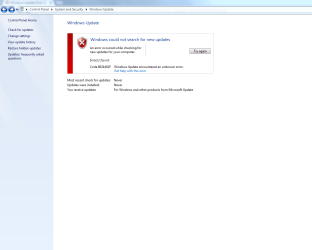
I recently installed windows 7 home basic in my pc then later upgraded to windows 7 ultimate using any time upgrade. But i am unable to get any windows update, getting error 8024402F
I tried
1.windows update troubleshooting still the same problem.
2.sfc/scan showed no problem

Any help is appreciated
 

My Computer

Computer type
Laptop
Computer Manufacturer/Model Number
Dell
OS
Microsoft Windows 7 Ultimate 64-bit 7601 Multiprocessor Free Service Pack 1
CPU
Intel(R) Core(TM) i7-2670QM CPU @ 2.20GHz
Motherboard
Dell Inc. 0MY6GN
Memory
8.00 GB
Graphics Card(s)
(1) NVIDIA GeForce GT 540M (2) Intel(R) HD Graphics Family
Sound Card
(1) Realtek High Definition Audio (2) Intel(R) Display Aud
Screen Resolution
1920 x 1080 x 32 bits (4294967296 colors) @ 60 Hz
Hard Drives
WDC WD7500BPKT-75PK4T0 ATA Device
PSU
19.5 voltage; Current: 6.7 amps 130 watts
Cooling
P11F003
Mouse
Hp Mouse X500 Wired
Internet Speed
1.38Mbps Download and 1.36Mbps Upload
Antivirus
Microsoft Security Essentials
Browser
Google chrome,Mozilla,Internet explorer
Hi,
When manually installing updates you need to switch your update settings to Never check for updates and restart the machine first.
http://www.sevenforums.com/tutorials/2797-windows-update-settings-change.html
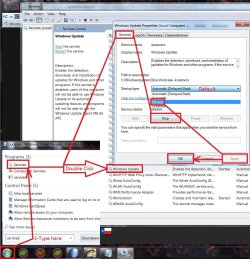
After restart verify that the windows update service is not running if it is Stop and switch to Manual apply and okay.
service stop windows update.jpg
Make sure KB3020369 is installed if not manually install it this is the main article page with all versions,
https://support.microsoft.com/en-us/kb/3020369
These other links do prompt you to download as soon as you click on them just to give you a heads up :)

Win-7 32 bit
https://download.microsoft.com/down...B0A-35769CBBE6B0/Windows6.1-KB3020369-x86.msu
Win-7 64 bit
https://download.microsoft.com/down...020-EC41D56B074F/Windows6.1-KB3020369-x64.msu

Then manually install KB3172605 main article page with all versions,
https://support.microsoft.com/en-us/kb/3172605
KB3172605
Win-7 32 bit
https://download.microsoft.com/down...A9C-6B30C3E1735A/Windows6.1-KB3172605-x86.msu

Win-7 64 bit
https://download.microsoft.com/down...67F-C713F7821374/Windows6.1-KB3172605-x64.msu

After switch your windows update and service settings back to what you had prior and manually check for updates and the rest should show up shortly.
 

My Computer

Computer type
PC/Desktop
Computer Manufacturer/Model Number
Custom assembled by me :}
OS
Win-7-Pro64bit 7-H-Prem-64bit
CPU
i7-5930K 2nd i9-9940x both water blocked VRM's too
Motherboard
ASUS SABERTOOTH X99 2nd ASUS x299 Apex
Memory
Trident-z 3200C14 2nd Trident-z 3600C16
Graphics Card(s)
EVGA 1080ti ftw3 2nd Titan Xp both water blocked
Sound Card
Built-in Realtek
Monitor(s) Displays
1-AOC G2460PG 24"G-Sync 144Hz/ 2nd 1-ASUS VG248QE 24" 144Hz
Screen Resolution
1920 x 1080 144Hz
Hard Drives
2-Samsung M.2 Evo & Evo Plus
2-Samsung 850 EVO 500GB SSD's/ 3-2.5 W.D. Black 1tb-&3-1tb/3-3.5 WD Black 1tb hdd's
PSU
EVGA SuperNOVA 1000-P2 2nd 1200-P2
Case
2-Corsair Obsidian Series 450D Black ATX Mid Tower
Cooling
Custom water loops
Keyboard
Logitech G710+/ 2nd Logitech G910
Mouse
2-RedDragon M901 Perdition 16400 dpi Gaming mouse = wired
Internet Speed
Comcast Ping 19ms 89.31mbps download speed 6.12mbps upload
Antivirus
Malwarebytes Pro/ Superantispyware Pro
Browser
FireFox & Pale moon
Other Info
2nd ASUS X299 Apex/Intel i9-9940x with Custom water loop/7H-Prem-x64/Corsair 450D case/Ram Trident-z 3600C16 4x8gb / Samsung970Evo plus 500gb SSD/Dual ssd EZ swap evo/PSU EVGA SuperNova 1200w-P2 80+Platinum/GPU Titan Xp /8-ML-140 on push-pull on 2-280GTX rads
Yup done all those things you said but still the same problem repeats
 

Attachments

  • Capture1.PNG
    Capture1.PNG
    32.7 KB · Views: 6

My Computer

Computer type
Laptop
Computer Manufacturer/Model Number
Dell
OS
Microsoft Windows 7 Ultimate 64-bit 7601 Multiprocessor Free Service Pack 1
CPU
Intel(R) Core(TM) i7-2670QM CPU @ 2.20GHz
Motherboard
Dell Inc. 0MY6GN
Memory
8.00 GB
Graphics Card(s)
(1) NVIDIA GeForce GT 540M (2) Intel(R) HD Graphics Family
Sound Card
(1) Realtek High Definition Audio (2) Intel(R) Display Aud
Screen Resolution
1920 x 1080 x 32 bits (4294967296 colors) @ 60 Hz
Hard Drives
WDC WD7500BPKT-75PK4T0 ATA Device
PSU
19.5 voltage; Current: 6.7 amps 130 watts
Cooling
P11F003
Mouse
Hp Mouse X500 Wired
Internet Speed
1.38Mbps Download and 1.36Mbps Upload
Antivirus
Microsoft Security Essentials
Browser
Google chrome,Mozilla,Internet explorer
Hi,
So both are installed and the second on prompted you to restart after it installed ?

If yes
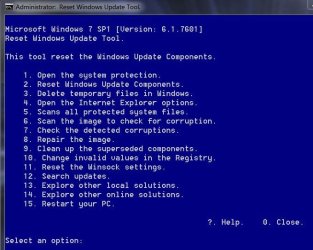
Try using this to reset the update system it's very good,
Use Option 2 on the list after right clicking it and select run as administrator
https://gallery.technet.microsoft.com/scriptcenter/Reset-Windows-Update-Agent-d824badc

Download it to your downloads folder
Right click it and select Extract all to the downloads folder.
Then right click ResetWUEng and select run as administrator
Follow the rest of the prompts
Press any key to continue
Type 2 for that Option on the list and the Enter key to reset update services..
Press y for Yes and then the Enter key I believe twice
After it has completed
Type 15 for that option and the Enter key to restart the machine.
Should say will restart in 60 seconds save your work.... press any key to continue.
After restart go to windows updates and manually check for updates shouldn't take a few minutes.
Reset win updates eng.JPG
 

My Computer

Computer type
PC/Desktop
Computer Manufacturer/Model Number
Custom assembled by me :}
OS
Win-7-Pro64bit 7-H-Prem-64bit
CPU
i7-5930K 2nd i9-9940x both water blocked VRM's too
Motherboard
ASUS SABERTOOTH X99 2nd ASUS x299 Apex
Memory
Trident-z 3200C14 2nd Trident-z 3600C16
Graphics Card(s)
EVGA 1080ti ftw3 2nd Titan Xp both water blocked
Sound Card
Built-in Realtek
Monitor(s) Displays
1-AOC G2460PG 24"G-Sync 144Hz/ 2nd 1-ASUS VG248QE 24" 144Hz
Screen Resolution
1920 x 1080 144Hz
Hard Drives
2-Samsung M.2 Evo & Evo Plus
2-Samsung 850 EVO 500GB SSD's/ 3-2.5 W.D. Black 1tb-&3-1tb/3-3.5 WD Black 1tb hdd's
PSU
EVGA SuperNOVA 1000-P2 2nd 1200-P2
Case
2-Corsair Obsidian Series 450D Black ATX Mid Tower
Cooling
Custom water loops
Keyboard
Logitech G710+/ 2nd Logitech G910
Mouse
2-RedDragon M901 Perdition 16400 dpi Gaming mouse = wired
Internet Speed
Comcast Ping 19ms 89.31mbps download speed 6.12mbps upload
Antivirus
Malwarebytes Pro/ Superantispyware Pro
Browser
FireFox & Pale moon
Other Info
2nd ASUS X299 Apex/Intel i9-9940x with Custom water loop/7H-Prem-x64/Corsair 450D case/Ram Trident-z 3600C16 4x8gb / Samsung970Evo plus 500gb SSD/Dual ssd EZ swap evo/PSU EVGA SuperNova 1200w-P2 80+Platinum/GPU Titan Xp /8-ML-140 on push-pull on 2-280GTX rads
yeah after that it asked for restart. Done resetting windows update components and restarted again still the same error :(
 

My Computer

Computer type
Laptop
Computer Manufacturer/Model Number
Dell
OS
Microsoft Windows 7 Ultimate 64-bit 7601 Multiprocessor Free Service Pack 1
CPU
Intel(R) Core(TM) i7-2670QM CPU @ 2.20GHz
Motherboard
Dell Inc. 0MY6GN
Memory
8.00 GB
Graphics Card(s)
(1) NVIDIA GeForce GT 540M (2) Intel(R) HD Graphics Family
Sound Card
(1) Realtek High Definition Audio (2) Intel(R) Display Aud
Screen Resolution
1920 x 1080 x 32 bits (4294967296 colors) @ 60 Hz
Hard Drives
WDC WD7500BPKT-75PK4T0 ATA Device
PSU
19.5 voltage; Current: 6.7 amps 130 watts
Cooling
P11F003
Mouse
Hp Mouse X500 Wired
Internet Speed
1.38Mbps Download and 1.36Mbps Upload
Antivirus
Microsoft Security Essentials
Browser
Google chrome,Mozilla,Internet explorer

My Computer

Computer type
PC/Desktop
Computer Manufacturer/Model Number
Custom assembled by me :}
OS
Win-7-Pro64bit 7-H-Prem-64bit
CPU
i7-5930K 2nd i9-9940x both water blocked VRM's too
Motherboard
ASUS SABERTOOTH X99 2nd ASUS x299 Apex
Memory
Trident-z 3200C14 2nd Trident-z 3600C16
Graphics Card(s)
EVGA 1080ti ftw3 2nd Titan Xp both water blocked
Sound Card
Built-in Realtek
Monitor(s) Displays
1-AOC G2460PG 24"G-Sync 144Hz/ 2nd 1-ASUS VG248QE 24" 144Hz
Screen Resolution
1920 x 1080 144Hz
Hard Drives
2-Samsung M.2 Evo & Evo Plus
2-Samsung 850 EVO 500GB SSD's/ 3-2.5 W.D. Black 1tb-&3-1tb/3-3.5 WD Black 1tb hdd's
PSU
EVGA SuperNOVA 1000-P2 2nd 1200-P2
Case
2-Corsair Obsidian Series 450D Black ATX Mid Tower
Cooling
Custom water loops
Keyboard
Logitech G710+/ 2nd Logitech G910
Mouse
2-RedDragon M901 Perdition 16400 dpi Gaming mouse = wired
Internet Speed
Comcast Ping 19ms 89.31mbps download speed 6.12mbps upload
Antivirus
Malwarebytes Pro/ Superantispyware Pro
Browser
FireFox & Pale moon
Other Info
2nd ASUS X299 Apex/Intel i9-9940x with Custom water loop/7H-Prem-x64/Corsair 450D case/Ram Trident-z 3600C16 4x8gb / Samsung970Evo plus 500gb SSD/Dual ssd EZ swap evo/PSU EVGA SuperNova 1200w-P2 80+Platinum/GPU Titan Xp /8-ML-140 on push-pull on 2-280GTX rads
hey this is the compressed folder of log
 

My Computer

Computer type
Laptop
Computer Manufacturer/Model Number
Dell
OS
Microsoft Windows 7 Ultimate 64-bit 7601 Multiprocessor Free Service Pack 1
CPU
Intel(R) Core(TM) i7-2670QM CPU @ 2.20GHz
Motherboard
Dell Inc. 0MY6GN
Memory
8.00 GB
Graphics Card(s)
(1) NVIDIA GeForce GT 540M (2) Intel(R) HD Graphics Family
Sound Card
(1) Realtek High Definition Audio (2) Intel(R) Display Aud
Screen Resolution
1920 x 1080 x 32 bits (4294967296 colors) @ 60 Hz
Hard Drives
WDC WD7500BPKT-75PK4T0 ATA Device
PSU
19.5 voltage; Current: 6.7 amps 130 watts
Cooling
P11F003
Mouse
Hp Mouse X500 Wired
Internet Speed
1.38Mbps Download and 1.36Mbps Upload
Antivirus
Microsoft Security Essentials
Browser
Google chrome,Mozilla,Internet explorer
Hi,
Thanks not sure where Noel is but stand by I posted for help reading it :)
Good luck
Cheers.
 

My Computer

Computer type
PC/Desktop
Computer Manufacturer/Model Number
Custom assembled by me :}
OS
Win-7-Pro64bit 7-H-Prem-64bit
CPU
i7-5930K 2nd i9-9940x both water blocked VRM's too
Motherboard
ASUS SABERTOOTH X99 2nd ASUS x299 Apex
Memory
Trident-z 3200C14 2nd Trident-z 3600C16
Graphics Card(s)
EVGA 1080ti ftw3 2nd Titan Xp both water blocked
Sound Card
Built-in Realtek
Monitor(s) Displays
1-AOC G2460PG 24"G-Sync 144Hz/ 2nd 1-ASUS VG248QE 24" 144Hz
Screen Resolution
1920 x 1080 144Hz
Hard Drives
2-Samsung M.2 Evo & Evo Plus
2-Samsung 850 EVO 500GB SSD's/ 3-2.5 W.D. Black 1tb-&3-1tb/3-3.5 WD Black 1tb hdd's
PSU
EVGA SuperNOVA 1000-P2 2nd 1200-P2
Case
2-Corsair Obsidian Series 450D Black ATX Mid Tower
Cooling
Custom water loops
Keyboard
Logitech G710+/ 2nd Logitech G910
Mouse
2-RedDragon M901 Perdition 16400 dpi Gaming mouse = wired
Internet Speed
Comcast Ping 19ms 89.31mbps download speed 6.12mbps upload
Antivirus
Malwarebytes Pro/ Superantispyware Pro
Browser
FireFox & Pale moon
Other Info
2nd ASUS X299 Apex/Intel i9-9940x with Custom water loop/7H-Prem-x64/Corsair 450D case/Ram Trident-z 3600C16 4x8gb / Samsung970Evo plus 500gb SSD/Dual ssd EZ swap evo/PSU EVGA SuperNova 1200w-P2 80+Platinum/GPU Titan Xp /8-ML-140 on push-pull on 2-280GTX rads
The error here is usually a temporary one - there's something blocking communication between the computer and the MS servers.

There are no problems in the CheckSUR log but there are a number of issues in the CBS.log, although the SFC scan was clear. It looks to me as if there may be some corruption present in the Windows Update Agent

A look at the windowsupdate.log file and the event logs may give us some more detailed information on the problem.

Please upload the following files:
C:\Windows\Windowsupdate.log
C:\Windows\System32\winevt\Logs\System.evtx
C:\Windows\System32\winevt\Logs\Application.evtx

...and I'll take a look.
 

My Computer

Computer type
Laptop
Computer Manufacturer/Model Number
Asus K52F or Lenovo B51-80
OS
Win 7 x64 Home Premium (and x86 VirtualBox VM)/Win10
CPU
i3 370M/i7 6500U
Motherboard
Asus/Lenovo
Memory
8GB - finally :)/8GB
Graphics Card(s)
it's an i3, dude!/dual Intel&nVidia
Sound Card
onboard
Monitor(s) Displays
15.6" built-in
Screen Resolution
1366x768/1920x1080
Hard Drives
750GB Seagate internal
Sundry external drives attached to other computers on the local network
1TB SSD on the Lenovo
PSU
n/a
Internet Speed
as much as I can get - usually on a dongle/phone, so <1MB/s
Antivirus
MSE/Defender
Browser
IE11/12/Edge/Chrome/FF(if I must)
Hey I uploaded the files you asked for :)
 

My Computer

Computer type
Laptop
Computer Manufacturer/Model Number
Dell
OS
Microsoft Windows 7 Ultimate 64-bit 7601 Multiprocessor Free Service Pack 1
CPU
Intel(R) Core(TM) i7-2670QM CPU @ 2.20GHz
Motherboard
Dell Inc. 0MY6GN
Memory
8.00 GB
Graphics Card(s)
(1) NVIDIA GeForce GT 540M (2) Intel(R) HD Graphics Family
Sound Card
(1) Realtek High Definition Audio (2) Intel(R) Display Aud
Screen Resolution
1920 x 1080 x 32 bits (4294967296 colors) @ 60 Hz
Hard Drives
WDC WD7500BPKT-75PK4T0 ATA Device
PSU
19.5 voltage; Current: 6.7 amps 130 watts
Cooling
P11F003
Mouse
Hp Mouse X500 Wired
Internet Speed
1.38Mbps Download and 1.36Mbps Upload
Antivirus
Microsoft Security Essentials
Browser
Google chrome,Mozilla,Internet explorer
I can't really see too much wrong in anything there.

However, I did notice that you appear to have ProxyCap installed - since this error may be related to proxy issues, I would uninstall that at least temporarily.

DCPlusPLus is also installed - and had probably also better come out until we have the problem resolved.

You have a mass of CAPI2 Error 4107 messages - see here for a possible resolution https://support.microsoft.com/en-gb/kb/2328240
 

My Computer

Computer type
Laptop
Computer Manufacturer/Model Number
Asus K52F or Lenovo B51-80
OS
Win 7 x64 Home Premium (and x86 VirtualBox VM)/Win10
CPU
i3 370M/i7 6500U
Motherboard
Asus/Lenovo
Memory
8GB - finally :)/8GB
Graphics Card(s)
it's an i3, dude!/dual Intel&nVidia
Sound Card
onboard
Monitor(s) Displays
15.6" built-in
Screen Resolution
1366x768/1920x1080
Hard Drives
750GB Seagate internal
Sundry external drives attached to other computers on the local network
1TB SSD on the Lenovo
PSU
n/a
Internet Speed
as much as I can get - usually on a dongle/phone, so <1MB/s
Antivirus
MSE/Defender
Browser
IE11/12/Edge/Chrome/FF(if I must)
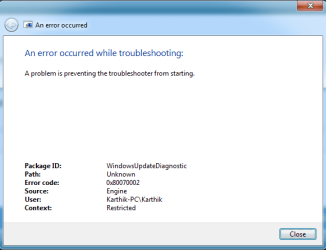
so you want me to uninstall proxycap and Dc++ and check again for windows updates? This is the error i am getting when i use the windows update trouble shooter
 

Attachments

  • Capture2.PNG
    Capture2.PNG
    11.2 KB · Views: 14
  • Capture3.PNG
    Capture3.PNG
    4.6 KB · Views: 4

My Computer

Computer type
Laptop
Computer Manufacturer/Model Number
Dell
OS
Microsoft Windows 7 Ultimate 64-bit 7601 Multiprocessor Free Service Pack 1
CPU
Intel(R) Core(TM) i7-2670QM CPU @ 2.20GHz
Motherboard
Dell Inc. 0MY6GN
Memory
8.00 GB
Graphics Card(s)
(1) NVIDIA GeForce GT 540M (2) Intel(R) HD Graphics Family
Sound Card
(1) Realtek High Definition Audio (2) Intel(R) Display Aud
Screen Resolution
1920 x 1080 x 32 bits (4294967296 colors) @ 60 Hz
Hard Drives
WDC WD7500BPKT-75PK4T0 ATA Device
PSU
19.5 voltage; Current: 6.7 amps 130 watts
Cooling
P11F003
Mouse
Hp Mouse X500 Wired
Internet Speed
1.38Mbps Download and 1.36Mbps Upload
Antivirus
Microsoft Security Essentials
Browser
Google chrome,Mozilla,Internet explorer
Hmmm - that's not a common error - it's a 'file not found' one.

Try using the manual method from the article instead.
 

My Computer

Computer type
Laptop
Computer Manufacturer/Model Number
Asus K52F or Lenovo B51-80
OS
Win 7 x64 Home Premium (and x86 VirtualBox VM)/Win10
CPU
i3 370M/i7 6500U
Motherboard
Asus/Lenovo
Memory
8GB - finally :)/8GB
Graphics Card(s)
it's an i3, dude!/dual Intel&nVidia
Sound Card
onboard
Monitor(s) Displays
15.6" built-in
Screen Resolution
1366x768/1920x1080
Hard Drives
750GB Seagate internal
Sundry external drives attached to other computers on the local network
1TB SSD on the Lenovo
PSU
n/a
Internet Speed
as much as I can get - usually on a dongle/phone, so <1MB/s
Antivirus
MSE/Defender
Browser
IE11/12/Edge/Chrome/FF(if I must)
yeah done that using manual method and checked for updates again still the same problem :( and do I need to uninstall those 2 applications and check for updates?
 

My Computer

Computer type
Laptop
Computer Manufacturer/Model Number
Dell
OS
Microsoft Windows 7 Ultimate 64-bit 7601 Multiprocessor Free Service Pack 1
CPU
Intel(R) Core(TM) i7-2670QM CPU @ 2.20GHz
Motherboard
Dell Inc. 0MY6GN
Memory
8.00 GB
Graphics Card(s)
(1) NVIDIA GeForce GT 540M (2) Intel(R) HD Graphics Family
Sound Card
(1) Realtek High Definition Audio (2) Intel(R) Display Aud
Screen Resolution
1920 x 1080 x 32 bits (4294967296 colors) @ 60 Hz
Hard Drives
WDC WD7500BPKT-75PK4T0 ATA Device
PSU
19.5 voltage; Current: 6.7 amps 130 watts
Cooling
P11F003
Mouse
Hp Mouse X500 Wired
Internet Speed
1.38Mbps Download and 1.36Mbps Upload
Antivirus
Microsoft Security Essentials
Browser
Google chrome,Mozilla,Internet explorer
I think it would be a good idea.
 

My Computer

Computer type
Laptop
Computer Manufacturer/Model Number
Asus K52F or Lenovo B51-80
OS
Win 7 x64 Home Premium (and x86 VirtualBox VM)/Win10
CPU
i3 370M/i7 6500U
Motherboard
Asus/Lenovo
Memory
8GB - finally :)/8GB
Graphics Card(s)
it's an i3, dude!/dual Intel&nVidia
Sound Card
onboard
Monitor(s) Displays
15.6" built-in
Screen Resolution
1366x768/1920x1080
Hard Drives
750GB Seagate internal
Sundry external drives attached to other computers on the local network
1TB SSD on the Lenovo
PSU
n/a
Internet Speed
as much as I can get - usually on a dongle/phone, so <1MB/s
Antivirus
MSE/Defender
Browser
IE11/12/Edge/Chrome/FF(if I must)
uninstalled those apps and yet still no change same error again.
 

My Computer

Computer type
Laptop
Computer Manufacturer/Model Number
Dell
OS
Microsoft Windows 7 Ultimate 64-bit 7601 Multiprocessor Free Service Pack 1
CPU
Intel(R) Core(TM) i7-2670QM CPU @ 2.20GHz
Motherboard
Dell Inc. 0MY6GN
Memory
8.00 GB
Graphics Card(s)
(1) NVIDIA GeForce GT 540M (2) Intel(R) HD Graphics Family
Sound Card
(1) Realtek High Definition Audio (2) Intel(R) Display Aud
Screen Resolution
1920 x 1080 x 32 bits (4294967296 colors) @ 60 Hz
Hard Drives
WDC WD7500BPKT-75PK4T0 ATA Device
PSU
19.5 voltage; Current: 6.7 amps 130 watts
Cooling
P11F003
Mouse
Hp Mouse X500 Wired
Internet Speed
1.38Mbps Download and 1.36Mbps Upload
Antivirus
Microsoft Security Essentials
Browser
Google chrome,Mozilla,Internet explorer
OK - post the new windowsupdate.log file please
 

My Computer

Computer type
Laptop
Computer Manufacturer/Model Number
Asus K52F or Lenovo B51-80
OS
Win 7 x64 Home Premium (and x86 VirtualBox VM)/Win10
CPU
i3 370M/i7 6500U
Motherboard
Asus/Lenovo
Memory
8GB - finally :)/8GB
Graphics Card(s)
it's an i3, dude!/dual Intel&nVidia
Sound Card
onboard
Monitor(s) Displays
15.6" built-in
Screen Resolution
1366x768/1920x1080
Hard Drives
750GB Seagate internal
Sundry external drives attached to other computers on the local network
1TB SSD on the Lenovo
PSU
n/a
Internet Speed
as much as I can get - usually on a dongle/phone, so <1MB/s
Antivirus
MSE/Defender
Browser
IE11/12/Edge/Chrome/FF(if I must)
new windows update
 

Attachments

My Computer

Computer type
Laptop
Computer Manufacturer/Model Number
Dell
OS
Microsoft Windows 7 Ultimate 64-bit 7601 Multiprocessor Free Service Pack 1
CPU
Intel(R) Core(TM) i7-2670QM CPU @ 2.20GHz
Motherboard
Dell Inc. 0MY6GN
Memory
8.00 GB
Graphics Card(s)
(1) NVIDIA GeForce GT 540M (2) Intel(R) HD Graphics Family
Sound Card
(1) Realtek High Definition Audio (2) Intel(R) Display Aud
Screen Resolution
1920 x 1080 x 32 bits (4294967296 colors) @ 60 Hz
Hard Drives
WDC WD7500BPKT-75PK4T0 ATA Device
PSU
19.5 voltage; Current: 6.7 amps 130 watts
Cooling
P11F003
Mouse
Hp Mouse X500 Wired
Internet Speed
1.38Mbps Download and 1.36Mbps Upload
Antivirus
Microsoft Security Essentials
Browser
Google chrome,Mozilla,Internet explorer

There appears to be an underlying error that results in the obvious one.

Please open an Elevated Command Prompt, and run the following command...

netsh winhttp reset proxy

reboot, and try Windows update again.
 

My Computer

Computer type
Laptop
Computer Manufacturer/Model Number
Asus K52F or Lenovo B51-80
OS
Win 7 x64 Home Premium (and x86 VirtualBox VM)/Win10
CPU
i3 370M/i7 6500U
Motherboard
Asus/Lenovo
Memory
8GB - finally :)/8GB
Graphics Card(s)
it's an i3, dude!/dual Intel&nVidia
Sound Card
onboard
Monitor(s) Displays
15.6" built-in
Screen Resolution
1366x768/1920x1080
Hard Drives
750GB Seagate internal
Sundry external drives attached to other computers on the local network
1TB SSD on the Lenovo
PSU
n/a
Internet Speed
as much as I can get - usually on a dongle/phone, so <1MB/s
Antivirus
MSE/Defender
Browser
IE11/12/Edge/Chrome/FF(if I must)
Yup done that still no change same error code again:(
 

My Computer

Computer type
Laptop
Computer Manufacturer/Model Number
Dell
OS
Microsoft Windows 7 Ultimate 64-bit 7601 Multiprocessor Free Service Pack 1
CPU
Intel(R) Core(TM) i7-2670QM CPU @ 2.20GHz
Motherboard
Dell Inc. 0MY6GN
Memory
8.00 GB
Graphics Card(s)
(1) NVIDIA GeForce GT 540M (2) Intel(R) HD Graphics Family
Sound Card
(1) Realtek High Definition Audio (2) Intel(R) Display Aud
Screen Resolution
1920 x 1080 x 32 bits (4294967296 colors) @ 60 Hz
Hard Drives
WDC WD7500BPKT-75PK4T0 ATA Device
PSU
19.5 voltage; Current: 6.7 amps 130 watts
Cooling
P11F003
Mouse
Hp Mouse X500 Wired
Internet Speed
1.38Mbps Download and 1.36Mbps Upload
Antivirus
Microsoft Security Essentials
Browser
Google chrome,Mozilla,Internet explorer
Back
Top