Windows Update Error 80246008 in Windows 7 - Fix

Windows Update Error 80246008 in Windows 7 - Fix

   Information

Reasons

This error is caused by issues with Background Inteligence Transfer Service or with COM+ Event System


Troubleshooting

1.Go to Start>>Search>>Services.msc

and check below services exist, have correct settings and are working

COM+ Event System :Automatic (started)

Background Intelligent Transfer Service (BITS):Manual or Automatic(Delayed Start)

If you have another settings you have to correct it.If COM+ Event System is not started then please run it manually,next run manually BITS service.

   Note

Please save order with running services.BITS service dependce from COM+ Event System -if this service is not working BITS service will not work too.


If you have only issue with running BITS service

STEP I

Reset Windows Update backgrounds components

how,see Windows Update - Reset

STEP II

Make sure that following folder exist

C:\ProgramData\Microsoft\Network\Downloader

   Note

Folder C:\ProgramData is hidden.To see this folder you have to in Control panel>>Folder Options enable option "Show hidden files and folders" or use any good 3p file manager which can see everything independly from system settings


if you don't have this folders,create it manually.Check also permissions for this folder

Administrators group and System have full access (all checked) to this folder, no one else has permission to that.

//how to check & change permissions see this tutorial CLICK //

see also

STEP III

Empty folder C:\ProgramData\Microsoft\Network\Downloader.

STEP IV

Reset fully Windows Updates

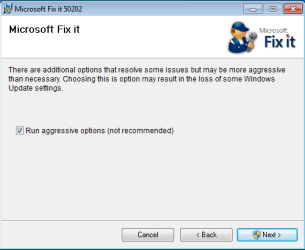
Please run this MS Fix 50202 in AGGRESSIVE MODE (image)

KB971058.png

STEP V

Uninstall all 3p security software,download accelerators and any program for managing and monitoring network connections.

If you have issue with COM+ Event System too...

As I said before if this service not working, BITS service will not work too. If unable to run this service or service doesn't exist please import this EventSystemWin7.reg fix to registry.


Download


and next restart computer

If you don't have BITS service or cannot to run it,none of previous method help...

Import BITSWin7.reg below fix for BITS service to registry.


Download


Because for some subkeys Administrators defaultly don't have full control to workaround this problem,import this fix from SYSTEM account

1.Download PsTools,extract from this psexec.exe file and put it in C:\Windows\System32
2.Download my fix for BITS service and unpack it anywhere e.g on your desktop
3..Run cmd.exe with administrative previlliges (right click on cmd.exe and choose "run as admin") and type:

psexec -s -i -d regedit


//This command run regedit from System account.//

4.Go to File>>Import choose location where you stored BITSWIN7.reg file,choose it and apply.

5.Restart Computer


Attachments

Last edited by a moderator:
First of all hello Win7 Fans.
Im new to the forum and need some serious help.

I have the same issue as everyone else and I think I have been hit with a virus that now disabled me from getting any windows updates. I have searched online and your tutorial seemed to work for everyone except for me.

I have tried all the steps as you mentioned them and the only thing that didnt work for me was the Microsoft Fix it.
Halfway it stopped and gave me an error and had no choice but to cancel. (now the windows update service isnt even running).

What is going on??

Thanks
Fitim
 

My Computer

OS
Win 7 Pro 64bit
Windows update is the only thing that is not working?? If u also have issues in firewall and chkdsk (as I had), the only solution is to reinstall windows.
 

My Computer

OS
Windows 7 starter 32 bit
You are correct.
Windows update doesn't work and I know for a fact the firewall doesn't work either.
The checkdisk I haven't checked yet.

Man I have tons of softwares that have plenty of plugins that I don't feel like reinstalling :(
This sucks. I don't even know what caused it or when it happened :(.

Thanks
Fitim
 

My Computer

OS
Win 7 Pro 64bit
Also, Microsoft Security Essentials updates was broken. If you can, try to restore your system to a previous restore point.
If that doesn't work... reinstall windows :(
 

My Computer

OS
Windows 7 starter 32 bit
All of these issues can typically be fixed if the right person is assisting you. However nothing beats a clean fresh install of Windows.
 

My Computer

OS
Windows 7 Pro x64
CPU
i7 2600K 4.7Ghz
Memory
16GB
Hard Drives
OCZ Vertex 3
RAID 0 SSD
Internet Speed
100Mbps
Worked perfectly for my BITS issue, thanks.

Thank you thank you for this effective resource. I had a missing BITS issue and, like others, got no notice at all from the system that Updates were failing. Your registry edit did the trick and updates now work perfectly. Thanks!
 

My Computer

Computer Manufacturer/Model Number
Dell Inspiron 580S
OS
Windows 7 64 bit
CPU
3.2 GHz
Memory
6 GB
Dear RuthC,
Just curious but which "effective Resource" or posting were you referring to?
That might be helpful to others looking for a resolution as I was some time ago.

Thanks, Whiteshoe1
 

My Computer

OS
Vista 32, Win 7-32 &64, XP ( 8-PC's)
Hello Hallie, and welcome to Seven Forums.

Are you logged in to an administrator account?

When you right click on the .reg file, do you have a Merge option?
 

My Computer

Computer type
PC/Desktop
Computer Manufacturer/Model Number
Self built custom
OS
64-bit Windows 11 Pro for Workstations
CPU
Intel i7-8700K OC'd to 5 GHz
Motherboard
ASUS ROG Maximus XI Formula Z390
Memory
64 GB (4x16GB) G.SKILL TridentZ RGB DDR4 3600 MHz
Graphics Card(s)
ASUS ROG-STRIX-GTX1080TI-O11G-GAMING
Sound Card
Integrated
Monitor(s) Displays
2 x Samsung Odyssey G7 27"
Screen Resolution
2560x1440
Hard Drives
1TB Samsung 990 PRO M.2,
4TB Samsung 990 PRO PRO M.2,
TerraMaster F8 SSD Plus NAS
PSU
Seasonic Prime Titanium 850W
Case
Thermaltake Core P3
Cooling
Corsair Hydro H115i
Keyboard
Logitech wireless K800
Mouse
Logitech MX Master 4
Internet Speed
2 Gb/s Download and 100 Mb/s Upload
Antivirus
Malwarebyte Anti-Malware Premium
Browser
Google Chrome
Other Info
Logitech Z625 speaker system,
Logitech BRIO 4K Pro webcam,
HP Color LaserJet Pro MFP M477fdn,
APC SMART-UPS RT 1000 XL - SURT1000XLI,
Galaxy S23 Plus phone
Thank god for google

Ive been trying to fix this windows update thing for 13 hrs now. At first i have a very slow internet connection thing that occurs usually when its raining out. However this was not case today, for some reason the status showed excellent signal on the wireless but the browser would not load the pages. so i tried a whole bunch of things to try and get it to work, nothing helped. i tried to do microsoft security essential update and kept getting error, so i thought it was a browser thing. i tried the windows update and that tooo did not work, i mean the update didnt go through and give me this error number. I tried system restore that too didnot work. all day i google this problem and all over the microsoft help garbage, i kept seeing this BITS thing but could not find it in the services list. so after dinner i google the BITS name and this forum came up, i saw the EVENT SYSTem thing and just on a hunch decided to not just start it but instead selected the "restart" button, this gave me a dialog box stating that bits and some other would also have to restart, so i selected yes of course. TTTTTHHHHHAAAANNNKKKK YOU:D:D:D:D:D:D:D it worked, the BITS showed up and was wrking. I immediately did the security update and scan and are currently doing the window update. it worked, did i say thank you.lol. now i can go to bed.:sleepy:
 

My Computer

Computer type
PC/Desktop
Computer Manufacturer/Model Number
dell
OS
windows 7 64 bit
Thank you for your help. I had been working on that for days.
 

My Computer

Computer type
PC/Desktop
Computer Manufacturer/Model Number
HP
OS
Windows 7 Home Premium
Thank you so much for this! I've been trying to fix the problem for two days and importing BITSWin7 to registry finally helped me.
 

My Computer

Computer type
PC/Desktop
OS
Windows 7 Professional 32 bit
Hello here,

Thanks for that thread.

I have one question should i install all updates or what? when i check updates there is a lot of updates so i have to install all of them? thanks
 

My Computer

Computer type
PC/Desktop
Computer Manufacturer/Model Number
asus
OS
windows nome premium x86
Motherboard
asus
Memory
2
ABSOLUTELY! Allow windows to always update their important patches - this is just another line of defense against possible attacks on your computer. Ignoring available updates, in my opinion, is a big no-no. I've had to repair several customer's computers because they blew them off. My recommendation is to "check for updates", install the important ones only (don't select the optional ones at this time). Then repeat the "check for updates" until no more are shown. THEN, look at the optional updates - I always have a few of the optional ones I install (but not all of them such as Bing (or Bing Desktop), or the search tool (don't recall the exact name for the optional items).
 

My Computer

OS
Windows 7 Pro 64 bit
I don't ever know you, but thank you so much for your help. I owe you some beers. :D
 

My Computer

Computer type
Laptop
Computer Manufacturer/Model Number
Asus
OS
Windows 7 Ultimate x64 - Windows 8 Pro x64
CPU
Intel Pentium D T2370 @1,73 GHz
Motherboard
Asus X51L
The Fixdamage program from Malwarebytes Anti-Rootkit scanner can now automatically fix this error for you.
 

My Computer

OS
Windows 7 Pro x64
CPU
i7 2600K 4.7Ghz
Memory
16GB
Hard Drives
OCZ Vertex 3
RAID 0 SSD
Internet Speed
100Mbps
Windows 7 64-bit

THANK YOU! My BITS Service apparently stopped working a couple of months ago. I did not realize it until I tried running Windows Update and it would not work. I tried several fixes from other websites, but this one was the only one that worked.
 

My Computer

OS
Windows 7 Ultimate 32bit
I am having some serious problems here and have been for quite awhile. It is extremely frustrating given that even when I try a clean Windows install the problems keep reoccurring. Here is the information I have collected so far:

Windows Updates Error Code 80246008
Also, cannot install printer (HP Photosmart D110 with WiFi connection) - pretty sure these problems are related but can't prove it
Cannot get Background Intelligent Transfer Service (BITS) to start (Startup Type: Automatic Delayed Start, Automatic, and Manual have been tried)
"Windows could not start the Background Intelligent Transfer Service on Local Computer. For more information, review the System Event Log. If this is a non-Microsoft service, contact the service vendor, and refer to service-specific error code -2147024894":
In addition I keep having to take ownership of folders in order to run the programs within them so I may need a way to reset permissions.
1. Reset to factory settings including reinstalling windows several times
2. Ran several System Restores
3. DL and Install Update kb954430 [next update kb973688 also failed to install]
4. sfc /scannow run as admin (elevated) x ["Windows Resource Protection did not find any integrity violations."]
5. Checked the dependancies for BITS - "Terminal Services" is not listed, Remote Procedure Call (RPC) is started, Systrem Event Notification is started, "Windows Management Instrumentation Driver Extensions" is not listed, "COM+ Event System" is started, "DCOM Server Process Launcher" is started.
6. Ran Tweaking.com Windows repair - 17 updates then downloaded.
7. When I try to start BITS I get an error code -2147024849
8. Reset/Reregister Windows Update Components and Reset Windows Update Full
9. Scanned and fixed problems using MalwareBytes
10. Ran Farbar scan as admin. Results:
Farbar Service Scanner Version: 26-07-2015
Ran by klear6 (administrator) on 23-08-2015 at 03:07:48
Running from "C:\Users\klear6\Desktop\4 Jagged\Windows Fixes"
Microsoft Windows 7 Home Premium Service Pack 1 (X86)
Boot Mode: Normal
****************************************************************

Internet Services:
============

Connection Status:
==============
Localhost is accessible.
LAN connected.
Google IP is accessible.
Google.com is accessible.
Yahoo.com is accessible.


Windows Firewall:
=============

Firewall Disabled Policy:
==================


System Restore:
============

System Restore Policy:
========================


Action Center:
============


Windows Update:
============
BITS Service is not running. Checking service configuration:
The start type of BITS service is OK.
The ImagePath of BITS service is OK.
The ServiceDll of BITS service is OK.


Windows Autoupdate Disabled Policy:
============================


Windows Defender:
==============
WinDefend Service is not running. Checking service configuration:
The start type of WinDefend service is set to Demand. The default start type is Auto.
The ImagePath of WinDefend service is OK.
The ServiceDll of WinDefend service is OK.


Windows Defender Disabled Policy:
==========================
[HKEY_LOCAL_MACHINE\SOFTWARE\Microsoft\Windows Defender]
"DisableAntiSpyware"=DWORD:1


Other Services:
==============


File Check:
========
C:\Windows\system32\nsisvc.dll => File is digitally signed
C:\Windows\system32\Drivers\nsiproxy.sys => File is digitally signed
C:\Windows\system32\dhcpcore.dll => File is digitally signed
C:\Windows\system32\Drivers\afd.sys => File is digitally signed
C:\Windows\system32\Drivers\tdx.sys => File is digitally signed
C:\Windows\system32\Drivers\tcpip.sys => File is digitally signed
C:\Windows\system32\dnsrslvr.dll => File is digitally signed
C:\Windows\system32\mpssvc.dll => File is digitally signed
C:\Windows\system32\bfe.dll => File is digitally signed
C:\Windows\system32\Drivers\mpsdrv.sys => File is digitally signed
C:\Windows\system32\SDRSVC.dll => File is digitally signed
C:\Windows\system32\vssvc.exe => File is digitally signed
C:\Windows\system32\wscsvc.dll => File is digitally signed
C:\Windows\system32\wbem\WMIsvc.dll => File is digitally signed
C:\Windows\system32\wuaueng.dll => File is digitally signed
C:\Windows\system32\qmgr.dll => File is digitally signed
C:\Windows\system32\es.dll => File is digitally signed
C:\Windows\system32\cryptsvc.dll => File is digitally signed
C:\Program Files\Windows Defender\MpSvc.dll => File is digitally signed
C:\Windows\system32\ipnathlp.dll => File is digitally signed
C:\Windows\system32\iphlpsvc.dll => File is digitally signed
C:\Windows\system32\svchost.exe => File is digitally signed
C:\Windows\system32\rpcss.dll => File is digitally signed


**** End of log ****

11. Windows Update Diagnostic - It says Compressed (zipped) Folders Error: File not found or no read permission
At this point I had to reinstall my audio driver so I know something changed. It then download one out of 30 windows updates and bits was running but when downloading updates it hung up at 0%.
12. I have tried what is suggested in the original post here: http://www.sevenforums.com/tutorials/113399-windows-update-error-80246008-windows-7-fix.html and it did not solve the problem - Did I do something wrong?

Regarding the printer:
I can see it when I do "Add a Printer" (it shows the IP address and the Host and says it is ready but the "Print" button is grayed out). It crashes part way through driver installation without warning or an error notice. At times I can find two printers from HP even though there is only one printer on the network
1. Downloaded the proper driver from the HP website (because Windows could not update drivers list)
2. Tried HPSupportSolutionsFramework-12.0.30.81.exe
It now appears that my mom's Mac cannot print wither, but my husband's PC can. As I was typing this she tried printing again and it went through. The next time I tried installing the driver it got most of the way through the installation but when I had to find the device using the wireless network option and I enter the IP it says that it is not found. I double checked on the printer that the IP was correct. It is. What is going on?
(I have tried these fixes with Avast Antivirus and Windows Firewall both enabled and disabled)
System Specs:
OS - Windows 7 Home Premium x32Acer
Manufacturer/Model # - Aspire One D270-1865;
CPU - Intel Atom N2600 (1.6 GHz, 1 MB L2 cache (only shows as 512 KB L1 and 32 KB L2 for some reason);
Memory - 2 GB DDR3;
Motherboard - Acer JE01_CT;
Video Card - Intel Graphics Media Accelerator 3600 Series;
Harddrive - 320 GB HDD (set up by Acer with seperate partition for Acer e Recovery with Windows Home Starter)
Antivirus - avast! Free Antivirus 2015
Browser - Maxthon v4.4.7.1000

Sorry that was so long, I am just trying to provide you guys with as much information to work with as possible.

 

My Computer

Computer type
Laptop
Computer Manufacturer/Model Number
Acer Aspire One D270-1865
OS
Windows 7 Home Premium x32
CPU
Intel Atom N2600 (1.6 GHz, 1 MB L2 cache)
Motherboard
Acer JE01_CT
Memory
2 GB DDR3
Graphics Card(s)
Intel Graphics Media Accelerator 3600 Series
Hard Drives
320 GB HDD
(set up by Acer with seperate partition for Acer e Recovery with Windows Home Starter)
Antivirus
avast! Free Antivirus 2015
Browser
Maxthon v4.4.7.1000
Hey guys! I did everything,but when I try to import the file i cant find it. I do have the option " Merge " when I right-click the file .. Please,help me !
 

My Computer

Computer type
PC/Desktop
OS
Windows 7 32 bit
OMG something worked! I have been having this problem for over two months and had almost given up on ever automatically downloading up update again. I feel your guys' frustration and I hope this helps. After about a million suggestions that failed to help someone posted:

***************

---Quote---
Click Start, click Run, type regedit, and then click OK.
Locate the following registry subkey:
HKEY_LOCAL_MACHINE\SYSTEM\CurrentControlSet\Control\BackupRestore\FilesNotToBackup
If the registry subkey exists, go to step 4. If the registry subkey does not exist, create the registry subkey. To do this, follow these steps:
Right-click Backup Restore, point to New, and then click Key.
Type FilesNotToBackup, and then press ENTER.
Quit Registry Editor.
---End Quote---
should work ;)
***************

Give it a shot if nothing else works!
Hope it helps!
 

My Computer

Computer type
Laptop
Computer Manufacturer/Model Number
Acer Aspire One D270-1865
OS
Windows 7 Home Premium x32
CPU
Intel Atom N2600 (1.6 GHz, 1 MB L2 cache)
Motherboard
Acer JE01_CT
Memory
2 GB DDR3
Graphics Card(s)
Intel Graphics Media Accelerator 3600 Series
Hard Drives
320 GB HDD
(set up by Acer with seperate partition for Acer e Recovery with Windows Home Starter)
Antivirus
avast! Free Antivirus 2015
Browser
Maxthon v4.4.7.1000
Back
Top