
Windows Update Error 80246008 in Windows 7 - Fix

Windows Update Error 80246008 in Windows 7 - Fix

   Information

Reasons

This error is caused by issues with Background Inteligence Transfer Service or with COM+ Event System


Troubleshooting

1.Go to Start>>Search>>Services.msc

and check below services exist, have correct settings and are working

COM+ Event System :Automatic (started)

Background Intelligent Transfer Service (BITS):Manual or Automatic(Delayed Start)

If you have another settings you have to correct it.If COM+ Event System is not started then please run it manually,next run manually BITS service.

   Note

Please save order with running services.BITS service dependce from COM+ Event System -if this service is not working BITS service will not work too.


If you have only issue with running BITS service

STEP I

Reset Windows Update backgrounds components

how,see Windows Update - Reset

STEP II

Make sure that following folder exist

C:\ProgramData\Microsoft\Network\Downloader

   Note

Folder C:\ProgramData is hidden.To see this folder you have to in Control panel>>Folder Options enable option "Show hidden files and folders" or use any good 3p file manager which can see everything independly from system settings


if you don't have this folders,create it manually.Check also permissions for this folder

Administrators group and System have full access (all checked) to this folder, no one else has permission to that.

//how to check & change permissions see this tutorial CLICK //

see also

STEP III

Empty folder C:\ProgramData\Microsoft\Network\Downloader.

STEP IV

Reset fully Windows Updates

Please run this MS Fix 50202 in AGGRESSIVE MODE (image)
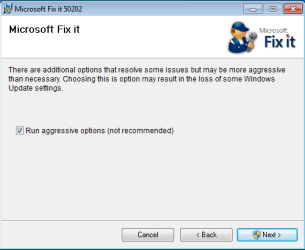
KB971058.png

STEP V

Uninstall all 3p security software,download accelerators and any program for managing and monitoring network connections.

If you have issue with COM+ Event System too...

As I said before if this service not working, BITS service will not work too. If unable to run this service or service doesn't exist please import this EventSystemWin7.reg fix to registry.


Download


and next restart computer

If you don't have BITS service or cannot to run it,none of previous method help...

Import BITSWin7.reg below fix for BITS service to registry.


Download


Because for some subkeys Administrators defaultly don't have full control to workaround this problem,import this fix from SYSTEM account

1.Download PsTools,extract from this psexec.exe file and put it in C:\Windows\System32
2.Download my fix for BITS service and unpack it anywhere e.g on your desktop
3..Run cmd.exe with administrative previlliges (right click on cmd.exe and choose "run as admin") and type:

psexec -s -i -d regedit


//This command run regedit from System account.//

4.Go to File>>Import choose location where you stored BITSWIN7.reg file,choose it and apply.

5.Restart Computer


Attachments

Last edited by a moderator:
Win7 BITS fix (did not work 09/10/15)...

I thought this was going to do it, but alas, the BITS service is back to manual and NOT started......

A little background - my last successful Win7 update from MS was mid August 2015 (Adobe Flash Player 18, Auslogics Disk Defrag, Auslogic Registry Cleaner, Auslogic Registry Defrag). Anyhow I had no idea I was not receiving any updates until I was working on my moms desktop Win 7 and saw she was having updates installed but I was not....

So, I install Avira v14 Internet Security Free, Malware Bytes, Super Anti-Spyware and they do not find anything...

Running under the Windows SELECTIVE STARTUP w/load system services and JUST the windows services (however Avira Mail Protection, Real-Time Protection, Web Protection) also running....

BITS is shown as being checked, but STOPPED

Here I am...
- I followed Steps 1 thru 5
- My COM+ Event System was started and Automatic
- My BITS was NOT started and Automatic-Delayed

STEP I - Downloaded Reset_Windows_Update_History.bat & Ran - OK

STEP II - Folder Existed

STEP III - It was Empty

STEP IV - Ran MS Fix 50202 in aggressive mode (checked it); rebooted PC

STEP V - Uninstalled Auslogic BoostSpeed 8, BitMeter, Auslogic Driver Updater; rebooted PC
(*** should I have UNINSTALLED AVIRA, too??? ***)
DID NOT need the EventSystemWin7.reg as COM+ was A-OK
DID DOWNLOAD BITSWin7.reg and placed on desktop
DID DOWNLOAD PsTools; copied PSEXEC.EXE to C:\Windows\System32
Extracted the PsTools fix to my DESKTOP
RAN psexec -s -i -d regedit in the CMD as Administrator
RAN REGEDIT.EXE in the CMD as Administrator
IMPORTED BITSWin7.reg into the registry - it was SUCCESSFUL
Exited REGEDIT.EXE; closed all OPEN windows, folders, etc - REBOOTED PC
Logged in and checked the BITS (now manual and NOT started)

I started the Control Panel >> Windows Updates and it found 17 updates, including the following:

KB3087038: Cumulative Security Update for Internet Explorer 11 for Windows x64-based Systems
(tried, downloaded, failed to install)
KB3074543: Security Update for Microsoft .NET Framework 3.5.1 on Windows 7 & Windows Server 2008 R2 SP1 x-64
KB3074230: Security Update for Microsoft .NET Framework 4.5,4.5.1,4.5.2 on Win7, Vista, Server 2008 ... x-64
KB3074550: Security Update for Microsoft .NET Framework 4.5,4.5.1,4.5.2 on Win7, Vista, Server 2008 ... x-64
KB3069114: Security Update For Windows 7 x64-based Systems
KB3083992: "
KB3084135: "
KB3086255: "
KB3087039: "
KB3087918: Security Update For Windows 7 x64-based Systems
KB3075249: Update for Win7 x64-based System
KB3077715: "
KB3078667: "
KB3080149: "
KB3083324: "
KB3092627: Update for Win7 x64-based System
Upgrade to Windows 10 (no way!)
KB8900830: Windows Malicious Scanner September 2015

I even tried to MANUALLY start BITS, but get that same darn error message:
"Windows could not start BITS on Local Computer. For more information review the System Event
Log. If this is a non-Microsoft service, contact the service vendor, and refer to service-specific
error code -2147024894."

Here is the System Event Log entry for the above:

- System

- Provider


[ Name] Service Control Manager


[ Guid] {555908d1-a6d7-4695-8e1e-26931d2012f4}


[ EventSourceName] Service Control Manager


- EventID 7024


[ Qualifiers] 49152


Version 0


Level 2


Task 0


Opcode 0


Keywords 0x8080000000000000

- TimeCreated


[ SystemTime] 2015-09-11T03:56:57.525732100Z


EventRecordID 2435983


Correlation

- Execution


[ ProcessID] 620


[ ThreadID] 3872


Channel System


Computer Scott-Laptop


Security
- EventData

param1 Background Intelligent Transfer Service

param2 %%-2147024894

I tried the 2nd item (Security update for .NET 3.5.1 - 646 bytes)
>> but it NEVER downloads anything
>> seems to get "stuck" trying to download

So, I am at a loss..... can you think of or see anything I missed or should try next?!?
 

My Computer

Computer type
Laptop
Computer Manufacturer/Model Number
Toshiba Satellite L775D-S7135
OS
Windows 7 Home Premium 64-bit SP1
CPU
AMD A6-3420M APU w/Radeon(tm) HD Graphics 1.50 GHz
Motherboard
Pegatron Corporation TKBSS (CPU 1)
Memory
4.00GB DDR3 @ 665MHz (9-9-9-24)
Graphics Card(s)
512MB ATI AMD Radeon HD 6520G (Toshiba)
Monitor(s) Displays
Generic PnP Monitor (1440x900@60Hz)
Screen Resolution
96 DPI
Hard Drives
596GB TOSHIBA MK6475GSX SATA Disk Device (SATA)
Cooling
Laptop Fan
Keyboard
Laptop Keyboard
Mouse
Touch Pad
Internet Speed
10 Mb
Antivirus
Avira Free Internet Security v14.0.12.260
Browser
IE 11, FF 40, Opera 31, Chrome 43
scottie916 I suggest that you start your own new thread. You will get proper help a lot quicker.
The same error code on different computer can be cause by more than one thing.
Using repairs methods for another computer can cause even more problems.
 

My Computer

Computer type
PC/Desktop
Computer Manufacturer/Model Number
Home made Desktop
OS
Windows 10 Pro. 64/ version 1709 Windows 7 Pro/64
CPU
Intel i7-6800K @ 4.3
Motherboard
ASUS X-99 Deluxe II
Memory
Corsair Platinum 16 gig @2400
Graphics Card(s)
EVGA GTX 1070 OC
Monitor(s) Displays
Asus 27" LED LCD/VE278Q
Screen Resolution
1920-1080 or 1280-720 HDMI
Hard Drives
INTEL SSD 730-240 Gb Sata 3.0/
PSU
EVGA Platium 1200W
Case
Phanteks Luxe Tempered Glass 8 fans/ one radiator
Cooling
XSPC/ Water Cooled CPU
Keyboard
Das 4 Professional
Mouse
Logitech M705/MX Anywhere 2-S
Internet Speed
100 mbits
Antivirus
Microsoft Security Essentials/ Malwarebytes Premium 3.0/ SAS
Browser
I.E. 11 default/Firefox/ ISP Time Warner Cable/Spectrum
Other Info
LG BluRay Burner/
Sound system-KLipsch-THX/
Icy Dock ssd Hot Swap bays.
scottie916 I suggest that you start your own new thread. You will get proper help a lot quicker.
The same error code on different computer can be cause by more than one thing.
Using repairs methods for another computer can cause even more problems.

This is a tutorial Jack. Although your advice is good, they are posting about the results from this tutorial.
 

My Computer

Computer type
PC/Desktop
Computer Manufacturer/Model Number
Self Built
OS
Win 10 Pro x64
CPU
Intel I5-2500K @3.3GHz
Motherboard
Asrock P67 Extreme4
Memory
16GB G.Skill Ripjaws X (4x4GB)
Graphics Card(s)
EVGA GeForce 750 Ti SC 2GB
Sound Card
ASUS Xonar DG 5.1 Channels 24-bit 96KHz PCI Interface Sound
Monitor(s) Displays
auria eq2367
Screen Resolution
1920 x 1080
Hard Drives
250GB Samsung 850 EVO SSD
1TB WD Blue
1TB Hitachi
PSU
SeaSonic X 650W 80 Plus Gold
Case
Corsair Obsidian 750D
Cooling
Corsair H60, Three 140mm case fans
Keyboard
Logitech Wireless Keyboard K520
Mouse
Logitech Wireless Mouse M310
Internet Speed
Wave Broadband ~ 100 dn 5 up
Antivirus
Windows Defender, Malwarebytes Premium
Browser
Edge, IE11, Chrome
Other Info
Laptop specs: HP g7-1365dx /
CPU: AMD A6-3420M APU with Radeon(tm) HD Graphics /
RAM: Crucial 8Gb (2x4Gb) /
SSD: Crucial M4-CT128M4SSD2 ATA Device/ FW 000F /
GFX: AMD Radeon HD 6520G /
OS: Windows 10 Pro x64
I have been having the Windows update problem ( Update Error 80246008) since June. I found this thread and followed all the instructions, still the BITS service doesn't start. When I try to start the BITS service I get the following error message

"Windows couldn't start BITS on local computer. For more info refer system log and refer to service specific error code 2147024893".

When I looked at the System event log , it's filled with errors about BITS service. The two errors that appear repeatedly are

1) The Background Intelligent Transfer Service service terminated with service-specific error %%-2147024893

2) The BITS service failed to start. Error 0x80070003

Another thing that I noticed while following Step 2 of the tutorial is, The folder C:\ProgramData\Microsoft\Network\Downloader is present in my system , however I can't access it even using the Admin account. When I try to access it by double clicking on it, I get the following error message

C:\ProgramData\Microsoft\Network\Downloader refers to a location that is unavailable.

Anyhelp to solve this problem is greatly appreciated.
 

My Computer

Computer type
PC/Desktop
Computer Manufacturer/Model Number
Custom build
OS
Windows 7 Home Premium 64 bit
CPU
Intel i5-4670K
Motherboard
Gigabyte Z87X-UD4H
Memory
Crucial Ballistix 16GB (PC3-12800)
Graphics Card(s)
EVGA NVIDIA GeForce GTX 750
Sound Card
ASUS Xonar DGX PCI-E GX2.5
Monitor(s) Displays
Dell U2311H
Screen Resolution
1920 x 1080
Hard Drives
Crucial M500 240GB SSD ( Primary),
WD Blue 500 GB,
WD Caviar Black 1 TB
PSU
Corsair HX750
Cooling
ZALMAN CNPS9500 (CPU) , Three cooling case fans.
Antivirus
Microsoft Security Essentials
Browser
Firefox, Chrome

My Computer

Computer type
PC/Desktop
Computer Manufacturer/Model Number
Self Built
OS
Win 10 Pro x64
CPU
Intel I5-2500K @3.3GHz
Motherboard
Asrock P67 Extreme4
Memory
16GB G.Skill Ripjaws X (4x4GB)
Graphics Card(s)
EVGA GeForce 750 Ti SC 2GB
Sound Card
ASUS Xonar DG 5.1 Channels 24-bit 96KHz PCI Interface Sound
Monitor(s) Displays
auria eq2367
Screen Resolution
1920 x 1080
Hard Drives
250GB Samsung 850 EVO SSD
1TB WD Blue
1TB Hitachi
PSU
SeaSonic X 650W 80 Plus Gold
Case
Corsair Obsidian 750D
Cooling
Corsair H60, Three 140mm case fans
Keyboard
Logitech Wireless Keyboard K520
Mouse
Logitech Wireless Mouse M310
Internet Speed
Wave Broadband ~ 100 dn 5 up
Antivirus
Windows Defender, Malwarebytes Premium
Browser
Edge, IE11, Chrome
Other Info
Laptop specs: HP g7-1365dx /
CPU: AMD A6-3420M APU with Radeon(tm) HD Graphics /
RAM: Crucial 8Gb (2x4Gb) /
SSD: Crucial M4-CT128M4SSD2 ATA Device/ FW 000F /
GFX: AMD Radeon HD 6520G /
OS: Windows 10 Pro x64
Windows 7 update error 80246008 - since 08/13/2015

Nikhiknh....

I would suggest following along with my specific thread that NeoIDP has been helping me along with at:

http://www.sevenforums.com/windows-...-80246008-since-08-13-2015-a.html#post3146772

I also tried following along and doing the steps of another thread that did not work. It appears I have a very different issue that NoeIDP has not seen before. So your's might also be along those lines.

But, I would NOT recommend just "blindly" trying someone else's fix. It could make your situation worse.

-Scott
 

My Computer

Computer type
Laptop
Computer Manufacturer/Model Number
Toshiba Satellite L775D-S7135
OS
Windows 7 Home Premium 64-bit SP1
CPU
AMD A6-3420M APU w/Radeon(tm) HD Graphics 1.50 GHz
Motherboard
Pegatron Corporation TKBSS (CPU 1)
Memory
4.00GB DDR3 @ 665MHz (9-9-9-24)
Graphics Card(s)
512MB ATI AMD Radeon HD 6520G (Toshiba)
Monitor(s) Displays
Generic PnP Monitor (1440x900@60Hz)
Screen Resolution
96 DPI
Hard Drives
596GB TOSHIBA MK6475GSX SATA Disk Device (SATA)
Cooling
Laptop Fan
Keyboard
Laptop Keyboard
Mouse
Touch Pad
Internet Speed
10 Mb
Antivirus
Avira Free Internet Security v14.0.12.260
Browser
IE 11, FF 40, Opera 31, Chrome 43
I registered just to add to this.
i have Win7 x64 and updates was stuck at zero% and processor was just running forever for months without me knowing it.
finally found out today and had a go. searched and tried a few things. what worked for me in general are:

1. ran rootkit detect from MBaR, cleaned a few things, maybe or maybe not related
2. downloaded and ran update diagnostics / troubleshooter (WindowsUpdate.diagcab) a few times.
- first time it ran it seemed that it fixed a few things. but when i tried update again. it gets stuck again.
- 2nd time it ran it would say that it couldnt fix the issues.
- i would get the message (file not found or no read permission)
- i tried looking where this might be causing it, the folder has correct permissions, i was admin, etc...
- finally i killed the svchost task (and assoc processes) that was running while it was doing detection and something new popped up. something about a update db of sorts being created.
- after that things finally worked!

in addition for the KB2538243 that failed for me. i just downloaded it direct and installed it. no issues there.

just thought this might help.
CK
 
Last edited:

My Computer

Computer type
PC/Desktop
Computer Manufacturer/Model Number
Dell
OS
win7 pro x64
CPU
Core2Quad Q6600
Motherboard
DELL 745
Memory
6gb
Graphics Card(s)
AMD 7570
Hard Drives
SSD
Back
Top