Solved Windows update fails for IE10 on Win7 error code 9C59

speedology

New member
Local time
7:39 PM
Messages
18
Hi folks

I found my way here after being unable to update to IE10 on Windows 7 (32)

the windows update error is:

"Internet Explorer 10 for Windows 7
Installation date: ‎09/‎05/‎2013 10:22 AM
Installation status: Failed
Error details: Code 9C59
Update type: Optional"

I have attached the CBS.zip file. (NB: when I pasted the copy of CBS folder to my desktop I got an error message that access to CBS.log was denied. Maybe this is normal?) :confused:

I'd be most grateful for any help you can give.

:)

Regards

Chris
 

My Computer My Computer

OS
Windows 7 Home Premium 32bit.
the copy/paste problem is common - which is one reason why I tend to prefer just collecting the CBS.log file on its own.
Copy the C:\Windows\logs\CBS\CBS.log file to your desktop, and compress it, then upload that.
 

My Computer My Computer

Computer type
Laptop
Computer Manufacturer/Model Number
Asus K52F or Lenovo B51-80
OS
Win 7 x64 Home Premium (and x86 VirtualBox VM)/Win10
CPU
i3 370M/i7 6500U
Motherboard
Asus/Lenovo
Memory
8GB - finally :)/8GB
Graphics Card(s)
it's an i3, dude!/dual Intel&nVidia
Sound Card
onboard
Monitor(s) Displays
15.6" built-in
Screen Resolution
1366x768/1920x1080
Hard Drives
750GB Seagate internal
Sundry external drives attached to other computers on the local network
1TB SSD on the Lenovo
PSU
n/a
Internet Speed
as much as I can get - usually on a dongle/phone, so <1MB/s
Antivirus
MSE/Defender
Browser
IE11/12/Edge/Chrome/FF(if I must)
Hi Noel

Many thanks for your help. Finally managed to copy that pesky file to my desktop!
Have attached the zip file.

Regards

Chris
 

My Computer My Computer

OS
Windows 7 Home Premium 32bit.
Thanks - unfortunately, there's nothing very revealing in it.
The SFC results are clear, but the system did a large amount of tidying-up along the way.

The CheckSUR results are typical for a system with IE10 installed

Are you certain that IE10 is not installed? what happens if you check the version? - click on the cog-wheel in IE, and select About Internet Explorer. What do you see?

Please post your C:\Windows\windowsupdate.log file
 

My Computer My Computer

Computer type
Laptop
Computer Manufacturer/Model Number
Asus K52F or Lenovo B51-80
OS
Win 7 x64 Home Premium (and x86 VirtualBox VM)/Win10
CPU
i3 370M/i7 6500U
Motherboard
Asus/Lenovo
Memory
8GB - finally :)/8GB
Graphics Card(s)
it's an i3, dude!/dual Intel&nVidia
Sound Card
onboard
Monitor(s) Displays
15.6" built-in
Screen Resolution
1366x768/1920x1080
Hard Drives
750GB Seagate internal
Sundry external drives attached to other computers on the local network
1TB SSD on the Lenovo
PSU
n/a
Internet Speed
as much as I can get - usually on a dongle/phone, so <1MB/s
Antivirus
MSE/Defender
Browser
IE11/12/Edge/Chrome/FF(if I must)
I've just double checked and yes it is still IE9

:)

log file attached

Chris
 

My Computer My Computer

OS
Windows 7 Home Premium 32bit.
It looks to me like there's corruption of the SoftwareDistribution folder.


the problem with that the conventional cure can lead to problems later on, if not handled properly, and you will lose your Update history (but the updates will still be installed, and viewable in the Installed Updates listing).

Open an Elevated Command Prompt
Run the following commands

NET STOP WUAUSERV
REN C:\WINDOWS\SoftwareDistribution SDOLD
NET START WUAUSERV

wait 15 minutes, and reboot
then wait 10 minutes, and open Windows Updates, and run a Check for Updates.

Install only the oldest update found - and reboot once installed
then go back to Windows updates and install the others.
 

My Computer My Computer

Computer type
Laptop
Computer Manufacturer/Model Number
Asus K52F or Lenovo B51-80
OS
Win 7 x64 Home Premium (and x86 VirtualBox VM)/Win10
CPU
i3 370M/i7 6500U
Motherboard
Asus/Lenovo
Memory
8GB - finally :)/8GB
Graphics Card(s)
it's an i3, dude!/dual Intel&nVidia
Sound Card
onboard
Monitor(s) Displays
15.6" built-in
Screen Resolution
1366x768/1920x1080
Hard Drives
750GB Seagate internal
Sundry external drives attached to other computers on the local network
1TB SSD on the Lenovo
PSU
n/a
Internet Speed
as much as I can get - usually on a dongle/phone, so <1MB/s
Antivirus
MSE/Defender
Browser
IE11/12/Edge/Chrome/FF(if I must)
Hi Noel

I followed your instructions carefully but no success I'm afraid. The windows update result showed 3 updates available. The oldest of these was actually IE10 so I tried to install this but it failed with error code 5.

As you said, the update history is now empty.

Any further suggestions? Should I roll back in time using system restore?

Regards

Chris
 

My Computer My Computer

OS
Windows 7 Home Premium 32bit.
Error Code 5 is usually Access Denied - but in this case, I have not idea what it means.

Please post your C:\Windows\Windowsupdate.log file, and then attempt a System Restore back to around the 7th May - then run SFC again and post the new CBS.log
 

My Computer My Computer

Computer type
Laptop
Computer Manufacturer/Model Number
Asus K52F or Lenovo B51-80
OS
Win 7 x64 Home Premium (and x86 VirtualBox VM)/Win10
CPU
i3 370M/i7 6500U
Motherboard
Asus/Lenovo
Memory
8GB - finally :)/8GB
Graphics Card(s)
it's an i3, dude!/dual Intel&nVidia
Sound Card
onboard
Monitor(s) Displays
15.6" built-in
Screen Resolution
1366x768/1920x1080
Hard Drives
750GB Seagate internal
Sundry external drives attached to other computers on the local network
1TB SSD on the Lenovo
PSU
n/a
Internet Speed
as much as I can get - usually on a dongle/phone, so <1MB/s
Antivirus
MSE/Defender
Browser
IE11/12/Edge/Chrome/FF(if I must)
OK
windows update log is attached
I will get back to you later with the CBS.log file.

Thanks again

:)

Chris
 

My Computer My Computer

OS
Windows 7 Home Premium 32bit.
Hmmm - from the looks of it, the critical update failed first on 16th April....
let's wait and see what the current SR has to say to help
Please check and see if there are points going back as far as the beginning of April, and let me know.
 

My Computer My Computer

Computer type
Laptop
Computer Manufacturer/Model Number
Asus K52F or Lenovo B51-80
OS
Win 7 x64 Home Premium (and x86 VirtualBox VM)/Win10
CPU
i3 370M/i7 6500U
Motherboard
Asus/Lenovo
Memory
8GB - finally :)/8GB
Graphics Card(s)
it's an i3, dude!/dual Intel&nVidia
Sound Card
onboard
Monitor(s) Displays
15.6" built-in
Screen Resolution
1366x768/1920x1080
Hard Drives
750GB Seagate internal
Sundry external drives attached to other computers on the local network
1TB SSD on the Lenovo
PSU
n/a
Internet Speed
as much as I can get - usually on a dongle/phone, so <1MB/s
Antivirus
MSE/Defender
Browser
IE11/12/Edge/Chrome/FF(if I must)
Well, I tried a few SR dates and they all failed (which is fairly typical of that tool!) so I've gone for the nuclear option and restored Drive C from a backed up image from October 2012.

Have downloaded and run SURT and there were no alerts or issues.

Have run SFC and it said "Windows Resource Protection did not find any integrity violations."

Have started Windows Update and it wants to install 39 updates!!

I assume I should go ahead and install them?

Thinking about it the PC did suffer a catastrophic crash due to power outage a few weeks back which resulted in a BSOD and took ticklish use of SR to get the machine running again. Maybe that was the point where the file corruption occured.

Chris
 

My Computer My Computer

OS
Windows 7 Home Premium 32bit.
Yep - install them in this order...

Critical Security updates
reboot
other Security updates
reboot
optional updates
reboot
.NET updates
reboot
only then think about installing IE 10 - I'd wait for a bit yet - also wait on the optional Platform update.
 

My Computer My Computer

Computer type
Laptop
Computer Manufacturer/Model Number
Asus K52F or Lenovo B51-80
OS
Win 7 x64 Home Premium (and x86 VirtualBox VM)/Win10
CPU
i3 370M/i7 6500U
Motherboard
Asus/Lenovo
Memory
8GB - finally :)/8GB
Graphics Card(s)
it's an i3, dude!/dual Intel&nVidia
Sound Card
onboard
Monitor(s) Displays
15.6" built-in
Screen Resolution
1366x768/1920x1080
Hard Drives
750GB Seagate internal
Sundry external drives attached to other computers on the local network
1TB SSD on the Lenovo
PSU
n/a
Internet Speed
as much as I can get - usually on a dongle/phone, so <1MB/s
Antivirus
MSE/Defender
Browser
IE11/12/Edge/Chrome/FF(if I must)
Hi Noel

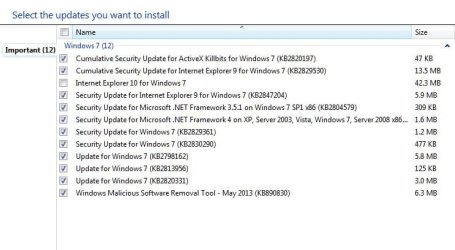
I did that and it all went smoothly. The batch of updates included the optional platform update.

I left the IE10 update as you suggested. A few days have passed and I've now received a further batch of updates
for processing from WU. I have attached a screen grab.

What should I do now?

Chris
 

Attachments

  • Capture.JPG
    Capture.JPG
    45.5 KB · Views: 6

My Computer My Computer

OS
Windows 7 Home Premium 32bit.
Install all except the IE10 and .NET updates, then install the .NET updates.

I'd hide the IE10 update at least for the present
 

My Computer My Computer

Computer type
Laptop
Computer Manufacturer/Model Number
Asus K52F or Lenovo B51-80
OS
Win 7 x64 Home Premium (and x86 VirtualBox VM)/Win10
CPU
i3 370M/i7 6500U
Motherboard
Asus/Lenovo
Memory
8GB - finally :)/8GB
Graphics Card(s)
it's an i3, dude!/dual Intel&nVidia
Sound Card
onboard
Monitor(s) Displays
15.6" built-in
Screen Resolution
1366x768/1920x1080
Hard Drives
750GB Seagate internal
Sundry external drives attached to other computers on the local network
1TB SSD on the Lenovo
PSU
n/a
Internet Speed
as much as I can get - usually on a dongle/phone, so <1MB/s
Antivirus
MSE/Defender
Browser
IE11/12/Edge/Chrome/FF(if I must)
Hi Noel

Done that. All OK.

When do I get to install IE10?

Regards

Chris
 

My Computer My Computer

OS
Windows 7 Home Premium 32bit.
Do you have all other updates in now?


If so, create a System Restore point, and then reboot, and attempt an IE upgrade.
 

My Computer My Computer

Computer type
Laptop
Computer Manufacturer/Model Number
Asus K52F or Lenovo B51-80
OS
Win 7 x64 Home Premium (and x86 VirtualBox VM)/Win10
CPU
i3 370M/i7 6500U
Motherboard
Asus/Lenovo
Memory
8GB - finally :)/8GB
Graphics Card(s)
it's an i3, dude!/dual Intel&nVidia
Sound Card
onboard
Monitor(s) Displays
15.6" built-in
Screen Resolution
1366x768/1920x1080
Hard Drives
750GB Seagate internal
Sundry external drives attached to other computers on the local network
1TB SSD on the Lenovo
PSU
n/a
Internet Speed
as much as I can get - usually on a dongle/phone, so <1MB/s
Antivirus
MSE/Defender
Browser
IE11/12/Edge/Chrome/FF(if I must)
Hey Noel

We have lift off!! :)

Many thanks for your expert assistance. It is much appreciated!!!

Regards

Chris
 

My Computer My Computer

OS
Windows 7 Home Premium 32bit.
Great news!

Good luck with it.
 

My Computer My Computer

Computer type
Laptop
Computer Manufacturer/Model Number
Asus K52F or Lenovo B51-80
OS
Win 7 x64 Home Premium (and x86 VirtualBox VM)/Win10
CPU
i3 370M/i7 6500U
Motherboard
Asus/Lenovo
Memory
8GB - finally :)/8GB
Graphics Card(s)
it's an i3, dude!/dual Intel&nVidia
Sound Card
onboard
Monitor(s) Displays
15.6" built-in
Screen Resolution
1366x768/1920x1080
Hard Drives
750GB Seagate internal
Sundry external drives attached to other computers on the local network
1TB SSD on the Lenovo
PSU
n/a
Internet Speed
as much as I can get - usually on a dongle/phone, so <1MB/s
Antivirus
MSE/Defender
Browser
IE11/12/Edge/Chrome/FF(if I must)
Back
Top