This problem had been driving me nuts over the last year.
I would do a fresh install of Windows 7 for a customer, and the updates would fail to function. This is for Windows 7 Pro or Home, with service pack two.
I tried everything. Hunted the 'net for hours. Finally, I had settled on downloading some 3rd party software that would force-feed Windows its updates. This would work, but it took a while and was a rather inelegant solution.
Then I stumbles across a webpage that has an answer that actually worked.
1. Disable Windows Updates (tell it to never check for updates).
2. Reboot.
3. Download and install Internet Explorer 11.
4. Download update KB3102810 and place it on your desktop (make sure you get the correct one, 64 bit or 32 (X86) bit). Place on your desktop.
5. Reboot.
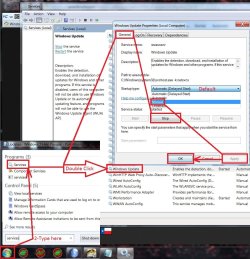
6. Go into Computer Management (right click on Computer in Start Menu) and select Services.
7. Stop Windows Update service.
8. Start Menu, Computer, C: drive, Windows, delete the entire Software Distribution folder.
9. Double click on update KB3102810 and let it install.
10: Reboot (this will turn update service back on).
11. Go into Windows Updates and check for updates. Give it about an hour, it may take less time but be patient. It will start working.
12. After installing your updates, you can turn Windows Update automatic check for updates back on if you like.
I have tested this on four fresh Windows 7 Home Premium and 3 Windows 7 Pro fresh installs and it worked on all of them.