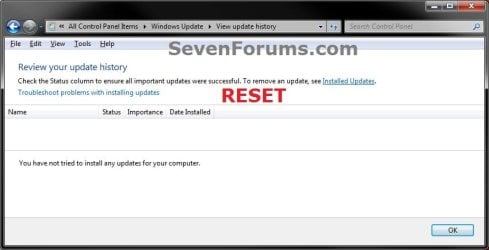
Windows Update - Reset

How to Reset Windows Update in Vista, Windows 7, and Windows 8


   Information
This will show you how to reset Windows Update view update history, and how to reset and re-register Windows Update Components if you are having a problem updating with Windows Update.


OPTION ONE

To Only Reset Windows Update History


   Note
Resetting Windows Update using this option will clear the view update history details list (cache).

This will not actually uninstall any of your currently installed Windows Update. They will just not be listed anymore. Any new Windows Update installed after the reset will show up in the view update history list as normal though.

1. Click/tap on the Download button below to download this file below.
Reset_Windows_Update_History.bat


Download


2. Save the .bat file to your Desktop.

3. Right click or press and hold on the downloaded .bat file, and click/tap on Run as administrator.

4. If prompted by UAC click/tap on Run, then Yes/Continue (if administrator) or type in administrator's password (if standard user).

5. You will now see an elevated command prompt open and run. When it's finished, it will close automatically.

6. If opened, close and reopen Windows Update to verify that it has been reset.
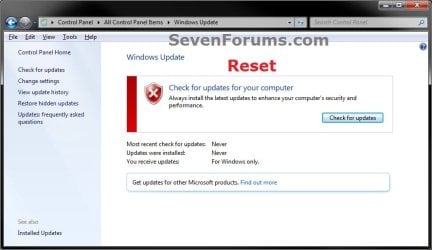
Reset.jpg

Update_History.jpg

7. Resetting the Windows Update history will also restore the default language packs being listed in Windows Upate again in the Windows 7 Ultimate and Enterprise editions after you check for updates next.
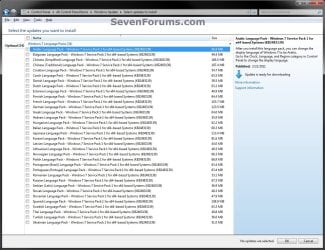
Language_Packs.jpg


OPTION TWO

To Reset and Re-register Windows Update Components


NOTE: This option is the Windows version of: How do I reset Windows Update components?. It will reset Windows Update Components and re-register the BITS files and the Windows Update files to help fix Windows Update errors. This option will not clear the view update history details list as it does in OPTION ONE above.
1. Click/tap on the Download button below to download this file below.
Reset_Reregister_Windows_Update_Components.bat


Download


2. Save the .bat file to your Desktop.

3. Right click or press and hold on the downloaded .bat file, and click/tap on Run as administrator.

4. If prompted by UAC click on Run, then Yes/Continue (if administrator) or type in administrator's password (if standard user).

5. You will now see an elevated command prompt open and run. When it's finished, it will close automatically.

6. Restart the computer afterwards to apply.

7. If this still does not help, then run the Microsoft Fix it tool here:
How do I reset Windows Update components?

See also: Unable to install updates in Windows Vista, Windows 7, Windows Server 2008 and Windows Server 2008 R2


OPTION THREE

To Reset and Re-register Windows Update Components AND Reset Update History in One Easy Click


   Note
This option combines OPTION ONE and OPTION TWO above in one .bat file.

1. Click/tap on the Download button below to download this file below.
Reset_Windows_Update_Full.bat


Download


2. Save the .bat file to your Desktop.

3. Right click or press and hold on the downloaded .bat file, and click/tap on Run as administrator.

4. If prompted by UAC click/tap on Run, then Yes/Continue (if administrator) or type in administrator's password (if standard user).

5. You will now see an elevated command prompt open and run. When it's finished, it will close automatically.

6. Restart the computer afterwards to apply.

7. If this still does not help, then run the Microsoft Fix it tool here:

Download


How do I reset Windows Update components?

See also: Unable to install updates in Windows Vista, Windows 7, Windows Server 2008 and Windows Server 2008 R2
That's it,
Shawn


Attachments

Last edited:
One quick question that I don't see clearly stated yet in this Forum; does method "I" (reseting Windows Update) actually cause Windows update to believe it needs to reinstall ALL updates since the original install? I know it does not uninstall any of the updates, but does it cause WU to believe it's never been updated and to subsequently want to install all updates (even over top of the same update/file versions) again? If this is the case then I believe it would solve at least half my current issues.

Thanks again for all you help!
DrewMann

No, it only clears their entry from the installed updates list. They are still installed, so Windows Update will not have them listed to be installed again.

I look forward to seeing your results with Windows 2008 R2.

(The results of this off topic issue continued here: http://www.sevenforums.com/windows-updates-activation/172456-cbs-registry-errors.html)
 
Last edited:

My Computer

Computer type
PC/Desktop
Computer Manufacturer/Model Number
Self built custom
OS
64-bit Windows 11 Pro for Workstations
CPU
Intel i7-8700K OC'd to 5 GHz
Motherboard
ASUS ROG Maximus XI Formula Z390
Memory
64 GB (4x16GB) G.SKILL TridentZ RGB DDR4 3600 MHz
Graphics Card(s)
ASUS ROG-STRIX-GTX1080TI-O11G-GAMING
Sound Card
Integrated
Monitor(s) Displays
2 x Samsung Odyssey G7 27"
Screen Resolution
2560x1440
Hard Drives
1TB Samsung 990 PRO M.2,
4TB Samsung 990 PRO PRO M.2,
TerraMaster F8 SSD Plus NAS
PSU
Seasonic Prime Titanium 850W
Case
Thermaltake Core P3
Cooling
Corsair Hydro H115i
Keyboard
Logitech wireless K800
Mouse
Logitech MX Master 4
Internet Speed
2 Gb/s Download and 100 Mb/s Upload
Antivirus
Malwarebyte Anti-Malware Premium
Browser
Google Chrome
Other Info
Logitech Z625 speaker system,
Logitech BRIO 4K Pro webcam,
HP Color LaserJet Pro MFP M477fdn,
APC SMART-UPS RT 1000 XL - SURT1000XLI,
Galaxy S23 Plus phone
Uh-oh - I forgot to right click and run as administrator! How do I get admin privileges back for Windows Update?
 

My Computer

OS
Windows 7 Home Premium 32bit
Hello Pete, and welcome to Seven Forums.

Could you explain your issue with more details please??
 

My Computer

Computer type
PC/Desktop
Computer Manufacturer/Model Number
Self built custom
OS
64-bit Windows 11 Pro for Workstations
CPU
Intel i7-8700K OC'd to 5 GHz
Motherboard
ASUS ROG Maximus XI Formula Z390
Memory
64 GB (4x16GB) G.SKILL TridentZ RGB DDR4 3600 MHz
Graphics Card(s)
ASUS ROG-STRIX-GTX1080TI-O11G-GAMING
Sound Card
Integrated
Monitor(s) Displays
2 x Samsung Odyssey G7 27"
Screen Resolution
2560x1440
Hard Drives
1TB Samsung 990 PRO M.2,
4TB Samsung 990 PRO PRO M.2,
TerraMaster F8 SSD Plus NAS
PSU
Seasonic Prime Titanium 850W
Case
Thermaltake Core P3
Cooling
Corsair Hydro H115i
Keyboard
Logitech wireless K800
Mouse
Logitech MX Master 4
Internet Speed
2 Gb/s Download and 100 Mb/s Upload
Antivirus
Malwarebyte Anti-Malware Premium
Browser
Google Chrome
Other Info
Logitech Z625 speaker system,
Logitech BRIO 4K Pro webcam,
HP Color LaserJet Pro MFP M477fdn,
APC SMART-UPS RT 1000 XL - SURT1000XLI,
Galaxy S23 Plus phone
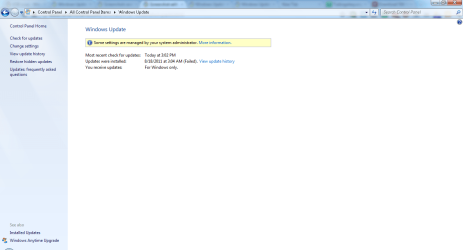
I've been having problems with windows update, getting an error 80070003. I came across this article and decided to attempt a fix with the Reset_Windows_Update_History.bat file. However I forgot to right click and run it as an administrator. Now when I go to Windows Update there is a message "Some settings are managed by your system administrator" and I cannot run update. I am the only person who has a user account on this computer and I log in as the administrator.

I should add that I did a system restore but it didn't change the settings.
 

My Computer

OS
Windows 7 Home Premium 32bit
Pete,

You can go ahead and run the BAT file again with Run as administrator this time to reset it again. I don't believe that it's going to help with the "Some settings are managed by your system administrator" message though.

If you are still geting the "Some settings are managed by your system administrator" message afterwards, then please post a screenshot of your Windows Update with this message displaying to see it what it may be from. :)
 

My Computer

Computer type
PC/Desktop
Computer Manufacturer/Model Number
Self built custom
OS
64-bit Windows 11 Pro for Workstations
CPU
Intel i7-8700K OC'd to 5 GHz
Motherboard
ASUS ROG Maximus XI Formula Z390
Memory
64 GB (4x16GB) G.SKILL TridentZ RGB DDR4 3600 MHz
Graphics Card(s)
ASUS ROG-STRIX-GTX1080TI-O11G-GAMING
Sound Card
Integrated
Monitor(s) Displays
2 x Samsung Odyssey G7 27"
Screen Resolution
2560x1440
Hard Drives
1TB Samsung 990 PRO M.2,
4TB Samsung 990 PRO PRO M.2,
TerraMaster F8 SSD Plus NAS
PSU
Seasonic Prime Titanium 850W
Case
Thermaltake Core P3
Cooling
Corsair Hydro H115i
Keyboard
Logitech wireless K800
Mouse
Logitech MX Master 4
Internet Speed
2 Gb/s Download and 100 Mb/s Upload
Antivirus
Malwarebyte Anti-Malware Premium
Browser
Google Chrome
Other Info
Logitech Z625 speaker system,
Logitech BRIO 4K Pro webcam,
HP Color LaserJet Pro MFP M477fdn,
APC SMART-UPS RT 1000 XL - SURT1000XLI,
Galaxy S23 Plus phone
I attemted to run the BAT file as adminstrator but no joy.
 

Attachments

  • screenshot.png
    screenshot.png
    127 KB · Views: 392

My Computer

OS
Windows 7 Home Premium 32bit
Pete,

It appears that Windows Update has been disabled by something instead. Try OPTION ONE in the tutorial below to enable Windows Update again to see if that may be able to help.

http://www.sevenforums.com/tutorials/88554-windows-update-enable-disable-access.html

In addition, I would recommend to scan your system with Microsoft Standalone System Sweeper at boot and Malwarebytes Anti-Malware Free to help make sure that your system is malware free in case that was the cause.

Hope this helps,
Shawn
 

My Computer

Computer type
PC/Desktop
Computer Manufacturer/Model Number
Self built custom
OS
64-bit Windows 11 Pro for Workstations
CPU
Intel i7-8700K OC'd to 5 GHz
Motherboard
ASUS ROG Maximus XI Formula Z390
Memory
64 GB (4x16GB) G.SKILL TridentZ RGB DDR4 3600 MHz
Graphics Card(s)
ASUS ROG-STRIX-GTX1080TI-O11G-GAMING
Sound Card
Integrated
Monitor(s) Displays
2 x Samsung Odyssey G7 27"
Screen Resolution
2560x1440
Hard Drives
1TB Samsung 990 PRO M.2,
4TB Samsung 990 PRO PRO M.2,
TerraMaster F8 SSD Plus NAS
PSU
Seasonic Prime Titanium 850W
Case
Thermaltake Core P3
Cooling
Corsair Hydro H115i
Keyboard
Logitech wireless K800
Mouse
Logitech MX Master 4
Internet Speed
2 Gb/s Download and 100 Mb/s Upload
Antivirus
Malwarebyte Anti-Malware Premium
Browser
Google Chrome
Other Info
Logitech Z625 speaker system,
Logitech BRIO 4K Pro webcam,
HP Color LaserJet Pro MFP M477fdn,
APC SMART-UPS RT 1000 XL - SURT1000XLI,
Galaxy S23 Plus phone
I was having problems with updates continually failing, so I ran both of these.

While restarting, the updates that were pending finally installed successfully, but now I'm having other major problems.

After restarting, I am not able to run Windows Update because BITS won't start. I have searched for and tried many things to fix this to no avail.

Also, I am no longer able to download anything (i.e. Microsoft Fix-Its). I can't even delete a file from my desktop, open Thunderbird, save, move, delete or open any files due to "Access Denied."

Again, I've tried several things to fix these problems, but they all started after running these two programs to reset windows updates.

Any help is greatly appreciated.

Thanks!

Brian
 

My Computer

OS
Windows 7 Home Premium 32 bit
Hello Brian, and welcome to Seven Forums.

It sounds like you got a lot more going on under the hood since the BAT files in this tutorial cannot affect or cause the issues you just described.

You might see if doing a system restore (at boot if need be) using a restore point dated before you had all of these issues may be able to undo and fix them for you.

In addition, it wouldn't hurt to scan your system with Malwarebytes (free edition) and Microsoft Standalone System Sweeper to help make sure your system is malware free.
 

My Computer

Computer type
PC/Desktop
Computer Manufacturer/Model Number
Self built custom
OS
64-bit Windows 11 Pro for Workstations
CPU
Intel i7-8700K OC'd to 5 GHz
Motherboard
ASUS ROG Maximus XI Formula Z390
Memory
64 GB (4x16GB) G.SKILL TridentZ RGB DDR4 3600 MHz
Graphics Card(s)
ASUS ROG-STRIX-GTX1080TI-O11G-GAMING
Sound Card
Integrated
Monitor(s) Displays
2 x Samsung Odyssey G7 27"
Screen Resolution
2560x1440
Hard Drives
1TB Samsung 990 PRO M.2,
4TB Samsung 990 PRO PRO M.2,
TerraMaster F8 SSD Plus NAS
PSU
Seasonic Prime Titanium 850W
Case
Thermaltake Core P3
Cooling
Corsair Hydro H115i
Keyboard
Logitech wireless K800
Mouse
Logitech MX Master 4
Internet Speed
2 Gb/s Download and 100 Mb/s Upload
Antivirus
Malwarebyte Anti-Malware Premium
Browser
Google Chrome
Other Info
Logitech Z625 speaker system,
Logitech BRIO 4K Pro webcam,
HP Color LaserJet Pro MFP M477fdn,
APC SMART-UPS RT 1000 XL - SURT1000XLI,
Galaxy S23 Plus phone
Apparently System Restore is disabled on my machine and I'm not able to download or run anything, so the other two options won't work either.

The problems started right after restarting from running these files, but apparently aren't related. Sounds like I might be SOL.. :(
 

My Computer

OS
Windows 7 Home Premium 32 bit
Brian,

Sorry mate. If it were the BAT files from here that caused it, then it would be a easy fix. It's just not possible for them to cause those issues since the only reset and re-register Windows Update and nothing else.

You could create the bootable DVD or USB Microsoft Standalone System Sweeper on another 32-bit computer to boot from on your computer to scan it for malware.

Are you able to log into another administrator account, the built-in Administrator, or Safe Mode to create backups of anything that you do not want to lose?
 

My Computer

Computer type
PC/Desktop
Computer Manufacturer/Model Number
Self built custom
OS
64-bit Windows 11 Pro for Workstations
CPU
Intel i7-8700K OC'd to 5 GHz
Motherboard
ASUS ROG Maximus XI Formula Z390
Memory
64 GB (4x16GB) G.SKILL TridentZ RGB DDR4 3600 MHz
Graphics Card(s)
ASUS ROG-STRIX-GTX1080TI-O11G-GAMING
Sound Card
Integrated
Monitor(s) Displays
2 x Samsung Odyssey G7 27"
Screen Resolution
2560x1440
Hard Drives
1TB Samsung 990 PRO M.2,
4TB Samsung 990 PRO PRO M.2,
TerraMaster F8 SSD Plus NAS
PSU
Seasonic Prime Titanium 850W
Case
Thermaltake Core P3
Cooling
Corsair Hydro H115i
Keyboard
Logitech wireless K800
Mouse
Logitech MX Master 4
Internet Speed
2 Gb/s Download and 100 Mb/s Upload
Antivirus
Malwarebyte Anti-Malware Premium
Browser
Google Chrome
Other Info
Logitech Z625 speaker system,
Logitech BRIO 4K Pro webcam,
HP Color LaserJet Pro MFP M477fdn,
APC SMART-UPS RT 1000 XL - SURT1000XLI,
Galaxy S23 Plus phone
Shawn,
Another excellent tutorial.

I have two questions:
Is Option 2 to be preferred over Option 1?

In what situations should I recommend this tutorial?

Ive been trying to help a couple of chaps who have really messed up their computers and then are so messed up that I'm not sure where to start.

Thanks,
karl
 

My Computer

Computer Manufacturer/Model Number
Toshiba Satellite S875D-S7239 laptop
OS
MS Windows 7 Ultimate SP1 64-bit
CPU
AMD A10-4600M
Motherboard
AMD Pumori (Socket FT1)
Memory
6.00 GB Dual-Channel DDR3 @ 798MHz (11-11-12-28)
Graphics Card(s)
AMD Radeon HD 7660G
Sound Card
High Definition Audio Device
Monitor(s) Displays
Generic PnP Monitor (1600x900@60Hz)
Screen Resolution
1600x900@60Hz
Hard Drives
SSD 119GB Corsair CSSD-V128GB2 ATA Device
Keyboard
Standard PS/2 Keyboard
Mouse
HP Wireless Optical Mobile Mouse Model FHA-3410
Internet Speed
What the local pub, local coffee shop offers.
Other Info
Optical Drive:MATSHITA BD-CMB UJ160B ATA Device


Also have an Asus ha1002xp netbook with Win 7 Ultimate installed.
Hello Karl,

Option One, is only for clearing the Windows Update history to not have the installed or failed updates listed anymore. It doesn't help with any Windows Update errors.

Option Two is to reset and re-register Windows Update in an attempt to fix it.

The links in the notes under each option will give some more details on them though. :)
 

My Computer

Computer type
PC/Desktop
Computer Manufacturer/Model Number
Self built custom
OS
64-bit Windows 11 Pro for Workstations
CPU
Intel i7-8700K OC'd to 5 GHz
Motherboard
ASUS ROG Maximus XI Formula Z390
Memory
64 GB (4x16GB) G.SKILL TridentZ RGB DDR4 3600 MHz
Graphics Card(s)
ASUS ROG-STRIX-GTX1080TI-O11G-GAMING
Sound Card
Integrated
Monitor(s) Displays
2 x Samsung Odyssey G7 27"
Screen Resolution
2560x1440
Hard Drives
1TB Samsung 990 PRO M.2,
4TB Samsung 990 PRO PRO M.2,
TerraMaster F8 SSD Plus NAS
PSU
Seasonic Prime Titanium 850W
Case
Thermaltake Core P3
Cooling
Corsair Hydro H115i
Keyboard
Logitech wireless K800
Mouse
Logitech MX Master 4
Internet Speed
2 Gb/s Download and 100 Mb/s Upload
Antivirus
Malwarebyte Anti-Malware Premium
Browser
Google Chrome
Other Info
Logitech Z625 speaker system,
Logitech BRIO 4K Pro webcam,
HP Color LaserJet Pro MFP M477fdn,
APC SMART-UPS RT 1000 XL - SURT1000XLI,
Galaxy S23 Plus phone
Thanks Shawn,

That confirms everything. Just wanted to make sure that I'd not missed anything.

karl
 

My Computer

Computer Manufacturer/Model Number
Toshiba Satellite S875D-S7239 laptop
OS
MS Windows 7 Ultimate SP1 64-bit
CPU
AMD A10-4600M
Motherboard
AMD Pumori (Socket FT1)
Memory
6.00 GB Dual-Channel DDR3 @ 798MHz (11-11-12-28)
Graphics Card(s)
AMD Radeon HD 7660G
Sound Card
High Definition Audio Device
Monitor(s) Displays
Generic PnP Monitor (1600x900@60Hz)
Screen Resolution
1600x900@60Hz
Hard Drives
SSD 119GB Corsair CSSD-V128GB2 ATA Device
Keyboard
Standard PS/2 Keyboard
Mouse
HP Wireless Optical Mobile Mouse Model FHA-3410
Internet Speed
What the local pub, local coffee shop offers.
Other Info
Optical Drive:MATSHITA BD-CMB UJ160B ATA Device


Also have an Asus ha1002xp netbook with Win 7 Ultimate installed.
You're welcome mate. :)
 

My Computer

Computer type
PC/Desktop
Computer Manufacturer/Model Number
Self built custom
OS
64-bit Windows 11 Pro for Workstations
CPU
Intel i7-8700K OC'd to 5 GHz
Motherboard
ASUS ROG Maximus XI Formula Z390
Memory
64 GB (4x16GB) G.SKILL TridentZ RGB DDR4 3600 MHz
Graphics Card(s)
ASUS ROG-STRIX-GTX1080TI-O11G-GAMING
Sound Card
Integrated
Monitor(s) Displays
2 x Samsung Odyssey G7 27"
Screen Resolution
2560x1440
Hard Drives
1TB Samsung 990 PRO M.2,
4TB Samsung 990 PRO PRO M.2,
TerraMaster F8 SSD Plus NAS
PSU
Seasonic Prime Titanium 850W
Case
Thermaltake Core P3
Cooling
Corsair Hydro H115i
Keyboard
Logitech wireless K800
Mouse
Logitech MX Master 4
Internet Speed
2 Gb/s Download and 100 Mb/s Upload
Antivirus
Malwarebyte Anti-Malware Premium
Browser
Google Chrome
Other Info
Logitech Z625 speaker system,
Logitech BRIO 4K Pro webcam,
HP Color LaserJet Pro MFP M477fdn,
APC SMART-UPS RT 1000 XL - SURT1000XLI,
Galaxy S23 Plus phone
In what situations should I recommend this tutorial?

Ive been trying to help a couple of chaps who have really messed up their computers and then are so messed up that I'm not sure where to start.

Thanks,
karl

Hello Karl,

I know that this wasn't addressed to me, and so I hope that this post is appropriate...

Basically, as you already know (just for other, possible readers in the future), this tutorial is for Windows Update errors only. It won't help with anything related to Windows Update, for example SFC or Side by Side Configuration errors.

This method of reset or equivalent used to be part of my first post to users. However, I have subsequently removed this from my first post, and now only use it when I have evidence that it may help, to save users time, and to prevent the Windows Update history from being deleted needlessly.

May I just show you which parts of the script fix which errors?

Please have a look here: How do I reset Windows Update components?

Now, Brink's .bat files are better, in that they re-register more components than the above link does. I do have a reason for linking to this...

If you were to run the above Fix-It, you would be presented with an option to run in Aggressive Mode:

AggressiveOptions.PNG

Aggressive Option does everything mentioned in the link above, and non-aggressive mode does everything except step 4.

The reason is that step 4 deletes Windows Update history, however, step 4 also fixes the most problems!

Therefore, BOTH batch files in this tutorial fix Windows Update errors:

Option 1: Reset_Windows_Update_History.bat:

This will delete your History, but not uninstall any updates. This is a side effect.

However, it will also fix many errors. The SoftwareDistribution\Download folder is a temporary store for Windows Updates. It stores downloaded installers. extracted installers. and other such temporary files. The SoftwareDistribution folder itself stores parts of the Windows Update Agent, and other temporary files.

Errors fixed by this batch file:

  • Bad download of a Windows Update.

  • Bad extraction of a Windows Update.

  • Corrupt Windows Update Agent download.

  • The 0x800B0100 error code, but ONLY if no errors show in a System Update Readiness Tool logfile (more notes on this later...)

  • Further error codes after fixing all errors in a System Update Readiness Tool logfile.

  • etc. etc.

This actually accounts for the vast majority of errors fixed by a reset. Please be aware that:

  • The Option Two .bat file does NOT include the all important renaming of the SoftwareDistribution folder.
  • Neither of these .bat files rename the CatRoot2 folder.
  • NEVER rename the CatRoot folder (you can rename the CatRoot2 folder, but NEVER the CatRoot ;))
For more information on what to look out for/how to fix CatRoot/CatRoot2 corruptions, see here: You cannot install some updates or programs

Option 2: Reset_Reregister_Windows_Update_Components.bat:

This does not rename either CatRoot2 or SoftwareDistribution folder, and so fixes not very many errors, however, it will fix:

  • Some cases of the Windows Update dialogue not being displayed properly.
  • Some cases of the BITS and Windows Update services failing to start with error code 5 (Access is Denied)
  • Some errors relating to BITS.
  • Corrupt WinSock.
  • For when you get really stuck, and don't know what else to try :p
Some other notes:

Error code 0x800B0100:Means TRUST_E_NOSIGNATURE. A good 90% of the time, this is caused by a missing or corrupt .cat or .mum file, in the Windows folder. Don't ever attempt a manual fix. As soon as you see this error code, run the System Update Readiness Tool, and then fix any errors.

Also, I have written many additional tutorials and tools to automate the fixing procedure for many System Update Readiness Tool (SURT) error codes, so do drop me a PM if anyone is ever interested, and I can send you what I have, although I intend to release a small load of public tutorials as soon as I find the time to touch them up :)

If, in a very rare case, you find a 0x800B0100 error, and find no errors in a System Update Readiness Tool logfile, then what has happened is that instead of this file being corrupt in a Windows directory, it is corrupt in the extracted temporary location in SoftwareDistributation.

Here is evidence from a CBS.log of just such a corruption (line spoofed)

Code:
2011-05-22 15:07:49, Error                 CBS    Failed to verify if catalog file \\?\C:\Windows\SoftwareDistribution\Download\b5702e0fe00acea3cb977a242b00ceb5\Package_1_for_KB2506223~31bf3856ad364e35~x86~~6.1.1.1.cat is valid. [HRESULT = 0x800b0100 - TRUST_E_NOSIGNATURE]
In this case, run Brink's Option 1 .bat to fix some cases :)

Other notes:

  • If there are errors in a System Update Readiness Tool logfile, there is not point in trying either of these batch file, or anything else like that. Until those errors are fixed, Windows Update will not work. If a user posts a CheckSUR.log, just open it, and see if there are any lines beginning with (f) which stands for FATAL. If there are, there is no point in recommending this tutorial.

  • Also, if a service is completely missing, neither of these batch files will fix this. This problem requires a very quick and simple registry fix.

  • SFC error "Windows Resource Protection could not start the repair service" is a service problem, whereas the similar SFC error "Windows Resource Protection could not perform the requested operation" relates to a corruption too big too be fixed by SFC, and must be analysed through the whole CBS.log (it will NOT appear in a parsed CBS.log). A common example is if you delete certain whole Windows directories, SFC will throw this error.

  • If you ever recommend this to an OP, in order to fix all problems, always recommend running BOTH .bat files, especially Option 1's .bat file.

I can't think of anything else at the moment...

I am not sure if this has been helpful or not, but I have written it now!

Richard
 

My Computer

Computer Manufacturer/Model Number
Dell XPS 420
OS
Vista Home Premium x86 SP2
CPU
Intel Core 2 Quad Q9300 2.50GHz
Motherboard
Stock Dell 0TP406
Memory
4 gb (DDR2 800) 400MHz
Graphics Card(s)
ATI Radeon HD 3870 (512 MBytes)
Monitor(s) Displays
1 x Dell 2007FP and 1 x (old) Sonic flat screen
Screen Resolution
1600 x 1200 and 1280 x 1204
Hard Drives
1 x 640Gb (SATA 300) Western Digital: WDC WD6400AAKS-75A7B0 1 x 1Tb (SATA 600) Western Digital: Caviar Black, SATA 6GB/S, 64Mb cache, 8ms Western Digital: WDC WD1002FAEX-00Z3A0 ATA Device
Case
Dell XPS 420
Cooling
Stock Fan
Keyboard
Dell Bluetooth
Mouse
Advent Optical ADE-WG01 (colour change light up)
Internet Speed
Varies from 10kb/s to 170kb/s. So unreliable it is not funny
Other Info
ASUS USB 3.0 5Gbps/SATA 6Gbps - PCI-Express Combo Controller Card (U3S6)
Richard,

Many thanks. Now to digest and assimilate all.

karl
 

My Computer

Computer Manufacturer/Model Number
Toshiba Satellite S875D-S7239 laptop
OS
MS Windows 7 Ultimate SP1 64-bit
CPU
AMD A10-4600M
Motherboard
AMD Pumori (Socket FT1)
Memory
6.00 GB Dual-Channel DDR3 @ 798MHz (11-11-12-28)
Graphics Card(s)
AMD Radeon HD 7660G
Sound Card
High Definition Audio Device
Monitor(s) Displays
Generic PnP Monitor (1600x900@60Hz)
Screen Resolution
1600x900@60Hz
Hard Drives
SSD 119GB Corsair CSSD-V128GB2 ATA Device
Keyboard
Standard PS/2 Keyboard
Mouse
HP Wireless Optical Mobile Mouse Model FHA-3410
Internet Speed
What the local pub, local coffee shop offers.
Other Info
Optical Drive:MATSHITA BD-CMB UJ160B ATA Device


Also have an Asus ha1002xp netbook with Win 7 Ultimate installed.
Was reviewing the .BAT file from option 1.

I do not have a %windir%\system32\softwaredistribution folder.

Is this normal?

I run CMD from an elevated command prompt.

I enter a rename command and here's what happens:

C:\>ren %systemroot%\SoftwareDistribution\Datastore *.bak
The filename, directory name, or volume label syntax is incorrect.

What am I doing wrong?

The mistake must be starring me in the face.
 
Last edited by a moderator:

My Computer

Computer Manufacturer/Model Number
Toshiba Satellite S875D-S7239 laptop
OS
MS Windows 7 Ultimate SP1 64-bit
CPU
AMD A10-4600M
Motherboard
AMD Pumori (Socket FT1)
Memory
6.00 GB Dual-Channel DDR3 @ 798MHz (11-11-12-28)
Graphics Card(s)
AMD Radeon HD 7660G
Sound Card
High Definition Audio Device
Monitor(s) Displays
Generic PnP Monitor (1600x900@60Hz)
Screen Resolution
1600x900@60Hz
Hard Drives
SSD 119GB Corsair CSSD-V128GB2 ATA Device
Keyboard
Standard PS/2 Keyboard
Mouse
HP Wireless Optical Mobile Mouse Model FHA-3410
Internet Speed
What the local pub, local coffee shop offers.
Other Info
Optical Drive:MATSHITA BD-CMB UJ160B ATA Device


Also have an Asus ha1002xp netbook with Win 7 Ultimate installed.
Sorry for the late reply Karl.

I didn't have the %windir%\system32\softwaredistribution folder either, so I removed it.


I'm not sure why Microsoft had the command like that at this link. To rename that folder with .bak at the end, the command should be this below instead.

Ren %systemroot%\SoftwareDistribution\DataStore DataStore.bak

Of course, you have to stop the Windows Update service with the command below first.

net stop wuauserv
 

My Computer

Computer type
PC/Desktop
Computer Manufacturer/Model Number
Self built custom
OS
64-bit Windows 11 Pro for Workstations
CPU
Intel i7-8700K OC'd to 5 GHz
Motherboard
ASUS ROG Maximus XI Formula Z390
Memory
64 GB (4x16GB) G.SKILL TridentZ RGB DDR4 3600 MHz
Graphics Card(s)
ASUS ROG-STRIX-GTX1080TI-O11G-GAMING
Sound Card
Integrated
Monitor(s) Displays
2 x Samsung Odyssey G7 27"
Screen Resolution
2560x1440
Hard Drives
1TB Samsung 990 PRO M.2,
4TB Samsung 990 PRO PRO M.2,
TerraMaster F8 SSD Plus NAS
PSU
Seasonic Prime Titanium 850W
Case
Thermaltake Core P3
Cooling
Corsair Hydro H115i
Keyboard
Logitech wireless K800
Mouse
Logitech MX Master 4
Internet Speed
2 Gb/s Download and 100 Mb/s Upload
Antivirus
Malwarebyte Anti-Malware Premium
Browser
Google Chrome
Other Info
Logitech Z625 speaker system,
Logitech BRIO 4K Pro webcam,
HP Color LaserJet Pro MFP M477fdn,
APC SMART-UPS RT 1000 XL - SURT1000XLI,
Galaxy S23 Plus phone
Many thanks Shawn.

It's always amazing how a typo from prior KBs often ends up being propagated.
 

My Computer

Computer Manufacturer/Model Number
Toshiba Satellite S875D-S7239 laptop
OS
MS Windows 7 Ultimate SP1 64-bit
CPU
AMD A10-4600M
Motherboard
AMD Pumori (Socket FT1)
Memory
6.00 GB Dual-Channel DDR3 @ 798MHz (11-11-12-28)
Graphics Card(s)
AMD Radeon HD 7660G
Sound Card
High Definition Audio Device
Monitor(s) Displays
Generic PnP Monitor (1600x900@60Hz)
Screen Resolution
1600x900@60Hz
Hard Drives
SSD 119GB Corsair CSSD-V128GB2 ATA Device
Keyboard
Standard PS/2 Keyboard
Mouse
HP Wireless Optical Mobile Mouse Model FHA-3410
Internet Speed
What the local pub, local coffee shop offers.
Other Info
Optical Drive:MATSHITA BD-CMB UJ160B ATA Device


Also have an Asus ha1002xp netbook with Win 7 Ultimate installed.
Back
Top