Windows Update - Reset

How to Reset Windows Update in Vista, Windows 7, and Windows 8


   Information
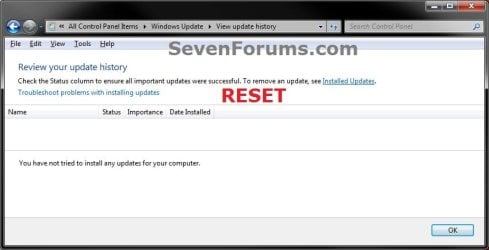
This will show you how to reset Windows Update view update history, and how to reset and re-register Windows Update Components if you are having a problem updating with Windows Update.


OPTION ONE

To Only Reset Windows Update History


   Note
Resetting Windows Update using this option will clear the view update history details list (cache).

This will not actually uninstall any of your currently installed Windows Update. They will just not be listed anymore. Any new Windows Update installed after the reset will show up in the view update history list as normal though.

1. Click/tap on the Download button below to download this file below.
Reset_Windows_Update_History.bat


Download


2. Save the .bat file to your Desktop.

3. Right click or press and hold on the downloaded .bat file, and click/tap on Run as administrator.

4. If prompted by UAC click/tap on Run, then Yes/Continue (if administrator) or type in administrator's password (if standard user).

5. You will now see an elevated command prompt open and run. When it's finished, it will close automatically.

6. If opened, close and reopen Windows Update to verify that it has been reset.
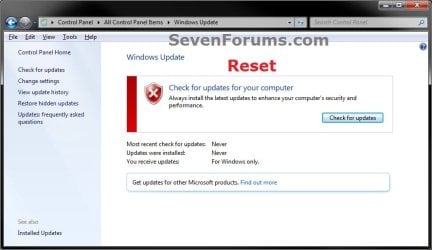
Reset.jpg

Update_History.jpg

7. Resetting the Windows Update history will also restore the default language packs being listed in Windows Upate again in the Windows 7 Ultimate and Enterprise editions after you check for updates next.
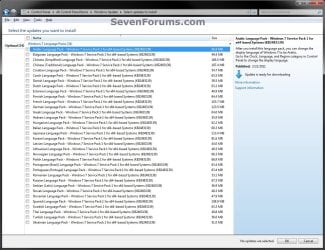
Language_Packs.jpg


OPTION TWO

To Reset and Re-register Windows Update Components


NOTE: This option is the Windows version of: How do I reset Windows Update components?. It will reset Windows Update Components and re-register the BITS files and the Windows Update files to help fix Windows Update errors. This option will not clear the view update history details list as it does in OPTION ONE above.
1. Click/tap on the Download button below to download this file below.
Reset_Reregister_Windows_Update_Components.bat


Download


2. Save the .bat file to your Desktop.

3. Right click or press and hold on the downloaded .bat file, and click/tap on Run as administrator.

4. If prompted by UAC click on Run, then Yes/Continue (if administrator) or type in administrator's password (if standard user).

5. You will now see an elevated command prompt open and run. When it's finished, it will close automatically.

6. Restart the computer afterwards to apply.

7. If this still does not help, then run the Microsoft Fix it tool here:
How do I reset Windows Update components?

See also: Unable to install updates in Windows Vista, Windows 7, Windows Server 2008 and Windows Server 2008 R2


OPTION THREE

To Reset and Re-register Windows Update Components AND Reset Update History in One Easy Click


   Note
This option combines OPTION ONE and OPTION TWO above in one .bat file.

1. Click/tap on the Download button below to download this file below.
Reset_Windows_Update_Full.bat


Download


2. Save the .bat file to your Desktop.

3. Right click or press and hold on the downloaded .bat file, and click/tap on Run as administrator.

4. If prompted by UAC click/tap on Run, then Yes/Continue (if administrator) or type in administrator's password (if standard user).

5. You will now see an elevated command prompt open and run. When it's finished, it will close automatically.

6. Restart the computer afterwards to apply.

7. If this still does not help, then run the Microsoft Fix it tool here:

Download


How do I reset Windows Update components?

See also: Unable to install updates in Windows Vista, Windows 7, Windows Server 2008 and Windows Server 2008 R2
That's it,
Shawn


Attachments

Last edited:
Update error

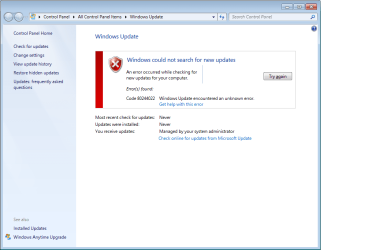
I tried option two but it did not work. This machine is a windows 7 Ent 64bit and I cannot get my updates, i receiev an 80244022 error. I tried stopping the services and deleting the software distribution fodler in c:\windows\softwaredistribution . with no success. I have also tried this solution How do I reset Windows Update components? with no success. Please help. Thank in advanced.
 

Attachments

  • error.png
    error.png
    28.5 KB · Views: 426
  • Log Name.docx
    Log Name.docx
    10.3 KB · Views: 466

My Computer

OS
windows 7 Enterprise 64bit
Hello Drifft, and welcome to Seven Forums.

For that specific Windows Update error 80244022, you might see if this below may be able to help. :)

Windows Update error 80244022

Hope this helps,
Shawn
 

My Computer

Computer type
PC/Desktop
Computer Manufacturer/Model Number
Self built custom
OS
64-bit Windows 11 Pro for Workstations
CPU
Intel i7-8700K OC'd to 5 GHz
Motherboard
ASUS ROG Maximus XI Formula Z390
Memory
64 GB (4x16GB) G.SKILL TridentZ RGB DDR4 3600 MHz
Graphics Card(s)
ASUS ROG-STRIX-GTX1080TI-O11G-GAMING
Sound Card
Integrated
Monitor(s) Displays
2 x Samsung Odyssey G7 27"
Screen Resolution
2560x1440
Hard Drives
1TB Samsung 990 PRO M.2,
4TB Samsung 990 PRO PRO M.2,
TerraMaster F8 SSD Plus NAS
PSU
Seasonic Prime Titanium 850W
Case
Thermaltake Core P3
Cooling
Corsair Hydro H115i
Keyboard
Logitech wireless K800
Mouse
Logitech MX Master 4
Internet Speed
2 Gb/s Download and 100 Mb/s Upload
Antivirus
Malwarebyte Anti-Malware Premium
Browser
Google Chrome
Other Info
Logitech Z625 speaker system,
Logitech BRIO 4K Pro webcam,
HP Color LaserJet Pro MFP M477fdn,
APC SMART-UPS RT 1000 XL - SURT1000XLI,
Galaxy S23 Plus phone
Many thanks, Shawn!

I'm a new user, and your fix has helped greatly:)
 

My Computer

Computer Manufacturer/Model Number
Acer Aspire 5732Z
OS
Windows 7 Home Premium 64 bit
You're most welcome jthelw, and welcome to Seven Forums. :)
 

My Computer

Computer type
PC/Desktop
Computer Manufacturer/Model Number
Self built custom
OS
64-bit Windows 11 Pro for Workstations
CPU
Intel i7-8700K OC'd to 5 GHz
Motherboard
ASUS ROG Maximus XI Formula Z390
Memory
64 GB (4x16GB) G.SKILL TridentZ RGB DDR4 3600 MHz
Graphics Card(s)
ASUS ROG-STRIX-GTX1080TI-O11G-GAMING
Sound Card
Integrated
Monitor(s) Displays
2 x Samsung Odyssey G7 27"
Screen Resolution
2560x1440
Hard Drives
1TB Samsung 990 PRO M.2,
4TB Samsung 990 PRO PRO M.2,
TerraMaster F8 SSD Plus NAS
PSU
Seasonic Prime Titanium 850W
Case
Thermaltake Core P3
Cooling
Corsair Hydro H115i
Keyboard
Logitech wireless K800
Mouse
Logitech MX Master 4
Internet Speed
2 Gb/s Download and 100 Mb/s Upload
Antivirus
Malwarebyte Anti-Malware Premium
Browser
Google Chrome
Other Info
Logitech Z625 speaker system,
Logitech BRIO 4K Pro webcam,
HP Color LaserJet Pro MFP M477fdn,
APC SMART-UPS RT 1000 XL - SURT1000XLI,
Galaxy S23 Plus phone
Brink you are awesome, you just fixed my windows update/windows firewall/security center/security essantials problems cause of a malware disabled all of those services.

Big thanks from France ;)
 

My Computer

OS
Windows 7 Ultimate x64
You're most welcome Pleymo, and welcome to Seven Forums. I'm glad that it was able to help.
smile.gif
 

My Computer

Computer type
PC/Desktop
Computer Manufacturer/Model Number
Self built custom
OS
64-bit Windows 11 Pro for Workstations
CPU
Intel i7-8700K OC'd to 5 GHz
Motherboard
ASUS ROG Maximus XI Formula Z390
Memory
64 GB (4x16GB) G.SKILL TridentZ RGB DDR4 3600 MHz
Graphics Card(s)
ASUS ROG-STRIX-GTX1080TI-O11G-GAMING
Sound Card
Integrated
Monitor(s) Displays
2 x Samsung Odyssey G7 27"
Screen Resolution
2560x1440
Hard Drives
1TB Samsung 990 PRO M.2,
4TB Samsung 990 PRO PRO M.2,
TerraMaster F8 SSD Plus NAS
PSU
Seasonic Prime Titanium 850W
Case
Thermaltake Core P3
Cooling
Corsair Hydro H115i
Keyboard
Logitech wireless K800
Mouse
Logitech MX Master 4
Internet Speed
2 Gb/s Download and 100 Mb/s Upload
Antivirus
Malwarebyte Anti-Malware Premium
Browser
Google Chrome
Other Info
Logitech Z625 speaker system,
Logitech BRIO 4K Pro webcam,
HP Color LaserJet Pro MFP M477fdn,
APC SMART-UPS RT 1000 XL - SURT1000XLI,
Galaxy S23 Plus phone
I followed steps 1 and 3 (I skipped 2 because it's included in step 3) and I still can't update windows :(

I've followed quite a few steps online and none have worked, this is quite frustrating because I'm pretty sure there are some very important updates that I'm missing right now.

I'd very much appreciate some help in this matter because I don't really know much about fixing these kinds of issues (the most I can do to improve my pc's performance is cleaning the fan) :p
 

My Computer

Computer type
Laptop
Computer Manufacturer/Model Number
Acer Aspire 7720
OS
Microsoft Windows 7 Ultimate 32-bit
CPU
Intel(R) Core(TM)2 Duo CPU T5750 @ 2.00GHz
Motherboard
Acer Poyang
Memory
3.00 GB
Graphics Card(s)
GeForce 9300m G 256mb
Sound Card
High Definition Audio Device
Screen Resolution
1440 x 900 x 32 bits (4294967296 colors) @ 59 Hz
Hard Drives
WDC WD3200BEVT-22ZCT0 ATA Device
Hello Ed, and welcome to Seven Forums.

Please go ahead and post back with all details about your Windows Update issue along with any error messages you may be getting. :)
 

My Computer

Computer type
PC/Desktop
Computer Manufacturer/Model Number
Self built custom
OS
64-bit Windows 11 Pro for Workstations
CPU
Intel i7-8700K OC'd to 5 GHz
Motherboard
ASUS ROG Maximus XI Formula Z390
Memory
64 GB (4x16GB) G.SKILL TridentZ RGB DDR4 3600 MHz
Graphics Card(s)
ASUS ROG-STRIX-GTX1080TI-O11G-GAMING
Sound Card
Integrated
Monitor(s) Displays
2 x Samsung Odyssey G7 27"
Screen Resolution
2560x1440
Hard Drives
1TB Samsung 990 PRO M.2,
4TB Samsung 990 PRO PRO M.2,
TerraMaster F8 SSD Plus NAS
PSU
Seasonic Prime Titanium 850W
Case
Thermaltake Core P3
Cooling
Corsair Hydro H115i
Keyboard
Logitech wireless K800
Mouse
Logitech MX Master 4
Internet Speed
2 Gb/s Download and 100 Mb/s Upload
Antivirus
Malwarebyte Anti-Malware Premium
Browser
Google Chrome
Other Info
Logitech Z625 speaker system,
Logitech BRIO 4K Pro webcam,
HP Color LaserJet Pro MFP M477fdn,
APC SMART-UPS RT 1000 XL - SURT1000XLI,
Galaxy S23 Plus phone
I get the 'Windows Update cannot currently check for updates because blah blah blah', basically the typical response that people have been getting.

That's basically it.

However, when I try and 'start' the Windows Update Service in the 'Services' area, I can't actually find it, which is odd.
Not sure if that helps.

I'm not really getting any error message apart from that one, so I feel like I have little to work with, which makes this kind of awkward.
 

My Computer

Computer type
Laptop
Computer Manufacturer/Model Number
Acer Aspire 7720
OS
Microsoft Windows 7 Ultimate 32-bit
CPU
Intel(R) Core(TM)2 Duo CPU T5750 @ 2.00GHz
Motherboard
Acer Poyang
Memory
3.00 GB
Graphics Card(s)
GeForce 9300m G 256mb
Sound Card
High Definition Audio Device
Screen Resolution
1440 x 900 x 32 bits (4294967296 colors) @ 59 Hz
Hard Drives
WDC WD3200BEVT-22ZCT0 ATA Device
Sorry Ed, but we need to know what the full exact error message is so we may be able to have a chance to determine what may be wrong.
 

My Computer

Computer type
PC/Desktop
Computer Manufacturer/Model Number
Self built custom
OS
64-bit Windows 11 Pro for Workstations
CPU
Intel i7-8700K OC'd to 5 GHz
Motherboard
ASUS ROG Maximus XI Formula Z390
Memory
64 GB (4x16GB) G.SKILL TridentZ RGB DDR4 3600 MHz
Graphics Card(s)
ASUS ROG-STRIX-GTX1080TI-O11G-GAMING
Sound Card
Integrated
Monitor(s) Displays
2 x Samsung Odyssey G7 27"
Screen Resolution
2560x1440
Hard Drives
1TB Samsung 990 PRO M.2,
4TB Samsung 990 PRO PRO M.2,
TerraMaster F8 SSD Plus NAS
PSU
Seasonic Prime Titanium 850W
Case
Thermaltake Core P3
Cooling
Corsair Hydro H115i
Keyboard
Logitech wireless K800
Mouse
Logitech MX Master 4
Internet Speed
2 Gb/s Download and 100 Mb/s Upload
Antivirus
Malwarebyte Anti-Malware Premium
Browser
Google Chrome
Other Info
Logitech Z625 speaker system,
Logitech BRIO 4K Pro webcam,
HP Color LaserJet Pro MFP M477fdn,
APC SMART-UPS RT 1000 XL - SURT1000XLI,
Galaxy S23 Plus phone
Oh, sorry. I saw it posted alot so I thought it was the only error message people received.

The message basically said: 'Windows Update cannot currently check for updates, because the service is not running. You may need to restart your computer.'

But the problem, as I stated in my post, is that I can't find the 'Windows Update Service' option in the 'Services' area. :(
 

My Computer

Computer type
Laptop
Computer Manufacturer/Model Number
Acer Aspire 7720
OS
Microsoft Windows 7 Ultimate 32-bit
CPU
Intel(R) Core(TM)2 Duo CPU T5750 @ 2.00GHz
Motherboard
Acer Poyang
Memory
3.00 GB
Graphics Card(s)
GeForce 9300m G 256mb
Sound Card
High Definition Audio Device
Screen Resolution
1440 x 900 x 32 bits (4294967296 colors) @ 59 Hz
Hard Drives
WDC WD3200BEVT-22ZCT0 ATA Device

My Computer

Computer type
PC/Desktop
Computer Manufacturer/Model Number
Self built custom
OS
64-bit Windows 11 Pro for Workstations
CPU
Intel i7-8700K OC'd to 5 GHz
Motherboard
ASUS ROG Maximus XI Formula Z390
Memory
64 GB (4x16GB) G.SKILL TridentZ RGB DDR4 3600 MHz
Graphics Card(s)
ASUS ROG-STRIX-GTX1080TI-O11G-GAMING
Sound Card
Integrated
Monitor(s) Displays
2 x Samsung Odyssey G7 27"
Screen Resolution
2560x1440
Hard Drives
1TB Samsung 990 PRO M.2,
4TB Samsung 990 PRO PRO M.2,
TerraMaster F8 SSD Plus NAS
PSU
Seasonic Prime Titanium 850W
Case
Thermaltake Core P3
Cooling
Corsair Hydro H115i
Keyboard
Logitech wireless K800
Mouse
Logitech MX Master 4
Internet Speed
2 Gb/s Download and 100 Mb/s Upload
Antivirus
Malwarebyte Anti-Malware Premium
Browser
Google Chrome
Other Info
Logitech Z625 speaker system,
Logitech BRIO 4K Pro webcam,
HP Color LaserJet Pro MFP M477fdn,
APC SMART-UPS RT 1000 XL - SURT1000XLI,
Galaxy S23 Plus phone
Thanks, that got rid of the error message that I stated in my post, but now I'm getting error code 80246008.
Windows Update managed to find updates (14) that it could perform, but as soon as I clicked on 'Download Updates', that error popped up.

I'll look online for some way to fix this, but I figure I should post here in case you've encountered this error code before.
 

My Computer

Computer type
Laptop
Computer Manufacturer/Model Number
Acer Aspire 7720
OS
Microsoft Windows 7 Ultimate 32-bit
CPU
Intel(R) Core(TM)2 Duo CPU T5750 @ 2.00GHz
Motherboard
Acer Poyang
Memory
3.00 GB
Graphics Card(s)
GeForce 9300m G 256mb
Sound Card
High Definition Audio Device
Screen Resolution
1440 x 900 x 32 bits (4294967296 colors) @ 59 Hz
Hard Drives
WDC WD3200BEVT-22ZCT0 ATA Device

My Computer

Computer type
PC/Desktop
Computer Manufacturer/Model Number
Golden Mk. I.4
OS
Windows 10 Pro x64 ; Xubuntu x64
CPU
Intel i7 860 @ 2.80 GHz O/C'ed to 4.0GHz
Motherboard
Gigabyte P55A-UD3R Rev.1. Award BIOS F13
Memory
16GB Corsair Vengance DDR3 @ 661 MHz Dual Channel (9-9-9-24)
Graphics Card(s)
EVGA NVidia GTX 560 1024MB
Sound Card
Realtek Integrated
Monitor(s) Displays
Dual Samsung SyncMaster 2494HS
Screen Resolution
1920*1080 and 1920*1080
Hard Drives
1*Samsung 840 EVO 120GB SSD;
1*OCZ Vertex 2 60GB SSD;
2*Samsung F3 SpinPoint 1TB in RAID0;
1*Samsung F1 SpinPoint 1TB;
2*Western Digital 1TB External USB 3.0
1*Western Digital 500GB External USB 3.0
1*Seagate 500GB External USB 2.0
PSU
Thermaltake ToughPower QFan 750W
Case
Thermaltake Element S VK60001W2Z
Cooling
Corsair H60 Water Cooling, 2*230mm and 2*80mm case fans
Keyboard
Logitech G110
Mouse
Logitech MX518
I think it's fixed now.

It was the BITS service that was just non-existent on my pc, so I followed Brink's link, which contained the windows update reset, and found the BITS reset aswell.

The updates are currently downloading, so it's just a matter of waiting. But I'm guessing this is fixed now.


Thanks for all your help guys, I don't think I could have done it without you :party:
 

My Computer

Computer type
Laptop
Computer Manufacturer/Model Number
Acer Aspire 7720
OS
Microsoft Windows 7 Ultimate 32-bit
CPU
Intel(R) Core(TM)2 Duo CPU T5750 @ 2.00GHz
Motherboard
Acer Poyang
Memory
3.00 GB
Graphics Card(s)
GeForce 9300m G 256mb
Sound Card
High Definition Audio Device
Screen Resolution
1440 x 900 x 32 bits (4294967296 colors) @ 59 Hz
Hard Drives
WDC WD3200BEVT-22ZCT0 ATA Device
Yep, that tutorial above ^ has the BITS download and fix.
 

My Computer

Computer type
PC/Desktop
Computer Manufacturer/Model Number
Golden Mk. I.4
OS
Windows 10 Pro x64 ; Xubuntu x64
CPU
Intel i7 860 @ 2.80 GHz O/C'ed to 4.0GHz
Motherboard
Gigabyte P55A-UD3R Rev.1. Award BIOS F13
Memory
16GB Corsair Vengance DDR3 @ 661 MHz Dual Channel (9-9-9-24)
Graphics Card(s)
EVGA NVidia GTX 560 1024MB
Sound Card
Realtek Integrated
Monitor(s) Displays
Dual Samsung SyncMaster 2494HS
Screen Resolution
1920*1080 and 1920*1080
Hard Drives
1*Samsung 840 EVO 120GB SSD;
1*OCZ Vertex 2 60GB SSD;
2*Samsung F3 SpinPoint 1TB in RAID0;
1*Samsung F1 SpinPoint 1TB;
2*Western Digital 1TB External USB 3.0
1*Western Digital 500GB External USB 3.0
1*Seagate 500GB External USB 2.0
PSU
Thermaltake ToughPower QFan 750W
Case
Thermaltake Element S VK60001W2Z
Cooling
Corsair H60 Water Cooling, 2*230mm and 2*80mm case fans
Keyboard
Logitech G110
Mouse
Logitech MX518
A big thank you

Many thanks for your tutorial it resolved my problems

Richard
 

My Computer

OS
Vista and 7 32 bit
You're most welcome Richard, and welcome to Seven Forums. I'm glad that it was able to help. :)
 

My Computer

Computer type
PC/Desktop
Computer Manufacturer/Model Number
Self built custom
OS
64-bit Windows 11 Pro for Workstations
CPU
Intel i7-8700K OC'd to 5 GHz
Motherboard
ASUS ROG Maximus XI Formula Z390
Memory
64 GB (4x16GB) G.SKILL TridentZ RGB DDR4 3600 MHz
Graphics Card(s)
ASUS ROG-STRIX-GTX1080TI-O11G-GAMING
Sound Card
Integrated
Monitor(s) Displays
2 x Samsung Odyssey G7 27"
Screen Resolution
2560x1440
Hard Drives
1TB Samsung 990 PRO M.2,
4TB Samsung 990 PRO PRO M.2,
TerraMaster F8 SSD Plus NAS
PSU
Seasonic Prime Titanium 850W
Case
Thermaltake Core P3
Cooling
Corsair Hydro H115i
Keyboard
Logitech wireless K800
Mouse
Logitech MX Master 4
Internet Speed
2 Gb/s Download and 100 Mb/s Upload
Antivirus
Malwarebyte Anti-Malware Premium
Browser
Google Chrome
Other Info
Logitech Z625 speaker system,
Logitech BRIO 4K Pro webcam,
HP Color LaserJet Pro MFP M477fdn,
APC SMART-UPS RT 1000 XL - SURT1000XLI,
Galaxy S23 Plus phone
You're most welcome Kyramas, and welcome to Seven Forums. :)
 

My Computer

Computer type
PC/Desktop
Computer Manufacturer/Model Number
Self built custom
OS
64-bit Windows 11 Pro for Workstations
CPU
Intel i7-8700K OC'd to 5 GHz
Motherboard
ASUS ROG Maximus XI Formula Z390
Memory
64 GB (4x16GB) G.SKILL TridentZ RGB DDR4 3600 MHz
Graphics Card(s)
ASUS ROG-STRIX-GTX1080TI-O11G-GAMING
Sound Card
Integrated
Monitor(s) Displays
2 x Samsung Odyssey G7 27"
Screen Resolution
2560x1440
Hard Drives
1TB Samsung 990 PRO M.2,
4TB Samsung 990 PRO PRO M.2,
TerraMaster F8 SSD Plus NAS
PSU
Seasonic Prime Titanium 850W
Case
Thermaltake Core P3
Cooling
Corsair Hydro H115i
Keyboard
Logitech wireless K800
Mouse
Logitech MX Master 4
Internet Speed
2 Gb/s Download and 100 Mb/s Upload
Antivirus
Malwarebyte Anti-Malware Premium
Browser
Google Chrome
Other Info
Logitech Z625 speaker system,
Logitech BRIO 4K Pro webcam,
HP Color LaserJet Pro MFP M477fdn,
APC SMART-UPS RT 1000 XL - SURT1000XLI,
Galaxy S23 Plus phone
Back
Top