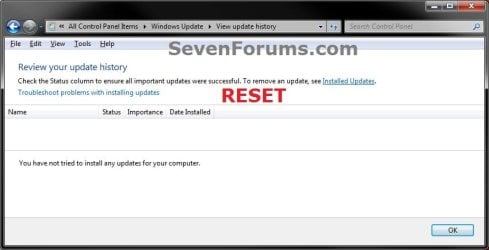
Windows Update - Reset

How to Reset Windows Update in Vista, Windows 7, and Windows 8


   Information
This will show you how to reset Windows Update view update history, and how to reset and re-register Windows Update Components if you are having a problem updating with Windows Update.


OPTION ONE

To Only Reset Windows Update History


   Note
Resetting Windows Update using this option will clear the view update history details list (cache).

This will not actually uninstall any of your currently installed Windows Update. They will just not be listed anymore. Any new Windows Update installed after the reset will show up in the view update history list as normal though.

1. Click/tap on the Download button below to download this file below.
Reset_Windows_Update_History.bat


Download


2. Save the .bat file to your Desktop.

3. Right click or press and hold on the downloaded .bat file, and click/tap on Run as administrator.

4. If prompted by UAC click/tap on Run, then Yes/Continue (if administrator) or type in administrator's password (if standard user).

5. You will now see an elevated command prompt open and run. When it's finished, it will close automatically.

6. If opened, close and reopen Windows Update to verify that it has been reset.
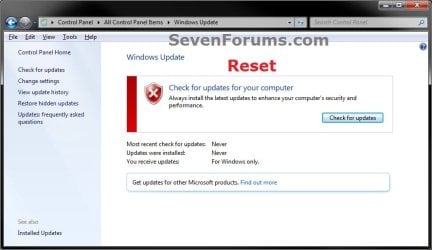
Reset.jpg

Update_History.jpg

7. Resetting the Windows Update history will also restore the default language packs being listed in Windows Upate again in the Windows 7 Ultimate and Enterprise editions after you check for updates next.
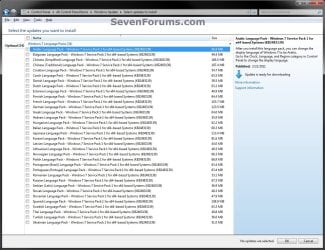
Language_Packs.jpg


OPTION TWO

To Reset and Re-register Windows Update Components


NOTE: This option is the Windows version of: How do I reset Windows Update components?. It will reset Windows Update Components and re-register the BITS files and the Windows Update files to help fix Windows Update errors. This option will not clear the view update history details list as it does in OPTION ONE above.
1. Click/tap on the Download button below to download this file below.
Reset_Reregister_Windows_Update_Components.bat


Download


2. Save the .bat file to your Desktop.

3. Right click or press and hold on the downloaded .bat file, and click/tap on Run as administrator.

4. If prompted by UAC click on Run, then Yes/Continue (if administrator) or type in administrator's password (if standard user).

5. You will now see an elevated command prompt open and run. When it's finished, it will close automatically.

6. Restart the computer afterwards to apply.

7. If this still does not help, then run the Microsoft Fix it tool here:
How do I reset Windows Update components?

See also: Unable to install updates in Windows Vista, Windows 7, Windows Server 2008 and Windows Server 2008 R2


OPTION THREE

To Reset and Re-register Windows Update Components AND Reset Update History in One Easy Click


   Note
This option combines OPTION ONE and OPTION TWO above in one .bat file.

1. Click/tap on the Download button below to download this file below.
Reset_Windows_Update_Full.bat


Download


2. Save the .bat file to your Desktop.

3. Right click or press and hold on the downloaded .bat file, and click/tap on Run as administrator.

4. If prompted by UAC click/tap on Run, then Yes/Continue (if administrator) or type in administrator's password (if standard user).

5. You will now see an elevated command prompt open and run. When it's finished, it will close automatically.

6. Restart the computer afterwards to apply.

7. If this still does not help, then run the Microsoft Fix it tool here:

Download


How do I reset Windows Update components?

See also: Unable to install updates in Windows Vista, Windows 7, Windows Server 2008 and Windows Server 2008 R2
That's it,
Shawn


Attachments

Last edited:
Have you tried Control Panel > Troubleshooting and using the Windows Update troubleshooter? Reboot and usually everything is back to normal.
The easiest way to find the troubleshooter is to use the View as Small Icons in the "View by" selector in the top right of the Control Panel.
 

My Computer

Computer type
PC/Desktop
Computer Manufacturer/Model Number
Alienware® ALX X58
OS
Win 7 Ult SP1/Win 10 Pro (all x64)
CPU
Intel® Core™ i7-975 Extreme O/C to 4.02 GHz, 8MB Cache
Motherboard
Asus® P6T Deluxe V2 X58 LGA1366
Memory
24GB Corsair Vengeance DDR3 SDRAM at 1600MHz - 6 x 4096MB
Graphics Card(s)
1792 MB NVIDIA® GeForce® GTX 295 Dual Core
Sound Card
Onboard Soundmax® High-Definition 7.1 Performance Audio
Monitor(s) Displays
Samsung XL2370 LED backlit 23" W/S 2ms response time
Screen Resolution
1920 X 1080
Hard Drives
2 x 500gb SATA II
1 x 1TB SATA II
1 external eSATA LaCie 3TB
(Non-RAID)
PSU
Alienware® 1200 Watt Multi-GPU
Case
Alienware® P2 ALX Chassis with AlienIce™ 3.0 Video Cooling
Cooling
Alienware® High-Perf. Liquid Cooling + Acoustic Dampening
Keyboard
Microsoft® Wireless Entertainment 8000 + Logitech® G15 Wired
Mouse
Microsoft® Wireless Laser 8000 + Logitech® G9 Wired
Internet Speed
1Gb/s
Antivirus
McAfee LiveSafe
Browser
Firefox - latest
Other Info
Using non-RAID on purpose as I find RAID to be too temperamental.
Now set to AHCI
Hi Snugglebugs,

thats quite a specific error - Out of memory

Can you start a thread in the Updates/activations sub-forum please.


checking on something will update shortly - DONE see below

WHICH machine does this relate too, will also need specific OS/Machine details

Roy
 

My Computer

Computer type
PC/Desktop
Computer Manufacturer/Model Number
medionl/Aspire 6930G/acer x55a
OS
W7 home premium 32bit/W7HP 64bit/w10 tp insider ring
CPU
E5300 dual core
Motherboard
medion MS7366
Memory
3gb
Graphics Card(s)
Nvidia Geforce 7100 Nforce 630i
Monitor(s) Displays
avixc
Internet Speed
n (isp resticted to 72)
Antivirus
mse/pands
Browser
palemoon
Other Info
Belkin Fd7050 n USB using Railink RT2870 drivers, more upto date
Re CP troubleshooting suggestion - I have gone to that and after the Detecting problems/ checking for updates online message and searching bar appeared I got "Troubleshooting couldn't identify the problem, so no help there.
The Report stated "no issues detected"

Roy's "see below" note doesn't seem to refer to anything. Where below?

Start a new thread suggestion - I will do that soon and send link.

Tony
 

My Computer

Computer type
PC/Desktop
Computer Manufacturer/Model Number
Acer twice plus Lenovo
OS
XP Pro and Win7 Pro both 32 bit plus Win 8.1 64bit
Memory
4 G
Hard Drives
300G and 500 G with 4TB backup drive
Antivirus
AVG, MS Essentials and Windows Defender
Browser
IE8, IE9, IE11 and Opera.
Other Info
The various items listed are NOT all on one PC! But all PCs are connected via a combined LAN/WLAN which also provides connection to a network printer
By the way, where did you get the error description "out of memory" message from? I never found that comment in my searches!
 

My Computer

Computer type
PC/Desktop
Computer Manufacturer/Model Number
Acer twice plus Lenovo
OS
XP Pro and Win7 Pro both 32 bit plus Win 8.1 64bit
Memory
4 G
Hard Drives
300G and 500 G with 4TB backup drive
Antivirus
AVG, MS Essentials and Windows Defender
Browser
IE8, IE9, IE11 and Opera.
Other Info
The various items listed are NOT all on one PC! But all PCs are connected via a combined LAN/WLAN which also provides connection to a network printer
Hi Snugglebugs,

The see below comment i meant i'd add the next line, was looking at your system specs previously and saw you had 2 showing.

As for the error code meaning - i've got one of the MS error code tables, doesn't come up directly from a google search.

Roy
 

My Computer

Computer type
PC/Desktop
Computer Manufacturer/Model Number
medionl/Aspire 6930G/acer x55a
OS
W7 home premium 32bit/W7HP 64bit/w10 tp insider ring
CPU
E5300 dual core
Motherboard
medion MS7366
Memory
3gb
Graphics Card(s)
Nvidia Geforce 7100 Nforce 630i
Monitor(s) Displays
avixc
Internet Speed
n (isp resticted to 72)
Antivirus
mse/pands
Browser
palemoon
Other Info
Belkin Fd7050 n USB using Railink RT2870 drivers, more upto date
I followed up the memory comment and had a look at the virtual memory settings. There was only one partition set to allocate any of a small amount. So I increased the total amount to 6000 MB over two partitions.

After restart, I still got the same error message!
 

My Computer

Computer type
PC/Desktop
Computer Manufacturer/Model Number
Acer twice plus Lenovo
OS
XP Pro and Win7 Pro both 32 bit plus Win 8.1 64bit
Memory
4 G
Hard Drives
300G and 500 G with 4TB backup drive
Antivirus
AVG, MS Essentials and Windows Defender
Browser
IE8, IE9, IE11 and Opera.
Other Info
The various items listed are NOT all on one PC! But all PCs are connected via a combined LAN/WLAN which also provides connection to a network printer
I restarted Windows using the Repair Computer from the install DVD after I had added to the virtual memory settings. Your comment about the error referring to memory have me the idea to dig deep.

Then I tried Update again, and lo and behold, at last it went through the complete sequence and recommended I make 191 updates!!! No wonder my 3 GB RAM (normally leaving very lttle for the massive 1043.9 MB all those updates needed!) was not enough.

Through most of today I have been updating and then restarting. Each time some have failed and new ones popped up. The present situation is that I need to restart again to check the 7 updates that failed on the last cycle. I will keep cycling round until no more updates are reported.

But it looks like the problem is solved. I will check again tomorrow and hopefully be able to conclude this thread as solved.

Tony
 

My Computer

Computer type
PC/Desktop
Computer Manufacturer/Model Number
Acer twice plus Lenovo
OS
XP Pro and Win7 Pro both 32 bit plus Win 8.1 64bit
Memory
4 G
Hard Drives
300G and 500 G with 4TB backup drive
Antivirus
AVG, MS Essentials and Windows Defender
Browser
IE8, IE9, IE11 and Opera.
Other Info
The various items listed are NOT all on one PC! But all PCs are connected via a combined LAN/WLAN which also provides connection to a network printer
Yes, that fixed it :D

This has taken me 1t least 6 hours computing time to solve my problem. Altogether I had to install at least 220 updates and now I have the task of finding all my programme downloads. Luckily most of those (and their licenses/passwords etc) are on a partition that was unaffected by the upgrade from XP/P to Win 7/P.

The solution has never been suggested by Windows troubleshooter and the error code always comes up like, Duh! :mad:

All that has decided me - upgrade to Win 10 ASAP. I am going to buy a cheap refurb Lenovo with Win 10 already installed and run that alongside this 10 year old Acer/Win 7 until I have made all the transfers and got used to it. The cost is almost the same as buying an MS license alone!
My monitor has got switchable inputs and I have spare HIDs so can keep both going easily enough.
 

My Computer

Computer type
PC/Desktop
Computer Manufacturer/Model Number
Acer twice plus Lenovo
OS
XP Pro and Win7 Pro both 32 bit plus Win 8.1 64bit
Memory
4 G
Hard Drives
300G and 500 G with 4TB backup drive
Antivirus
AVG, MS Essentials and Windows Defender
Browser
IE8, IE9, IE11 and Opera.
Other Info
The various items listed are NOT all on one PC! But all PCs are connected via a combined LAN/WLAN which also provides connection to a network printer
Step 1 and 2 don't work for me and i can't do step 3 because the file has been removed...Anyone can help?
 

My Computer

Computer type
PC/Desktop
OS
Windows 7
Step 1 and 2 don't work for me and i can't do step 3 because the file has been removed...Anyone can help?

Hello, :-)

I've updated the download for step 7 in option 3 to hopefully help.
 

My Computer

Computer type
PC/Desktop
Computer Manufacturer/Model Number
Self built custom
OS
64-bit Windows 11 Pro for Workstations
CPU
Intel i7-8700K OC'd to 5 GHz
Motherboard
ASUS ROG Maximus XI Formula Z390
Memory
64 GB (4x16GB) G.SKILL TridentZ RGB DDR4 3600 MHz
Graphics Card(s)
ASUS ROG-STRIX-GTX1080TI-O11G-GAMING
Sound Card
Integrated
Monitor(s) Displays
2 x Samsung Odyssey G7 27"
Screen Resolution
2560x1440
Hard Drives
1TB Samsung 990 PRO M.2,
4TB Samsung 990 PRO PRO M.2,
TerraMaster F8 SSD Plus NAS
PSU
Seasonic Prime Titanium 850W
Case
Thermaltake Core P3
Cooling
Corsair Hydro H115i
Keyboard
Logitech wireless K800
Mouse
Logitech MX Master 4
Internet Speed
2 Gb/s Download and 100 Mb/s Upload
Antivirus
Malwarebyte Anti-Malware Premium
Browser
Google Chrome
Other Info
Logitech Z625 speaker system,
Logitech BRIO 4K Pro webcam,
HP Color LaserJet Pro MFP M477fdn,
APC SMART-UPS RT 1000 XL - SURT1000XLI,
Galaxy S23 Plus phone
Windows Update Reset batch file

I have just downloaded and used your Windows Update Reset batch file. I haven't used it for years, but it's a real time saver - thanks!
 

My Computers

System One System Two

  • OS
    Windows 7 Professional x64
  • Computer type
    PC/Desktop
I have just downloaded and used your Windows Update Reset batch file. I haven't used it for years, but it's a real time saver - thanks!

:thumbsup:
 

My Computer

Computer type
PC/Desktop
Computer Manufacturer/Model Number
Self built custom
OS
64-bit Windows 11 Pro for Workstations
CPU
Intel i7-8700K OC'd to 5 GHz
Motherboard
ASUS ROG Maximus XI Formula Z390
Memory
64 GB (4x16GB) G.SKILL TridentZ RGB DDR4 3600 MHz
Graphics Card(s)
ASUS ROG-STRIX-GTX1080TI-O11G-GAMING
Sound Card
Integrated
Monitor(s) Displays
2 x Samsung Odyssey G7 27"
Screen Resolution
2560x1440
Hard Drives
1TB Samsung 990 PRO M.2,
4TB Samsung 990 PRO PRO M.2,
TerraMaster F8 SSD Plus NAS
PSU
Seasonic Prime Titanium 850W
Case
Thermaltake Core P3
Cooling
Corsair Hydro H115i
Keyboard
Logitech wireless K800
Mouse
Logitech MX Master 4
Internet Speed
2 Gb/s Download and 100 Mb/s Upload
Antivirus
Malwarebyte Anti-Malware Premium
Browser
Google Chrome
Other Info
Logitech Z625 speaker system,
Logitech BRIO 4K Pro webcam,
HP Color LaserJet Pro MFP M477fdn,
APC SMART-UPS RT 1000 XL - SURT1000XLI,
Galaxy S23 Plus phone
Hi Shawn,

I've tried Option 1 and Option 3 without any luck.

After each Option, the results were the same. It got through to the 99% mark and then decided to revert all changes.

I've read through the entire thread to see if there was another step I was missing, alas no.

Some details:
- running Windows 7 Ultimate
- I've checked to make sure that all the required Services are active
- I've disabled all firewalls and antivirus
- When I run the Microsoft Fix It routine, I get an error 80072F8F - error in trying to contact the server (I've checked that I'm running the correct version of TLS)
- after each attempt, the only updates that so successfully installed are the Malicious software removal tool), everything else fails with a 800F0826

Where to from here?
 

My Computers

System One System Two

  • OS
    Windows 7 Ultimate
  • Computer type
    PC/Desktop
Hi Shawn,

I've tried Option 1 and Option 3 without any luck.

After each Option, the results were the same. It got through to the 99% mark and then decided to revert all changes.

I've read through the entire thread to see if there was another step I was missing, alas no.

Some details:
- running Windows 7 Ultimate
- I've checked to make sure that all the required Services are active
- I've disabled all firewalls and antivirus
- When I run the Microsoft Fix It routine, I get an error 80072F8F - error in trying to contact the server (I've checked that I'm running the correct version of TLS)
- after each attempt, the only updates that so successfully installed are the Malicious software removal tool), everything else fails with a 800F0826

Where to from here?

Hello, and welcome to the forum. :-)

Options are limited considering Windows 7 is no longer supported.

You could try manually installing the update via MSU or ISO file.
 

My Computer

Computer type
PC/Desktop
Computer Manufacturer/Model Number
Self built custom
OS
64-bit Windows 11 Pro for Workstations
CPU
Intel i7-8700K OC'd to 5 GHz
Motherboard
ASUS ROG Maximus XI Formula Z390
Memory
64 GB (4x16GB) G.SKILL TridentZ RGB DDR4 3600 MHz
Graphics Card(s)
ASUS ROG-STRIX-GTX1080TI-O11G-GAMING
Sound Card
Integrated
Monitor(s) Displays
2 x Samsung Odyssey G7 27"
Screen Resolution
2560x1440
Hard Drives
1TB Samsung 990 PRO M.2,
4TB Samsung 990 PRO PRO M.2,
TerraMaster F8 SSD Plus NAS
PSU
Seasonic Prime Titanium 850W
Case
Thermaltake Core P3
Cooling
Corsair Hydro H115i
Keyboard
Logitech wireless K800
Mouse
Logitech MX Master 4
Internet Speed
2 Gb/s Download and 100 Mb/s Upload
Antivirus
Malwarebyte Anti-Malware Premium
Browser
Google Chrome
Other Info
Logitech Z625 speaker system,
Logitech BRIO 4K Pro webcam,
HP Color LaserJet Pro MFP M477fdn,
APC SMART-UPS RT 1000 XL - SURT1000XLI,
Galaxy S23 Plus phone
Back
Top